
e-tab Pro 4+ - Tablet Microtech - Free user manual and instructions
Find the device manual for free e-tab Pro 4+ Microtech in PDF.


| Product Type | Tablet |
| Model | e-tab Pro 4+ |
| Brand | Microtech |
| Dimensions (W x H x D) | 253 mm x 168 mm x 9.2 mm |
| Weight | 620 g |
| Processor | Intel® Celeron® N4020 |
| Graphics | Intel® UHD Graphics 600 |
| RAM | 8 GB DDR |
| Storage | 128 GB eMMC |
| Display | 10.1 inch FHD (1920x1200), capacitive 10-point touch |
| Operating System | Windows 10 |
| Battery | Lithium polymer 3150 mAh |
| Power Adapter | DC 12V, 3A (included) |
| Wireless Connectivity | Wi-Fi 802.11 a/b/g/n/ac (2.4/5 GHz), Bluetooth 4.2 |
| USB Ports | 1 x USB 3.0 Type-A, 1 x USB Type-C (Full Function) |
| Video Output | 1 x MicroHDMI |
| Memory Card Slot | MicroSD (up to 128 GB) |
| Audio | 3.5 mm headphone/mic jack, dual 1W stereo speakers |
| Cameras | 2 MP front, 2 MP rear |
| Sensors | G-sensor |
| Keyboard | Include EK4101 (Italian layout) |
| Case Material | Metal |
| Cleaning | Use a soft dry cloth; avoid chemicals or detergents |
| Safety Precautions | Keep away from magnetic fields, humidity, and heat; use only original accessories |
| Warranty | Limited warranty per conditions on Microtech website |
Frequently Asked Questions - e-tab Pro 4+ Microtech
User questions about e-tab Pro 4+ Microtech
0 question about this device. Answer the ones you know or ask your own.
Ask a new question about this device
Download the instructions for your Tablet in PDF format for free! Find your manual e-tab Pro 4+ - Microtech and take your electronic device back in hand. On this page are published all the documents necessary for the use of your device. e-tab Pro 4+ by Microtech.
USER MANUAL e-tab Pro 4+ Microtech
Tablet 10.1"
Manuale d'uso / User manual

natural_image
Blue circular icon with a white document symbol inside, no text or numbers present.Indice
Ringraziamenti 4
Copyright © 2021 Microtech 5
https://microtech.store
https://microtech.store
https://www.microtech.store
https://www.microtech.store/supporto/
https://www.microtech.store
QUICK USER GUIDE
Index
Acknowledgments 35
Copyright © 2021 Microtech 36
Conditions and limits of coverage of the product warranty 37
Packaging contents 41
Yours e-tab Pro 4+ 43
Yours e-tab Pro 4 44
To recharge your e-tab Pro 4+ / e-tab Pro 4 45
Safety precautions for the power supply and battery 46
Warnings 47
Update management 49
Memory card usage 50
Windows 10 52
Functions 54
Datasheet 55
Environmental protection 59
Correct disposal 60
Assistance and support 61
QUICK USER GUIDE 32
Acknowledgments
Thank you for purchasing e-tab Pro 4+ / e-tab Pro 4.
This product has been designed to take advantage of mobility and Wi-Fi and Bluetooth connectivity, ensuring different user experiences such as study, entertainment, business and office work.
Microtech
Copyright © 2021 Microtech. All rights reserved.
e-tab Pro is a registered trademark of Microtech.
All registered trademarks and copyrights belong to their rightful owners.
Microtech provides this manual “as it is” without warranty of any kind, whether implicit or explicit, including but not limited to the implied warranties or conditions of merchantability or fitness for a particular purpose. Under no circumstances Microtech, its director, officers, employees or distributors be liable for any indirect, special, incidental or consequential damages (including damages resulting from loss of profit, loss of contracts, loss of use or data, interruption of activities and similar), even if Microtech has been advised of the possibility that such damages may occur as a result of any defect or error in this manual or in the product.
The specifications and information contained in this manual are provided only for informational use and are subject to change at any time, without notice, and can not be construed as a commitment by Microtech. Microtech assumes no responsibility and does not assume any error or inaccuracy that may appear in this manual, including the products and software described.
Conditions and limits of warranty of the products
Warranty conditions change depending on the type of product.
Furthermore the guarantee is not valid in case of damages or defects due to the following factors:
(a) unsuitable use, improper operation or maintenance included (without limitation) and use of the product for a purpose other than that in accordance with the instructions provided by Microtech regarding its suitability for use and maintenance; (b) installation or use of the product in a manner that does not comply with the technical or safety standards in force in the European Economic Area and in Switzerland; (c) connection to power supply network with voltage not correct; (d) use of the product with third part accessories, auxiliary or peripheral products or devices; (e) attempted repair by any third part other than authorized Microtech service centers; (f) accidents, lightning, water, fire or any other cause whose control does not depend on Microtech; (g) abuse, negligence or improper commercial use.
The Warranty is not valid for receiving technical assistance or support for the use of the Product. The assistance and support available (if provided) as well as the costs and other terms relating to assistance and support (if provided) will be specified in the customer documentation published on the website: www.microtech.store.
It is the user's responsibility, even before requesting
assistance, to back up the contents of the Product, including archived data or installed software.
Microtech is in no way responsible for any damage, loss of programs, data or other information stored on any medium or part of the product for which assistance is requested; Microtech is in no way responsible for the consequences of such damage or loss, including activity, in the event of system malfunction, program errors or data loss.
It is the user's responsibility, before requesting assistance, to delete any functions, components, options, modifications and attachments not covered by the Warranty before sending the product to a service center. Microtech is in no way responsible for any loss or loss damage to the components described above.
Microtech is in no way responsible for deletions, modifications or alterations to the contents of the Product including any data or applications produced during the repair procedures of the Product itself. The Product will be returned to the user with the original sales configuration, based on the availability of software in stock.
Limitation of liability
There may be circumstances for which, due to defects in Microtech components, or due to faults in Microtech components other reasons, you have the right to claim damages to Microtech. In each of these circumstances, regardless of the reasons for which you are entitled
to compensation for damages, Microtech is liable for damages to persons (including death), damage to property or private property; or any other real and direct damage resulting from omission or failure to comply with the legal obligations set forth in this document, and up to the contract price listed for each product and not later.
Microtech will only be liable or indemnify for losses, damages or claims on a contractual, non-contractual or infringing basis pursuant to this document.
This limit also applies to Microtech suppliers and resellers. This is the maximum limit for which Microtech, its suppliers and your dealer are collectively responsible.
IN NO EVENT SHALL MICROTECH BE LIABLE FOR THE FOLLOWING: (1) THIRD PARTY REQUESTS FOR DAMAGE CAUSED BY YOU; (2) LOSS OR DAMAGE TO YOUR DATA OR DOCUMENTS OR (3) ANY INDIRECT, PARTICULAR, INCIDENTAL OR CONSEQUENTIAL DAMAGES (INCLUDING DAMAGES ARISING FROM LOSS OF PROFIT, LOSS OF CONTRACTS, LOSS OF USE OR DATA, INTERRUPTION OF ACTIVITY AND SIMILAR) EVEN IF MICROTECH, ITS DISTRIBUTORS AND YOUR DEALERS ARE AWARE OF THE POSSIBILITY THAT SUCH DAMAGES CAN BE CHECKED.
Software license
Microtech products can be accompanied by software, depending on the type of product. The software, combined
with the products, are in the “OEM” version: the OEM software is licensed to the end user as an integral part of the product; this means that it can not be transferred to other hardware systems and that, in the event of breakage, theft or any other situation that renders it unusable, even the possibility of using the OEM product is compromised. Anyone who purchases, together with the product, an OEM software is required to observe the terms and conditions of the license agreement, called “EULA” (End User License Agreement), between the owner of the software and the end user and displayed on video during the installation of the software itself.
Please note that user acceptance of the EULA conditions takes place at the time the software is installed.
e-tab Pro 4+ packaging contents
Make sure the following items are in the package:
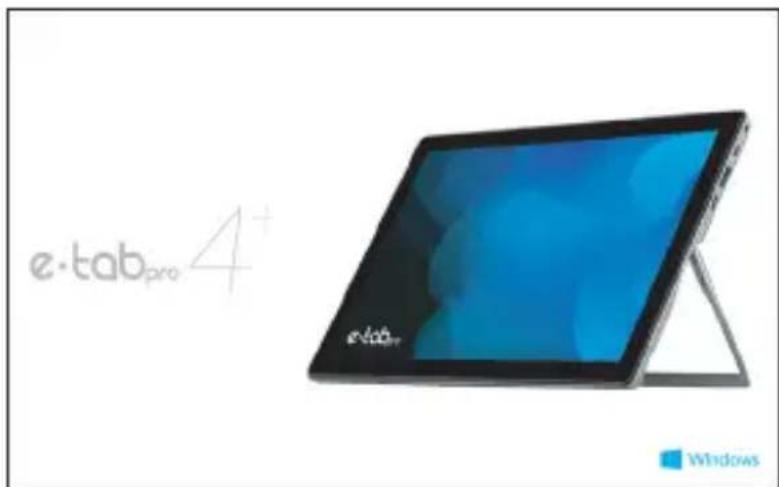
x1 e-tab Pro 4+
x1 User manual in Italian / English
x1 Power supply
x1 EK4101 keyboard (italian layout)
If anything is missing or damaged, please contact the manufacturer and keep the entire packaging for transport.
e-tab Pro 4 packaging contents
Make sure the following items are in the package:
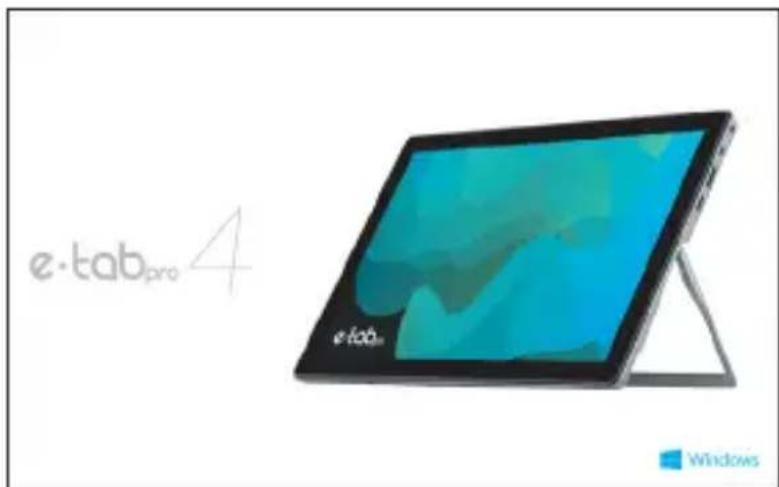
x1 e-tab Pro 4
x1 User manual in Italian / English
x1 Power supply
If anything is missing or damaged, please contact the manufacturer and keep the entire packaging for transport.
https://microtech.store/?lang=en
Yours e-tab Pro 4+
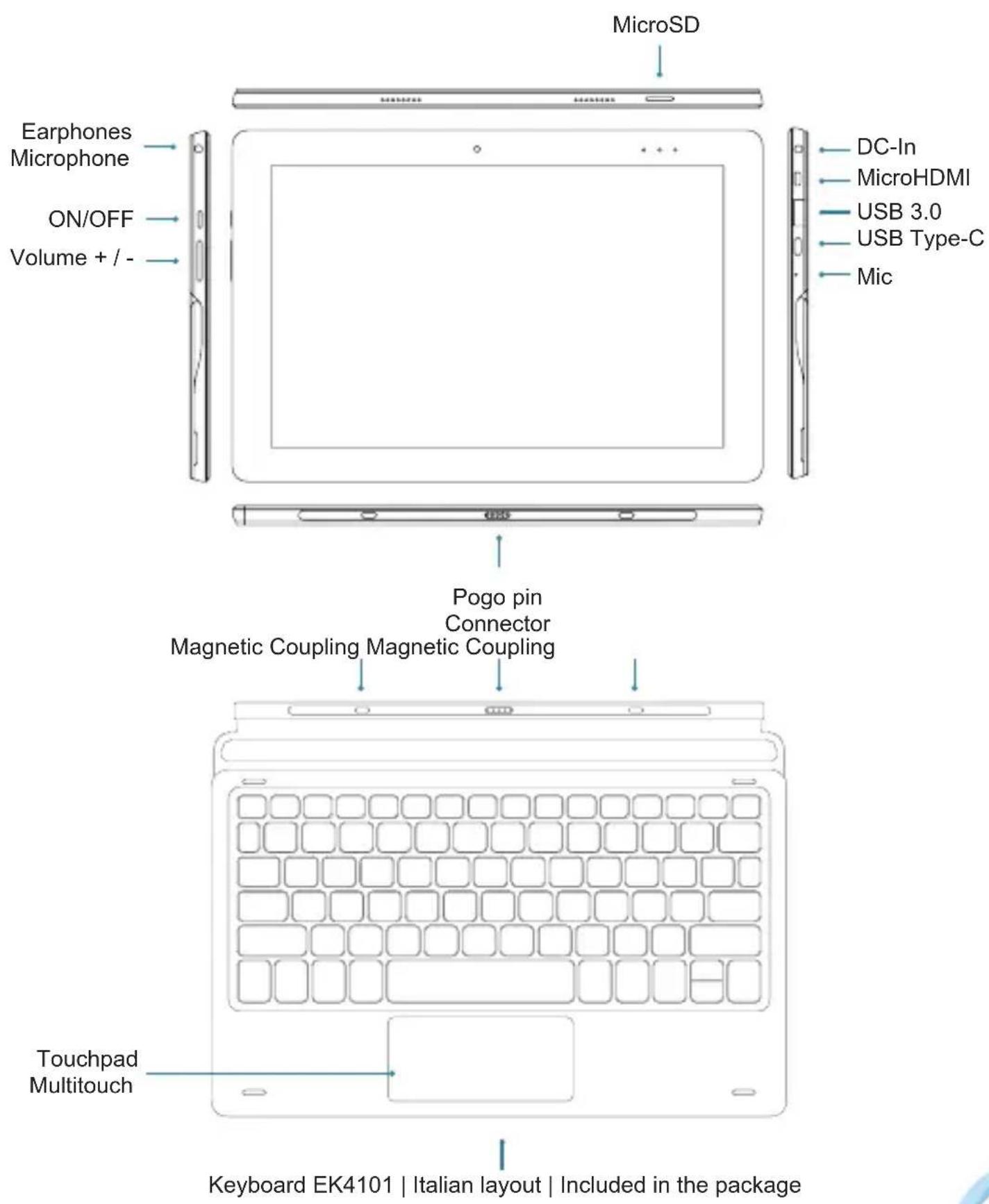
Keyboard EK4101 | Italian layout | Included in the package
Yours e-tab Pro 4

To recharge your e-tab Pro 4+ / e-tab Pro 4
Preferably use the supplied power adapter to charge the battery of your e-tab Pro 4+ / e-tab Pro 4.
Using a different or incompatible power adapter could damage your tablet.
It is possible to power e-tab Pro 4 and e-tab Pro 4+ via the USB Type-C port using a power supply compatible with the Power Delivery specifications capable of delivering at least 36W (not included in the sales package).
Safety precautions for the power supply and battery
Use the correct external power source. The power adapter of this product can only be used with the type of power source indicated on the electrical rating label. If you are unsure of the type of power source required, contact the authorized Microtech assistance service.
Battery Pack Care
The product contains a lithium polymer battery.
If the battery pack is handled incorrectly there is a risk of fire and burns. Do not attempt to open or repair the battery pack.
Charging the device
Make sure to fully charge your e-tab Pro 4+ / e-tab Pro 4 before using it in battery mode for extended periods. Remember that the power adapter charges the battery as long as it is connected to a power source. Note that it takes much longer to charge the battery when e-tab Pro is running.
Do not leave e-tab Pro 4+ / e-tab Pro 4 connected to the power source when the battery is fully charged.
e-tab Pro 4+ / e-tab Pro 4 has not been designed to remain connected to an electrical source for long periods of time.
Warnings
Preferably use the supplied power adapter to charge the battery of your e-tab Pro 4+ / e-tab Pro 4. Using a different or incompatible power adapter could damage the tablet.
Make sure you connect the power adapter to the appropriate power outlet with the correct input power rating. The output voltage of the adapter is DC 12V, 3A.
! e-tab Pro 4+ / e-tab Pro 4 should be reloaded at least every 3 months.
Keep the tablet away from strong magnetic fields - they could damage the device.
Only people qualified and authorized by Microtech can repair e-tab Pro 4+ / e-tab Pro 4.
Be careful not to drop the device or bump it against objects, it could cause damage not covered by the standard warranty.
Do not expose e-tab Pro 4+ / e-tab Pro 4 to humid environments, rain or excessively hot environments.
Do not use chemicals or detergents to clean e-tab Pro 4+ / e-tab Pro 4, they could corrode the surface.
In case of contact with water, sand or prolonged exposure to high temperatures, irreparable malfunctions may occur.
Avoid using e-tab Pro 4+ / e-tab Pro 4 with wet hands to avoid unexpected electric shocks.
All wireless devices are subject to interference that could affect their performance.
Do not use e-tab Pro 4+ / e-tab Pro 4 in petrol stations or near fuels or chemicals.
It is recommended to keep the volume at a safe level to preserve health. In case of prolonged exposure to loud sounds, hearing damage may occur.
It is recommended to use original accessories that can be purchased through the site https://microtech.store/?lang=en&
Update management
During software updates or during download operations, do not remove the power supply, irreversible data loss may occur.
Any tampering with the software could generate additional costs for recovery.
Memory card usage
Installing a memory card
e-tab Pro 4+ / e-tab Pro 4 supports memory cards with a maximum capacity of 128 GB. Depending on the manufacturer and type, some memory cards may not be compatible with your device.
- Some memory cards may not be fully compatible with the device. Using an incompatible memory card could damage the device or memory card, or corrupt the stored data.
- Be careful to insert the memory card from the correct side.
- e-tab Pro 4+ / e-tab Pro 4 natively supports FAT, exFAT and NTFS file systems for memory cards. Reformatting may be required when a card formatted with other file systems is inserted.
- Frequent erasing and rewriting of data shortens the life span of memory cards.
1 Insert a memory card with the contacts facing the e-tab Pro screen.
2 Push the memory card into the slot until it locks into place.
Removing the memory card
Before removing the memory card, turn it off for safe removal.
Do not remove the memory card while the device is transferring or accessing information. This could result in data loss or corruption, or it could damage the card or device. Microtech is not responsible for losses resulting from the improper use of damaged memory cards, including data loss.
Before formatting the memory card, remember to back up any important data stored in the device. The manufacturer's warranty does not cover data loss resulting from user actions.
Microsoft Windows 10
Start
Press and release the power button for 1 second. (Note: if there is no response when you press the power button, the device may need to be recharged).
Shutdown / Restart
From the Start screen, press the Power symbol >Suspend / Shut Down / Reboot.
Lock the screen
Press the power button.
Wi-Fi Connection
Select the Network icon on the taskbar> Select the desired WiFi network > Connect, then type the password and follow the instructions.
Bluetooth Connection
Thanks to Bluetooth, you can use all types of wireless devices with your e-tab Pro 4+ / e-tab Pro 4.
System language change
Go to: Settings> Date / Time and language> Region and language.
Menù Start
By activating the Start menu at the bottom left, you will find quick links to Documents, Settings, Shutdown (Suspend, Shut down system, Reboot system), all Apps.
The applications you have used most often appear in the top left.
The Live tiles that appear on the right side of the Start menu act as quick links to applications. You can rearrange, resize, add and remove tiles as often as you like.
Functions
Capacitive multitouch
Use your finger on the screen for system control.
Camera
Take photos, record videos.
DC interface
It can be connected to the DC-IN power supply.
MicroSD slot
Supports MicroSD up to 128GB.
MicroHDMI port
Supports MicroSD up to 128GB.multimediali.
Jack audio 3,5 mm
Connect headphones or earphones via this output.
Microphone
Detect your voice and sounds from your surroundings.
Loudspeakers
They offer clear and optimal sound quality.
Volume keys
+ Increase Volume
- Decreases Volume
e-tab Pro 4+ datasheet
Dimensions Tablet
Width: 253 mm
Height: 168 mm
Thickness: 9.2 mm Weight: 620 g
Processor
Intel® Celeron® N4020
Graphics
Intel® UHD Graphics 600
Display


Size: 10.1 inch Resolution: FHD 1.920x1.200
Touch Screen
Capacitive at 10 points G+G
Operating system

Windows
Case

Metal
Memory
RAM 8 GB DDR Storage capacity of 128 GB eMMC
| Input | Output |  |  | 1 USB 3.0 Type-A1 USB Type-C Full Funcion1 MicroHDMI1 MicroSD1mini jack port for earphones / microphone |
 | |||
| Keys |  |  | Power on Volume |
| Battery | 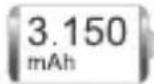 | Lithium Polymers: 3.150 mAh | |
| Connections |  |  | Wi-Fi 802.11a/b/g/n/ac(2.4 GHz / 5 GHz)Bluetooth 4.2 |
| Audio Camera Sensors |  |  | 2 MP Front, 2 MP Rear2x1W Stereo SpeakersG-sensor |
| Certifications |  | CERohs | |
 |
The information contained in the manual may be subject to change without notice.
e-tab Pro 4 datasheet
Dimensions Tablet
Width: 253 mm
Height: 168 mm
Thickness: 9.2 mm Weight: 620 g
Processor
Intel® Celeron® N4020
Graphics
Intel® UHD Graphics 600
Display

Size: 10.1 inch Resolution: FHD 1.920x1.200
Touch Screen

Capacitive at 10 points G+G
Operating system

Windows
Case

Metal
Memory
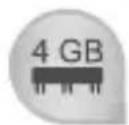
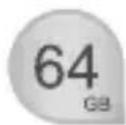
RAM 4 GB DDR Storage capacity of 64 GB eMMC
| Input | Output | | | 1 USB 3.0 Type-A1 USB Type-C Full Funcion1 MicroHDMI1 MicroSD1mini jack port for earphones / microphone |
| |||
| Keys | | | Power on Volume |
| Battery | | Lithium Polymers: 3.150 mAh | |
| Connections | | | Wi-Fi 802.11a/b/g/n/ac(2.4 GHz / 5 GHz)Bluetooth 4.2 |
| Audio Camera Sensors | | | 2 MP Front, 2 MP Rear2x1W Stereo SpeakersG-sensor |
| Certifications | | CERohs | |
|
The information contained in the manual may be subject to change without notice.
Environmental protection
Microtech is committed to creating products and materials for packaging with no environmental impact to safeguard the health of consumers and respect the environment. The decrease in the number of pages in this manual is part of the policies to reduce carbon dioxide emissions.
Correct disposal

RISK OF EXPLOSION if the battery is replaced with one of another incompatible type. Dispose of used batteries according to the manufacturer's instructions.

DO NOT THROW the battery in municipal waste bins. The X symbol on the waste bin indicates that the battery should not be placed in municipal waste bins.
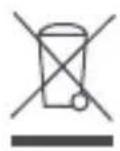
DO NOT THROW your e-tab Pro 4+ / e-tab Pro 4 in municipal waste bins. This product has been designed to allow the reuse of some parts and the recycling of others. The X symbol on the waste bin indicates that the product (electrical, electronic, batteries containing mercury) should not be disposed of in municipal waste bins. Check your local regulations for proper disposal of electronic products.

DON'T THROW your e-tab Pro 4+ / e-tab Pro 4 into the fire. DO NOT create short circuits between the contacts. DO NOT disassemble the product.
Assistance and support
Visit our website at the following address:
https://microtech.store/?lang=en
Register your e-tab Pro 4+ / e-tab Pro 4 in the Microtech Customer Area:
https://microtech.store/support/
Within this area, you can view information on your e-tab Pro, obtain technical support and possibly request a repair.
All repair requests must in fact be entered in the Customer Area in order to be processed.
Microtech S.r.l
Via Aldo Moro, 9 Buccinasco, 20090 (MI)
Italy
+39 02472663
https://microtech.store/?lang=en
Microtech
www.microtech.store



- Tablet 10.1"
- Indice
- QUICK USER GUIDE
- Index
- Functions 54
- Datasheet 55
- Environmental protection 59
- Correct disposal 60
- Assistance and support 61
- QUICK USER GUIDE 32
- Acknowledgments
- Copyright © 2021 Microtech. All rights reserved.
- Conditions and limits of warranty of the products
- Limitation of liability
- Software license
- e-tab Pro 4+ packaging contents
- e-tab Pro 4 packaging contents
- To recharge your e-tab Pro 4+ / e-tab Pro 4
- Safety precautions for the power supply and battery
- Battery Pack Care
- Charging the device
- Warnings
- Update management
- Memory card usage
- Installing a memory card
- Removing the memory card
- Microsoft Windows 10
- Start
- Shutdown / Restart
- Lock the screen
- Wi-Fi Connection
- Bluetooth Connection
- System language change
- Menù Start
- Functions
- Capacitive multitouch
- Camera
- DC interface
- MicroSD slot
- MicroHDMI port
- Jack audio 3,5 mm
- Microphone
- Loudspeakers
- Volume keys
- e-tab Pro 4+ datasheet
- e-tab Pro 4 datasheet
- Environmental protection
- Correct disposal
- Assistance and support
- Microtech S.r.l
- Microtech
Brand : Microtech
Model : e-tab Pro 4+
Category : Tablet