
DM-XIO-DIR-160 - Switch Crestron - Free user manual and instructions
Find the device manual for free DM-XIO-DIR-160 Crestron in PDF.


| Product Type | DigitalMedia 8G+ Expansion Module |
| Brand | Crestron |
| Model | DM-XIO-DIR-160 |
| Dimensions (H × W × D) | 1.7 in × 17.3 in × 6.2 in (43 mm × 439 mm × 157 mm) |
| Weight | 2.5 lb (1.1 kg) |
| Power Supply | External 12 V DC, 2.5 A (included) or PoE+ (802.3at) |
| Power Consumption | 15 W maximum |
| Digital Inputs | 16, switch closure or voltage sensing (0–24 V DC) |
| Relay Outputs | 16, normally open, 30 V AC/DC, 1 A |
| Communication | DM 8G+ (Crestron DigitalMedia) via DMNet |
| Mounting | 1 RU rack-mountable (brackets included) or surface mount |
| Operating Temperature | 32°F to 104°F (0°C to 40°C) |
| Humidity | 10% to 90% RH (non-condensing) |
| Main Features | Expands DM system with 16 inputs and 16 relays, supports feedback and control |
| Included Accessories | Power supply, rack ears, connectors, DMNet cable |
| Safety Approvals | CE, FCC Part 15, UL Listed |
| Warranty | 3 years (Crestron standard) |
| General Information | Designed for use with Crestron DigitalMedia 8G+ systems; provides seamless integration of contact closures and relay control. |
Frequently Asked Questions - DM-XIO-DIR-160 Crestron
User questions about DM-XIO-DIR-160 Crestron
0 question about this device. Answer the ones you know or ask your own.
Ask a new question about this device
Download the instructions for your Switch in PDF format for free! Find your manual DM-XIO-DIR-160 - Crestron and take your electronic device back in hand. On this page are published all the documents necessary for the use of your device. DM-XIO-DIR-160 by Crestron.
USER MANUAL DM-XIO-DIR-160 Crestron
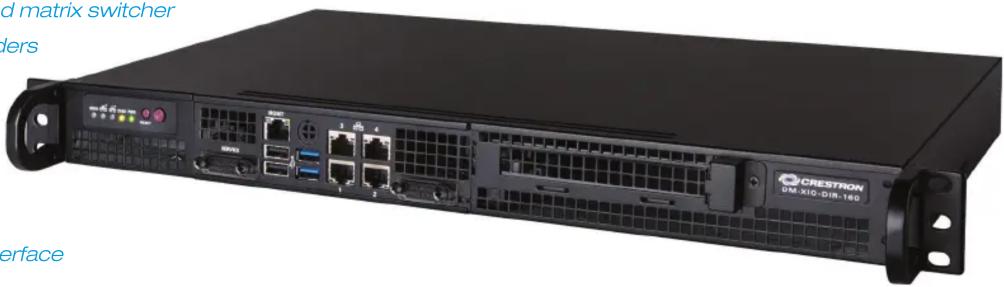
DigitalMedia™ XiO Director – Virtual Switching Appliance for 160 Endpoints
Comprehensive network AV system configuration, management, and signal routing
Emulates a traditional hardware-based matrix switcher
Works with Crestron® DM NVX encoders and decoders
Supports 160 endpoints and 20 domains
Enables grouping of endpoints in up to 20 independent subsystems
Fully scalable for any sized network
Intuitive web-based graphical user interface
Ethernet control system interface
Fully-programmable control of virtual matrices and physical endpoints
Automatic endpoint device discovery
Custom naming and search tools
Easy diagnostics and signal status display
XML device map file import/export
Built-in logging
Four Gigabit Ethernet LAN ports
Single-space 19" rack-mountable
Universal 100-240V internal power supply
The DM ^ XiO Director, model DM-XIO-DIR-160, is an enterprise-grade network appliance that facilitates configuration, control, and management of a large-scale AV network. Using DM NVX encoder/decoders, Crestron ^ offers the industry's most versatile and scalable solution for distributing 4K60 4:4:4 HDR video over an IP network. The XiO Director provides a means for managing large networks of DM NVX devices, routing AV signals, and simplifying integration with one or more Crestron control systems.
Virtual DM® Switcher
The XiO Director virtually emulates the functionality of a traditional hardware-based DigitalMedia™ matrix switcher, routing high-quality 4K streaming AV signals throughout a room, building, or campus. The DM-XIO-DIR-160 model supports a total of 160 endpoint devices consisting of DM NVX encoders and decoders. Multiple XiO Director units can be deployed, with the ability to route signals between units just like hardware switchers [1], easily handling even the largest corporate enterprise, university, governmental, military, medical, transportation, sports, entertainment, hospitality, gaming, or retail application.
Simple, Flexible Configuration
System configuration could not be simpler. The XiO Director automatically discovers each DM NVX endpoint on the network, and allows each endpoint to be assigned as a logical input or output within a “domain.” A domain is a logical grouping of endpoints that operate together as a single switching entity, allowing individual rooms and other subsystems to be arranged and controlled independently. It’s like having multiple independent matrix switchers in a single rack space. The XiO Director effectively eliminates the need for physical switchers in every room, replacing them with the virtual equivalent running on the AV network.
Note: The DM-XIO-DIR-160 supports a maximum of 20 domains. For larger systems, use multiple units or use model DM-XIO-DIR-ENT, which supports 240 domains and includes additional “enterprise” features. Refer to the DM-XIO-DIR-ENT spec sheet for more information.
Easy Web-based Setup and Control
The XiO Director provides an intuitive web-based user interface to facilitate system configuration, signal routing, and comprehensive diagnostics of the complete AV network. Each domain and endpoint, as well as the inputs and outputs on each endpoint, can be designated with a user-friendly name. Navigating the entire system is easy using the search box [1] to quickly find domains, endpoints, inputs, and outputs by name or address. A system overview screen is also provided, showing the video and audio signal status for every input and output in a graphical layout that's easy to view and navigate.
SPECIFICATIONS
Device Support
Endpoints: Supports 160 DM NVX devices, each configured as an encoder or decoder
Domains: Supports 20 domains (allows grouping of endpoints in up to 20 individual subsystems)
Communications
Ethernet: 10/100/1000 Mbps, auto-switching, auto-negotiating, auto-discovery, full/half duplex, TCP/IP, UDP/IP, CIP, DHCP, SSL, TLS, SSH, IPv4 or IPv6, HTTPS web browser setup and control, Crestron control system integration
DM NVX (via Ethernet): HDCP 2.2, AES audio/video content encryption, RTP, RTSP, SDP, ONVIF, IGMPv2, IGMPv3, SMPTE 2022, FEC (Forward Error Correction)
Connectors
MGMT (front): (1) 8-pin RJ45 connector, shielded, female; 10Base-T/100Base-TX/1000Base-T Ethernet port for hardware management
DM-XIO-DIR-160 DigitalMedia ™ XiO Director

natural_image
Front view of a network equipment rack with labeled ports and connectors (no readable text beyond labels)
natural_image
Front view of a black server rack with indicator lights and a power outlet (no readable text or symbols)Front and Rear Panels
USB 2.0 (front): (2) USB Type A connectors, female, black;
USB 2.0 host ports for factory use only
USB 3.0 (front): (2) USB Type A connectors, female, blue;
USB 3.0 host ports for factory use only
LAN 1 – 4 (front): (4) 8-pin RJ45 connectors, shielded, female;
10Base-T/100Base-TX/1000Base-T Ethernet ports for web browser, endpoint, and control traffic
100-240V\~ 2-4A 50/60Hz (rear): (1) IEC 60320 C14 main power inlet;
Mates with removable power cord, included
Controls & Indicators
MSG: (1) Blue LED, identifies the device when “unit identification” is initiated
LAN 1 – 2: (2) Green LEDs, each indicates Ethernet activity on the corresponding LAN port
DISK: (1) Yellow LED, indicates SSD activity
PWR: (1) Green LED, indicates the unit is powered on
RESET: (1) Recessed pushbutton, initiates a hard reset
Power Button: (1) Pushbutton, initiates boot up or shutdown
MGMT: (1) Amber LED & (1) bi-color green/orange LED; indicates Ethernet activity, speed, and link status for the management LAN port
LAN 1 – 4: (1) Amber LED & (1) bi-color green/orange LED per each of (4) ports; each pair indicates Ethernet activity, speed, and link status for the corresponding LAN port
Power
Main Power: 4 Amps @ 100-120 Volts AC, 50/60 Hz;
2 Amps @ 220-240 Volts AC, 50/60 Hz
Power Consumption: 35 Watts at 100% CPU usage and fan speed
Environmental
Operating Temperature: 50° to 95° F (10° to 35° C)
Operating Humidity: 8% to 90% RH (non-condensing)
Non-Operating Temperature: -40^ to 158^ F ( -40^ to 70^ C)
Non-Operating Humidity: 5% to 95% RH (non-condensing)
Heat Dissipation: 119.4 BTU/hr
Construction
Chassis: Metal, black finish; vented front, rear, and sides; variable speed fan cooled
Mounting: Freestanding or 1 RU 19-inch rack-mountable (rack ears included)
Dimensions
Height: 1.72 in (44 mm)
Width: 17.21 in (437 mm) without rack ears;
19.00 in (483 mm) with rack ears
Depth: 10.49 in (267 mm) without rack ears
Compliance
IC, CE, FCC Part 15 Class B digital device
MODELS & ACCESSORIES
Available Models
DM-XIO-DIR-160: DigitalMedia™ XiO Director – Virtual Switching
Appliance for 160 Endpoints
Available Accessories
DM-NVX Series: DigitalMedia™ 4K60 4:4:4 HDR Network AV
Encoder/Decoders
DM-RPP-K24: DigitalMedia™ 24-Port Keystone Patch Panel
DM-CONN-ULTRA-RECP: DigitalMedia™ Ultra Keystone RJ45 Jack
DM-CBL-ULTRA-PC: DigitalMedia™ Ultra Patch Cables
DM-XIO-DIR-160 DigitalMedia ^TM XiO Director
Notes:
- Search box navigation and the ability to route signals between units are future features that will be enabled via firmware update.
This product may be purchased from an authorized Crestron dealer. To find a dealer, please contact the Crestron sales representative for your area. A list of sales representatives is available online at https://www.crestron.com/How-To-Buy/Find-a-Representative or by calling 855-263-8754.
The specific patents that cover this and other Crestron products are listed online at https://www.crestron.com/legal/patents.
Certain Crestron products contain open source software. For specific information, visit https://www.crestron.com/opensource.
Crestron, the Crestron logo, DigitalMedia, and DM are either trademarks or registered trademarks of Crestron Electronics, Inc. in the United States and/or other countries. Other trademarks, registered trademarks, and trade names may be used in this document to refer to either the entities claiming the marks and names or their products. Crestron disclaims any proprietary interest in the marks and names of others. Crestron is not responsible for errors in typography or photography. Specifications are subject to change without notice. ©2018 Crestron Electronics, Inc.

natural_image
Front panel of a computer drive with fan and indicator lights (no readable text or symbols)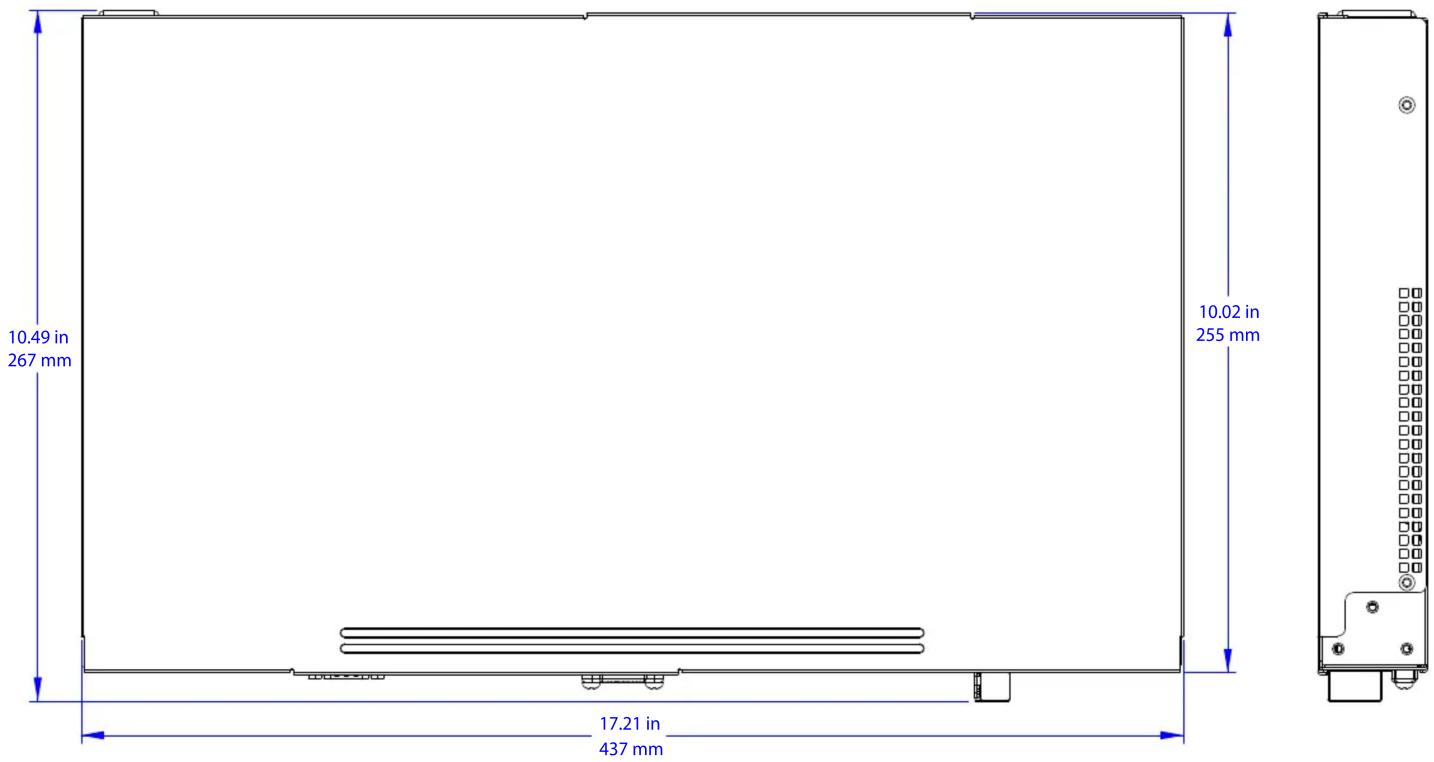


- DigitalMedia™ XiO Director – Virtual Switching Appliance for 160 Endpoints
- Virtual DM® Switcher
- Simple, Flexible Configuration
- Easy Web-based Setup and Control
- SPECIFICATIONS
- Device Support
- Communications
- Connectors
- DM-XIO-DIR-160 DigitalMedia ™ XiO Director
- Controls & Indicators
- Power
- Environmental
- Construction
- Dimensions
- Compliance
- MODELS & ACCESSORIES
- Available Models
- Available Accessories
- DM-XIO-DIR-160 DigitalMedia TM XiO Director
Brand : Crestron
Model : DM-XIO-DIR-160
Category : Switch