WUC-D06H - Ultrasonic cleaner WiseClean - Free user manual and instructions
Find the device manual for free WUC-D06H WiseClean in PDF.


User questions about WUC-D06H WiseClean
0 question about this device. Answer the ones you know or ask your own.
Ask a new question about this device
Download the instructions for your Ultrasonic cleaner in PDF format for free! Find your manual WUC-D06H - WiseClean and take your electronic device back in hand. On this page are published all the documents necessary for the use of your device. WUC-D06H by WiseClean.
USER MANUAL WUC-D06H WiseClean
text_image
WiseClean WiseClean® WISd.22 WISD.22 WISD.22 WISD.22 WISD.22 WISD.22 WISD.22 WISD.22 WISD.22 WISD.22 WISD.22 WISD.22 WISD.22 WISD.22 WISD.22 WISD.19 WISD.19 WISD.19 WISD.19 WISD.19 WISD.19 WISD.19 WISD.19 WISD.19 WISD.19 WISD.19 WISD.19 WISD.19 WISD.19 WISD.19 MADNUltraschallreiniger
Bedienungsanleitung
Ultrasonic Cleaner
Operating Manual
(English manual at page 9)
Inhaltverzeichnis
1 Vorwort .... 1
2 Sicherheitsanweisungen....1
4 Packing content....13
5 Positioning the device and commissioning....13
6 Job description .... 13
6.1 Menu structure diagram 13
6.2 Main menu 13
6.3 Menu for timer setting.... 14
6.4 Menu for temperature setting 14
6.5 Ultrasonic setting 14
7 Maintenance and cleaning .... 15
8 Technical data .... 15
9 Certificate 16
1 Introduction
Thank you for purchasing our WUC-D Ultrasonic Cleaner. You did a good choice buying a Wisd product.
Before use, please read this manual and use it properly.
To cover the user's health and avoid the product's destruction you have to follow the safety instructions of the second chapter.
Please keep this operating manual in a save place for future reference and hand it out if you consign the device to a third person.
Witeg reserves to modify the capsule or make amendments for the improvement of quality and efficiency without prior notice.
2 Safety Instructions
2.1 Description of symbols

WARNING
Information for avoiding injuries or fatal accidents.

ATTENTION
Safety instruction to avoid a damage of the product.

ATTENTION
Information about technical parameters.

Environment
Information about the operating environment.
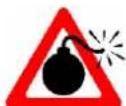
WARNING of explosions
Safety instruction to avoid explosions.

ATTENTION to high temperatures
Instructions to avoid injuries caused by high temperatures.
2.2 Instructions
For a safety and faultless using of the device it is indispensable that you read the following instructions purposely and follow them by the use.

Connect the device only to the suitable power supply. Please have a look to the identification plate.
➢ Use the device only in electric circuits with ground fault circuit interrupter.
➢ Check the power supply cord before you stick it into the electrical outlet.
Do not use power bars to extend the power supply cord.
- Only use extension cables with sufficient cable cross section.
Do not touch the device with wet hands during the usage because this might cause an electrical shock.
If unexpected sound, smell or smog is generated by the device, pull out the main plug and contact the manufacturer or your supplier immediately.
➢ Disconnect the power supply plug before cleaning or maintenance.
If you use radiation or contaminated samples the responsibility is only up to you.
Switch the device of during when you load the device.
- Avoid injuries: never put your hands or other parts of your body in the working device.
Do not clean living creatures in this device.

It is important that the device stands up on a horizontal, stable and firm subsurface to avoid vibrations.
Make sure that the device can not slip away.
To avoid heat congestion or fires make sure that there is enough space for air circulations.
- Avoid direct solar radiation.
Do not use the device near highly combustible materials.
Do not set the device outdoors.
It is superiorly to set the device in a good illuminated place to avoid accidents engendered by handling errors.
To set the device in wet or dusty places could cause overheating, short circuits or fires.
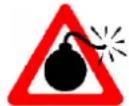
Do not use this device in area with potentially explosive atmosphere.
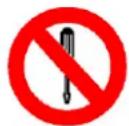
➢ Reparations and amendments should only made by witeg authorized people. Contraventions exclude the warranty.

Do not put heat-sensitive items at the device.
➢ Warn all attendees if you leave the device unattended.
Pay attention when you lift up the lid, hot condensation water may drop down or hot steam could come out.
Do not clean the hot device.

Use this device only if you read the whole safety instructions.
This device should only be used by persons who are familiarized with safety instructions made for laboratories.
Pay attention that no liquid reaches the controller or inward of the capsule.
➢ You have to keep the device clean if you want to get a longer life of it.
- Wear corresponding protective work clothing during the usage.
Pull out the power cable if you didn't want to use the device for a longer time.
3 Product description
3.1 Key features
Digital timer and temperature adjustment.
➢ Frequency 40 kHz.
➢ Temperature up to 80 °C adjustable.
Stainless steel bath.
- Drain valve for devices op to 10 liter capacity.
Stainless Steel lid inclusive.
➢ Over temperature protection by safety switch.
3.2 Operating panel
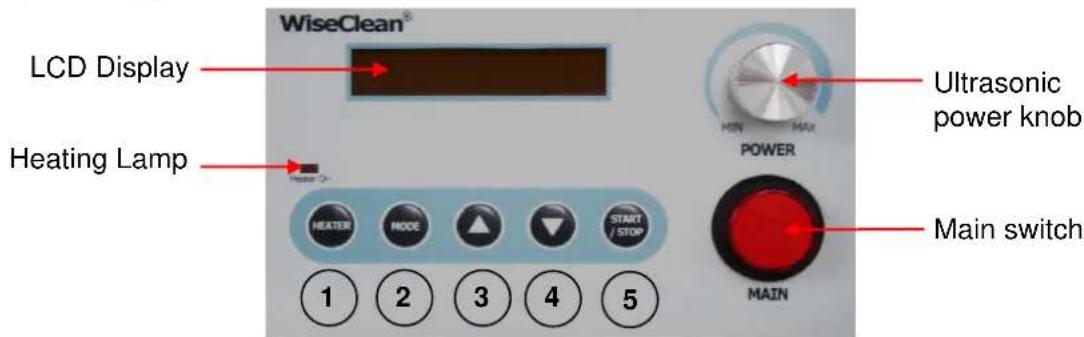
text_image
WiseClean® LCD Display Heating Lamp HEATER MODE ▲ START STOP 1 2 3 4 5 POWER ULTRASONIC power knob MAIN switch1 - HEATER button
2 - MODE button
3 - Arrow up button
4 - Arrow down button
5 - START/STOP button
Heating lamp
➢ Shines when heater is on.
Ultrasonic power knob (not matching for D03H)
Power adjustment of ultrasonic cleaner.
Main switch
To switch the device on or of.
HEATER button
To switch the heater on or of.
MODE button
To change menu item.
Arrow up button / Arrow down button
To change timer and temperature values.
START/STOP button
To switch the ultrasonic cleaning on or of.
4 Packing content
| Article Amount | D03H | D06H | D10H | D22H |
| 1 | Ultrasonic Cleaner | |||
| 1 | Stainless steel lid | |||
| 1 | Power cord | |||
| 1 | Operating manual | |||
5 Positioning the device and commissioning

- Follow especially the safety instructions marked with following symbol:
- Remove the package and perhaps soiling carefully.
- If there are any unexpected transport damages, please inform your forwarder and your costumer service.
- Before you connect the device with the electrical outlet, please let some time laps until the device is acclimatised.
- Make sure that you follow all safety instructions.
- Fill enough cleaning liquid in. Minimum fill the half of the bath. Maximum filling level is 3 cm under bath edge.
- Close the drain valve.
- Connect the device with the power outlet.
- Fill enough operating liquid in.
- Switch the device on and start the process (look at job description).
6 Job description
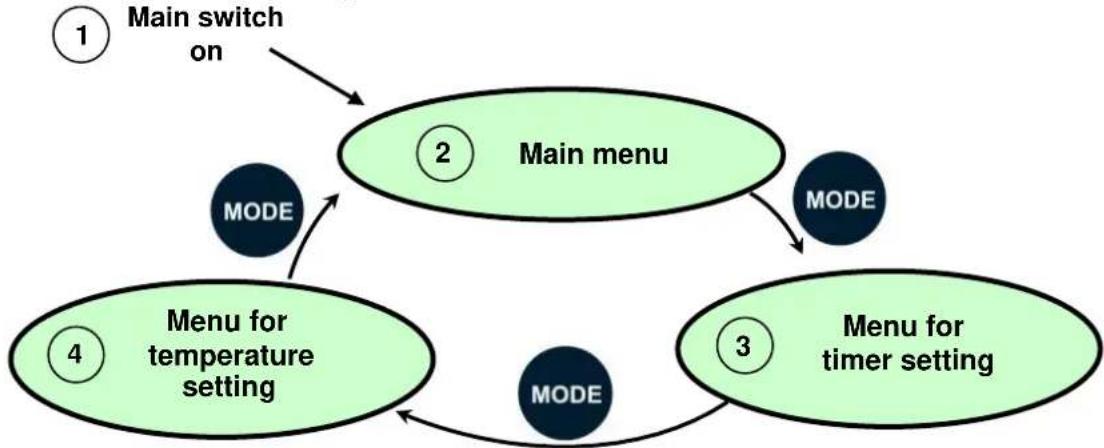
6.1 Menu structure diagram
flowchart
graph TD
    A["Main switch on"] --> B["Main menu"]
    B --> C["MODE"]
    C --> D["Menu for temperature setting"]
    D --> E["MODE"]
    E --> F["Menu for timer setting"]
    F --> G["MODE"]
    G --> H["Main menu"]
    style A fill:#f9f,stroke:#333
    style B fill:#ccf,stroke:#333
    style C fill:#cfc,stroke:#333
    style D fill:#fcc,stroke:#333
    style E fill:#cff,stroke:#333
    style F fill:#ffc,stroke:#333
    style G fill:#cfc,stroke:#333
    style H fill:#fcc,stroke:#333
6.2 Main menu
Main menu and the last used values are showed after switching the device on. f.e.:
| WAIT | 10 m | 13° Off | |
| Status ultrasonic cleaner | Status Timer | Present temperature | Heater is off |
Oder z.B.:
| WAIT | 30 s | 13° / 36° | |
| Status ultrasonic cleaner | Status Timer | Present temperature | Heater is on Set value 36 °C |
Switch heating on or off by HEATER button main menu. Use START/STOP button switch ultrasonic cleaner on and off.
6.3 Menu for timer setting
Push MODE button in main menu to reach timer setting menu:
| Timer Set | 30 s |
| Start/Stop | |
| Timer Set | 30 min |
Change between minutes and seconds
Use arrow buttons to adjust time.
Ultrasonic cleaner will be automatically switched off when time is elapsed.
6.4 Menu for temperature setting
Push MODE button in menu for time setting (6.2) to open temperature setting menu item:
| Temp Set | OFF |
| Start/Stop HEATER Heating on/off | |
| Temp Set | 30° |
Switch heating off and use arrow buttons to adjust temperature. Use Mode button to open main menu item.
6.5 Ultrasonic setting (not matching for D03H)
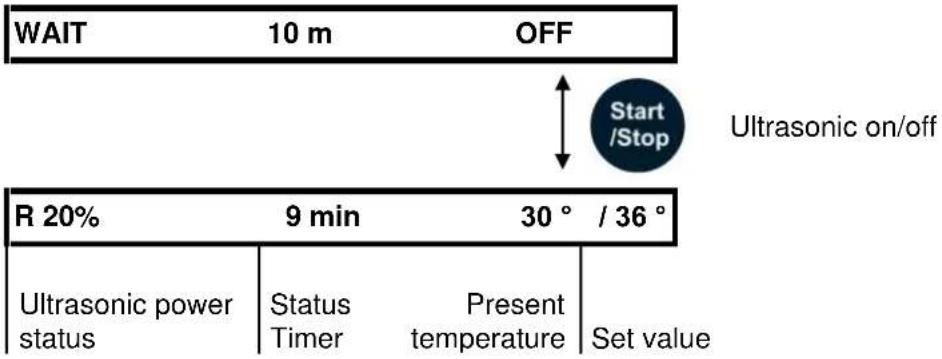
Use ultrasonic power knob to adjust the power of ultrasonic cleaning.
Use START/STOP button to switch ultrasonic on/off.
text_image
WAIT 10 m OFF Start/Stop Ultrasonic on/off R 20% 9 min 30° / 36° Ultrasonic power status Status Timer Present temperature Set value7 Maintenance and cleaning
➢ Please read the whole safety instructions before you start to maintain or clean the device.
➢ Pull the power plug out of the electrical outlet.
Only use care cleaning agents and soft cleaning rags.
Organic lotions, strong chemicals and rough cleaning rags can damage the device.
If you not want to use the device for a long time, pull of the power plug and keep it dry in the package.
▶ Only use original spare parts.
There is no need to maintenance the device.
8 Technical data
| WUC-D03H | WUC-D06H | WUC-D10H | WUC-D22H | |
| Capacity | 3,3 l | 6 l | 10 l | 22 l |
| Temperature | 30-80 °C | 30-80 °C | 30-80 °C | 30-80 °C |
| Capsule size | 266x163x252 | 366x178x303 | 366x266x308 | 570x327x312 |
| Bath size | 240x140x100 | 290x150x150 | 290x240x150 | 500x300x150 |
| Drain valve | no | no | yes | yes |
| HF-Power (output) | 100 W | 253 W | 407 W | 528 W |
| Heating power | 172 W | 172 W | 258 W | 344 W |
| Overall power | 290 W | 425 W | 665 W | 872 W |
| HF-Frequency | 40 kHz | |||
| Weight | 3,7 kg | 5,9 kg | 8,1 kg | 12,3 kg |
9 Certificate
Certificate

text_image
for Wisd 23LABORATORY INSTRUMENTS
The quality and all features were checked by the manufacturer before the shipment.
We grant from date of purchase
two years guaranty.
This certificate excludes damages by natural disasters or incorrect usages by the costumer.
Please look on your account and complete following table:
| Article | WUC-D Ultrasonic Cleaner |
| Typ | |
| Serialno. | |
| Date |