SCL-1080 - Microphone Polsen - Free user manual and instructions
Find the device manual for free SCL-1080 Polsen in PDF.


User questions about SCL-1080 Polsen
0 question about this device. Answer the ones you know or ask your own.
Ask a new question about this device
Download the instructions for your Microphone in PDF format for free! Find your manual SCL-1080 - Polsen and take your electronic device back in hand. On this page are published all the documents necessary for the use of your device. SCL-1080 by Polsen.
USER MANUAL SCL-1080 Polsen
natural_image
Illustration of a black handheld device with coiled cable and earplifier (no text or symbols)PRODUCT MANUAL
THANK YOU FOR CHOOSING POLSEN.
The Polsen SCL-1080 is designed to capture clear, natural audio on your DSLR, camcorder, or portable recorder. This condenser shotgun mic is optimized to reject ambient noise and focus on the subject in front of it, which is perfect for recording single subjects, interviews, dialog, and indoor or outdoor events. A switch allows you to select between cardioid and supercardioid modes to effectively capture sound in different environments.
The SCL-1080 comes with accessories designed to quickly attach it to a boom pole, tripod, or shoe mount, as well as detachable cables for rapid connection to your recorder. The boom pole clip doubles as a handgrip that's great for getting the mic close to your subject while staying out of the picture frame. The included cables attach to the microphone with a locking connector that won't accidentally disconnect when the cable is stretched.
PRECAUTIONS
- Please read and follow these instructions, and keep this manual in a safe place.
- Keep this product away from water and any flammable gases or liquids.
- Do not attempt to disassemble or repair this product.
- Handle this product with care.
- Clean this product with only a soft, dry cloth.
- Make sure that this product is intact and that there are no missing parts.
• All images are for illustrative purposes only.
CONTENTS INCLUDE
- Microphone
- Foam windscreen
- Coiled 3.5 mm cable
- Straight 3.5 mm cable
- Shoe-mount/tripod mic clip
- Boom-pole/handheld mic clip
• 3.5mm female to 6.3mm TRS M adapter
• 5/8-27 to 3/8-16 reducer bushing - Padded carry case
INSTALLING THE BATTERY
The SCL-1080 runs on a single AA battery (not included). To install a battery, make sure the SCL-1080 is turned off, and follow these steps:
- Unscrew the base of the microphone and pull it away from the body to uncover the battery compartment.
- Insert the battery in the orientation indicated by the illustration inside the compartment.
- Return the base of the microphone to its original position and screw it back in place.

text_image
2. 1.MOUNTING THE SCL-1080
Camera
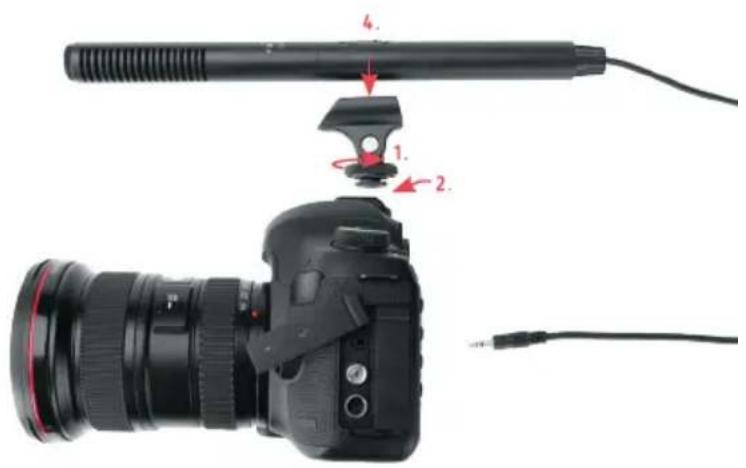
The SCL-1080 mounts onto your camera via the shoe-mount microphone clip. To mount the microphone onto your camera, make sure the SCL-1080 is turned off, and follow these steps:
- Rotate the locking wheel counterclockwise to loosen it.
- Slide the mounting foot all the way into your camera's hot shoe.
natural_image
Close-up of a DSLR camera with attached microphone and cable, showing adjustment steps (no text or symbols)-
Rotate the locking wheel clockwise until secure.
-
Position the microphone with its controls facing up. Snap the microphone into the clip at the midpoint of the microphone, making sure it's well balanced in the clip. If necessary, use a slotted screwdriver to tighten the bolt on the clip.
Tip: You can adjust the angle of the shoe-mount microphone clip to tilt the microphone up or down.
Boom Pole and Mic Stand
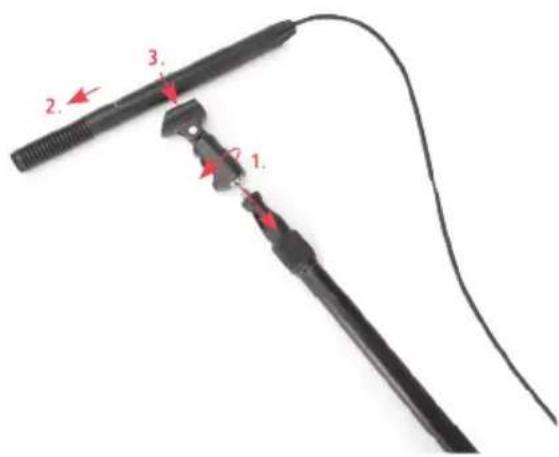
You can mount the SCL-1080 onto a boom pole, microphone stand, or tripod via the boom-pole microphone clip.
The boom-pole/handheld clip has a 5/8-27 socket that's compatible with most mic stands. To attach the clip to a boom pole or tripod with a 3/8-16 post, screw the included reducer bushing into the clip's socket. To make sure it's fully inserted, use a coin or a slotted screwdriver to tighten the bushing until secure.
Make sure the SCL-1080 is tuned off, and follow these steps:
-
Screw the clip onto the boom pole or mic stand until secure.
-
Make sure the microphone and the handgrip on the clip are facing forward and position the microphone with its controls facing up.
-
Snap the microphone into the clip at the midpoint of the microphone, making sure it's well balanced on the clip. If necessary, use a coin or a slotted screwdriver to tighten the bolt on the clip.
Tip: You can adjust the angle of the shoe-mount microphone clip to tilt the microphone up or down.
text_image
Diagram of a medical or surgical tool with numbered parts and red arrows indicating specific positionsTripod, Accessory Arm, and Monopod
The shoe-mount microphone clip has a 1/4-20 socket in order to mount the SCL-1080 on a tripod or accessory with a 1/4-20 screw like an articulating arm, monopod, or selfie stick.
- Screw the shoe-mount clip onto the tripod or accessory until secure.
- Make sure the microphone and the handgrip on the clip are facing forward, and position the microphone with its controls facing up.
- Snap the microphone into the clip at the midpoint of the microphone, making sure it's well balanced in the clip. If necessary, use a coin or a slotted screwdriver to tighten the bolt on the clip.
CONNECTING THE SCL-1080 TO A CAMERA OR PORTABLE RECORDER
- Insert the locking end of the 3.5 mm cable into the microphone, and secure it with a clockwise quarter turn. Insert the other end into your camera or recorder's 3.5 mm audio input jack.
- Turn the microphone on by sliding the control switch to Normal or Tele mode.
NORMAL AND TELE MODES
Use the SCL-1080's selector switch to set the microphone to Normal or Tele mode.
Normal mode is a cardioid polar pattern optimized to focus on the subject while rejecting off-axis sound. This mode is ideal when recording subjects that are close to the microphone.
Tele mode is a supercardioid polar pattern that's more focused than the cardioid pattern, and it's better at isolating the subject and rejecting off-axis sound and ambient noise. Select Tele mode when you're recording subjects that are farther away from the microphone.
USING THE WINDSCREEN
The SCL-1080 includes a foam windscreen that helps reduce noise from wind, fans, or air conditioners. To fit the windscreen onto the microphone, rotate the windscreen while gently pushing it onto the microphone barrel. Make sure the windscreen covers all the ports on the sides of the microphone barrel.
SPECIFICATIONS
| TRANSDUCER TYPE | Condenser |
| POLAR PATTERNS | Normal: CardioidTele: Supercardioid |
| FREQUENCY RESPONSE 60 Hz | to 13 kHz |
| IMPEDANCE | Normal: 1 kΩ ±30%Tele: 2.3 kΩ ±30% |
| SENSITIVITY | Normal: 3 mV/Pa @1 kHzTele: 15 mV/Pa @1 kHz |
| AUDIO CONNECTION 1/8 in. (3.5 mm) | |
| CABLE | Straight: 25 ft. (7.6 m)Coiled: 1 to 5 ft. (0.3 to 1.5 m) |
| POWER REQUIREMENT 1.5 V AA battery | |
| MICROPHONE DIMENSIONS | Length: 11.2 in. (28.5 cm)Diameter: 1 in. (2.5 cm) |
| WEIGHT 4.1 oz. (116 g) without battery | |
ONE-YEAR LIMITED WARRANTY
This Polsen product is warranted to the original purchaser to be free from defects in materials and workmanship under normal consumer use for a period of one (1) year from the original purchase date or thirty (30) days after replacement, whichever occurs later. The warranty provider's responsibility with respect to this limited warranty shall be limited solely to repair or replacement, at the provider's discretion, of any product that fails during normal use of this product in its intended manner and in its intended environment. Inoperability of the product or part(s) shall be determined by the warranty provider. If the product has been discontinued, the warranty provider reserves the right to replace it with a model of equivalent quality and function.
This warranty does not cover damage or defect caused by misuse, neglect, accident, alteration, abuse, improper installation or maintenance. EXCEPT AS PROVIDED HEREIN, THE WARRANTY PROVIDER MAKES NEITHER ANY EXPRESS WARRANTIES NOR ANY IMPLIED WARRANTIES, INCLUDING BUT NOT LIMITED TO ANY IMPLIED WARRANTY OF MERCHANTABILITY OR FITNESS FOR A PARTICULAR PURPOSE. This warranty provides you with specific legal rights, and you may also have additional rights that vary from state to state.
To obtain warranty coverage, contact the Polsen Customer Service Department to obtain a return merchandise authorization ("RMA") number, and return the defective product to Polsen along with the RMA number and proof of purchase. Shipment of the defective product is at the purchaser's own risk and expense.
For more information or to arrange service, visit www.polsenaudio.com or call Customer Service at 212-594-2353.
Product warranty provided by the Gradus Group.
www.gradusgroup.com
Polsen is a registered trademark of the Gradus Group. © 2020 Gradus Group LLC. All Rights Reserved.

POLSEN® A Gradus Group Brand