
PMA-2B - Earphones Polsen - Free user manual and instructions
Find the device manual for free PMA-2B Polsen in PDF.


| Product Type | In-Ear Earphones |
| Brand | Polsen |
| Model | PMA-2B |
| Driver Unit | 10 mm dynamic driver |
| Impedance | 16 ohms |
| Frequency Response | 20 Hz - 20 kHz |
| Sensitivity | 95 dB |
| Cable Length | 1.2 meters |
| Connector | 3.5 mm TRS gold-plated plug |
| Weight | 15 grams |
| Ear Tips Included | 3 sizes (S, M, L) |
| Microphone | Yes, with inline remote |
| Compatibility | Smartphones, tablets, PCs, MP3 players |
| Maintenance & Care | Clean with a soft, dry cloth. Do not immerse in water. |
| Safety Warnings | Avoid prolonged listening at high volume to prevent hearing damage. |
| Spare Parts Availability | Replacement ear tips available online |
| Warranty | 1 year limited warranty |
Frequently Asked Questions - PMA-2B Polsen
User questions about PMA-2B Polsen
0 question about this device. Answer the ones you know or ask your own.
Ask a new question about this device
Download the instructions for your Earphones in PDF format for free! Find your manual PMA-2B - Polsen and take your electronic device back in hand. On this page are published all the documents necessary for the use of your device. PMA-2B by Polsen.
USER MANUAL PMA-2B Polsen
natural_image
Exterior view of a black POLSEN® electronic device with ports and buttons (no readable text beyond branding)PRODUCT MANUAL
THANK YOU FOR CHOOSING POLSEN.
The Polsen PMA-2B is a stereo personal monitor amplifier that lets you create the balance and level that are perfect for you, whether you're performing or monitoring. This durable personal monitor features an all-metal chassis that can withstand travel as well as demanding onstage use or location shoots.
For studio and live musicians, the dual balanced XLR inputs accept the stereo signal from a mixing board. The high-power headphone output delivers plenty of volume, so even drummers can hear the cue mix over their drum kits. Film directors and cinematographers who want to monitor the camera's audio will love the PMA-2B, which can connect to the XLR outputs of a field mixer.
PRECAUTIONS

- Please read and follow these instructions, and keep this manual in a safe place.
- Exposure to high sound levels can cause permanent hearing loss. Avoid listening at high volumes for extended periods of time.
- Use only the correct, recommended voltage.
- Do not attempt to disassemble or repair this product. There are components inside that can produce a hazardous electric shock.
- Clean this product with only a soft, dry cloth.
- Make sure that this product is intact and that there are no missing parts.
- All images are for illustrative purposes only.
OVERVIEW
- Battery status indicator (red)
- 1/8 in. (3.5 mm) headphone output
- Power / Battery status indicator (green)
- Volume knob
- Balance knob
- Stereo/mono button
- Locking ring
- Mounting foot
- 3/8-16 socket
- Belt clip
- Battery compartment
- On/off button
- Power input
- Left input (XLR female)
- Right input (XLR female)

MOUNTING THE PMA-2B
Shoe Mount
Loosen the locking ring, and slide the PMA-2B's foot into a camera's shoe mount until it's completely inserted. Then tighten the locking ring until secure.
3/8-16 Socket
Screw the PMA-2B onto the 3/8-16 stud of a mic stand, tripod, or accessory arm. Use a 5/8-27 female to 3/8-16 male adapter (not included) to mount the PMA-2B onto a mic stand with a 5/8-27 top.
Belt Clip
Use the belt clip to carry the PMA-2B on your belt or guitar strap.
POWERING THE PMA-2B
Installing a Battery
- Press the battery compartment release, and open the battery compartment door.
- Press the battery connector onto the terminals of a 9-volt battery, and place the battery into the battery compartment.
- Close the battery door until it clicks shut.
- Press the on/off button to turn on the PMA-2B. The Green LED indicator will illuminate to indicate sufficient battery power.
Battery Status LEDs
When a new battery is installed, the green LED will glow, indicating that the battery is at full power. As the battery life decreases, both the green and red LEDs will glow. When only the red LED glows, the battery is low and needs to be replaced.
Tip: Install a fresh battery before a lengthy session or show.
Plug-In Power
The PMA-2B can be powered from an outlet by connecting the PS-9V AC adapter (available separately).
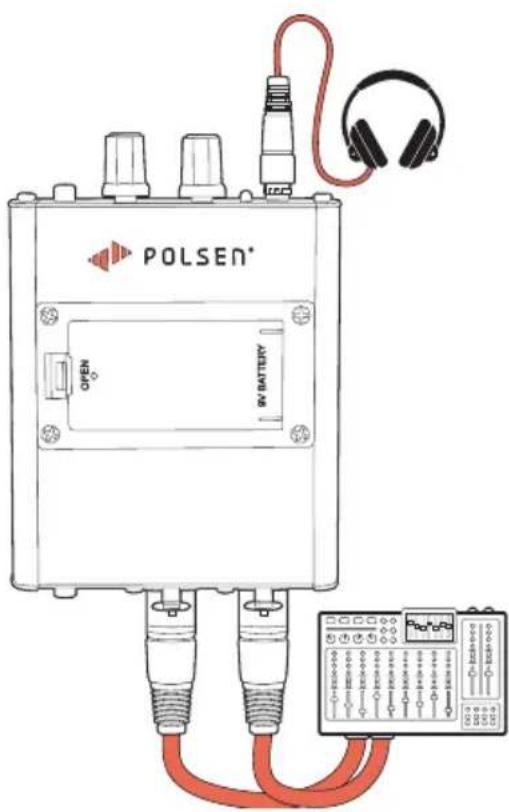
CONNECTING THE PMA-2B
Use balanced cables to connect the PMA-2B with the aux out of a mixing board or the outputs of a field mixer.
Connect headphones to the 1/8 in. headphone jack.
OPERATING THE PMA-2B
Mode Button
The mode button determines how the input signals are routed to the headphones.
Mono
Select mono mode to combine the audio from both inputs and rout the combined signal to each headphone channel.
Stereo
Select stereo to rout the signal from the left and right inputs to their own channels for the full stereo mix.
BALANCE KNOB
In mono mode, the balance knob adjusts the level between the two channels while maintaining equal volume in both sides of the headphone.
In stereo mode, use the balance knob to control the stereo balance.
VOLUME KNOB
Adjust the overall monitor level with the volume knob.
SPECIFICATIONS
| NUMBER OF CHANNELS 2 | |
| INPUT CONNECTORS | XLR balanced (×2) |
| OUTPUT CONNECTORS | Headphone out:1/8 in. (3.5 mm) TRS |
| FUNCTION CONTROLS Volume knobBalance knobMono/stereo selector | |
| MAXIMUM OUTPUT LEVEL | 9.5 dBu |
| MAXIMUM INPUT LEVEL | 6 dBu |
| FREQUENCY RESPONSE | 20 Hz to 80 kHz(±0.5 dB) |
| DISTORTION (THD) | 0.01% |
| S/N RATIO | >90 dB (A-weighted) |
| CMRR | >50 dB |
| INPUT IMPEDANCE | ≥20 kΩ |
| OUTPUT IMPEDANCE | ≤10 Ω per channel |
| CROSSTALK | >40 dB |
| POWER | 9 V DC |
| MAX OPERATION CURRENT | 90 mA |
| MAX OUTPUT POWER | 40 mW per channel |
| DIMENSIONS (W × H × D) | 3.5 × 1.4 × 4 in.(8.8 × 3.6 × 10.2 cm) |
| WEIGHT | 9 oz. (255 g) |
TROUBLESHOOTING
| Problem Solution | |
| There's no sound in the headphones. | Make sure the headphones are completely plugged in.Make sure the volume levels are turned up.Make sure the XLR inputs are receiving a signal. |
| I can't hear my microphone in the headphones. | If the PMA-2B is receiving only one channel, use the stereo/mono button to select mono.Make sure the balance knob is centered. |
| The green LED indicator doesn't light up. | Make sure the on/off button is in the on position.Make sure the battery is properly installed.The battery might be low. Replace the battery. |
| The red LED indicator is on. | The battery is low. Install a new battery. |
ONE-YEAR LIMITED WARRANTY
This Polsen product is warranted to the original purchaser to be free from defects in materials and workmanship under normal consumer use for a period of one (1) year from the original purchase date or thirty (30) days after replacement, whichever occurs later. The warranty provider's responsibility with respect to this limited warranty shall be limited solely to repair or replacement, at the provider's discretion, of any product that fails during normal use of this product in its intended manner and in its intended environment. Inoperability of the product or part(s) shall be determined by the warranty provider. If the product has been discontinued, the warranty provider reserves the right to replace it with a model of equivalent quality and function.
This warranty does not cover damage or defect caused by misuse, neglect, accident, alteration, abuse, improper installation or maintenance. EXCEPT AS PROVIDED HEREIN, THE WARRANTY PROVIDER MAKES NEITHER ANY EXPRESS WARRANTIES NOR ANY IMPLIED WARRANTIES, INCLUDING BUT NOT LIMITED TO ANY IMPLIED WARRANTY OF MERCHANTABILITY OR FITNESS FOR A PARTICULAR PURPOSE. This warranty provides you with specific legal rights, and you may also have additional rights that vary from state to state.
To obtain warranty coverage, contact the Polsen Customer Service Department to obtain a return merchandise authorization ("RMA") number, and return the defective product to Polsen along with the RMA number and proof of purchase. Shipment of the defective product is at the purchaser's own risk and expense.
For more information or to arrange service, visit www.polsenaudio.com or call Customer Service at 212-594-2353.
Product warranty provided by the Gradus Group.
www.gradusgroup.com
Polsen is a registered trademark of the Gradus Group. © 2020 Gradus Group LLC. All Rights Reserved.

POLSEN® A Gradus Group Brand
Brand : Polsen
Model : PMA-2B
Category : Earphones