
MVS-5 - Microphone Polsen - Free user manual and instructions
Find the device manual for free MVS-5 Polsen in PDF.


| Type | Stereo Shotgun Microphone |
| Transducer | Back electret condenser (×2) |
| Polar Pattern | XY stereo |
| Frequency Response | 100 Hz to 15 kHz |
| Sensitivity | -28 / -38 / -48 dB ±3 dB |
| Impedance | 1200 Ω ±30% |
| Signal-to-Noise Ratio | ≥60 dB |
| Maximum SPL | ≥120 dB |
| Total Harmonic Distortion | ≤1% |
| Power Requirement | 3 V CR2032 coin battery |
| Battery Life | 36 hours |
| Cable | 1/8 in. (3.5 mm) TRS |
| Dimensions (Diameter) | 1.2 in. (3.1 cm) |
| Dimensions (Length) | 4.6 in. (11.7 cm) |
| Dimensions (Height) | 2.5 in. (6.4 cm) |
| Weight | 3.5 oz (98.5 g) |
| Mounting | Shoe mount with 1/4-20 tripod socket |
| High-Pass Filter | 80 Hz cutoff |
| Gain Settings | 0 dB, +10 dB, -10 dB |
| LED Indicator | Power on status |
| Construction | All-metal |
| What's Included | Foam windscreen, CR2032 battery |
| Warranty | 1-year limited |
Frequently Asked Questions - MVS-5 Polsen
User questions about MVS-5 Polsen
0 question about this device. Answer the ones you know or ask your own.
Ask a new question about this device
Download the instructions for your Microphone in PDF format for free! Find your manual MVS-5 - Polsen and take your electronic device back in hand. On this page are published all the documents necessary for the use of your device. MVS-5 by Polsen.
USER MANUAL MVS-5 Polsen
natural_image
Close-up of a black handheld microphone with attached cord and connector (no visible text or symbols)PRODUCT MANUAL

POLSEN®
THANK YOU FOR CHOOSING POLSEN
The Polsen MVS-5 Stereo Shotgun Microphone is a rugged, compact, and lightweight mic designed for recording audio directly to a DSLR camera or portable recorder. It delivers pristine and quiet professional-quality sound and is a vast improvement over a DSLR camera's built-in microphone.
This dependable microphone features two condenser cardioid capsules arranged in an X-Y pattern for capturing audio with realistic stereo imaging. The microphone is powered by a single 3 V coin battery for 36 hours of run time with most cameras and recorders that have a 1/8-inch audio input connector. The MVS-5 attaches to a camera's shoe mount or tripod, and its all-metal construction makes it a great addition to a camera rig for a variety of field and run-and-gun productions like documentaries, music videos, sporting events, and nature videos.
PRECAUTIONS
- Please read and follow these instructions, and keep this manual in a safe place.
- Keep this product away from water and flammable gases or liquids.
- Use only the batteries recommended by this manual.
- Do not attempt to disassemble or repair this product yourself.
- Handle this product with care.
- Clean this product with only a soft, dry cloth.
•Make sure that this product is intact and that there are no missing parts.
•To avoid damaging the product, remove the battery during long periods of nonuse.
•All images are for illustrative purposes only.
OVERVIEW
-
Microphone ports
-
LED indicator
-
High-pass filter / Power switch
-
Three-level gain switch
-
Battery compartment cover
-
1/8 in. audio output cable
-
Mounting foot with 1/4-20 tripod socket
-
Locking wheel

Also included
- Foam Windscreen
- CR2032 Coin Battery
INSTALLING THE BATTERY
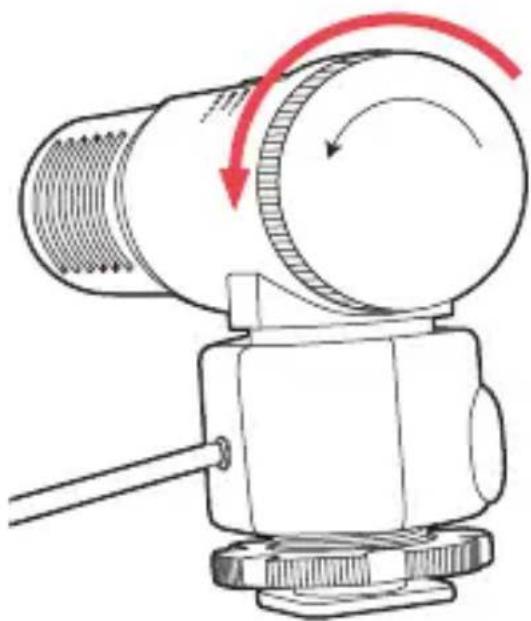
The MVS-5 runs on a CR2032 coin battery. To install the battery, make sure the power switch is off, and follow these steps:
- Remove the cover at the base of the microphone to access the battery compartment.
natural_image
Technical line drawing of a mechanical device with red motion arrows indicating rotational motion (no text or symbols)- Insert a CR2032 coin battery into the compartment, Insert the battery with the plus sign facing out, and then replace the cover.

MOUNTING THE MVS-5 AND TURNING IT ON
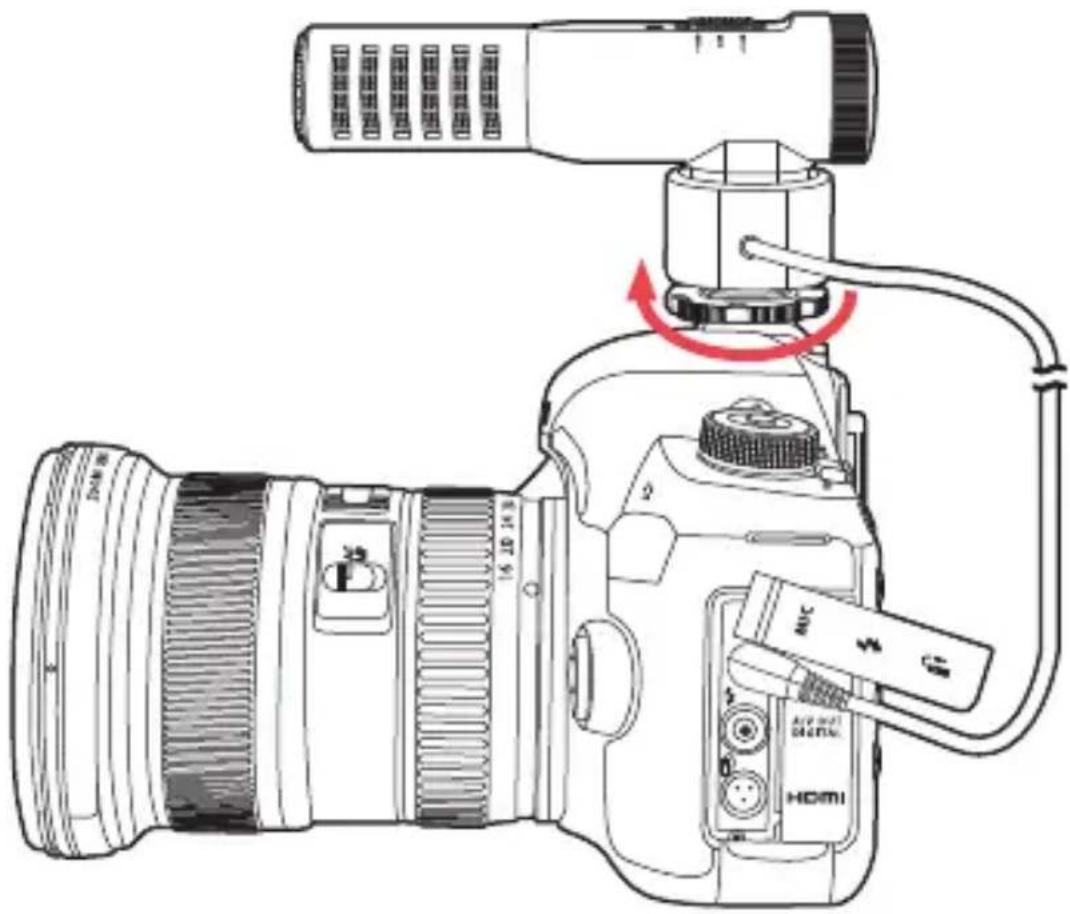
To attach the microphone to a camera, make sure the MVS-5 is turned off, and follow these steps:
- Rotate the shock mount's locking wheel counterclockwise to loosen it.
- Slide the mounting foot all the way into your camera's shoe mount.
- Tighten the locking wheel by rotating it clockwise until secure.
RECORDING
- Plug the audio output cable into the 1/8-inch audio input jack on the recording device or camera.
- To turn on the microphone, slide the power switch to either the flat or high-pass position.
Note: Smartphones that have a Lightning or USB Type-CTM connector will require an adapter (sold separately).
USING THE HIGH-PASS FILTER
The high-pass filter attenuates noise below 80 Hz. This helps prevent the microphone from recording low-frequency noises like the rumble of an air conditioner, blower, or fan.
To turn on the high-pass filter, slide the switch to the high-pass position. Set the switch to the flat position — if the high-pass filter isn't needed.
USING THE THREE-LEVEL GAIN SWITCH
The three-level gain switch provides normal 0 dB gain, a +10 dB boost, or -10 dB pad.
- 0 dB: The microphone's normal gain setting. This is the optimal setting for recording normal speech or dialog.
- +10 dB: Boost the microphone's gain to record low-level or distant sounds in a quiet environment.
- -10 dB: Attenuate the level of the incoming signal to record in high-decibel environments, like a rock concert or sporting event.
SPECIFICATIONS
Transducer Back electret condenser (×2)
Polar Pattern XY stereo
Frequency Response 100 Hz to 15 kHz
Sensitivity -28 / -38 / -48 dB ±3 dB
Impedance 1200 Ω ±30%
Signal-to-Noise Ratio ≥60 dB
Max SPL ≥120 dB
THD ≤1%
Power Requirement 3 V CR2032 battery
Battery Duration 36 hr.
Cable 1/8 in. (3.5 mm) TRS
Diameter 1.2 in. (3.1 cm)
Length 4.6 in. (11.7 cm)
Height 2.5 in. (6.4 cm)
Weight 3.5 oz. (98.5 g)
FREQUENCY RESPONSE

line
| Frequency in Hertz | Relative Response in dB (Red) | Relative Response in dB (Gray) | Relative Response in dB (Light Gray) | | ------------------ | ----------------------------- | ------------------------------ | ------------------------------------- | | 0 | -28 | -40 | -50 | | 20k10 | -32 | -45 | -55 | | 40k10 | -33 | -47 | -56 | | 60k10 | -34 | -48 | -57 | | 80k10 | -35 | -49 | -58 | | 100k10 | -36 | -50 | -59 | | 120k10 | -37 | -51 | -60 | | 140k10 | -38 | -52 | -61 | | 160k10 | -39 | -53 | -62 | | 180k10 | -40 | -54 | -63 | | 200k10 | -41 | -55 | -64 |+10 dB 0 dB -10 dB
TROUBLESHOOTING
The microphone won't turn on.
•Make sure a fresh battery is installed and is in the correct orientation.
The sound is distorted.
•Make sure the microphone is fully plugged into the audio input jack of your camera, smartphone, or recorder.
- If the +10 dB boost is selected on the three-level gain switch, change it to either 0 dB or the -10 dB pad setting.
The sound is too low.
- Make sure the microphone's audio cable is fully plugged into the camera, smartphone, or recorder audio input jack.
- If the -10 dB pad is selected on the three-level gain switch, change it to either the 0 dB or the +10 dB boost setting.
- Increase the audio input level on the recording device.
- If there is no input level control on the recording device, move the microphone closer to the source.
The sound is recording on only one channel.
- Make sure the microphone's audio cable is fully plugged into the camera, smartphone, or recorder audio input jack.
•Make sure the recording control is enabled on both input channels of the recording device. - Turn up the input gain control of the silent channel.
ONE-YEAR LIMITED WARRANTY
This Polsen product is warranted to the original purchaser to be free from defects in materials and workmanship under normal consumer use for a period of one (1) year from the original purchase date or thirty (30) days after replacement, whichever occurs later. The warranty provider's responsibility with respect to this limited warranty shall be limited solely to repair or replacement, at the provider's discretion, of any product that fails during normal use of this product in its intended manner and in its intended environment. Inoperability of the product or part(s) shall be determined by the warranty provider. If the product has been discontinued, the warranty provider reserves the right to replace it with a model of equivalent quality and function.
This warranty does not cover damage or defect caused by misuse, neglect, accident, alteration, abuse, improper installation or maintenance. EXCEPT AS PROVIDED HEREIN, THE WARRANTY PROVIDER MAKES NEITHER ANY EXPRESS WARRANTIES NOR ANY IMPLIED WARRANTIES, INCLUDING BUT NOT LIMITED TO ANY IMPLIED WARRANTY OF MERCHANTABILITY OR FITNESS FOR A PARTICULAR PURPOSE. This warranty provides you with specific legal rights, and you may also have additional rights that vary from state to state.
To obtain warranty coverage, contact the Polsen Customer Service Department to obtain a return merchandise authorization ("RMA") number, and return the defective product to Polsen along with the RMA number and proof of purchase. Shipment of the defective product is at the purchaser's own risk and expense.
For more information or to arrange service, visit www.polsenaudio.com or call Customer Service at 212-594-2353.
Product warranty provided by the Gradus Group.
www.gradusgroup.com
Polsen is a registered trademark of the Gradus Group.
© 2020 Gradus Group LLC. All Rights Reserved.
- PRODUCT MANUAL
- THANK YOU FOR CHOOSING POLSEN
- PRECAUTIONS
- OVERVIEW
- Also included
- INSTALLING THE BATTERY
- MOUNTING THE MVS-5 AND TURNING IT ON
- RECORDING
- USING THE HIGH-PASS FILTER
- USING THE THREE-LEVEL GAIN SWITCH
- SPECIFICATIONS
- TROUBLESHOOTING
- The microphone won't turn on.
- The sound is distorted.
- The sound is too low.
- The sound is recording on only one channel.
- ONE-YEAR LIMITED WARRANTY
Brand : Polsen
Model : MVS-5
Category : Microphone