
Philadelphia 865 - Car stereo BLAUPUNKT - Free user manual and instructions
Find the device manual for free Philadelphia 865 BLAUPUNKT in PDF.


| Product Type | Car Stereo |
| Brand | Blaupunkt |
| Model | Philadelphia 865 |
| Form Factor | Single DIN (approx. 180 x 50 x 160 mm) |
| Weight | Approx. 0.5 kg |
| Power Supply | 12V DC (negative ground) |
| Maximum Power Output | 4 x 50 Watts |
| Tuner Bands | FM (RDS), AM |
| Playback Sources | USB, AUX, Bluetooth audio streaming |
| Bluetooth | Yes, for hands-free calling and audio |
| Display | LCD with illumination |
| Controls | Rotary encoder, push buttons, remote control included |
| Audio Features | Equalizer, bass/treble adjustment, loudness |
| Connectivity | USB 2.0, 3.5 mm AUX input |
| Dimensions (W x H x D) | Approx. 180 x 50 x 160 mm |
| Mounting Depth | Approx. 100 mm |
| Weight | Approx. 0.5 kg |
| Operating Temperature | -20°C to +60°C |
| Fuse Rating | 10A (ATC/ATO type) |
| Cleaning | Wipe with a soft, dry cloth. Do not use solvents. |
| Spare Parts Availability | Contact Blaupunkt service centers or authorized dealers |
| Repairability | Standard DIN form factor, easy installation and service |
Frequently Asked Questions - Philadelphia 865 BLAUPUNKT
User questions about Philadelphia 865 BLAUPUNKT
0 question about this device. Answer the ones you know or ask your own.
Ask a new question about this device
Download the instructions for your Car stereo in PDF format for free! Find your manual Philadelphia 865 - BLAUPUNKT and take your electronic device back in hand. On this page are published all the documents necessary for the use of your device. Philadelphia 865 by BLAUPUNKT.
USER MANUAL Philadelphia 865 BLAUPUNKT
MULTIMEDIA NAVIGATION
PHILADELPHIA 865
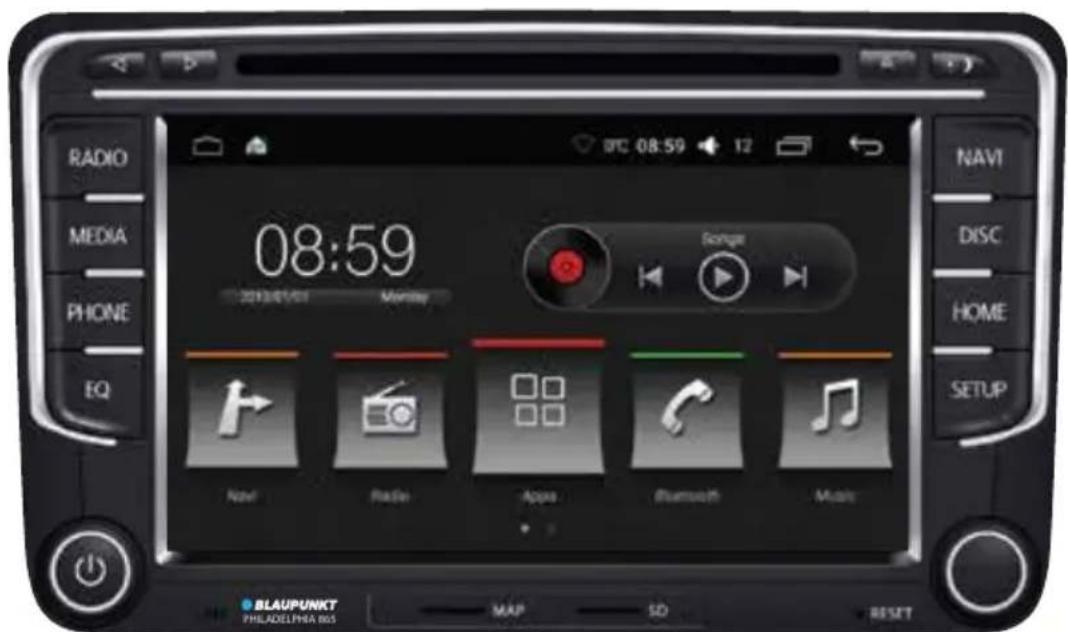
Enjoy it.
Safety Notes
This car radio has been manufactured according to established safety guidelines. However, dangers may still occur if the safety notes in this manual is not observed. This manual is intended to familiarize the user with the car radio's important functions. Read this carefully, prior to using the car radio. Keep this manual in an easily accessible location. In addition, do observe the instructions of the devices used in conjunction with this car radio.
Road Safety
Always observe the following notes for road safety:
- Car radio must be used in a way that compliments safety of the user when driving the vehicle. It is recommended for the user to at an appropriate location when operating the car radio. While driving, user is not recommended to use applications that can be prone to distraction e.g. streaming to videos, entering destination etc.
- User is recommended to proceed with proposed driving routes only if it does not violate any traffic regulations. Local traffic signs and regulations always prevail over the routes proposed.
- User is advised to keep the volume of the car radio to a moderate level for the protection of the ears and to increase the ability to hear any emergency warning signals (e.g. police and ambulance sirens). Do not increase the car radio volume while the car radio is muted as it is not audible. The car radio volume can be too loud when the car radio is unmuted.
General Safety Notes:
Observe the following for protection against injuries:
- This car radio is intended for installation and operation in a vehicle with 12V vehicle system outage, hence the radio unit must be installed in a DIN slot. Observe the output limits of the car radio. Do not dismantle or modify the car radio. Installation and repairs, if necessary, should be performed by a specialist. We are not liable for any loss or damage caused or resulting from unauthorized disassembly or modification to the product.
- This car radio's core components may result to damage when the car is driven on bumpy roads for a prolonged period of time or if it is used to play non-standard or severely damaged discs.
-
Please do not operate the car radio under extreme temperature conditions (extremely high temperature or extremely low temperature); make sure that temperature within the car ranges from -20°C to 80°C before you connect the car radio to the power supply.
-
For abnormalities, please refer to the "Troubleshooting" section. If the problem cannot be resolved, please press the Reset button to recover its factory settings. Otherwise, please contact respective installer/seller directly for help.
- As Disc/SD/USB file formats, codecs, bitrate, resolution and other parameters available in the market are not all the same, Blaupunkt does cnot guarantee the flawless functions of copy-protected disc and all disc blanks, USB data carriers and memory cards available in the market.
- Different cars may have different configurations. It is normal that some CAN-Bus functions cannot be enabled because it is not supported by the user's car or this car radio.
- Solvents, cleaning and scouring agents as well as dashboard spray and plastics care products may contain materials which can damage the surface and screen of the car radio. Use only dry or slightly moistened cloth to clean the car radio surface and screen.
Disclaimer
This manual may be updated from time to time without any notice.
In no event shall Blaupunkt be liable for any direct, indirect, punitive, incidental, special consequential damages to property or life and whatsoever arising out of or connected with the use or misuse of our products.
USA & CANADA: This product is not intended for sale in the United States and Canada. If purchased in the U.S. or Canada, this product is purchased on as-is basis. No warranty, whether expressed or implied is provided in the U.S. or Canada.
Scope of Delivery
The scope of delivery includes:
- Car sound system
- RCA-out Cable
- Manual
- USB Cable (2-way)
- FM Antenna Cable
- Main Harness
• GPS Antenna Cable - WiFi Antenna
- Reverse Cam-in Cable
• CANbus box (selected model) - Aux-in Cable
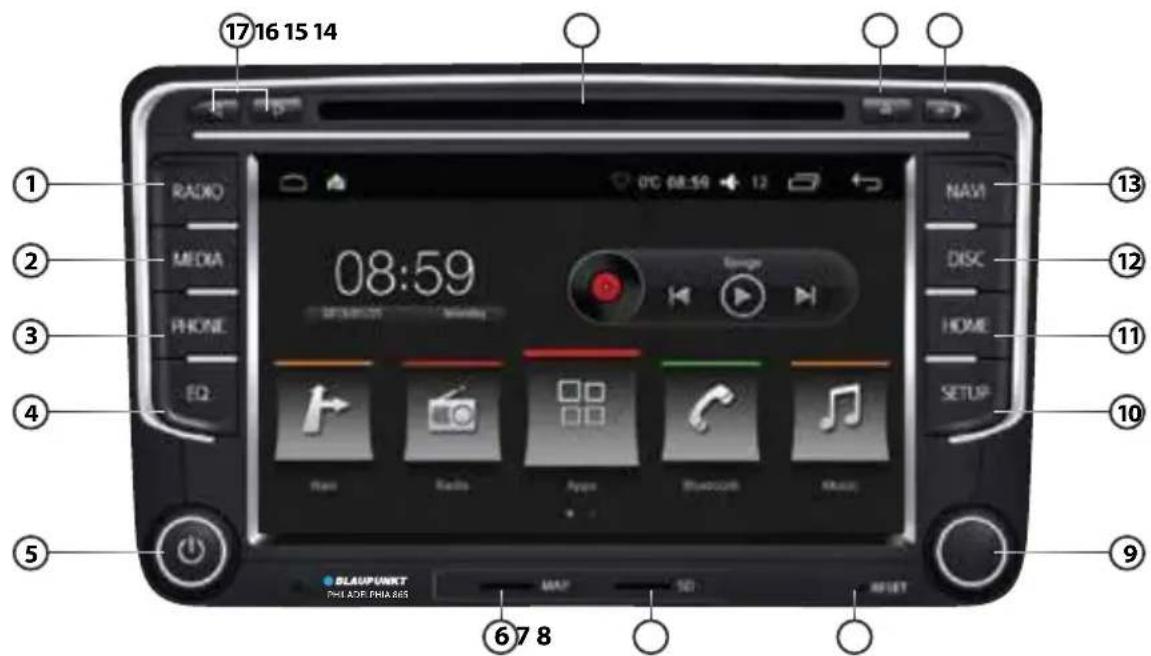
1RADIO
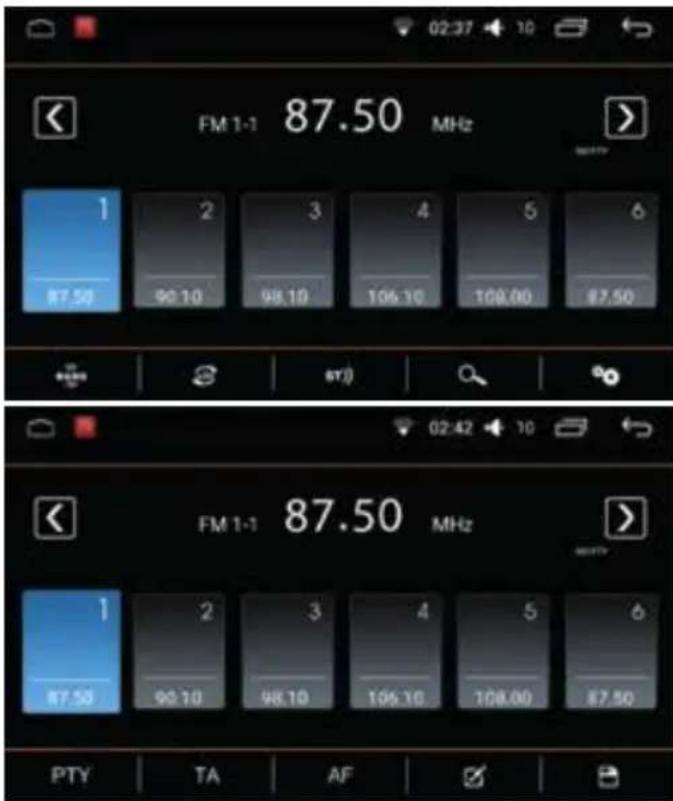
- Press BAND to switch between FM (18 preset) & AM (12 preset).
- Press to turn on or off Local search. Turning on Local search will reduce the receiving sensitivity, therefore only strong signal stations will be received. Turning off Local search allows device to receive weak signal stations.
- Press ST) to turn on or off Stereo mode. Turning on Stereo allows surround sound output (depends on car speaker system).
- Press 🔒 to automatically search and save stations into all preset stations Note: Saved radio stations will be overwritten when 🔒 is selected.
- Press ⚙ to go to Radio Settings.
- Press PTY to switch between programme types
- Press TA to enable traffic announcement. The device may pause the media playback or raising the volume of the traffic announcement
- Press AF to enable alternative frequency. When radio station signal becomes too weak, a different providing the same station will be automatically selected.
- Press ☑ to view list of saved radio stations.
- Press 📋 to save stations.
② MEDIA : Press to begin media modes (Disc/ SD/ USB/ Bluetooth/ Aux-in). Device will automatically play files when SD/ USB/ Disc is inserted.
③ PHONE
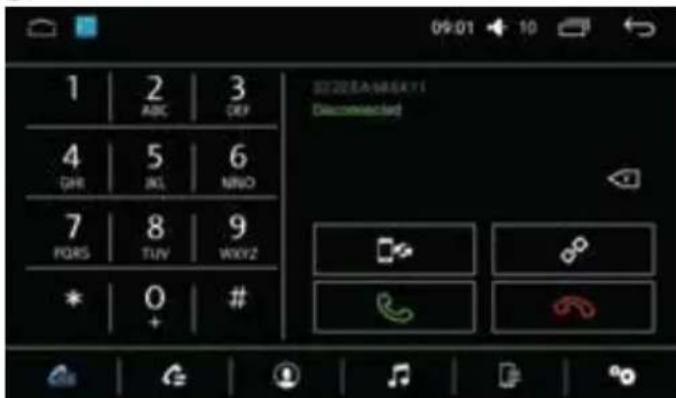
• Pre-pair Bluetooth
Ensure mobile phone supports Bluetooth function
before pairing. Different mobile phone will have different emissive power. To get the best connection, the recommended distance range is 3m without any object obstruction.
- Pairing
Turn on mobile phone's Bluetooth to set up. (Please refer to the instruction manual of the mobile phone on how to operate Bluetooth) "PHILADELPHIA865" should appear on your available Bluetooth scanning list.
- Select "PHILADELPHIA865" then insert password "0000", if password is required. Select confirm buttons when pairing prompt message appear. will appear in white on status bar when pairing successful.
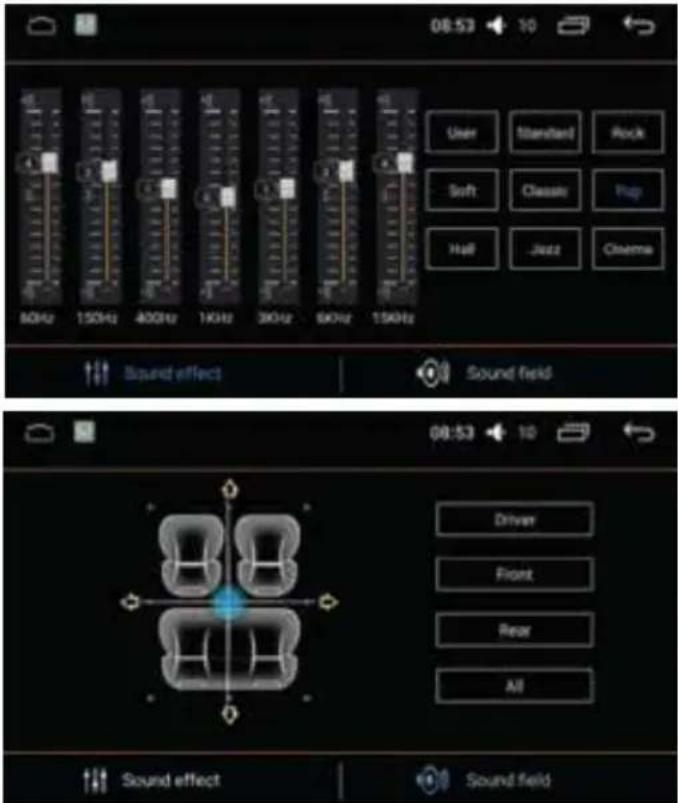
④ EQ: Press to begin equalizer mode
⑤ POWER
- Press to turn On/ Mute/ Unmute
- Press & hold to turn off
- Turn knob to adjust volume
⑥ MAP : MicroSD card reader for nagivation
⑦ SD: MicroSD card reader
⑧ RESET : Restore original factory settings Caution! All personal setting will be lost!
⑨ TUNER
- Radio mode: Rotate to select saved radio stations, then press & hold to save the selected frequency.
• Media mode : Rotate to browse files then press to select files.
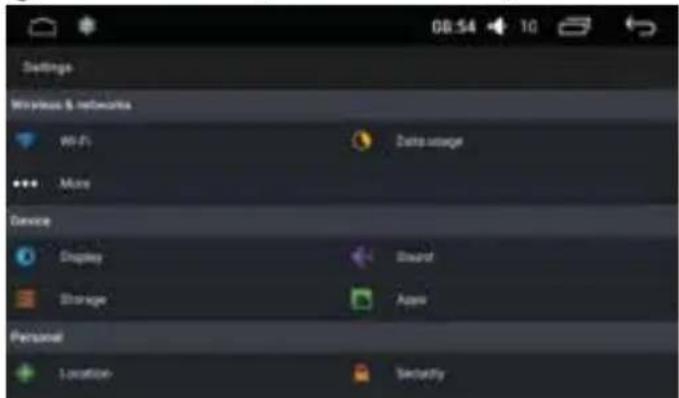
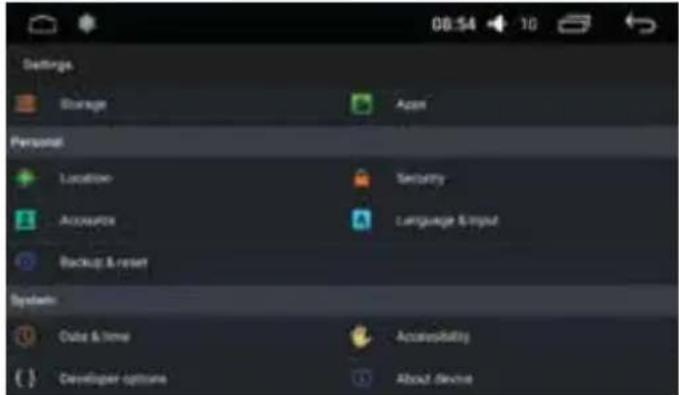
⑩ SETUP : Press to go to device's settings
⑪ HOME: Press to return to Home page
⑫ DISC : Press to begin disc mode.
The device support DVD, +/-R, +/-RW, -ROM, VCD, CD-DA, -ROM, -R/-RW
Note : To ensure proper functioning, use only original CD/ VCD/ DVD.
⑬ NAVI: Insert map data to ⑥ to operate
⑭ ADJUST BRIGHTNESS
⑮ EJECT DISC
16 DISC SLOT
17 LEFT/ RIGHT
EASYCONNECTION
i. Android - Support Android 5.0 & above (2-way with USB cable, 1-way with WiFi)
ii. iOS - Support 7.0 & above (1-way with WiFi)
• Pre-pair PhoneLink
Go to smartphone's setting to connect to car radio's Bluetooth (for audio output) and enable USB debugging. (Please refer to the smartphone's instruction manual on how to operate USB debugging (Android only) & Bluetooth setting)
• Android Mirroring via USB/ WiFi
Ensure Smartphone is downloaded with EasyConnection App from Google Play before begin with mirroring connection.
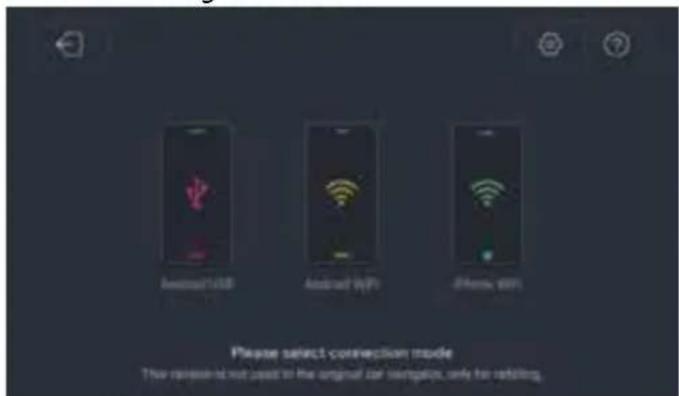
i. Via USB
- Access the downloaded app and select EasyConnection, then select Android USB and connect the device and smartphone with USB cable. Approve all the prompts. The device will begin to project smartphone's display when pairing successful.
ii. Via WiFi
- Ensure device is connected to smartphone via USB cable and smartphone's hotspot; the downloaded app should be opened. Select EasyConnection then select Android WiFi. Approve all the prompts. The device will begin to project smartphone's display when pairing is successful. The USB cable can be removed now.
- iOS Mirroring via WiFi
Ensure device is connected to iPhone's hotspot. Go to iPhone's Control Center, then select Screen Mirroring. The device will begin to project iPhone's display when pairing is successful.
CAR INFO
Select Car info at Home Page
CAR INFO
- Fuel Level
- Temperature
- Battery Voltage
- Water Level
• Safety Belt Status - Trunk Status
• Engine Oil Level
• Wiper Liquid Level - Door Status
- Engine Speed
- Precision Speed
- Mileage
- Fuel Consumption
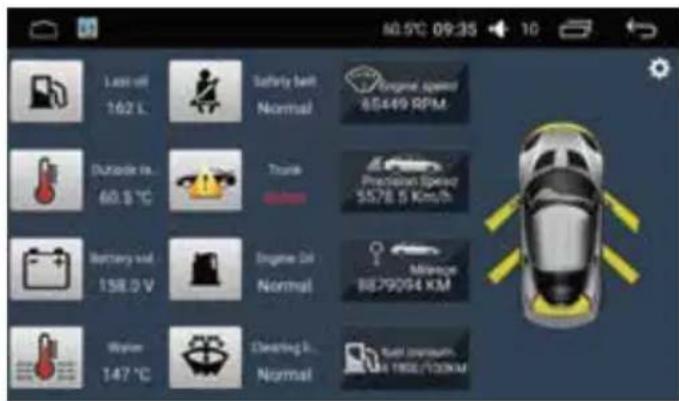
- Radar Function - Front & rear radar simulation view will appear when vehicle is in Park mode. Some vehicles may install a 360° panoramic camera. The reversing path can be turned off in the System Setting.
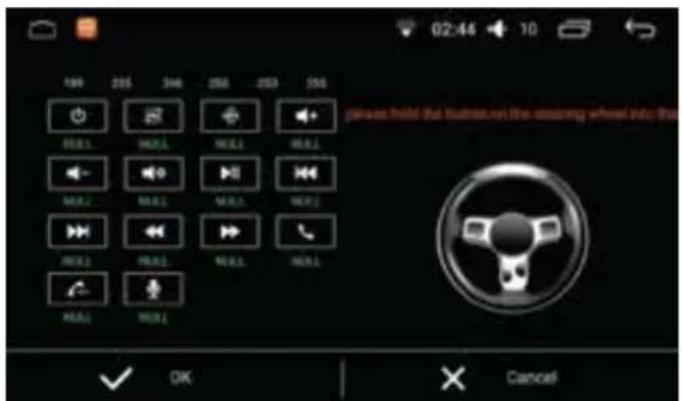
Steering Wheel Control
Power supply....11 \~ 16V DC
Current consumption.... max. 10 A
Maximum power output..... 4 x 50W channels (max)
Dimension (WxDxH) 177 x 102 x 42mm
Weight 0.52kg
Operation temperature -40^ 85^
Screen size....7 inch
Resolution.... 1024 x 600 pixel
Aspect ratio 4:3 / 16:9
FM Stereo Radio
Frequency range 87.5 - 108MHz
Preset memory stations....18
AM/MW Radio
Frequency range.... 522 - 1620kHz
Preset memory stations.... 12
Audio Specification
Frequency response 20Hz-20kHz
Input
USB 2.0 / microSD ...... MKV, AVI, MP4, MOV, TS,
ASF, FLV, PMP, MPG, VOB,
JPEG, BMP, GIF, PNG
MP3, WMA, OGG, FLAC, APE
AAC, AC3, ATRA, DTS
Aux/Video-in.... RCA / AV Cable
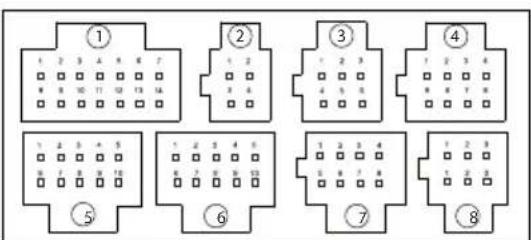
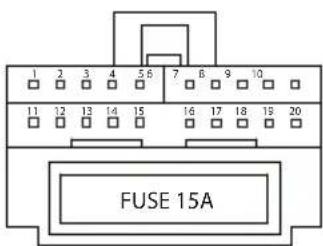
WIRING DIAGRAM
① RCA-OUT 2 NC 3 AUX-IN
④ CAM-IN 5 USB 6 NC
⑦ NC 8 NC ○
① PARK 2 XT1; IR 3 KEY2 4 KEY1 5 FL
⑥FL+ 7 FR-8 FR+ 9 FL+10 IL-
11 P-ANT 12 ACC 13 ILLM 14 REV 15 B+
16 GND 17 CAN 18 CAN 19 RR- 20 RR+

WIFI ANTENNA

RADIO

GPS
If any of the following problems happens to your system, please resort to Troubleshooting for possible solutions. Consult Blaupunkt authorized dealer if problem persist.
| Problems | Possible Causes | Solutions |
| Unable to start up | The car key is not inserted into the ignition; ignition is off. | Insert the car key and turn on the ignition. |
| Power Cable is not inserted into the main body. | Insert the power cable. | |
| Burnt power fuse . | Replace it with a new one of the same specification. | |
| Exhausted car battery. | Charge or replace the car battery. | |
| No sound | Audio cables are not properly connected to the unit. | Ensure proper connection of the audio cables. |
| Mute setting is on. | Unmute the volume. | |
| Low volume. | Adjust the volume. | |
| No sound from front, rear, left and right speakers due to Fade-Balance settings. | Press EQ, and enter "Sound Equalizer" menu to adjust "left & right/front & rear balance". | |
| Unable to play the Disc | The Disc is not inserted properly. | Re-insert the Disc and ensure orientation is correct. |
| The Disc is scratched, distorted or stained. | Replace it with a functioning disc. | |
| The Disc is not readable by this system. | Please confirm the format of the file saved in the Disc, and make sure the Disc is playable. | |
| Dim screen or black-&-white screen while playing DVD | Brightness, contrast ratio and color values are excessively adjusted. | Adjust brightness, color and contrast ratio values, and make sure they are in normal range. |
| Slow in SD card reading | The pixel of the picture file exceeds this system's capacity. | Replace it with a new audio/video SD card with compatible file formats. |
| SD card may contain corrupted files or a virus. | ||
| No rear-view reverse image | The rear camera is not appropriately connected with power supply. | Please check the camera's power supply. There is a red reverse power-supply line, and it will automatically display 12V. |
| Camera's signal line is not well connected with this radio. | Insert the camera's signal line into the interface port of this machine. | |
| Unable to search enough radio stations or fix on a radio station | Radio's antenna is not well inserted. | Fix radio antenna installation. |
| GPS is unable to perform positioning and Navigation | Map has not been set up. | Set up the map - Refer to the Navigation section --> Initial Setup section in this manual. |
| GPS antenna is not well inserted. | Re-insert GPS antenna properly | |
| The car may arrive at a place where GPS signal is blocked. | Move car to area where GPS signal reception is better. | |
| Blind Areas that are not covered by the Navigation Map. | Update the Navigation Map. | |
| Unable to correctly find the destination | The destination keyed-in is not included in the Navigator's database. | Confirm that the destination input is correct; can try to input another name of the place, or input any other landmark nearby. |
Designed and engineered by Blaupunkt
1 107 18 003 20 01
1 107 18 004 20 01
1 107 18 005 20 01
1 107 18 006 20 01
1 104 18 015 20 01