P43 CWA - Pregnant Syrincs - Free user manual and instructions
Find the device manual for free P43 CWA Syrincs in PDF.


User questions about P43 CWA Syrincs
0 question about this device. Answer the ones you know or ask your own.
Ask a new question about this device
Download the instructions for your Pregnant in PDF format for free! Find your manual P43 CWA - Syrincs and take your electronic device back in hand. On this page are published all the documents necessary for the use of your device. P43 CWA by Syrincs.
USER MANUAL P43 CWA Syrincs
1 General information about this manual 4
2 For your safety 6
3 Features 9
4 Connections and controls 10
5 Technical specifications 13
6 Plug and connection assignment 15
7 Protecting the environment 17
1 General information about this manual
This user manual contains important instructions for the safe operation of the unit. Read and follow the safety instructions and all other instructions. Keep the manual for future reference. Make sure that it is available to all those using the device. If you sell the unit, please make sure that the buyer also receives this manual.
Our products are subject to a process of continuous development. Thus, they are subject to change.
Signal words used
All precautions in this manual are clearly highlighted. The following signal words are used for precautions:
| DANGER This warns of dangers that can result in severe injuries or death if the instructions are not followed. |
| WARNING This warns of dangers that can result in severe injuries or death and/or cause considerable material damage if the instructions are not followed. |
| CAUTION This warns of dangers that can result in reversible injuries and/or considerable material damage if the instructions are not followed. |
| NOTICE This warns of dangers that can result to faults during operation and/or considerable material damage. Environmental damage may also occur if the instructions are not followed. |
Symbols used

General warning of a dangerous location

Warning – dangerously high voltage

Notice
2 For your safety
Intended use
This device is designed as a PA system. Use the device only as described in this user manual. Any other use or use under other operating conditions is considered to be improper and may result in personal injury or property damage. No liability will be assumed for damages resulting from improper use.
This device may be used only by persons with sufficient physical, sensorial, and intellectual abilities and having corresponding knowledge and experience. Other persons may use this device only if they are supervised or instructed by a person who is responsible for their safety.
Safety instructions

DANGER
Danger for children
Ensure that plastic bags, packaging, etc. are properly disposed of and are not in the reach of babies and young children. Choking hazard!
→ Ensure that children do not detach any small parts (e.g. knobs or the like) from the product. They could swallow the pieces and choke!
→ Never let children play unattended with the electrical devices.
DANGER
Electric shock caused by high voltages inside
Within the device there are areas where high voltages may be present.
→ Never remove any covers. There are no user-serviceable parts inside.
DANGER
Electric shock caused by short circuit
→ Always use properly insulated, tripe-core mains cable. Do not modify the mains cable. Failure to do so may result in electric shock and lead to a fire hazard and risk of death. If in doubt, seek advice from a registered electrician.

CAUTION
Possible hearing damage
The device can produce volume levels that may cause temporary or permanent hearing impairment. Over an extended period of time, even levels that seem to be uncritical can cause hearing damage.
→ Decrease the volume level immediately if you experience ringing in your ears or hearing impairment. If this is not possible, keep a greater distance or use sufficient ear protectors.

NOTICE
Operating conditions
This device has been designed for indoor use only.
→ To prevent damage, never expose the device to any liquid or moisture. Avoid direct sunlight, heavy dirt, and strong vibrations.

NOTICE
Power supply
→ Before connecting the device, ensure that the input voltage (AC outlet) matches the voltage rating of the device and that the AC outlet is protected by a residual current circuit breaker. Failure to do so could result in damage to the device and possibly the user.
→ Unplug the device before electrical storms occur and when it is unused for long periods of time to reduce the risk of electric shock or fire.
3 Features
Special features of this active subwoofer:
- XLR and RCA chassis connectors for signal input
- XLR chassis connector for signal output
- Integrated digital amplifier with sound processor (DSP)
- Setting options and display for delay time, crossover frequency and volume
- Switchable pattern (cardioid or end-fire)
– Power supply via locking PowerCON input
– powerCON-Ausgang for additional devices - Multiplex housing
- Pole mount (2 × M20)
Optionally available accessories:
- Transport casters
4 Connections and controls
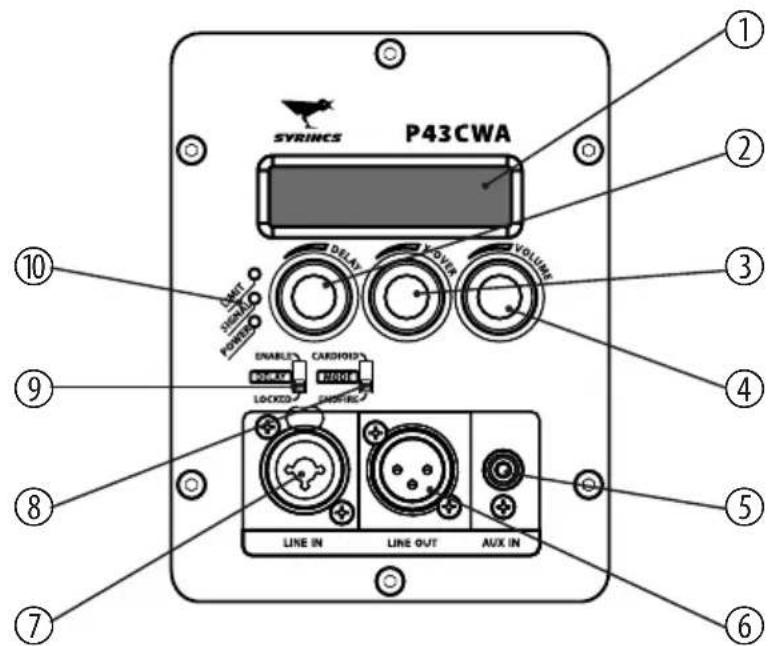
text_image
P43CWA SVRINCS UNIT SUPPORT POWER DELAY VOLUME DOUBLE CARDIOLOGY BOX 2016 LOCKING LINE IN LINE OUT AUX IN ① ② ③ ④ ⑤ ⑥ ⑦ ⑧ ⑨ ⑩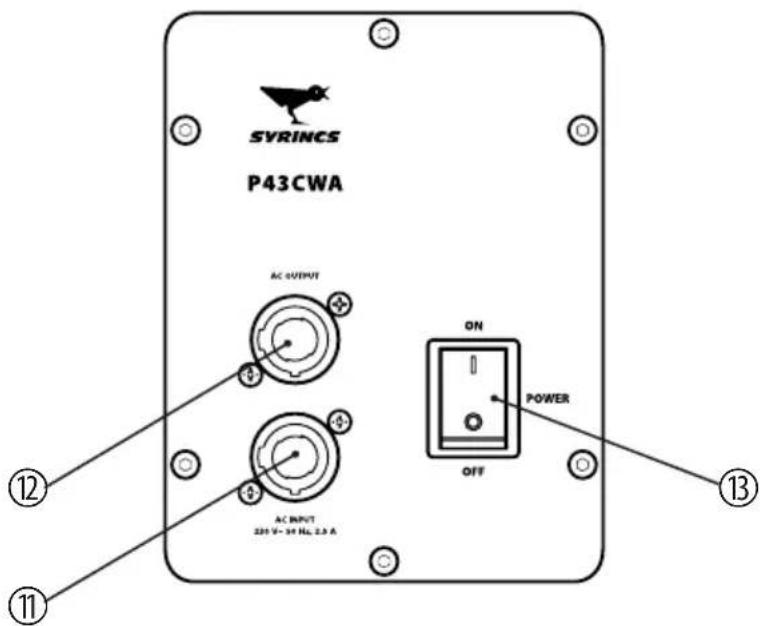
text_image
SVRINCS P43CWA AC OUTPUT AC INPUT 20V - 50 Hz, 2.5 A ON POWER OFF ⑫ ⑪ ⑬| 1 Display. Shows the set values for delay time, crossover frequency and volume. | |
| 2 DELAYControl for adjusting delay time. This allows you to balance out time differences when speakers are arranged at an offset. | |
| 3 X-OVERControl for adjusting crossover frequency. | |
| 4 VOLUMEVolume control. | |
| 5 AUX INSignal input for additional audio devices like MP3 or CD players. | |
| 6 LINE OUTLine output for connecting further speakers, designed as XLR chassis plug. | |
| 7 LINE INLine signal input, designed as XLR chassis socket. | |
| 8 MODESwitch for operating mode selection. In "cardioid" operating mode, sources at the back of the microphone are suppressed quite effectively. In "end-fire" operating mode, the two front speakers are delayed so as to amplify the sound forward. | |
| 9 DELAYSwitch for locking delay time setting. In the "enable" position, the delay time can be set using the DELAY (2) control. In the "disable" position, the last delay time set is maintained. | |
| 10 Control LEDs– LIMIT: The red LED indicates that the limiter has been triggered.– SIGNAL: The green LED indicates that a signal is present at the input.– POWER: The green LED lights up when the device is turned on. | |
| 11 AC INPUTPower supply input powerCON (NAC3FA). | |
| 12 AC OUTPUTLockable powerCON output socket (NAC3FCB). This output is looped through from the input socket. Here you can connect the power supply for additional devices. | |
| 13 POWERMain switch. Turns the device on and off. |
5 Technical specifications
| Configuration 3 × 12 in. neodym woofer | |
| Power handling 3000 W (RMS) | |
| Maximum sound pressure level | 128 dB (1 m)134 dB (peak) |
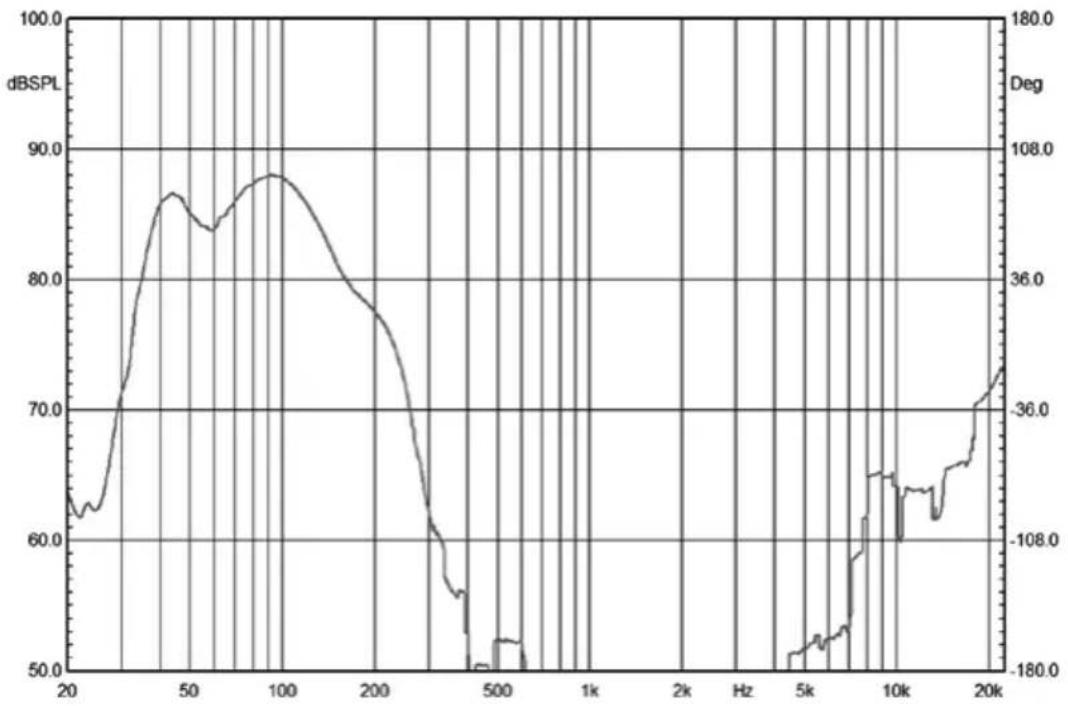
| Frequency range 40 Hz ... 120 Hz (-3 dB) | |
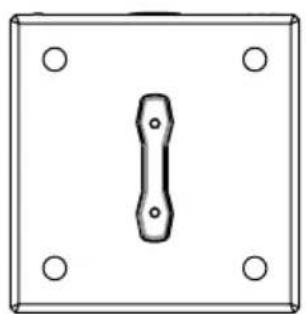
| Dimensions (W × H × D) 650 mm × 400 mm × 650 mm | |
| Weight 52 kg | |
natural_image
Simple line drawing of a rectangular frame with four corner holes and a central vertical slot (no text or symbols)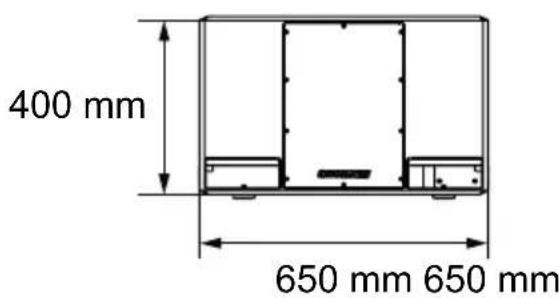
text_image
400 mm 650 mm 650 mm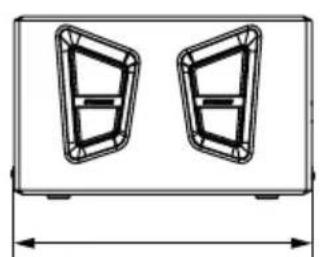
natural_image
Technical line drawing of a two-segment display panel with no text or symbolsFrequency response
line
| Frequency | dBSPL | Deg | | --------- | ----- | --- | | 20 | 63.0 | 108.0 | | 50 | 87.0 | 36.0 | | 100 | 88.0 | 36.0 | | 200 | 78.0 | 36.0 | | 500 | 52.0 | -180.0 | | 1k | 52.0 | -180.0 | | 2k | 52.0 | -180.0 | | 5k | 52.0 | -180.0 | | 10k | 65.0 | -180.0 | | 20k | 72.0 | -36.0 |6 Plug and connection assignment
Introduction
This chapter will help you select the right cables and plugs to connect your valuable equipment in such a way that a perfect sound experience is ensured.
Please follow these tips, because special care is required when dealing with sound and light: Even if a plug fits into the socket, an incorrect connection may result in a destroyed power amp, a short circuit or just in poor transmission quality!
Balanced and unbalanced transmission
Unbalanced transmission is mainly used in semi-professional environment and in Hi-Fi use. Instrument cables with two conductors (one core plus shielding) are typical representatives of the unbalanced transmission. One conductor is ground and shielding while the signal is transmitted through the core.
Unbalanced transmission is susceptible to electromagnetic interference, especially at low levels, such as microphone signals and when using long cables.
In a professional environment, therefore, the balanced transmission is preferred, because this enables an undisturbed transmission of signals over long distances. In addition to the conductors ‘Ground’ and ‘Signal’, in a balanced transmission a second core is added. This also transfers the signal, but phase-shifted by 180^ .
Since the interference affects both cores equally, by subtracting the phase-shifted signals, the interfering signal is completely neutralized. The result is a pure signal without any noise interference.
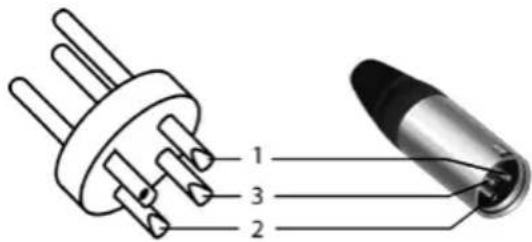
XLR connector (balanced)
text_image
1 3 21 Ground, shielding
2 Signal (in phase, +)
3 Signal (out of phase, -)
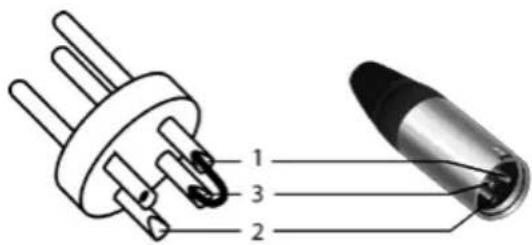
XLR connector (unbalanced)
text_image
1 3 21 Ground, shielding
2 Signal
3 Jumpered with pin 1
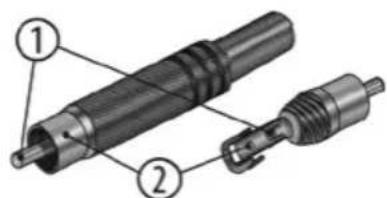
RCA connections
The figure and the table show the pin assignment of an RCA connector.
text_image
Technical diagram of a mechanical component with numbered parts labeled 1 and 21 Signal
2 Ground
7 Protecting the environment
Packaging

For the packaging, environmentally friendly materials have been chosen that can be supplied to normal recycling. Ensure that plastic bags, packaging, etc. are properly disposed of.
Do not just dispose of these materials with your normal household waste, but make sure that they are collected for recycling. Please follow the notes and markings on the packaging.
Disposal of your old device
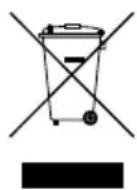
This product is subject to the European Waste Electrical and Electronic Equipment Directive (WEEE) in its currently valid version. Do not dispose with your normal household waste.
Dispose of this device through an approved waste disposal firm or through your local waste facility. When discarding the device, comply with the rules and regulations that apply in your country. If in doubt, consult your local waste disposal facility.

natural_image
Silhouette of a bird with pointed beak and outstretched tail (no text or symbols)SYRINCS