
Aironet 1142 - Access Point CISCO - Free user manual and instructions
Find the device manual for free Aironet 1142 CISCO in PDF.


User questions about Aironet 1142 CISCO
0 question about this device. Answer the ones you know or ask your own.
Ask a new question about this device
Download the instructions for your Access Point in PDF format for free! Find your manual Aironet 1142 - CISCO and take your electronic device back in hand. On this page are published all the documents necessary for the use of your device. Aironet 1142 by CISCO.
USER MANUAL Aironet 1142 CISCO
Cisco Aironet 1140 Series Access Point

Performance with Investment Protection
- Six times faster than 802.11a/g networks
- Backward-compatible with 802.11a/b/g clients
• M-Drive technology optimizes RF
Easy Installation and Power Efficient
- 802.11n performance with existing PoE switches
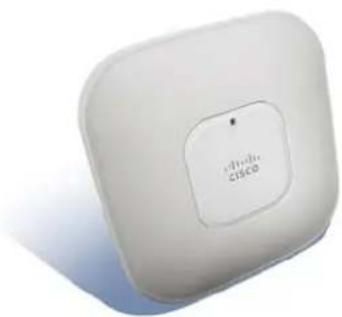
- Sleek design blends into a variety of indoor environments
Secure Interoperability
• 802.11n compliant
• Intel Connect with Centrino Certified
Simplified Network Management
- Controller-based or standalone deployment options
Secure Connections
• Supports rogue access point detection and denial of service attacks
• Management frame protection detects malicious users and alerts network administrators
Greater Network Capacity
• Dynamic frequency selection 2 (DFS-2) compliant
Easy-to-Install, Multipurpose Mounting Bracket
- Designed for easy replacement of existing access points
- UL 2043 plenum rated for above ceiling installation options or suspended from drop ceilings
- Locks for theft protection
natural_image
White wireless router with 'Cisco' branding on the front panel (no additional text or symbols visible)Taking Business Mobility Mainstream
The Cisco® Aironet® 1140 Series Access Point is a business-ready, 802.11n access point designed for simple deployment and energy efficiency. The high-performance platform, which offers at least six times the throughput of existing 802.11a/g networks, prepares the business for the next wave of mobile devices and applications. Building on the Cisco Aironet heritage of RF excellence, the 1140 Series combines the industry's most widely deployed 802.11n technology with a sleek industrial design that blends seamlessly into any enterprise environment. Designed for sustainability, the 1140 Series delivers high performance from standard 802.3af Power over Ethernet while decreasing waste with multiunit eco-packs and Energy Star certified power supplies.
RF Excellence
Building on the Cisco Aironet heritage of RF excellence, the 1140 Series delivers industry-leading performance for secure and reliable wireless connections. Enterprise-class silicon and optimized radios deliver a robust mobility experience using Cisco M-Drive technology, which includes:
- ClientLink improves reliability and coverage for legacy clients
• BandSelect improves 5-GHz client connections in mixed client environments
• VideoStream uses multicast to improve rich-media applications
All of these features ensure the best possible end-user experience on the wireless network.
The Cisco Aironet 1140 Series is a component of the Cisco Unified Wireless Network, which can scale up to 18,000 access points with full Layer 3 mobility across central or remote locations on the enterprise campus, in branch offices, and at remote sites. The Cisco Unified Wireless Network is the industry's most flexible, resilient, and scalable architecture, delivering secure access to mobility services and applications and offering the lowest total cost of ownership and investment protection by integrating seamlessly with the existing wired network.
Product Specifications
Table 1 lists the product specifications for Cisco Aironet 1140 Series Access Points.
Table 1. Product Specifications for Cisco Aironet 1140 Series Access Points
| Item Specification | |||||
| Part Numbers Cisco Aironet | 1140 Series Access PointAIR-LAP1142N-x-K9 - Dual-band Controller-based 802.11a/g/nAIR-LAP1141N-x-K9 - Single-band Controller-based 802.11g/nAIR-AP1142N-x-K9 - Dual-band Standalone 802.11a/g/nAIR-AP1141N-x-K9 - Single-band Standalone 802.11g/nAIR-LAP1142-xK9-PR - Eco-pack (dual-band 802.11a/g/n) 10 quantity Controller-based access pointsAIR-AP1142-xK9-5PR - Eco-pack (dual-band 802.11a/g/n) 5 quantity Standalone access pointsRegulatory domains: (x = regulatory domain)Customers are responsible for verifying approval for use in their individual countries. To verify approval and to identify the regulatory domain that corresponds to a particular country, please visithttp://www.cisco.com/go/aironet/compliance.Not all regulatory domains have been approved. As they are approved, the part numbers will be available on the Global Price List. | ||||
| Software | Cisco Unified Wireless Network Software Release 5.2 or laterCisco IOS ^8 Software Release 12.4(21a)JA | ||||
| 802.11n Capabilities | 2x3 multiple-input multiple-output (MIMO) with two spatial streamsMaximal ratio combining (MRC)Legacy beamforming (hardware supports this capability; not yet enabled in software)20- and 40-MHz channelsPHY data rates up to 300 MbpsPacket aggregation: A-MPDU (Tx/Rx), A-MSDU (Tx/Rx)802.11 dynamic frequency selection (DFS) (Bin 5)Cyclic shift diversity (CSD) support | ||||
| Data Rates Supported | 802.11a: 6, 9, 12, 18, 24, 36, 48, and 54 Mbps | ||||
| 802.11g: 1, 2, 5.5, 6, 9, 11, 12, 18, 24, 36, 48, and 54 Mbps | |||||
| 802.11n data rates (2.4 GHz and 5 GHz): | |||||
| ^1 | GI ^2 = 800ns GI = 400ns MCS Index | ||||
| 20-MHz Rate (Mbps) | 40-MHz Rate (Mbps) | 20-MHz Rate (Mbps) | 40-MHz Rate (Mbps) | ||
| 0 | 6.5 | 13.5 | 7.2 | 15 | |
| 1 | 13 | 27 | 14.4 | 30 | |
| 2 | 19.5 | 40.5 | 21.7 | 45 | |
| 3 | 26 | 54 | 28.9 | 60 | |
| 4 | 39 | 81 | 43.3 | 90 | |
| 5 | 52 | 108 | 57.8 | 120 | |
| 6 | 58.5 | 121.5 | 65 | 135 | |
| 7 | 65 | 135 | 72.2 | 150 | |
| 8 | 13 | 27 | 14.4 | 30 | |
| 9 | 26 | 54 | 28.9 | 60 | |
| 10 | 39 | 81 | 43.3 | 90 | |
| 11 | 52 | 108 | 57.8 | 120 | |
| 12 | 78 | 162 | 86.7 | 180 | |
| 13 | 104 | 216 | 115.6 | 240 | |
| 14 | 117 | 243 | 130 | 270 | |
| 15 | 130 | 270 | 144.4 | 300 | |
| Frequency Band and 20-MHz Operating Channels | A (A Regulatory Domain):• 2.412 to 2.462 GHz; 11 channels• 5.180 to 5.320 GHz; 8 channels• 5.500 to 5.700 GHz, 8 channels(excludes 5.600 to 5.640 GHz)• 5.745 to 5.825 GHz; 5 channelsC (C Regulatory Domain):• 2.412 to 2.472 GHz; 13 channels• 5.745 to 5.825 GHz; 5 channelsE (E Reg Domain):• 2.412 to 2.472 GHz; 13 channels• 5.180 to 5.320 GHz; 8 channels• 5.500 to 5.700 GHz, 8 channelsI (I Regulatory Domain):• 2.412 to 2.472 GHz, 13 channels• 5.180 to 5.320 GHz; 8 channelsK (K Regulatory Domain):• 2.412 to 2.472 GHz; 13 channels• 5.180 to 5.320 GHz; 8 channels• 5.500 to 5.620 GHz, 7 channels• 5.745 to 5.805 GHz, 4 channels | N (N Regulatory Domain):• 2.412 to 2.462 GHz; 11 channels• 5.180 to 5.320 GHz; 8 channels• 5.745 to 5.825 GHz; 5 channelsP (P Regulatory Domain):• 2.412 to 2.472 GHz; 13 channels• 5.180 to 5.320 GHz; 8 channelsS (S Regulatory Domain):• 2.412 to 2.472 GHz; 13 channels• 5.180 to 5.320 GHz; 8 channels• 5.745 to 5.825 GHz; 5 channelsT (T Regulatory Domain):• 2.412 to 2.462 GHz; 11 channels• 5.280 to 5.320 GHz; 3 channels• 5.500 to 5.700 GHz, 11 channels• 5.745 to 5.825 GHz; 5 channels | |||
| Note: This varies by regulatory domain. Refer to the product documentation for specific details for each regulatory domain. | |||||
| Maximum Number of Non-Overlapping Channels | 2.4 GHz• 802.11b/g:▪ 20 MHz: 3• 802.11n:▪ 20 MHz: 3 | 5 GHz• 802.11a:▪ 20 MHz: 21• 802.11n:▪ 20 MHz: 21▪ 40 MHz: 9 | |||
| Note: This varies by regulatory domain. Refer to the product documentation for specific details for each regulatory domain. | |||||
| Receive Sensitivity 802.11b | -91 dBm @ 1 Mb/s-91 dBm @ 2 Mb/s-91 dBm @ 5.5 Mb/s-88 dBm @ 11 Mb/s | 802.11g-86 dBm @ 6 Mb/s-86 dBm @ 9 Mb/s-86 dBm @ 12 Mb/s-86 dBm @ 18 Mb/s-85 dBm @ 24 Mb/s-83 dBm @ 36 Mb/s-78 dBm @ 48 Mb/s-77 dBm @ 54 Mb/s | 802.11a-90 dBm @ 6 Mb/s-90 dBm @ 9 Mb/s-90 dBm @ 12 Mb/s-90 dBm @ 18 Mb/s-88 dBm @ 24 Mb/s-85 dBm @ 36 Mb/s-80 dBm @ 48 Mb/s-79 dBm @ 54 Mb/s | ||
| 2.4-GHz802.11n (HT20)-88 dBm @ MCS0-87 dBm @ MCS1-86 dBm @ MCS2-83 dBm @ MCS3-80 dBm @ MCS4-76 dBm @ MCS5-74 dBm @ MCS6-73 dBm @ MCS7-87 dBm @ MCS8-85 dBm @ MCS9-83 dBm @ MCS10-80 dBm @ MCS11-77 dBm @ MCS12-73 dBm @ MCS13-71 dBm @ MCS14-70 dBm @ MCS15 | 5-GHz802.11n (HT20)-91 dBm @ MCS0-91 dBm @ MCS1-90 dBm @ MCS2-87 dBm @ MCS3-84 dBm @ MCS4-79 dBm @ MCS5-77 dBm @ MCS6-76 dBm @ MCS7-90 dBm @ MCS8-89 dBm @ MCS9-86 dBm @ MCS10-83 dBm @ MCS11-80 dBm @ MCS12-75 dBm @ MCS13-74 dBm @ MCS14-72 dBm @ MCS15 | 5-GHz802.11n (HT40)-78 dBm @ MCS0-78 dBm @ MCS1-78 dBm @ MCS2-78 dBm @ MCS3-78 dBm @ MCS4-75 dBm @ MCS5-73 dBm @ MCS6-72 dBm @ MCS7-76 dBm @ MCS8-76 dBm @ MCS9-76 dBm @ MCS10-76 dBm @ MCS11-76 dBm @ MCS12-71 dBm @ MCS13-69 dBm @ MCS14-68 dBm @ MCS15 | |||
| Item Specification | ||
| Maximum Transmit Power 2.4GHz802.11b20 dBm with 1 antenna802.11g20 dBm with 2 antennas802.11n (HT20)20 dBm with 2 antennas | 5GHz802.11a20 dBm with 2 antennas802.11n non-HT duplicate (802.11a duplicate) mode20 dBm with 2 antennas802.11n (HT20)20 dBm with 2 antennas802.11n (HT40)20 dBm with 2 antennas | |
| Note: The maximum power setting will vary by channel and according to individual country regulations. Refer to the product documentation for specific details. | ||
| Available Transmit Power Settings | 2.4GHz20 dBm (100 mW)17 dBm (50 mW)14 dBm (25 mW)11 dBm (12.5 mW)8 dBm (6.25 mW)5 dBm (3.13 mW)2 dBm (1.56 mW)-1 dBm (0.78 mW) | 5GHz20 dBm (100 mW)17 dBm (50 mW)14 dBm (25 mW)11 dBm (12.5 mW)8 dBm (6.25 mW)5 dBm (3.13 mW)2 dBm (1.56 mW)-1 dBm (0.78 mW) |
| Note: The maximum power setting will vary by channel and according to individual country regulations. Refer to the product documentation for specific details. | ||
| Integrated Antenna | 2.4 GHz, Gain 4.0 dBi, horizontal beamwidth 360°5 GHz, Gain 3 dBi, horizontal beamwidth 360° | |
| Interfaces | 10/100/1000BASE-T autosensing (RJ-45)Management console port (RJ45) | |
| Indicators | Status LED indicates boot loader status, association status, operating status, boot loader warnings, boot loader errors | |
| Dimensions (W x L x H) | Access point (without mounting bracket): 8.7 x 8.7 x 1.84 in. (22.1 x 22.1 x 4.7 cm) | |
| Weight | 2.3 lbs (1.04 kg) | |
| Environmental | Nonoperating (storage) temperature: -22 to 185°F (-30 to 85°C)Operating temperature: 32 to 104°F (0 to 40°C)Operating humidity: 10 to 90% percent (non-condensing) | |
| System Memory | 128 MB DRAM32 MB flash | |
| Input Power Requirements | AP1140: 44 to 57 VDCPower Supply and Power Injector: 100 to 240 VAC; 50 to 60 Hz | |
| Powering Options | 802.3af Ethernet SwitchCisco AP1140 Power Injectors (AIR-PWRINJ4=)Cisco AP1140 Local Power Supply (AIR-PWR-B=) | |
| Power Draw | AP1140: 12.95 WNote: When deployed using PoE, the power drawn from the power sourcing equipment will be higher by some amount dependent on the length of the interconnecting cable. This additional power may be as high as 2.45W, bringing the total system power draw (access point + cabling) to 15.4W. | |
| Warranty Limited Lifetime Hardware Warranty | ||
| Item Specification | |
| Compliance | StandardsSafety:UL 60950-1CAN/CSA-C22.2 No. 60950-1UL 2043IEC 60950-1EN 60950-1Radio approvals:FCC Part 15.247, 15.407RSS-210 (Canada)EN 300.328, EN 301.893 (Europe)ARIB-STD 33 (Japan)ARIB-STD 66 (Japan)ARIB-STD T71 (Japan)AS/NZS 4268.2003 (Australia and New Zealand)EMI and susceptibility (Class B)FCC Part 15.107 and 15.109ICES-003 (Canada)VCCI (Japan)EN 301.489-1 and -17 (Europe)EN 60601-1-2 EMC requirements for the Medical Directive 93/42/EECIEEE Standard:IEEE 802.11a/b/g, IEEE 802.11n, IEEE 802.11h, IEEE 802.11dSecurity:802.11i, Wi-Fi Protected Access 2 (WPA2), WPA802.1XAdvanced Encryption Standards (AES), Temporal Key Integrity Protocol (TKIP)EAP Type(s):Extensible Authentication Protocol-Transport Layer Security (EAP-TLS)EAP-Tunneled TLS (TTLS) or Microsoft Challenge Handshake Authentication Protocol Version 2 (MSCHAPv2)Protected EAP (PEAP) v0 or EAP-MSCHAPv2Extensible Authentication Protocol-Flexible Authentication via Secure Tunneling (EAP-FAST)PEAPv1 or EAP-Generic Token Card (GTC)EAP-Subscriber Identity Module (SIM)Multimedia:Wi-Fi Multimedia (WMMTM)Other:FCC Bulletin OET-65CRSS-102 |
| Calculated Mean Time Between Failure (MTBF) | 390,000 hours |
Service and Support
Cisco and Cisco Wireless LAN Specialized Partners offer a broad portfolio of end-to-end services based on proven methodologies for planning, designing, implementing, operating, and optimizing the performance of your wireless network. Cisco recommends the following services for the Cisco Aironet 1140 Series Access Points implementation:
Cisco Wireless LAN 802.11n Readiness Assessment Service
Prevent common challenges and reduce deployment costs by determining the readiness of your wired and wireless infrastructure.
Cisco Wireless LAN 802.11n Migration Service
Simplify the migration to high-performance, next generation 802.11n.
Cisco Wireless LAN Optimization Service
Evolve your 802.11n network to meet ever-changing network demands through planning and assessments, design, performance tuning, and ongoing support for system changes.
For more information about Cisco 802.11n planning and deployment services, visit
http://www.cisco.com/go/wirelesslanservices.
Limited Lifetime Hardware Warranty
This Cisco Aironet 1140 Series Access Point comes with a Limited Lifetime Warranty that provides full warranty coverage of the hardware for as long as the original end user continues to own or use the product. The warranty includes 10-day advance hardware replacement and ensures that software media is defect-free for 90 days. For more details, visit: http://www.cisco.com/go/warranty.
For More Information
For more information about the Cisco Aironet 1140 Series, visit http://www.cisco.com/go/wireless or contact your local account representative.

Americas Headquarters
Cisco Systems, Inc.
San Jose, CA
Asia Pacific Headquarters
Cisco Systems (USA) Pte. Ltd.
Singapore
Europe Headquarters
Cisco Systems International BV Amsterdam,
The Netherlands
Cisco has more than 200 offices worldwide. Addresses, phone numbers, and fax numbers are listed on the Cisco Website at www.cisco.com/go/offices.
Cisco and the Cisco Logo are trademarks of Cisco Systems, Inc. and/or its affiliates in the U.S. and other countries. A listing of Cisco's trademarks can be found at www.cisco.com/go/trademarks. Third party trademarks mentioned are the property of their respective owners. The use of the word partner does not imply a partnership relationship between Cisco and any other company. (1005R)
Printed in USA C78-502793-07 12/10