
9000 - Headphones ULTIMATE EARS - Free user manual and instructions
Find the device manual for free 9000 ULTIMATE EARS in PDF.


| Product Type | Wireless Over-Ear Headphones |
| Brand | Ultimate Ears |
| Model | 9000 |
| Driver Diameter | 40 mm |
| Frequency Response | 20 Hz – 20 kHz |
| Impedance | 32 Ω |
| Connectivity | Bluetooth 5.0, 3.5 mm wired |
| Battery Life | Up to 30 hours |
| Charging Time | 2 hours (USB-C) |
| Noise Cancellation | Active Noise Cancellation (ANC) |
| Microphone | Built-in, noise suppression |
| Weight | 250 g |
| Dimensions (folded) | 18 x 15 x 5 cm |
| Water Resistance | IPX4 (splash-proof) |
| Controls | Touch and button controls |
| Carrying Case | Included hard case |
| Cleaning Instructions | Wipe with dry cloth; avoid liquids |
| Safety Certifications | CE, FCC, RoHS |
| Spare Parts Availability | Ear pads and cables replaceable |
| Repairability Index | 7/10 |
Frequently Asked Questions - 9000 ULTIMATE EARS
User questions about 9000 ULTIMATE EARS
0 question about this device. Answer the ones you know or ask your own.
Ask a new question about this device
Download the instructions for your Headphones in PDF format for free! Find your manual 9000 - ULTIMATE EARS and take your electronic device back in hand. On this page are published all the documents necessary for the use of your device. 9000 by ULTIMATE EARS.
USER MANUAL 9000 ULTIMATE EARS
Press play on your media device.
Turn on the UE 9000 Wireless Headphones
Turn on your Ultimate Fars 9000 Wireless Headphones. The Bluetooth® LED should blink blue rapidly, indicating that the headphones are discoverable.
Pair your headphones with your Bluetooth-enabled device.
Apple iOS* Go to Settings > General > Bluetooth. Turn on Bluetooth. Select "UE 9000" from "Devices."
Optional: Pair additional Bluetooth-enabled devices.
You can pair your headphones with up to eight devices. To do so.
- Move the slider to the "Bluetooth" position and hold it there until the Bluetooth LED blinks rapidly blue, indicating that the headphones are discoverable.
- Complete ping according to the instructions on the previous page.
- Press play on the device you've just paired.
When you've successfully paired a device, the Bluetooth LED will turn solid blue. If pairing times out (the LED will blink slowly), move the slider to the "Bluetooth" position and hold it there until the LED starts rapidly blinking again.
WHAT'S IN THE BOX:
1 UE 9000 Wireless Headphones
② Molded travel case
3 Optional audio cable with on-cord mic and controls
USB charging cable
⑤ AC adapter
34-inch (6.35 mm) adapter
7 Microfiber polishing cloth

natural_image
Product catalog image showing various electronic devices including headphones, flip-flops, audio jack, and rectangular device (no text or labels visible)GET TO KNOW YOUR UE 9000 WIRELESS HEADPHONES.
On/Off/Bluetooth connection slider
Bluetooth LED
Battery level LED
Music/Calling
On-ear controls On-cord controls
Volume up Click, or press and hold
Play/Pausa Single click
Call answer/hang up — Single click to answer/
press and hold to hang up
Next track — Double click
M. Previous track ____ Tripla click
Volume down —— Click, or press and hold
Lign Through button
C
MICROSE CHARGING PORT
3.5 mm input (Interrupts Bluetooth connection when connected)

FEATURES: LED BEHAVIOR.
Bluetooth LED
Off
Headphones off or connected to
an audio source via the 3.5 mm jack
。
Blue (blinking rapidly):
Discoverable/pairing mode
-
Blue (blinking slowly): Connecting
-
Blue (solid): Connected
Battery Level LED
The image is too blurry to recognize any text content.
Off Headphone off
The image is too blurry to recognize any text content.
Green (pulsing slowly): Charging
-
Green (solid): Power on; fully charged
-
Red: Low battery
When in wireless mode, all LEDs turn off automatically. However, the LEDs will illuminate when there is a pairing change or a control is activated.
To use the "listen through" feature, press the Listen Through button once. Your music will be muted and environmental sounds will be amplified into your headphones. To resume listening to music, simply press the Listen Through button again.
The "listen through" feature is only available in wireless mode while listening to music. It is not available in wired mode or during phone calls.
FEATURES: CHARGING.
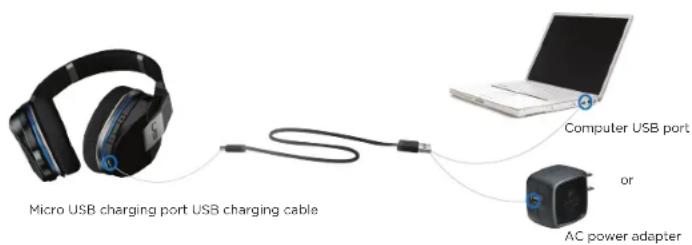
Typically a three-hour charge through an AC outlet provides up to 10 hours of power, and you can use your headphones while they're charging.
When the battery level LED turns red, you should recharge your headphones. To do so:
- Charge the headphones via the supplied AC adapter or USB. The battery level LED will pulse green.
- When your headphones are fully charged, the battery level LED will glow solid green.
FEATURES: TRAVEL STORAGE.
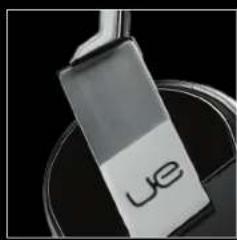
natural_image
Close-up of a metallic object with the letters 'ye' on its body, resting on a dark surface (no readable text or symbols beyond the label)
natural_image
Black and silver headband with 'USB' branding, shown against black background (no text or symbols on device)To safely store your headphones while you're on the go:
- Swivel the ear cups until they "click".
- Place the headphones flat in their case.
- Place the AC adapter in the top pocket.
- Place all cables and accessories in the bottom pocket.

PRODUCT CENTRAL.
There's more information and support available for your product online.
Visit Product Central, where you can:
- Browse online articles and tutorials.
• Find tips about usage and information about additional features.
• Get help troubleshooting a problem. - Download the latest software for your product.
• Find online documentation and warranty information.
- Connect with other users in our Community Forums to get advice, ask questions and share solutions.
• Order spare parts (when available).
Go to www.logitech.com/support/ue9000
TROUBLESHOOTING.
If your headphones are not working or pairing/connecting properly, try the following:
- Move closer. The range of the Bluetooth wireless connection is up to 10 meters or 30 feet.
- Recharge, particularly if the battery level LED is red. See "Charging."
- Try increasing the volume on the headphones, on your device or in your media application. And if you're connected to a computer, check the volume settings for your operating system.
- Enable Bluetooth on your device, and then select "UE 9000" from the Bluetooth device list.
• To fix a Bluetooth connection by repairing: - On your device: Delete "UE 9000" from the Bluetooth device list
- On the headphones: Move the slider to "Bluetooth" and hold until the Bluetooth LED blinks blue.
- On your device: Select "UE 9000" from the Bluetooth device list
- From the media player on your Bluetooth device: Select "UE 9000"
- For computers, you may need to specify the headphone as the input/output device for your operating system.
For help, go to www.logitech.com/support/ue9000
WHAT DO YOU THINK?
Please take a minute to tell us.
www.logitech.com/ithink
PRODUCT SUPPORT.
www.logitech.com/support/ue9000
United States +1-646-454-3200
BATTERY REMOVAL AND RECYCLING
- Peel and remove the ear pad from the left ear cup.
- Remove screws to disassemble the speaker chamber.
- Unplug the old battery.
- Dispose of old battery at an authorized
battery recycling center.

HEADPHONE DISASSEMBLY
Remove screws

natural_image
3D cutaway view of a device showing internal components including a central fan and exposed casing (no text or symbols visible)Unplug battery
Peel and remove earpad
LEFT EAR CUP

natural_image
Completely black image with no visible content, text, or symbols.© 2012 Logitech. Logitech, the Logitech logo, the Logitech UE logo, and other Logitech marks are owned by Logitech and may be registered. All other trademarks are the property of their respective owners. Logitech assumes no responsibility for any errors that may appear in this manual. Information contained herein is subject to change without notice.

Logitech | ue™
www.logitechUE.com
620-004322.003
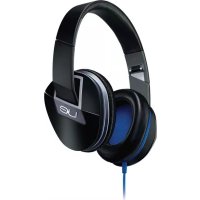
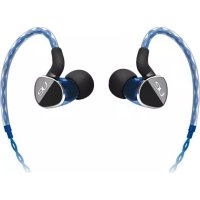


- WHAT'S IN THE BOX:
- GET TO KNOW YOUR UE 9000 WIRELESS HEADPHONES.
- Music/Calling
- FEATURES: LED BEHAVIOR.
- FEATURES: CHARGING.
- FEATURES: TRAVEL STORAGE.
- To safely store your headphones while you're on the go:
- PRODUCT CENTRAL.
- TROUBLESHOOTING.
- WHAT DO YOU THINK?
- PRODUCT SUPPORT.
- BATTERY REMOVAL AND RECYCLING
- HEADPHONE DISASSEMBLY
- Logitech | ue™
Brand : ULTIMATE EARS
Model : 9000
Category : Headphones