
Aspire One KAV60 - Laptop ACER - Free user manual and instructions
Find the device manual for free Aspire One KAV60 ACER in PDF.


| Product Type | Notebook PC (Netbook) |
| Brand | Acer |
| Model | Aspire One KAV60 |
| Dimensions (approx) | 260 x 180 x 25 mm (10.2 x 7.1 x 1.0 in) |
| Weight (approx) | 1.1 kg (2.4 lbs) |
| Display | 10.1-inch LED-backlit LCD, 1024 x 600 resolution |
| Processor | Intel Atom N270 (1.6 GHz, 512 KB L2 cache) |
| RAM | 1 GB DDR2 SDRAM (upgradeable to 2 GB) |
| Storage | 160 GB SATA hard drive (5400 RPM) |
| Operating System | Windows XP Home Edition SP3 (or Linux variant) |
| Battery | 6-cell Li-ion, 4400 mAh (up to 5 hours) |
| Power Supply | AC adapter, 19 V, 1.58 A (30 W) |
| Wireless Connectivity | 802.11 b/g Wi-Fi, Bluetooth 2.0 (optional) |
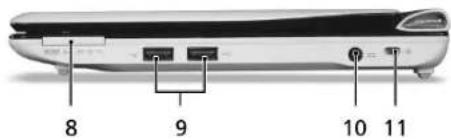
| Wired Connectivity | 10/100 Ethernet, 2 x USB 2.0, 1 x VGA (external display), headphone/speaker jack |
| Card Reader | Multi-in-1 (SD, MMC, Memory Stick, xD-Picture Card) |
| Webcam | 0.3 MP integrated webcam |
| Audio | Built-in stereo speakers, microphone |
| Certifications | FCC, CE, RoHS compliant |
| Safety Instructions | Do not block vents; avoid liquids; use only Acer-approved accessories; unplug during storms. |
| Cleaning | Turn off and unplug; wipe with a soft, dry cloth; no solvents or abrasives. |
| Battery Care | Charge fully before first use; avoid complete discharge; store at 30-50% charge if unused. |
| Repair & Spare Parts | Contact authorized Acer service center; use genuine Acer parts; user-replaceable: battery, RAM, HDD (with caution). |
Frequently Asked Questions - Aspire One KAV60 ACER
User questions about Aspire One KAV60 ACER
0 question about this device. Answer the ones you know or ask your own.
Ask a new question about this device
Download the instructions for your Laptop in PDF format for free! Find your manual Aspire One KAV60 - ACER and take your electronic device back in hand. On this page are published all the documents necessary for the use of your device. Aspire One KAV60 by ACER.
USER MANUAL Aspire One KAV60 ACER
Copyright © 2009. Acer Incorporated.
Federal Communications Commission Declaration of Conformity
This device complies with Part 15 of the FCC Rules. Operation is subject to the following two conditions: (1) This device may not cause harmful interference, and (2) This device must accept any interference received, including interference that may cause undesired operation.
The following local manufacturer/importer is responsible for this declaration:
Product name: Notebook PC
Model number: KAV60
Machine type: Aspire one
SKU number: Aspire one-xxxx ("x" = 0 - 9, a - z, or A - Z)
Name of responsible party: Acer America Corporation
Address of responsible party: 333 West San Carlos St. San Jose, CA 95110 USA
Contact person: Acer Representative
Tel: 1-254-298-4000
Fax: 1-254-298-4147
CE Declaration of Conformity
We,
Acer Incorporated
8F, 88, Sec. 1, Hsin Tai Wu Rd., Hsichih, Taipei Hsien 221, Taiwan
Contact Person: Mr. Easy Lai
Tel: 886-2-8691-3089 Fax: 886-2-8691-3120
Hereby declare that:
Product: Notebook PC Trade name: Acer
Model number: KAV60 Machine type: Aspire one
SKU number: Aspire one-xxxxx ("x" = 0 - 9, a - z, or A - Z)

Is compliant with the essential requirements and other relevant provisions of the following EC directives, and that all the necessary steps have been taken and are in force to assure that production units of the same product will continue comply with the requirements.
EMC Directive 2004/108/EC as attested by conformity with the following harmonized standards:
• EN55022: 2006, AS/NZS CISPR22: 2006, Class B
• EN55024: 1998 + A1: 2001 + A2: 2003
• EN55013: 2001 + A1: 2003 + A2:2006 (Applicable to product built with TV tuner module)
• EN55020: 2007 (Applicable to product built with TV tuner module)
• EN61000-3-2: 2006, Class D
• EN61000-3-3: 1995 + A1: 2001+A2: 2005
Low Voltage Directive 2006/95/EC as attested by conformity with the following harmonized standard:
• EN60950-1: 2001 + A11: 2004
• EN60065: 2002 + A1: 2006 (Applicable to product built with TV tuner module)
Kurzanleitung
RoHS Directive 2002/95/EC on the Restriction of the Use of certain Hazardous Substances in Electrical and Electronic Equipment R&TTE Directive 1999/5/EC as attested by conformity with the following harmonized standard:
• Article 3.1(a) Health and Safety
- EN60950-1:2001 + A11:2004
- EN50371:2002
• Article 3.1(b) EMC
- EN301 489-1 V1.6.1
- EN301 489-3 V1.4.1 (Applicable to non-bluetooth wireless keyboard mouse set).
- EN301 489-17 V1.2.1
• Article 3.2 Spectrum Usages
- EN300 440-2 V1.1.2 (Applicable to non-bluetooth wireless keyboard mouse set).
- EN300 328 V1.7.1
- EN301 893 V1.4.1 (Applicable to 5GHz high performance RLAN).
Year to begin affixing CE marking 2009.
Easy Lai
Easy Lai /Manager
Regulation Center, Acer Inc.
Feb. 20, 2009
Date
natural_image
Laptop with open screen and circular inset showing a CD-ROM drive (no visible text or symbols)natural_image
Side view of a laptop keyboard with labeled parts (no text or symbols on the body)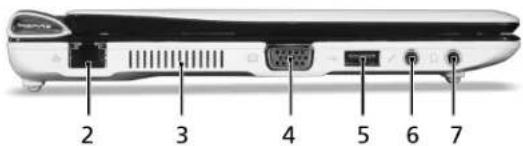
Kurzanleitung
Rechte Seite