
SC-AKX75 - Hi-Fi System PANASONIC - Free user manual and instructions
Find the device manual for free SC-AKX75 PANASONIC in PDF.


| Product Type | Hi-Fi System with CD, USB, FM/AM Radio |
| Model Number | SC-AKX75 |
| Main Unit Dimensions (W x H x D) | 220 mm x 334 mm x 250 mm (8.7" x 13.1" x 9.8") |
| Main Unit Weight | 3.4 kg (7.5 lbs) |
| Speaker Dimensions (per pair, W x H x D) | 300 mm x 401 mm x 268 mm (11.8" x 15.8" x 10.6") |
| Speaker Weight (each) | 5.5 kg (12.1 lbs) |
| Subwoofer Dimensions (W x H x D) | 320 mm x 401 mm x 286 mm (12.6" x 15.8" x 11.3") |
| Subwoofer Weight | 6.9 kg (15.2 lbs) |
| Power Supply | AC 120 V, 60 Hz |
| Power Consumption | 120 W |
| Standby Power Consumption | Approx. 0.2 W |
| Total RMS Output Power (30% THD) | 1400 W (Front Hi: 250 W/ch, Front Lo: 250 W/ch, Subwoofer: 400 W) |
| Total FTC Output Power (1% THD) | 495 W (Front Hi: 150 W/ch, Front Lo: 60 W/ch, Subwoofer: 75 W) |
| Disc Playback | CD, CD-R/RW (CD-DA, MP3) |
| USB Playback | MP3 files, FAT12/16/32, up to 8000 tracks |
| Radio Frequency Range (FM) | 87.9 - 107.9 MHz (200 kHz step) or 87.5 - 108.0 MHz (100 kHz step) |
| Radio Frequency Range (AM) | 520 - 1710 kHz (10 kHz step) |
| Preset Stations (FM/AM) | 30 FM / 15 AM |
| Sound Effects | D.BASS, Preset EQ (Heavy, Soft, Clear, Vocal, Flat), Manual EQ (Bass/Mid/Treble), Surround, Superwoofer levels, Re-master (for MP3) |
| Illumination Effects | Selectable illumination color |
| Connections | Music Port (3.5 mm front), AUX input (RCA), FM/AM antenna terminals |
| Timers | Sleep timer (up to 90 min), Play timer (daily wake-up) |
| Remote Control | Included, range approx. 7 m (23 ft) |
| Safety Features | Auto-off after 30 min idle (CD/USB), overheat protection, laser class II |
| Maintenance | Clean with soft dry cloth; no alcohol or solvents |
| Warranty (USA/Puerto Rico) | 1 year parts and labor |
Frequently Asked Questions - SC-AKX75 PANASONIC
User questions about SC-AKX75 PANASONIC
0 question about this device. Answer the ones you know or ask your own.
Ask a new question about this device
Download the instructions for your Hi-Fi System in PDF format for free! Find your manual SC-AKX75 - PANASONIC and take your electronic device back in hand. On this page are published all the documents necessary for the use of your device. SC-AKX75 by PANASONIC.
USER MANUAL SC-AKX75 PANASONIC
natural_image
Four black Super Woofor speakers with mesh head covers, shown from different angles (no visible text or symbols on devices)Thank you for purchasing this product.
For optimum performance and safety, please read these instructions carefully.
Please keep this manual for future reference.
If you have any questions, contact: 1-800-211-PANA (7262)
Register online at www.panasonic.com/register (U.S. customers only)
Panasonic®
Owner's Manual
CD Stereo System
Model No. SC-AKX75
Do the procedures with the remote control. You can also use the buttons on the main unit if they are the same.
Your system and the illustrations can look differently. These operating instructions are applicable to the following system.
| System SC-AKX75 | |
| Main unit SA-AKX75 | |
| Speakers SB-AKX75 | |
| Subwoofer SB-AKW75 |
The model number and serial number of this product can be found on either the back or the bottom of the unit. Please note them in the space provided below and keep for future reference.
MODEL NUMBER SC-AKX75
SERIAL NUMBER
User memo:
DATE OF PURCHASE
DEALER NAME
DEALER ADDRESS
TELEPHONE NUMBER
CAUTION - VISIBLE AND INVISIBLE LASER RADIATION WHEN OPEN. DO NOT STARE INTO BEAM. FDA 21CFR / CLASS II (IIa) RQLS0512
Inside of product
IMPORTANT SAFETY INSTRUCTIONS
Read these operating instructions carefully before using the unit. Follow the safety instructions on the unit and the applicable safety instructions listed below. Keep these operating instructions handy for future reference.
- Read these instructions.
- Keep these instructions.
- Heed all warnings.
- Follow all instructions.
- Do not use this apparatus near water.
- Clean only with dry cloth.
- Do not block any ventilation openings. Install in accordance with the manufacturer's instructions.
- Do not install near any heat sources such as radiators, heat registers, stoves, or other apparatus (including amplifiers) that produce heat.
-
Do not defeat the safety purpose of the polarized or grounding-type plug. A polarized plug has two blades with one wider than the other. A grounding-type plug has two blades and a third grounding prong. The wide blade or the third prong are provided for your safety. If the provided plug does not fit into your outlet, consult an electrician for replacement of the obsolete outlet.
-
Protect the power cord from being walked on or pinched particularly at plugs, convenience receptacles, and the point where they exit from the apparatus.
- Only use attachments/accessories specified by the manufacturer.
- Use only with the cart, stand, tripod, bracket, or table specified by the manufacturer, or sold with the apparatus. When a cart is used, use caution when moving the cart/apparatus combination to avoid injury from tip-over.
- Unplug this apparatus during lightning storms or when unused for long periods of time.
- Refer all servicing to qualified service personnel. Servicing is required when the apparatus has been damaged in any way, such as power-supply cord or plug is damaged, liquid has been spilled or objects have fallen into the apparatus, the apparatus has been exposed to rain or moisture, does not operate normally, or has been dropped.

Safety precautions
WARNING!
Unit
- To reduce the risk of fire, electric shock or product damage,
- Do not expose this unit to rain, moisture, dripping or splashing.
- Do not place objects filled with liquids, such as vases, on this unit.
– Use only the recommended accessories. - Do not remove covers.
- Do not repair this unit by yourself. Refer servicing to qualified service personnel.
- Do not let metal objects fall inside this unit.
CAUTION!
Unit
- To reduce the risk of fire, electric shock or product damage,
- Do not install or place this unit in a bookcase, built-in cabinet or in another confined space. Ensure this unit is well ventilated.
- Do not obstruct this unit's ventilation openings with newspapers, tablecloths, curtains, and similar items.
- Do not place sources of naked flames, such as lighted candles, on this unit.
- Set the unit up on an even surface away from direct sunlight, high temperatures, high humidity, and excessive vibration.
- The power plug is the disconnecting device. Install this unit so that the power plug can be unplugged from the socket outlet immediately.
- This unit utilizes a laser. Use of controls or adjustments or performance of procedures other than those specified herein may result in hazardous radiation exposure.
Battery
- Danger of explosion if battery is incorrectly replaced. Replace only with the type recommended by the manufacturer.
- When disposing the batteries, please contact your local authorities or dealer and ask for the correct method of disposal.
- Do not heat or expose to flame.
- Do not leave the battery(ies) in a car exposed to direct sunlight for a long period of time with doors and windows closed.
- Do not break open or short-circuit the battery.
- Do not charge the alkaline or manganese battery.
- Do not use the battery if the cover has peeled off.
- Remove the battery if you do not use the remote control for a long period of time. Keep in a cool, dark area.
CAUTION RISK OF ELECTRIC SHOCK DO NOT OPEN

CAUTION: TO REDUCE THE RISK OF ELECTRIC SHOCK, DO NOT REMOVE SCREWS. NO USER-SERVICEABLE PARTS INSIDE. REFER SERVICING TO QUALIFIED SERVICE PERSONNEL.
The lightning flash with arrowhead symbol, within an equilateral triangle, is intended to alert the user to the presence of uninsulated “dangerous voltage” within the product’s enclosure that may be of sufficient magnitude to constitute a risk of electric shock to persons.

The exclamation point within an equilateral triangle is intended to alert the user to the presence of important operating and maintenance (servicing) instructions in the literature accompanying the appliance.
Table of contents
IMPORTANT SAFETY INSTRUCTIONS ..... 2
Safety precautions .... 3
Supplied accessories 4
Placement of speakers....4
Making the connections....5
Preparing the remote control .... 5
Overview of controls 6
Disc 8
USB 9
Radio 9
Clock and timers....10
External equipment 10
Sound and illumination effects ..... 11
Troubleshooting 12
Maintenance 13
Specifications 14
Spanish quick reference / Referencia rápida
en español....15
Limited Warranty (ONLY FOR U.S.A. AND
PUERTO RICO)....19
- If you see this symbol -
Information on Disposal in other Countries outside the European Union
This symbol is only valid in the European Union.
If you wish to discard this product, please contact your local authorities or dealer and ask for the correct method of disposal.
FCC Note:
This equipment has been tested and found to comply with the limits for a Class B digital device, pursuant to Part 15 of the FCC Rules.
These limits are designed to provide reasonable protection against harmful interference in a residential installation. This equipment generates, uses and can radiate radio frequency energy and, if not installed and used in accordance with the instructions, may cause harmful interference to radio communications. However, there is no guarantee that interference will not occur in a particular installation. If this equipment does cause harmful interference to radio or television reception, which can be determined by turning the equipment off and on, the user is encouraged to try to correct the interference by one or more of the following measures:
- Reorient or relocate the receiving antenna.
- Increase the separation between the equipment and receiver.
- Connect the equipment into an outlet on a circuit different from that to which the receiver is connected.
- Consult the dealer or an experienced radio/TV technician for help.
Any unauthorized changes or modifications to this equipment would void the user's authority to operate this device.
This device complies with Part 15 of the FCC Rules. Operation is subject to the following two conditions:
(1) This device may not cause harmful interference, and (2) this device must accept any interference received, including interference that may cause undesired operation.
Responsible Party:
Panasonic Corporation of North America
One Panasonic Way, Secaucus, NJ 07094
Support Contact:
Panasonic Consumer Marketing Company of North America
Telephone No.: 1-800-211-PANA (7262)
Supplied accessories
Check and identify the supplied accessories.
Use numbers indicated in parentheses when asking for replacement parts. (Product numbers correct as of March 2013. This may be subject to change.)
To order accessories, refer to "Accessory Purchases (United States and Puerto Rico)" on page 19.
☐ 1 x AC power supply cord (K2CB2CB00022)
□ 1 x AM loop antenna (N1DYYYY00011)
☐ 1 x FM indoor antenna (RSAX0002)
☐ 1 x Remote control battery
□ 1 x Remote control
(N2QAYB000636)
□ 1 x Audio cable (K2KYYYY00230)
Placement of speakers
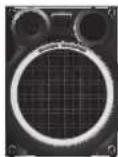
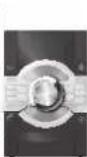
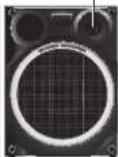
Tweeter
Front speakers
Put the speakers so that the tweeter is on the outside.
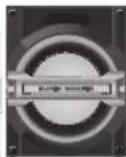
Subwoofer
Put on the floor or a sturdy shelf to reduce vibration.
CAUTION!
Do not touch the subwoofer cone's reverberating surfaces:
• This may damage the subwoofer cone.
• The subwoofer cone may be hot.
Use only the supplied speakers.
You can cause damage to the system and decrease the sound quality if you use other speakers.
Note:
- Keep your speakers at least 10 mm (") away from the system for proper ventilation.
- Put the speakers on a flat safe surface.
• These speakers do not have magnetic shielding. Do not put them near TVs, PCs or other equipment easily influenced by magnetism. - When you play at high levels for a long period, it can cause damage to the speakers and decrease the life of the speakers.
- Decrease the volume in these conditions to prevent damage:
- When the sound is distorted.
- When you adjust the sound quality.
CAUTION!
- Use the speakers only with the recommended system. If not, you can cause damage to the amplifier and speakers and can cause a fire. Consult an approved service personnel if damage occurs or if there is a sudden apparent change in performance.
- Do the procedures included in these instructions when you attach the speakers.
Making the connections
Connect the AC power supply cord only after all the other connections have been made.
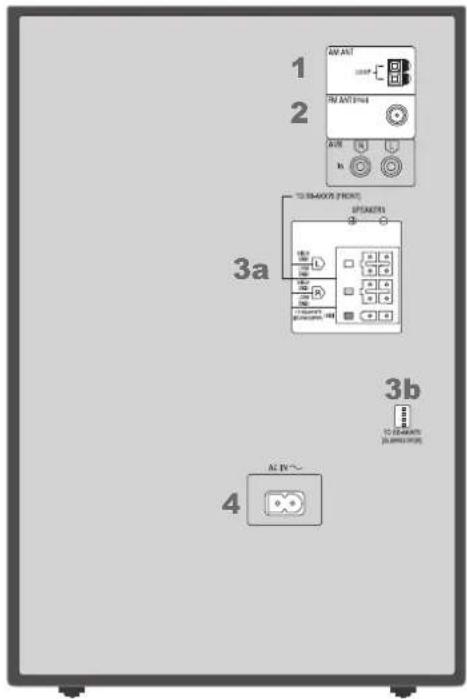
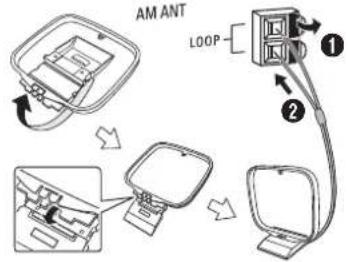
1 Connect the AM loop antenna.
Stand the antenna up on its base until it clicks.
flowchart
graph TD
    A["Switch"] --> B["Loop"]
    B --> C["Cell with 1200x magnification"]
    C --> D["Battery with 1200x magnification"]
    D --> E["Switch"]
    style A fill:#f9f,stroke:#333
    style B fill:#ccf,stroke:#333
    style C fill:#cfc,stroke:#333
    style D fill:#fcc,stroke:#333
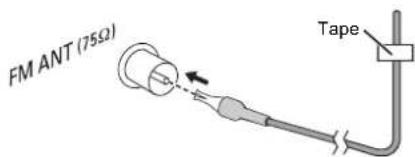
2 Connect the FM indoor antenna.
Place the antenna where reception is best.
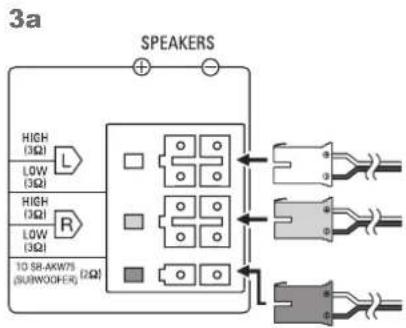
3 Connect the speakers.
Connect the speaker cables to the terminals of the same color.
flowchart
graph TD
    A["SPEAKERS"] --> B["High (3Ω)"]
    A --> C["Low (3Ω)"]
    A --> D["High (3Ω)"]
    A --> E["Low (3Ω)"]
    A --> F["10 SB-AKW75 (SUBWOCER) (2Ω)"]
    B --> G["Diode symbol"]
    C --> H["Diode symbol"]
    D --> I["Diode symbol"]
    E --> J["Diode symbol"]
    F --> K["Diode symbol"]
    G --> L["Three connected connectors"]
    H --> L
    I --> L
    J --> L
    K --> L
3b
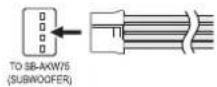
4 Connect the AC power supply cord.
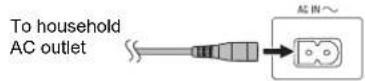
Do not use an AC power supply cord from other equipment.
Conserving power
The system consumes approximately 0.2 W when it is in standby mode. Disconnect the power supply if you do not use the system.
Some settings will be lost after you disconnect the system. You have to set them again.
Preparing the remote control
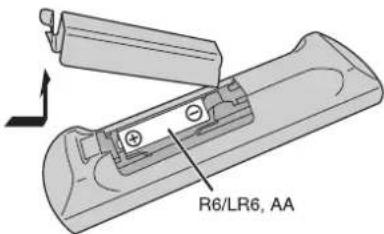
Use alkaline or manganese battery.
Install the battery so that the poles (+ and -) align with those in the remote control.
Overview of controls
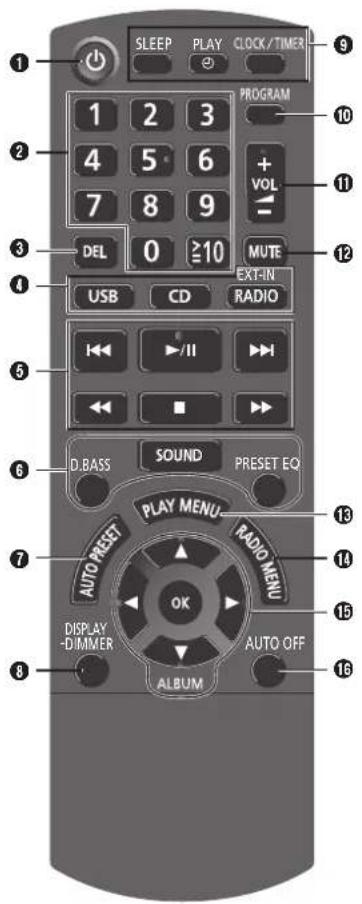
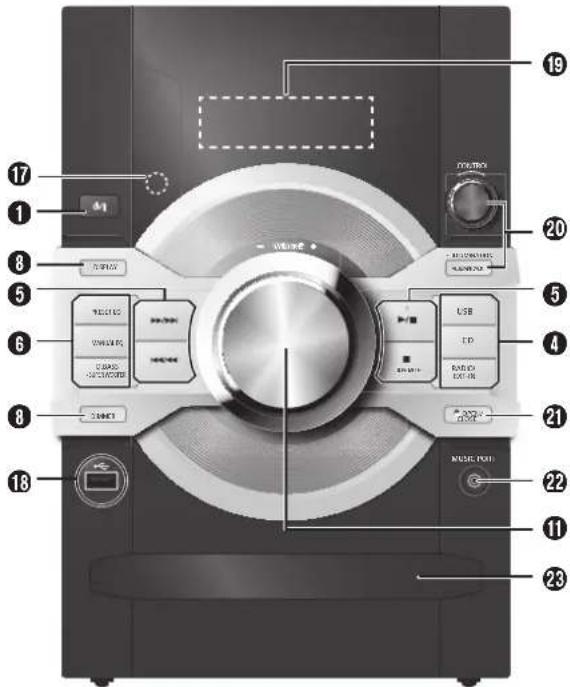
Standby/on switch [∅], [∅/]
Press to switch the unit from on to standby mode or vice versa. In standby mode, the unit is still consuming a small amount of power.
②Numeric buttons [1 to 9, 0, 10] To select a 2-digit number Example: 16: [10]→[1]→[6]
③ Delete a programmed track
④Select audio source
⑤ Basic playback control
6 Select the sound effects
⑦Auto preset the radio station
8 View content information
Decrease the brightness of the display panel
Press and hold [- DIMMER] on the remote control or press [DIMMER] on the main unit to use this function.
To cancel, do the above step again.
⑨ Set the clock and timer
⑩Set the program function
⑪Adjust the volume of the system
⑫Mute the sound of the system
Press the button again to cancel.
"MUTE" is also canceled when you adjust the volume or when you switch off the system.
⑬Set the play menu item
⑭Set the radio menu item
15Select the option
16 Automatically switch off the system
When you are in disc or USB source, the auto off function switches off the system if you do not use the system for 30 minutes.
To cancel, press the button again.
⑰Remote control sensor
Distance: Within approximately 7 m (23 ft)
Angle: Approximately 20^ up and down, 30^ left and right
18USB port ()
19Display panel
20Browse tracks or albums
CD
Turn [CONTROL] to browse the track.
Press [▶/■] to start playback from the selection.
MP3
Press [ALBUM/TRACK] to select album or track and then turn [CONTROL] to browse.
Press [▶/■] to start playback from the selection.
Set the illumination effect
Press and hold [-ILLUMINATION] and then turn [CONTROL] to select the desired setting.
②1 Open or close the disc tray
22Music port jack
23Disc tray
Disc
Playing disc
1 Press [▲ OPEN/CLOSE] on the main unit to open the disc tray. Put in a disc with the label facing up. Press [▲ OPEN/CLOSE] again to close the disc tray.
2 Press [CD] and then press [▶/Ⅲ] to start playback.
| Stop playback Press [■]. | |
| Pause playback | Press [▶/■].Press again to continue playback. |
| Skip album Press [▲, ▼].MP3 | |
| Skip track | Press [◀◀] or [▶▶] (main unit: [◀◀/◀◀] or [▶▶/▶▶]). |
| Search through track | Press and hold [◀◀] or [▶▶](main unit: [◀◀/◀◀] or [▶▶/▶▶]). |
Viewing available information
You can view the available information on the display panel.
Press [DISPLAY].
Note:
• Maximum characters that can be shown: approximately 32
• This system supports ver. 1.0 and 1.1 ID3 tags.
- Text data that the system does not support can show differently.
Play menu
1 Press [PLAY MENU] to select "PLAYMODE" or "REPEAT".
2 Press [◀, ▶] and then press [OK] to select the desired mode.
PLAYMODE
| OFF PLAYMODE | Play all tracks. |
| 1-TRACK 1-TR | Play one selected track on the disc. Press the numeric buttons to select the track. |
| 1-ALBUM 1-ALB MP3 | Play one selected album on the disc. Press [▲, ▼] to select the album. |
| RANDOM RND | Play a disc randomly. |
| 1-ALBUM RANDOM 1-ALB RND MP3 | Play all tracks in one selected album randomly. Press [▲, ▼] to select the album. |
REPEAT
ON REPEAT Repeat playback.

OFF REPEAT Cancel repeat playback.
Note:
The setting returns to the default "OFF PLAYMODE" when you open the disc tray.
Program playback
This function allows you to program up to 24 tracks.
1 Press [PROGRAM] in the stop mode.
"PGM" is shown.
2 CD
Press the numeric buttons to select the desired track.
Do this step again to program other tracks.

- Press [▲, ▼] to select the desired album.
- Press [▶▶] and then press the numeric buttons to select the desired track.
- Press [OK].
Do these steps again to program other tracks.
3 Press [▶/III] to start playback.
| Cancel program mode | Press [PROGRAM] in the stop mode. |
| Check program contents | Press [i◄◄] or [►►i] when "PGM" is shown in the stop mode. |
| Clear the last track | Press [DEL] in the stop mode. |
| Clear all programmed tracks | Press [■] in the stop mode. “CLR ALL” is shown. Within 5 seconds, press [■] again. |
Note:
- You cannot use program playback together with "PLAYMODE" function.
- The program memory is cleared when you open the disc tray.
Note on disc
- This system can play CD-R/RW with CD-DA or MP3 format content.
- Some CD-R/RW cannot be played because of the condition of the recording.
- MP3 files are defined as tracks and folders are defined as albums.
- This system can access up to: - CD-DA: 99 tracks
- MP3: 999 tracks, 255 albums and 20 sessions
- Disc must conform to ISO9660 level 1 or 2 (except for extended formats).
- Recordings will not necessarily be played in the order you recorded them.
Note about using a DualDisc
The digital audio content side of a DualDisc does not meet the technical specifications of the Compact Disc Digital Audio (CD-DA) format so playback may not be possible.
MPEG Layer-3 audio coding technology licensed from Fraunhofer IIS and Thomson.
USB
You can connect and play music tracks from your USB device.
Do not use a USB extension cable. The system cannot recognize USB device connected through a cable.
1 Decrease the volume and connect the USB device to the USB port. Hold the main unit when connecting or disconnecting the USB device.
2 Press [USB] and then press [▶/III] to start playback.
Stop playback Press [■] during playback. "RESUME" is shown. Press [▶/■] to continue playback. OR Press [■] two times to stop the playback fully.
For other operations, refer to "Disc".
Compatible USB devices which are defined as mass storage class:
- USB devices that support bulk-only transfer. - USB devices that support USB 2.0 full speed.
Note:
- Files are defined as tracks and folders are defined as albums.
- Track must have the extension ".mp3" or ".MP3".
- This system can access up to:
- 800 albums (including root folder)
- 8000 tracks
- 999 tracks in one album
• CBI (Control/Bulk/Interrupt) is not supported.
- NTFS file system is not supported (only FAT 12/16/32 file system is supported).
- Some files can fail to work because of the sector size.
Radio
Manual tuning
1 Press [RADIO, EXT-IN] to select "FM" or "AM".
2 Press [◀◀] or [▶▶] to select the frequency of the required station.
To tune automatically, press and hold the button until the frequency starts changing quickly.
“STIs shown when a stereo broadcast is being received.
Using the main unit
1 Press [RADIO/EXT-IN] to select "FM" or "AM".
2 Press [TUNE MODE] to select "MANUAL".
3 Press [◀◀/◀◀] or [▶▶/▶▶] to select the frequency of the required station.
Memory presetting
30 FM and 15 AM stations can be preset.
Automatic presetting
1 Press [OK] to select "LOWEST" or "CURRENT" frequency.
2 Press [AUTO PRESET] to start presetting. To cancel, press [■].
Manual presetting
1 Press [◀◀] or [▶▶] to tune in to the station.
2 Press [PROGRAM].
3 Press the numeric buttons to select a preset number. Do steps 1 through 3 again to preset more stations. The new station replaces any station that occupies the same preset number.
Selecting a preset station
Press the numeric buttons, [◀◀] or [▶▶] to select the preset station.
Using the main unit
1 Press [TUNE MODE] to select "PRESET".
2 Press [|◀◀/◀◀] or [▶▶/▶▶] to select the preset station.
Improving the sound quality
When "FM" is selected
1 Press [RADIO MENU] to select "FM MODE".
2 Press [◀, ▶] to select "MONO" and then press [OK].
To cancel, select "STEREO".
"MONO" is also canceled when you change the frequency.
When "AM" is selected
1 Press [RADIO MENU] to select "B.PROOF".
2 Press [◀, ▶] to select from "BP 1" to "BP 8" that provides the best reception and then press [OK].
FM allocation setting
By main unit only
This system can also receive FM broadcasts allocated in 0.1 MHz steps.
1 Press [RADIO/EXT-IN] to select "FM" or "AM".
2 Press and hold [RADIO/EXT-IN].
After a few seconds, the display panel shows the current minimum radio frequency. Release the button when the minimum frequency changes.
- To go back to the initial setting, do the above steps again.
- After you change the setting, preset frequencies are erased.
Clock and timers
Setting the clock
This is a 12-hour clock.
1 Press [CLOCK/TIMER] to select "CLOCK".
2 Within 20 seconds, press [▲, ▼] to set the time.
3 Press [OK].
Press [CLOCK/TIMER] to show the clock for a few seconds.
Note:
Reset the clock regularly to maintain accuracy.
Sleep timer
The sleep timer switches off the system after the set time.
Press [SLEEP] to select the setting (in minutes).
To cancel, select "OFF".
MIN → 90MIN
MIN→→
To show the remaining time
Press [SLEEP].
Note:
- The sleep timer can be used together with the play timer.
- The sleep timer always comes first. Be sure not to set an overlap of timers.
Play timer
You can set the timer to come on at a certain time to wake you up.
Preparation
Set the clock.
1 Press [CLOCK/TIMER] to select "∅PLAY".
2 Within 20 seconds, press [▲, ▼] to set the start time.
3 Press [OK].
4 Do steps 2 and 3 again to set the end time.
5 Press [▲, ▼] to select the source you want to play and then press [OK].
To start the timer
1 Prepare the audio source you want to listen to (disc, radio, USB, music port or AUX) and set the volume.
6FFONIM03 Press [PLAY ②].
“②PLAY” is shown.
To cancel, press [PLAY ⊕] again.
The system must be switched off for the timer to operate.
To check the settings
Press [CLOCK/TIMER] to select "∅PLAY".
Note:
- The timer starts at a low volume and increases gradually to the preset level.
- The timer comes on at the set time every day if the timer is on.
- If you switch off the system and switch on again while a timer is in operation, the timer will not stop at the end time.
External equipment
Preparation
- Disconnect the AC power supply cord.
- Switch off all equipment and read the appropriate operating instructions.
Note:
Components and cables are sold separately.
Using the music port
You can play music from a portable audio equipment.
Preparation
Switch off the equalizer (if any) of the portable audio equipment to prevent sound distortion. Decrease the volume of the system and the portable audio equipment before you connect or disconnect the portable audio equipment.
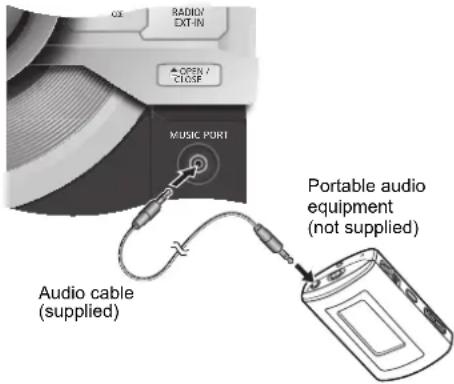
1 Connect the portable audio equipment.
2 Press [RADIO, EXT-IN] (main unit: [RADIO/EXT-IN]) to select "MUSIC PORT".
3 Play the portable audio equipment.
Using the auxiliary input
You can connect a VCR, DVD player etc. and listen to the audio through this system.
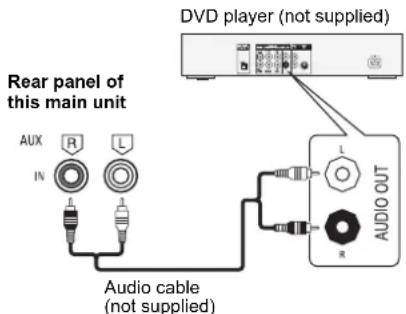
1 Connect the external equipment.
2 Press [RADIO, EXT-IN] (main unit: [RADIO/EXT-IN]) to select "AUX".
3 Play the external equipment.
Note:
- If you want to connect equipment other than those described, refer to the audio dealer.
• Sound distortion can occur when you use an adapter.
Sound and illumination effects
Sound effects
| BASS MID TREBLE | 1. Press [SOUND] to select "BASS", "MID" or "TREBLE".2. Press [◀, ▶] to adjust the level (-4 to +4).Using the main unit1. Press [MANUAL EQ] to select "BASS", "MID" or "TREBLE".2. Press [◀◀/◀◀] or [▶▶/▶▶] to adjust the level. |
| SURROUND | 1. Press [SOUND] to select "SURROUND".2. Press [◀, ▶] to select "ON SURROUND" or "OFF SURROUND". |
| INPUT LEVEL (For music port source) | 1. Press [SOUND] to select "INPUT LEVEL".2. Press [◀, ▶] to select "NORMAL" or "HIGH".Note:Select "NORMAL" if the sound is distorted during "HIGH" input level. |
| SUPERWOOFER | 1. Press [SOUND] to select "SUPERWOOFER".2. Press [◀, ▶] to select "SW1", "SW2", "SW3" or "OFF".Using the main unit1. Press and hold [-SUPER WOOFER].2. Press [◀◀/◀◀] or [▶▶/▶▶] to select the desired setting. |
| RE-MASTERMP3 | 1. Press [SOUND] to select "RE-MASTER".2. Press [◀, ▶] to select "ON RE-MASTER" or "OFF RE-MASTER". |
| D.BASS Press [D.BASS] to select"ON D.BASS", "AUTO D.BASS" or"OFF D.BASS". |
| PRESET EQ Press [PRESET EQ] to select"HEAVY", "SOFT", "CLEAR","VOCAL" or "FLAT". |
Illumination effects
By main unit only
You can change the illumination color on this system.
1 Press and hold [-ILLUMINATION].
2 Within 5 seconds, turn [CONTROL] to select the desired setting.
Troubleshooting
Before requesting service, make the following checks. If you are in doubt about some of the check points, or if the solutions indicated do not solve the problem, refer to "Customer Services Directory (United States and Puerto Rico)" on page 19.
Common problems
The display panel lights up and changes continuously in standby mode.
- Press and hold [■] on the main unit to select "DEMO OFF".
No operations can be done with the remote control. - Examine that the battery is installed correctly.
Sound is distorted or no sound.
- Adjust the volume of the system. - Switch off the system, determine and correct the cause, then switch the system on again. It can be caused by straining of the speakers through excessive volume or power, and when using the system in a hot environment.
A humming sound can be heard during playback.
- An AC power supply cord or fluorescent light is near the cables. Keep other appliances and cords away from the cables of this system.
The sound level reduces.
- The protection circuit has been activated due to the continuous use at high volume output. This is to protect the system and maintain the sound quality.
Disc
Display not shown correctly. Playback does not start.
- You have not put in the disc correctly. Put it in correctly.
- Disc is dirty. Clean the disc.
- Replace the disc if it is scratched, warped, or non-standard.
- There is condensation. Let the system dry for 1 to 2 hours.
The total number of tracks displayed is incorrect. The disc cannot be read.
Distorted sound is heard.
- You put in a disc that the system cannot play. Change to a playable disc.
- You put in a disc that has not been finalized.
Radio
Sound is distorted.
- Use an optional FM outdoor antenna. The antenna should be installed by a competent technician.
A beat sound is heard.
- Switch off the TV or move it away from the system.
- When in AM tuner mode, select from "BP 1" to "BP 8" that provides the best reception.
A low hum is heard during AM broadcasts.
- Move the antenna away from other cables and cords.
USB
The USB device or the contents in it cannot be read.
- The format of the USB device or the contents in it is/are not compatible with the system.
- USB devices with storage capacity of more than 32 GB cannot work in some conditions.
Slow operation of the USB device.
- Large content size or large memory USB device takes longer time to read.
Main unit displays
"AC LOW"
- The household AC power supply is fluctuating. The sound level of the system will reduce gradually to protect the system.
"ERROR"
- An incorrect operation was done. Read the instructions and try again.
"F61"
- Examine and correct the speaker cords connection.
- Disconnect the USB device. Switch off the system and then switch it on again.
"NODEVICE"
- The USB device is not connected. Examine the connection.
"NO PLAY"
"UNSUPPORT"
- Examine the content. You can only play supported format.
- The files in the USB device can be corrupted. Format the USB device and try again.
"NO TRACK"
• There is no album or track in the USB device.
"NOT MP3 → ERROR"
- You played an unsupported MP3 file. The system will skip that track and play the next one.
"PLAYEROR"
- You played an unsupported MP3 file. The system will skip that track and play the next one.
"REMOTE 1" or "REMOTE 2"
- The remote control and the main unit are using different codes. Change the code of the remote control.
- When "REMOTE 1" is shown, press and hold [OK] and [1] for a minimum of 4 seconds.
- When "REMOTE 2" is shown, press and hold [OK] and [2] for a minimum of 4 seconds.
"TEMP NG"
- The temperature protection circuit has been activated, and the system will switch off. Let the unit cool down before switching it on again.
- Check that the ventilation opening of the unit is not obstructed.
- Ensure this unit is well ventilated.
"USB OVER CURRENT ERROR"
- The USB device is using too much power. Disconnect the USB device, switch off the system and then switch on again.
"VBR-"
- The system cannot show the remaining play time for variable bit rate (VBR) tracks.
Remote control code
When other Panasonic equipment responds to the remote control of this system, change the remote control code for this system.
Preparation
Press [RADIO, EXT-IN] (main unit: [RADIO/EXT-IN]) to select "MUSIC PORT" or "AUX".
To set the code to "REMOTE 2"
1 Press and hold [RADIO/EXT-IN] on the main unit and [2] on the remote control until "REMOTE 2" is shown.
2 Press and hold [OK] and [2] for a minimum of 4 seconds.
To set the code to "REMOTE 1"
1 Press and hold [RADIO/EXT-IN] on the main unit and [1] on the remote control until "REMOTE 1" is shown.
2 Press and hold [OK] and [1] for a minimum of 4 seconds.
Memory reset (initialization)
Reset the memory when the following situations occur:
- There is no response when buttons are pressed.
- You want to clear and reset the memory contents.
1 Disconnect the AC power supply cord.
2 While you press and hold [∅/l] on the main unit, connect the AC power supply cord again.
Continue to press and hold the button (approximately 10 seconds) until “----” is shown.
3 Release [⏻/ı].
All the settings are set back to the factory preset. It is necessary to set the memory items again.
Maintenance
To clean this system, wipe with a soft, dry cloth.
- Never use alcohol, paint thinner or benzine to clean this system.
- Before using chemically treated cloth, read the instructions that came with the cloth carefully.
Specifications
Amplifier section
RMS output power stereo mode
Front Hi
250 W per channel (3 Ω), 1 kHz, 30% THD
Front Lo
250 W per channel (3 Ω), 100 Hz, 30% THD
Subwoofer Ch
400 W per channel (2 Ω), 100 Hz, 30% THD
Total RMS stereo mode power 1400 W (30% THD)
FTC output power stereo mode
Front Hi 150 W per channel (3 Ω),
400 Hz to 20 kHz, 1% THD
Front Lo 60 W per channel (3 Ω),
70 Hz to 200 Hz, 1% THD
Subwoofer Ch 75 W per channel (2 Ω),
60 Hz to 100 Hz, 1% THD
Total FTC stereo mode power 495 W
Tuner, terminals section
Preset memory FM 30 stations
AM 15 stations
Frequency modulation (FM)
Frequency range
87.9 MHz to 107.9 MHz (200 kHz step)
87.5 MHz to 108.0 MHz (100 kHz step)
Antenna terminals 75 Ω (unbalanced)
Amplitude modulation (AM)
520 kHz to 1710 kHz (10 kHz step)
Music port (front)
Sensitivity 100 mV, 4.7 kΩ
Terminal Stereo, 3.5 mm ( 18 ) jack
AUX input Pin jack
Disc section
Disc played [8 cm (3") or 12 cm (5")]
CD, CD-R/RW (CD-DA, MP3*)
Pick up
Wavelength 790 nm (CD)
Audio output (disc)
Number of channels 2.1 ch (FL, FR, SW)
FL = Front left channel
FR = Front right channel
SW = Subwoofer channel
* MPEG-1 Layer 3
USB section
USB port
USB standard USB 2.0 full speed
Media file format support MP3 (*.mp3)
USB device file system FAT12, FAT16, FAT32
USB port power 500 mA (max)
Bit rate 16 kbps to 320 kbps ( playback)
Speaker section
Speakers (SB-AKX75)
Type 3 way, 3 speaker system (bass reflex)
Speaker unit(s)
Super Woofer 20 cm (7 78 ) cone type
Woofer 8 cm (3 18 ) cone type
Tweeter 6 cm (2 %) cone type
Impedance
High 3 Ω / Low 3 Ω
Output sound pressure 86 dB/W (1 m)
Frequency range
42 Hz to 28 kHz (-16 dB)
46 Hz to 23 kHz (-10 dB)
Dimensions (W x H x D)
300 mm x 401 mm x 268 mm
(11 3/4" x 15 3/4" x 10 1/2")
Mass (Weight)
5.5 kg (12.1 lbs)
Subwoofer (SB-AKW75)
Type 1 way, 1 speaker system (bass reflex)
Speaker unit(s)
Super Woofer 25 cm (10") cone type
Impedance
2 Ω
Output sound pressure 83 dB/W (1 m)
Frequency range 40 Hz to 250 Hz (-16 dB)
43 Hz to 200 Hz (-10 dB)
Dimensions (W x H x D)
320 mm x 401 mm x 286 mm
(12 ^5/8 " x 15 ^3/4 " x 11 ^1/4 ")
Mass (Weight) 6.9 kg (15.2 lbs)
General
”
Power supply AC 120 V, 60 Hz
Power consumption 120 W
Dimensions (W x H x D)
220 mm x 334 mm x 250 mm
Mass (Weight) 3.4 kg (7.5 lbs)
Operating temperature range 0°C to +40°C
(+32°F to +104°F)
Operating humidity range
35% to 80% RH (no condensation)
Power consumption in standby mode
0.2 W (approximate)
Note:
- Specifications are subject to change without notice. Mass (weight) and dimensions are approximate.
- Total harmonic distortion is measured by the digital spectrum analyzer.
Limited Warranty (ONLY FOR U.S.A. AND PUERTO RICO)
Panasonic Consumer Marketing Company of North America,
Division of Panasonic Corporation of North America
One Panasonic Way, Secaucus, New Jersey 07094
Panasonic Products Limited Warranty
Limited Warranty Coverage
(For USA and Puerto Rico Only)
If your product does not work properly because of a defect in materials or workmanship, Panasonic Consumer Marketing Company of North America (referred to as "the warrantor") will, for the length of the period indicated on the chart below, which starts with the date of original purchase ("warranty period"), at its option either (a) repair your product with new or refurbished parts, (b) replace it with a new or a refurbished equivalent value product, or (c) refund your purchase price. The decision to repair, replace or refund will be made by the warrantor.
| Product or Part Name Parts Labor | ||
| CD Stereo System 1 Year 1 Year | ||
| All included Accessories(Except Non-Rechargeable Batteries) | 90 Days NotApplicable | |
| Only Non-Rechargeable Batteries 10 Days NotApplicable | ||
During the "Labor" warranty period there will be no charge for labor. During the "Parts" warranty period, there will be no charge for parts. This Limited Warranty excludes both parts and labor for non-rechargeable batteries, antennas, and cosmetic parts (cabinet). This warranty only applies to products purchased and serviced in the United States or Puerto Rico. This warranty is extended only to the original purchaser of a new product which was not sold "as is".
Mail-In Service
For assistance in the U.S.A. and Puerto Rico in obtaining repairs, please ship the product prepaid to:
Panasonic Exchange Center
4900 George McVay Drive
Suite B
McAllen, TX 78503
panacare@us.panasonic.com
Online Repair Request
To submit a new repair request and for quick repair status visit our Web Site at www.panasonic.com/repair.
When shipping the unit, carefully pack, include all supplied accessories listed in the Owner's Manual, and send it prepaid, adequately insured and packed well in a carton box.
When shipping Lithium Ion batteries please visit our Web Site at www.panasonic.com/BatteryHandling as Panasonic is committed to providing the most up to date information. Include a letter detailing the complaint, a return address and provide a daytime phone number where you can be reached. A valid registered receipt is required under the Limited Warranty.
IF REPAIR IS NEEDED DURING THE WARRANTY PERIOD, THE PURCHASER WILL BE REQUIRED TO FURNISH A SALES RECEIPT/PROOF OF PURCHASE INDICATING DATE OF PURCHASE, AMOUNT PAID AND PLACE OF PURCHASE. CUSTOMER WILL BE CHARGED FOR THE REPAIR OF ANY UNIT RECEIVED WITHOUT SUCH PROOF OF PURCHASE.
Limited Warranty Limits And Exclusions
This warranty ONLY COVERS failures due to defects in materials or workmanship, and DOES NOT COVER normal wear and tear or cosmetic damage. The warranty ALSO DOES NOT COVER damages which occurred in shipment, or failures which are caused by products not supplied by the warrantor, or failures which result from accidents, misuse, abuse, neglect, mishandling, misapplication, alteration, faulty installation, set-up adjustments, misadjustment of consumer controls, improper maintenance, power line surge, lightning damage, modification, introduction of sand, humidity or liquids, commercial use such as hotel, office, restaurant, or other business or rental use of the product, or service by anyone other than a Factory Service Center or other Authorized Servicer, or damage that is attributable to acts of God.
THERE ARE NO EXPRESS WARRANTIES EXCEPT AS LISTED UNDER "LIMITED WARRANTY COVERAGE".
THE WARRANTOR IS NOT LIABLE FOR INCIDENTAL OR CONSEQUENTIAL DAMAGES RESULTING FROM THE USE OF THIS PRODUCT, OR ARISING OUT OF ANY BREACH OF THIS WARRANTY.
(As examples, this excludes damages for lost time, travel to and from the servicer, loss of or damage to media or images, data or other memory or recorded content. The items listed are not exclusive, but for illustration only.)
ALL EXPRESS AND IMPLIED WARRANTIES, INCLUDING THE WARRANTY OF MERCHANTABILITY, ARE LIMITED TO THE PERIOD OF THE LIMITED WARRANTY.
Some states do not allow the exclusion or limitation of incidental or consequential damages, or limitations on how long an implied warranty lasts, so the exclusions may not apply to you.
This warranty gives you specific legal rights and you may also have other rights which vary from state to state. If a problem with this product develops during or after the warranty period, you may contact your dealer or Service Center. If the problem is not handled to your satisfaction, then write to the warrantor's Consumer Affairs Department at the addresses listed for the warrantor.
PARTS AND SERVICE, WHICH ARE NOT COVERED BY THIS LIMITED WARRANTY, ARE YOUR RESPONSIBILITY.
Customer Services Directory (United States and Puerto Rico)
Obtain Product Information and Operating Assistance; locate your nearest Dealer or Service Center; purchase Parts and Accessories; or make Customer Service and Literature requests by visiting our Web Site at: http://www.panasonic.com/help
or, contact us via the web at:
http://www.panasonic.com/contactinfo
You may also contact us directly at:
1-800-211-PANA (7262)
Monday-Friday 9am-9pm,
Saturday-Sunday 10am-7pm EST
For hearing or speech Impaired TTY users, TTY: 1-877-833-8855
Accessory Purchases (United States and Puerto Rico)
Purchase Parts, Accessories and Instruction Books online for all Panasonic Products by visiting our Web Site at: http://www.pstc.panasonic.com
or, send your request by E-mail to:
npcparts@us.panasonic.com
You may also contact us directly at:
1-800-332-5368 (Phone) 1-800-237-9080 (Fax Only) (Monday-Friday 9am-9pm EST)
Panasonic National Parts Center
20421 84th Ave. S., Kent, WA 98032
(We accept Visa, MasterCard, Discover Card, American Express)
For hearing or speech impaired TTY users, TTY: 1-866-605-1277
As of October 2012
Panasonic Consumer Marketing Company of North America, Division of Panasonic Corporation of North America
One Panasonic Way, Secaucus,
New Jersey 07094
http://www.panasonic.com
© Panasonic Corporation 2013
Printed in Malaysia
En Sp
RQT9789-P
L0313HH0
- Panasonic®
- User memo:
- IMPORTANT SAFETY INSTRUCTIONS
- Safety precautions
- WARNING!
- Unit
- CAUTION!
- Battery
- Table of contents
- FCC Note:
- Supplied accessories
- Placement of speakers
- Note:
- Making the connections
- Connect the AM loop antenna.
- Connect the FM indoor antenna.
- Connect the speakers.
- Conserving power
- Preparing the remote control
- Disc
- Playing disc
- Viewing available information
- Press [DISPLAY].
- Play menu
- REPEAT
- Program playback
- USB
- Radio
- Manual tuning
- Memory presetting
- Improving the sound quality
- FM allocation setting
- Clock and timers
- Setting the clock
- Sleep timer
- Play timer
- External equipment
- Using the music port
- Using the auxiliary input
- Sound and illumination effects
- Illumination effects
- By main unit only
- Troubleshooting
- Common problems
- The display panel lights up and changes continuously in standby mode.
- Sound is distorted or no sound.
- A humming sound can be heard during playback.
- The sound level reduces.
- Display not shown correctly. Playback does not start.
- The total number of tracks displayed is incorrect. The disc cannot be read.
- Distorted sound is heard.
- Sound is distorted.
- A beat sound is heard.
- A low hum is heard during AM broadcasts.
- The USB device or the contents in it cannot be read.
- Slow operation of the USB device.
- Main unit displays
- "AC LOW"
- "ERROR"
- "F61"
- "NODEVICE"
- "NO PLAY"
- "UNSUPPORT"
- "NO TRACK"
- "NOT MP3 → ERROR"
- "PLAYEROR"
- "REMOTE 1" or "REMOTE 2"
- "TEMP NG"
- "USB OVER CURRENT ERROR"
- "VBR-"
- Remote control code
- Preparation
- Memory reset (initialization)
- Maintenance
- Specifications
- Amplifier section
- Tuner, terminals section
- Disc section
- USB section
- Speaker section
- Subwoofer (SB-AKW75)
- General
- Limited Warranty (ONLY FOR U.S.A. AND PUERTO RICO)
- Panasonic Products Limited Warranty
- Limited Warranty Coverage
- (For USA and Puerto Rico Only)
- Mail-In Service
- Online Repair Request
- Limited Warranty Limits And Exclusions
- THERE ARE NO EXPRESS WARRANTIES EXCEPT AS LISTED UNDER "LIMITED WARRANTY COVERAGE".
- Customer Services Directory (United States and Puerto Rico)
- Accessory Purchases (United States and Puerto Rico)
Brand : PANASONIC
Model : SC-AKX75
Category : Hi-Fi System