M12 - Headphones Valore - Free user manual and instructions
Find the device manual for free M12 Valore in PDF.


| Product Type | Wireless Bluetooth Headset |
| Model | M12 |
| Brand | Valore |
| Color | Black (typical) |
| Material | ABS + PC |
| Dimensions (Single Side) | 65 x 47 x 30 mm |
| Weight | 8 g |
| Battery Type | Lithium polymer battery |
| Charging Time | 2 hours |
| Playback Time | 6 hours |
| Wireless Range | Up to 10 m |
| Bluetooth Version | Not specified (estimated v4.0 or higher) |
| Supported Profiles | A2DP |
| Controls | Volume up/down, previous/next track, multi-function button (play/pause, call, pairing) |
| LED Indicator | Orange/blue for charging and pairing status |
| Charging Port | Micro USB |
| Package Contents | Wireless headset, USB charging cable, ear tips (S, M, L) – 3 pairs |
| Care Instructions | Do not expose to moisture or high temperature; clean with dry cloth |
| Safety Warnings | Do not disassemble or modify; avoid drops and impacts |
| Spare Parts Availability | Contact manufacturer or store for ear tips or cable |
| Warranty | Via Valore warranty registration (www.valore.sg) |
| Compliance | IDA standards (DA 103331) |
| Repairability | Not user-serviceable; contact support for issues |
Frequently Asked Questions - M12 Valore
User questions about M12 Valore
0 question about this device. Answer the ones you know or ask your own.
Ask a new question about this device
Download the instructions for your Headphones in PDF format for free! Find your manual M12 - Valore and take your electronic device back in hand. On this page are published all the documents necessary for the use of your device. M12 by Valore.
USER MANUAL M12 Valore
Thank you for purchasing the Valore Wireless Headset.
With flexible earhooks and multiple fitting eartips to fit snugly in your ears, this lightweight wireless headset will take your workout to the next level. Secure the music in your ears and connect up to 10m away from a Bluetooth-enabled device.
Important: Please read the user manual thoroughly before using your wireless headset.
Specifications:
Package Contents:
- Built-in battery: Lithium polymer battery
- Wireless headset
- Wireless range: Up to 10m
- USB charging cable
- Playback time: 6 hours
- Ear tips x 3 pairs (S, M, L)
- Charging time: 2 hours
- Support: A2DP
- Material: ABS + PC
• Dimension (L x W x H): 65 x 47 x 30mm (single side) - Weight: 8g
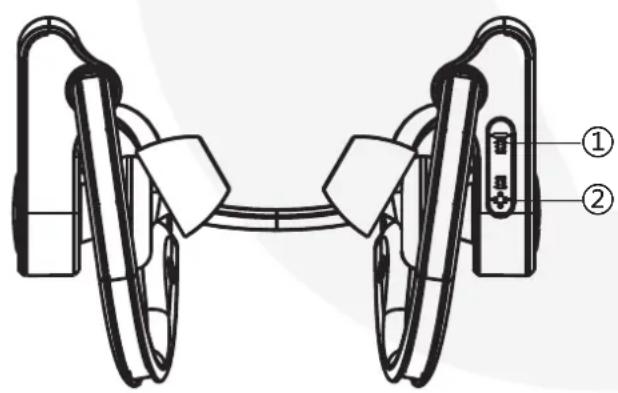
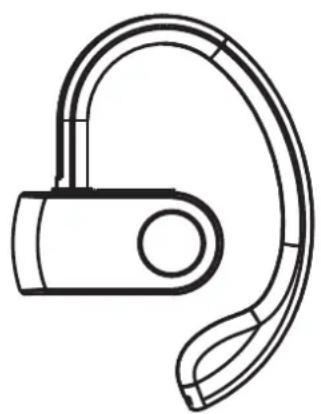
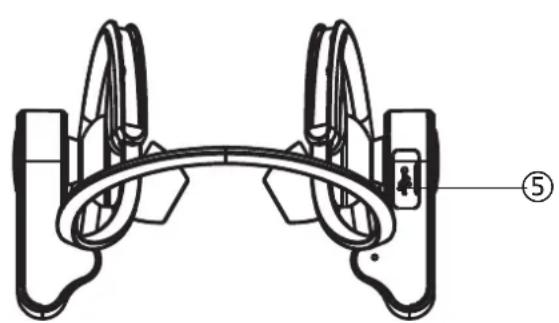
UNDERSTANDING THE PRODUCT
natural_image
Diagram of a mechanical device with two labeled parts (① and ②), showing no text or symbols beyond labels.① Volume down and previous track button
② Volume up and next track button
③ LED status indicator
④ Multi-functional button
⑤ Micro USB input
natural_image
Line drawing of a handheld earband device (no text or symbols)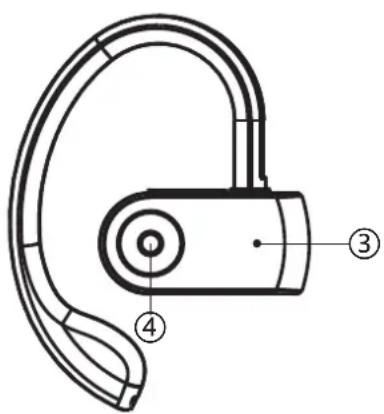
natural_image
Technical line drawing of a mechanical clamp or bracket assembly (no text or symbols)START USING THE WIRELESS HEADSET
1) Charging the headset (1.0A USB adapter to wall plug)
Make sure that the wireless headset is turned off before charging. Plug the micro USB cable into the charging port located at the bottom right side of the Bluetooth headset and connect it to a USB adapter (1.0A) to a wall plug. A orange LED indicator will turn on when the headset is charging. The orange LED indicator will switch to blue when headset is fully charged. To fully charge the headset, it will require at least 2 hours.
Note: Please charge the headset for at least 4 hours before first use. Please make sure that the headset is switched off when charging is in progress.
2) Pairing and connecting (switched off)
Step 1: Press and hold the On/Off button of the headset until the LED light flashes orange and blue rapidly.
Step 2: Activate Bluetooth function on your mobile device to begin pairing with headset.
Step 3: Connect to the headset by selecting 'Valore M12' under the device list. (If prompted to enter a pin-code, enter '0000')
Step 4: Once connected, the LED light will indicate Blue and flashes slowly.
Note: If the pairing is not successful, please turn off wireless headset first and then re-pair again. After pairing is successful, paired devices will remember each other. Unless pairing information is deleted because of new pairing, no need to pair when using the next time.
If you want to pair the wireless headset with other devices, please turn off Bluetooth function of existing source device, and pair the wireless headset with the new device according to steps 1-4 mentioned above.
3) Re-pairing the wireless headset
Each time the wireless headset is turned on, it will attempt to connect to the last device it was paired with automatically (mobile device with Bluetooth function turned on).
The wireless headset will do as follows:
-
Connect to last connected devices automatically;
-
Be listed in the screen of devices as an output channel. Select 'Valore M12' as the output channel to play music.
Note: In some cases, the headset may need to be manually selected from your operating system sound or hardware output list.
4) Pairing the wireless headset with a second device
Repeat the steps shown in “Pairing the wireless headset” section to pair and connect with the second mobile phone.
Once connected, go into the Bluetooth function of the first mobile phone and manually select 'Valore M12' to connect to the wireless earpiece.
5) Wireless headset controls
a) Volume control
- via Bluetooth device;
2. Wireless headset
- Short press 'Volume up and next track' button to increase volume.
- Short press 'Volume down and previous track' button to decrease volume.
b) Multi-functional button
1. Bluetooth connection
- Press and hold button for about 5 seconds to turn on the Bluetooth pairing mode on the headset.
2. Play and Pause music
- Press button to pause the music.
- Press again to resume playback.
3. Picking up and Ending calls
- Press button once during an incoming call to answer.
- Press button once again to end the call.
- Press button twice for last number redial function.
- Press and hold the button for 2 seconds to reject call.
4. Picking up and Ending calls when paired with 2 devices
- If you are talking on the phone when you get another call, long press the button for 2 seconds to reject the incoming calls from another mobile phone.
- Short press the button twice to put the first call on hold automatically, short press the button again to re-connect to the first call
- Short press the button once to hang up the current phone call and answer the in coming call from another phone.
c) Next and Previous track
- Press and hold 'Volume up and next track' button to go to next track.
- Press and hold 'Volume down and previous track' to go to previous track.
TROUBLESHOOTING
Issue 1: Headset is unable to connect successfully to your mobile device
Problem 1: Headset's battery is flat
Solution: Fully charge the headset (2 hours) and retry connection with your mobile device.
Problem 2: Headset not paired to your mobile device
Solution: Make sure that the headset is successfully paired upon selecting 'Valore M12' in the device list.
Problem 3: Headset and mobile device too far apart
Solution: Make sure that the headset is within a metre range during pairing and connection.
Problem 4: Headset is connected to other mobile device
Solution: Make sure that the headset has already been disconnected before making a new connection with a new device.
Issue 2: Sound from the headset is too soft or silent
Problem 1: Headset's battery is low / flat
Solution: Fully charge the headset (2 hours) and retry connection with your mobile device.
Problem 2: Headset or mobile device's volume is too low
Solution: Turn the volume of the headset or mobile device up to increase the volume.
Problem 3: Music track may not be audible
Solution: Make sure that the music track is of a playable format for the mobile device.
Problem 4: Headset and mobile device might not be connected properly.
Solution: Repeat the connection step via Bluetooth/ auxiliary cable again to make sure that it is connected properly and try again.
Issue 3: The user manual instructions does not work
Solution: Contact the manufacturer or the staff at the store of purchase for assistance.
Issue 4: Unable to hear from both side of a call answered by the headset
Problem 1: Headset not paired properly
Solution: Make sure the headset is properly paired.
Problem 2: Headset volume may be too low
Solution: Turn up the volume of the headset and phone.
Problem 3: Microphone may be obstructed
Solution: Make sure the microphone is not being obstructed by other objects.
TECHNICAL SUPPORT & WARRANTY
- For Technical Support, email us at v.info@valore.sg.
- For Warranty Registration, visit www.valore.sg.
Cautions:
Read all the instructions and warnings carefully prior to using this product.
- Do not store the headset in a high temperature environment.
- Do not place the headset near a fire or other excessively hot environments.
- Do not expose its headset to moisture or submerge it in liquid. Keep headset dry at all times.
- Do not attempt to charge the headset using any other method or connection other than the headset's provided charging cable.
- Do not disassemble this headset or attempt to repair or modify it in any manner.
- Be cautious of excessive drops, bumps, abrasions or other impacts to this headset. If there is any damage to the headset such as dents, punctures, tears, deformities or corrosion, stop using the headset and contact us immediately via email at v.info@valore.sg, or return this product to the store where you have purchased it from.
- If the product produces an abnormal smell, high temperature (low temperature during normal use), discolours or changes shape abnormally, stop using the product and contact us immediately via email at v.info@valore.sg.
DISCLAIMER & TRADEMARKS
All information, trademarks, logos, graphics, and images (“Materials”) provided on this user manual are copyrighted or trademarked and are the property of Valore Lifestyle Pte Ltd. Any unauthorized use of any material contained on the instruction manual may violate copyright laws, trademark laws, laws of privacy and communications statutes.
The trademarks, service marks and logos used and displayed in the Materials are registered and unregistered trademarks and service marks of Valore and others. All other registered and unregistered company names, product names and marks mentioned herein the (“Materials”) are the property of their respective owners and may be trademarks or registered trademarks.
Complies with
IDA standards
DA 103331


- Specifications:
- Package Contents:
- UNDERSTANDING THE PRODUCT
- START USING THE WIRELESS HEADSET
- 1) Charging the headset (1.0A USB adapter to wall plug)
- 2) Pairing and connecting (switched off)
- 3) Re-pairing the wireless headset
- 4) Pairing the wireless headset with a second device
- 5) Wireless headset controls
- a) Volume control
- Wireless headset
- b) Multi-functional button
- Bluetooth connection
- Play and Pause music
- Picking up and Ending calls
- Picking up and Ending calls when paired with 2 devices
- c) Next and Previous track
- TROUBLESHOOTING
- Issue 1: Headset is unable to connect successfully to your mobile device
- Issue 2: Sound from the headset is too soft or silent
- Issue 3: The user manual instructions does not work
- Issue 4: Unable to hear from both side of a call answered by the headset
- TECHNICAL SUPPORT & WARRANTY
- Cautions:
- DISCLAIMER & TRADEMARKS
Brand : Valore
Model : M12
Category : Headphones