BTi39 - Headphones Valore - Free user manual and instructions
Find the device manual for free BTi39 Valore in PDF.


| Product Type | Bluetooth Headphones |
| Model | BTi39 |
| Brand | Valore |
| Connectivity | Bluetooth 5.0 |
| Wireless Range | Up to 10 meters |
| Driver Size | 40 mm |
| Frequency Response | 20 Hz – 20 kHz |
| Impedance | 32 Ω |
| Battery Type | Lithium-ion, 200 mAh |
| Battery Life | Up to 10 hours |
| Charging Time | Approximately 2 hours |
| Charging Port | Micro USB |
| Microphone | Built-in, omnidirectional |
| Controls | Multi-function button, volume +/- |
| Weight | 150 g |
| Dimensions | 180 x 170 x 80 mm (folded) |
| Foldable Design | Yes |
| Material | Plastic and synthetic leather |
| Color | Black |
| Warranty | 1 year |
| Compatibility | Most Bluetooth-enabled devices |
Frequently Asked Questions - BTi39 Valore
User questions about BTi39 Valore
0 question about this device. Answer the ones you know or ask your own.
Ask a new question about this device
Download the instructions for your Headphones in PDF format for free! Find your manual BTi39 - Valore and take your electronic device back in hand. On this page are published all the documents necessary for the use of your device. BTi39 by Valore.
USER MANUAL BTi39 Valore
Thank you for purchasing the Valore Inspire Air – True Wireless Earbuds (BTi39).
- Enjoy HD stereo with extra bass music without worrying about wire tangles
- Store wireless earbuds in a protective case while it recharges
Important: Please read the user manual thoroughly before using your wireless earbuds.
Specifications:
Package Contents
- Wireless range: Up to 10m
- Earbuds battery type: Built-in 50mAh lithium battery
- Charging case battery type: Built-in 500mAh lithium-polymer battery
- Standby time: Up to 24 hours (while connected)
• Charging time: Up to 2 hours
• Support: A2DP / HFP / HSP / AVRCP - Playback/working time: Up to 4.5 hours
• Power input: DC5V/1A
• True wireless earbuds x 1 pair
- Charging case x 1
• USB charging cable (300mm) x 1
- Silicone earbuds x 3 pairs
UNDERSTANDING THE PRODUCT

START USING THE WIRELESS EARBUDS
1) Charging

2) Pairing both wireless earbuds (switched off)
Earbuds will connect to each other automatically. The left earbud is the default master.
Step 1: Activate Bluetooth function on your mobile device to begin pairing with earbuds.
Step 2: Remove earbuds from charging dock and wait for "left/right channel" voice prompt.
Step 3: Connect to the earbuds by selecting 'Valore BTi39 under the device list.
Step 4: Once connected, there will be a pairing voice prompt.
Power on : The earbuds will be turn on automatically when take them out from charging case .
(When the charging case is out of battery, you can touch the MFB button for 3 seconds to turn on both earbuds)
Power off : The earbuds will be turn off automatically when put them back on charging case .
(Touch MFB button of both earbuds for 3 seconds to turn off the earbuds)
If the pairing is not successful, please turn off wireless earbuds first, and then re-pair again. After pairing is successful, paired devices will remember each other. Unless pairing information is deleted because of new pairing, no need to pair when using the next time.
If you want to pair the wireless earbuds with other devices, please turn off Bluetooth function of existing source device, and pair the wireless earbuds with the new device according to steps 1-4 mentioned above.

flowchart
graph TD
    A["Remove insulating film and put it back to charging case before using"] --> B["Automatic pairing"]
    B --> C["3s=TWS PALRED\n4s=SEARCH BLUETOOTH"]
    C --> D["Bluetooth 12%"]
    D --> E["Device 87/88"]
START USING THE WIRELESS EARBUDS
3) Controls
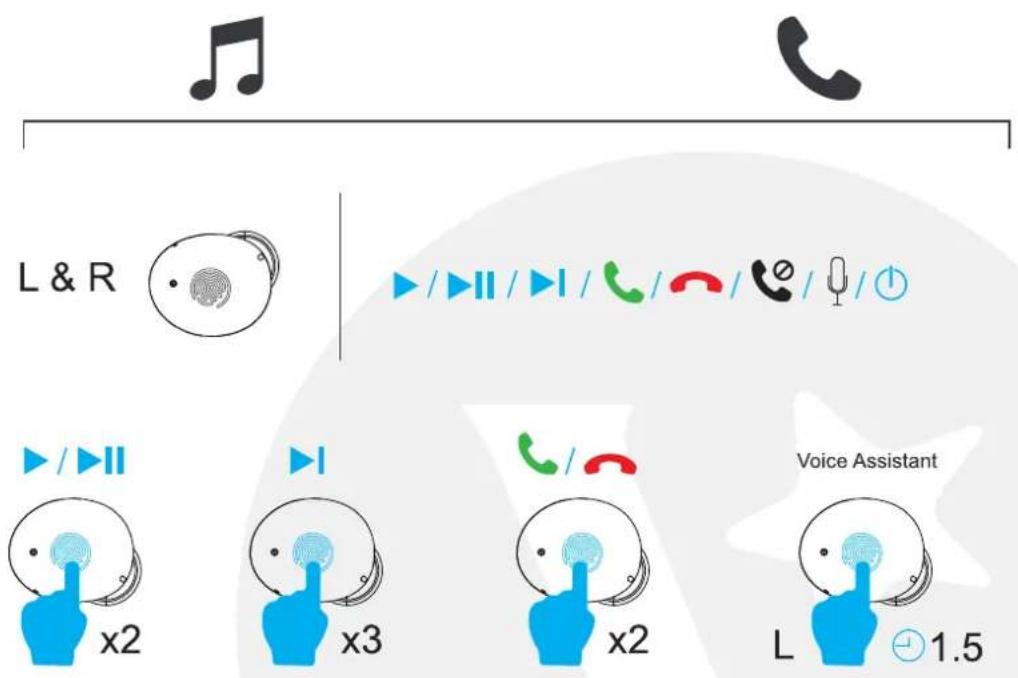
Play / Pause / Answer / End : Touch the MFB button twice
Reject call: Touch the MFB button for 2 seconds
Next track : Touch the MFB button thrice
Active Siri / Other voice assistant: Touch the MFB button for 1.5 seconds
EARBUDS RESET
FAQ:if the earphone cant connect each other or only one earphone have sound,pls follow below step:
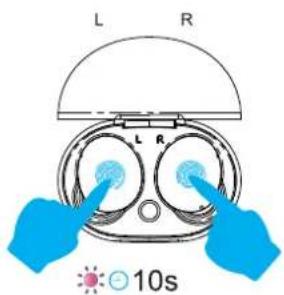
- Touch the MFB button of both earbuds for 10 seconds, release it when purple and red LED lights flash.

natural_image
Simple line drawing of a cup with two cups and red arrows indicating upward motion (no text or symbols)- Take both earbuds out, blue LED lights will be flash
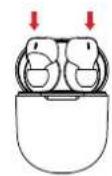
3. Put them back on charging case, red LED lights on

4. Reset Finished
TECHNICAL SUPPORT & WARRANTY
- For Technical Support, email us at v.info@valore.sg.
- For Warranty Registration, visit www.valore.sg.
Cautions:
Read all the instructions and warnings carefully prior to using this product.
- Do not store the earbuds in a high temperature environment.
- Do not place the earbuds near a fire or other excessively hot environments.
- Do not expose this speakerto moisture or submerge it in liquid. Keep earbuds dry at all times.
- Do not attempt to charge the earbuds using any other method or connection other than the headset's provided charging cable.
- Do not disassemble this earbuds or attempt to repair or modify it in any manner.
- Be cautious of excessive drops, bumps, abrasions or other impacts to this headset. If there is any damage to the earbuds such as dents, punctures, tears, deformities or corrosion, stop using the earbuds and contact us immediately via email at v.info@valore.sg, or return this product to the store where you have purchased it from.
- If the product produces an abnormal smell, high temperature (low temperature during normal use), discolours or changes shape abnormally, stop using the product and contact us immediately via email at v.info@valore.sg.
DISCLAIMER & TRADEMARKS
All information, trademarks, logos, graphics, and images (“Materials”) provided on this user manual are copyrighted or trademarked and are the property of Valore Lifestyle Pte Ltd. Any unauthorized use of any material contained on the instruction manual may violate copyright laws, trademark laws, laws of privacy and communications statutes.
The trademarks, service marks and logos used and displayed in the Materials are registered and unregistered trademarks and service marks of Valore and others. All other registered and unregistered company names, product names and marks mentioned herein the (“Materials”) are the property of their respective owners and may be trademarks or registered trademarks.
Complies with IMDA Standards DA102803


Brand : Valore
Model : BTi39
Category : Headphones