Source - Régulateur Dangerous Music - Free user manual and instructions
Find the device manual for free Source Dangerous Music in PDF.


User questions about Source Dangerous Music
0 question about this device. Answer the ones you know or ask your own.
Ask a new question about this device
Download the instructions for your Régulateur in PDF format for free! Find your manual Source - Dangerous Music and take your electronic device back in hand. On this page are published all the documents necessary for the use of your device. Source by Dangerous Music.
USER MANUAL Source Dangerous Music
text_image
HEADPHONES SOURCE AN 1 AN 2 AES/SPDIF USB SETUP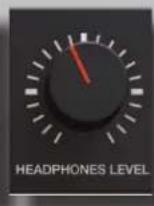
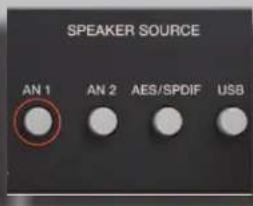
text_image
SPEAKER SOURCE AN 1 AN 2 AES/SPDIF USB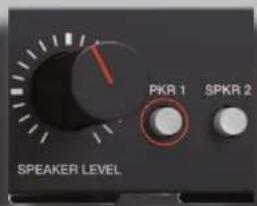
text_image
PKR 1 SPKR 2 SPEAKER LEVEL
USER GUIDE
SOURCE®
The Truth is In Here
text_image
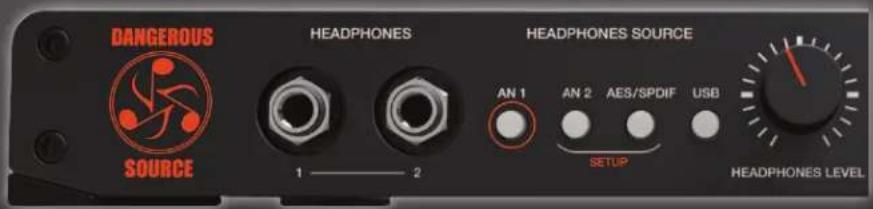
DANGEROUS HEADPHONES HEADPHONES SOURCE AN 1 AN 2 AES/SPDIF USB SOURCE 1 —— 2 SETUP HEADPHONES LEVEL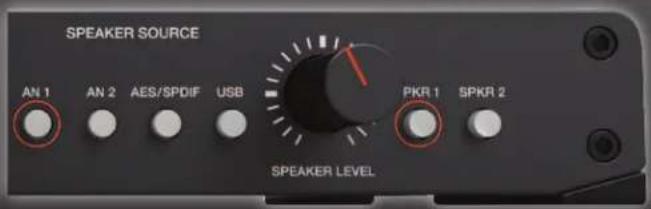
text_image
SPEAKER SOURCE AN 1 AN 2 AES/SPDIF USB PKR 1 SPKR 2 SPEAKER LEVEL
SAFETY REVIEW
The Exclamation point within an equilateral triangle is intended to alert the user to the presence of important operating and maintenance (servicing) instructions in the literature accompanying this product
Certain precautions should be taken when using electrical products. Please observe the safety hints by reading the manual and obtaining qualified help if necessary to adhere to the precautions.

- Always use a properly grounded power supply cord with this product. Please do not defeat the ground pin on the mains plug. This connection provides earth to the chassis and signal grounds inside the device for clean and quiet operation.

- Avoid high temperature operation in equipment racks by providing air circulation. The number one killer of electronic gear is HEAT. Vented rack panels may look like wasted space to an interior decorator, but they look like beauty to a technician or equipment designer! If the front panel is hot, it is roasting inside the box.

- Avoid areas of high magnetic fields. The steel chassis is designed to shield the circuits from EMI and RFI (magnetic and radio interference). When installing equipment in racks, it is prudent to put power amplifiers and large power supplies at least several rack spaces, if not in a different rack, away from equipment that deals with low level signals. Separation of high level and low level equipment can pre-empt trouble caused by heat and EMI.

- Care should be taken to avoid liquid spills around equipment. If a spill occurs, please shut off the gear and disconnect the mains. A qualified technician should investigate accidents to prevent further equipment damage or personnel hazards caused by spills.

- If one is uncomfortable with opening gear and changing jumpers or making adjustments, please seek qualified help if necessary.

- If adjustments or jumper changes are required, please disconnect the mains plug before opening the top. Dropped screws or tools on a live circuit board can manifest themselves as burn marks and smoked components. While we feel your pain, (been there) subsequent damage is not covered by the warranty.
Dangerous Music Incorporated reserves the right to change the specifications or modify the designs of its equipment. Sending in the registration card is our way of keeping in touch with users of our equipment should this become necessary. Registration information is always kept confidential and never disclosed to third parties for any reason. Company contact information is on the last page of this manual.

RoHS COMPLIANT
2002/95/EC
The CE sign on this product signifies the fact that the SOURCE® has been tested and verified to conform to the applicable standards of 89/336/EEC.EN55103-1 (emissions) EN61000-2 (immunity) and EN60065:2002 (safety requirements)
This product uses components of the types and quantities that comply with the EC RoHS standard 2002/95/EC. A list of suppliers and materials is available from DMI. We tightly control production to use top quality materials.
THANK YOU
Thank you for choosing products from the exciting and innovative line of Dangerous Music recording equipment. Many years of reliable service can be expected from our gear. This is made possible through careful design, construction, and component choices by recording industry veterans.
The Dangerous Music Source is designed to inspire your musical genes. No matter if you're on the road or in studio, Source allows you to hear with unparalleled accuracy, propelling composition, performance and mixing to new heights.
Though the box is overwhelmingly simple in appearance, there are comprehensive tips and application notes in this user's guide, so don't skip the read.
If you have any suggestions for future products, feel free to forward them!

"Audio Integrity: non-negotiable." This is the credo upon which Dangerous Music is founded. Conceived and designed by end users—not by engineers in lab coats— the results are products that resurrect dynamic range, punch, intelligibility and emotion. These high-fidelity, uncompromising signal paths are achieved by harnessing over 20 years of Chris Muth's design wizardry; creator of infamous custom black boxes for world class facilities like Hit Factory, Masterdisk, Absolute Audio and Sterling Sound Mastering. Then the critical listening skills of golden-eared luminaries are applied, with the result being musical tools that fulfill the actual needs of today's flexible computer based studio.
TABLE OF CONTENTS
| Overview | 1 | |
| Source Rear Panel Features & Benefits | 2 | |
| Source Front Panel Features, Benefits & Connection | 5 | |
| Setup: Mac | 9 | |
| Setup: PC 10 | ||
| Source Application Notes | 12 | |
| Specifications | 13 | |
| Warranty | 15 |
OVERVIEW
The Dangerous Source provides the critical link between your ears and the music. Every tracking and mixing decision hinges upon what you hear: how to locate the microphone's sweet spot for the perfect vocal, where to place the panning to define each instrument's space, creating the perfect marriage of kick and bass in the track...
Plug in two pairs of headphones and get inspired- serious amplification to turn up your creative heat.
Select any of the four sources individually or at the same time- plug your iPod into AN2 and jam along in AN1. There are 2 independent D/A converters built in, so you can monitor different digital inputs independently.
Listen to any combination of sources from either section. For example, let the singer hear their own personal headphone mix from the AN2 input, while you engineer the real mix, coming from the USB 2.0 compliant input.
There's even a line level control room output, mirroring the speaker selector for dubbing, sampling or running external meters.
Switch between two sets of speakers... or use one output for a subwoofer... or play them both at once to blow up the neighborhood.
Built for life on the road, slide the SOURCE into your backpack and hit the streets.

text_image
DANGEROUS SOURCE 1 —— 2 HEADPHONES HEADPHONES SOURCE AN 1 AN 2 AES/SPDIF USB SETUP HEADPHONES LEVEL SPEAKER SOURCE AN 1 AN 2 AES/SPDIF USB SPEAKER LEVEL PKR 1 SPKR 2Inside the box you'll find the Source, a USB 2.0 compliant cable, 12 volt/2 Amp power supply (PSU-SRC) and the manual you're reading now.
NOTE:
Requires Mac OS 10.6 or higher for driverless plug and play
Windows requires a driver. Download from www.dangerousmusic.com (navigate to the Source product page)
Source: Rear Panel Connections

text_image
(-10 dBV) AN INPUT 2 AN INPUT 1 LEFT AN INPUT 1 RIGHT AES/ISPDF IN AES/ISPDF THROUGH USB IN LEFT SPEAKER 1 RIGHT SPEAKER 2 SELECTED LINE OUT 12V / 1.5A[REAR PANEL INPUTS PICTURED ABOVE]
1. ANALOG INPUTS
Feature: Analog Input 1 is on XLR / TRS combination connectors.
Benefit: Use gear with XLR balanced connectors, or TRS balanced connectors or TS unbalanced connectors.
Use: Connect audio feeds here, for example, the outputs of your computer interface, keyboard, guitar rack, sampler.
Feature: Analog Input 2 is on an 1/8" mini TRS connector.
Benefit: Compatible with portable playback devices.
Use: Plug in your iPod, SmartPhone, computer output etc... here.
Note: This input is set to unity gain for an iPhone. There is a header internally for setting it to a true -10 dBv.
Tip: Cables DO make a difference. Ask for Mogami interconnects.
2. DIGITAL INPUT

text_image
AN INPUT 2 AN INPUT 1 LEFT AN INPUT 1 RIGHT AES/SPDIF IN AES/SPDIF THEROUGH USB IN LEFT SPEAKER 1 RIGHT LEFT RIGHT LEFT RIGHT SPEAKER 2 SELECTED LINE OUT 12V / 1.5A[REAR PANEL DIGITAL INPUT PICTURED ABOVE]
Feature: Digital input available on XLR / TRS combination connector.
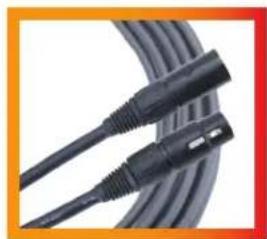
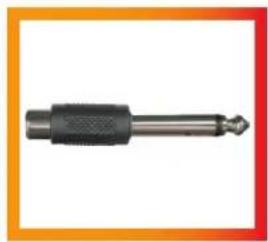
Benefit: Use either AES or SPDIF coaxial, just get a properly wired cable (i.e. RCA-XLRM)
Note: SPDIF = 75 ohms, AES = 110 ohms. The origin, not the destination, will dictate the whether to use SPDIF or AES. In other words, if your interface is outputting SPDIF, then use 75 ohm cable. If it's outputting AES, use 110 ohm cable.
Use: Take the digital output from your computer interface and connect it here to monitor through the mastering quality D/A converter. This will provide an extremely accurate, yet musical representation of your audio that will translate across multiple systems (i.e. iPod, car stereo, home hi-fi...)
natural_image
Close-up of a black cable with attached metallic connector (no text or symbols visible)EXAMPLE 1: AES CABLE
[AES XLR(F)-XLR(M)]
natural_image
Close-up of a black mechanical component with a pointed tip, set against a gradient orange border (no text or symbols visible)EXAMPLE 2: ADAPTaS/PDIFCABLE
[RCA(F)-1/4"]
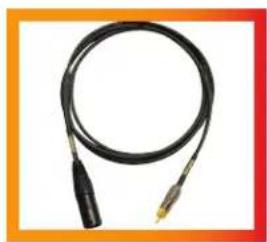
natural_image
Coiled black cable with metallic connectors, no visible text or symbolsEXAMPLE 3: AES to S/PDIF CABLE
[DIGITAL XLR(M)-RCA]
3. DIGITAL THROUGH

text_image
(15 dBV) AN INPUT 2 AN INPUT 1 LEFT AN INPUT 1 RIGHT AES/SPOIF IN AES/SPOIF THROUGH USB IN LEFT SPEAKER 1 RIGHT SPEAKER 2 LEFT RIGHT LEFT RIGHT LEFT RIGHT SELECTED LINE OUT 12V / 1.5A[REAR PANEL DIGITAL THROUGH PICTURED ABOVE]
Feature: Make AES or SPDIF connections here.
Benefit: Pass through the AES or SPDIF digital input signal.
Use: Monitor an external A/D converter while simultaneously sending to recorder or send the audio back into the session for more processing, or plug into an outboard digital meter or run into another SOURCE for expanded monitoring options.
4. USB INPUT

text_image
(-18 dBV) AN INPUT 2 AN INPUT 1 LEFT AN INPUT 1 RIGHT AES/SPDEF IN AES/SPDEF THROUGH USB IN LEFT SPEAKER 1 RIGHT LEFT RIGHT LEFT RIGHT SELECTED LINE OUT 12V / 1.5A[REAR PANEL USB INPUT PICTURED ABOVE]
Feature: Connect the USB 2.0 compliant output from your computer here.
Benefit: Skip using an interface or use this to monitor an additional output source from your computer.
Use: Use one set of outputs to set up a custom headphone mix for the talent and use the USB output to monitor the main mix, leveraging the mastering grade converter in SOURCE. Or reference your masters and music library in high resolution up to 24 bit, 192 kHz via USB!
Note: Requires Mac OS 10.6 or higher for driverless plug and play
PC requires a driver. Download from www.dangerousmusic.com (navigate to the Source product page)
5. SPEAKER 1 & 2 OUTPUTS

text_image
(-19 dB) AN INPUT 2 AN INPUT 1 LEFT AN INPUT 1 RIGHT AES/SPOF IN AES/SPOF THROXUT USB M LEFT RIGHT SPEAKER 1 LEFT RIGHT SPEAKER 2 LEFT RIGHT SELECTED LINE OUT 12V / 1.5A[REAR PANEL SPEAKER OUTPUTS PICTURED ABOVE]
Feature: Two stereo outputs for connecting two sets of reference monitors.
Benefit: Compare and contrast your mixes on two sets of speakers using XLR and/or TRS connectors.
Tip: Use one output for speakers and the other output for a sub: turn the sub on or off whenever you need it. (Also, always hear the speakers in full range- some subs have a non bypassable crossover.)
6. SELECTED LINE OUTPUTS

text_image
AN INPUT 2 AN INPUT 1 LEFT AN INPUT 1 RIGHT AES/SPDF IN AES/SPDF THROUGH USB 46 LEFT SPEAKER 1 RIGHT SPEAKER 2 LEFT RIGHT SELECTED LINE OUT 12V / 1.5A[REAR PANEL SELECTED LINE OUTPUTS PICTURED ABOVE]
Feature: A pair of stereo outputs that mirror the speaker source selected.
Benefit: Send your selected source or sources to another destination (i.e. Front of House PA system, mixdown device like a CD Burner, iPhone or cassette deck- remember those?)
Note: These outputs are unaffected by the SPEAKER LEVEL KNOB.
7. POWER ADAPTOR

text_image
(10 MHz) AN INPUT 2 AN INPUT 1 LEFT AN INPUT 1 RIGHT AES/SPOIF IN AES/SPOIF THROUGH USB IN LEFT SPEAKER 1 RIGHT LEFT RIGHT LEFT RIGHT SELECTED LINE OUT 12V / 1.5A[REAR PANEL POWER SUPPLY CONNECTION PICTURED ABOVE]
Feature: Power supply is 12 volts, 2 Amps (part number PSU-SRC) and plug into either receptacle.
Benefit: The other is for possible future accessories that could run off the main power supply (shhh).
Source: Front Panel Features & Benefits
1. HEADPHONE OUTPUTS

text_image
DANGEROUS HEADPHONES HEADPHONES SOURCE AN 1 AN 2 AES/SPDIF USB SETUP HEADPHONES LEVEL SPEAKER SOURCE AN 1 AN 2 AES/SPDIF USB PKR 1 SPKR 2 SPEAKER LEVEL[HEADPHONE SOURCE SECTION PICTURED ABOVE]
Feature: Headphone jack 1 & 2 sport a potent headphone amplifier.
Benefit: Loads of HEADROOM, to audition intelligibly, make intelligent decisions and drive an inspired performance. Please exhibit caution when selecting a level. (See "TIP")
Operation: First choose a source to monitor from, by depressing the appropriate HEADPHONE SOURCE button. Then determine a moderate listening level via the HEADPHONE LEVEL knob.
Tip: Always start with the level control completely counter clockwise (minimum). The headphone amplifiers are very powerful and there is no solution for destroyed hearing, even from the audio alchemists at Dangerous Music.
2. HEADPHONE SOURCE (TOGGLE & LATCH MODE)

text_image
HEADPHONES SOURCE AN 1 AN 2 AES/SPDIF USB SETUP HEADPHONES LEVEL SPEAKER SOURCE AN 1 AN 2 AES/SPDIF USB SPKR 1 SPKR 2 SPEAKER LEVEL[HEADPHONE SOURCE SELECTOR PICTURED ABOVE]
TOGGLE
Feature: Instantly and silently switch between four headphone input sources (ANALOG 1, ANALOG 2, AES/SPDIF and USB).
Benefit: While mixing, flip between a reference track. For example, CD source or iPod connected via analog INPUT ONE or INPUT TWO and your mix connected digitally via USB or AES/SPDIF.
Note: This is the default setup.
LATCH
Feature: Silently select or deselect any combination of 1, 2, 3 or 4 headphone sources (i.e. ANALOG 1, ANALOG 2, AES/SPDIF and USB).
Benefit: Monitor multiple audio inputs simultaneously. For example, feed the master mix into the USB input and the talent (i.e. vocalist singing now) into ANALOG 1 for zero latency monitoring. (See APPENDIX for more examples from DJ's to Producers).
Note: Requires SETUP. See the following section for details.
Tip: 🚆 Headphone sources and Speakers sources are completely independent. (i.e. listen to different things from each).
3. HEADPHONE SETUP (TOGGLE TO LATCH MODE)

text_image
DANGEROUS HEADPHONES HEADPHONES SOURCE AN 1 AN 2 AES/SPDIF USB SETUP HEADPHONES LEVEL SPEAKER SOURCE AN 1 AN 2 AES/SPDIF USB PKR1 SPKR1 SPEAKER LEVEL[HEADPHONE SETUP SOURCE BUTTONS PICTURED ABOVE]
Feature: Set the desired behavior for the HEADPHONE SOURCE BUTTONS: either TOGGLE or LATCH mode.
Operation: Simultaneously press and hold the bracketed SETUP buttons (AN 2 and AES/SPDIF) on the HEADPHONE SOURCE side. The SETUP LIGHTS will blink. Then press the button with the orange circle (AN 1) on the HEADPHONE SOURCE side to switch between TOGGLE mode (button unlit) and LATCH mode (button lit). Press either of the blinking SETUP BUTTONS (AN 2 or AES/SPDIF) to store and exit setup mode.
4. SPEAKER SOURCE BUTTONS (TOGGLE & LATCH MODE)

text_image
MINDIROS HEADphones 1 —— 2 HEADPHONES SOURCE AN 1 AN 2 AES/SPDIF USB SPEER HEADPHONES LEVEL SPEAKER SOURCE AN 1 AN 2 AES/SPDIF USB SPEAKER LEVEL PKR 1 SPKR 2[SPEAKER SOURCE BUTTONS PICTURED ABOVE]
TOGGLE
Feature: Instantly and silently switch between four input sources that feed your speakers (ANALOG 1, ANALOG 2, AES/SPDIF and USB).
Benefit: While mixing, flip between a reference track (i.e. cd source or iPod) and your mix. Or setup two master faders in your recording software to compare two mixes: one with plug-ins instantiated and the original. (Just two suggestions).
Note: This is the default setup.
LATCH
Feature: Silently select or deselect any combination of 1, 2, 3 or 4 speaker sources (i.e. ANALOG 1, ANALOG 2, AES/SPDIF and USB).
Benefit: Monitor multiple audio inputs simultaneously. For example, feed the master mix into the USB input and the drummer's click track into ANALOG 1. Now you can turn the click off when you realize he'll never lock to it or continue to monitor it for places to punch-in and rescue. (See APPENDIX for more examples from DJ's to Producers).
Tip: 🚆 Headphone sources and Speakers sources are completely independent. (i.e. listen to different things from each).
5. SPEAKER SOURCE SETUP (TOGGLE TO LATCH MODE)

text_image
HEADPHONES HEADPHONES SOURCE AN 1 AN 2 AES/SPDIF USB 1 2 HEADPHONES LEVEL SPEAKER SOURCE AN 1 AN 2 AES/SPDIF USB PKR 1 SPKR 2 SPEAKER LEVEL[SPEAKER SOURCE BUTTONS PICTURED ABOVE]
Feature: Set the desired behavior for the SPEAKER SOURCE BUTTONS: either TOGGLE or LATCH mode.
Benefit: Simultaneously press and hold the bracketed SETUP buttons (AN 2 and AES/SPDIF) on the HEADPHONE SOURCE side. The SETUP LIGHTS will blink. Then press the button with the orange circle (AN 1) on the SPEAKER SOURCE side to switch between TOGGLE mode (button unlit) and LATCH mode (button lit). Press either of the blinking SETUP BUTTONS (AN 2 or AES/SPDIF) to store and exit setup mode.
6. SPEAKER SELECTION (TOGGLE OR LATCH MODE)

text_image
HEADPHONES HEADPHONES SOURCE SPEAKER SOURCE 1 —— 2 AN 1 AN 2 AES/SPDIF USB OFFICE AN 1 AN 2 AES/SPDIF USB HEADPHONES LEVEL SPEAKER LEVEL PKR 1 SPKR 2[SPEAKER SELECTION BUTTONS PICTURED ABOVE]
TOGGLE
Feature: Instantly and silently switch between your speakers using the SPEAKER SELECTION BUTTONS (SPKR 1 and SPKR 2) auditioning only one set of monitors at a time.
Benefit: A/B tracking and mix decisions between two different sets of speakers.
Note: This is the default setup.
LATCH
Feature: Silently select or deselect any combination of 1 and/or 2 speakers (i.e. SPKR 1 and SPKR 2).
Benefit: Audition through either set of speakers or both simultaneously (ie. for the control room and live room).
Tip: Use one output for speakers and the other output for a sub (not the sandwich): turn the sub on or off whenever you need it. (Also, always hear the speakers in full range- some subs have a non bypassable crossover.)
7. SPEAKER SELECTION (TOGGLE TO LATCH MODE)

text_image
HEADPHONES HEADPHONES SOURCE SPEAKER SOURCE 1 —— 2 AN 1 AN 2 AES/SPDIF USB OFFICE AN 1 AN 2 AES/SPDIF USB HEADPHONES LEVEL SPEAKER LEVEL PKR 1 SPKR 2[SPEAKER SELECTION BUTTONS PICTURED ABOVE]
Feature: Set the desired behavior for the SPEAKER SELECTION BUTTONS.
Benefit: Simultaneously press and hold the bracketed SETUP buttons (AN 2 and AES/SPDIF) on the HEADPHONE SOURCE side. The SETUP LIGHTS will blink. Then press the button with the orange circle (SPKR 1) on the SPEAKER SELECTOR side to switch between TOGGLE mode (button unlit) and LATCH mode (button lit). Press either of the blinking SETUP BUTTONS (AN 2 or AES/SPDIF) to store and exit setup mode.
8. MOMENTOGGLE (HEADPHONES SOURCE • SPEAKER SOURCE • SPEAKERS)

text_image
RAMPHONES HEADPHONES SOURCE SPEAKER SOURCE AN 1 AN 2 AES/SPDIF USB AN 1 AN 2 AES/SPDIF USB SETUP HEADPHONES LEVEL PKN 1 SPKR 2 SPEAKER LEVEL[HEADPHONES SOURCE, SPEAKER SOURCE AND SPEAKER SELECTION BUTTONS PICTURED ABOVE]
Feature: MOMENTOGGLE is built into all of the buttons above. It provides either a momentary or latching mode, at the user's discretion.
Operation:LATCH MODE. If the buttons are pressed and released quickly, they will latch.
TOGGLE MODE. If pressed and held for more than a second, the function remains locked until the button is released.
Uses: Create a talkback mic: Plug a mic and preamp into analog input two (AN 2). To communicate with the talent, just hold the AN 2 button on the HEADPHONES SOURCE side to speak directly into their cans. Release and it deactivates.
Subwoofer check: Plug your main monitors into SPKR 1 and the sub(s) into SPKR 2. Then hold the SPKR 2 button for as long as you'd like to check the low frequency content.
9. OPTIONAL RACK KIT

text_image
DANGEROUS SOURCE HEADPHONES HEADPHONES SOURCE SPEAKER SOURCE AN 1 AN 2 AES SPORF USB AN 1 AN 2 AES SPORF USB SPOR 1 SPOR 2 HEADPHONES LEVEL SPEAKER LEVEL[OPTIONAL SRK RACK KIT PICTURED ABOVE]
Feature: Mount SOURCE in traditional racks or road cases with the optional 19" faceplate (part number SRK).
Benefit: Ability to tuck SOURCE into a 19" rack bag or into a fixed installation.
Operation: Remove the desktop front and install the single rack space faceplate as explained below.
(1) Gently pull off the two knobs
(2) Remove the two nuts from around phones jacks Remove the four main hex screws from the faceplate
(3) Remove the four main hex screws from the faceplate
(4) Remove the four feet
(5) Replace the phillip head screws in the former holes where the feet had been
(6) Install the one space rack panel
Source: Mac Setup
PRO TOOLS
Plug in source via USB to your Mac.
Power up SOURCE.
Launch Pro Tools.
Navigate to the "SETUP" menu.
Select "PLAYBACK ENGINE". (PHOTO OP 01)
A pop up screen will appear (PHOTO OP 02), select "PRO TOOLS AGGREGATE I/O" from the drop down menu. (PHOTO OP 03)
Select "Yes" from the pop up window (PHOTO OP 04)
Hit "OKAY" and the session will reopen with the new "PLAYBACK ENGINE"
Navigate to the "SETUP" menu again
Select "HARDWARE" (PHOTO OP 05)
Click on "LAUNCH SETUP APP" (PHOTO OP 06)
Click on "PRO TOOLS AGGREGATE I/O" from the left hand menu (PHOTO OP 07)
Select in the checkboxes all the interfaces you'd like to utilize, including "XMOS USB 2.0 AUDIO OUT" (PHOTO OP 07)
Hit "OKAY"
Start monitoring from Pro Tools!
Hardware...
Playback Engine...
Disk Allocation...
Peripherals... I/O...
Video Sync Offset...
Session
2
Current Feet+Frames Position... Current Timecode Position...
External Timecode Offset...
MIDI
Connect to SoundCloud Click/Countoff... Preferences...
√ Pro Tools Aggregate I/O
PHOTO OP 03
Hardware...
Playback Engine...
Disk Allocation...
Peripherals...
I/O...
Video Sync Offset...
Session
2
Current Feet+Frames Position...
Current Timecode Position...
External Timecode Offset...
MIDI
Connect to SoundCloud Click/Countoff... Preferences...
PHOTO OP 05
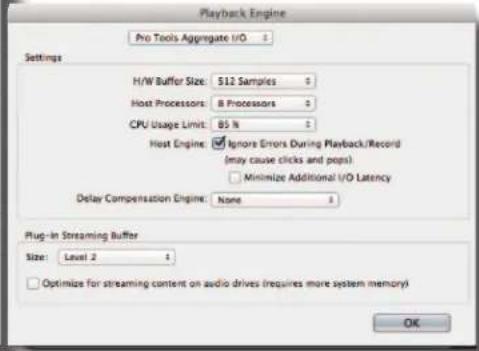
text_image
Playback Engine Pro Tools Aggregate I/O Settings H/W Buffer Size: 512 Samples Host Processors: B Processors CPU Usage Limit: 85 % Host Engine: Ignore Errors During Playback/Record (may cause clicks and pops) Minimize Additional I/O Latency Delay Compensation Engine: None Plug-in Streaming Buffer Size: Level 2 Optimize for streaming content on audio drives (requires more system memory) OK
Selecting this playback engine will automatically Save and Close your session. The session will be reopened when you are done changing settings. Are you sure you want to proceed?
Cancel
Yes
PHOTO OP 04
Hardware Setup
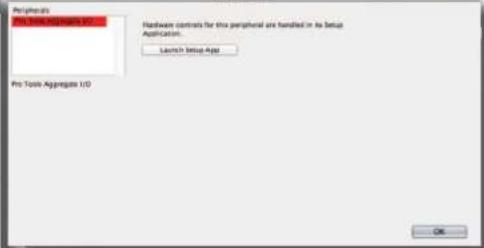
text_image
Peripherals Pro Tools Aggregate I/O Hardware controls for this peripheral are handled in the Setup Application. Launch Setup App Pro Tools Aggregate I/O OKPHOTO OP 06
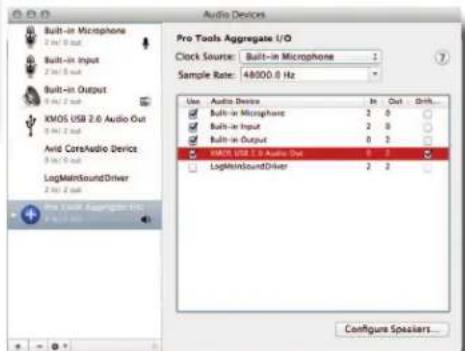
text_image
Audio Devices Built-in Microphone 2 bit 0 bit Built-in Input 2 bit 0 bit Built-in Output 1 bit 2 bit XMOS USB 2.0 Audio Out 2 bit 2 bit Avid CareAudio Device 3 bit 3 bit LogMainSoundDriver 2 bit 2 bit Pro Tools Aggregate I/O Clock Source: Built-in Microphone Sample Rate: 48000.0 Hz Use Audio Devices In Out Drift... Built-in Microphone 2 0 Built-in Input 2 0 Built-in Output 0 2 WMT, USB, 2.0 Audio Out 6 1 LightMainSoundDriver 2 2 Configure SpeakersPHOTO OP 07
Source: PC Setup
Plug in source via USB
To install the driver, plug the USB port to the computer and power up SOURCE.
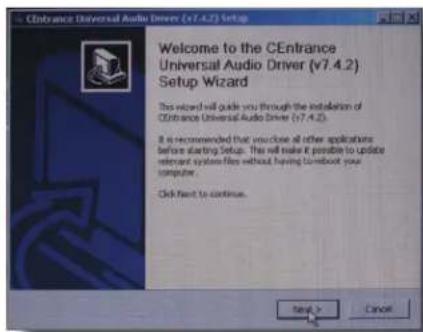
Double click on the CEUDUSB-7.4.2 icon and extract the driver installer file.
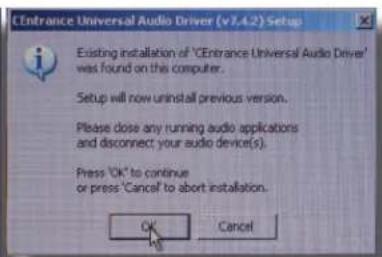
Double click on the extracted file and follow the directions. (PHOTO OP 01 & 02)
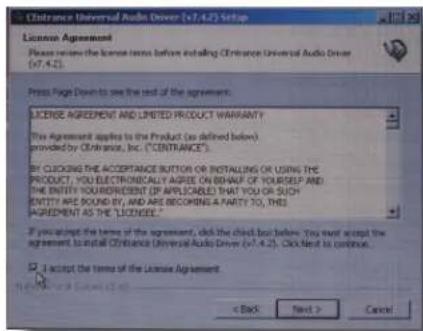
Accept the license agreement then click Next. (PHOTO OP 03)
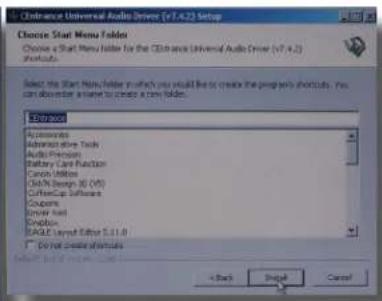
Click Install. (PHOTO OP 04)
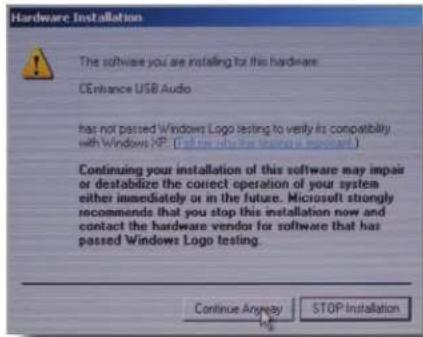
Continue anyway. (PHOTO OP 05)
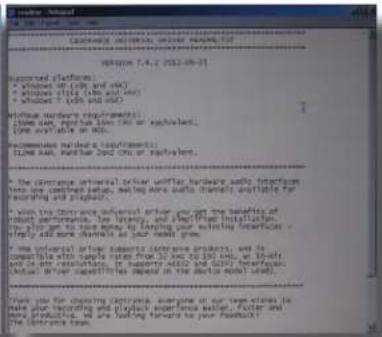
Ignore the 'Readme' file like everyone else does. Actually, it contains important info. (PHOTO OP 06)
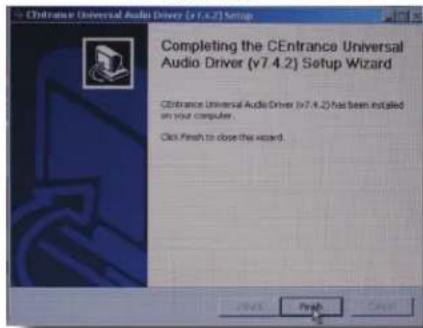
Finish the Wizard. (PHOTO OP 07)
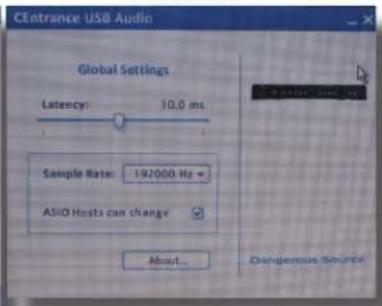
You are ready to go. If you need to check on the CE control panel, it is in the Task bar.
Double click on the CE icon and it opens the control panel. (PHOTO OP 08)
text_image
CEntrance Universal Audio Driver (v7.4.2) Setup Welcome to the CEntrance Universal Audio Driver (v7.4.2) Setup Wizard This wizard will guide you through the installation of CEntrance Universal Audio Driver (v7.4.2). It is recommended that you close all other applications before starting Setup. This will make it possible to update relevant system files without having to boost your computer. Click Next to continue.PHOTO OP 01
text_image
Entrance Universal Audio Driver (v1.4.2) Setup Existing installation of "Entrance Universal Audio Driver" was found on this computer. Setup will now uninstall previous version. Please close any running audio applications and disconnect your audio device(s). Press "OK" to continue or press "Cancel" to abort installation. OK CancelPHOTO OP 02
text_image
License Agreement Please review the license terms before installing Clinkance Universal Audio Driver (v7.4.2) Press Page Down to see the end of the agreement. LICENSE AGREEMENT AND LIMITED PRODUCT WARRANTY? The Agreement applies to the Product (as defined below) provided by Clinkance, Inc. ("CENTRANCE"). BY CLOCKING THE ACCEPTANCE BUTTON OR INSTALLING OR USING THE PRODUCT, YOU ELECTRONICALLY AGREES ON BENEFUR OF YOURSELF AND THE ENTITY YOURREPRESENT (IF APPLICABLE) THAT YOU OR SUCH ENTITY ARE SOUND BY, AND ARE BECOMING A PARTY TO, THIS AGREEMENT AS THE "LICENSEE?" If you accept the terms of the agreement, click the check but below. You must accept the agreement to install Clinkance Universal Audio Driver (v7.4.2). Click Next to continue. I accept the terms of the License Agreement < Back Next > CancelPHOTO OP 03
text_image
Clontrance Universal Audio Driver (V7.4.2) Setup Choose Start Menu Folder Choose a Start Menu Folder for the Clontrance Universal Audio Driver (V7.4.2) Starts: Select the Start Menu Folder in which you would like to create the program shortcuts. You can also order a new to create a new folder. Categories Accessories Administrative Tools Audio Parameters Battery Card Function Cache Utilities Cell/Cell Design 30 (CIS) Coffee/Cap Software Experts Driver Test Options EAGLE Layout Editor 5.1.1.0 Do not create options < Back Next CancelPHOTO OP 04
text_image
Hardware Installation The software you are installing for this hardware. CEntance USB Audio has not passed Windows Logo testing to verify its compatibility with Windows XP. (Call me with this logo or important.) Continuing your installation of this software may impair or destabilize the correct operation of your system either immediately or in the future. Microsoft strongly recommends that you stop this installation now and contact the hardware vendor for software that has passed Windows Logo testing. Continue Anyway STOP InstallationPHOTO OP 05
text_image
RPSK 7.4.2 (2022-09-15) Supported platforms: * Opened in cold and cold * Windows 10.6 (win and wax) * Whipped 1 (win and wax) Windows hardcover requirements: [1] New, open, print, print, print or equivalent. [2] Open available to RDS. Recommended hardware requirements: [3] New, portable, 1000 chip or equivalent. A: The computer universal other unit, hardware audio interface from one continued setup, making more audio channels available for the driving oil platform. B: With the computer universal other you are the healthy of physical performance, low latency, and complex installation. C: It is an open on the time frame, and is using interfaces - simply and more channels as your head grows. D: The universal other supports computer products, and is compatible with simple hours from 10 AM to 15 AM, so all are necessary. E: Support Adobe and Adobe Accessories. Active driver capabilities depend on the sector model used. Thank you for choosing computer everyone on our large windows to access your reporting and play experience rather than more products, we are looking forward to your Facebook's computer system.PHOTO OP 06
text_image
CEntrance Universal Audio Driver (v7.4.2) Setup Completing the CEntrance Universal Audio Driver (v7.4.2) Setup Wizard CEntrance Universal Audio Driver (v7.4.2) has been installed on your computer. Click Finish to close the wizard.PHOTO OP 07
text_image
CEentrance USB Audio Global Settings Latency: 10.0 ms Sample Rate: 192000 Hz + ASIO Hosts can change About... Dangerous SourcePHOTO OP 08
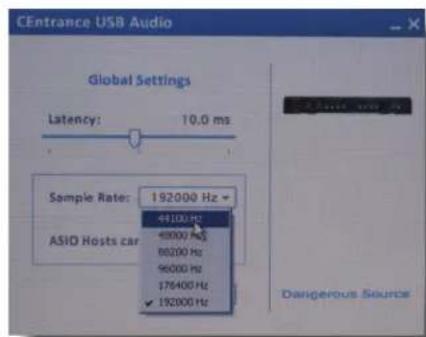
Set the rate (In this case auditioning a CD).
(PHOTO OP 09)
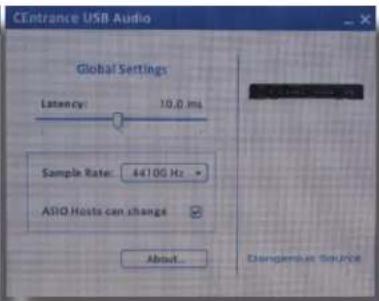
44100Hz selected (PHOTO OP 10)
text_image
CEentrance USB Audio Global Settings Latency: 10.0 ms Sample Rate: 192000 Hz ASIO Hosts car 44100 Hz 48000 Hz 86200 Hz 96000 Hz 176400 Hz ✓ 192000 Hz Dangerous SourcePHOTO OP 09
text_image
CEentrance USB Audio Global Settings Latency: 10.0 ms Sample Rate: 4410G Hz ASIO Hosts can change About... Dangerous SourcePHOTO OP 10
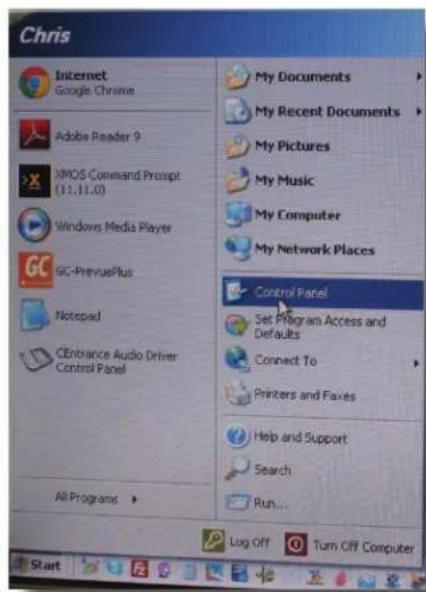
To select the USB card if you have multiple devices, open the Windows control panel.
(PHOTO OP 11)
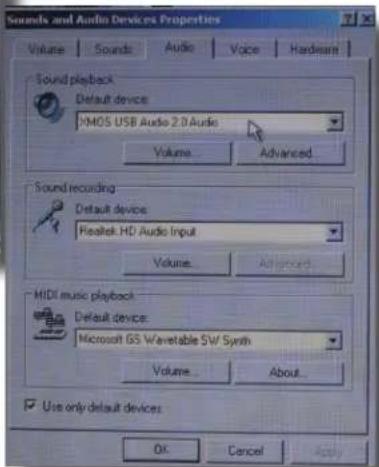
Select 'Sounds and Devices'. (PHOTO OP 12)
Select the XMOS USB Audio 2.0 device. (PHOTO OP 13)
text_image
Chris Internet Google Chrome Adobe Reader 9 XMOS Command Prompt (11.11.0) Windows Media Player GC-PreviewPlus Notepad CEnbrance Audio Driver Control Panel All Programs > My Documents My Recent Documents My Pictures My Music My Computer My Network Places Control Panel Set Program Access and Defaults Connect To Printers and Faxes Help and Support Search Run... Log Off Turn Off ComputerPHOTO OP 11

text_image
C:\Users\Current Settings\Current Settings\Current Settings\Current Settings\Current Settings\Current Settings\Current Settings\Current Settings\Current Settings\Current Settings\Current Settings\Current Settings\Current Settings\Current Settings\Current Settings\Current Settings\Current Settings\Current Settings\Current Settings\Current Settings\Current Settings\Current Settings\Current Settings\Current Settings\Current Settings\Current Settings\Current Settings\Current Settings\Current Settings\Current Settings\Current Settings\Current Settings\Current Settings\Current Settings\nCurrent Settings\nCurrent Settings\nCurrent Settings\nCurrent Settings\nCurrent Settings\nCurrent Settings\nCurrent Settings\nCurrent Settings\nCurrent Settings\nCurrent Settings\nCurrent Settings\nCurrent Settings\nCurrent Settings\nCurrent Settings\nCurrent Settings\nCurrent Settings\nCurrent Settings\nCurrent Settings\nCurrent Settings\nCurrent Settings\nCurrent Settings\nCurrent Settings\nCurrent Settings\nCurrent Settings\nCurrent Settings\nCurrent Settings\nCurrent Settings\nCurrent Settings\nCurrent Settings\nCurrent Settings\nCurrent Settings\nCurrent Settings\nCurrent Settings\n current settings\ncurrent settings\ncurrent settings\ncurrent settings\ncurrent settings\ncurrent settings\ncurrent settings\ncurrent settings\ncurrent settings\ncurrent settings\ncurrent settings\ncurrent settings\ncurrent settings\ncurrent settings\ncurrent settings\ncurrent settings\ncurrent settings\ncurrent settings\ncurrent settings\ncurrent settings\ncurrent settings\ncurrent settings\ncurrent settings\ncurrent settings\ncurrent settings\ncurrent settings\ncurrent settings\ncurrent settings\ncurrent settings\ncurrent settings\ncurrent settings\ncurrent settings\ncurrent settings\ncurrent settings\ncurrent设置\ncurrent settings\ncurrent settings\ncurrent settings\ncurrent settings\ncurrent settings\ncurrent settings\ncurrent settings\ncurrent settings\ncurrent settings\ncurrent settings\ncurrent settings\ncurrent settings\ncurrent settings\ncurrent settings\ncurrent settings\ncurrent settings\ncurrent settings\ncurrent settings\ncurrent settings\ncurrent settings\ncurrent settings\ncurrent settings\ncurrent settings\ncurrent settings\ncurrent settings\ncurrent settings\ncurrent settings\ncurrent settings\ncurrent settings\ncurrent settings\ncurrent settings\ncurrent settings\ncurrent settings\ncurrent settings\ncurrent settings\ncurrent settings\ncurrent settings\ncurrent settings\ncurrent settings\ncurrent settings\ncurrent settings\ncurrent settings\ncurrent settings\ncurrent settings\ncurrent settings\ncurrent settings\ncurrent settings\ncurrent settings\ncurrent settings\ncurrent settings\ncurrent settings\ncurrent settings\ncurrent settings\ncurrent settings\ncurrent settings\ncurrent settings\ncurrent settings\ncurrent settings\nccurrent settings\ncurrent settings\ncurrent settings\ncurrent settings\ncurrent settings\ncurrent settings\ncurrent settings\ncurrent settings\ncurrent settings\ncurrent settings\ncurrent settings\ncurrent settings\ncurrent settings\ncurrent settings\ncurrent settings\ncurrent settings\ncurrent settings\ncurrent settings\ncurrent settings\ncurrent settings\ncurrent settings\ncurrent settings\ncurrent settings\ncurrent settings\ncurrent settings\ntcnsatnctnctnctnctnctnctnctnctnctnctnctnctnctnctnctnctnctnctnctnctnctnctnctnctnctnctnctnctnctnctnctnctnctnctnctnctnctnctnctnctnctnctnctnctnctnctnctnctnctnctnactnctnctnctnctnctnctnctnctnctnctnctnctnctnctnctnctnctnctnctnctnctnctnctnctnctnctnctnctnctnctnctnctnctnctnctnctncttnttnttnttnttnttnttnttnttnttnttnttnttnttnttnttnttnttnttnttnttnttnttnttnttnttnttnttnttnttnttnttnttnttnttnttnttnttnttnttnttnttnttnttnttnttnttnttnttnttnttmttttttttttttttttttttttttttttttttttttttttttttttttttttttttttttttttttttttttttttttttttttttttttttttttttttttttttttttttttttttttttttttttttttttttttttttttttttttttttttttttttttttttttttttttttttttttttttttttttttttttttPHOTO OP 12
Play audio for one second so the USB card learns the sample rate and clocking information.
You are ready to rock.
text_image
Sounds and Audio Devices Properties Volume | Sounds | Audio | Voice | Hardware | Sound playback Default device: XMOS USB Audio 2.0 Audio Volume... Advanced... Sound recording Default device: Realtek HD Audio Input Volume... Advanced... MIDI music playback Default device: Microsoft GS Wavetable SW/ Synth Volume... About... Use only default devices OK Cancel ApplyPHOTO OP 13
Note: If you change the sample rate, you have to give the USB card a 1 second burst of "Play" again so it can adjust itself to the new condition.
Windows 8 is supposed to implement a USB Audio 2.0 system. The engineers at Dangerous chose Audio 2.0 because it runs higher sample and bit rates. PC users, welcome to the bleeding edge!
Source: Application Examples
The Producer
Talent is using headphones with ANALOG INPUT TWO (headphone mix out of the computer) and ANALOG INPUT ONE for zero latency vocals.
Producer is monitoring via speakers the usb for the master mix and ANALOG INPUT ONE for zero latency vocals.
The Road Warrior (traveling musician)
Monitor the music and click track while jamming guitar and looping it back into the session.
Laptop main session tracks connected via USB.
Click track connected via the analog output of the laptop to INPUT TWO.
Guitar processor plugged into INPUT ONE.
Headphones set up to monitor all 3.
Speaker outputs select USB and INPUT ONE.
SELECTED LINE OUT feeds a return back into the laptop to track session ideas.
The DJ
A laptop DJ, feeding SOURCE via USB (or any other input), could send this mix to the front of house for amplification, while they utilize the speaker levels for booth control and headphone levels for personal monitoring.
More applications to come!
We want to hear about your creative uses.
SPECIFICATIONS
INPUT 1 TO SELECTED LINE OUT AND SPEAKERS
| Frequency Response | +0, -0.5dB from <10 Hz to >80 kHz | |||
| THD+N | < | 0.0025% | @+4d | |
| IMD (SMPTE) | < 0.0025% @ +4dBu | |||
| Crosstalk rejection | >108dB | |||
| Noise | < | -93 dB, | unweighted |
NOTE: Speaker outs can run at -6dB (factory setting) or unity gain (remove jumpers 3 and 4)
| Maximum input level | > +26 dBu | |||
| INPUT 2 TO SELECTED LINE OUT AND SPEAKERS | ||||
| Frequency Response | +0, -0.5dB from <10 Hz to >80 kHz | |||
| THD+N | < | 0.0025% | @ | |
| IMD (SMPTE) | < 0.0026% @ +4dBu | |||
| Crosstalk rejection | > | -98dB | ||
| Noise | < | -90 dB, | unweighted | |
NOTE: Input 2 can run at -10dBV or -16dBV (by setting JP1 and JP2. Remove for -10dBV)
Default factory setting is -16dBV to accommodate 1/8" headphone outputs of iPhones and cell phones
| Frequency response | +0, -0.5dB from <10Hz to >50kHz | ||
| OUTPUTS | |||
| The meter and speakers outputs are fully balanced and 600 ohm drive capable to >+26dBu. | |||
| Volume knobs track better than | +- 0.5dB from unity to -40dB. | ||
| The headphone amp can easily drive several sets of cans. | |||
| Maximum output level | > +26 dBu | ||
| Shipping weight (in carton) | 7 | Ibs | |
| Dimensions | 12 3/4" wide X 8" deep X 1 5/8" high | ||
DIGITAL INPUTS
The AES inputs lock from 32kHz to 192kHz sample rates with the following: <0.004% THD+N
-0.2dB at 10 Hz and 22kHz (48kHz sample rate)
| -0.2dB | at | 10Hz | and | ||
| Crosstalk | rejection | >103dB | |||
| Power Supply: | 12 volt, 2 Amp (Part number PSU-SRC) | ||||
| Optional | Rack Kit: | SRC | (Source | Rack |
Now it's your turn to unleash the potential of SOURCE and tell us all the unusual applications you've utilized it in!
Experiment well beyond the pages of this manual. The Source is a still audio river that runs deep.
-The Dangerous Music Team
-you will hear the difference...
WARRANTY
Free 2 year extended warranty with online registration.
Standard warranty: 90 days parts and labor, subject to inspection.
Does not include damage incurred through shipping damage, abusive operation or modifications/attempted repair by unauthorized technicians.
| USA | EUROPE |
| Dangerous Music Inc. Dangerous Music Europe | |
| 231 Stevens Road Stieleichenweg 55 | |
| Edmeston, NY 13335 50999 Cologne, Germany | |
| Fon: +49 2236 393731 | |
| Email: info@dangerousmusic.com E-mail: info@dangerousmusic.de | |
Dangerous Music, Inc. reserves the right to alter the software and design of their equipment.
If after reading the manual more information for an application is needed, please contact us via email for the quickest response.
- Factory contact for RA# must occur before shipping a unit to us for service.
- Please keep the original cartons in case storage or transportation of units is required.
- Always insure shipment as these damages are not covered by the warranty.
- Operating the device with anything other than the Dangerous Music Power Supply will void the warranty
- Thank you for actually reading the manual. Now go make some Dangerous Music!
DANGEROUS