
TRS-10 - Remote control Ziv - Free user manual and instructions
Find the device manual for free TRS-10 Ziv in PDF.


| Product Type | Wireless Remote Control for Sony Cameras with Multi-Terminal |
| Brand | Ziv |
| Model | TRS-10 |
| Compatibility | Sony cameras with Multi Interface Port or 3-pin Port |
| Channels | 32 |
| Operation Distance | 328 ft (100 m) |
| Transmitter Standby Time | 1000 hours |
| Receiver Standby Time | 300 hours |
| Power Source (Transmitter) | 2 AAA batteries |
| Power Source (Receiver) | 2 AAA batteries |
| Transmitter Dimensions | 5.35 × 1.8 × 0.66 in (135.9 × 45.7 × 16.8 mm) |
| Receiver Dimensions | 2.75 × 1.5 × 0.99 in (70 × 38 × 25 mm) |
| Transmitter Weight | 1.6 oz (45.4 g) |
| Receiver Weight | 1.2 oz (34 g) |
| Shutter Release Modes | Single, Continuous, Delayed, Bulb, Timed |
| Video Recording Modes | Time Elapsed (N1) and Timed (N2) |
| Zoom Control | Optical and digital zoom via T/W buttons |
| Display | LCD screen on both transmitter and receiver |
| Mounting | Cold-shoe mount and 1/4 in. tripod mount on receiver |
| Warranty | 1 Year Limited Warranty |
| Cleaning | Clean with a soft, dry cloth |
| Safety Precautions | Keep dry; do not disassemble; keep away from children |
Frequently Asked Questions - TRS-10 Ziv
User questions about TRS-10 Ziv
0 question about this device. Answer the ones you know or ask your own.
Ask a new question about this device
Download the instructions for your Remote control in PDF format for free! Find your manual TRS-10 - Ziv and take your electronic device back in hand. On this page are published all the documents necessary for the use of your device. TRS-10 by Ziv.
USER MANUAL TRS-10 Ziv
COMPATIBLE WITH SONY CAMERAS WITH A MULTI-TERMINAL
USER MANUAL
PRECAUTIONS
- Please read and follow these instructions, and keep this manual in a safe place.
- There are no user-serviceable parts inside the device. Do not attempt to disassemble or perform any unauthorized modification.
- Do not operate the unit in the presence of flammable gas or vapors.
- Do not handle with wet hands or immerse in water or expose to rain. Failure to observe these precautions could result in fire or electric shock.
- Keep out of the reach of children. This device contains small parts which may pose a choking hazard.
- Do not use or leave the device in conditions of extreme heat, severe cold, or high humidity.
- Clean the unit with a soft, dry cloth.
- Make sure the item is intact and that there are no missing parts.
- Handle the unit with care.
- All images are for illustrative purposes only.
OVERVIEW
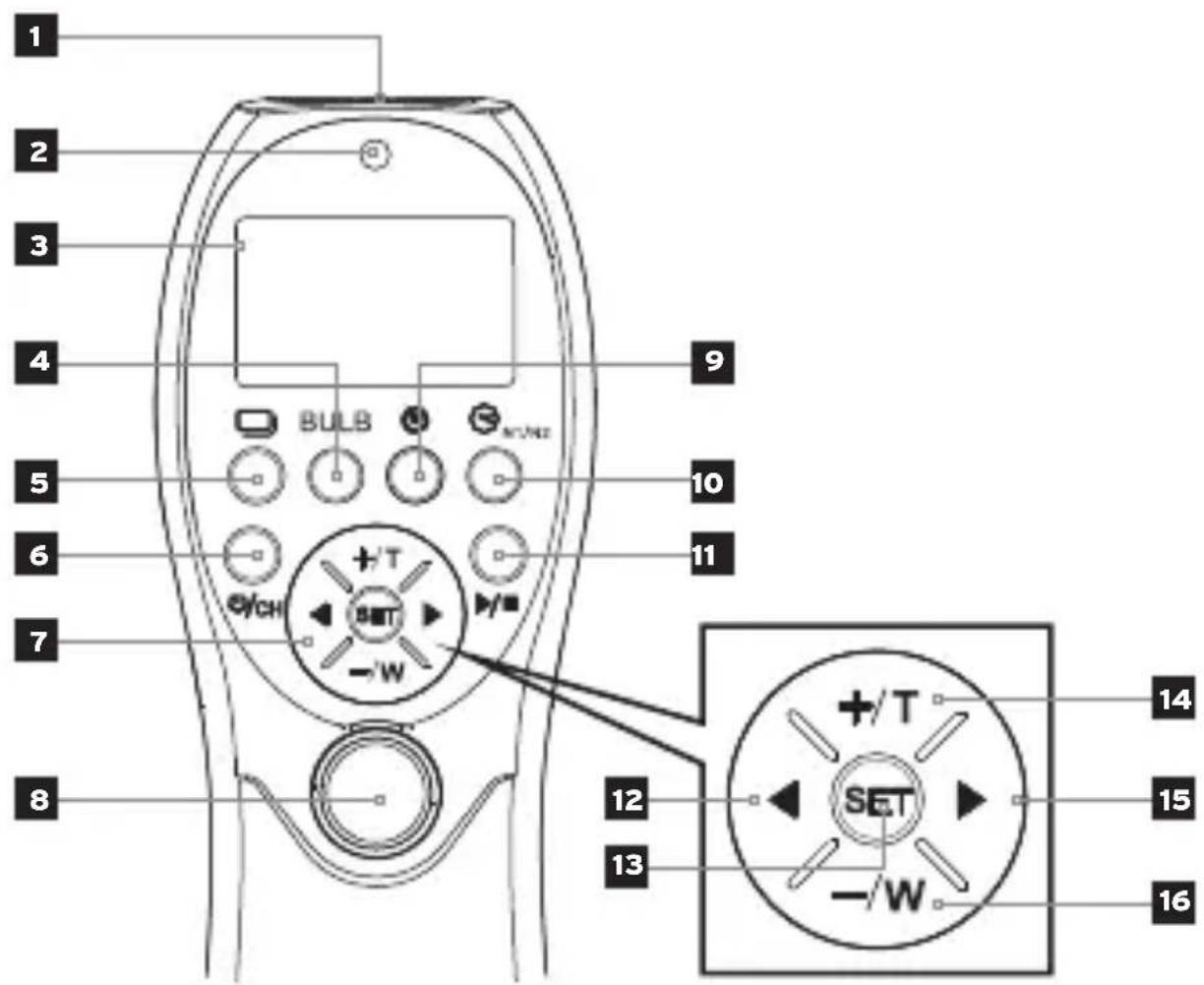
Transmitter
- USB port
- Indicator light
- LCD screen
- Bulb exposure [BULB
-
Single/continuous shooting [1]
-
Power/channel [ψ/CH]
-
Directional pad
-
Shutter button
-
Timed exposure [ ]
-
Video mode [ ] N1/N2
-
Play/Stop button [▶]
-
Left select [◀]
-
Setting confirm [SET]
-
Numeric increase/ +zoom [+]T
-
Right select[▶]
-
Numeric decrease/- -zoom [-/w]
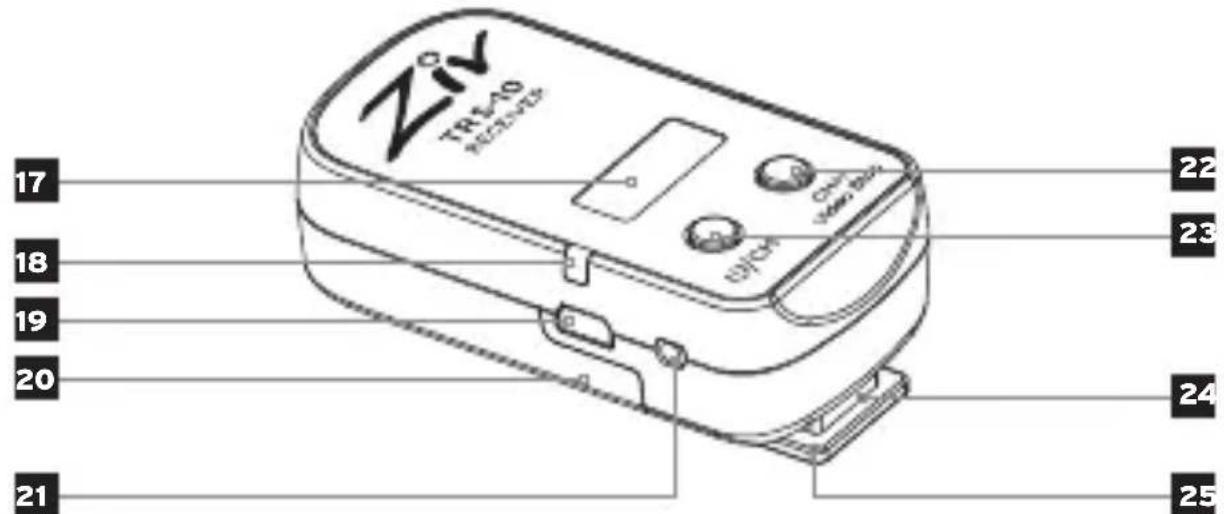
Receiver
- LCD screen
- Indicator light
- USB port
- Battery cover
- 2.5 mm trigger output
- Channel increase/video stop* [Video Stop]
- Power/Channel decrease* [U/CH-]
- Cold-shoe mount
- 1/4 in. mount
* Press and hold together to set the receiver channel. Use the directional pad to change the channel.
Note: The remote's photo features are not available for camcorder operation.
Transmitter
Receiver
SINGLE SHOOTING
1 Press [☐] until CS appears on the LCD screen.
2 Half press the shutter release button to focus.
3 Press fully to take a shot.
CONTINUOUS SHOOTING
1 Press [☐] until CS appears on the LCD screen.
2 Set your camera to a continuous shooting mode.
3 Half press the shutter release button to focus.
4 Press and hold the shutter release to trigger continuous shooting.
5 Release the shutter button to stop continuous shooting.
DELAYED SHOOTING
1 Press and hold [☐] until Delay appears on the LCD screen.
2 Press the [SET] button until the onscreen numbers are flashing. Use the directional pad to change settings.
(Left digits = Number of shots)
(Right digits = Delay before shots)
3 Half press the shutter release button to focus.
4 Press fully to start countdown and exposures.
BULB SHOOTING
1 Set the camera and remote into Bulb mode.
2 Half press the shutter release button to focus.
3 Press fully to start Bulb shooting.
4 Press again to stop Bulb shooting.
TIMED SHOOTING
1 Press [→] to enter timed shooting. Use the directional [←] to switch between settings. Press [s] until numbers flash on the LCD, and use the [+] buttons to change the selected values.
[DELAY] Delay before start time [LONG] Exposure time [INTVL] Interval between exposure [N1] Number of shots
2 Press [▶] to start the sequence.
VIDEO SHOOTING
N1: Time Elapsed Video Recording
1 Press [☐] until N1 appears on the LCD screen.
2 Press [▶] to start video recording. Use the [T] buttons to adjust zoom.
3 Press [▶] again to stop recording.
N2: Timed Video Recording
1 Press and hold [ ] until N2 appears on the LCD screen.
2 Press [s] until the time is flashing. Use the [+] buttons to change the value.
3 Press [▶] to start video recording. Use the [T] buttons to adjust zoom. Once the time has run out, the remote will reset.
CONNECTIVITY AVAILABLE FUNCTIONS Multi Interface Port
- Timed/ delayed/ bulb/ single and continuous shutter release
• Optical and digital zoom - Video shooting
3-pin Port
- Timed, delayed, bulb, single, and continuous shutter release
SPECIFICATIONS
| Channels | 32 |
| Operation distance | 328 ft. (100 m) |
| Transmitter standby | 1000 hr. |
| Receiver standby | 300 hr. |
| Power | Transmitter2 AAA batteries |
| Receiver2 AAA batteries | |
| Dimensions(H × W × D) | Transmitter5.35 × 1.8 × 0.66 in.135.9 × 45.7 × 16.8 mm |
| Receiver2.75 × 1.5 × 0.99 in.70 × 38 × 25 mm | |
| Weight | 1.6 oz. (45.4 g) |
| Receiver1.2 oz. (34 g) |
ONE-YEAR LIMITED WARRANTY
This ZIV product is warranted to the original purchaser to be free from defects in materials and workmanship under normal consumer use for a period of one (1) year from the original purchase date or thirty (30) days after replacement, whichever occurs later. The warranty provider's responsibility with respect to this limited warranty shall be limited solely to repair or replacement, at the provider's discretion, of any product that fails during normal use of this product in its intended manner and in its intended environment. Inoperability of the product or part(s) shall be determined by the warranty provider. If the product has been discontinued, the warranty provider reserves the right to replace it with a model of equivalent quality and function.
This warranty does not cover damage or defect caused by misuse, neglect, accident, alteration, abuse, improper installation or maintenance. EXCEPT AS PROVIDED HEREIN, THE WARRANTY PROVIDER MAKES NEITHER ANY EXPRESS WARRANTIES NOR ANY IMPLIED WARRANTIES, INCLUDING BUT NOT LIMITED TO ANY IMPLIED WARRANTY OF MERCHANTABILITY OR FITNESS FOR A PARTICULAR PURPOSE. This warranty provides you with specific legal rights, and you may also have additional rights that vary from state to state.
To obtain warranty coverage, contact the Ziv Customer Service Department to obtain a return merchandise authorization ("RMA") number, and return the defective product to Ziv along with the RMA number and proof of purchase. Shipment of the defective product is at the purchaser's own risk and expense.
For more information or to arrange service, visit www.zivphotogear.com or call Customer Service at 212-594-2353.

natural_image
Abstract black logo resembling a stylized letter G (no text or symbols)ZIV°
A Gradus Group Brand
Product warranty provided by the Gradus Group.
www.gradusgroup.com
ZIV is a registered trademark of the Gradus Group.
© 2017 Gradus Group LLC. All Rights Reserved.
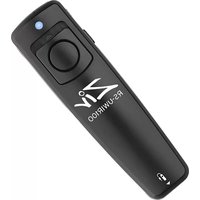

Brand : Ziv
Model : TRS-10
Category : Remote control