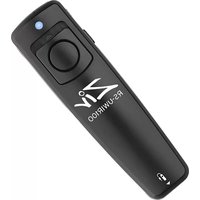
RS-UWIR100 - DVD player Ziv - Free user manual and instructions
Find the device manual for free RS-UWIR100 Ziv in PDF.


| Product Type | Remote Shutter Trigger |
| Brand | Ziv |
| Model | RS-UWIR100 |
| Dimensions | 1 x 0.6 x 3.5 in (2.5 x 1.6 x 8.9 cm) |
| Weight | 0.9 oz (25 g) |
| Power Source | 12V 23A battery (included) |
| Wireless Trigger | Infrared (IR) with up to 16 ft range (line of sight) |
| Wired Trigger | Via shutter release cable (8 included cables + 2.5 mm adapter) |
| Shooting Modes | Single shot, continuous (with trigger lock for bulb mode) |
| LED Light Modes | 4 modes: slow blink, fast blink, fast double blink, medium blink, solid medium, solid bright (selectable via side and rear switches) |
| Trigger Lock | Yes, for continuous shooting or bulb mode |
| Cable Compatibility | Canon sub-mini, Canon N3, Sony 3-pin, Nikon 10-pin, Nikon DC1, Nikon DC2, Olympus 3-pin, Olympus USB multi-connector |
| Battery Life | Varies; remove battery when not in use to prevent leakage |
| Operating Temperature | Not specified; avoid extreme heat, cold, and humidity |
| Construction | Plastic body |
| Safety Precautions | Do not disassemble, avoid flammable gas, keep dry, handle battery with care |
| Maintenance | Clean with soft dry cloth; remove battery for long storage |
| Included Accessories | Remote, 23A battery, 8 shutter release cables, user manual, 2.5 mm cable compatibility insert |
| Warranty | 1-year limited warranty (repair or replacement) |
| Compatible Cameras | Most DSLR cameras with IR or wired shutter release port |
Frequently Asked Questions - RS-UWIR100 Ziv
User questions about RS-UWIR100 Ziv
0 question about this device. Answer the ones you know or ask your own.
Ask a new question about this device
Download the instructions for your DVD player in PDF format for free! Find your manual RS-UWIR100 - Ziv and take your electronic device back in hand. On this page are published all the documents necessary for the use of your device. RS-UWIR100 by Ziv.
USER MANUAL RS-UWIR100 Ziv
The Ziv Shutter Remote RS-UWIR100 can trigger the shutter on most DSLR cameras. With both wired and infrared (IR) triggering abilities, this accessory is perfect for portrait, outdoor, and long-exposure photography where the user is looking to step away from the camera to avoid camera shake. The eight included shutter release cables expand the remote's compatibility to cover nearly every digital SLR camera (additional cables for the latest cameras are available separately). The remote also features a four-mode LED light.
PRECAUTIONS
- Please read and follow these instructions and keep this manual in a safe place.
-
There are no user-serviceable parts inside the devices. Do not attempt to disassemble or perform any unauthorized modification.
-
Do not operate the unit in the presence of flammable gas or vapors.
- Do not handle with wet hands or immerse in water or expose to rain. Failure to observe these precautions could result in fire or electric shock.
- Keep out of reach of children. This device contains small parts which may pose a choking hazard.
- Observe caution when handling the battery. Battery may leak or explode if improperly handled. Use only the batteries listed in this manual. Make certain to align the battery with the correct polarity.
- The battery is prone to leakage when fully discharged. To avoid damage to the product, be sure to remove the battery when leaving the product unattended for prolonged periods or when no charge remains.
- Handle the unit with care.
- Do not use or leave the devices in conditions of extreme heat, severe cold, or high humidity.
- Turn off the power of the camera before inserting or removing the remote's cable.
- Dispose of used batteries, packaging, and old devices in accordance with appropriate local environmental regulations.
- Clean the unit with a soft, dry cloth.
• Make sure the item is intact and that there are no missing parts.
- All photos are for illustrative purposes only.
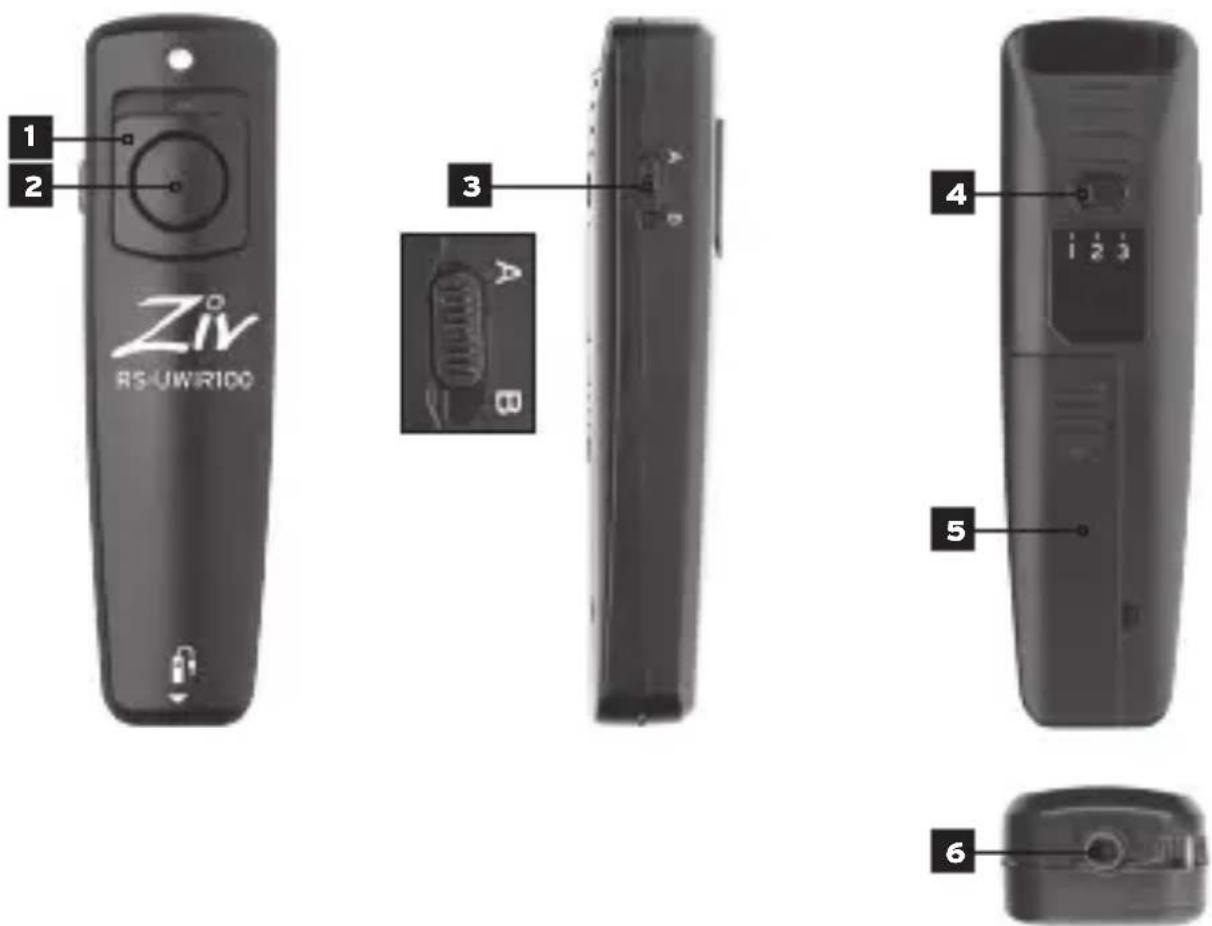
OVERVIEW
Front
- Trigger lock switch
- Shutter trigger button
Side
- Side switch
Back
- Rear switch
- Battery compartment
Bottom
- Shutter release port
In The Box
- RS-UWIR100 remote
- 23A battery
- Eight shutter release cables
- User manual
- 2.5 mm Cable Compatibility insert
CHANGING THE BATTERY
The Ziv RS-UWIR100 uses a 12V 23A battery. To replace the battery, do the following:
1 OPEN BATTERY DOOR.
Remove the battery compartment door on the back of the remote.
2 REMOVE BATTERY.
Remove the battery from the compartment.
INSERT NEW BATTERY.
Install the new battery in the compartment. Ensure the battery is oriented as indicated according to the markings inside the chamber.
4 CLOSE BATTERY DOOR.
Reinstall the battery compartment door to complete the process.
1 ACTIVATE CAMERA'S IR MODE.
Power on your camera and activate IR remote control mode (see your camera's manual).
2 SET REAR SWITCH TO 1.
Set the remote's rear switch to position "1".
3 ENSURE CLEAR LINE OF SIGHT.
Ensure you have a clear line of sight between the remote trigger and your camera's IR sensor(s).
4 SET CAMERA'S SHOOTING MODE.
Set your camera to the desired shooting mode.
5 FOCUS CAMERA AND PRESS TRIGGER.
Pre-focus your camera, then press or hold the remote trigger's shutter release button to activate your camera's shutter.
Note: When using the remote as a wireless IR trigger, ensure that there is no shutter release cable plugged into the remote's shutter release port.
WIRED SINGLE SHOT MODE
1 SET CAMERA TO SINGLE SHOT MODE.
Power on your camera and set it to single shot mode.
2 CONNECT REMOTE TO CAMERA.
Plug the included compatible shutter release cable into your camera's shutter release port, then into the remote's shutter release port.
PRESS TRIGGER.
Press the remote's shutter release button to activate your camera's shutter.
WIRED CONTINUOUS SHOT MODE
1 SET CAMERA TO CONTINUOUS SHOT MODE.
Power on your camera and set it to continuous shot mode.
2 CONNECT REMOTE TO CAMERA.
Plug the included compatible shutter release cable into your camera's shutter release port, then into the remote's shutter release port.
FOCUS CAMERA AND PRESS TRIGGER.
Pre-focus your camera, then press or hold the remote trigger's shutter release button to activate your camera's shutter.
Note: When using your camera in bulb or continuous mode, you can use the remote's trigger lock switch to simulate holding down the shutter release button. Simply undo the lock to release the button.
LED MODE
The Ziv RS-UWIR100 includes an LED function, which enables the remote to emit a bright light. This is useful in dark situations, or instances in which you need to catch the attention of your subject or someone nearby. This function has four modes.
| SWITCH POSITION PRESS TYPE | |||
| SideRearHalfFull | |||
| A | 3 | Slow speed blink | Fast speed blink |
| B 1 None | Fast double blinks | ||
| B 2 None | Medium speed blink | ||
| B | 3 | Solid light medium | Solid light bright |
Simply press and hold the remote's shutter release button to activate the light or use the trigger lock to keep the shutter release button pressed down.
SPECIFICATIONS
| Power | 12V 23A battery |
| Dimensions | 1" x 0.6" x 3.5"(2.5 x 1.6 x 8.9 cm) |
| Weight | 0.9 oz. (25 g) |
CABLE COMPATIBILITY
| 01 | Canon sub-mini |
| 02 | Canon (N3 type) 3-pin |
| 03 | Sony 3-pin |
| 04 | Nikon 10-pin |
| 05 | Nikon DC1 |
| 06 | Nikon DC2 |
| 07 | Olympus 3-pin |
| 08 | Olympus USB multi-connector |
Note: For additional compatibility information, visit www.zivphotogear.com.
ONE-YEAR LIMITED WARRANTY
This ZIV product is warranted to the original purchaser to be free from defects in materials and workmanship under normal consumer use for a period of one (1) year from the original purchase date or thirty (30) days after replacement, whichever occurs later. The warranty provider's responsibility with respect to this limited warranty shall be limited solely to repair or replacement, at the provider's discretion, of any product that fails during normal use of this product in its intended manner and in its intended environment. Inoperability of the product or part(s) shall be determined by the warranty provider. If the product has been discontinued, the warranty provider reserves the right to replace it with a model of equivalent quality and function.
This warranty does not cover damage or defect caused by misuse, neglect, accident, alteration, abuse, improper installation or maintenance. EXCEPT AS PROVIDED HEREIN, THE WARRANTY PROVIDER MAKES NEITHER ANY EXPRESS WARRANTIES NOR ANY IMPLIED WARRANTIES, INCLUDING BUT NOT LIMITED TO ANY IMPLIED WARRANTY OF MERCHANTABILITY OR FITNESS FOR A PARTICULAR PURPOSE. This warranty provides you with specific legal rights, and you may also have additional rights that vary from state to state.
To obtain warranty coverage, contact the Ziv Customer Service Department to obtain a return merchandise authorization (“RMA”) number, and return the defective product to Ziv along with the RMA number and proof of purchase. Shipment of the defective product is at the purchaser's own risk and expense.
For more information or to arrange service, visit www.zivphotogear.com or call Customer Service at 212-594-2353.

Product warranty provided by the Gradus Group.
www.gradusgroup.com
ZIV is a registered trademark of the Gradus Group.
© 2015 Gradus Group LLC. All Rights Reserved.


Brand : Ziv
Model : RS-UWIR100
Category : DVD player