
HOLDER EASY MOUNT HH-12 - Phone Accessories NOKIA - Free user manual and instructions
Find the device manual for free HOLDER EASY MOUNT HH-12 NOKIA in PDF.


| Product Type | Windshield mounting bracket |
| Brand | NOKIA |
| Model | HOLDER EASY MOUNT HH-12 |
| Category | Phone accessories |
| Compatibility | Nokia phone holders (e.g., CR-39); phones with height 95-120 mm, width 42-55 mm, thickness 13-26 mm, max weight 200 g |
| Attachment Method | Suction cup with locking lever |
| Adjustments | Arm angle (center screws); plate orientation (screw under plate) |
| Operating Temperature | Up to +70 °C (do not expose to direct sunlight) |
| Power Supply | None (mechanical) |
| Maintenance and Cleaning | Clean windshield before installation; use a soft cloth and soapy water; avoid harsh chemicals |
| Safety | Do not obstruct airbags; do not adjust while driving; check attachment regularly; comply with local laws |
| Spare Parts | Replacement suction cup (not included, check availability) |
| Repairability | Not user-repairable; contact an authorized service center |
| Warranty | Not specified |
Frequently Asked Questions - HOLDER EASY MOUNT HH-12 NOKIA
User questions about HOLDER EASY MOUNT HH-12 NOKIA
0 question about this device. Answer the ones you know or ask your own.
Ask a new question about this device
Download the instructions for your Phone Accessories in PDF format for free! Find your manual HOLDER EASY MOUNT HH-12 - NOKIA and take your electronic device back in hand. On this page are published all the documents necessary for the use of your device. HOLDER EASY MOUNT HH-12 by NOKIA.
USER MANUAL HOLDER EASY MOUNT HH-12 NOKIA
Nokia Holder Easy Mount HH-12
Introduction
This mounting device allows you to attach your compatible Nokia mobile holder to the windshield of your vehicle.
To use the mounting device with your compatible mobile holder,
attach the mounting device to the windshield, adjust the mounting device into the desired position, and attach your mobile holder to the mounting device.
General safety instructions
Obey all local laws. Always keep your hands free to operate the vehicle while driving. Your first consideration while driving should be road safety. Only operate the mounting device or mobile holder if it is safe to do so under all driving conditions.
When you install the mounting device or mobile holder, ensure that they do not interfere with or hinder the steering or braking systems or other systems used in the operation of the vehicle (for example, airbags) or disturb your field of vision while driving.
Check that the deployment of the airbag is not blocked or impaired in any way.
Ensure that the mounting device or mobile holder is not installed where you might come in contact with it in the event of an accident or collision.
Periodically check that the suction cup at the bottom of the mounting device is firmly attached to the
windshield, especially if the ambient temperature changes a lot.
Never leave the mounting device inside the vehicle in direct sunlight or in excessive heat. The mounting device and suction cup may be damaged and adhesion may be impaired if the inside temperature exceeds +70ircC (160ircF) .
Attach to a windshield
Locate a safe mounting surface on the windshield, and clean the surface thoroughly with a glass cleaner and a clean towel. If the ambient temperature is below +15ircC (60ircF) , carefully warm the surface and the suction cup with a hair dryer to ensure a firm grip on the windshield. Ensure that you do
not heat the windshield excessively to avoid damage to it.
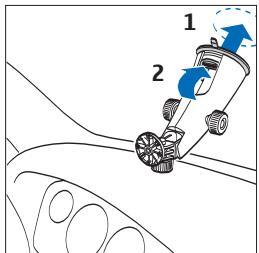
Press the suction cup at the bottom of the mounting device firmly on the windshield (see step 1 at the start of this guide), and carefully push the locking lever inside the mounting device [2] towards the suction cup to create
a vacuum between the suction cup and the windshield. Check that the suction cup is firmly attached.
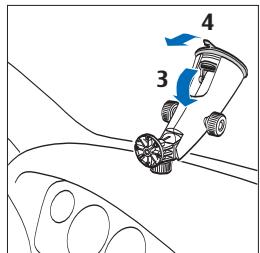
To detach the mounting device from the windshield, carefully push
the locking lever toward the top of the mounting device (3), and pull the strap located on the edge of the suction cup (4).
Set to the desired position
Do not adjust the mounting device while driving.
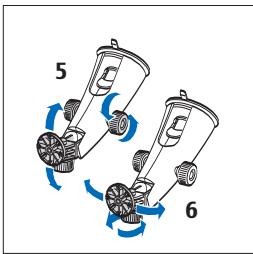
To set the top of the mounting device to the desired position, loosen the two screws in the middle of the mounting device, turn the top to the desired position, and tighten the screws
(5). Ensure that the top of the device is firmly locked into place.
To set the mounting plate at the top of the mounting device to the desired position, loosen the screw below the plate, turn the plate to the desired position, and tighten the screw (6).
Mount the mobile holder
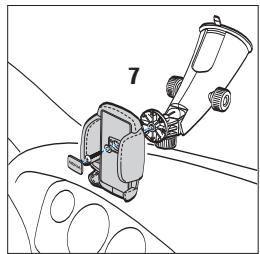
To attach a compatible Nokia mobile holder to the mounting plate, use the screw supplied with the holder.
For example, to use the mobile holder CR-39, remove the protection plate with the Nokia text from the holder, attach the
holder to the mounting plate with the supplied screw, and replace the protection plate (7). Insert your phone into the holder, and press the clamps at the sides of the holder until the phone is firmly in place. To release the phone, press the button below the left clamp. The mobile holder CR-39 supports mobile devices with the following
dimensions: height 95 - 120 mm, width 42 - 55 mm, thickness 13 - 26 mm, weight 200 g at maximum.
When attaching a mobile holder, ensure that the phone display is clearly visible for the user. For your safety, install the holder in the upright position.
Care and maintenance
Your device is a product of superior design and craftsmanship and should be treated with care. The suggestions below will help you protect your warranty coverage.
-
Keep all accessories and enhancements out of the reach of small children.
-
Do not use or store the device in dusty, dirty areas. Its moving parts can be damaged.
- Do not drop, knock, or shake the device. Rough handling can break fine mechanics.
-
Do not use harsh chemicals, cleaning solvents, or strong detergents to clean the device.
-
Do not paint the device. Paint can clog the moving parts and prevent proper operation.
If the product is not working properly, take it to the nearest authorized service facility for service.
Brand : NOKIA
Model : HOLDER EASY MOUNT HH-12
Category : Phone Accessories