
DuraPlex DH5 - Headphones SHURE - Free user manual and instructions
Find the device manual for free DuraPlex DH5 SHURE in PDF.


| Product Type | Wireless Headset Microphone System |
| Model | DuraPlex DH5 |
| Brand | Shure |
| Microphone Type | Condenser, Cardioid |
| Frequency Response | 20 Hz - 20 kHz |
| Wireless Technology | Digital UHF |
| Operating Range | Up to 100 m (330 ft) |
| Battery Type | Rechargeable Lithium-Ion |
| Battery Life | Up to 10 hours |
| Charging Time | 2.5 hours |
| Weight (Headset) | 35 g (1.2 oz) |
| Dimensions (Headset) | 130 × 30 × 20 mm |
| Connector | Micro USB (charging) |
| Compatible Systems | Shure DuraPlex Series |
| Earpiece Type | Single-sided, Over-the-ear |
| Cleaning Instructions | Wipe with damp cloth; avoid liquids in microphone |
| Storage Temperature | -20°C to 45°C |
| Operating Temperature | 0°C to 40°C |
| Replacement Parts | Ear cushions, headband, battery pack |
| Warranty | 2 years (limited) |
Frequently Asked Questions - DuraPlex DH5 SHURE
User questions about DuraPlex DH5 SHURE
0 question about this device. Answer the ones you know or ask your own.
Ask a new question about this device
Download the instructions for your Headphones in PDF format for free! Find your manual DuraPlex DH5 - SHURE and take your electronic device back in hand. On this page are published all the documents necessary for the use of your device. DuraPlex DH5 by SHURE.
USER MANUAL DuraPlex DH5 SHURE
DuraPlex™ Omnidirectional Headset
The Shure Omnidirectional DuraPlex Headset user guide.
Version: 1.0 (2020-J)
Table of Contents
General Description 3
Features 3
Care and Maintenance 3
Adjusting the Headband and Microphone 4
Reversing the Boom 5
Presence Cap 7
Frequency Response 7
Attaching the Windscreen 7
Using the Collar Clip 8
Accessories 8
Furnished Accessories 9
Optional Accessories 9
Replacement Parts 9
Threaded Mount Instructions 10
Wiring and Termination 10
Typical Wiring Table 11
MTQG Connector Assembly 11
Specifications 12
Certifications 14
DH5
DuraPlex™ Omnidirectional Headset
General Description
natural_image
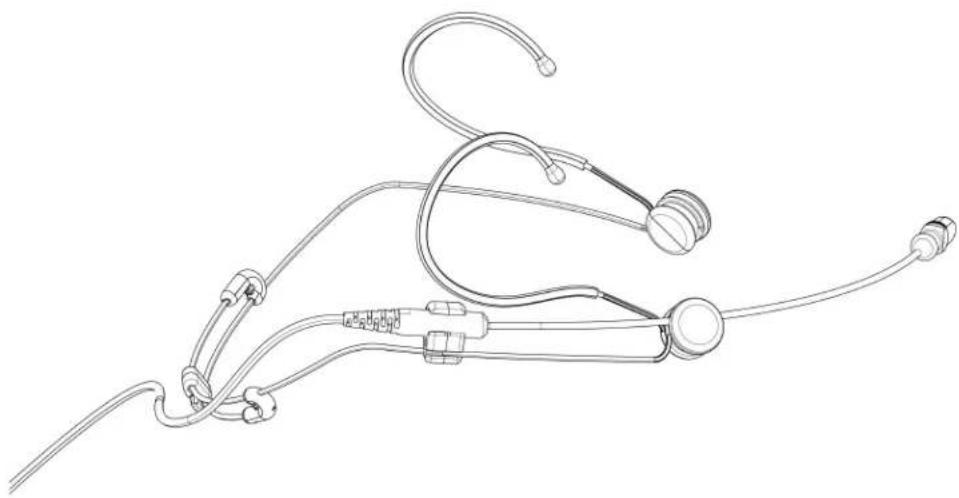
Line drawing of a medical or surgical device with attached tubing and connectors (no text or symbols)The DuraPlex DH5 omnidirectional headset microphone is ideal for both speech and performance applications that require durability and minimal visibility. The bendable lightweight headset features switchable boom mounting placement and a neutral clear design to be used with any DH5 color variant. The certified IP57 rated headset can withstand challenging conditions involving sweat and dust for use in theater, corporate events, and TV broadcast applications. Each microphone is supplied with a storage pouch, single tie clip, vocal presence frequency response cap, snap fit windscreen, foam windscreen, and TA4F threaded adapter.
Features
• IP57 Certified dust resistant and waterproof/sweatproof headset
- 5mm omnidirectional subminiature design for discrete placement and improved gain before feedback
• 1.6mm PLEX Cable technology, paintable cable, and no memory effect
• Professional sound quality for speech and performance applications
• High RF immunity, compatible with digital wireless systems without RF interference
- Attachable Presence Cap included for tailored frequency response in speech applications
- Included furnished accessories for storage, mounting options, and wind protection
• TA4F and LEMO terminations for variable wireless system connectivity
• Universal clear headset frame with switchable boom mount placement
• Available in Black, Tan, Cocoa finishes
Care and Maintenance
The DuraPlex omnidirectional microphone has been IP57 dust-protected, waterproof rated by extensive internal tests, so you can clean it using distilled water and a mild detergent when necessary.
Adjusting the Headband and Microphone
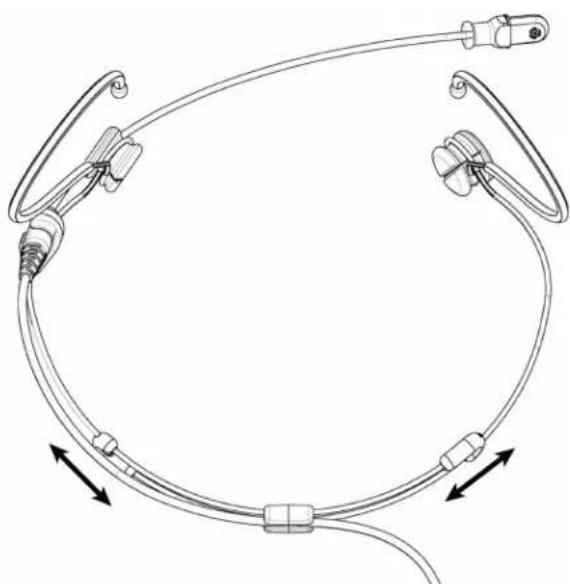
① Adjust headband width.
natural_image
Diagram of a medical or surgical device with attached tubing and connectors, showing directional arrows (no text or labels)② Adjust the earhooks, slide the boom arm in the boom pivot, and twist the pivot to adjust height and length.
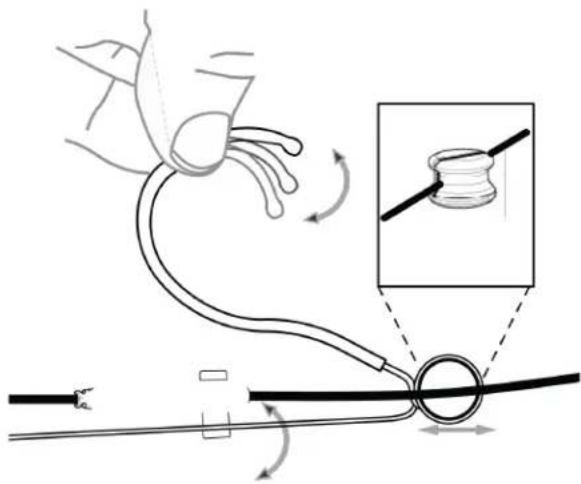
| 3 Bend boom arm into place. Adjust position. | 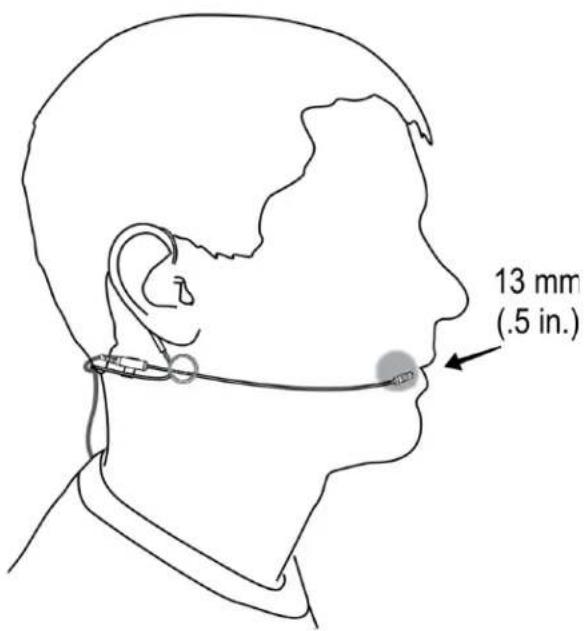 |
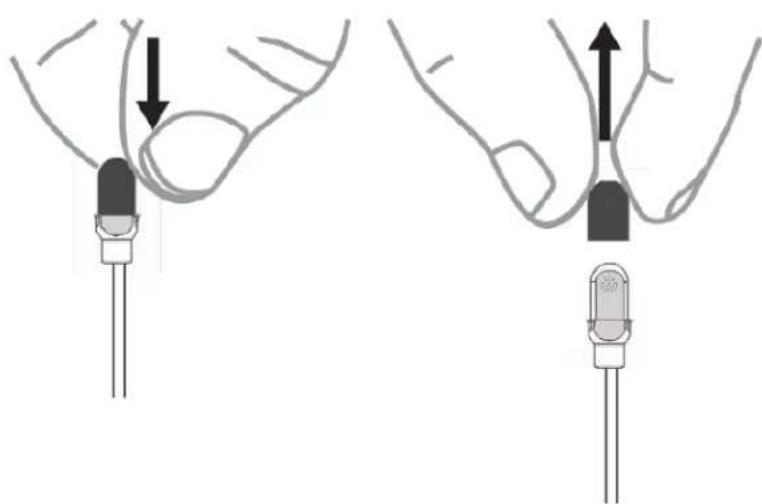
| 4 Use presence cap or leave off.Important:Use slide-fit windscreen with the presence capUse snap-fit windscreen without the presence cap | 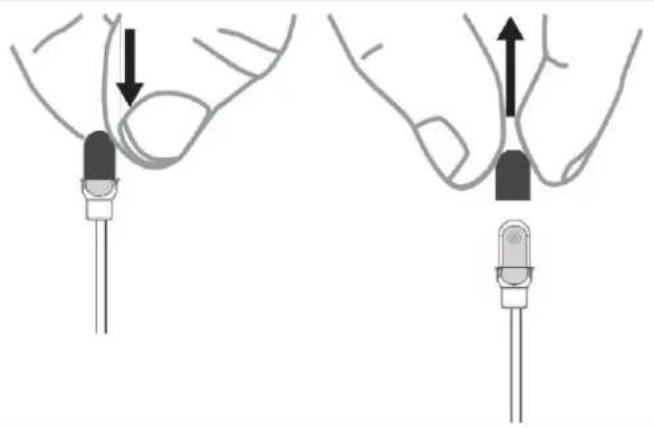 |
Reversing the Boom
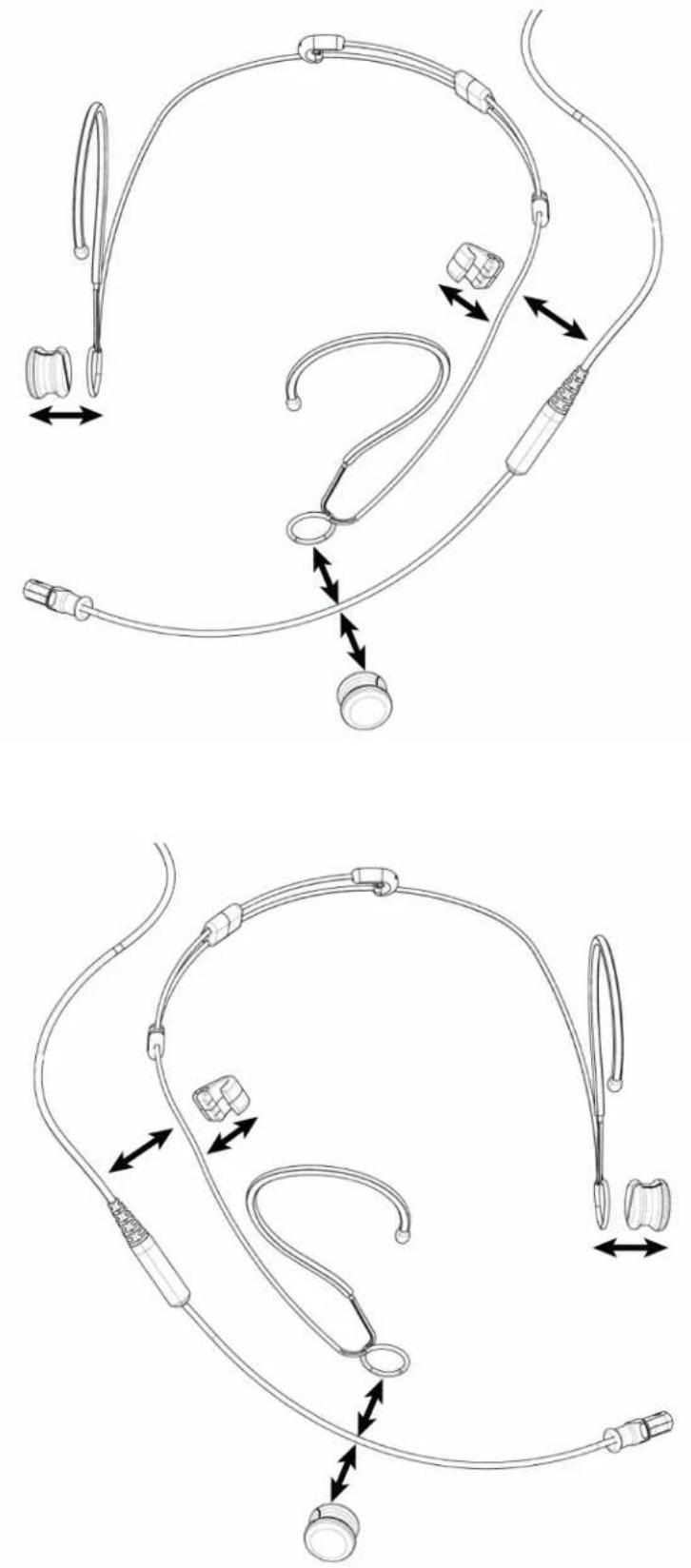
The microphone boom can be positioned on the left or right side of the head.
-
Squeeze the earpiece towards the headband.
-
Push out the boom arm and boom pivot.
- On the other side, repeat the steps to remove the boom pivot.
- Move the boom arm to the preferred side, ensuring that the boom arm is placed in the slot in the boom pivot.
- Squeeze each earpiece towards the headband to push boom pivots back into place.
Presence Cap
natural_image
Diagram showing two configurations of LED indicators with arrows indicating direction (no text or symbols present)Frequency Response
line
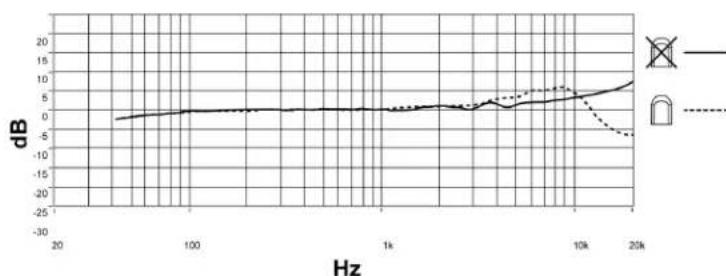
| Hz | dB (Solid Line) | dB (Dashed Line) | |------|-----------------|------------------| | 20 | ~0 | ~0 | | 100 | ~0 | ~0 | | 1k | ~0 | ~0 | | 10k | ~5 | ~5 | | 20k | ~10 | ~-5 |Attaching the Windscreen
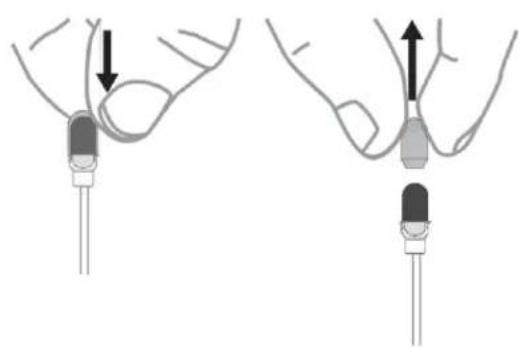
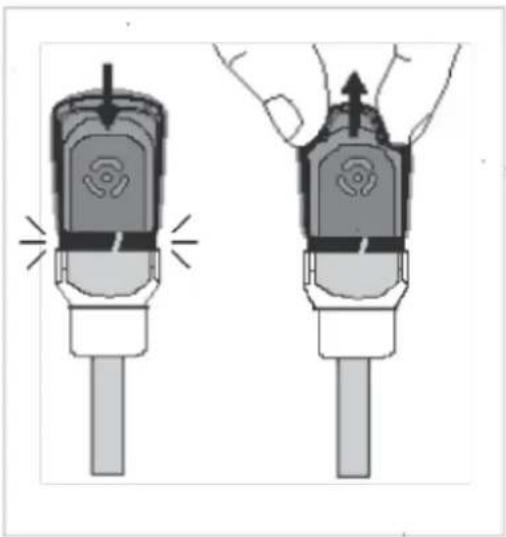
There are two windscreens for use with the DuraPlex microphone:
- A slide-fit windscreen for use with the presence cap
natural_image
Diagram showing two stages of a medical procedure with arrows indicating process direction (no text or symbols present)- A snap-fit windscreen for use without the presence cap
Note: Do not use the snap-fit windscreen with the presence cap--the presence cap can become caught inside the snap-fit windscreen.
natural_image
Illustration of a handheld device with two views showing internal components and a hand holding the top part (no text or symbols)Using the Collar Clip
natural_image
Diagram of a hand pressing down on a device component, with an arrow indicating motion direction (no text or symbols present)
natural_image
Mechanical assembly diagram showing a lever mechanism with a diagonal line (no text or symbols)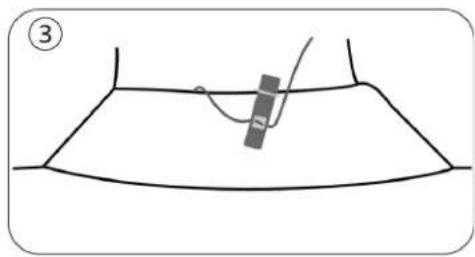
natural_image
Simple line drawing of a garment pattern with a curved seam and a hanging object (no text or symbols)Accessories
Furnished Accessories
| Furnished Accessories | DH5 Black | DH5 Tan | DH5 Cocoa |
| Single Tie Clip | 95A43715 | 95A43715 | 95A43715 |
| Presence Cap | 65A44182 | 65B44182 | 65C44182 |
| Snap-Fit Windscreen | 95A16167 | 95B16167 | 95C16167 |
| Foam Windscreen | 95A43438 | 95B43438 | 95C43438 |
| Sticky Mount | 66A44183 | 66A44183 | 66A44183 |
| Case | 95A44075 | 95A44075 | 95A44075 |
| Threaded TA4F Adapter | 95A29490 | 95A29490 | 95A29490 |
Accessories are available in Black (/B), Tan (/T), AND Cocoa (/C) color varieties. Please consult your Shure representative for available options.
Optional Accessories
| TA4F/TQG XLR Preamplifier | RPM400TQG |
| Lemo XLR Preamplifier | RPM400LEMO |
Replacement Parts
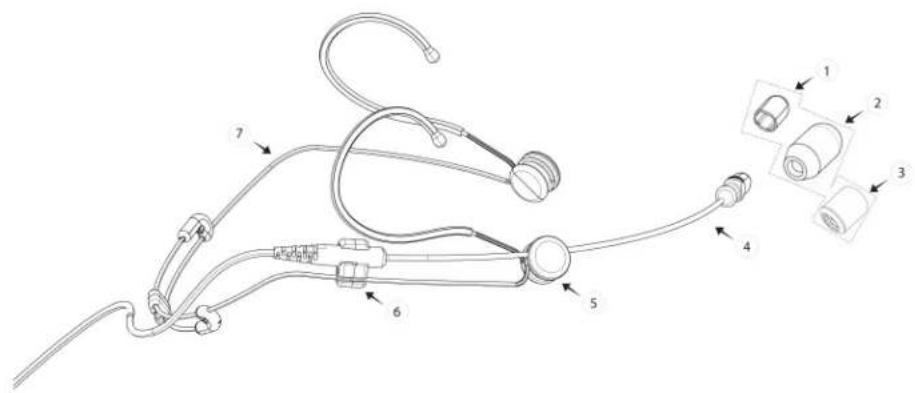
| Description | Black | Tan | Cocoa | |
| 1 | Presence Cap, qty. 5 | RPMDL4FC/B | RPMDL4FC/T | RPMDL4FC/C |
| 2 | Foam Windscreen, qty. 3 | RPMDL4WS/B | RPMDL4WS/T | RPMDL4WS/C |
| 3 | Snap-fit Windscreen, qty. 3 | RPMDL4SFWS/B | RPMDL4SFWS/T | RPMDL4SFWS/C |
| 4 | Microphone Boom Arm and Cable Assembly, Lemo Connector | RPMDH5B/O-LM3 | RPMDH5T/O-LM3 | RPMDH5C/O-LM3 |
| Microphone Boom Arm and Cable Assembly, MTQG Connector | RPMDH5B/O-MTQG | RPMDH5T/O-MTQG | RPMDH5C/O-MTQG | |
| 5 | Boom Pivot, qty. 4 | RPMDH5PIVOT | RPMDH5PIVOT | RPMDH5PIVOT |
| 6 | Boom Mount, qty. 4 | RPMDH5BM | RPMDH5BM | RPMDH5BM |
| 7 | Headset Frame, qty. 1 | RPMDHSF | RPMDHSF | RPMDHSF |
| Single Tie Clip, qty. 3 | RPMDL4STC/B | RPMDL4STC/T | RPMDL4STC/C | |
| Dual Tie Clip, qty. 3 | RPMDL4DTC/B | RPMDL4DTC/T | RPMDL4DTC/C | |
| DL4 Sticky Mount, qty. 3 | RPMDL4SM | RPMDL4SM | RPMDL4SM | |
| DH5 Case, Headsset | RPMDH5CASE | RPMDH5CASE | RPMDH5CASE | |
| TA4F XLR Preamp | RPM400TQG | RPM400TQG | RPM400TQG | |
| LEMO XLR Preamp | RPM400LEMO | RPM400LEMO | RPM400LEMO |
Threaded Mount Instructions
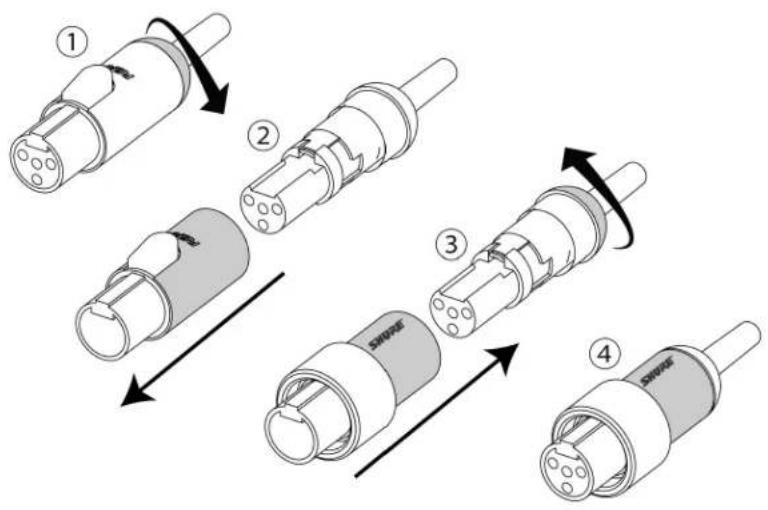
Wiring and Termination
Typical Wiring Table
| Series | Cable Construction | Electrical Design | Polarity | Replacement Connector | For Use With | Wiring | Line Art (From Solder Side) |
| DL4-LEMO | 1.6mm cable with single conductor and shield | 3 wire with additional bias on pin 3 | Positive with respect to ground | WA416 | Shure Lemo Bodypacks (AD1/ADX1-Lemo, Shure UR1M-Lemo, ULXD1-Lemo) | Red wire: Audio/Bias(2)Blue wire: Audio(3Shield: Ground(1)) | 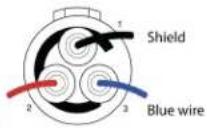 Red wire Red wire |
| DL4-MTQG | 1.6mm cable with 2 conductors, 2 shield wires and shield | 3-Wire | Positive with respect to ground | WA430 | All Shure TA4F Body-packs | Red wire: Bias(2)Blue wire: Audio(3)Shield wire: Ground(1)Shield: Ground (Shell) | 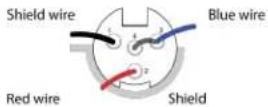 |
Note: The conductors have a black, protective coating that you must remove with isopropyl alcohol to see their actual color.
MTQG Connector Assembly
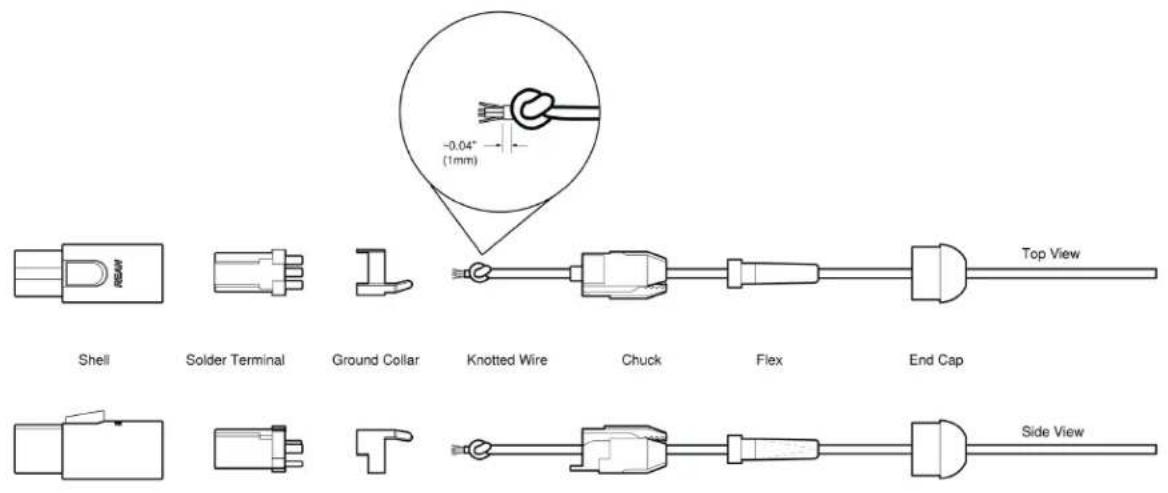
Exploded View
Note: Make sure to solder the shield to ground collar.

natural_image
Cross-sectional diagram of a mechanical or electrical component with internal structure and no visible text or symbolsAssembled View
Specifications
Note:
- All specification values are based on using a typical bodypack with 5 V bias input or the RPM400MTQG preamplifier. When using the RPM400LEMO amplifier, refer to the RPM400LEMO specifications.
- All specifications measured with a 48 Vdc phantom power supply. The microphone operates at lower voltages, but with slightly decreased headroom and sensitivity.
Microphone Capsule MEMS
Polar Pattern Omnidirectional
Frequency Response 20 Hz to 20 kHz
Sensitivity -42.5 dBV at 1 kHz [1]
Self-Noise, A-Weighted, Equivalent Acoustical 31 dB SPL-A
Signal-To-Noise Ratio [2] 63.0 dB
Maximum SPL [3] 132.0 dB SPL, 1 kHz at 1% THD, typical
Dynamic Range 101.0 dB typical
Microphone Current Draw 220 μA, maximum
Bias Voltage
Recommended Operating Voltage
5 V DC, 2.6 V DC minimum
Housing
Molded ABS
Polarity
| MTQG | Positive pressure on diaphragm produces positive voltage on pin 3 with respect to pin 1 |
| LEMO | Positive pressure on diaphragm produces positive voltage on pin 3 with respect to pin 1 |
Cable Diameter
1.6 mm
Cable Length
66 in. (1.67 m)
Net Weight
| DL4 | 15.0 g(0.53 oz.) |
| DH5 | 20.0 g(0.7 oz.) |
[1]1 Pa=94 dB SPL ^[2]
S/N ratio is the difference between 94 dB SPL and equivalent SPL of self noise, A-weighted [3]
THD of microphone preamplifier when applied input signal level is equivalent to cartridge output at specified SPL
natural_image
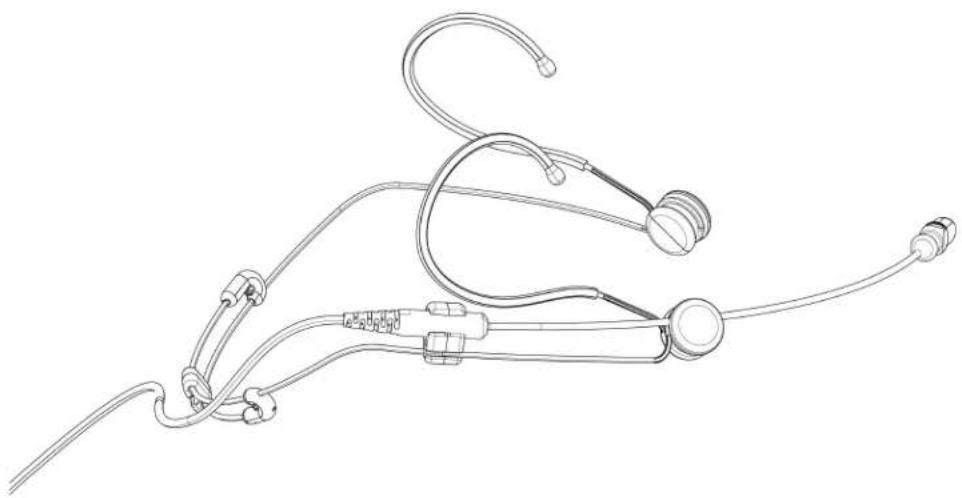
Line drawing of a medical or surgical device with coiled tubing and connectors (no text or symbols)Dimensions
| Cable Length | Cable Diameter | Microphone Length | Microphone Diameter | Boom Length | |
| DH5-MTQG, DH5-LEMO | 66 in. (1.67M) | 1.6MM | 14.5MM | 5.2MM | 13.6CM |
Certifications
This product meets the Essential Requirements of all relevant European directives and is eligible for CE marking.
The CE Declaration of Conformity can be obtained from: www.shure.com/europe/compliance
Authorized European representative:
Shure Europe GmbH
Headquarters Europe, Middle East & Africa
Department: EMEA Approval
Jakob-Dieffenbacher-Str. 12
75031 Eppingen, Germany
Phone: +49-7262-92 49 0
Fax: +49-7262-92 49 11 4


- DuraPlex™ Omnidirectional Headset
- Table of Contents
- General Description 3
- Care and Maintenance 3
- Adjusting the Headband and Microphone 4
- Presence Cap 7
- Attaching the Windscreen 7
- Using the Collar Clip 8
- Accessories 8
- Threaded Mount Instructions 10
- Wiring and Termination 10
- Specifications 12
- Certifications 14
- DH5
- General Description
- Features
- Care and Maintenance
- Adjusting the Headband and Microphone
- Reversing the Boom
- Presence Cap
- Frequency Response
- Attaching the Windscreen
- Using the Collar Clip
- Accessories
- Threaded Mount Instructions
- Wiring and Termination
- Specifications
- Note:
- Bias Voltage
- Housing
- Cable Diameter
- Cable Length
- Certifications
Brand : SHURE
Model : DuraPlex DH5
Category : Headphones