
IAN 102635 - Uncategorized ULTIMATE SPEED - Free user manual and instructions
Find the device manual for free IAN 102635 ULTIMATE SPEED in PDF.


| Product Type | Multi-purpose car bracket |
| Brand | Ultimate Speed |
| Model | IAN 102635 |
| Intended Use | Holder for smartphones, mobile phones, MP3 players in vehicles |
| Mounting Location | Inside windscreen pane |
| Mounting Type | Vacuum suction cup with lever |
| Compatible Device Width | 46–74 mm |
| Adjustable Tilt | Yes, via ball joint (vertical, horizontal, tilt angle) |
| Jaw Opening Mechanism | Push button on left side of holder |
| Suction Cup Release | Pull up suction lever and vacuum tab |
| Optimal Installation Temperature | Above 15°C (59°F) |
| Maximum Interior Temperature | 70°C (158°F) |
| Cleaning Instructions | Dry, lint-free cloth; do not use alcohol or flammable liquids |
| Safety Precautions | Do not install near airbags or steering wheel; do not use while driving; check stability before each ride |
| Package Contents | Mounting support with jaws, support bracket with vacuum suction mount, user manual |
| Warranty | 3 years (from date of purchase, first purchaser only, material or production faults) |
| Disposal | Residual waste; packaging recyclable |
Frequently Asked Questions - IAN 102635 ULTIMATE SPEED
User questions about IAN 102635 ULTIMATE SPEED
0 question about this device. Answer the ones you know or ask your own.
Ask a new question about this device
Download the instructions for your Uncategorized in PDF format for free! Find your manual IAN 102635 - ULTIMATE SPEED and take your electronic device back in hand. On this page are published all the documents necessary for the use of your device. IAN 102635 by ULTIMATE SPEED.
USER MANUAL IAN 102635 ULTIMATE SPEED
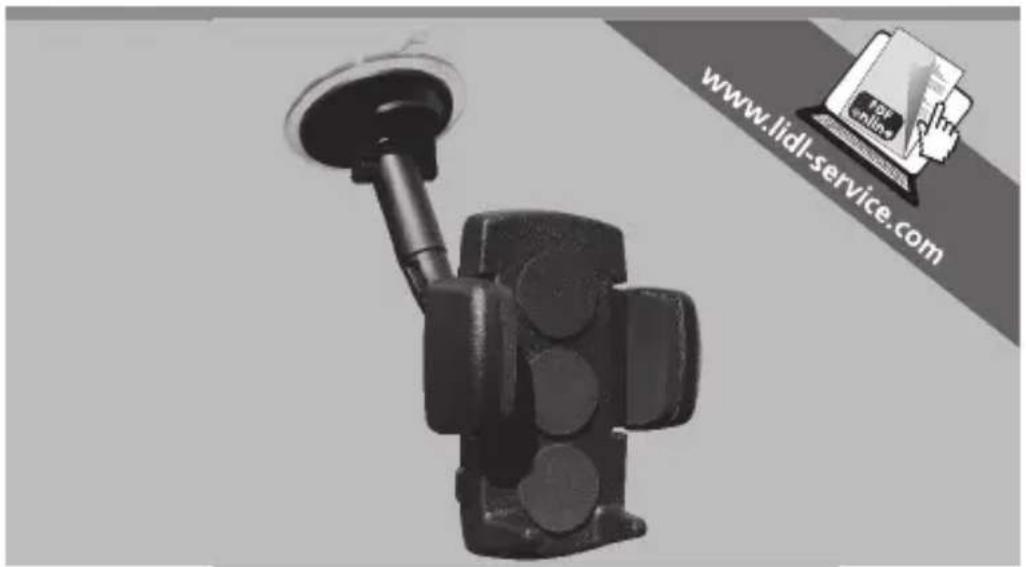
Multi-purpose car bracket
Instructions for use and safety guidelines
DE
natural_image
Close-up of a black automotive electrical plug with circular arrows indicating rotation or clockwise motion (no text or symbols visible)natural_image
Two identical mechanical components with circular holes and directional arrows, one pointing to a button (no text or symbols)natural_image
Illustration of a hand holding a device with a separate view showing internal components (no text or symbols)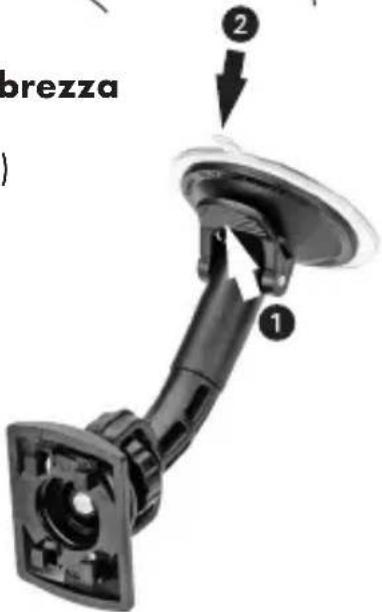
natural_image
Close-up of a black mechanical component with circular arrows indicating rotation or adjustment (no text or symbols visible)natural_image
Two identical mechanical components with circular holes and directional arrows, one pointing to a button (no text or symbols)natural_image
Close-up of a black mechanical component with circular arrows indicating rotation or adjustment (no text or symbols visible)4. Fixar as garras
natural_image
Two identical mechanical components with circular holes and side brackets, shown in two different states of rotation (no text or symbols)Multi-purpose car bracket
Instructions for use and safety guidelines
Intended use
Congratulations! You have chosen a high-quality product to purchase. This product is intended as a holder in vehicles for smartphones, mobile phones or MP3 players. The mount is designed for the inside windscreen pane. Use the product only for the intended use.
Delivery content
• 1 mounting support with jaws
• 1 support bracket with vacuum suction mount
- 1 user manual
Parts Description
• Vacuum suction cup
• Holding arm with ball joint and connector plate
• Holder with fixing jaw
Technical Data
• Suitable for appliances with a width of 46-74mm
Safety Guidelines
- Do not install the product within the operating parameter of an airbag or near the steering wheel.
- The positioning of the product must not impair the driver in any way.
• Do not use, install or adjust whilst driving.
- Lay all feed lines so that they pose no danger (tripping hazard) and cannot be damaged.
- Check the mounting support for stability before each time taking a ride.
- In case of failure to observe the safety guidelines, the holder or the appliance may come loose and be damaged. Consequential damages cannot be ruled out.
- When passing on to third parties, please include the user manual and safety guidelines.
• Store the safety guidelines together with the appliance.
Notes
• Strong sunlight can affect functioning of the product.
- Direct sunlight can damage the suction cup and adhesion if the temperature inside the vehicle exceeds 70°C (158°F).
- The suction cup is suitable for attaching to a smooth and clean surface for a limited time only.
- No liability is accepted for damages caused by misuse of the product or by failure to observe the safety guidelines.
Installation Instructions
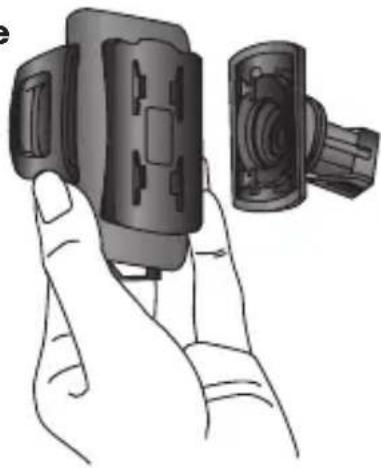
1. Fastening the holder on the holding arm:
a. Insert the suction cup's 4 claws into the holder's 4 hole system. Hold it vertically so that the 2 holding feet face downward.
b. To connect securely, push the holder downward until it clicks into place.
c. To remove the holder, push it upward.
2. Fastening the suction cup to the windscreen
a. The ambient temperature should be above 15^ C ( 59^ F) for an optimal and secure adhesion of the suction cup. If the ambient temperature is not above 15^ C ( 59^ F), warm the surface with a hair-dryer. Press the sucker firmly onto the base and move the suction lever ① to create a vacuum between the base and the sucker.
b. In order to remove the fastening system from the base, pull up the suction lever ① and pull on the vacuum tab ② to release the vacuum.
natural_image
Illustration of a hand holding a device with a separate view showing internal components (no text or symbols)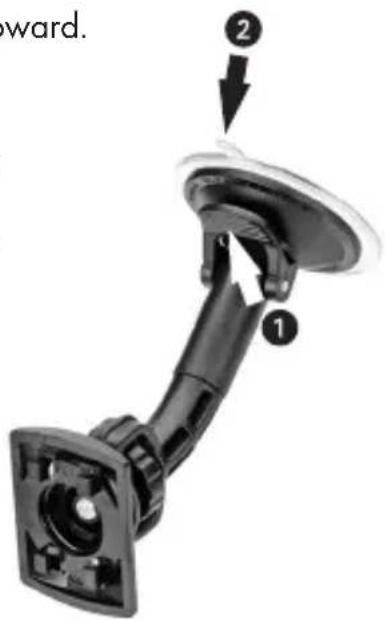
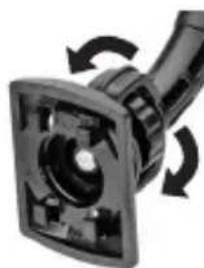
3. Setting the ball joint for the desired tilt angle
a. Loosen the little wheel on the ball joint behind the holder and set the desired vertical or horizontal position, as well as the tilt angle. Then tighten the little wheel again.
natural_image
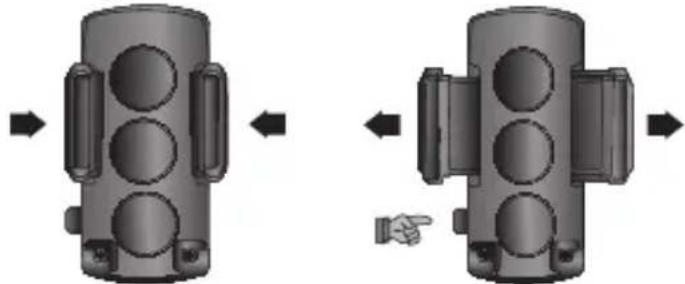
Close-up of a mechanical component with circular arrows indicating rotation or adjustment (no visible text or symbols)4. Fastening the jaws
natural_image
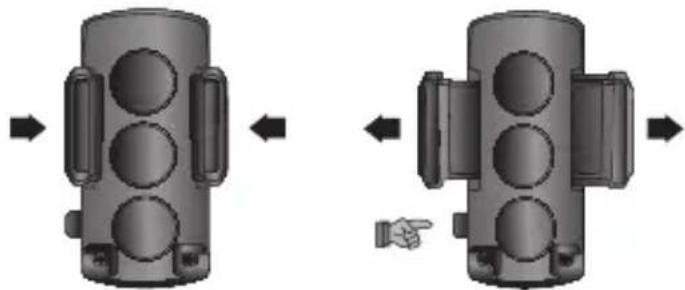
Diagram showing two mechanical components with arrows indicating movement, one pointing to a button (no text or symbols present)a. To open the jaws, push the button on the left side of the holder.
b. Insert the desired appliance and secure into place by pushing the jaws together.
c. To release the appliance, push the button to open the jaws.
Cleaning and care
- Do not use any cleaning agents with alcohol or other flammable liquids/substances.
• Clean the product with a dry, lint-free cloth.
Disposal
- The packaging consists of environmentally friendly materials that you can dispose of at local recycling points. Dispose of the product in the residual waste at the end of its lifespan.
Warranty
3 years warranty on this product from the date of purchase, only applies to the first purchaser, not transferable. Please keep the receipt as proof. The warranty only applies to material or production faults, not for wear parts or for damage due to incorrect use. The warranty is void in the case of external intervention. Your legal rights remain unaffected by
this warranty. In the case of a warranty claim, please contact the service point. This ensures that your device can be sent to us free of charge.
Service / Manufacturer
natural_image
Close-up of a black electrical plug with circular arrows indicating rotation or clockwise motion (no text or symbols visible)natural_image
Two identical mechanical components with circular holes and directional arrows, one pointing to a button (no text or symbols)
- Multi-purpose car bracket
- Fixar as garras
- Intended use
- Delivery content
- Parts Description
- Technical Data
- Safety Guidelines
- Notes
- Installation Instructions
- Fastening the holder on the holding arm:
- Fastening the suction cup to the windscreen
- Setting the ball joint for the desired tilt angle
- Fastening the jaws
- Cleaning and care
- Disposal
- Warranty
- Service / Manufacturer
Brand : ULTIMATE SPEED
Model : IAN 102635
Category : Uncategorized