
ComfortTemp 4 HCE640B - Oven HONEYWELL - Free user manual and instructions
Find the device manual for free ComfortTemp 4 HCE640B HONEYWELL in PDF.


| Product Type | Ceramic Heater |
| Brand | Honeywell |
| Model | ComfortTemp 4 HCE640B |
| Series | HCE640 Series |
| Dimensions | 7.9" L x 7.9" W x 23.4" H |
| Power Supply | 120V, 60Hz |
| Current Draw | 12.5 Amps |
| Max Power Output | 1500 Watts |
| Max Heat Output | 5118 BTUs |
| Heat Settings | 4 (Gentle Warmth, Cozy, Toasty, Heat Blast) |
| Operating Modes | Continuous or Auto Shut-Off (8 hours) |
| Timer | 1, 2, 4, or 6 hours |
| Oscillation | 90° |
| Safety Features | 360° tip-over switch, overheat sensor, thermal cut-off fuse, SafeGuard Auto Shut-Off, cool-touch housing, polarized plug |
| Cleaning | Dry cloth only; do not use water, waxes, polishes, or chemical solutions |
| Storage | Cool, dry place; wrap cord; use original box |
| Warranty | 3 years limited |
Frequently Asked Questions - ComfortTemp 4 HCE640B HONEYWELL
User questions about ComfortTemp 4 HCE640B HONEYWELL
0 question about this device. Answer the ones you know or ask your own.
Ask a new question about this device
Download the instructions for your Oven in PDF format for free! Find your manual ComfortTemp 4 HCE640B - HONEYWELL and take your electronic device back in hand. On this page are published all the documents necessary for the use of your device. ComfortTemp 4 HCE640B by HONEYWELL.
USER MANUAL ComfortTemp 4 HCE640B HONEYWELL
natural_image
Two black and white cylindrical speakers with 'Shinyi wall' branding, no visible text or symbols on the devices themselves.IMPORTANT SAFETY INSTRUCTIONS
WARNING – READ AND SAVE THESE OPERATING AND SAFETY INSTRUCTIONS BEFORE USING THIS HEATER. IF YOU DO NOT UNDERSTAND THESE INSTRUCTIONS OR PRODUCT LABELS PLEASE CALL OUR CUSTOMER REPRESENTATIVES AT 1-800-477-0457 FOR ASSISTANCE BEFORE USING THIS PRODUCT.
Warning – Failure to follow any of these safety instructions could result in fire, injury, or death.
YOUR RESPONSIBILITIES
Electrical appliances may expose people to hazards that can cause severe injury as well as death. The use of electrical products may create hazards that include, but are not limited to, injury, fire, electric shock and electrical system damage. These instructions are intended to provide you with the information you need to use the product correctly and to avoid such hazards.
When using electrical appliances, basic precautions should always be followed to reduce risk of fire, electric shock, and injury to persons including the following:
-
Warning – Read all instructions before using this heater.
-
Warning – This heater is hot when in use. To avoid burns, DO NOT let bare skin touch hot surfaces. Use handles when moving this heater. Keep combustible materials, such as furniture, pillows, bedding, papers, clothes, and curtains at least 3 feet (0.9 m) from the front of the heater and keep them away from all sides of the heater.
-
Warning – Extreme caution is necessary when any heater is used by or near children or invalids, and whenever the heater is left operating and unattended.
-
Warning – ALWAYS unplug heater when not in use.
-
Warning – DO NOT operate any heater with a damaged cord or plug, any heater that malfunctions, or any heater that has been dropped or damaged in any manner. Discard heater or return heater to authorized service facility for examination and/or repair.
-
Warning – For residential use only.
-
Warning - DO NOT use outdoors.
-
Warning – This heater is not intended for use in bathrooms, laundry areas, and similar indoor locations. DO NOT locate heater where it may fall into a bathtub or other water container.
-
Warning – DO NOT run cord under carpeting. DO NOT cover cord with throw rugs, runners, or similar coverings. DO NOT route cord under furniture or appliances. Arrange cord away from traffic areas and where it will not be a tripping hazard.
-
Warning – This appliance has a polarized plug (one blade is wider than the other). To reduce the risk of electric shock, this plug is intended to fit in a polarized outlet only one way. If the plug does not fit fully in the outlet, reverse the plug. If it still does not fit, contact a qualified electrician. DO NOT attempt to defeat this safety feature.
-
Warning – This heater draws 12.5 amps during operation. To prevent overloading a circuit, DO NOT plug the heater into a circuit that already has other appliances working.
-
Warning – It is normal for the plug to feel warm to the touch; however, a loose fit between the AC outlet (receptacle) and plug may cause overheating and distortion of the plug. Contact a qualified electrician to replace loose or worn outlet.
- Warning – To disconnect the heater, first turn off the product, then grip the plug body and pull it from the wall outlet. DO NOT pull by the cord.
- Warning – DO NOT insert or allow foreign objects to enter any ventilation or exhaust opening as this may cause electric shock, fire, or damage to the heater.
- Warning – To prevent a possible fire, DO NOT block air intakes or exhaust in any manner. DO NOT use on soft surfaces, like a bed, or where openings may become blocked.
- Warning – A heater has hot and arcing or sparking parts inside. DO NOT use it in areas where gasoline, paint or flammable liquids are used or stored.
- Warning – Use this heater only as described in this manual. Any other use not recommended by the manufacturer may cause fire, electric shock, or injury to persons.
- Warning – ALWAYS plug heater directly into a wall outlet/receptacle. DO NOT use with an extension cord or relocatable power tap (outlet/power strip).
-
Warning – NEVER tamper with this product or attempt to fix it. Any tampering with, or modification of this product can result in serious injury, death, or fire. DO NOT open. Risk of electric shock. There are no user serviceable parts inside.
-
Warning – DO NOT remove product labels that contain warnings or safety instruction.
- Caution – The output of this heater may vary and its temperature may become intense enough to burn exposed skin. Use of this heater is not recommended for persons with reduced sensitivity to heat or an inability to react to avoid burns.
- Caution – Before cleaning, or storage, or when not in use, turn the product's controls to the OFF position and unplug the heater from the electrical outlet and allow to cool.
- Caution – Place the heater on a firm, level, open surface free from obstructions and at least 3 feet (0.9 m) away from any combustible materials. DO NOT use on an unstable surface such as bedding or deep carpeting. Be sure the heater is not in a position where it may be tripped over by small children or pets.
- Caution – If your home has aluminum wiring have a licensed electrician check your receptacle's connections. When using a 1500 watt heater, aluminum wire connections can cause a safety issue.
- SAVE THESE INSTRUCTIONS
ABOUT CERAMIC TECHNOLOGY
- Ceramic heaters generate heat by passing electricity through heating elements embedded in ceramic plates.
- In the Honeywell ComfortTemp™ 4 Ceramic Heater, air is drawn into the back of the heater by a fan, and then pushed through the ceramic element and out the front of the heater to gently introduce warm air into the room.
- This type of heating technology provides consistent, even heating.
- For best heat output, place heater on the floor and allow it to run for 5-10 minutes.
SET UP
- The Honeywell ComfortTemp™ 4 Ceramic Heater requires no assembly. Simply unpack heater and save all packaging materials for off-season storage.
- Place the heater on a firm, level, open surface free from obstructions and at least 3 feet (0.9m) away from any wall or combustible material.
- DO NOT use on an unstable surface such as bedding or deep carpeting.
- BE SURE THE HEATER IS NOT IN A POSITION WHERE IT MAY BE TRIPPED OVER BY CHILDREN OR PETS.
MOVING THE HEATER
- This heater is equipped with a Cool Touch handle for your convenience.
- Turn off the heater.
- Allow it to cool for ten minutes.
- Unplug heater and move.
OPERATION
• NOTE: NEVER LEAVE AN OPERATING HEATER UNATTENDED
- Plug the heater into a polarized 120V outlet. DO NOT FORCE THE POLARIZED PLUG INTO THE OUTLET; it will only fit one way.
- With 90° oscillation, the Honeywell ComfortTemp™ 4 Ceramic Heater is versatile and designed to be placed in the center of the room or closer to the wall (at least 3 feet away) for maximum convection room heating.
- Turn heater on by pressing the Power Button ( ⏻ ). The Power Indicator will illuminate and the heater will start in the highest level setting (Heat Blast).
- The heater has two operational modes, which can be chosen using the red switch on the back of the unit (Fig. 2):
- Continuous heating ( ∞) – heater will run until it is manually shut off.
- Auto Shut-Off ( ↑8 ) mode - heater will automatically shut off after 8 hours each time that you use the heater. This is a built-in safety feature to help ensure the heater isn't accidentally left on for an extended period of time.
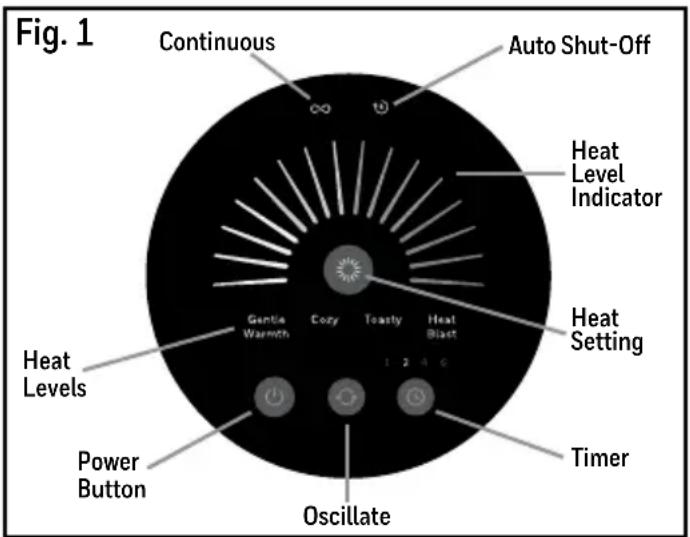
NOTE: Controls/features will vary slightly by model
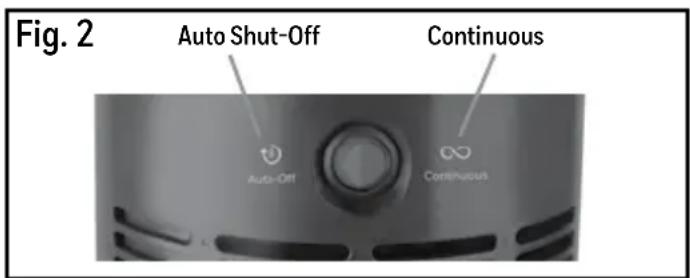
NOTE: See the SafeGuard® Auto Shut-Off feature section for more information on this feature.
- This heater comes pre-set from the factory with the Auto Shut-Off mode engaged. When the unit is turned on, the Auto Shut-Off icon (8) will be illuminated on the top of the controls. All features are functional while operating in the Auto Shut-Off mode.
- Should you NOT want the heater to automatically shut off after 8 hours, switch to Continuous heating by simply pressing the red switch on the back of the unit. Once selected, the Continuous heat icon (∞) will illuminate on the top of the control panel.
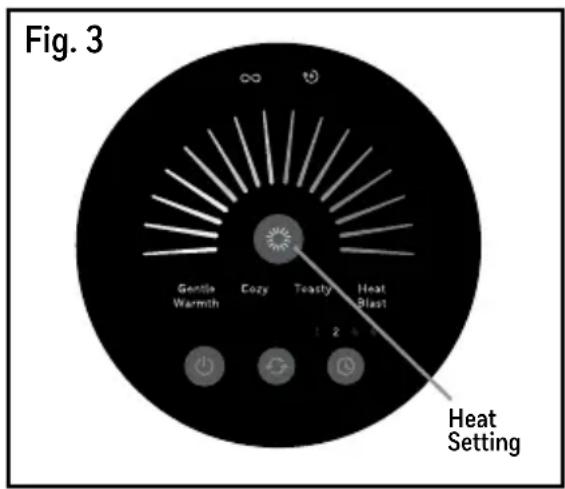
- To select a heat setting, press (✗). There are 4 comfort settings available to choose from - Gentle Warmth, Cozy, Toasty, Heat Blast - with each setting designed to provide both a unique heat and sound level based on your desired needs.
NOTE: see next section for an overview of each of the heat settings.
- Press the Timer Button ( Ⓤ) to select 1, 2, 4, or 6 hour setting. The heater will run for that chosen period in the selected setting/mode, counting down the hours and automatically shutting the heater off after the selected time has passed.
- The ComfortTemp™ 4 Ceramic Heater has an oscillation feature. Press the Oscillate Button ( 🔍) to turn on or off the oscillation function.
- To shut the heater off, press the Power Button (1) and the heater will begin Powering Down. The heater will shut off after counting down 10 seconds to cool down the internal components.
- It is important to allow the heater to run through the cool down phase. DO NOT unplug the heater until it has completed the cool down phase.
4 COMFORT SETTINGS THAT YOU ADJUST TO YOUR NEEDS
Once your heater is ON, use the heat setting control button () on the front panel to select the desired heat setting for your needs. Your heater will start on the highest setting (Heat Blast) each time you turn on the heater. Below is a handy reference to help select the heat option that best suits your desired comfort level. (Fig. 3)
GENTLE WARMTH - (LOW HEAT)
This setting provides a soft, more personal touch of warmth.
COZY - (MEDIUM HEAT)
Ideal for personal and small areas, this setting slightly steps up the heat output for soothing, comforting heat.
TOASTY – (MODERATE-HIGH HEAT)
Gradually increasing the heat level, this setting is perfect for creating that comforting room environment.
HEAT BLAST - (HIGH HEAT)
Choose this maximum heat setting to quickly remove chill and deliver comforting, quick heat.
SAFEGUARD® AUTO SHUT-OFF FEATURE
The Honeywell ComfortTemp™ 4 Ceramic Heater is enhanced with a SafeGuard® Auto Shut-Off feature. This innovative feature is designed to automatically shut the heater off after 8 hours of continuous use and provides an extra layer of protection for peace-of-mind.
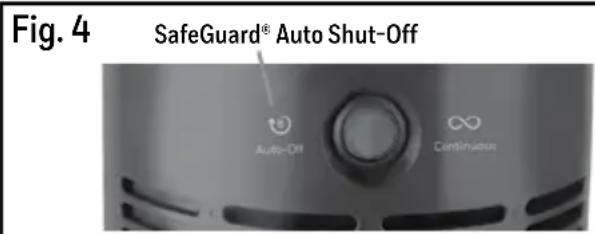
How it works: By default, the ComfortTemp™ 4 Ceramic Heater comes with the Auto Shut-Off feature engaged. If you chose to operate the heater in the Auto Shut-Off mode (8), the heater will shut off automatically after 8 hours every time the heater is used, unless the heater is turned off prior to the 8 hour auto-off time. All features are functional while operating in the Auto Shut-Off feature. If you choose to disengage this feature, the unit will operate in the Continuous heat mode ( ∞ ).
- Press the SafeGuard® Auto Shut-Off switch on the back of the unit (Fig. 4) to select either the Auto Shut-Off or Continuous heating modes. The corresponding icon will illuminate on the controls to indicate which mode you are in.
SAFEGUARD® MOTION SENSOR FEATURE (HCE645 Series only)
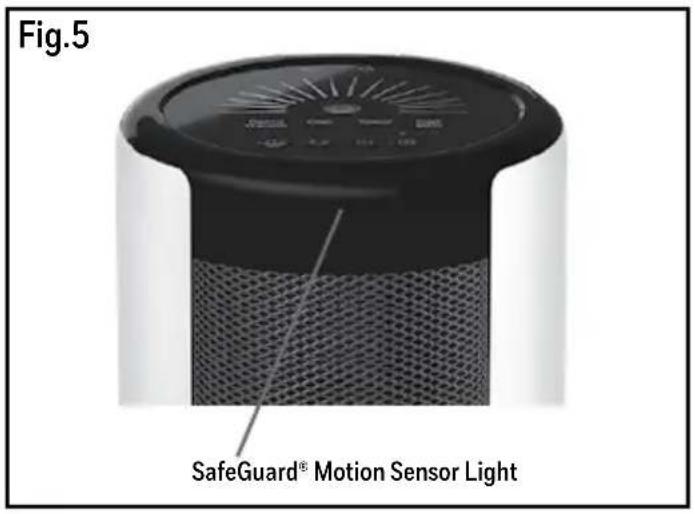
The Honeywell ComfortTemp™ 4 Ceramic Heater (Model series HCE645 only) is equipped with a SafeGuard® Motion Sensor feature. This motion sensor feature identifies objects that may obstruct the normal flow of heat from the unit, shutting the unit off when necessary, for an additional level of protection.
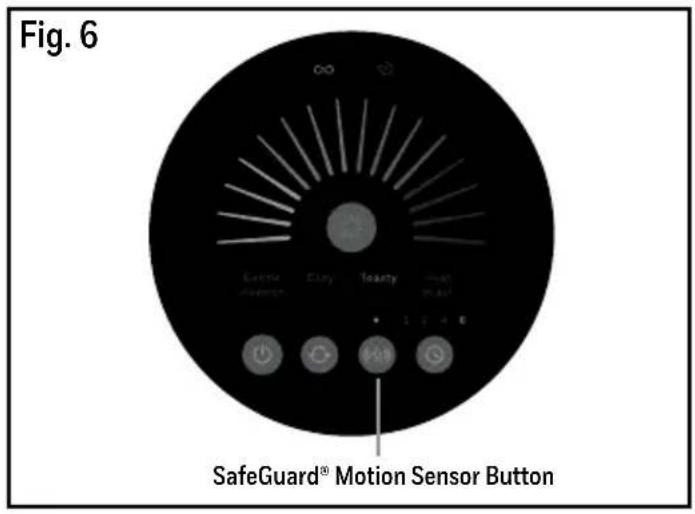
How It Works: If an object remains too close to the front of the heater for too long - 6 inches or closer for more than a few seconds - the Motion Sensor light on the front of the unit (Fig. 5) will blink as a warning that there is an obstruction. If the object is not removed, the sensors will disable the heat, turning the heater off until the object is removed. The heater will restart after a few seconds once the object is removed.
- Press the SafeGuard® Motion Sensor Button («✿») (Fig. 6) to turn this feature on or off.
REMOTE CONTROL (HCE643 and HCE645 Series only)
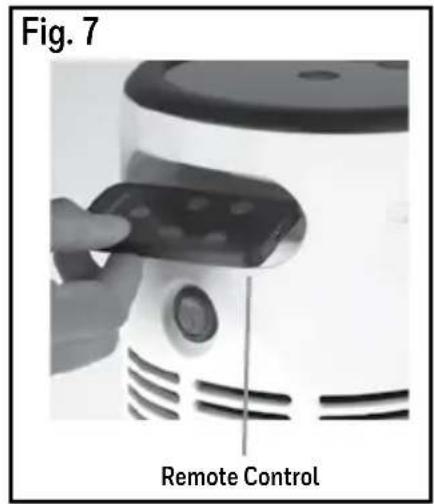
The Honeywell ComfortTemp™ 4 Ceramic Heater (Model Series HCE643 and HCE645 only) can be controlled using the remote (Fig. 7). This remote uses a button cell type battery which comes included in the remote.
• To activate the battery, simply pull the plastic tab.
- All functions may be controlled with the remote with the exception of choosing which operational mode you prefer (Auto Shut-Off or Continuous Heating). This must be done manually using the red switch on the back of the unit.
- Place remote control in the holder located in the handle area in the back of the heater when not in use.
SAFETY FEATURES
The Honeywell ComfortTemp™ 4 Ceramic Heater is equipped with several devices and features for added protection:
- A 360° tip-over switch that disables the heater if it is tipped in any direction.
- A high temperature safety sensor prevents overheating.
- This heater is also equipped with a thermal cut-off fuse that will permanently shut down the heater should it operate at a higher than normal temperature. If activated, the unit will need to be replaced.
- This heater was built using a high temperature plastic and has a cool to touch housing and handle.
- This heater is designed with thermal insulated wiring for heat resistance and reinforced wire connections to help protect against loose connections.
- This heater also has a SafeGuard® Auto Shut-Off feature. If selected, this feature is designed to automatically shut the heater off after 8 hours of continuous use.
- The HCE645 Series models have a SafeGuard® Motion Sensor that shuts the heater off if an object gets too close to the motion sensor.
CLEANING AND STORAGE
It is recommended that the Honeywell ComfortTemp™ 4 Ceramic Heater be cleaned at least once a month and before off-season storage.
- Turn Off ( ⏻) and unplug heater. Allow unit to cool for 10 minutes.
- Use a dry cloth only to clean the external surfaces of the heater. DO NOT USE WATER, WAXES, POLISHES OR ANY CHEMICAL SOLUTION.
- Before storing, clean the Ceramic Heater using the above-mentioned steps. Wrap the cord around the unit. Place in its original box and store it in a cool, dry place.
• This heater does not disassemble.
TROUBLESHOOTING
Problem Solution
If your Honeywell ComfortTemp™ 4 Ceramic Heater shuts off unexpectedly or fails to operate, one of your heater safety features may have been activated to prevent overheating.
- Be sure heater is plugged in and that the electrical outlet is working.
- Check for any obstructions. If you find an obstruction, turn the heater OFF (⏻) and unplug it.
- Allow the heater to cool completely, then remove the obstruction. Wait at least 10 minutes, then re-plug the heater in and follow the OPERATION instructions.
PRODUCT SPECIFICATIONS
Model(s) Unit Dims Amps Unit Voltage Max Watts Max BTUs
| HCE640 Series | 7.9" L x 7.9"W x 23.4" H | 12.5 | 120V, 60Hz | 1500 | 5118 |
| HCE643 Series | 7.9" L x 7.9"W x 23.4" H | 12.5 | 120V, 60Hz | 1500 | 5118 |
| HCE645 Series | 7.9" L x 7.9"W x 23.4" H | 12.5 | 120V, 60Hz | 1500 | 5118 |
3 YEAR LIMITED WARRANTY
You should first read all instructions before attempting to use this product.
A. This 3 year limited warranty applies to repair or replacement of product found to be defective in material or workmanship. This warranty does not apply to damage resulting from commercial, abusive, unreasonable use or supplemental damage. Defects that are the result of normal wear and tear will not be considered manufacturing defects under this warranty. KAZ IS NOT LIABLE FOR INCIDENTAL OR CONSEQUENTIAL DAMAGES OF ANY NATURE, ANY IMPLIED WARRANTY OF MERCHANTABILITY OR FITNESS FOR A PARTICULAR PURPOSE ON THIS PRODUCT IS LIMITED IN DURATION TO THE DURATION OF THIS WARRANTY. Some jurisdictions do not allow the exclusion or limitation of incidental or consequential damages or limitations on how long an implied warranty lasts, so the above limitations or exclusions may not apply to you. This warranty gives you specific legal rights, and you also may have other rights which vary from jurisdiction to jurisdiction. This warranty applies only to the original purchaser of this product from the original date of purchase.
B. At its option, Kaz will repair or replace this product if it is found to be defective in material or workmanship.
C. This warranty does not cover damage resulting from any unauthorized attempts to repair or from any use not in accordance with the instruction manual.
This device complies with Part 15 of the FCC Rules. Operation is subject to the following two conditions: (1) This device may not cause harmful interference, and (2) This device must accept any interference received, including interference that may cause undesired operation.
CUSTOMER SERVICE
Questions or comments
Call us toll-free at: 1-800-477-0457
E-mail: consumerrelations@kaz.com
Or visit our website at: www.HoneywellPluggedIn.com
Please be sure to specify the model number.
NOTE: IF YOU EXPERIENCE A PROBLEM, PLEASE CONTACT CONSUMER RELATIONS FIRST OR SEE YOUR WARRANTY. DO NOT RETURN THE HEATER TO THE ORIGINAL PLACE OF PURCHASE. DO NOT ATTEMPT TO OPEN THE MOTOR HOUSING YOURSELF, DOING SO MAY VOID YOUR WARRANTY AND CAUSE DAMAGE TO THE PRODUCT OR PERSONAL INJURY.
CALEFACTOR DE CERÁMICA COMFORTTEMP™ 4
natural_image
Two black and white cylindrical speakers with 'Honeywell' branding, no visible text or symbols on the devices themselves.natural_image
Close-up of a hand inserting a card into a white air fryer (no visible text or symbols)Control Remoto
For responsible recycling, please visit:
RECYCLE NATION
www.RecycleNation.com
© 2019 All rights reserved.
Kaz USA, Inc., a Helen of Troy Company, Marlborough, MA 01752
www.HoneywellPluggedIn.com/Heaters
consumerrelations@kaz.com
Honeywell is a trademark of Honeywell International Inc., used under license by Helen of Troy Limited.
Honeywell International Inc., makes no representation or warranties with respect to this product.
SafeGuard ^® and ComfortTemp ^™ are trademarks of Helen of Troy Limited.
En EE.UU.
Para reciclar responsablemente, por favor visite:
RECYCLE NATION
www.RecycleNation.com
- IMPORTANT SAFETY INSTRUCTIONS
- YOUR RESPONSIBILITIES
- ABOUT CERAMIC TECHNOLOGY
- SET UP
- MOVING THE HEATER
- OPERATION
- COMFORT SETTINGS THAT YOU ADJUST TO YOUR NEEDS
- GENTLE WARMTH - (LOW HEAT)
- COZY - (MEDIUM HEAT)
- TOASTY – (MODERATE-HIGH HEAT)
- HEAT BLAST - (HIGH HEAT)
- SAFEGUARD® AUTO SHUT-OFF FEATURE
- SAFEGUARD® MOTION SENSOR FEATURE (HCE645 Series only)
- REMOTE CONTROL (HCE643 and HCE645 Series only)
- SAFETY FEATURES
- CLEANING AND STORAGE
- TROUBLESHOOTING
- Problem Solution
- PRODUCT SPECIFICATIONS
- YEAR LIMITED WARRANTY
- You should first read all instructions before attempting to use this product.
- CUSTOMER SERVICE
- CALEFACTOR DE CERÁMICA COMFORTTEMP™ 4
- RECYCLE NATION
Brand : HONEYWELL
Model : ComfortTemp 4 HCE640B
Category : Oven