
Wireless Remote Switch (Single Rocker) - Wireless switch Xiaomi - Free user manual and instructions
Find the device manual for free Wireless Remote Switch (Single Rocker) Xiaomi in PDF.


| Product type | Wireless switch |
| Model | WXKG03LM |
| Brand | Xiaomi / Aqara |
| Dimensions | 86 × 86 × 15.12 mm |
| Weight (estimated) | Approximately 20 g (with battery) |
| Power source | CR2032 battery (included) |
| Wireless protocol | Zigbee |
| Main functions | Single press, double press, long press (reconnection), 5 quick presses (range test) |
| Compatibility | Requires an Aqara Hub (HomeKit compatible) |
| Visual indicator | LED indicator (slot) |
| Installation | Free placement or mounting with double-sided adhesive (included) |
| Operating humidity | 5% to 95% RH, non-condensing |
| Maintenance and cleaning | Clean with a soft dry cloth |
| Safety | Indoor use only; minimum distance of 20 cm from body (IC compliance) |
| Spare parts | Replaceable CR2032 battery |
| Repairability | No user-serviceable parts (except battery) |
| Customer service | www.aqara.com/support / support@aqara.com |
| Manufacturer | Lumi United Technology Co., Ltd. |
| Certifications | CE, IC (Industry Canada) |
Frequently Asked Questions - Wireless Remote Switch (Single Rocker) Xiaomi
User questions about Wireless Remote Switch (Single Rocker) Xiaomi
0 question about this device. Answer the ones you know or ask your own.
Ask a new question about this device
Download the instructions for your Wireless switch in PDF format for free! Find your manual Wireless Remote Switch (Single Rocker) - Xiaomi and take your electronic device back in hand. On this page are published all the documents necessary for the use of your device. Wireless Remote Switch (Single Rocker) by Xiaomi.
USER MANUAL Wireless Remote Switch (Single Rocker) Xiaomi
Wireless Remote Switch (Single Rocker)
Wireless Remote Switch (Single Rocker) Quick Start Guide
Product Introduction
Wireless Remote Switch (Single Rocker) is a remote control switch with low energy consumption and standard 86 type industrial design. Simply place or stick it almost anywhere to use. You can control Smart Wall Switch, Smart Plug and other smart accessories with single press, double press or long press of the Wireless Remote Switch.
A hub is required.*
* Aqara Hub is required to enable Aqara Wireless Remote Switch (Single Rocker) to work with HomeKit technology. See www.aqara.com for more details.
This product is for indoor use only.*
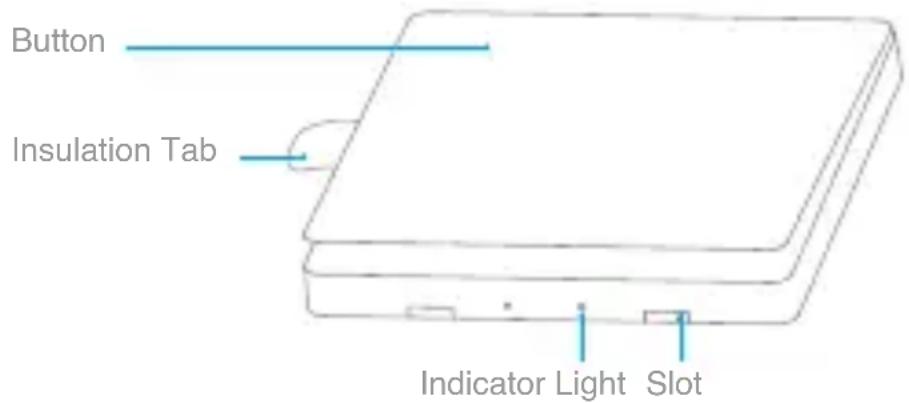
Button
Long Press for 10s: Reset
Quick Press 5 Times: Effective Range Test
Quick Setup
- Please add the Hub to the app according to the Hub Quick Start Guide. Please remove the battery insulation tab before use.
- Please open the app, tap "Home" and then tap "+" in the top right corner to enter "Add Device (Accessory)" page. Select "Wireless Remote Switch (Single Rocker)", and add it according to instructions.
* If the connection fails, please move the accessory closer to the Hub and try again.
Installation
Effective Range Test: Quick press the button 5 times at your desired position. If the Hub makes voice prompts, it indicates that the accessory can communicate effectively with the Hub.
Avoid metal surface to maximize signal strength.*
Option 1: Place it directly in the desired position.
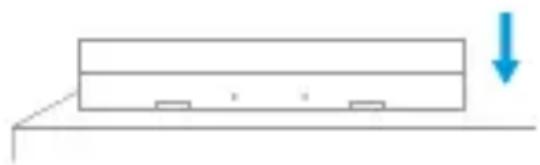
Option 2: Remove the protective film, and stick it to the desired position.
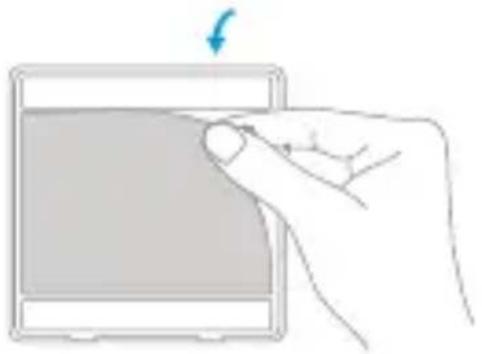
Keep the surface clean and dry.*
Identify an Accessory: Open the app, go to "Device List (Accessories)" page. Quick press the button 5 times. If the Hub makes voice prompts and the related accessory icon in the app blinks, it indicates that the accessory is identified.
Only Aqara Home app support this function.*
Specifications
Model: WXKG03LM
Dimensions: 86 × 86 × 15.12 mm (3.39 × 3.39 × 0.60 in.)
Wireless Protocol: Zigbee
Battery: CR2032
Operating Temperature: -5°C to +50°C
Operating Humidity: 5 – 95% RH, no condensation
Online Customer Service: www.aqara.com/support
Email: support@aqara.com
Manufacturer: Lumi United Technology Co., Ltd.
Address: 8th Floor, JinQi Wisdom Valley, No.1 Tangling Road, Liuxian
Ave, Taoyuan Residential District, Nanshan District, Shenzhen, China
Wireless Switch (Wall-Mounted Single Button) User Manual
Product Introduction
Please ensure the surface where you paste is clean and dry.*
*Please ensure the surface where you paste is clean and dry.
Address: 8th Floor, JinQi Wisdom Valley, No.1 Tangling Road, Liuxian
Ave, Taoyuan Residential District, Nanshan District, Shenzhen, China
Address: 8th Floor, JinQi Wisdom Valley, No.1 Tangling Road, Liuxian
Ave, Taoyuan Residential District, Nanshan District, Shenzhen, China
Ave, Taoyuan Residential District, Nanshan District, Shenzhen, China
Address: 8th Floor, JinQi Wisdom Valley, No.1 Tangling Road, Liuxian
Ave, Taoyuan Residential District, Nanshan District, Shenzhen, China
Choose a dry, clean placement surface.
Federal Communications Commission (FCC) compliance statement
- This device complies with Part 15 of the FCC Rules. Operation is subject to the following two conditions:
(1) This device may not cause harmful interference.
(2) This device must accept any interference received, including interference that may cause undesired operation.
- Changes or modifications not expressly approved by the party responsible for compliance could void the user's authority to operate the equipment.
NOTE: This equipment has been tested and found to comply with the limits for a Class B digital device, pursuant to Part 15 of the FCC Rules. These limits are designed to provide reasonable protection against harmful interference in a residential installation.
This equipment generates, uses, and can radiate radio frequency energy and, if not installed and used in accordance with the instructions, may cause harmful interference to radio communications.
However, there is no guarantee that interference will not occur in a particular installation. If this equipment does cause harmful interference to radio or television reception, which can be determined by turning the equipment off and on, the user is encouraged to try to correct the interference by one or more of the following measures:
- Reorient or relocate the receiving antenna.
- Increase the separation between the equipment and receiver.
- Connect the equipment into an outlet on a circuit different from that to which the receiver is connected.
-Consult the dealer or an experienced radio/TV technician for help.
FCC Radiation Exposure Statement
This equipment complies with FCC radiation exposure limits set forth for an uncontrolled environment. This equipment should be installed and operated with minimum distance 20cm between the radiator & your body.
IC: 22635-WXKG02LM
IC NOTICE TO CANADIAN USERS
This device complies with Industry Canada license - exempt RSS standard(s). Operation is subject to the following two conditions: (1) This device may not cause interference, and (2) This device must accept any interference, including interference that may cause undesired operation of the device. This device complies with RSS - 247 of Industry Canada. Operation is subject to the condition that this device does not cause harmful interference. This Class B digital apparatus complies with Canadian ICES - 003 (Cet appareil numérique de la Classe B conforme à la norme NMB - 003 du Canada).
This equipment complies with IC radiation exposure limits set forth for an uncontrolled environment. This equipment should be installed and operated with minimum distance of 20 cm between the radiator and your body. This transmitter must not be co-located or operating in conjunction with any other antenna or transmitter.
Hereby, LUMI UNITED TECHNOLOGY CO., LTD declares that the Radio Equipment type is in compliance with RED 2014/53/EU. The full text of the EU Declaration of Conformity is available at the following internet address: www.lumiunited.com/DoC.
This product can be used across EU member states.

Complies with the European Union's Restriction of Hazardous Substances Directive which protects the environment by restricting specific hazardous materials and products.
CAUTION: RISK OF EXPLOSION IF BATTERY IS REPLACED BY AN INCORRECT TYPE.
DISPOSE OF USED BATTERIES ACCORDING TO THE INSTRUCTIONS.
RECYCLING. This product bears the selective sorting symbol for Waste electrical and electronic equipment (WEEE). This means that this product must be handled pursuant to European directive 2012/19/EU in order to be recycled or dismantled to minimize its impact on the environment.
Symbol for “ENVIRONMENT PROTECTION – Waste electrical products should not be disposed of with household waste. Please recycle where facilities exist. Check with your local Authority or retailer for recycling advice”.
Symbol on the product or on its packaging indicates that this product may not be treated as household waste. Instead it shall be handed over to the applicable collection point for the recycling of electrical and electronic equipment.
Name and content of hazardous substances in the product
Brand : Xiaomi
Model : Wireless Remote Switch (Single Rocker)
Category : Wireless switch