
MiJia 360° Sphere Panoramic Camera - Camera Xiaomi - Free user manual and instructions
Find the device manual for free MiJia 360° Sphere Panoramic Camera Xiaomi in PDF.
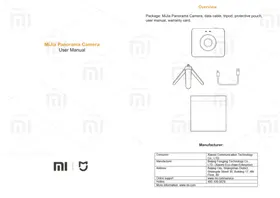


| Product Type | 360° Sphere Panoramic Camera |
| Brand | Xiaomi |
| Model | MiJia Panorama Camera (QJTZ01FJ) |
| Dimensions | 78.00 × 67.40 × 24.03 mm |
| Weight | 108.3 g |
| Power Input | 5V ⎓ 2A |
| Power Consumption | 3.8 W |
| Battery Capacity | 1600 mAh |
| Operating Temperature | -10°C to 45°C |
| Storage Temperature | -20°C to 45°C |
| Storage Humidity | 10% – 90% |
| Protection Rating | IP67 |
| Lens Aperture | F2.0 |
| Focal Length | 1.43 mm |
| Max Photo Resolution | 6912 × 3456 |
| Max Video Resolution | 3456 × 1758 |
| Wireless Connectivity | Wi-Fi 802.11 b/g/n 2.4 GHz, Bluetooth 4.0 |
| Storage | Micro SD Class 10 or U3 up to 128 GB |
| Mobile App Support | Android 5.0+ / iOS 8.0+ |
| Package Contents | Camera, data cable, tripod, protective pouch, user manual, warranty card |
| Initial Wi-Fi Password | 12345678 |
| Warranty | 12 months (with valid receipt and warranty card) |
Frequently Asked Questions - MiJia 360° Sphere Panoramic Camera Xiaomi
User questions about MiJia 360° Sphere Panoramic Camera Xiaomi
0 question about this device. Answer the ones you know or ask your own.
Ask a new question about this device
Download the instructions for your Camera in PDF format for free! Find your manual MiJia 360° Sphere Panoramic Camera - Xiaomi and take your electronic device back in hand. On this page are published all the documents necessary for the use of your device. MiJia 360° Sphere Panoramic Camera by Xiaomi.
USER MANUAL MiJia 360° Sphere Panoramic Camera Xiaomi
Package: MiJia Panorama Camera, data cable, tripod, protective pouch, user manual, warranty card.

Manufacturer:
| Consumer: | Xiaomi Communication Technology Co., LTD. |
| Manufacturer: | Beijing Fengjing Technology Co., LTD. (Xiaomi Eco-chain Enterprise) |
| Address: | Beijing City, Shijingshan District, Shixingda Street 30, Building 17, 4th Floor, 80 |
| Online support | www.mi.com/service |
| Hotline: | 400-100-5678 |
| More information: www.mi.com | |

Product components
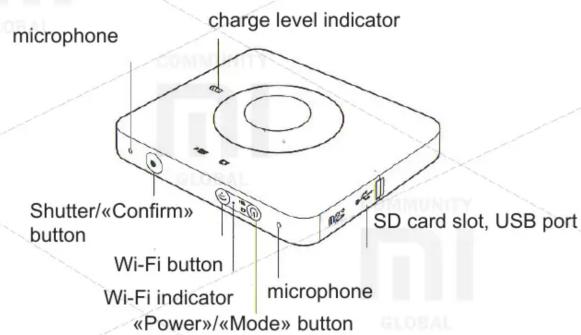
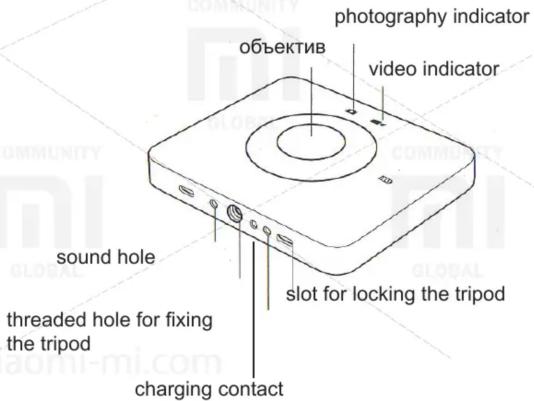
Introduction to camera functions
- Power on / off
Power on: perform a short press on the «Power»/«Mode» button, at the same time photo and video indicators light up; when the current mode indicator lights up, the camera is turned on.
Shutdown: hold down the «Power»/«Mode» button; when the current mode indicator light off, the camera is turned off.
- Switching between photo and video modes
By short pressing the «Power»/«Mode» button, you can switch between the photo and video modes (the video mode is initially set).
- Video shooting
In video recording mode, when the indicator of this mode constantly glows in blue, press the Shutter/Confirm button; the video recording indicator (red color) will flash slowly for a short time to start the video recording. Pressing the Shutter/Confirm button again will stop the video recording, the video recording indicator will turn blue and blink rapidly 3 times.
- Photo by second
In still picture mode, hold down Shutter/Confirm to start taking photos by second, the photography indicator will flash slowly (in red), after 10 seconds, the camera will automatically stop shooting. A time to take a photo by second can be changed via the mobile application.
- Photographing
In the photography mode, the indicator of this mode is constantly glowing in blue. After a short press on the Shutter/Confirm button, the photography indicator blinks 1 time.
- Reset your Wi-Fi password
Press and hold the Wi-Fi button for 5 seconds, then the Wi-Fi password will be reset.
Introduction to camera functions
- Battery indicator
A) When the charger is off:
Low battery warning: the battery indicator will flash slowly in red.
Device recharge warning: the battery indicator lights off.
B) When the charger is connected:
When charging, the battery indicator glows red.
Charging is complete: the battery indicator lights in blue.
- Standby mode
If there are no camera operations for 120 seconds, it will go into standby mode, and the battery indicator will flash blue. To exit the camera from standby mode, press any button.
- Video recording using the remote control
Using the remote control (supplied separately), you can control video shooting at a distance of up to 30 meters from the camera.
Download and install the mobile app
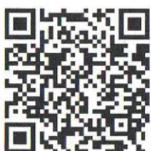
Enter "MiJia Panorama Camera" in the App Store search box, or scan the QR code to download the MiJia Panorama Camera mobile application.
Scan the QR code to download and install.
Connecting to the camera
- Download and install the MiJia Panorama Camera mobile application.
- Briefly press the "Wi-Fi" button to turn on the camera's Wi-Fi module; the Wi-Fi indicator will glow blue.
- Open the MiJia Panorama Camera mobile application, tap the "Camera" button at the bottom of the screen, and follow the instructions to connect.
- The camera's default password is 12345678.
Camera care
- Extreme weather conditions may temporarily reduce camera functionality or trigger automatic shutdown.
- Avoid using the camera in environments with sudden temperature or humidity changes, as condensation may form on the surface or inside the camera. If you notice condensation, immediately open the memory card slot cover to let the water vapor escape.
- When using the camera, do not place it lens-down on rough surfaces (e.g., the ground) to avoid scratching the lens.
Non-warranty cases
- Unauthorized repairs, misuse, shocks, careless handling, violation of operating rules, liquid ingress, accidents, upgrades, improper use of optional accessories not included with the device, as well as tearing, damaging, or forging the anti-counterfeiting label.
- Malfunctions occurring after the warranty period has ended.
- Damage caused by force majeure circumstances.
- Malfunctions not listed in the "Characteristic malfunction table";
- Malfunctions caused by the user, which led to damage to the elements specified in the "Table of Characteristic Faults".
Table of faults
- Malfunction of switching on/off;
- Malfunctions associated with the image/sound;
- Malfunctions associated with indicators;
- Problems with Wi-Fi/Bluetooth;
- Malfunctions associated with the buttons;
- Malfunctions with a signal;
- Faults related to a battery.
The declared content of harmful and toxic substances
| Component name | Harmful and poisoning substances | |||||
| (Pb) | (Hg) | (Cd) | (CRV) | (PBB) | (PBDE) | |
| Body parts | O | O | O | O | O | O |
| PCBA | O | O | O | O | O | O |
| Lens parts | O | O | O | O | O | O |
| Sound signalizer and microphone | O | O | O | O | O | O |
| Screws, Buffer gaskets and other small-scale structural components | O | O | O | O | O | O |
This table is created in accordance with the provisions of SJ/T 11364. O: The content of this hazardous and toxic material in all homogeneous materials of this component is within the requirements of GB/T26572. X: The content of this harmful and toxic material in at least one of the homogeneous materials of this component exceeds the requirements of GB/T26572.
After-sales service
Warranty maintenance of the MiJia Panorama Camera is carried out in accordance with the Law of the People's Republic of China "On Protection of Consumer Rights" and the Law of the People's Republic of China "On the Quality of Products", including:
- Within 7 days after receipt of the goods, in case of faults included in the "Table of Faults", which was confirmed by the Xiaomi Service Center, a free return or replacement of the product is performed;
- Within 8 to 15 days after receipt of the goods, in case of faults included in the «Table of Faults» and confirmed by the Xiaomi Service Center, a free replacement or repair of the product is performed;
- Within 12 months after receipt of the product, in the event of malfunctions included in the «Table of Faults» and confirmed by the Xiaomi Service Center, the product is repaired free of charge. In the event of breakdowns of accessories that come with the camera (data cable and tripod) not through the fault of the user, as confirmed by the Xiaomi Service Center, free repair is performed;
- To obtain warranty service, present a valid sales receipt from the vendor organization with the specified serial number of the device and a warranty card;
- The serial number of the device must be confirmed by the Xiaomi service department and completely coincide with the serial number in the service channel of the service.
Main Parameters
| Product name: | MiJia Panorama Camera | ||
| Product version: | QJTZ01FJ | ||
| Product dimensions: | 78,00 × 67,40 × 24,03 mm | ||
| Product weight: | 108,3 g | Input: | 5V = 2A |
| Consumer power of the device: | 3,8 W | Rated temperature: | -10 — 45°C |
| Temperature of storage: | -20 — 45°C | Relative humidity of storage: | 10% — 90% |
| Focal length | 1,43 | Aperture: | F2.0 |
| Battery volume: | 1600 mAh | Level of protection: | IP67 |
| Maximum resolution of photos: | 6912 × 3456 | ||
| Maximum resolution of videos: | 3456 × 1758 | ||
| Wireless connection: | Wi-Fi IEEE 802.11 b/g/n 2.4 GHz, Bluetooth 4.0 | ||
| Data storage: | Micro SD Class 10, for hi-res videos use a Micro SD U3 to 128 GB. | ||
| Cellular OS support: | Android 5/iOS 8 and higher | ||
| CMIIT ID: | 2016DP6594 | ||
| Standard: | Q/Madv0001-2016 | ||
| Charging adaptor | |||
| Input: | 100-240~50/60 Hz | ||
| Output: | 5V=2A/9V=2A/12V=1,5ASupport of QC2.0, USB-A port | ||
XIAOMI-MI.COM

Brand : Xiaomi
Model : MiJia 360° Sphere Panoramic Camera
Category : Camera