X61073 (MD 43057) - Pregnant Lifebeat - Free user manual and instructions
Find the device manual for free X61073 (MD 43057) Lifebeat in PDF.


User questions about X61073 (MD 43057) Lifebeat
0 question about this device. Answer the ones you know or ask your own.
Ask a new question about this device
Download the instructions for your Pregnant in PDF format for free! Find your manual X61073 (MD 43057) - Lifebeat and take your electronic device back in hand. On this page are published all the documents necessary for the use of your device. X61073 (MD 43057) by Lifebeat.
USER MANUAL X61073 (MD 43057) Lifebeat
natural_image
Black rectangular electronic device with three small water droplets on top (no visible text or symbols)WLAN- Multiroom-Lautsprecher WLAN multi-room speaker WLAN-Multiroom hoparlör
LIFEBEAT ^® X61073 (MD 43057)
Inhaltsverzeichnis
DE
The Spotify ^® software is subject to third party licenses found here:
www.spotify.com/connect/third-party-licenses.

text_image
Spotify®12.4. Spotify installieren
natural_image
Digital music player interface showing a blue abstract circular background with purple and purple hues, no readable text or symbols.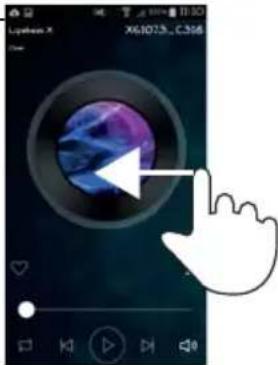
text_image
Lyphon X X61073_C3M8text_image
GENATELISTE Family room 32 Teasometer 3 R Storage 37 Teasometer 3 LR 50/100 A After 50text_image
Lyphon X X61073_C316text_image
Understanding Please run up the upreader Systemtext_image
Lyphen X X61073...C.315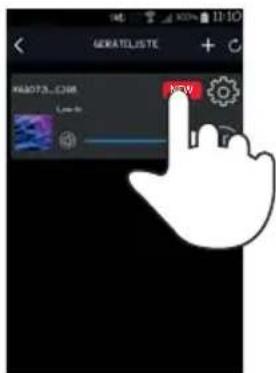
text_image
GERATELISTE NEW HADOTA.COM Live-to19. Fehlerbehebung
1. Notes on how to use these instructions .... 26
1.1. Symbols and signal words used in these instructions....26
2. Proper use
3. Safety information
3.1. People not permitted to use this device 27
3.2. Setting up the appliance safely 28
3.3. Mains connection....28
3.4. Thunderstorms....29
3.5. Never carry out repairs yourself ....29
4. Getting started
4.1. Check package contents 30
4.2. Connections....30
5. Overview of the Wi-Fi speaker 31
5.1. Front 31
5.2. Rear 32
6. LED displays
7. Network configuration
7.1. Network requirements 33
8. Connecting to a power supply 33
9. Switching the speaker on/off....34
10. First use.... 34
10.1. Wi-Fi connection via WPS 34
11. Playback via the network.... 35
12. Playing music 36
13. Playback via the LIFEBEAT X app 38
14. Playback via Bluetooth 39
15. Playback from an external audio device.... 39
16. Charging a USB via the USB port 39
17. Resetting the device in case of malfunction.... 40
17.1. Resetting the device to factory settings....40
18. Software updates......41
19. Troubleshooting 42
20. Cleaning 42
21. Disposal 43
22. Technical data 44
23. Compliance information 45
24. Legal notice 46
1. Notes on how to use these instructions

Before using the device for the first time, read these operating instructions thoroughly and, first and foremost, follow the safety advice! Please keep these operating instructions in a safe place for future reference. Always include these operating instructions, if you pass the device on to a new owner.
1.1. Symbols and signal words used in these instructions

DANGER!
Warning of immediate risk of fatal injury!
WARNING!
Warning of possible risk of fatal injury and/or serious irreversible injuries!
CAUTION!
Warning of possible minor or moderate injuries!

ATTENTION!
Please follow the instructions to avoid property damage!

NOTE!
Additional information on using the device!

NOTE!
Please follow the instructions in the operating instructions!

WARNING!
Warning of risk of electric shock!
WARNING!
Warning of danger due to loud volume!
- Bullet point/information on steps during operation
2. Proper use
This device is used for playing audio files streamed via a Wi-Fi network. In addition, you can use the device to play back audio signals from external devices and also charge USB devices
Never use the device for any other purpose. Only use the device indoors.
- The device is intended for private use only and not for industrial/commercial use.
Please note that we shall not be liable in cases of improper use:
- Do not modify the device without our consent and do not use any auxiliary equipment which we have not approved or supplied.
- Only use spare parts and accessories that we have supplied or approved.
- Heed all the information in these operating instructions, especially the safety information. Any other use is deemed improper and can cause personal injury or property damage.
- Do not use the device in extreme environmental conditions.
3. Safety information
3.1. People not permitted to use this device
Keep the device and its accessories out of the reach of children.
- This device may be used by children over the age of 8 and by persons with reduced physical, sensory or mental abilities or by those without experience and/or knowledge, if they are supervised or have been instructed in the safe use of the device and have understood the dangers that result from it. Children must not be allowed to play with the device. Cleaning and user maintenance may not be carried out by children, unless they are aged 8 or over and are supervised.
- Children younger than 8 should be kept away from the device and the mains cable.
- DANGER! Keep plastic packaging out of the reach of children. There is a risk of suffocation!
3.2. Setting up the appliance safely
- Set up and operate all the components on a stable, level and vibration-free surface to prevent the device from falling.
- Do not subject the device to knocks and vibrations. Knocks and vibrations may damage the sensitive electronics.
- Do not place the device near heat sources (e.g. heaters) that could affect it.
- Do not place naked flames (e.g. lit candles) on or near the device.
- Make sure that the vents are never covered so as to ensure that there is always adequate ventilation.
- Do not place any objects on the cables as they may be damaged.
- Maintain a minimum distance of approx. 10 cm between the device or mains adapter and any walls. Ensure adequate ventilation.
- Do not place liquid-filled containers, such as vases, on or near the device. The container may tip over and the liquid may impair the electrical safety of the device. Keep the device away from moisture and from splashes or sprayed water.
- In order to prevent malfunctions, avoid knocks, dust, heat and direct sunlight. The operating temperature is 5-35°C.
- Do not use your device outdoors as it could be damaged by rain, snow, etc.
- To avoid malfunctions, keep the product at a distance of at least one metre from high-frequency or magnetic interference sources (televisions, loudspeakers, mobile telephones, etc.). If any malfunctions occur, set up the device at a different location.
- Major changes in temperature or fluctuations in humidity can cause moisture to build up within the device due to condensation – this can cause an electrical short circuit.
3.3. Mains connection
- Connect the mains adapter only to a power socket (AC 100–240 V \~ 50/60 Hz) that is easy to reach and close to the place where you have set up the device. The socket outlet must be freely accessible so that you can unplug the device from the mains quickly if necessary.
- Only use the mains adapter supplied with the product. Never try to
connect the mains adapter to other connectors as this may cause damage.
- If the device has been moved from a cold room to a warm room, wait before connecting it to the power supply. The resulting condensation may damage the device. The device can be operated safely as soon as it has reached room temperature.
- Make sure that the connecting cable does not present a trip hazard. Do not allow the connecting cable to become trapped or squashed.
3.4. Thunderstorms
Pull out the mains plug if you are away for a long period of time or there is a thunderstorm.
3.5. Never carry out repairs yourself
- If the mains adapter, connecting cable or device is damaged, immediately unplug the device from the mains.
- Do not use the device if it or the connecting cables are visibly damaged or if the device itself has been dropped.

WARNING!
Never try to open and/or repair a device component yourself. There is a risk of electric shock!
- In the event of a fault, contact our Service Centre or another suitable professional repair workshop.
4. Getting started
4.1. Check package contents
Remove all packaging materials including the film on the display.

DANGER!
Do not let children play with the plastic film. There is a risk of suffocation!
Please check your purchase to ensure that all items are included. If anything is missing, please contact us within 14 days of purchase. The following items are supplied with your product:
• Wi-Fi Speakers
- Mains adapter (model PS36IBIAK2000E)
- 3.5mm stereo cable
• These operating instructions
- Warranty card
4.2. Connections
Before connecting the radio, switch it off using the power switch at the back of the device.
▶ Operation in Wi-Fi mode: The device has an integrated Wi-Fi antenna.
Mains adapter: Connect the connector plug on the mains adapter (supplied) to the DC IN port and plug the mains power plug into a AC 100–240 V \~ 50/60 Hz socket.
LINE IN: Connect a 3.5 mm stereo jack to the AUX IN socket to play back stereo sound output from other audio devices via the Wi-Fi speaker.
USB: Here you can connect a smart device to recharge its internal battery via the USB port.
5. Overview of the Wi-Fi speaker
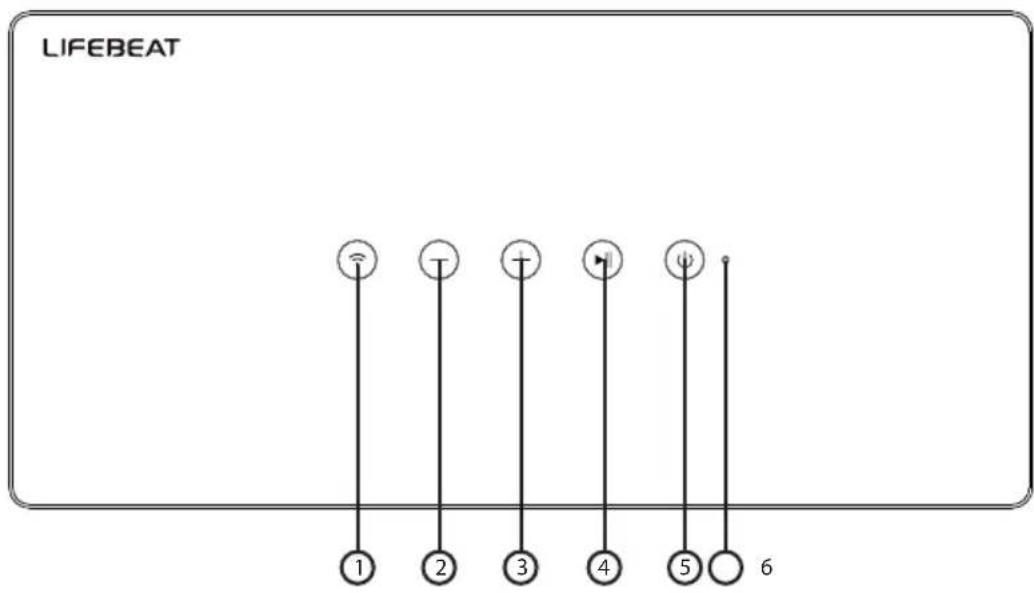
5.1. Front
DE
EN
TR
text_image
LIFEBEAT 1 2 3 4 5 61) WI-FI
2) VOL -: Reduce volume, press 2x for previous track
3) VOL +: Increase volume, press 2x for next track
4) ▶ II: Play/pause
5) STANDBY
6) OPERATING LED
5.2. Rear
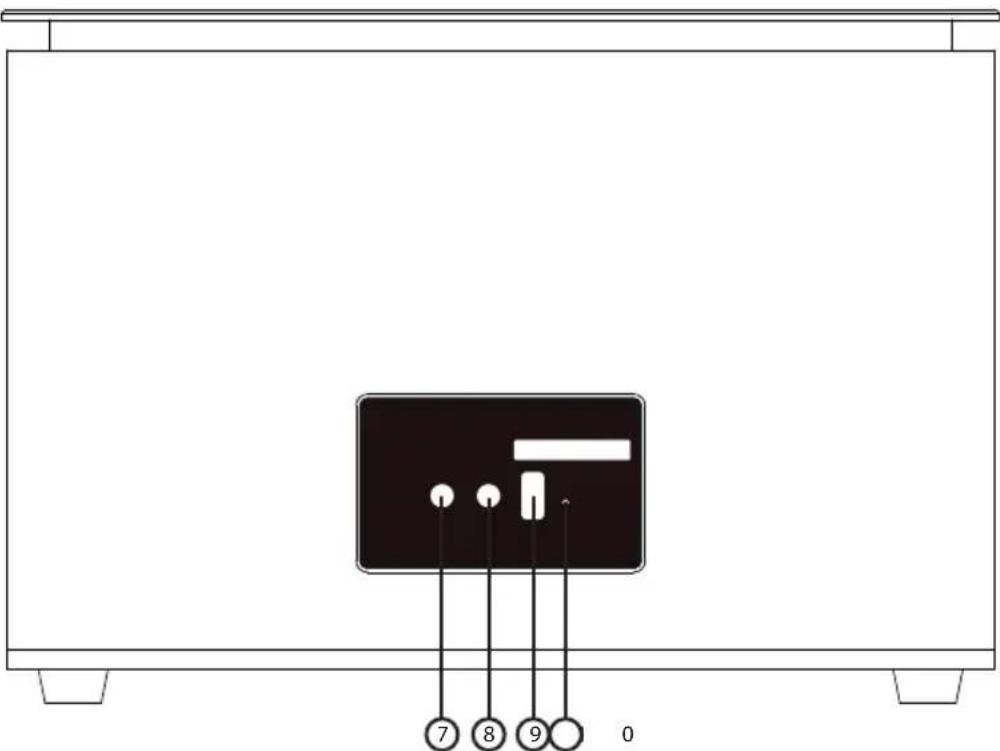
text_image
7 8 9 07) LINE-IN: Audio input, 3.5 mm stereo socket
8) DC IN: Socket for power cable
9) USB CHARGE: USB port for charging external devices
10) RESET
6. LED displays
| Button/LED Display Status | ||
| STANDBY | Lights up red Standby mode | |
| Off Standby mode | ||
| LINE IN | Lights up blue Cable | connection via LINE IN |
| WIFI | Flashes blue Ready to connect(Wi-Fi network)Ready to pair(Bluetooth devices) | |
| Flashes quickly, blue | Wi-Fi connection establishedBluetooth device connected | |
| Lights up blue Wi-Fi/Bluetooth connectedBattery is fully charged | ||
7. Network configuration
The Wi-Fi speaker is connected to the network via Wi-Fi. The Wi-Fi antenna of the speaker receives the signals from the network router.
7.1. Network requirements
The network requires the following properties in order for the device to access music files via the network:
- The router used for the network must have a DHCP server function so it can automatically assign the device a network IP address.
Otherwise, set the DHCP function via the Web interface.
• Media sharing for UPnP must be set up in the router.
8. Connecting to a power supply
Connect the power supply plug of the supplied adapter (model: PS36IBIAK2000E) to the DC IN socket on the device.
9. Switching the speaker on/off
Switching on the speaker
Hold down the standby button to switch the speaker on. The standby LED lights up blue.
Standby mode
▶ Hold down the standby button to switch the speaker into standby mode.
The standby LED lights up red when you operate the Wi-Fi speaker via the supplied mains adapter.
If you operate the Wi-Fi speaker using the integrated battery, the standby LED will go off.
In standby mode, the speaker retains the network connection so that it is available immediately after being switched back on. In this operating mode the speaker consumes more power than in standby mode.
10. First use
- You can connect the Wi-Fi speaker to your router's existing network via the button.

- When using the Wi-Fi speaker for the first time, place it as close as possible to the router to ensure a perfect Wi-Fi signal during set-up. Later, you can place the Wi-Fi speaker anywhere within range of the Wi-Fi signal.
10.1. Wi-Fi connection via WPS
If your router has a WPS button, you can establish the connection of the speaker to the network simply by using this button:
▶ Press the button on the Wi-Fi speaker for about 3 seconds until the operating LED flashes blue.
Now press the WPS button on the Wi-Fi router.

NOTE!
Please also refer to the operating instructions for the router.
The device will now establish a connection with the network. While this happens, the operating LED will flash rapidly.
- Once the connection has been successfully made, the operating LED will light up permanently blue.
- The device can now play back audio signals from the network.
- The device saves the connection data so that it does not need to be entered again the next time you switch on the speaker.
11. Playback via the network
▶ Switch the Wi-Fi speaker on. The operating LED lights up blue.
Connect your mobile device to your Wi-Fi network.
▶ Start the LIFEBEAT X app and tap Add Multi-Room speaker.
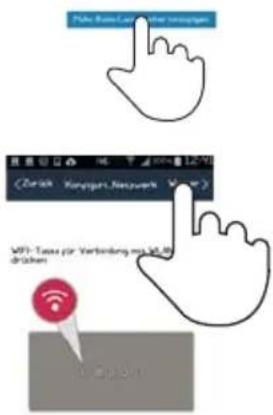
▶ Press and hold the MODE button until the operating LED flashes blue and tap on Continue in the LIFEBEAT X app.
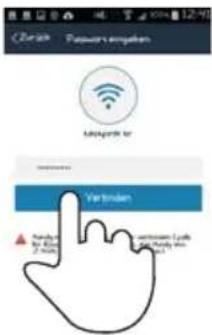
Now enter the password of your Wi-Fi network and confirm the entry by tapping on Connect.
You mobile device (smartphone or tablet PC) must be registered on the Wi-Fi network of your router.
12. Playing music
Your Wi-Fi speaker can be used to play back music from the network, music from a device registered via Wi-Fi (direct mode) or the stereo signal of an externally connected device.
The following section describes how you can listen to audio from various sources on your Wi-Fi speaker.

NOTE!
To control music playback from the network with a smart phone or tablet PC, you will need a corresponding UPnP-enabled app.
12.1. Installing the app on an Android/Apple smartphone/tablet PC
To be able to control playback on the Wi-Fi speaker from a tablet PC or smartphone, you first need to visit the Play store (Android) or AppStore (Apple) to install the LifebeatX app on your tablet PC/smartphone.
12.2. Setting up a Wi-Fi direct connection via Lifebeat X
If it is not possible to set up the network connection via WPS, use the LIFEBEAT X app on your smartphone or tablet to set up a connection to the Wi-Fi speaker.
▶ Switch the Wi-Fi speaker on.
▶ Open the wireless settings of your mobile device.
▶ Select the suggested audio system "MEDION XX-XX-XX" and tap on Connect.
Now press the back button on your smartphone.
▶ Start the LIFEBEAT X app.
The LIFEBEAT X app now connects your mobile device to the Wi-Fi speaker.
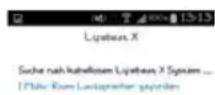
As soon as the connection is ready, the app automatically switches to the source directory.
As soon as the device has been set up, and thus the connection of the Wi-Fi speaker to the Internet has been successfully completed, the operating LED will light up permanently blue.
text_image
Daimer Festrian Plaza-Phade Luisen Mauritalkos Spray Lipather Kursatzungen12.3. Listening to music via Spotify®
You can play back audio data from the music streaming service Spotify® via the Wi-Fi speaker. The prerequisites are that you have the premium version of the Spotify app installed on your smartphone or tablet PC and that the Wi-Fi speaker and the device with the Spotify app are registered on the same network.
The Spotify ^® software is subject to third party licenses found here:
www.spotify.com/connect/third-party-licenses.

text_image
Spotify®12.4. Install Spotify
▶ Open Google Play or the Apple App Store and enter the search term Spotify.
▶ Install the Spotify app on your smartphone or tablet PC. Follow the on-screen installation instructions.
- Subscribe to a Spotify® premium account.

NOTE!
To install the Spotify application, there must be an Internet connection. The premium version of the Spotify app is a pay service.
Information on Spotify ^® software licenses is available via www.spotify.com/connect/third-party-licenses.
13. Playback via the LIFEBEAT X app
▶ Switch the Wi-Fi speaker on. The operating LED lights up blue.
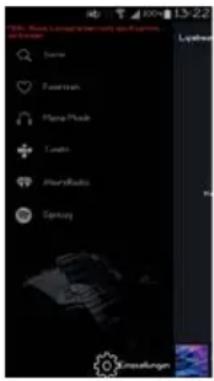
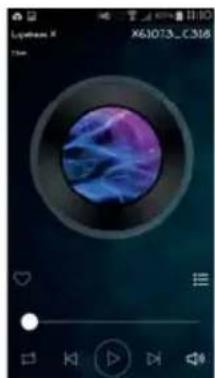
▶ Start the LIFEBEAT X app. The app launches to its main screen in which you can open playlists, skip tracks back and forward, change the volume or select favourites.
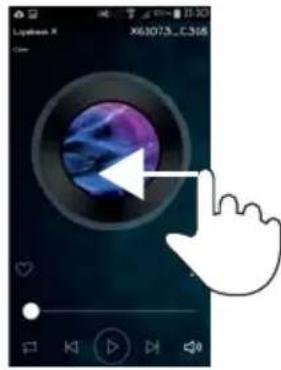
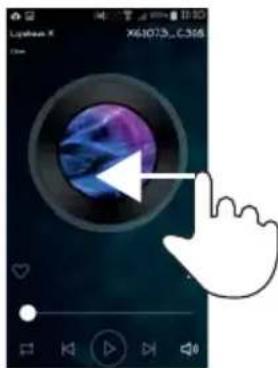
Open the device list by swiping the app's main screen from right to left with your finger.
natural_image
Digital music player interface showing a blue abstract circular background with purple and purple hues, no readable text or symbols.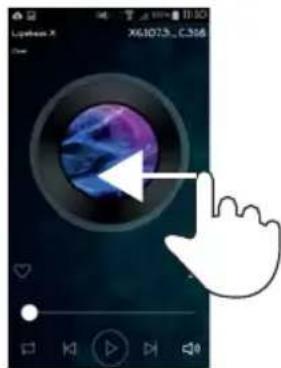
text_image
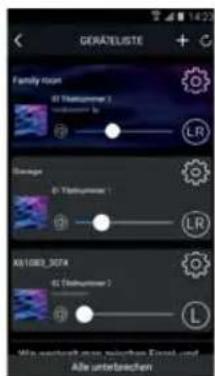
Lipidos X X61073, C386A list of all registered Wi-Fi speakers is displayed here.
To add a Wi-Fi speaker to a group, you need to tap on the corresponding Wi-Fi speaker and simply "drag" it onto another desired Wi-Fi speaker. You can now play music simultaneously via every Wi-Fi speaker that is "stored" in the group.
text_image
GERATELISTE + Family Room @ Thalungamer 1 @ Thalungamer 2 LR Storage @ Thalungamer 1 LR R01083_074 @ Thalungamer 2 L Wit: wertock, non werten Email und Alle unterwerten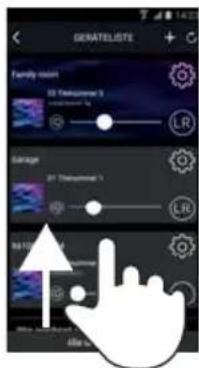
text_image
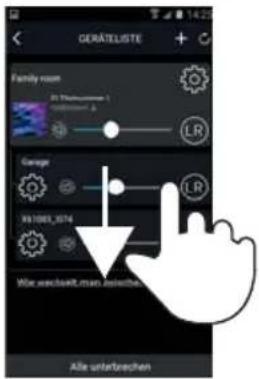
GENATELISTE Family room 32 Teasometer 3 10000000000 LR Storage 37 Teasometer 3 LR 54/12/2024 File list▶ To remove a Wi-Fi speaker from a group, simply "drag" the desired Wi-Fi speaker out of the group. Now you can play different music on each individual Wi-Fi speaker.
text_image
GERATELISTE Family room (St. Thalmusser) R100000000 Gauge X3108X_574 Mie werteinkt man bewertes Alle unterbrechenDE
EN
TR
14. Playback via Bluetooth
▶ Press the 📤 button briefly to switch the Wi-Fi speaker into Bluetooth mode. The operating LED starts flashing blue.
Connect the smart device via Bluetooth with the Bluetooth device X610XX. The operating LED lights up blue as soon as the Wi-Fi speaker is connected to the smartphone.
15. Playback from an external audio device
Connect the supplied 3.5 mm stereo jack cable to the LINE IN socket to play back stereo sound output from other audio devices via the Wi-Fi speaker.
The Wi-Fi speaker switches automatically into LINE IN mode and the operating LED lights up blue.
To switch back to a previously set up Wi-Fi mode (network or Bluetooth), press the 📤 button.
16. Charging a USB via the USB port
You can charge the battery of a device that is charged via a USB port on the USB port of the Wi-Fi speaker.
Connect the device that you want to charge via a USB cable to the USB port on the rear of the Wi-Fi speaker.

NOTE
The USB port on the Wi-Fi speaker delivers a charging current of 750 mA at an output voltage of max. 5 V. Any devices that you connect to the Wi-Fi speaker for charging should not have a higher power consumption.
The Wi-Fi speaker must be switched on to charge and the USB charging function must be selected or be in standby mode.
17. Resetting the device in case of malfunction
If your device does not respond, unplug the wall power supply and plug it back in again a few seconds later.
17.1. Resetting the device to factory settings
▶ Switch the Wi-Fi speaker on.
▶ Start the LIFEBEAT X app.
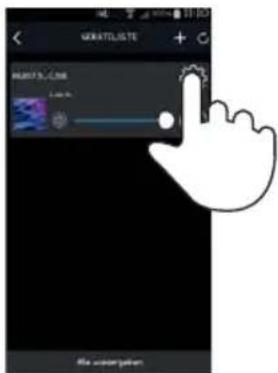
- Open the device list by swiping the app's main screen from right to left with your finger.
text_image
Lyphon X X61073_C316Now tap the setting() of the required Wi-Fi speaker.
text_image
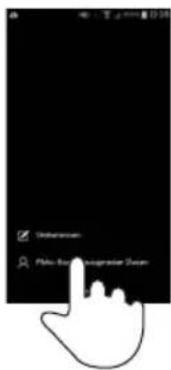
MORATOLISTE MORATOLISTE File underpapienNow tap on Multi-room speaker data.
text_image
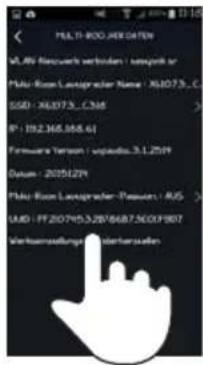
Unknown False-Blurred Logmaster StepNow tap on Restore factory settings.
text_image
TEL: 800.498.0478 VL.89 Research verbinden / support or Plku-Rioo Leasprader Name / X6073_1 GSD / X6073_2346 IP: 192.348.588.61 Hardware Version / upauda.3.1.2019 Datum: 2051221 Plku-Rioo Leasprader - Pressure / AUS LUG / FP 20795.328/6687.5007907 Verbauswaltungs- undelanzulienDE
EN
TR
Now tap on Confirm.
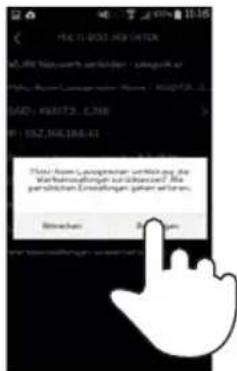
- You can update the software of the Wi-Fi speakers via the app. The app searches to see if a software update is available and then downloads the update onto the Wi-Fi speaker from the Internet.
▶ Switch the Wi-Fi speaker on.
▶ Start the LIFEBEAT X app.
Open the device list by swiping the app's main screen from right to left with your finger.
The app automatically checks whether a software update is available for the registered Wi-Fi speakers.
If this is the case, the info box NEW appears next to the setting (of the corresponding Wi-Fi speaker.
Now tap off NEW of the required Wi-Fi speaker to start the software update.
text_image
Lythan X X61073...C.365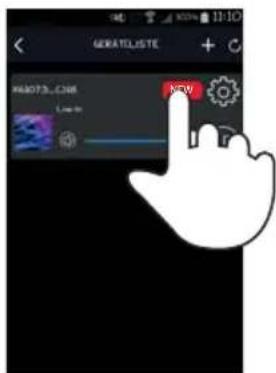
text_image
GERATELISTE HKEYC.COM OKY19. Troubleshooting
If the device malfunctions, please check first if you can remedy the problem yourself with the help of the following hints.
Never try to repair the devices yourself. Please contact our Service Centre or another professional repair shop if a repair is necessary.
| Problem Possible cause Solution | ||
| No sound Wrong playback | mode set Set LINE IN mode, | network mode or direct mode. |
| Volume level too low. Check the volume level. | ||
| No reception. Check the network settings. | ||
| Problems with the router connection. | No DHCP server is activated. | Check the router settings. |
| An incorrect network key was entered into the network. | Re-enter the network key. | |
| The IP address that you assigned manually is not within the router's address range. | Enter a valid IP address for the Wi-Fi speaker. | |
| The Wi-Fi speaker cannot be controlled by the Lifestream app. | Wi-Fi speaker and smart-phone/tablet PC are not on the same Wi-Fi network. | Check the network status of the Wi-Fi speaker and the smartphone/tablet PC. |
20. Cleaning
Switch off the device before cleaning it.
Use a soft, dry cloth to wipe the device. Never use rough cloths, abrasive detergent, thinners or solutions containing alcohol to clean the device. These can damage the device.
21. Disposal

Packaging
Your appliance is packaged to protect it from transportation damage. Packaging is raw material and can be reused or added to the recycling system.

Device
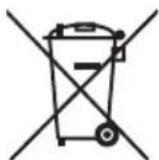
Old devices should not be disposed of with the normal household rubbish. In accordance with Directive 2012/19/EU, the device must be properly disposed of at the end of its service life. This involves separating the materials in the appliance for the purpose of recycling and minimising the environmental impact. Take old appliances to a collection point for electrical scrap or a recycling centre. Contact your local waste disposal company or your local authority for more information on this subject.
Batteries
Batteries must be properly disposed of. Retailers who stock batteries and local authority collection points have appropriate disposal containers for this purpose. You can contact your local waste disposal company or municipal authorities for further information.
22. Technical data
Mains adapter
Model:
PS36IBIAK2000E
Manufacturer:
FLYPOWER.,
China
Input voltage: AC 100 – 240 V, 1A, \~ 50/60 Hz
Output voltage: 18 V

Speakers: 2 x 20 W RMS
Dimensions: approx. 300 x 209 x 146 cm
Weight: approx. 2 kg
Wi-Fi
Frequency range: 2.4 GHz
Wi-Fi Standard: 802.11 b/g/n
Encryption:
WPA2
possible
Range: Inside / Outside approx. 35–100 m /
Bluetooth
BT Version: 2.4 GHz, 4.0 supports A2DP, AVRCP
Range: up to 10 m
Connections
Mains adapter input:
DC 18 V, 2 A

LINE -IN:
3.5 mm stereo jack
USB service and charging port
USB output:
DC 5 V ---
max. 750 mA
Subject to technical and optical changes as well as printing errors.
23. Compliance information
This device is supplied with the following wireless features:
- Wireless LAN
Medion AG hereby declares that the product conforms to the following European requirements:
• R&TTE Directive 1999/5/EC
• EMC Directive 2014/30/EU
• Ecodesign Directive 2009/125/EC
• RoHS Directive 2011/65/EU
This product satisfies the basic requirements and relevant regulations of the Ecodesign Directive 2009/125/EC (Commission Regulation 1275/2008). However, due to its mode of operation (continuous permanent provision of a Wi-Fi signal), no minimising of power consumption in accordance with the Ecodesign Directive is planned.
To minimise power consumption, disconnect the device from the mains when not in use.
Full declarations of conformity are available at www.medion.com/conformity.
CE
24. Legal notice
Copyright © 2016
All rights reserved.
These operating instructions are protected by copyright.
Mechanical, electronic and any other forms of reproduction are prohibited without the written permission of the manufacturer.
Copyright is owned by the company:
Medion AG
Am Zehnthof 77
45307 Essen
Germany
Subject to technical and optical changes as well as printing errors.
These instructions can be ordered again from the service hotline and are available for download via the service portal.
You can also scan the QR code below to download the instructions onto your mobile device via the service portal.
| URL QR code | ||
| DE www.medionservice.de |  | |
| ATwww.medion.com/at/service/start/ |  | |
| BE www.medion.com/be/nl/service/start/ |  | |
| LUX www.medion.com/lu/de/ |  | |
içindekiler
DE
EN