
AirRam Cordless 19841 - Vacuum Cleaner BISSELL - Free user manual and instructions
Find the device manual for free AirRam Cordless 19841 BISSELL in PDF.


User questions about AirRam Cordless 19841 BISSELL
0 question about this device. Answer the ones you know or ask your own.
Ask a new question about this device
Download the instructions for your Vacuum Cleaner in PDF format for free! Find your manual AirRam Cordless 19841 - BISSELL and take your electronic device back in hand. On this page are published all the documents necessary for the use of your device. AirRam Cordless 19841 by BISSELL.
USER MANUAL AirRam Cordless 19841 BISSELL
natural_image
Line drawing of a vacuum cleaner with a cylindrical body and base (no text or symbols)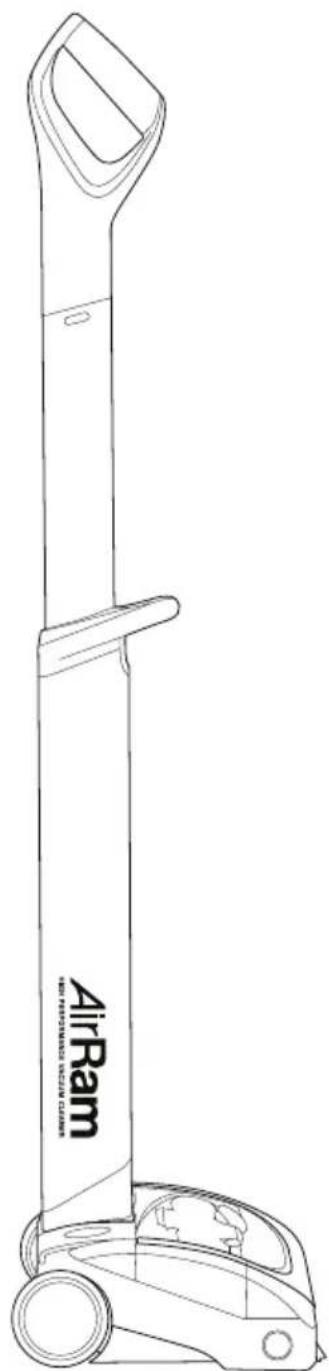
natural_image
Line drawing of an AirRam vacuum cleaner with a cylindrical body and wheels (no text or symbols on the device itself)IMPORTANT SAFETY INSTRUCTIONS

IMPORTANT: READ ALL INSTRUCTIONS BEFORE USE. RETAIN INSTRUCTIONS FOR FUTURE REFERENCE.

Do not use in rain or leave outdoors while raining.

WARNING: Basic safety precautions should always be observed when using an electrical appliance, including the following to reduce the risk of fire, electrical shock, or injury:
Personal Safety:
- Store indoors in a dry place out of the reach of children.
- Always use responsibly. This appliance can be used by children aged from 8 years and above and persons with reduced physical, sensory or mental capabilities or lack of experience and knowledge if they have been given supervision or instruction concerning use of the appliance in a safe way and understand the hazards involved.
- Don't let children play with the appliance; supervise children using or maintaining the appliance.
- Use only manufacturer's recommended attachments as described in this manual; misuse or use of any accessory or attachment other than those recommended, may present a risk of personal injury.
• Take extra care when cleaning stairs. - Keep the appliance and accessories away from hot surfaces.
- Do not block the appliances openings or hinder air flow; keep openings free of any objects including dust, lint, clothing, fingers (and all parts of the body).
• Particularly keep hair away from openings and moving parts.
Electrical safety:
- Only use batteries and chargers supplied by BISSELL.
- Never modify the charger in any way.
- The charger has been designed for a specific voltage. Always check that the mains voltage is the same as that stated on the rating plate.
A charger that is suitable for one type of battery pack may create a risk of fire when used with another battery pack; never use the charger with another appliance or attempt to charge this product with another charger.
- Before use, check the charger cord for signs of damage or ageing. A damaged or entangled charger cord increases the risk of fire and electric shock.
- Do not abuse the charger cord.
- Never carry the charger by the cord.
- Do not pull the cord to disconnect from a socket; grasp the plug and pull to disconnect.
- Don't wrap the cord around the charger when storing.
- Keep the charger cord away from hot surfaces and sharp edges.
- The supply cord cannot be replaced. If the cord is damaged the charger should be discarded and replaced.
- Do not handle the charger or the appliance with wet hands.
- Do not store or charge the appliance outdoors.
- The charger must be removed from the socket before removing the battery,
cleaning or maintaining the appliance.
Battery safety:
- This appliance includes Li-Ion batteries; do not incinerate batteries or expose to high temperatures, as they may explode.
- Liquid ejected from the battery may cause irritation or burns.
• In an emergency situation contact professional help immediately! - Leaks from the battery cells can occur under extreme conditions. Do not touch any liquid that leaks from the battery. If the liquid gets on the skin wash immediately with soap and water. If the liquid gets into the eyes, flush them immediately with clean water for a minimum of 10 minutes and seek medical attention. Wear gloves to handle the battery and dispose of immediately in accordance with local regulations.
- Shorting the battery terminals may cause burns or fire.
- When the battery pack is not in use, keep it away from paper clips, coins, keys, nails, screws or other small metal objects that could make a connection from one terminal to another.
- When you dispose of the appliance remove the battery and dispose of the battery safely in accordance with local regulations.
Service:
- Before using the appliance and after any impact, check for signs of wear or damage and repair as necessary.
- Do not use the appliance if any part is damaged or defective.
- Repairs should be carried out by a service agent or a suitably qualified person in accordance with relevant safety regulations. Repairs by unqualified persons could be dangerous.
- Never modify the appliance in any way as this may increase the risk of personal injury.
- Only use replacement parts or accessories provided or recommended by BISSELL.
Intended use:
- This appliance has been designed for domestic dry vacuum cleaning only.
- Do not pick up liquids or use on wet surfaces.
- Do not pick up anything that is flammable, burning or smoking.
- Use only as described in this manual.
- Don't use on concrete, tarmacadam or other rough surfaces.
- The brush bar may damage certain floor surfaces. Before vacuuming flooring, rugs or carpets, check the flooring manufacturer's recommended cleaning instructions.
- May damage delicate fabrics or upholstery. Care should be taken on loose-weave carpets and coverings or where there are loose threads. If in doubt please test on an inconspicuous area first.
- The BISSELL AirRam has been designed to clean a wide variety of floor surfaces without the need to change settings. However some surfaces such as delicate loose-pile rugs or carpets, tasselled rug edges or damaged carpets with exposed threads are not suitable for cleaning with a rotary brush. The AirRam can still be used to clean such surfaces by removing the brush bar as shown on page 11 and using the supplied plug in the brush bar hole. This setting should also be used to give the best performance on hard floors with deep crevices.
WARNING:
- Do not use water, solvents, or polishes to clean the outside of the appliance; wipe clean with a dry cloth.
- Never immerse the unit in water and do not clean in a dish washer.
- Never use the appliance without the filter fitted.
Thanks for buying a BISSELL vacuum!
We love to clean and we're excited to share one of our innovative products with you. We want to make sure your vacuum works as well in two years as it does today, so this guide has tips on using (pages 5-8), maintaining (pages 9-13), and if there is a problem, troubleshooting (page 14).
In just a few simple assembly steps, you'll be ready to vacuum. Let's get started!
What's in the Box
1 Head
2 Upper Handle
3 Lower Handle
4 Battery
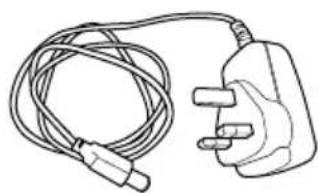
5 Charger
6 Dirt Bin
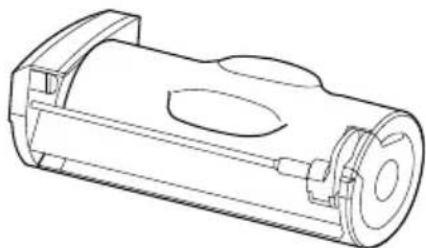
7 Washable Filter
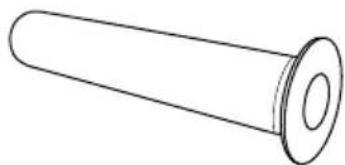
8 Brush Bar Hole plug
(Filter and bin are already in place)
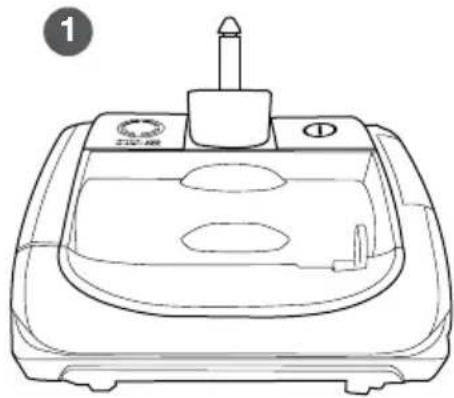
natural_image
Line drawing of a medical or laboratory device with a central cap and base (no text or symbols)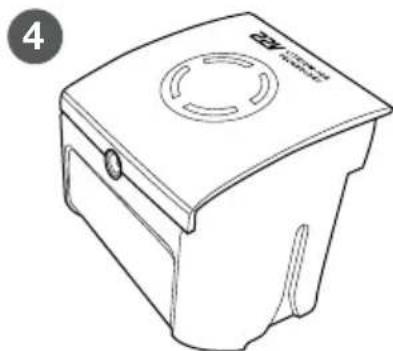
natural_image
Line drawing of a square-shaped container with a circular top and side slots, no text or symbols present.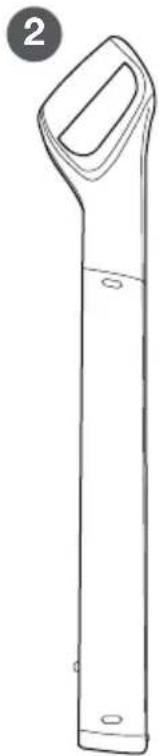
natural_image
Line drawing of a vertical cylindrical object with a handle and two small circular ends, labeled with number 2 (no text or symbols on the object itself)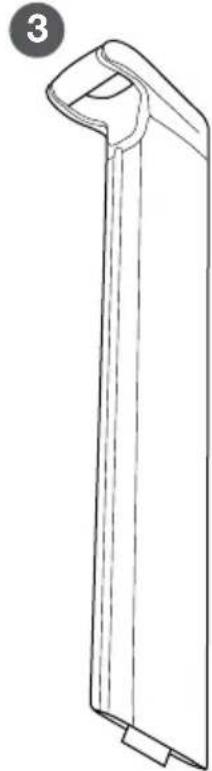
natural_image
Line drawing of a vertical mechanical part with a curved handle and base (no text or symbols)5
natural_image
Line drawing of a cord with two connectors and a plug, no text or symbols present6
natural_image
Technical line drawing of a mechanical component with cylindrical body and flanges (no text or symbols)7
natural_image
Simple line drawing of a cylindrical object with a flanged end (no text or symbols)8

NOTE: The Brush Bar Hole Plug is provided to you for situations for cleaning delicate loose-pile rugs or carpets, rugs with tasseled edges or damaged carpets with exposed threads that are not suitable for cleaning with the rotary brush roll. Please refer to instructions on how to remove brush roll and plug the brush bar hole.
Assembly
natural_image
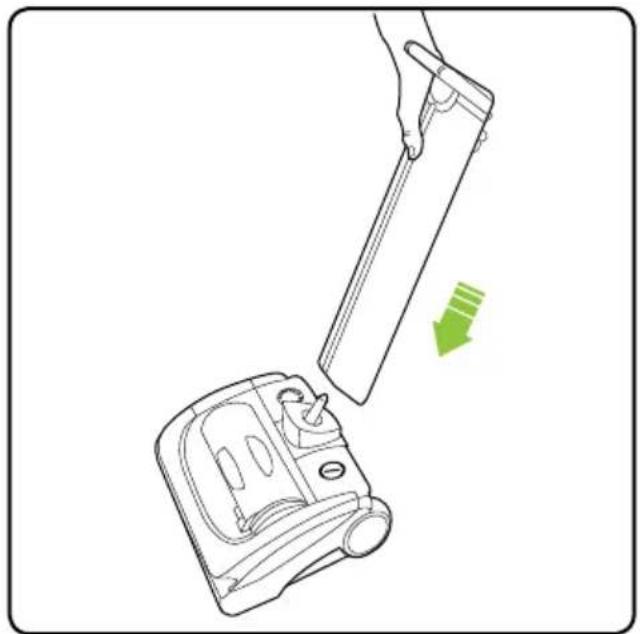
Line drawing of a hand holding a cylindrical object next to a device with a green arrow indicating motion (no text or symbols)Attach the lower handle onto the head of the AirRam.
text_image
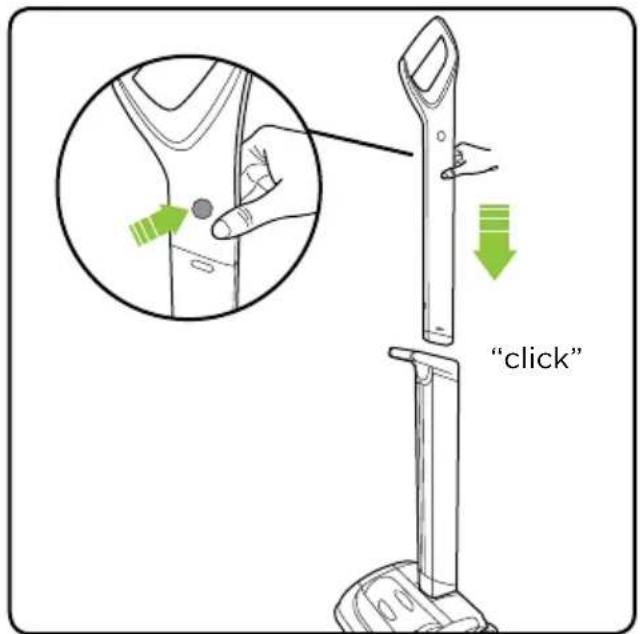
"click"Press the button at the top of the upper handle and slot it into the lower handle until it clicks.
text_image
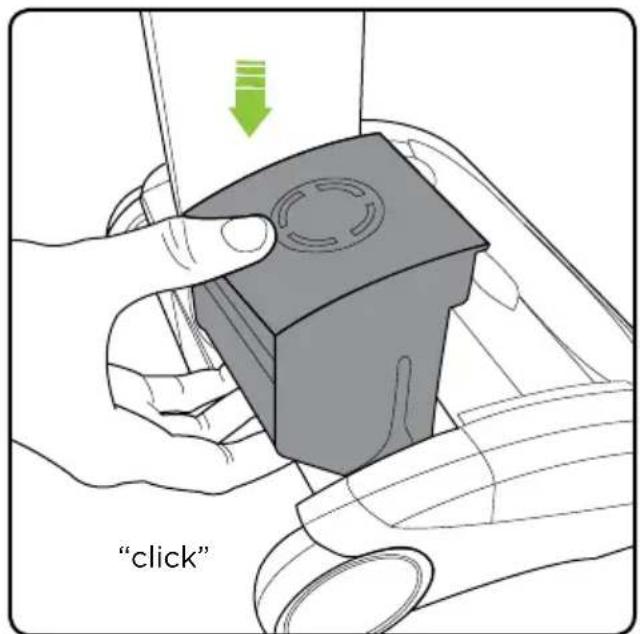
"click"Insert the battery by sliding it down. It will click into place.
text_image
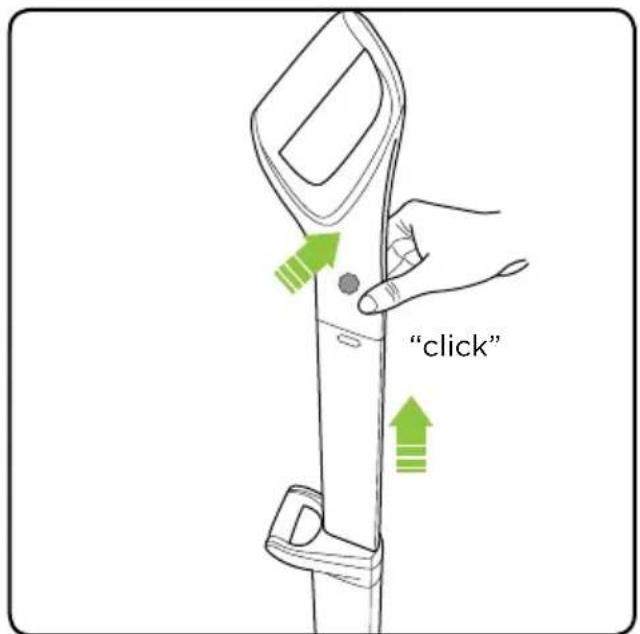
"click"To extend the upper handle, hold down the button on the left hand side and pull it up. It will click into place.
Operation
natural_image
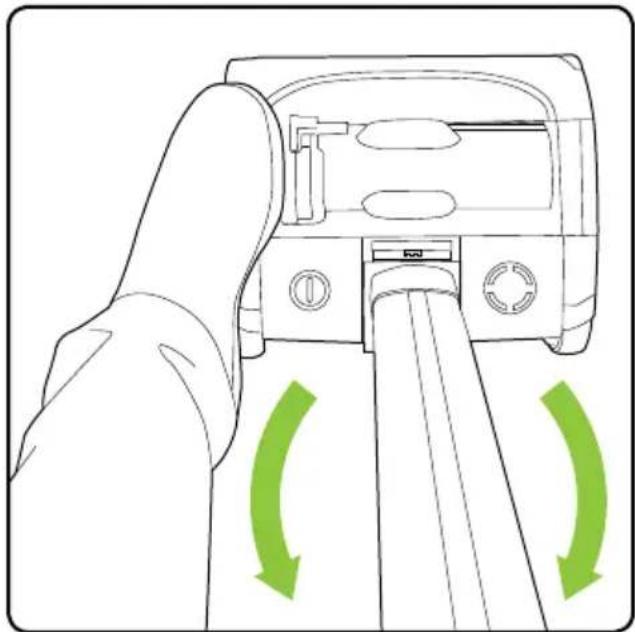
Line drawing of a hand inserting a device into a slot, with green arrows indicating rotation (no text or symbols)Without pressing the power button, place your foot on the left side of the AirRam head and pull the handle back.
natural_image
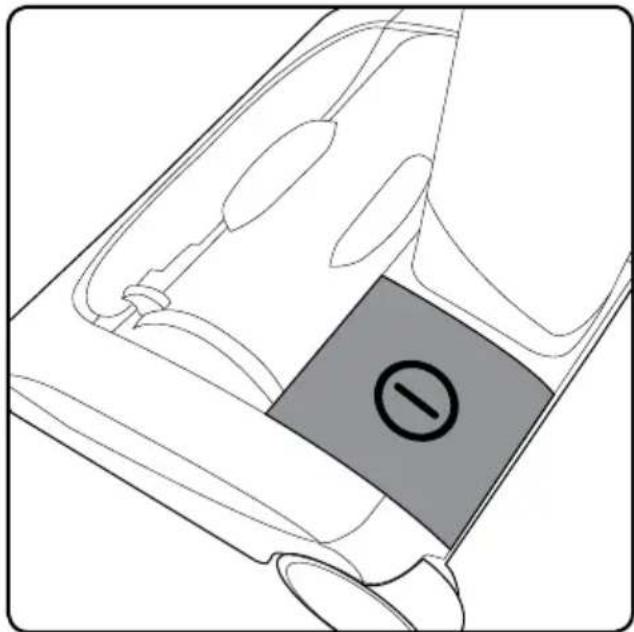
Diagram of a device with a highlighted circular symbol (no text or labels)The power button is located on the left hand side of the AirRam head.
natural_image
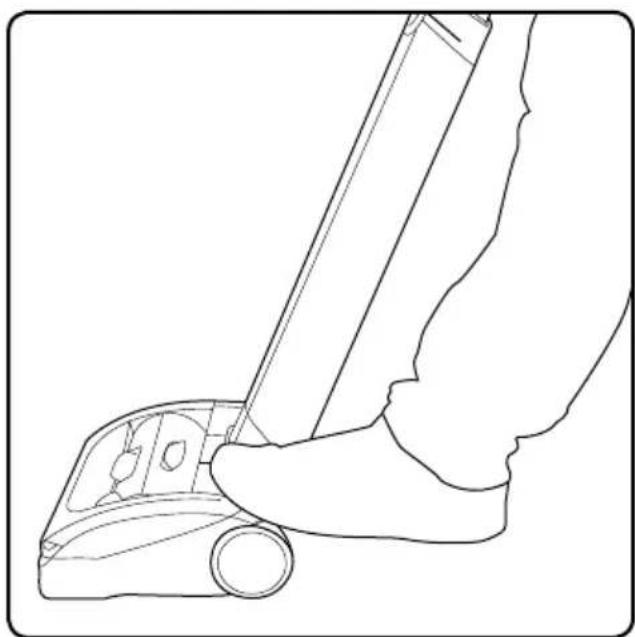
Line drawing of a hand using a handheld device to press or install a mechanical component (no text or symbols)Press the button with your foot to turn the AirRam on.
Storing Your AirRam
natural_image
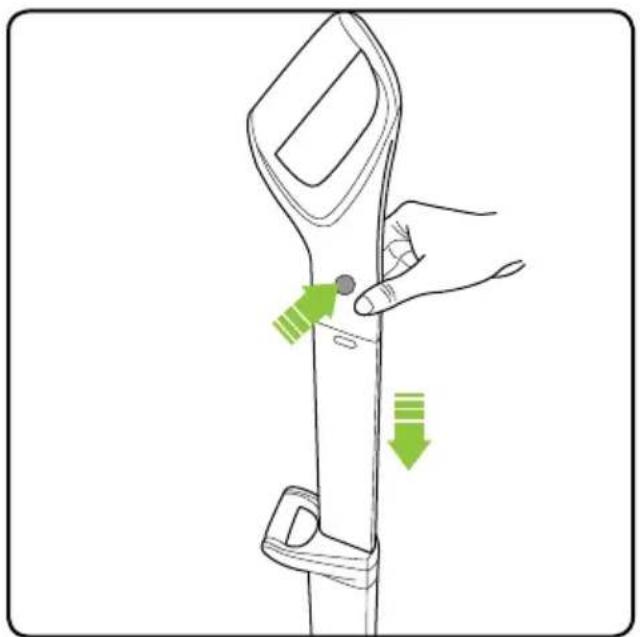
Illustration of a hand holding a handheld device with green directional arrows indicating movement or change (no text or symbols)To stow the upper handle, simply press the button on the left hand side and push the handle down.
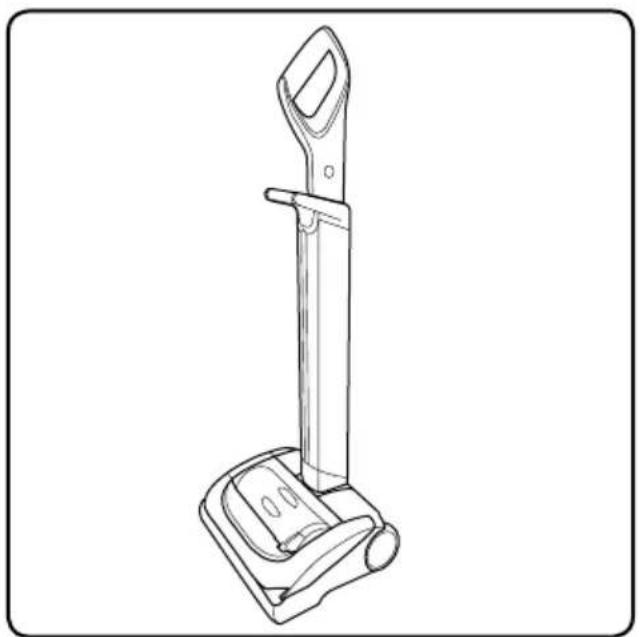
natural_image
Line drawing of a handheld vacuum cleaner device with handle and base (no text or symbols)The handle will now be fully retracted and the AirRam can be conveniently stored.
Battery Charging

natural_image
Circular icon with a green arc and radiating lines, resembling a progress or refresh symbol (no text or numbers present)When the state of charge indicator starts to flash one green LED, recharge the battery.
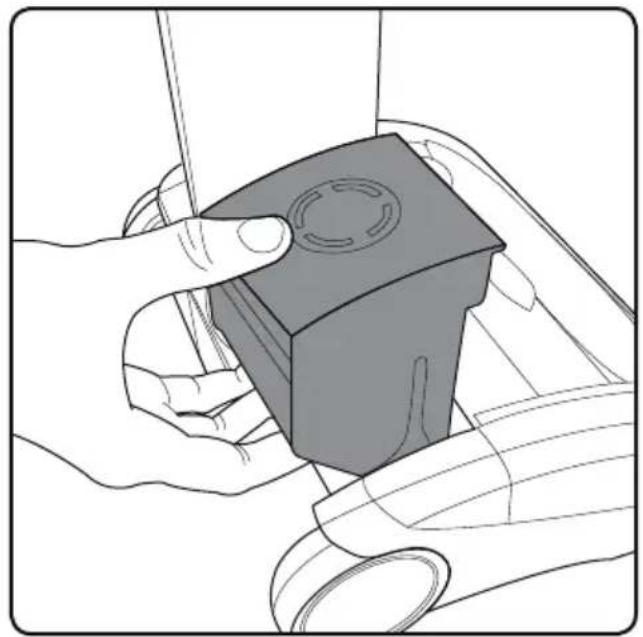
natural_image
Illustration of hands holding a small mechanical component with a circular feature, no text or symbols presentThe battery can be charged whilst it's in the AirRam, or when it's off the product. To remove the battery, squeeze the latch underneath and pull upwards.
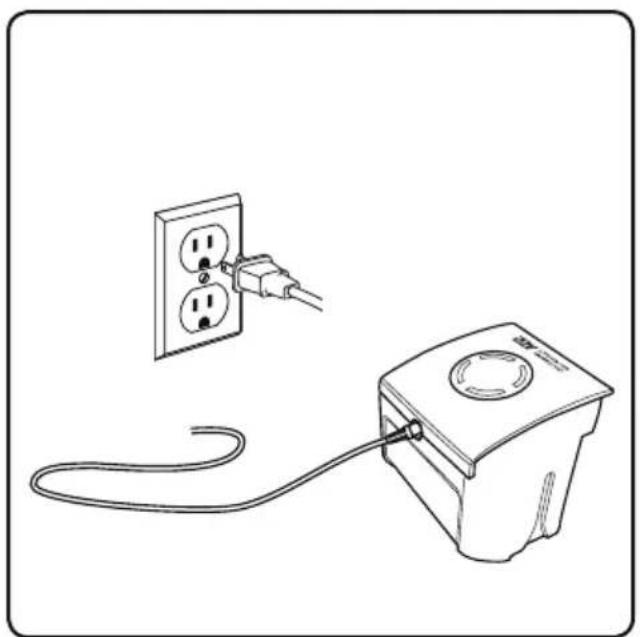
natural_image
Line drawing of a power outlet connected to a wall-mounted electrical device (no text or symbols)Plug the charger in and connect it to the battery.
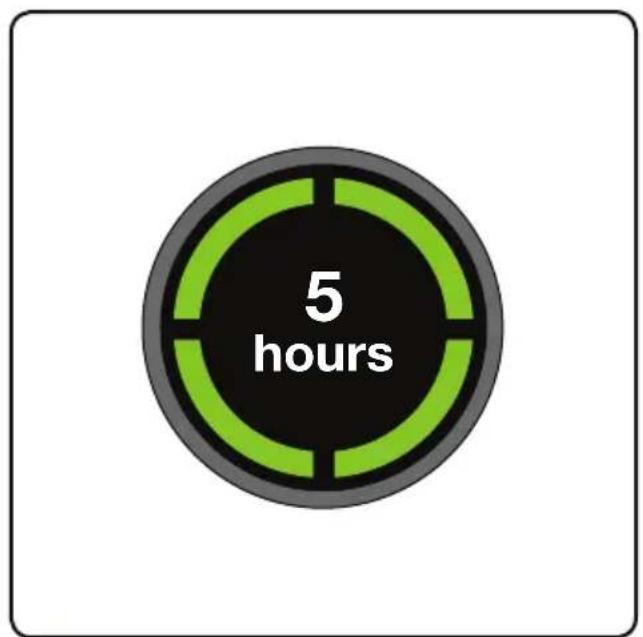
text_image
5 hoursThe battery can be charged from flat in 5 hours. The state of charge indicator will show 4 green lights when it is charged. It is OK to charge for 1 hour for a burst of cleaning.
Emptying the Dirt Bin
natural_image
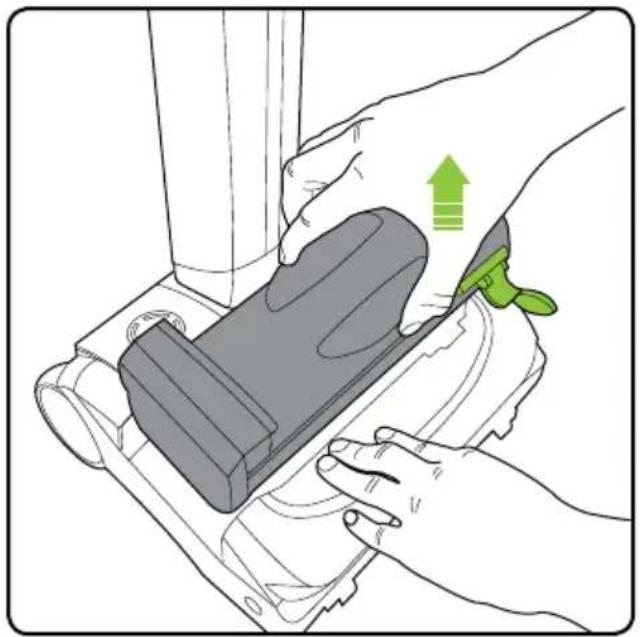
Illustration of hands using a device to adjust or install a component, with a green upward arrow indicating the motion (no text or symbols present)Firmly hold the AirRam with one hand and pull the dirt bin handle and lift the dirt bin our of the AirRam.
natural_image
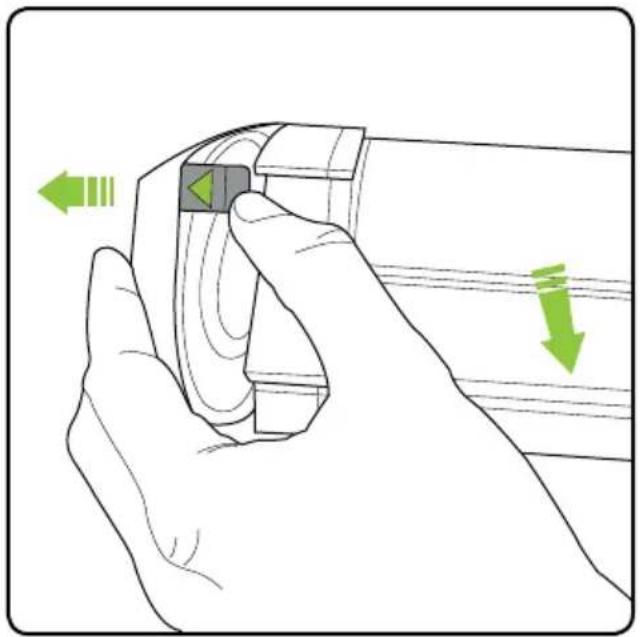
Illustration of a hand holding a device with green directional arrows indicating motion or movement (no text or symbols)Release the latch with the green arrow, to pull open the bin lid.
natural_image
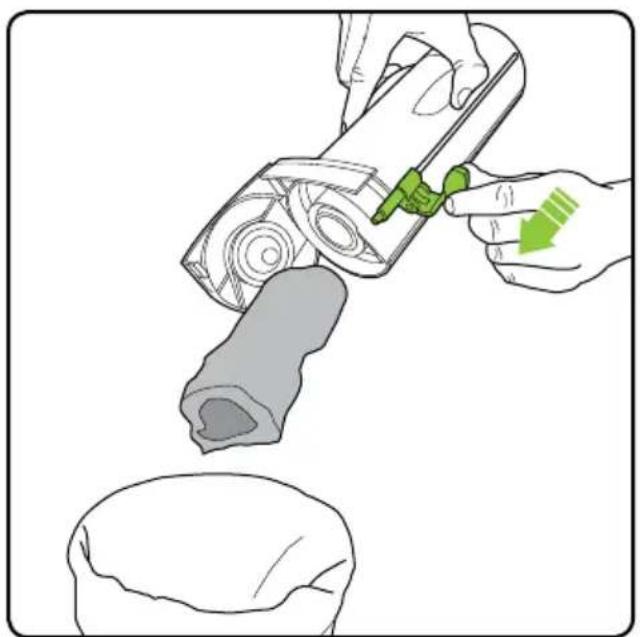
Illustration of a hand using a tool to press or install a mechanical component, with no visible text or symbols.Hold the AirRam's dirt bin over a waste basket and push the green lever towards the open lid to empty.
natural_image
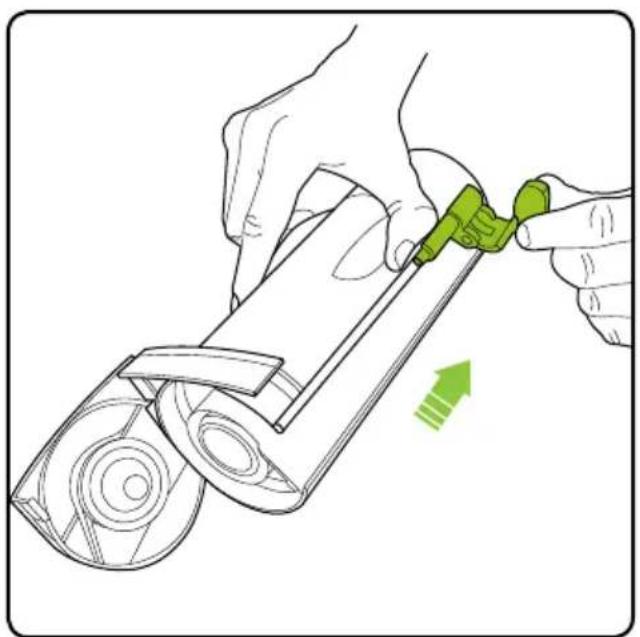
Illustration of hands using a green tool to adjust or install a mechanical component (no text or symbols visible)Pull the green lever back towards the bottom of the dirt bin. Close the dirt bin lid and reinsert into the AirRam.
NOTE: The green lever must be back in its original position to properly close the lid and insert into the AirRam.
Cleaning the Filters
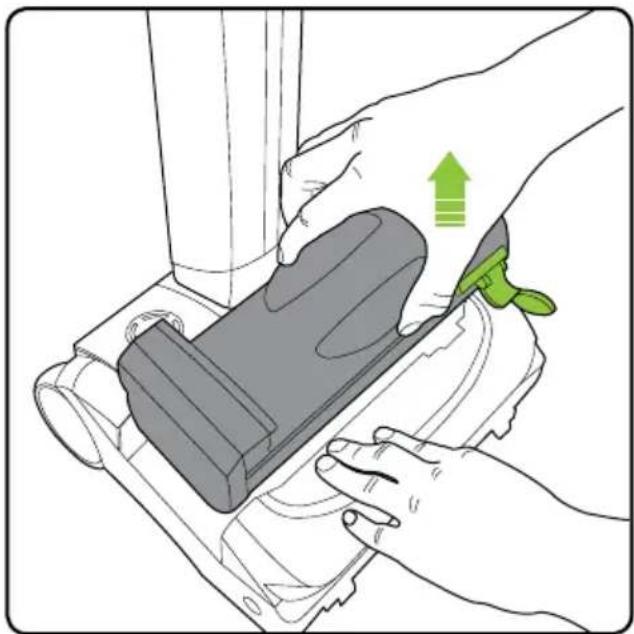
natural_image
Illustration of hands using a device to adjust or install a component, with a green upward arrow indicating motion (no text or symbols present)Firmly hold the AirRam with one hand and pull the dirt bin handle and lift the dirt bin out of the AirRam.
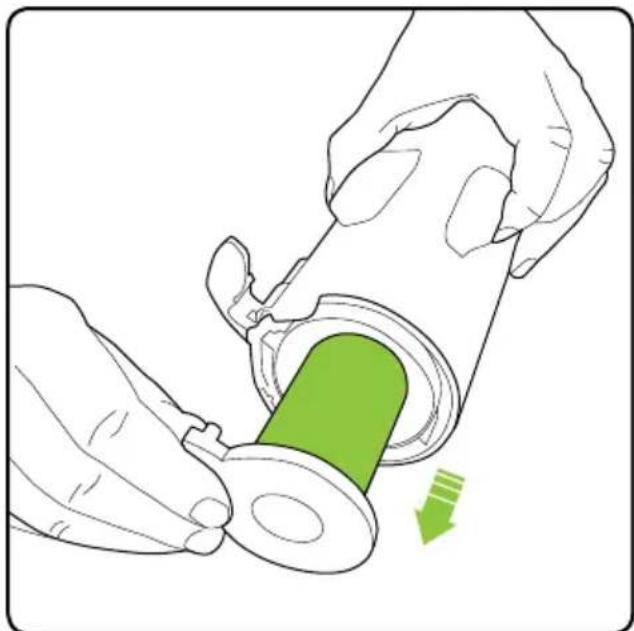
natural_image
Illustration of hands using a tool to adjust a green component into a mechanical part (no text or symbols)Pull the filter out of the dirt bin. Tap the dirt from the filter and tip any dirt from the filter housing. Wash the filter if necessary.
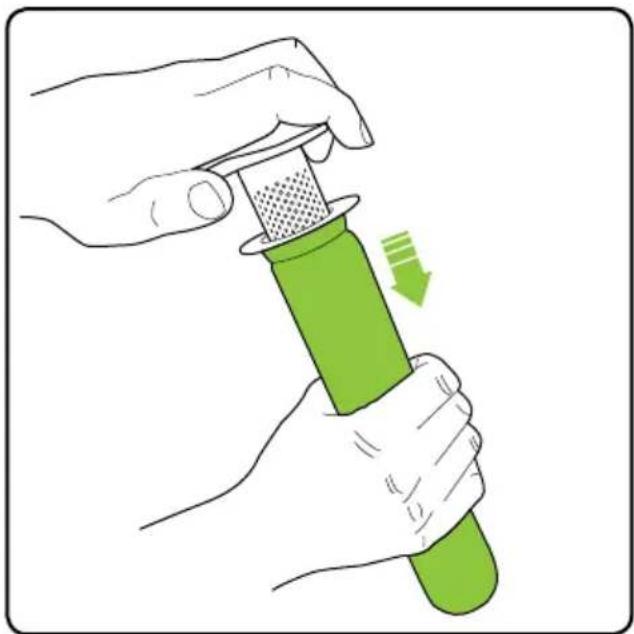
natural_image
Illustration of hands using a green tool to press or adjust a green object, with a green arrow indicating motion (no text or symbols)Firmly hold the filter and with the other hand grasp the separator cap. Gently pull the filter and separator cap apart. (Gently twisting and pulling will help separate the two parts.)
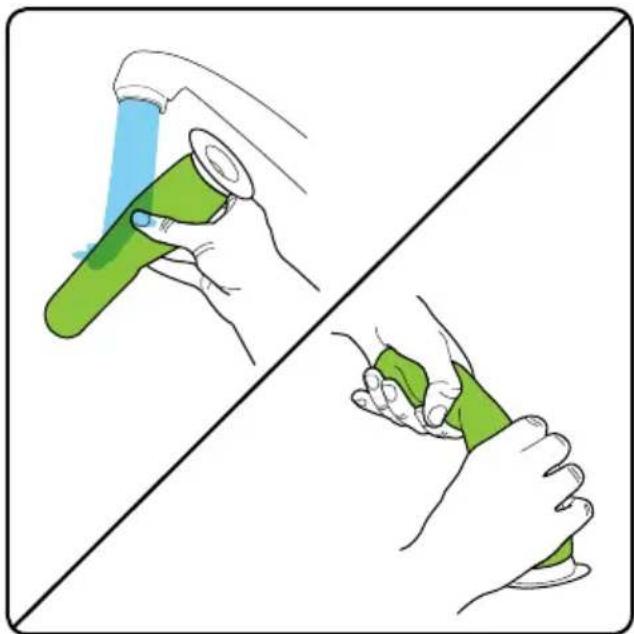
natural_image
Illustration showing two hands holding a green tool, one spraying water and the other handling it (no text or symbols)You may gently wash the filter under warm water. Do not use detergents or soaps. The filter must be completely dry before reinserting into the AirRam.
NOTE: Clean the filters at least once a month. More frequent filter cleaning may be necessary depending on your usage and environment
Replacing the Filters
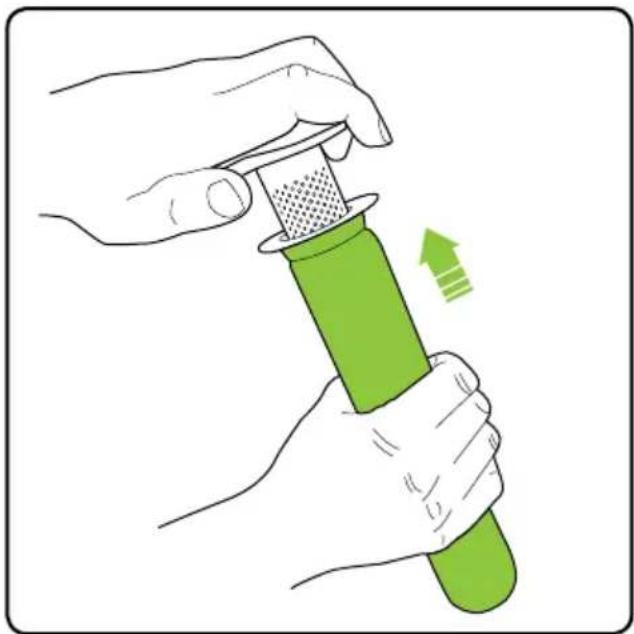
natural_image
Illustration of hands using a green tool to press or adjust a green object, with an arrow indicating motion (no text or symbols)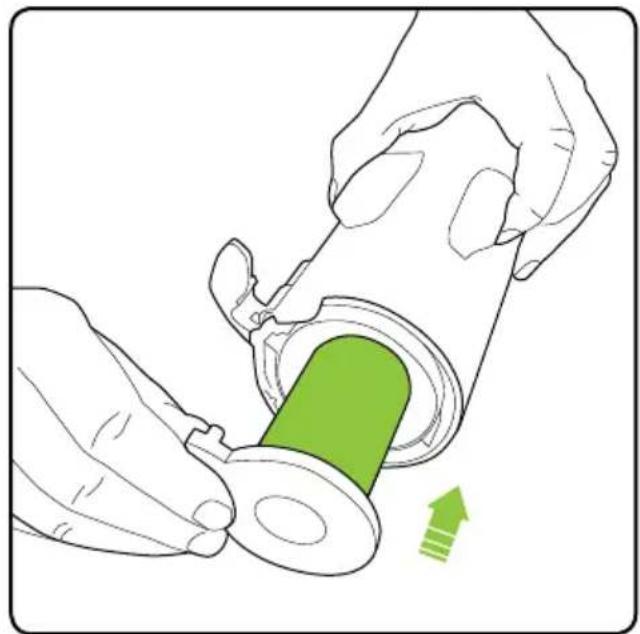
natural_image
Illustration of hands using a green tool to adjust a mechanical component (no text or symbols visible)Slide the filter onto the separator. Slide the filter back into the dirt bin.
Removing and Cleaning the Brush Roll
natural_image
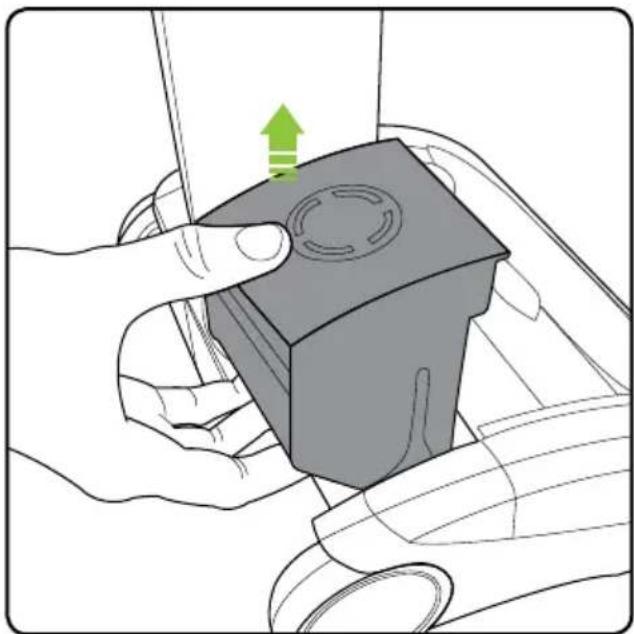
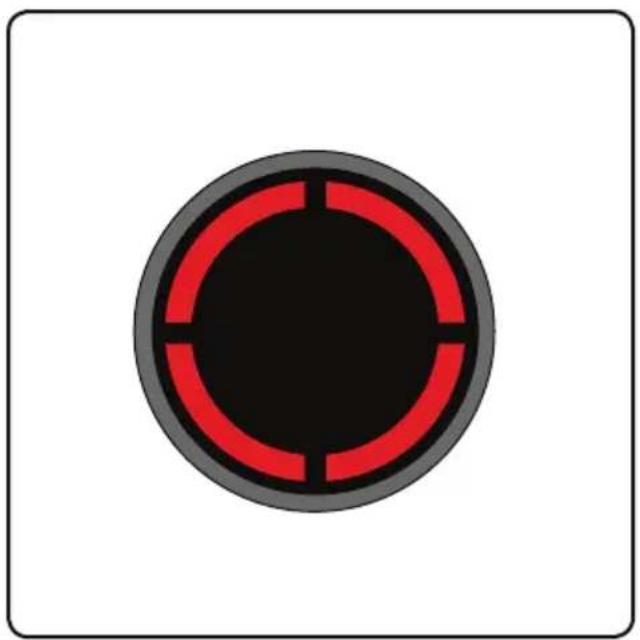
Illustration of hands using a tool to press a mechanical component with a green arrow indicating motion (no text or symbols)If the brush bar jams during use, the AirRam will stop and the LEDs will appear red. Before checking for a blockage, remove the battery.
natural_image
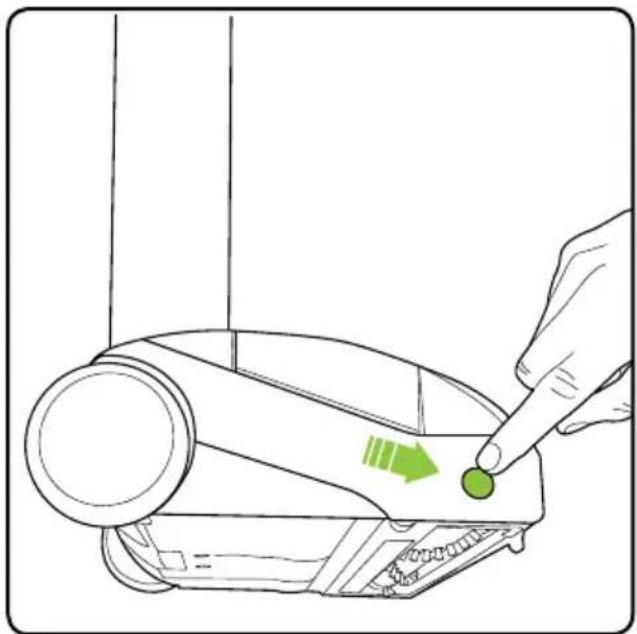
Line drawing of a device with a finger pointing to a green button (no text or symbols)Rest the AirRam on its side and locate the brush roll release button. Press and hold the release button and pull out the brush roll.
NOTE: The brush roll should be pulled first from the side near the release button.
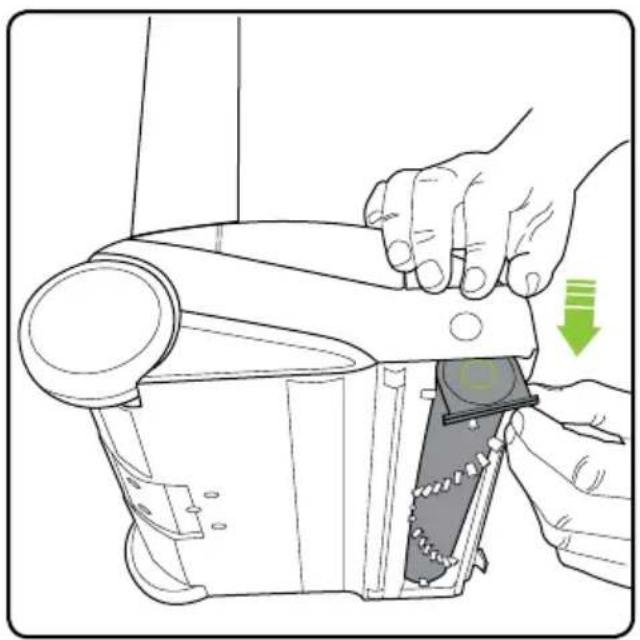
natural_image
Illustration of a hand using a tool to adjust or install a mechanical component, with no visible text or symbols.The brush roll can now be removed, starting at the button end.
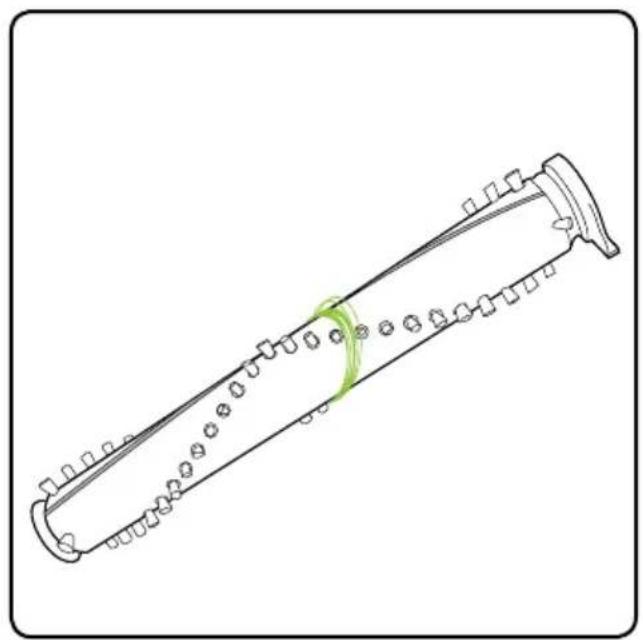
natural_image
Line drawing of a long, multi-layered musical instrument with no text or symbolsClean the brush roll as needed.
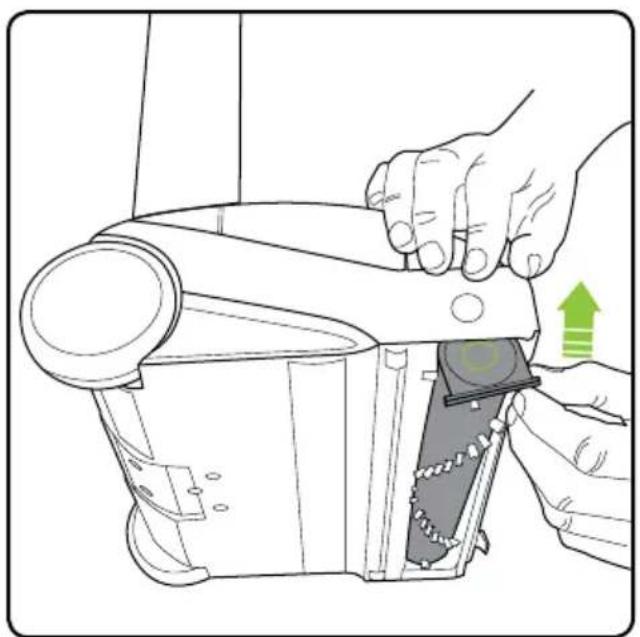
natural_image
Illustration of a hand using a tool to adjust or install a mechanical component, with no visible text or symbols.Re-insert the brush roll, starting by locating the end furthest away from the button. Then push the brush roll into the AirRam until it clicks into place.
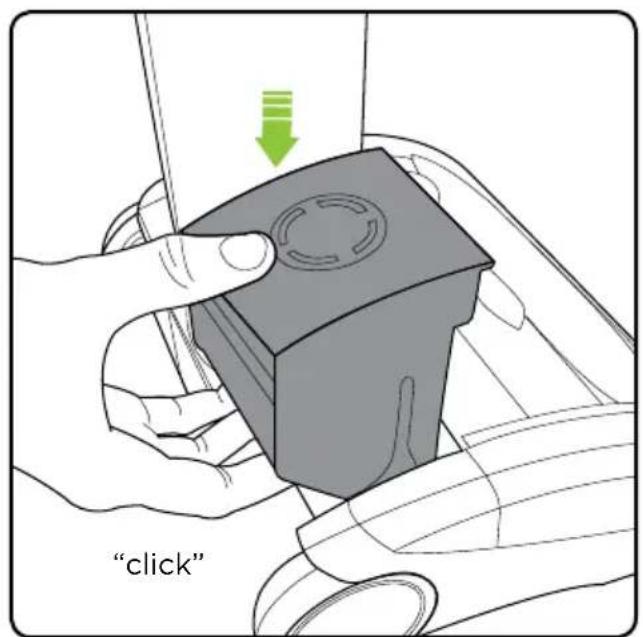
text_image
"click"Replace the battery by sliding it down. It will click into place.
natural_image
Circular diagram with red and black segments, no text or symbols presentIf the brush roll jams during use, the AirRam will stop working and the LED's will appear red. You will need to remove the battery first, and then remove the brush roll to clean it.
text_image
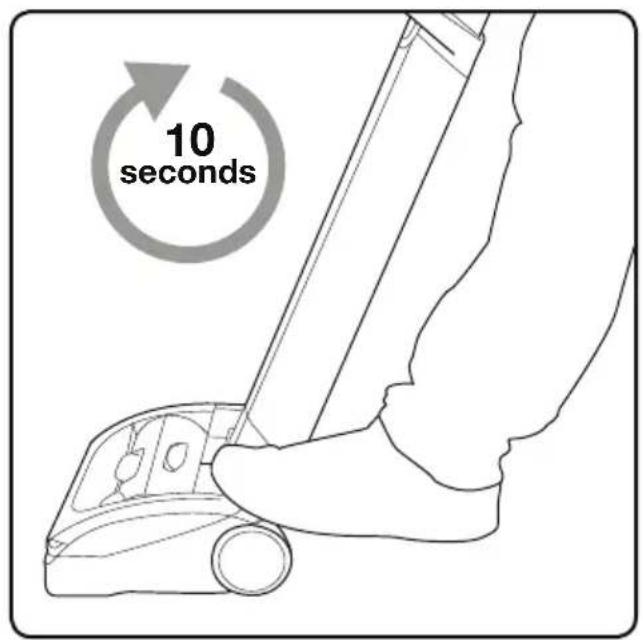
10 secondsThe AirRam will not re-start until the red LED lights go out. It should take approximately 10 seconds for the red lights to turn off after the brush roll has been removed, cleaned, and the jam is cleared.
Product Care
Your BISSELL AirRam doesn't need much maintenance: keep the filters clean, keep the brush bar tangle-free and charge the battery. Wipe it with a dry cloth if it gets dirty, including under the bin. Never wash it with liquid, run it under a tap or use it without the filter.
Trouble Shooting
WARNING:
To reduce the risk of electric shock, turn power switch off and disconnect plug from electrical outlet before performing maintenance or troubleshooting checks.
| Problem | Possible causes | Remedies |
| Air Ram stopped or won't work | Battery isn't fully charged | Charge battery following instructions on page 8 |
| Brush roll obstruction | Clear debris from the brush bar | |
| AirRam is not cleaning well | Dirt bin is full | Empty dirt bin |
| Dirt bin is not installed properly | Position bin correctly and snap firmly into place | |
| Filters need cleaning | Follow filter cleaning instructions on page 10 | |
| Filters need replacing | Visit www.bissell.com or call 1-800-237-7691 to order replacement filters | |
| Clog or obstruction | Clean the holes in the filter housing and check for blockages | |
| Battery will not charge | Connection failure | Check the plug and charger connections |
Warranty
This warranty gives you specific legal rights, and you may also have other rights which may vary from state to state. If you need additional instruction regarding this warranty or have questions regarding what it may cover, please contact BISSELL Consumer Care by E-mail, telephone, or regular mail as described below.
Limited Two-Year Warranty
Subject to the *EXCEPTIONS AND EXCLUSIONS identified below, upon receipt of the product BISSELL will repair or replace (with new or remanufactured components or products), at BISSELL's option, free of charge from the date of purchase by the original purchaser, for two years any defective or malfunctioning part. See information below on "If your BISSELL product should require service".
This warranty applies to product used for personal, and not commercial or rental service. This warranty does not apply to fans or routine maintenance components such as filters, belts, or brushes. Damage or malfunction caused by negligence, abuse, neglect, unauthorized repair, or any other use not in accordance with the User's Guide is not covered.
BISSELL IS NOT LIABLE FOR INCIDENTAL OR CONSEQUENTIAL DAMAGES OF ANY NATURE ASSOCIATED WITH THE USE OF THIS PRODUCT. BISSELL'S LIABILITY WILL NOT EXCEED THE PURCHASE PRICE OF THE PRODUCT.
Some states do not allow the exclusion or limitation of incidental or consequential damages, so the above limitation or exclusion may not apply to you.
\*EXCEPTIONS AND EXCLUSIONS FROM THE TERMS OF THE LIMITED WARRANTY
THIS WARRANTY IS EXCLUSIVE AND IN LIEU OF ANY OTHER WARRANTIES EITHER ORAL OR WRITTEN. ANY IMPLIED WARRANTIES WHICH MAY ARISE BY OPERATION OF LAW, INCLUDING THE IMPLIED WARRANTIES OF MERCHANTABILITY AND FITNESS FOR A PARTICULAR PURPOSE, ARE LIMITED TO THE TWO YEARS DURATION FROM THE DATE OF PURCHASE AS DESCRIBED ABOVE.
Some states do not allow limitations on how long an implied warranty lasts so the above limitation may not apply to you.
NOTE: Please keep your original sales receipt. It provides proof of date of purchase in the event of a warranty claim.
Service
If your BISSELL product should require service:
Contact BISSELL Consumer Care to locate a BISSELL Authorized Service Center in your area. If you need information about repairs or replacement parts, or if you have questions about your warranty, contact BISSELL Consumer Care.
Website:
www.BISSELL.com
E-mail:
www.BISSELL.com/email-us
Call:
BISSELL Consumer Care
1-800-237-7691
Monday - Friday 8am - 10pm ET
Saturday 9am - 8pm ET
Sunday 10am - 7pm ET
Please do not return this product to the store.
Other maintenance or service not included in the manual should be performed by an authorized service representative.
For any questions or concerns, BISSELL is happy to be of service.
Contact us directly at 1-800-237-7691.
Register your product today!
Registering is quick, easy and offers you benefits over the lifetime of your product.
You'll receive:
BISSELL Rewards Points
Automatically earn points for discounts and free shipping on future purchases.
Faster Service
Supplying your information now saves you time should you need to contact us with questions regarding your product.
Product Support Reminders and Alerts
We'll contact you with any important product maintenance reminders and alerts.
Special Promotions
Optional: Register your email to receive notice of offers, contests, cleaning tips and more!
Visit www.BISSELL.com/registration!
Visit the BISSELL website: www.BISSELL.com
When contacting BISSELL, have model number of cleaner available.
Please record your Model Number: ____
Please record your Purchase Date: ____
NOTE: Please keep your original sales receipt. It provides proof of purchase date in the event of a warranty claim. See Warranty on page 15 for details.
Parts & Supplies
For Parts and Supplies, go to www.BISSELL.com and enter your model number in the search field.
We can't wait to hear from you!
Rate this product and let us (and millions of your closest friends) know what you think!
www.BISSELL.com

©2016 BISSELL Homecare, Inc
Grand Rapids, Michigan
All rights reserved. Printed in China
Part Number 161-4130 11/17
Visit our website at: www.BISSELL.com