
Studio Slim - Soundbar DEFINITIVE TECHNOLOGY - Free user manual and instructions
Find the device manual for free Studio Slim DEFINITIVE TECHNOLOGY in PDF.


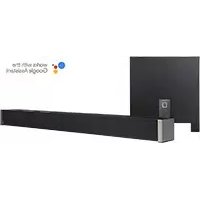
| Product Type | 3.1 Home Theater Sound Bar and Wireless Subwoofer System |
| Model | Studio Slim |
| Brand | Definitive Technology |
| Wireless Subwoofer | Yes, included |
| Audio Channels | 3.1 (Left, Center, Right + subwoofer) |
| Connectivity | HDMI ARC, Optical, Bluetooth, Wi-Fi (Chromecast built-in) |
| Remote Control | Included (IR) |
| Sound Modes | Music, Movie, Night |
| Audio Decoding | Dolby Audio, DTS TruSurround |
| Voice Control | Via Google Assistant (through separate device) |
| Setup | Requires Google Home app for initial Wi-Fi setup |
| TV Remote Compatibility | Preloaded IR codes for Samsung, LG, Sony, Vizio; HDMI CEC support |
| Power Supply | AC (sound bar and subwoofer each have power cord) |
| Subwoofer Pairing | Automatic wireless pairing; solid LED indicates connection |
| Firmware Updates | Automatic via internet when connected to Wi-Fi |
| Dimensions (Sound Bar - estimated) | Approx. 43.3 x 2.9 x 3.3 in (1100 x 74 x 84 mm) |
| Weight (Sound Bar - estimated) | Approx. 5.5 lbs (2.5 kg) |
| Dimensions (Subwoofer - estimated) | Approx. 7.9 x 12.2 x 7.9 in (200 x 310 x 200 mm) |
| Weight (Subwoofer - estimated) | Approx. 11 lbs (5 kg) |
| Care and Cleaning | Use dry cloth only; do not use water or cleaners |
| Safety | Read manual; keep away from water and heat; do not block ventilation |
| Spare Parts and Repairability | Not user-serviceable; contact Definitive Technology support |
| Warranty | 1-year limited warranty for original purchaser |
Frequently Asked Questions - Studio Slim DEFINITIVE TECHNOLOGY
User questions about Studio Slim DEFINITIVE TECHNOLOGY
0 question about this device. Answer the ones you know or ask your own.
Ask a new question about this device
Download the instructions for your Soundbar in PDF format for free! Find your manual Studio Slim - DEFINITIVE TECHNOLOGY and take your electronic device back in hand. On this page are published all the documents necessary for the use of your device. Studio Slim by DEFINITIVE TECHNOLOGY.
USER MANUAL Studio Slim DEFINITIVE TECHNOLOGY
3.1 Home Theater Sound Bar and Wireless Subwoofer System
Setup Guide
What's in the Box

natural_image
Blank white rectangular shape with no text, symbols, or markingsSound bar
natural_image
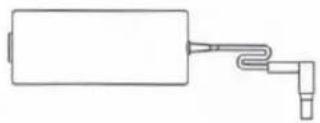
Simple line drawing of a rectangular device connected to a terminal port (no text or symbols)Power supply
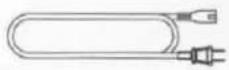
Subwoofer power cord
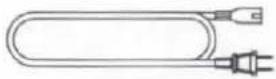
Power cord
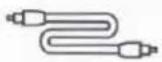
Optical cable

HDMI cable
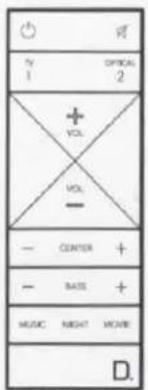
Remote control
natural_image
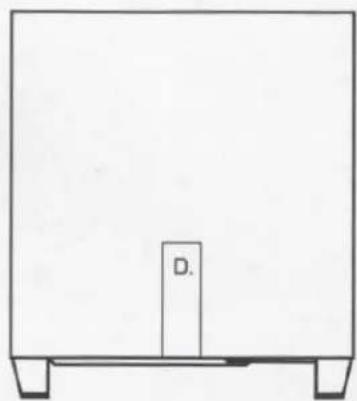
Simple line drawing of a rectangular frame with a central vertical block labeled 'D' and two side supports (no text or symbols beyond the label)Subwoofer

Literature
Setup
1.
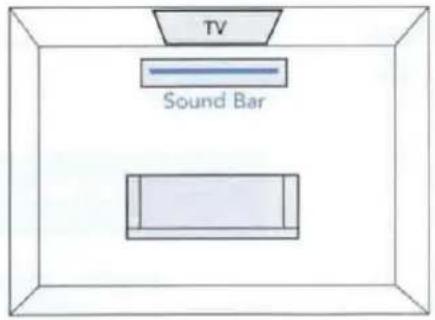
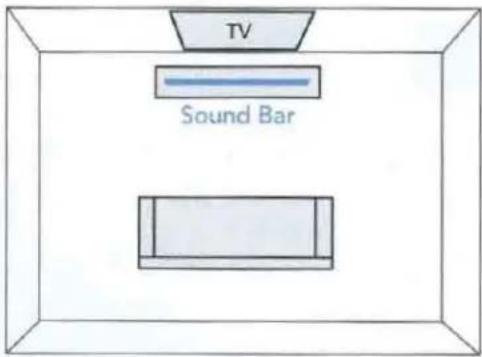
Place the sound bar
For the best listening experience, position the sound bar centered under your TV. You may choose to place it either on a stand, or wall-mount the sound bar below the TV.
2.
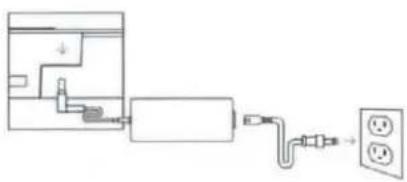
Connect the sound bar to an AC outlet
During startup, you will see multiple light shows. When all 10 LEDs are blinking slowly, the sound bar is ready for set up with the Google Home app.
natural_image
Pure electrical circuit lines without any symbols3.
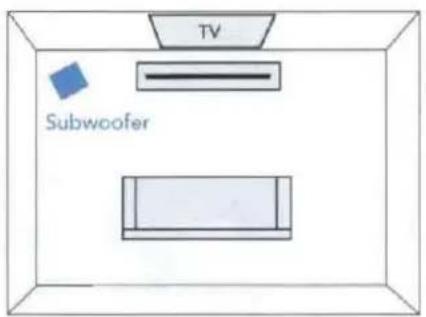
Place the subwoofer
For best performance place on the same wall as the TV, no more than 30ft (10m) from the sound bar.
Performance Tip: placing the subwoofer in a corner helps maximize the overall bass effect.
4.
Connect the subwoofer to an AC outlet
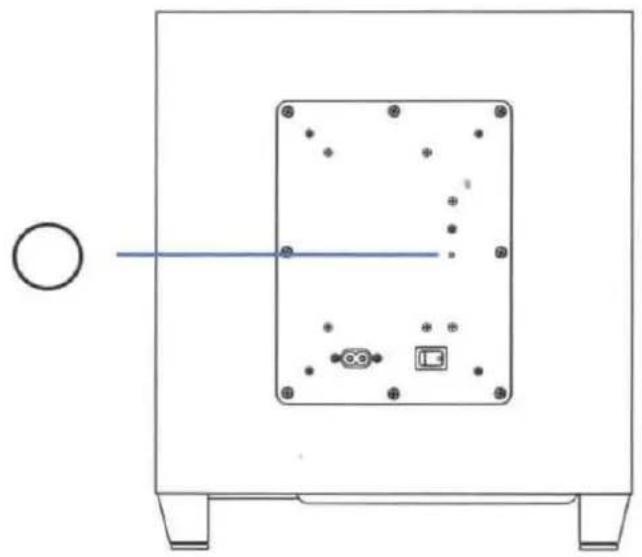
A solid light will be visible on the back of the subwoofer to indicate that it is paired to the sound bar.
5.
Download the Google Home app to setup your sound bar on your Wi-Fi network
Download the free Google Home app and follow the in-app instructions to setup the sound bar on your Wi-Fi network.
For more detailed setup information about Google Home and Chromecast built-in for audio, visit: https://support.google.com/googlehome and https://support.google.com/chromecastbuiltin
Once the sound bar is connected to your Wi-Fi network, it will receive firmware updates for the latest features, performance and tuning. We require updating your sound bar to the latest firmware for the best overall performance. Please refer to the "Receiving Automatic Updates" section under "Functionalities" (p. 8) for details.


6.
Connect to your TV
Is an HDMI input jack on your TV labeled "ARC"?
YES — Use HDMI (ARC)
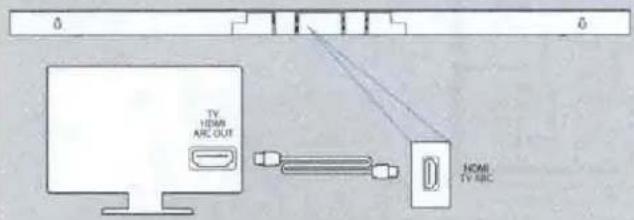
Connect the included HDMI cable to the HDMI jacks labeled with "ARC" on both the TV and the sound bar.
NO — Use Optical
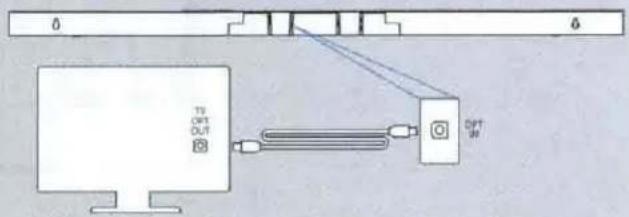
Connect the included Optical cable between the TV and sound bar.
7.
Turn on your TV and enjoy the Studio Slim
Turn on your TV and verify that you are hearing sound from the sound bar.
Note: Access your TV's menu and turn off its internal speakers.
If you do not hear sound and do not see any lights on the front of your sound bar, press the power button on the sound bar to turn it on.
natural_image
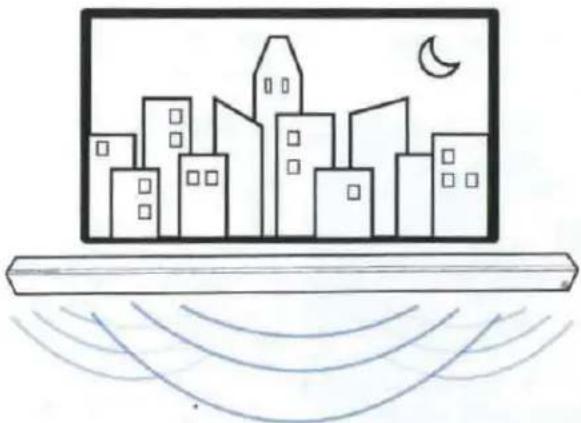
Simple line drawing of a city skyline with a crescent moon and wave lines below (no text or symbols)1. Using your TV remote to control the volume
The Studio Slim comes pre-configured to respond to volume and mute commands from the most popular TV remotes including: Samsung, LG, Sony, Vizio and other major brands.
*All other trademarks, product names, logos and brands referenced herein are the property of their respective owners
2.
- Bluetooth will only work after the product has been set up using the Google Home app.
• To pair your device using Bluetooth, press the Bluetooth button on the sound bar. A blue light will slowly pulse on the sound bar as it waits to connect to your Bluetooth device. - Go to the Bluetooth settings section in your phone, tablet or computer and select the name chosen in the Google Home app. The name of the device changes to the name configured in the Home app setup flow. The light will turn solid blue for 3 seconds and fade to off when your Bluetooth device is connected.
• To re-establish a Bluetooth connection after pairing has already been completed, go to the Bluetooth settings on your device and connect to the sound bar.

Bluetooth®
3. Chromecast built-in benefits
The Studio Slim features Chromecast built-in for easy streaming and more:
• Stream music from your favorite apps over Wi-Fi.
• Create a whole-home audio experience. Multi-room sync lets you play the same song across Chromecast built-in compatible speakers in your house at the same time.
• Use Google Assistant on a Google Home speaker or other Assistant-enabled device to control music playback on the Studio Slim with voice commands.

Chromecast built-in
Listening to music via Chromecast built-in
- Tap the cast button from your favorite music apps to start streaming to your speakers. For more information please visit: https://www.google.com/chromecast/built-in/audio/
• For information on list of Chromecast compatible apps please visit: https://store.google.com/us/product/chromecast_2015_apps?hl=en-US
Receiving automatic updates (highly recommended)
Definitive Technology securely provides periodic software updates via the Internet which improve product performance and expand the list of built-in TV remote controls.

Google Home App
for iPhone, iPad and Android devices
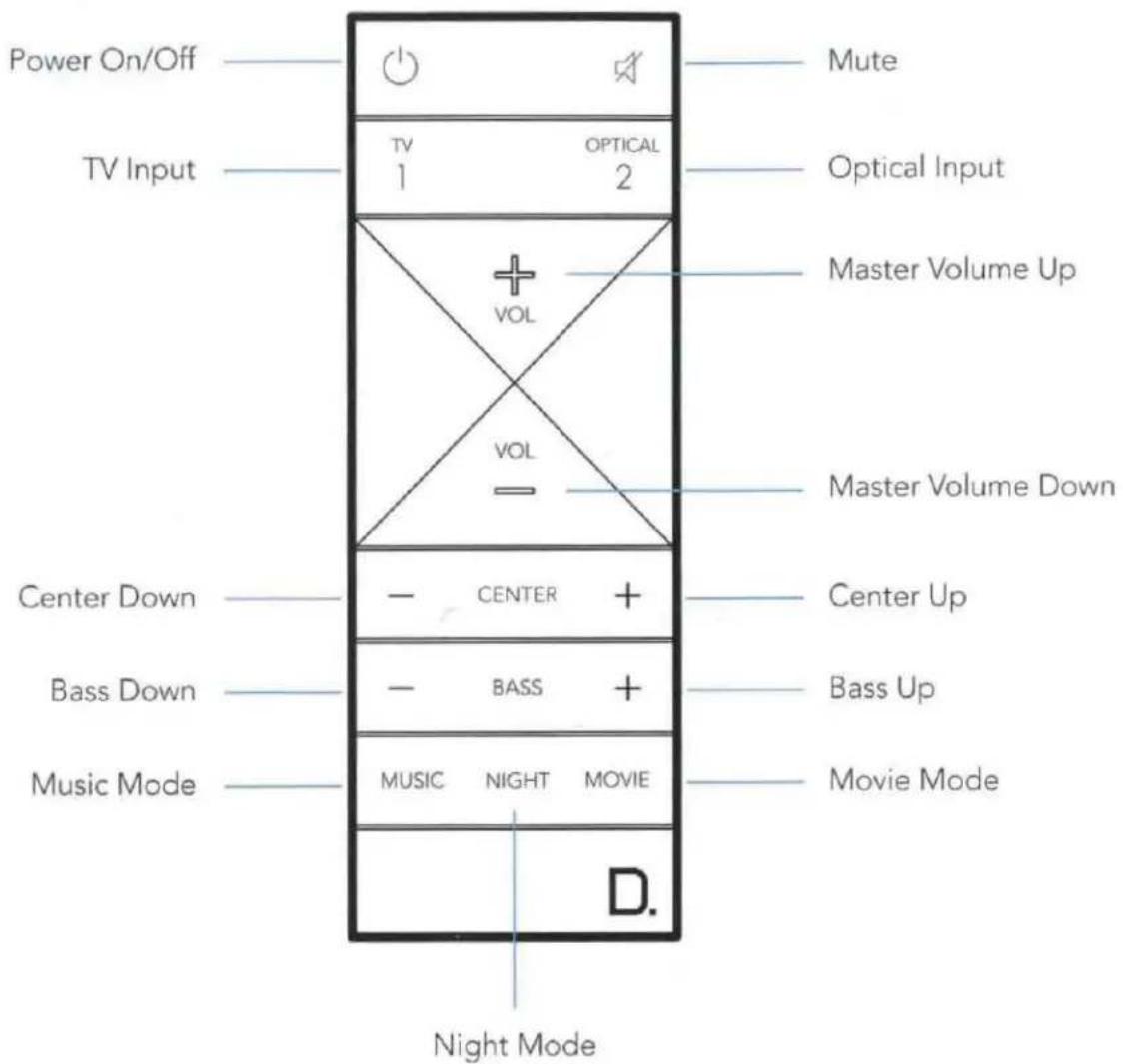
Remote Control
Sound Bar Controls
Front of Studio Slim
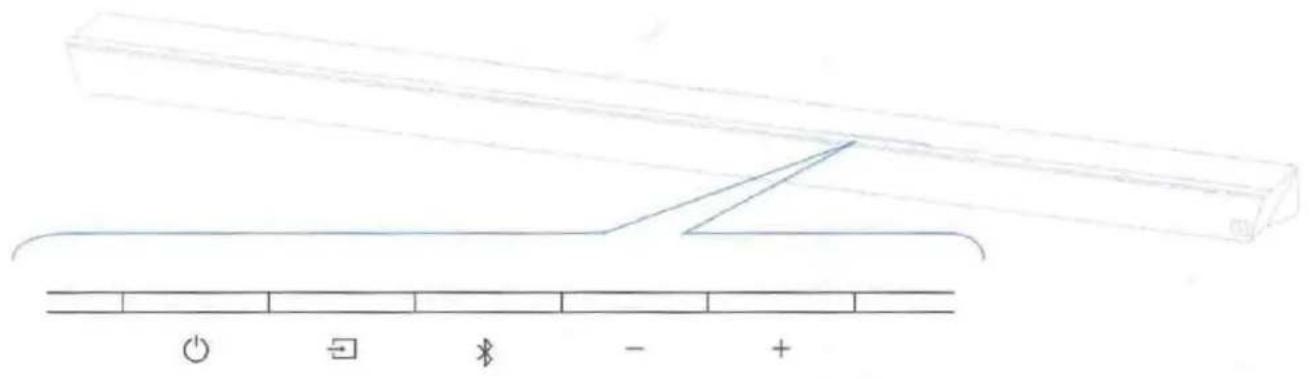
Power - Turns the Studio Slim on/off
Source - Switches sound bar inputs
Bluetooth - Initiates Bluetooth pairing
— Volume Down - Decreases the master volume
+ Volume Up - Increases the master volume
Back of Studio Slim
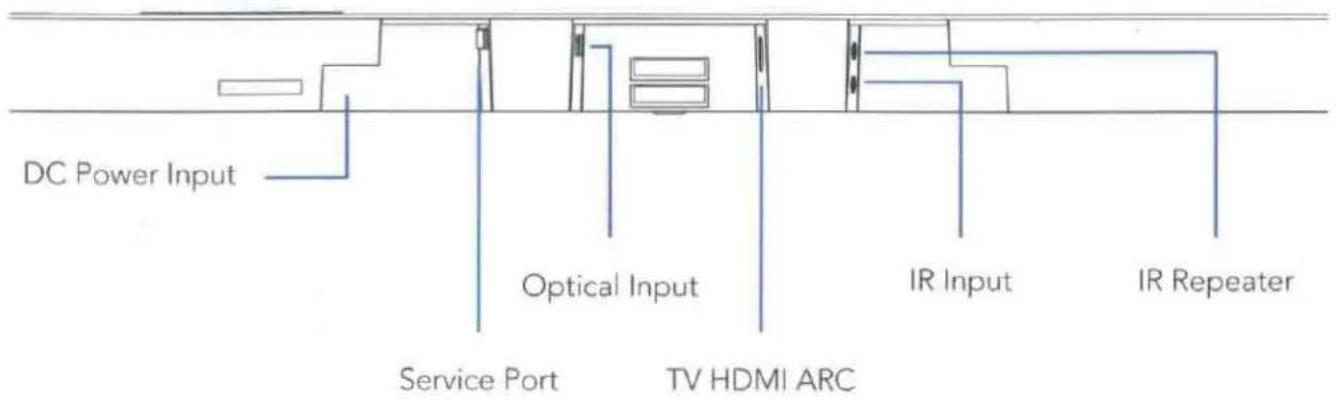
Visual LED Indicators (Sound Bar)

Above is a closeup of the source indicators.
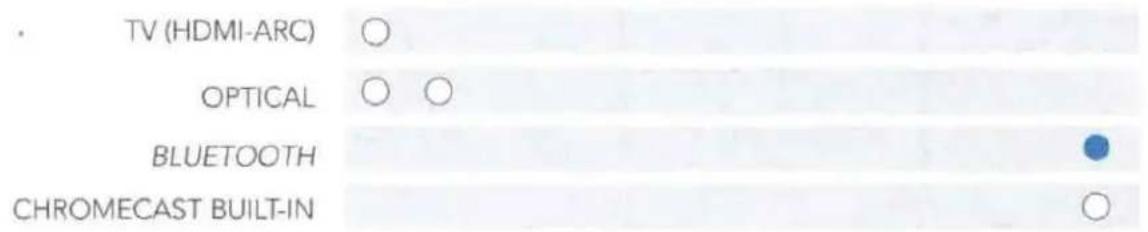
Several sources colors indicate the audio bitstream for non-streaming inputs.
○ PCM CONTENT
DOLBY CONTENT
DTS CONTENT
NOTE: All source indicators appear for three seconds before fading to off.
MUTE INDICATOR
While MUTE is active, the source indication will blink.
VOLUME LEVEL INDICATORS

natural_image
Row of identical empty circles arranged horizontally (no text or symbols)Master Volume will be indicated with 10 LEDs. Each LED will have 10 levels of brightness to indicate 1-100% volume. Volume 1% will be indicated with the left most volume dimly lit, volume 100% will be indicated with all 10 volume LEDs fully illuminated.
Volume indicators will illuminate in purple instead of white to indicate the state of Night Mode. In Standby, all lights are off.
● NIGHT MODE - enabled ○ NIGHT MODE - disabled
Visual Indicators (Subwoofer)
A solid light on the subwoofer indicates the subwoofer is connected to the sound bar.
If the light fails to turn solid after following the set up instructions, please contact customer service.
natural_image
Technical line drawing of a rectangular device with internal components and mounting feet (no text or symbols)Optimize Your Listening Experience
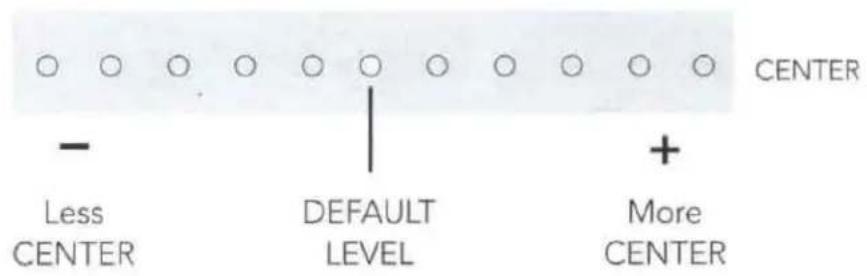
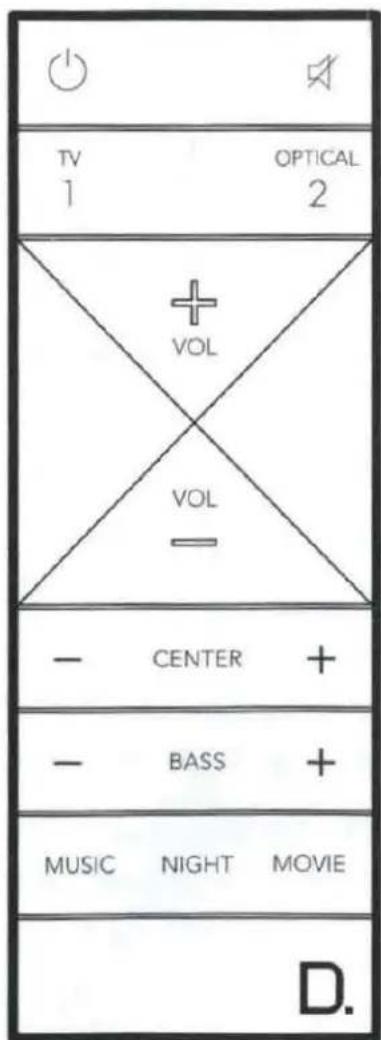
Customize the voice level to reproduce clear, crisp dialogue on your sound bar using the center (+/-) button on your sound bar remote.
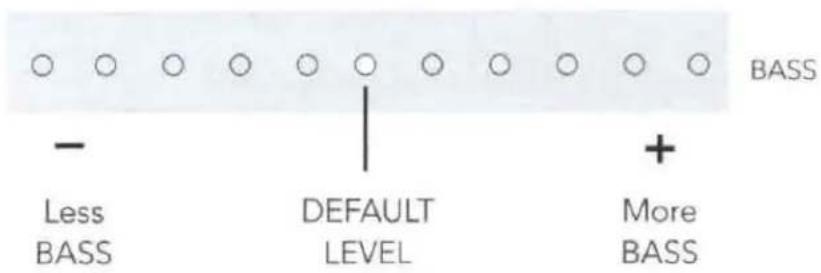
Customize the bass level using the bass (+/-) buttons on your sound bar remote.
Using Your TV or Cable/Satellite TV Remote to Control the Studio Slim
There are several ways to use your TV, cable, or satellite remote to control the Studio Slim.
HDMI CEC CONTROL
If your TV is connected via HDMI and your TV supports CEC (and it is enabled in the TV settings menu), you can control the volume and mute functions on the Studio Slim from your TV without any further setup.
PRELOADED IR CODES
The Studio Slim comes pre-loaded with remote commands for many of the televisions manufactured within the last 5 years. If your remote does not work, please be sure to leave your product plugged in and connected to the internet for software updates that will add more remotes in the future.
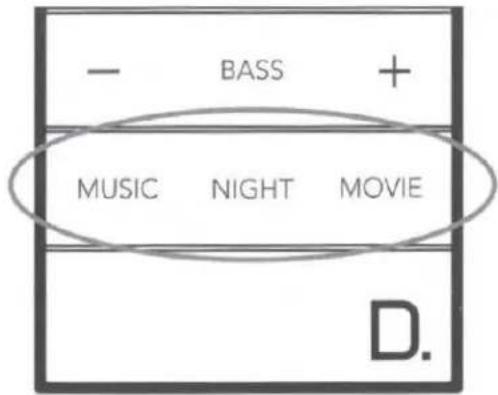
Sound Modes

Music Mode
Music mode provides a natural and balanced sound profile with smoother bass while minimizing home theater spatialization effects.
Movie Mode
Movie mode is optimized for both movies and TV content. It provides home theater spatialization effects, as well as enhanced dialogue and more dynamic bass impact. This is the default sound mode for HDMI and Optical input sources.
Night Mode
Night mode is optimal for low-volume listening. Bass and dynamic range are reduced to improve vocal clarity. Volume indicators will illuminate in purple instead of white to indicate the state of Night Mode. In Standby, all lights are off.
● NIGHT MODE - enabled ○ NIGHT MODE - disabled
For Further Assistance:
Phone Number
(800)228-7148(North America)
+1 (410) 363-7148
info@definitivetech.com
Definitive Technology
1 Viper Way
Vista, CA 92081
D.
DEFINITIVE TECHNOLOGY
1 Viper Way
Vista, CA 92081
800-228-7148
www.definitivetechnology.com
Sound United Europe
a division of D&M Europe B.V.
Beemdstraat 11
5653 MA Eindhoven
The Netherlands
HBP4236
D.
DEFINITIVE TECHNOLOGY
StudioSlim™
Important Product Information
Safety Precautions
FCC Statement
COMPLIANCE INFORMATION
Product Name: 3.1 Home Theater Sound Bar and Wireless Subwoofer System
Model Number: Studio Slim and Studio Slim Subwoofer CONTAINS TRANSMITTER MODULE FCC ID: IPUJMDD FCC ID: IPUSTUDIOSLIM (BAR) FCC ID: IPUSTUSLIMSUB (Subwoofer)
- This device complies with Part 15 of the FCC Rules. Operation is subject to the following two conditions:
1) This device may not cause harmful interference, and
2) This device must accept any interference received, including interference that may cause undesired operation.
- Any Changes or modifications not expressly approved by the party responsible for compliance could void the user's authority to operate the equipment.
NOTE: This equipment has been tested and found to comply with the limits for a Class B digital device, pursuant to Part 15 of the FCC Rules. These limits are designed to provide reasonable protection against harmful interference in a residential installation. This equipment generates uses and can radiate radio frequency energy and, if not installed and used in accordance with the instructions, may cause harmful interference to radio communications. However, there is no guarantee that interference will not occur in a particular installation. If this equipment does cause harmful interference to radio or television reception, which can be determined by turning the equipment off and on, the user is encouraged to try to correct the interference by one or more of the following measures:
- Reorient or relocate the receiving antenna.
- Increase the separation between the equipment and receiver.
- Connect the equipment into an outlet on a circuit different from that to which the receiver is connected.
- Consult the dealer or an experienced radio/TV technician for help.
FCC RF Radiation Exposure Statement
-
This transmitter must not be collocated or operating in conjunction with any other antenna or transmitter.
-
This equipment complies with FCC radiation exposure limits set forth for an uncontrolled environment. This equipment should be installed and operated with minimum distance 20cm between the radiator & your body.
-
FCC RF Warning
This equipment must be installed and operated in accordance with provided instructions and the antenna(s) used for this transmitter must be installed to provide a separation distance of at least 20 cm from all persons and must not be co-located or operating in conjunction with any other antenna or transmitter. End-users and installers must be provided with antenna installation instructions and transmitter operating conditions for satisfying RF exposure compliance.
IC RF Radiation Exposure Statement
CONTAINS TRANSMITTER MODULE IC: 10392A-JMDD IC: 10392A-STUDIOSLIM (BAR) IC: 10392A-STUSLIMSUB (SUBWOOFER) This device complies with the Canada portable RF exposure limit set forth for an uncontrolled environment and are safe for intended operation as described in this manual. The further RF exposure reduction can be achieved if the product can be kept as far as possible from the user body or set the device to lower output power if such function is available.
Canada, Industry Canada (IC) Notices
This Class B digital apparatus complies with Canadian ICES-003. To reduce potential radio interference to other users, the antenna type and its gain should be so chosen that the equivalent isotropically radiated power (e.i.r.p.) is not more than that permitted for successful communication.
This device complies with Industry Canada license-exempt RSS standard(s).
1) this device may not cause interference, and
2) this device must accept any interference, including interference that may cause undesired operation of the device.
For Canadian customers : CAN ICES-3(B) / NMB-3(B)
Radio Frequency (RF) Exposure Information
The radiated output power of the Wireless Device is below the Industry Canada (IC) radio frequency exposure limits. The Wireless Device should be used in such a manner such that the potential for human contact during normal operation is minimized.
This device has also been evaluated and shown compliant with the IC RF exposure limits under mobile exposure conditions. (antennas are greater than 20cm from a person's body).
5.15\~5.25GHz Band
Operations in the 5.15-5.25GHz band are restricted to indoor use only.
Slave Equipment:
This device is slave equipment, the device is not radar detection and not ad-hoc operation in the DFS band.
Important Safety Instructions
- Read these instructions.
- Keep these instructions.
- Heed all warnings.
- Follow all instructions.
- Do not use this apparatus near water.
- Clean only with dry cloth.
- Do not block any ventilation openings. Install in accordance with the manufacturer's instructions.
- Do not install near any heat sources such as radiators, heat registers, stoves, or other apparatus (including amplifiers) that produce heat.
- Do not defeat the safety purpose of the polarized or grounding-type plug. A polarized plug has two blades with one wider than the other. A grounding type plug has two blades and a third grounding prong.
The wide blade or the third prong are provided for your safety. If the provided plug does not fit into your outlet, consult an electrician for replacement of the obsolete outlet.
- Protect the power cord from being walked on or pinched particularly at plugs, convenience receptacles, and the point where they exit from the apparatus.
-
Only use attachments/accessories specified by the manufacturer.
-
Use only with the cart, stand, tripod, bracket, or table specified by the manufacturer, or sold with the apparatus. When a cart is used, use caution when moving the cart/apparatus combination to avoid injury from tip-over.

-
Unplug this apparatus during lightning storms or when unused for long periods of time.
-
Refer all servicing to qualified service personnel. Servicing is required when the apparatus has been damaged in any way, such as power-supply cord or plug is damaged, liquid has been spilled or objects have fallen into the apparatus, the apparatus has been exposed to rain or moisture, does not operate normally, or has been dropped.
-
The equipment could be used at maximum 45 degree C ambient temperature.
-
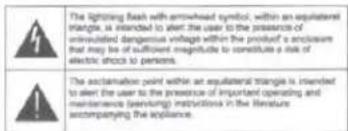
Do not open the equipment to reduce the risk of electrical shock. For safety reasons it is only allow to the opened by qualified service personnel.
-
WARNING: To reduce the risk of fire or electric shock, do not expose this apparatus to rain or moisture. And the apparatus shall not be exposed to dripping or splashing and that no objects filled with liquids, such as vases, shall be placed on the apparatus.
-
The Power Adapter / AC inlet is used as the disconnect device and shall remain readily operable.
-
Do not install this equipment in a confined or building-in space such as a book case or similar unit, and keep well ventilation conditions at open site. The ventilation should not be impeded by covering the
ventilation openings with items such as newspaper, table-cloths, curtains etc.
- No naked flame sources, such as lighted candles, should be placed on the apparatus.
- CAUTION: Danger of explosion if battery is incorrectly replaced. Replace only with the same or equivalent type.
- The battery (battery or batteries or battery pack) shall not be exposed to excessive heat such as sunshine, fire or the like.
- WARNING: Do not ingest battery, Chemical Burn Hazard. This product contains a coin / button cell battery. If the coin / button cell battery is swallowed, it
can cause severe internal burns in just 2 hours
and can lead to death. Keep new and used batteries away from children. If the battery compartment does not close securely, stop
using the product and keep it away from children.
If you think batteries might have been swallowed or placed inside any part of the body, seek immediate medical attention.
- WARNING: Do not recharge non-rechargeable batteries.
- WARNING: Avoid exposure to extreme heat or cold.
This equipment is a Class II or double insulated electrical appliance. It has been designed in such a way that it does not require a safety connection to electrical earth. For Subwoofer only.
WARNING: Please refer to the information on the rear of the subwoofer enclosure for electrical and Safety information before installing or operating the apparatus.


Disposal of Old Equipment and Batteries
Only for European Union and countries with recycling systems
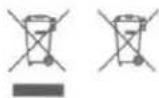
These symbols on the products, packaging, and/or accompanying documents mean that used electrical and electronic products and batteries must not be mixed with general household waste. For proper treatment, recovery and recycling of old products and used batteries, please take them to applicable collection points in accordance with your national legislation. By disposing of them correctly, you will help to save valuable resources and prevent any potential negative effects on human health and the environment. For more information about collection and recycling, please contact your local municipality. Penalties may be applicable for incorrect disposal of this waste, in accordance with national legislation.
Note for the battery symbol (right symbol): This symbol might be used in combination with a chemical symbol. In this case it complies with the requirement set by the Directive for the chemical involved.
CE
EU Compliance Information
Eligible to bear the CE mark; Conforms to European Union Low Voltage Directive 2014/35/EU; European Union EMC Directive 2014/30/EU; European Union Restriction of Hazardous Substances Recast (RoHS) Directive
2011/65/EU; European Union WEEE Directive 2012/19/EU; European Union Eco-Design Directive 2009/125/EC; European Union Registration, Evaluation, Authorization and Restriction of Chemicals (REACH) Directive 2006/121/EC; European Union Radio Equipment Directive 2014/53/EU
Declaration of Conformity (DoC)
Hereby, Definitive Technology LLC, declares that this equipment is in compliance with the essential requirements and other relevant provisions of Directive 2014/53/EU
Customers can download a copy of the original DoC for our radio equipment from our website: http://www.definitivetechnology.com
Electromagnetic compatibility and Radio spectrum Matters (ERM); Wideband transmission systems; Data transmission equipment operating in the 2,4 GHz ISM band and using wide band modulation techniques; Harmonized EN covering the essential requirements of article 3.2 of the RED Directive.
EN 301 489-1
ElectroMagnetic Compatibility (EMC) standard for radio equipment and services; Part 1: Common technical requirements; Harmonised Standard covering the essential requirements of article 3.1(b) of Directive 2014/53/EU and the essential requirements of article 6 of Directive 2014/30/EU.
EN 301 489-3
ElectroMagnetic Compatibility (EMC) standard for radio equipment and services; Part 3: Specific conditions for Short-Range Devices (SRD) operating on frequencies between 9 kHz and 246 GHz; Harmonised Standard covering the essential requirements of article 3.1(b) of Directive 2014/53/EU.
EN 301 489-17
ElectroMagnetic Compatibility (EMC) standard for radio equipment and services; Part 17: Specific conditions for Broadband Data Transmission Systems; Harmonised
Standard covering the essential requirements of article 3.1(b) of Directive 2014/53/EU.
EN 300 328
Wideband transmission systems; Data transmission equipment operating in the 2,4 GHz ISM band and using wide band modulation techniques; Harmonised Standard covering the essential requirements of article 3.2 of Directive 2014/53/EU.
EN 301 893
5 GHz RLAN; Harmonised Standard covering the essential requirements of article 3.2 of Directive 2014/53/EU.
EN 300 440
Short Range Devices (SRD); Radio equipment to be used in the 1 GHz to 40 GHz frequency range; Harmonised Standard covering the essential requirements of article 3.2 of Directive 2014/53/EU
EN 62479
Assessment of the compliance of low power electronic and electrical equipment with the basic restrictions related to human exposure to electromagnetic fields (10 MHz to 300 GHz).
EN 62311
Assessment of electronic and electrical equipment related to human exposure restrictions for electromagnetic fields (0 Hz to 300 GHz).
| Type of Wireless | Operating Frequency | Maximum RF Power |
| Bluetooth | 2402 - 2480MHz | 12 dBm |
| Wi-Fi | 2412 - 2472MHz5180 - 5320MHz5500 - 5700MHz5725 - 5850MHz | 17.21 dBm16.46 dBm16.46 dBm12.68 dBm |
| 2.4GHz Wireless System | 2403.5 - 2477.3 MHz | 17 dBm |
5.15 - 5.35 GHz band is restricted to indoor operations only in the following countries:

| UK | DE | FR | IT |
| ES | NL | SE | PL |

dts®
Digital Surround

dts®
TruSurround
For DTS patents, see http://patents.dts.com. Manufactured under license from DTS, Inc. DTS, the Symbol, DTS and the Symbol together, Digital Surround, and TruSurround are registered trademarks and/or trademarks of DTS, Inc. in the United States and/or other countries. © DTS, Inc. All Rights Reserved.
The Bluetooth® word mark and logos are registered trademarks owned by the Bluetooth. SIG, Inc. and any use of such marks by Definitive Technology LLC, is under license.
HDMI, HDMI High-Definition Multimedia Interface, and the HDMI Logo are trademarks or registered trademarks of HDMI Licensing LLC.
Manufactured under license from Dolby Laboratories. Dolby, Dolby Audio, and the double-D symbol are registered trademarks of Dolby Laboratories.
Other trademarks and trade names are those of their respective owners.
1-Year Limited Warranty
Definitive Technology, LLC ("Definitive Technology") warrants to the original retail purchaser that Definitive Technology branded wireless speakers, will be free from defects in materials and workmanship for a period of (1) one year, under normal use and conditions. Should this product prove to be defective in material or workmanship, Definitive Technology will, at its option, (a) repair the product, or (b) replace the product. If the product model is no longer available and cannot be repaired effectively, or replaced with an identical model, Definitive Technology may, at its sole and absolute option, replace the unit with a current model of equal or greater value.
To obtain warranty service, please visit the Definitive Technology website at www.definitivetechnology.com. You may also contact Definitive Technology Customer Service at 1-800-228-7148 for instructions on where to send the product. You will be required to provide an original receipt or bill of sale, identifying you as the original purchaser and identifying the purchase made through an authorized Definitive Technology retailer. You will need to ship the product, prepaid and insured, together with the proof of purchase to Definitive Technology, 1 Viper Way, Vista, CA 92081. Risk of loss or damage in transit shall be borne by the purchaser. Freight collect shipments will be refused.
This warranty is non-transferable and does not apply to any product that has been modified or used in a manner contrary to its intended purpose. This limited warranty is void if the product has an altered or missing serial number, or if the product was purchased from someone other than an authorized dealer. This limited warranty is void if the product has been damaged by accident or unreasonable use, neglect, improper service or other causes not arising out of defects in material or construction. Product(s) which are found to be damaged by abuse resulting in thermally damaged voice coils are not covered by this warranty but may be replaced at the sole and absolute discretion of Definitive Technology. This warranty terminates if you sell or otherwise transfer the product to another party. This limited warranty does not cover cosmetic damage, paint damage, damage to other components, parts or premises, or any consequential damages which may result for any reason.
Definitive Technology does not warrant that the product will operate without interruption or that the product will operate error-free. Certain external conditions which are out of Definitive Technology's control may affect the overall performance of the product, including, but not limited to, wireless network configuration, performance of the wireless network, distances between product and the wireless network connection and/or content sources, third party devices, radio and/or environmental interference with the product.
Definitive Technology may offer access to third party content or third party content providers via the Product. Definitive Technology reserves the right to alter, change, discontinue or modify access to any third party content or any third party content provider at any time, for any reason. Definitive Technology disclaims all warranties and representations offered by any third party content or third party content provider.
Definitive Technology shall have no obligation to provide any updates or upgrades to the product, but in the event that it does, such updates and upgrades shall be deemed the "product", and shall be subject to the terms and conditions stated herein.
THIS WARRANTY GIVES YOU SPECIFIC LEGAL RIGHTS AND YOU MAY HAVE OTHER RIGHTS THAT VARY FROM STATE TO STATE. ALL WARRANTIES, INCLUDING BUT NOT LIMITED TO EXPRESS WARRANTY, IMPLIED WARRANTIES OF MERCHANTABILITY AND FITNESS FOR A PARTICULAR PURPOSE, NON-INFRINGEMENT AND THE IMPLIED CONDITION OF SATISFACTORY QUALITY ARE EXPRESSLY EXCLUDED AND DISCLAIMED TO THE MAXIMUM EXTENT ALLOWED BY LAW, AND DEFINITIVE TECHNOLOGY NEITHER ASSUMES NOR AUTHORIZES ANY PERSON TO ASSUME FOR IT ANY LIABILITY IN CONNECTION WITH THE SALE OF THE PRODUCT. DEFINITIVE TECHNOLOGY HAS ABSOLUTELY NO LIABILITY FOR ANY ACTS OF THIRD PARTIES. SOME STATES DO NOT ALLOW THE EXCLUSION OF CERTAIN IMPLIED WARRANTIES, OR CONDITIONS ON AN IMPLIED WARRANTY, SO THE ABOVE LIMITATION MAY NOT APPLY TO YOU. DEFINITIVE TECHNOLOGY DOES NOT ACCEPT LIABILITY FOR SPECIAL, INDIRECT, INCIDENTAL, PUNITIVE OR CONSEQUENTIAL DAMAGES, LOST PROFITS, LOST SAVINGS OR DAMAGES RESULTING FROM IMPROPER USE, OR THE INABILITY TO USE THE PRODUCT. THE MAXIMUM LIABILITY FOR WHICH DEFINITIVE TECHNOLOGY MAY BE RESPONSIBLE SHALL NOT EXCEED THE PURCHASE PRICE OF THE PRODUCT. SOME STATES DO NOT ALLOW THE EXCLUSION OR LIMITATION OF INCIDENTAL OR CONSEQUENTIAL DAMAGES, SO THE ABOVE LIMITATION OR EXCLUSIONS MAY NOT APPLY TO YOU.
D.
DEFINITIVE TECHNOLOGY
1 Viper Way
Vista, CA 92081
800 638 7276
www.definitivetechnology.com
Sound United Europe,
a division of D&M Europe B.V.
Beemdstraat 11
5653 MA Eindhoven
The Netherlands
STOP
If you have trouble setting up your new wireless product, we are here to help.
FREE TECHNICAL SUPPORT:
(800) 228-7148
Mon-Fri, 10 a.m. - 7 p.m. EST (USA)
Sat 12 p.m. - 8 p.m. EST (USA)
wireless.definitivetech.com/support
Email: info@definitivetech.com

DEFINITIVE TECHNOLOGY
Most issues can be solved over the phone. We pride ourselves on building the best precision-crafted audio products and offering free U.S.-based technical assistance.
Let us delight you with our service. Rather than returning the product, please contact us to quickly resolve any issues.

- What's in the Box
- Setup
- 1.
- Place the sound bar
- 2.
- Connect the sound bar to an AC outlet
- 3.
- Place the subwoofer
- 4.
- Connect the subwoofer to an AC outlet
- 5.
- Download the Google Home app to setup your sound bar on your Wi-Fi network
- 7.
- Turn on your TV and enjoy the Studio Slim
- Using your TV remote to control the volume
- Bluetooth®
- Chromecast built-in benefits
- Chromecast built-in
- Listening to music via Chromecast built-in
- Receiving automatic updates (highly recommended)
- Google Home App
- Sound Bar Controls
- MUTE INDICATOR
- VOLUME LEVEL INDICATORS
- Visual Indicators (Subwoofer)
- Using Your TV or Cable/Satellite TV Remote to Control the Studio Slim
- HDMI CEC CONTROL
- PRELOADED IR CODES
- Sound Modes
- Music Mode
- Movie Mode
- Night Mode
- For Further Assistance:
- D.
- DEFINITIVE TECHNOLOGY
- StudioSlim™
- Safety Precautions
- FCC RF Radiation Exposure Statement
- IC RF Radiation Exposure Statement
- Canada, Industry Canada (IC) Notices
- For Canadian customers : CAN ICES-3(B) / NMB-3(B)
- Radio Frequency (RF) Exposure Information
- 5.15\~5.25GHz Band
- Slave Equipment:
- Important Safety Instructions
- Disposal of Old Equipment and Batteries
- CE
- EU Compliance Information
- Declaration of Conformity (DoC)
- EN 301 489-1
- EN 301 489-3
- EN 301 489-17
- EN 300 328
- EN 301 893
- EN 300 440
- EN 62479
- EN 62311
- dts®
- 1-Year Limited Warranty
- STOP
Brand : DEFINITIVE TECHNOLOGY
Model : Studio Slim
Category : Soundbar