
37923 - Screen MONOPRICE - Free user manual and instructions
Find the device manual for free 37923 MONOPRICE in PDF.


User questions about 37923 MONOPRICE
0 question about this device. Answer the ones you know or ask your own.
Ask a new question about this device
Download the instructions for your Screen in PDF format for free! Find your manual 37923 - MONOPRICE and take your electronic device back in hand. On this page are published all the documents necessary for the use of your device. 37923 by MONOPRICE.
USER MANUAL 37923 MONOPRICE
natural_image
Modern computer monitor displaying a colorful fireworks display over a cityscape, with no visible text or symbols on the screen.P/N 37923, 38939
User's Manual
CONTENTS
SAFETY WARNINGS AND GUIDELINES....3
CUSTOMER SERVICE....4
PACKAGE CONTENTS....4
SETUP 5
KENSINGTON SECURITY SLOT 6
OSD MENU 7
Button Labels and Functions....7
Menu Structure....8
SPECIFICATIONS....14
TECHNICAL SUPPORT....15
REGULATORY COMPLIANCE....15
Notice for FCC 15
Notice for Industry Canada....16
EU Declaration of Conformity....16
WEEE Information....17
Safety Notice....18
SAFETY WARNINGS AND GUIDELINES
Please read this entire manual before using this device, paying extra attention to these safety warnings and guidelines. Please keep this manual in a safe place for future reference.
- This monitor is intended for indoor use only.
- Do not expose this monitor to water or moisture of any kind. Do not place drinks or other containers with moisture on or near the monitor. If moisture does get in or on the monitor, immediately unplug it from the power outlet and allow it to fully dry before reapplying power.
- Do not touch the monitor, the power cord, or any other connected cables with wet hands.
- Do not place the monitor on an unstable surface where it could fall and cause either personal injury or damage to the monitor and/or other equipment.
- Do not subject the monitor to extreme force, shock, or fluctuations in temperature or humidity.
- Do not block the ventilation holes in the monitor's casing. Do not place the monitor in a confined space with inadequate ventilation. Periodically check the ventilation holes to ensure they do not become clogged with dust, debris, or nearby items.
- Do not place the monitor near a heat source, such as a fireplace, heating vent, radiator, etc. Do not leave it in direct sunlight.
- Do not place or install this monitor in an area where it can be exposed to excessive amounts of dust, humidity, oil, smoke, or combustible vapors.
- Prior to operation, check the monitor and power cord for physical damage. Do not use if physical damage has occurred.
- Unplug this monitor from the power source when not in use.
- Take care to prevent damage to the power cord. Do not allow it to become crimped, pinched, walked on, or become tangled with other cords. Ensure that the power cord does not present a tripping hazard.
-
Never unplug the monitor by pulling on the power cord. Always grasp the connector head or adapter body.
-
Clean using a soft, dry cloth only. Do not use chemical cleaners, solvents, or detergents. For stubborn deposits, moisten the cloth with warm water.
- This monitor has no user serviceable parts. Do not open the case or otherwise attempt to modify this monitor.
- Do not leave a single image on the display for a long period of time. Doing so could cause "burn-in" of the image. It is recommended to use a variable desktop background and to use a screen saver to prevent "burn-in". Alternatively, ensure that the monitor is powered off for at least 2 hours out of every 12.
CUSTOMER SERVICE
The Monoprice Customer Service department is dedicated to ensuring that your ordering, purchasing, and delivery experience is second to none. If you have any problem with your order, please give us an opportunity to make it right. You can contact a Monoprice Customer Service representative through the Live Chat link on our website www.monoprice.com or via email at support@monoprice.com. Check the website for support times and links.
PACKAGE CONTENTS
Please take an inventory of the package contents to ensure you have all the items listed below. If anything is missing or damaged, please contact Monoprice Customer Service for a replacement.
1x 27" CrystalPro UHD Monitor
1x AC Power Cord
1x Stand
1x User's Manual
1x HDMI® Cable
1x Thank You Card
SETUP
Perform the following steps to prepare your monitor for use.
- Either assemble the stand and attach it to the rear of the monitor or mount the monitor to a wall or desk mount.
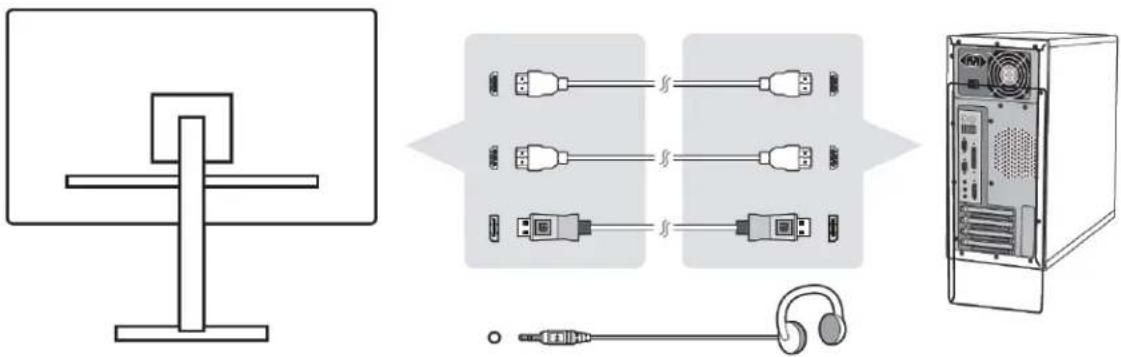
- Plug one end of the included HDMI® cable into one of the HDMI inputs on the monitor, then plug the other end into the HDMI video output on your computer. Alternatively, you can connect using a DisplayPort® cable (not included).
natural_image
Diagram showing connections between a monitor, USB cable connectors, a tower-mounted server, and an earphone (no text or symbols present)- (Optional) Plug a pair of headphones or powered speakers into the audio output on the monitor.
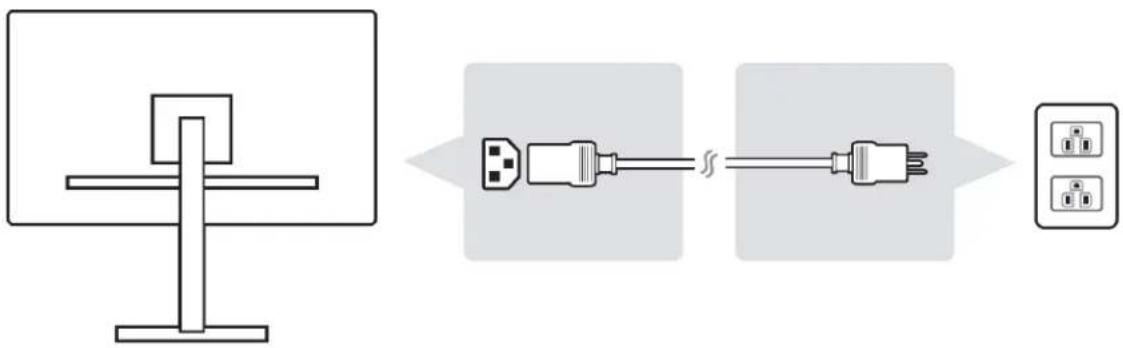
- Plug one end of the included AC power cord into the AC input on the monitor, then plug the other end into a nearby AC power outlet. The LED power indicator on the monitor will illuminate orange.
text_image
Diagram showing a computer monitor connected to two plug-in switches, with an output panel nearby.KENSINGTON SECURITY SLOT
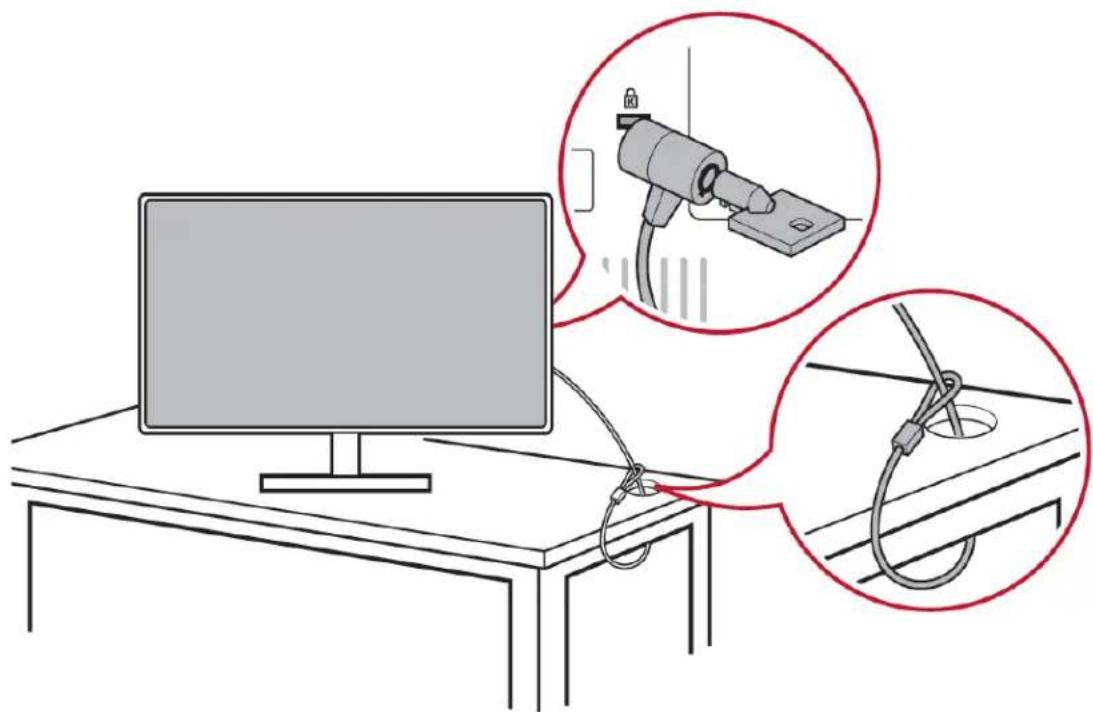
This monitor features a Kensington Security Slot™, which can be used to secure your monitor to prevent theft. The connector is located on the rear of the monitor. The following image illustrates an example of usage to secure the monitor to a table or desk.
natural_image
Illustration of a computer setup with a monitor and two close-up insets showing a mechanical device and rope (no text or symbols)For more information on installation and usage, please visit the Kensington website at the following address:
http://www.kensington.com
OSD MENU
Button Labels and Functions
Pressing any of the control buttons, other than the Power Button ( ) causes the button labels to appear on screen above their respective buttons. Following are the basic menu level button labels, from left to right.

View Mode: Displays a quick menu that allows for selection of one of nine video equalization presets (Standard, Game, Movie, Web, Text, MAC, and Mono).
Input Select: Displays a quick menu that allows for selection of one of three video inputs (HDMI ^® 1, HDMI 2, and DisplayPort ^® )

Menu: Displays the full OSD menu.

Exit: Turns off the on-screen button labels.
Once inside one of the above three menus, the button labels will change to indicate their functions in operating the menus. Following are the various labels and their purpose.

Select: Enters the highlighted submenu or edits the selected menu entry.

Back: Goes back to the previous menu or exits editing an entry.

Exit: Closes the OSD menu.

Up: Moves the highlight up.

Down: Moves the highlight down.

Left/Decrease: Moves the highlight to the left or decreases the displayed value when editing an entry.

Right/Increase: Moves the highlight to the right or increases the displayed value when editing an entry.
Menu Structure
Input Select
HDMI 1
HDMI 2
DisplayPort
Audio Adjust
Volume (0-100)
Mute (On/Off)
View Mode
Standard
Low Input Lag (On/Off)
Black Stabilization (0-100 in increments of 10)
Advanced DCR (0/25/50/75/100)
Low Input Lag (On/Off)
Black Stabilization (0-100 in increments of 10)
Advanced DCR (0/25/50/75/100)
Low Input Lag (On/Off)
Black Stabilization (0-100 in increments of 10)
Advanced DCR (0/25/50/75/100)
Low Input Lag (On/Off)
Black Stabilization (0-100 in increments of 10)
Advanced DCR (0/25/50/75/100)
Sharpness (0-100 in increments of 25)
Resolution Notice (On/Off)
Information
Resolution
H. Frequency
V. Frequency
Pixel Clock
OSD Timeout (5/15/30/60 seconds)
OSD Background (On/Off)
Auto Power Off (On/Off)
Sleep (30/45/60/120 minutes/Off)
ECO Mode
Standard
Optimize
Conserve
DDC/CI (On/Off)
Memory Recall
View Mode Quick Menu
Standard
Game
Movie
Web
Text
MAC
Mono
Input Select Quick Menu
HDMI 1
HDMI 2
DisplayPort
SPECIFICATIONS
| Model | 37923, 38939 |
| Display Size | 27" (686 mm) |
| Display Type | TFT Active Matrix |
| Display Finish | Anti-glare |
| Display Area | 23.5" x 13.2" (597 x 336 mm) |
| Video Inputs | 2x HDMI®, 1x DisplayPort® |
| Maximum Resolution | 3840 x 2160 @60Hz |
| Color Filter | RGB vertical stripe |
| Pixel Pitch | 0.1554 x 0.1554 mm |
| VESA® Mount Size | 100 x 100 |
| Input Power | 100 ~ 240 VAC, 50/60 Hz, auto switching |
| Maximum Power Consumption | 48 watts |
| Standby Power Consumption | < 0.5 watts |
| Operating Temperature | +32 ~ +104°F (0 ~ +40°C) |
| Storage Temperature | -4 ~ +140°F (-20 ~ +60°C) |
| Operating Humidity | 10 ~ 90% RH, noncondensing |
| Storage Humidity | 5 ~ 90% RH, noncondensing |
| Dimensions | 24.3" x 21.7: x 7.2": (617 x 552 x 184 mm) |
| Weight | 15.7 lbs. (7.1 kg) |
TECHNICAL SUPPORT
Monoprice is pleased to provide free, live, online technical support to assist you with any questions you may have about installation, setup, troubleshooting, or product recommendations. If you ever need assistance with your new product, please come online to talk to one of our friendly and knowledgeable Tech Support Associates. Technical support is available through the online chat button on our website www.monoprice.com or through email by sending a message to tech@monoprice.com. Check the website for support times and links.
REGULATORY COMPLIANCE
Notice for FCC

This device complies with Part 15 of the FCC rules. Operation is subject to the following two conditions: (1) this device may not cause harmful interference, and (2) this device must accept any interference received, including interference that may cause undesired operation.
Modifying the equipment without Monoprice's authorization may result in the equipment no longer complying with FCC requirements for Class B digital devices. In that event, your right to use the equipment may be limited by FCC regulations, and you may be required to correct any interference to radio or television communications at your own expense.
This equipment has been tested and found to comply with the limits for a Class B digital device, pursuant to Part 15 of the FCC Rules. These limits are designed to provide reasonable protection against harmful interference in a residential installation. This equipment generates, uses and can radiate radio frequency energy and, if not installed and used in accordance with the instructions, may cause harmful interference to radio communications. However, there is no guarantee that interference will not occur in a particular installation. If this equipment does cause harmful interference to radio or television reception, which can be determined by turning the equipment off and on, the
user is encouraged to try to correct the interference by one or more of the following measures:
- Reorient or relocate the receiving antenna.
- Increase the separation between the equipment and receiver.
- Connect the equipment into an outlet on a circuit different from that to which the receiver is connected.
- Consult the dealer or an experienced radio/TV technician for help.
Notice for Industry Canada
This Class B digital apparatus complies with Canadian ICES-003.
EU Declaration of Conformity
CE
Monoprice, Inc. declares the product described within this user guide or manual is in compliance with below applicable directives. The full text of the EU Declaration of Conformity is available at the following internet address:
https://www.monoprice.com/product?p_id=37923 or the CE DoC can be found within this user manual
• EMC Directive 2014/53/EC
• Low Voltage Directive 2014/35/EU
• RoHS2 Directive 2011/65/EU
• WEEE Directive 2012/19/EC
- Packaging & Packaging Waste Directive 94/62/EC
• REACH Directive 1907/2006/EC
WEEE Information
User information for consumer products covered by EU Directive 2012/19/EU on Waste Electric and Electronic Equipment (WEEE).
This document contains important information for users with regards to the proper disposal and recycling of Monoprice products. Consumers are required to comply with this notice for all electronic products bearing the following symbol:

For Consumers in the European Union: This EU Directive requires that the product bearing this symbol and or its packaging must not be disposed of with unsorted municipal waste. The symbol indicates that this product should be disposed of separately from regular household waste streams. It is your responsibility to dispose of this and other electrical and electronics products via designated collection facilities appointed by the government or local authorities. Correct disposal and recycling will help prevent potential negative consequences to the environment and human health. For more detailed information about the disposal of your unwanted product, please contacts your local authorities, waste disposal service, or the shop where you purchased the product.
Safety Notice

WARNING: Do not use this product near water, for example, in a wet basement or near swimming pool or in an area where accidental contact with water or liquid might occurs
WARNING: Avoid using this product during an electrical storm. There may be a remote risk of electric shock from the surge caused by lightning
WARNING: The external power adapter or AC power cord is the equipment's disconnection device. The power outlet must be located near the equipment and its access must be easy
WARNING: Use this product in a well-ventilated area
HDMI®, the HDMI Logo, and High-Definition Multimedia Interface are trademarks or registered trademarks of HDMI Licensing LLC in the United States and other countries.
VESA ^® , DisplayPort ^® , and the DisplayPort ^® logo are registered trademarks of the Video Electronics Standards Association.
Kensington Security Slot ^™ is a trademark of Kensington Computer Products Group.