
SP 120E - Loudspeaker BLAUPUNKT - Free user manual and instructions
Find the device manual for free SP 120E BLAUPUNKT in PDF.


| Product Type | Multimedia Player System |
| Brand | Blaupunkt |
| Model | SP 120E |
| Dimensions (Main Unit) | Φ175 × 198 mm |
| Dimensions (Speakers) | 40 × 95 mm each |
| Power Supply | AC ~230V / 50Hz, DC 15V 2A |
| Power Consumption | 8.5 W |
| Standby Power Consumption | ≤ 0.5 W |
| Output Power (RMS) | 10W × 2 + 25W |
| Bluetooth Version | 2.1 + EDR |
| Bluetooth Range | Approx. 10 m |
| Bluetooth Profiles | A2DP |
| Supported Codecs | SBC |
| Multi-Device Pairing | Up to 8 devices |
| Frequency Band | 2.4 GHz (2.4000 – 2.4835 GHz) |
| Accessories Included | Unit, Instruction Manual, Speakers ×2, Audio Connect Cable, AC/DC Adapter, Speaker Connect Line with Volume Control |
| Cleaning Instructions | Unplug unit, use clean cloth; avoid liquid or aerosol cleaners |
| Safety Precautions | Do not expose to rain or moisture; no user-serviceable parts; keep away from water sources |
| Disposal | WEEE compliant; do not dispose as unsorted municipal waste |
Frequently Asked Questions - SP 120E BLAUPUNKT
User questions about SP 120E BLAUPUNKT
0 question about this device. Answer the ones you know or ask your own.
Ask a new question about this device
Download the instructions for your Loudspeaker in PDF format for free! Find your manual SP 120E - BLAUPUNKT and take your electronic device back in hand. On this page are published all the documents necessary for the use of your device. SP 120E by BLAUPUNKT.
USER MANUAL SP 120E BLAUPUNKT
SP 120
www.blaupunkt.com
Thank you for purchasing this multimedia player system. To fully utilize this system, please read this instruction book carefully before use.
For your safety

CAUTION
RISK OF ELECTRIC SHOCK DO NOT OPEN

CAUTION:
TO REDUCE THE RISK OF ELECTRIC SHOCK, DO NOT REMOVE COVER. NO USER SERVICEABLE PARTS INSIDE. REFER SERVICING TO QUALIFIED SERVICE PERSONNEL.

This symbol indicates that dangerous voltage constituting a risk of electric shock is present within this unit.

This symbol indicates that there are important operating and maintenance instructions in the literature accompanying this unit.
Caution:
To prevent fire or shock hazard, do not expose this equipment to rain or moisture.
Power Requirement
Because the power requirement of electric products is different in various places, before you use this product, make sure that the power requirement of the product complies with the power that the native district supplies.
Precautions
- Before operating this system, check the voltage of this system to see if it is identical with the voltage of your local power supply.
- Unplug the system from the wall outlet if it is not used for a long time. To disconnect the cord, pull it out by grasping the plug.
- To avoid electric shock, do not open the cabinet by unqualified personnel.
- There is no user serviceable parts inside. In case of system failure, unplug the power cord and consult your dealer.
- The ventilation should not be impeded by covering the ventilation openings with items such as newspaper, table-cloths, curtains etc.
- The apparatus shall not be exposed to dripping or splashing and that no objects filled with liquids, such as vases, shall be placed on the apparatus.
- To prevent fire or shock hazard, do not expose this equipment to hot places, rain, moisture or dust.
- Don't get close to the water source when using this unit, such as near bathtub, bath slot, ish-washing slot, washing machine to use it; also, don't use this unit on damp plinth or nearby swimming pool or similar close to the water source.
- Do not place this unit close to strong magnetic field.
Before Connection
- Should any solid object or liquid fall into the system, unplug the system and have it checked by qualified personnel before operating it any further.
- Before cleaning this unit, unplug the system from the wall outlet first. Don't use the cleaner which is with liquid or aerosol (e.g. pesticide). You can use a clean cloth to clean this unit.
- Please use the connection cable to connect to unit. Don't use accessories equipment recommended by non manufacturer. It may course an electric shock by using this equipment.
- When the appliance coupler is used as the disconnect device, appliance coupler shall remain readily operable. Do not expose the product to any dripping or splashing and make sure no object filled with liquids, such as vase, etc., are placed on them.

Declaration of conformity (DOC)
Model number: SP120
Trade name: Bbupunkt
Responsible party: M3 Electronic GmbH
Gutenbergstrasse 5,
D-65830 Kriftel
Germany
Hereby, B. aupunkt Competence Center Audio, M3 Electronic GmbH, declares that this class equipment is in compliance with the essential requirements and other relevant provisions of Directive 1999/5/EC. Letter of conformity can be obtained from info@m3-electronic.de.

Bluetooth Declaration of Conformity (DOC)
Hereby, we declare the equipment is in compliance with the Bluetooth license requirement. You can consult the information from website: https://www.bluetooth.org/apps/content/
Accessories
Unit x 1
□ Instructions manual x 1
□ Speaker x 2
□ Audio Connect Cable x 1
☐ AC/DC Adapter x 1
Speaker connect line & Volume control knob or Switch on/off x 1
1 Connection
Caution: Please turn off all the equipment power before connecting.
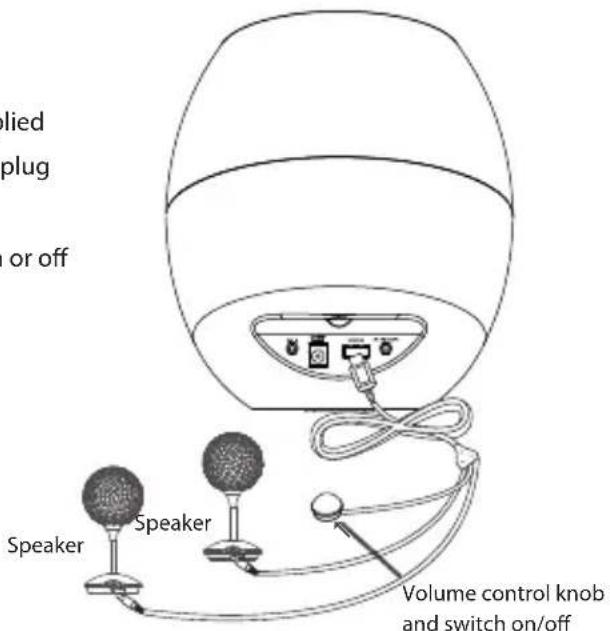
Connecting the Speakers
Connect the speakers to the UNIT socket using the supplied speaker connect line. Connect the right speaker's cable plug to R (red), and the left speaker's cable plug to L (white). Rotate the volume knob until you hear a click, switch on or off this unit.
Notes for connection
- Listen at a moderate volume. The higher decibel ranges are offered for those that may have already experienced some hearing loss.
- Set your volume control at a low setting before connecting the unit.
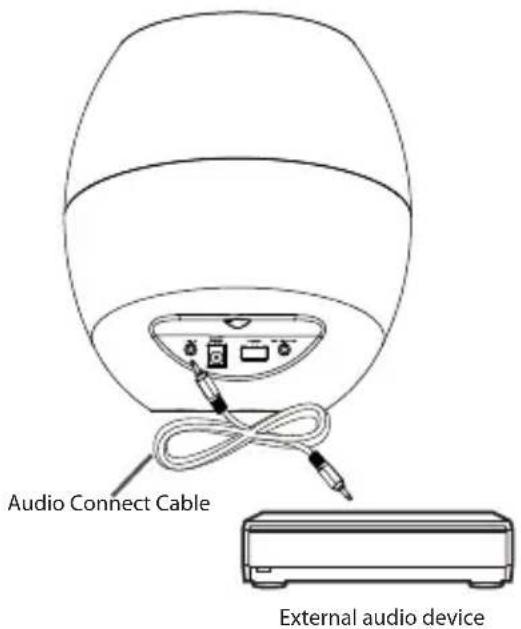
Connect an external audio device
- The unit has 2 sets of external audio input sockets. You can listen to an external audio device through this unit. Connect the LINE INPUT sockets on this unit to the output sockets on the external audio device.
Note:
Refer to the manual accompanying external devices for more information.
1 Connection
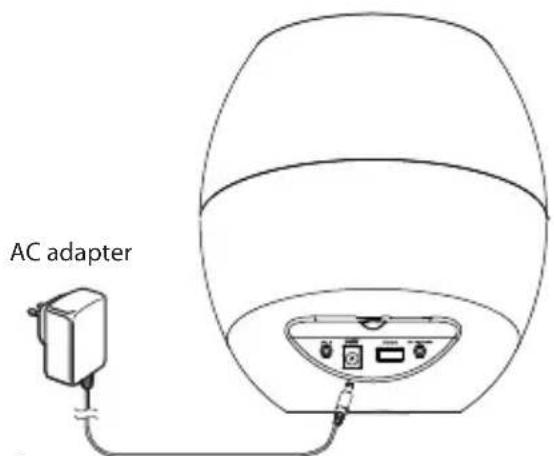
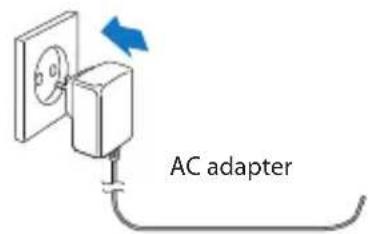
Connecting the AC/DC Power Cord
- After you make all necessary connections, insert the AC/DC power plug into a wall outlet, and your system is ready to use.
Caution:
Be sure to unplug the power cord from the outlet when going away or when the system is not in use for an extended period of time.
2 Playback
Play with Bluetooth device
Pair the Bluetooth-enabled devices
To connect your Bluetooth device to the unit, you need to pair the device to the unit. Pairing needs only to be done once.
Note:
- The operational range between this unit and a Bluetooth device is approximately 10 meters.
- Before you connect a Bluetooth device to this unit, familiarize yourself with the Bluetooth capabilities of the device.
- Compatibility with all Bluetooth devices is not guaranteed.
- Any obstacle between this unit and a Bluetooth device can reduce the operational range.
- Keep this unit away from any other electronic device that may cause interference.
- Turn on the Bluetooth function on your device.
- Search for other Bluetooth devices with your device.
- Select "SP120" in the pairing list.
- Enter the default password "0000", or other Bluetooth devices may not require a password and can pair directly.
LED flash light: If no Bluetooth device is connected, the LED light flashes once every 1 second. When connected, the Blue LED stays bright.
Note:
- The device will also be disconnected when it is moved beyond the operational range.
- If you want to reconnect the device to the unit, place it within the operational range.
- The device will be connected to the Bluetooth device that was already paired, and it will also enter pairing mode, allowing other Bluetooth devices to search for connection or pairing.
- When the unit disconnects from the Bluetooth device, it will automatically enter pairing mode, allowing other Bluetooth devices to search for connection or pairing.
Listen to music from a Bluetooth device
If the connected Bluetooth device supports Advanced Audio Distribution Profile (A2DP), you can listen to the music stored on the device through the unit.
- Pair the device with the unit.
- Start playing music via the device.
Note:
• If other devices are connected via Bluetooth and listening to music, the files within the Bluetooth device will play in an advanced manner.
3 Technical Specification
General
Power supply.... ~230V / 50Hz
DC supply.... 15V =2A
Power consumption 8.5W
Output power.... 10W × 2 + 25W(RMS)
Power consumption in standby mode ....≤ 0.5 W
Dimensions (Unit) ...... Φ175 × 198 mm
(Speaker) Φ40 × 95 mm
Bluetooth
Communication system .... Bluetooth Standard version 2.1 and EDR specification
Output......Bluetooth Standard Power Class 2
Maximum communication Range .... approx. 10m
Frequency band 2.4 GHz Band (2.4000 GHz - 2.4835 GHz)
Compatible Bluetooth profiles .... Advanced Audio Distribution Profile (A2DP)
Supported Multi devices pairing .... up to 8 devices
Supported codecs (Receive) .... SBC(Sub Band Codec) (Transmit).... SBC(Sub Band Codec)
Note: Design and specifications are subject to change without prior notice.
4 Troubleshooting
If you are having a problem with your system, check this list for a possible solution before calling for service. If you cannot solve the problem from the list below, or the system has been physically damaged, call a qualified person, or your dealer, for service.
No power
- Connections is incorrect.
No sound
• Volume is too low. Adjust volume.
- Speaker connections is incorrect.
About Bluetooth device
Music playback is unavailable on the system even after successful Bluetooth connection.
- The device cannot be used with the system to play music.
The audio quality is poor after connection with a Bluetooth-enabled device.
- The Bluetooth reception is poor. Move the device closer to the system or remove any obstacle between the device and the system.
Cannot connect with the system.
- The device does not support the profiles required for the system.
- The Bluetooth function of the device is not enabled. Refer to the user manual of the device for how to enable the function.
- The system is not in the pairing mode.
- The system is already connected with another Bluetooth-enabled device. Disconnect that device or all other connected devices and then try again.
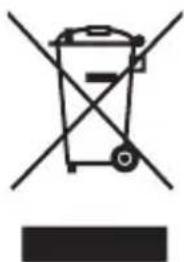
The mark is in compliance with the Waste Electrical and Electronic Equipment Directive 2002/96/EC (WEEE). The mark indicates the requirement NOT to dispose the equipment including any spent or discarded batteries as unsorted municipal waste, but use the return and collection systems available.
If the batteries or accumulators included with this equipment, display the chemical symbol Hg, Cd, or Pb, then it means that the battery has a heavy metal content of more than 0.0005% Mercury, or more than 0.002% Cadmium or more than, 0.004% Lead.
Notes for battery disposal
Your unit contains batteries covered by the European Directive 2006/66/EC, which cannot be disposed of with normal household waste. Please take note about the local rules on separate collection of batteries. The correct disposal of batteries helps prevent potentially negative consequences on the environment and human health.

BLAUPUNKT
Competence Center Audio
M3 Electronic GmbH
Gutenbergstrasse 5
D-65830 Kriftel - Germany
www.blaupunkt.com
Service Hotline Deutschland (Germany): 0180 55 88 66 4
All rights reserved. All brand names are registered
trademarks of their respective owners. Specifications are
subject to change without prior notice.
- FOR YOUR SAFETY
- CAUTION
- PRECAUTIONS
- BEFORE CONNECTION
- DECLARATION OF CONFORMITY (DOC)
- BLUETOOTH DECLARATION OF CONFORMITY (DOC)
- ACCESSORIES
- CONNECTION
- CONNECTING THE SPEAKERS
- NOTES FOR CONNECTION
- CONNECT AN EXTERNAL AUDIO DEVICE
- CONNECTING THE AC/DC POWER CORD
- PLAYBACK
- PLAY WITH BLUETOOTH DEVICE
- LISTEN TO MUSIC FROM A BLUETOOTH DEVICE
- TECHNICAL SPECIFICATION
- GENERAL
- BLUETOOTH
- TROUBLESHOOTING
- NO POWER
- NO SOUND
- ABOUT BLUETOOTH DEVICE
- CANNOT CONNECT WITH THE SYSTEM
- NOTES FOR BATTERY DISPOSAL
- BLAUPUNKT
Brand : BLAUPUNKT
Model : SP 120E
Category : Loudspeaker