
AWE01US1 - Laptop cooler TARGUS - Free user manual and instructions
Find the device manual for free AWE01US1 TARGUS in PDF.


| Brand | Targus |
| Model | AWE01US1 (Chill Hub XC) |
| Product Type | Laptop Cooler with USB Hub |
| Dimensions (approx.) | 14 x 10 x 1 inches (35.6 x 25.4 x 2.5 cm) |
| Weight (approx.) | 1.5 lbs (0.68 kg) |
| Power Source | USB (5V) or optional AC adapter (model APA09USZ) |
| USB Ports | 4 USB 2.0 ports (via single USB connection to laptop) |
| Fan Speeds | Low (I) and High (II) via slide switch |
| Cooling Mechanism | Dissipates thermal heat to reduce laptop temperature |
| Design | Thin, durable, portable with extendable feet for angled use |
| Compatibility | Laptops with USB 1.1/2.0 port |
| Warranty | 1-year limited warranty |
| Regulatory Compliance | FCC Class B, CE (Directive 1999/5/EC) |
| Cleaning Instructions | Wipe with a soft dry cloth; keep fans free of dust and debris |
| Safety Warning | Keep loose clothing, jewelry, and hair away from fans |
| Spare Parts / Repairability | No user-serviceable parts; contact Targus support for issues |
Frequently Asked Questions - AWE01US1 TARGUS
User questions about AWE01US1 TARGUS
0 question about this device. Answer the ones you know or ask your own.
Ask a new question about this device
Download the instructions for your Laptop cooler in PDF format for free! Find your manual AWE01US1 - TARGUS and take your electronic device back in hand. On this page are published all the documents necessary for the use of your device. AWE01US1 by TARGUS.
USER MANUAL AWE01US1 TARGUS
| Targus NOTEBOOK COOLING CHILL HUB XC |
1 YEAR LIMITED WARRANTY: We pride ourselves on the quality of our products. For complete warranty details and a list of our worldwide offices, please visit www.targus.com. Features and specifications are subject to change without notice. Microsoft, Windows and Windows Vista are registered trademarks or trademarks of Microsoft Corporation in the United States and/or other countries. Mac is a trademark of Apple Inc., registered in the U.S. and other countries. All trademarks and registered trademarks are the property of their respective owners. ©2010 Targus Group International, Inc. All rights reserved.
User Guide
Introduction
Congratulations on your purchase of the Targus Notebook Cooling Chill Hub XC. This cooling device dissipates thermal heat, reducing your computer's overall temperature, resulting in maximum performance. It also allows you to connect through a single USB connection up to 4 USB devices. Its thin yet durable design is both portable and sturdy.
System Requirements
• USB 1.1/2.0 compliant port
To use the Chill Hub
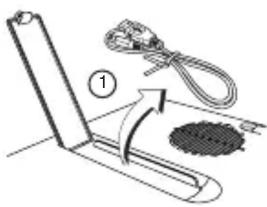
- Remove the USB cable from the bottom of the Chill Hub.
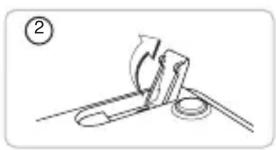
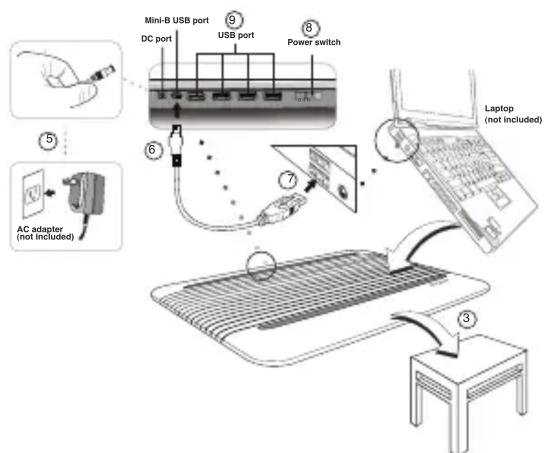
- Decide on where you want to place the Chill Mat, either on a work surface, such as a table or desktop, or your lap. If you choose to use the Chill Mat on a work surface, you can extend the feet to the required angle.
- Place the Chill Mat on the work surface or your lap.
-
Position your laptop computer on top of the Chill Hub.
-
If you have purchased the optional AC power adapter, connect one end into the Chill Hub's DC port and the other end into the power outlet.
- Connect one end of the USB cable into the mini-B USB port located at the rear of the Chill Hub.
- Connect the other end of the USB cable into an available USB port on your laptop computer.
- Turn the fan on by sliding the Power switch to "I" for low speed fan and "II" for high speed fan.
- To connect a USB device to the Chill Hub, plug the USB cable from the device into an available port on the Chill Hub.
natural_image
Simple line drawing of a mechanical clamp or bracket with a circular base and curved handle (no text or symbols)Targus Notetbook Cooling Chill Hub XC

NOTE: If there's insufficient power after connecting USB devices to the Chill Hub, you may purchase and use the separately sold AC Adapter (Targus model number APA09USZ) on www.targus.com to provide more power to the USB devices.

WARNING: Keep all items, such as loose clothing and jewelry, and long hair away from the fans to avoid possible personal injury or damage to the Chill Hub or your computer.
Targus Notetbook Cooling Chill Hub XC
Technical Support
For technical questions, please visit:
US Internet: www.targus.com/support.asp
Australia Internet: www.targus.com/au
Email:infoaust@targus.com
Telephone: 1800-641-645
New Zealand Telephone:0800-633-222
Product Registration
Targus recommends that you register your Targus accessory shortly after purchasing it. Go to:
http://www.targus.com/registration.asp
You will need to provide your full name, email address, country of residence and product information.
Warranty
Targus warrants this product to be free from defects in materials and workmanship for one year. If your Targus accessory is found to be defective within that time, we will promptly repair or replace it. This warranty does not cover accidental damage, wear and tear, or consequential or incidental loss. Under no conditions is Targus liable for loss of, or damage to devices; nor loss of, or damage to, programs, records, or data; nor any consequential or incidental damages, even if Targus has been informed of their possibility. This warranty does not affect your statutory rights.
Targus Notetbook Cooling Chill Hub XC
Regulatory Compliance
This device complies with Part 15 of the FCC Rules. Operation is subject to the following two conditions: (1) This device may not cause harmful interference, and (2) This device must accept any interference received, including interference that may cause undesired operation.
FCC Statement
Tested to Comply
This equipment has been tested and found to comply with the limits of a Class B digital device, pursuant to Part 15 of the FCC Rules. These limits are designed to provide reasonable protection against harmful interference in a residential installation. This equipment generates, uses, and can radiate radio frequency energy and if not installed and used in accordance with the instructions, may cause harmful interference to radio communications. However, there is no guarantee that interference will not occur in a particular installation. If this equipment does cause harmful interference to radio or television reception, which can be determined by turning the equipment off and on, the user is encouraged to try to correct the interference by one or more of the following measures:
Targus Notetbook Cooling Chill Hub XC
- Reorient or relocate the receiving antenna;
- Increase the separation between the equipment and receiver;
- Connect the equipment into an outlet on a circuit different from that to which the receiver is connected;
- Consult the dealer or an experienced radio/TV technician for help.
Changes or modifications not authorized by the party responsible for compliance could void the user's authority to operate this product.
Declaration of Conformity
Hereby, Targus, declares that this device is in compliance with the essential requirements and other relevant provisions of Directive 1999/5/EC.
Microsoft, Windows, and Windows Vista are either registered trademarks or trademarks of Microsoft Corporation in the United States and/or other countries. All trademarks and registered trademarks are the property of their respective owners. All rights reserved. Features and specifications are subject to change without notice. ©2010. Targus Group International, Inc. and Targus, Inc., Anaheim, CA 92806 USA

Brand : TARGUS
Model : AWE01US1
Category : Laptop cooler