
Smartphone 9.1 Lite - Smartphone TESLA - Free user manual and instructions
Find the device manual for free Smartphone 9.1 Lite TESLA in PDF.


| Product type | Smartphone |
| Brand | TESLA |
| Model | Smartphone 9.1 Lite |
| Dimensions (H x W x D) | 156 x 75 x 8 mm |
| Weight | 180 g |
| Display | 6.1-inch IPS LCD |
| Screen resolution | 1560 x 720 pixels |
| Processor | Quad-core 1.8 GHz |
| RAM | 3 GB |
| Internal storage | 32 GB |
| Expandable storage | Up to 256 GB via microSD |
| Battery | 4000 mAh lithium-ion |
| Power supply | USB-C, 5V/2A charger included |
| Operating system | Android 10 |
| Rear camera | 13 MP with LED flash |
| Front camera | 5 MP |
| Fingerprint sensor | Yes, rear-mounted |
| Connectivity | 4G, Wi-Fi 802.11 b/g/n, Bluetooth 5.0 |
| Care and cleaning | Use a soft, dry cloth. Avoid liquids. |
| Safety | Do not expose to extreme temperatures. Use only approved accessories. |
| Spare parts and repairability | Battery and screen replaceable by a qualified technician. Repairability score: 7.0/10 |
Frequently Asked Questions - Smartphone 9.1 Lite TESLA
User questions about Smartphone 9.1 Lite TESLA
0 question about this device. Answer the ones you know or ask your own.
Ask a new question about this device
Download the instructions for your Smartphone in PDF format for free! Find your manual Smartphone 9.1 Lite - TESLA and take your electronic device back in hand. On this page are published all the documents necessary for the use of your device. Smartphone 9.1 Lite by TESLA.
USER MANUAL Smartphone 9.1 Lite TESLA
| KeyFunction | |
| Power key | To turn the phone on or off, switch to Airplane mode, take a screenshot, reset phone and change audio profile settings, press and hold the “Power” button and select an optionTo switch your phone to Sleep mode or to wake up your phone press the “Power” button |
| Home key | To return to Home screen from any application or screen, press the “Home” buttonTo activate GoogleTM Assistant function, press and hold the “Home” button |
| Recents key | To see a list of recently used applications, press the “Recents” button |
| Back key | Press the “Back” button to go to the previous screen |
| Volume key | Press and hold the “Volume” button to increase/decrease the sound and to adjust audio profile |
| Fingerprint button | Set up to unlock your phone using fingerprint |
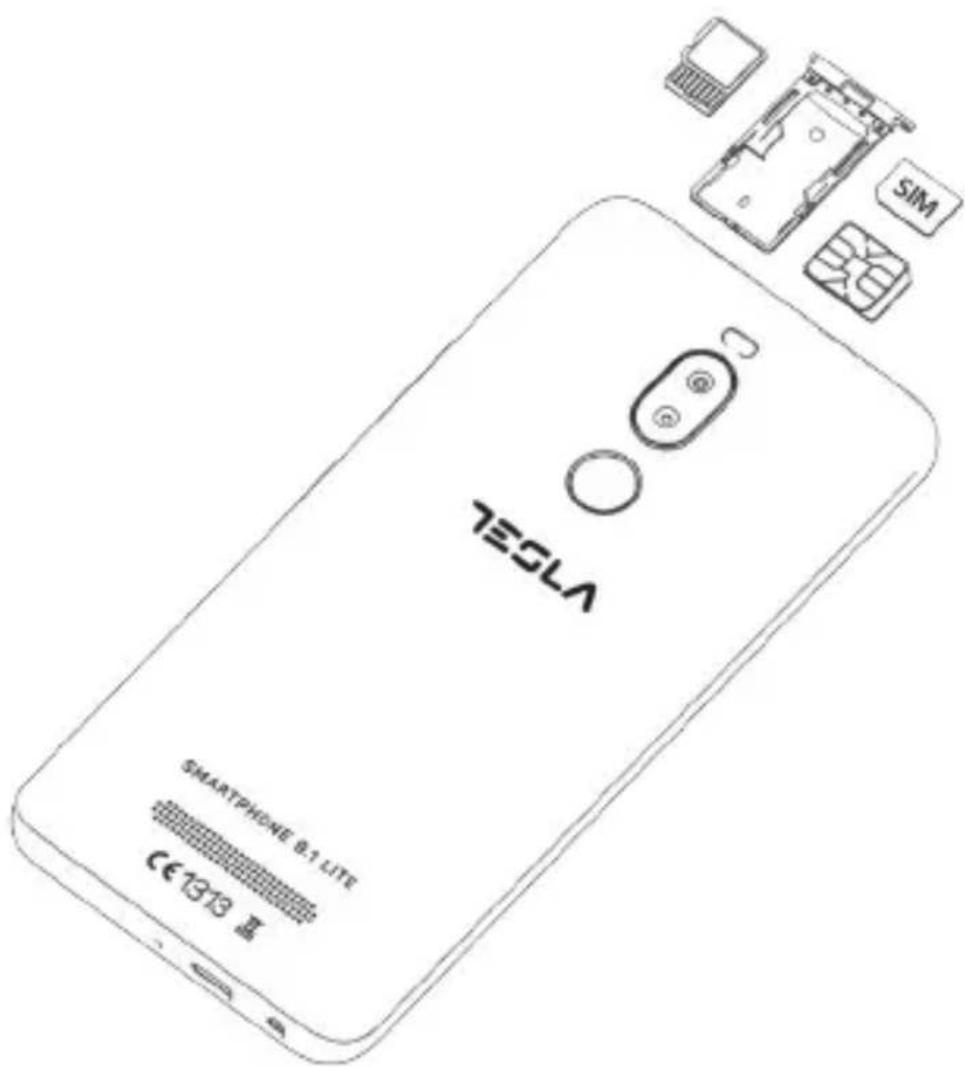
Switch off your phone before installing SIM card.
- Take the needle included in the package
- Insert it into the hole beside the SIM tray
- Put the SIM card inside the tray as shown on the picture
- Return the SIM tray back in the hole
Instead of the SIM card, you can insert micro SD card into the SIM1 slot. Instructions on how to insert micro SD card are shown in the illustration.
Google is a trademark of Google Inc.
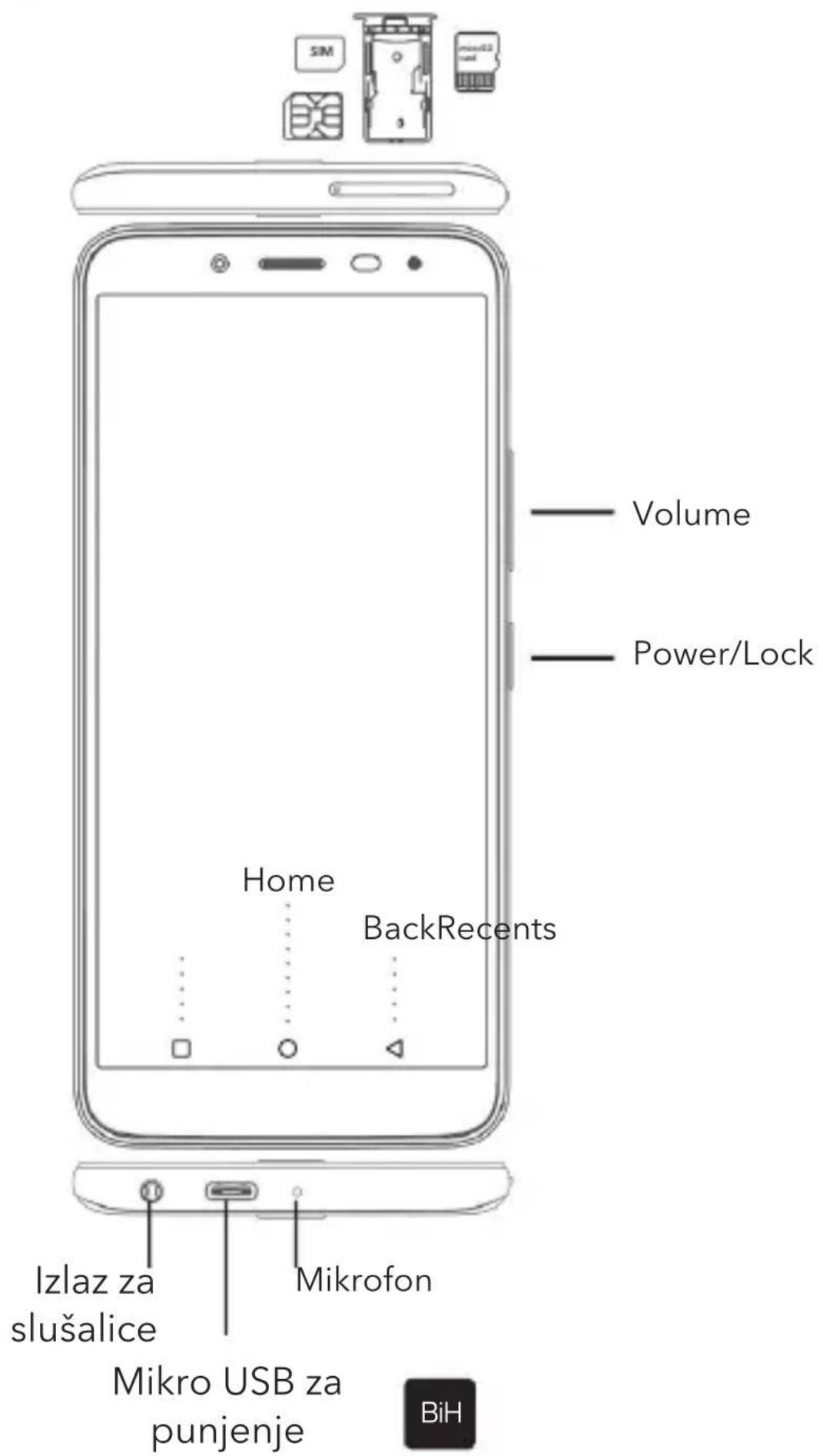
| TasteriFunkcije | |
| Power taster | Da biste uključili ili isključili telefon, prešli u Airplane režim rada, napravili snimak ekrana, resetovali telefon i podesili audio profile pritisnite i zadržite “Power” taster i odaberite odgovarajuću opcijuDa biste prebacili telefon u Sleep mode ili da biste “probudili” telefon, pritisnite “Power” taster |
| Home taster | Da biste se vratili na početnu stranicu iz bilo koje aplikacije, pritisnite “Home” tasterDa biste pokrenuli GoogleTM Assistant opciju, pritisnite i zadržite “Home” taster |
| Recentstaster | Da biste vidjeli listu skoro otvorenih aplikacija, pritisnite “Recents” taster |
| Back taster | Pritisnite “Back” taster kako biste se vratili na prethodnu stranicu |
| Volume taster | Pritisnite i zadržite “Volume” taster kako biste pojačali/smanjili zvuk i prilagodili audio profile prema potrebi |
| Senzor otiska prsta | Podesite otključavanje uređaja preko otiska prsta |
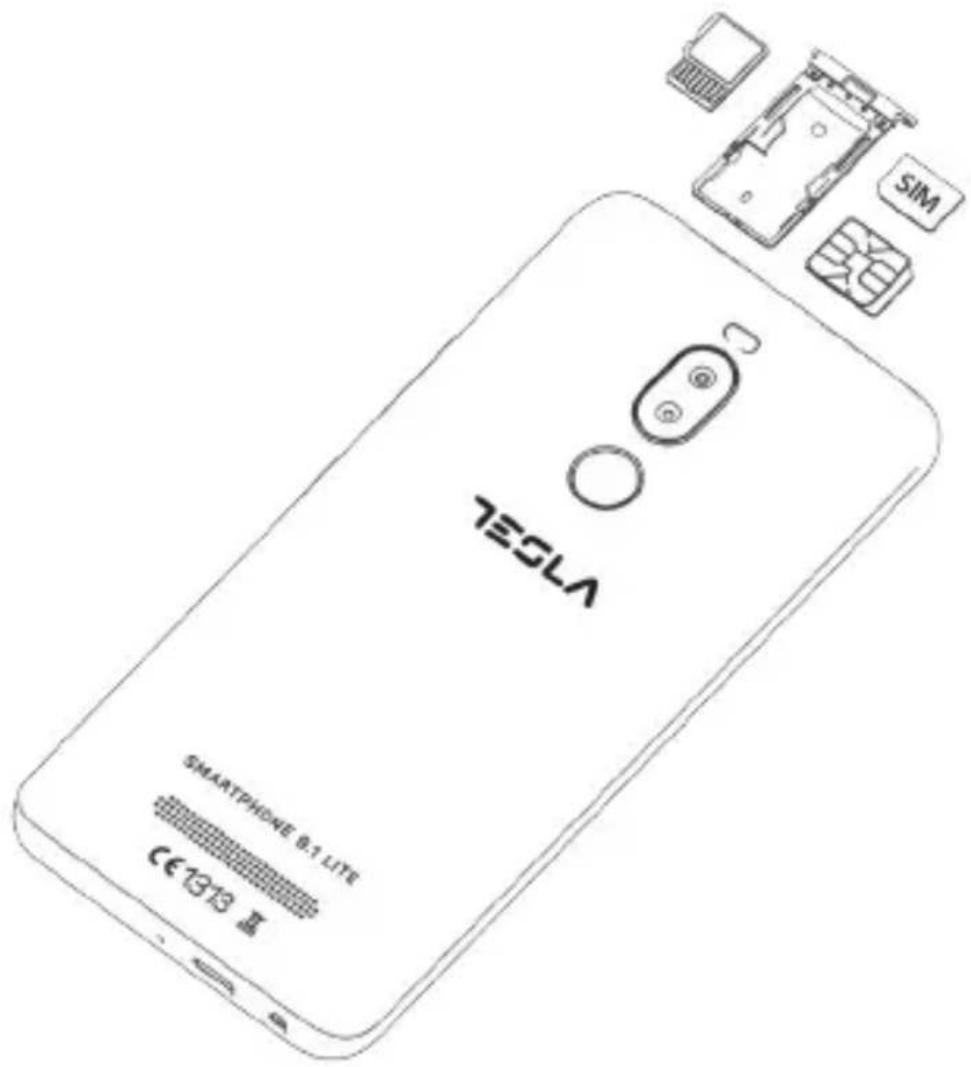
Isključite Vaš telefon prije instaliranja SIM kartice.
- Uzmite iglicu koju ste dobili u pakovanju
- Kutijicu za SIM izvadićete ubacivanjem iglice u otvor
- Ubacite SIM karticu u SIM kutijicu prema crtežu
- Vratite SIM kutijicu nazad u prorez
Umesto SIM kartice u SIM1 slot možete ubaciti mikro SD karticu. Ubacivanje mikro SD kartice se radi na način prikazan na crtežu.
Google je žig kompanije Google Inc.
TESLA
Brand : TESLA
Model : Smartphone 9.1 Lite
Category : Smartphone