
Paladin - Office Chair X Rocker - Free user manual and instructions
Find the device manual for free Paladin X Rocker in PDF.


| Product Type | Gaming/Office Chair with Audio |
| Brand | X Rocker |
| Model | Paladin |
| Item Number | 0777201 |
| Weight Capacity | 120 kg (265 lbs) |
| Power Supply | 5 VDC, 1 A via USB adapter (model BI12T-050100-I) |
| Connectivity | Bluetooth, Wired 3.5mm, RCA |
| Audio Output | Built-in speakers and vibration motor |
| Control Panel | ON/OFF, Volume, Bluetooth pairing, Input selection |
| Included Cables | USB power cable, 2m 3.5mm audio cable, 15cm RCA to 3.5mm(F) cable, RCA female adapters |
| Dimensions (Approx.) | Height 120 cm, Width 65 cm, Depth 55 cm |
| Weight (Approx.) | 15 kg |
| Material | Fabric upholstery, foam padding, metal frame |
| Color | Black/White (varies by region) |
| Adjustability | Height adjustment, tilt lock, 360° swivel, adjustable armrests |
| Assembly Required | Yes (separate assembly leaflet included) |
| Care Instructions | Wipe with damp cloth; avoid liquids; do not immerse |
| Safety Notes | Do not exceed 120 kg; avoid leaning back; do not stand on chair |
| Warranty | Keep original receipt as proof of purchase |
| Customer Support | Email: Service@XRockerNation.co.uk, Phone: 01274 683 109 |
Frequently Asked Questions - Paladin X Rocker
User questions about Paladin X Rocker
0 question about this device. Answer the ones you know or ask your own.
Ask a new question about this device
Download the instructions for your Office Chair in PDF format for free! Find your manual Paladin - X Rocker and take your electronic device back in hand. On this page are published all the documents necessary for the use of your device. Paladin by X Rocker.
USER MANUAL Paladin X Rocker
natural_image
Line drawing of an office chair with adjustable armrests and legs (no text or symbols)User Manual Item no: 0777201
Need Help? Email: Service@XRockerNation.co.uk
Phone: 01274 683 109 www.XRockerNation.co.uk
IMPORTANT: You must keep your original retail receipt as proof of purchase.
Thank you for purchasing this X Rocker gaming chair. You are now close to enhancing your favourite games with glorious audio!
To get started, please assemble the chair using the assembly instructions on the separate leaflet and then follow the instructions in this manual to get rocking!
Table of contents
3 Box contents and control panel overview
4 Wired Connection guide: TV (Xbox One and PS4 audio)
5 Connect by controller (PS4 systems only)
6 Bluetooth connection guide (Mobile phones/tablet devices)
7 Troubleshooting tips
8 Health and safety information
9 Power supply safety information
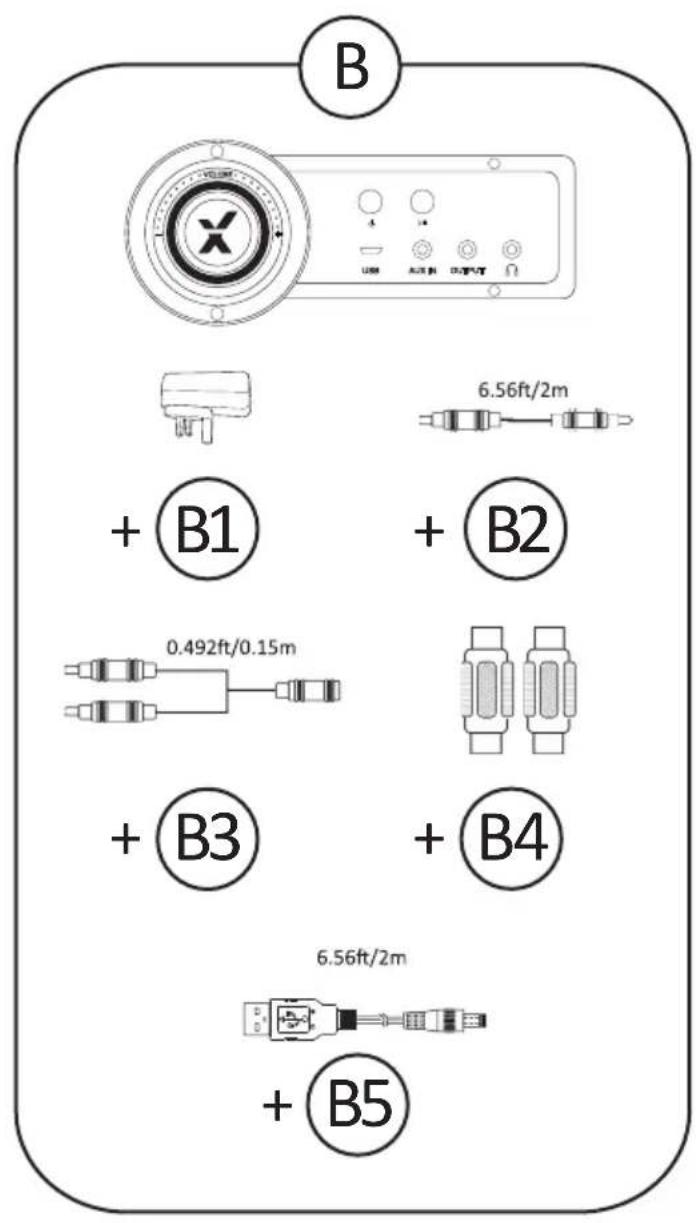
B1 - USB Power supply adapter
B2 - 2m 3.5mm to 3.5mm audio cable
B3 - 15cm RCA to 3.5mm(F) audio cable
B4 - RCA female to female adapters
B5 - USB Power cable
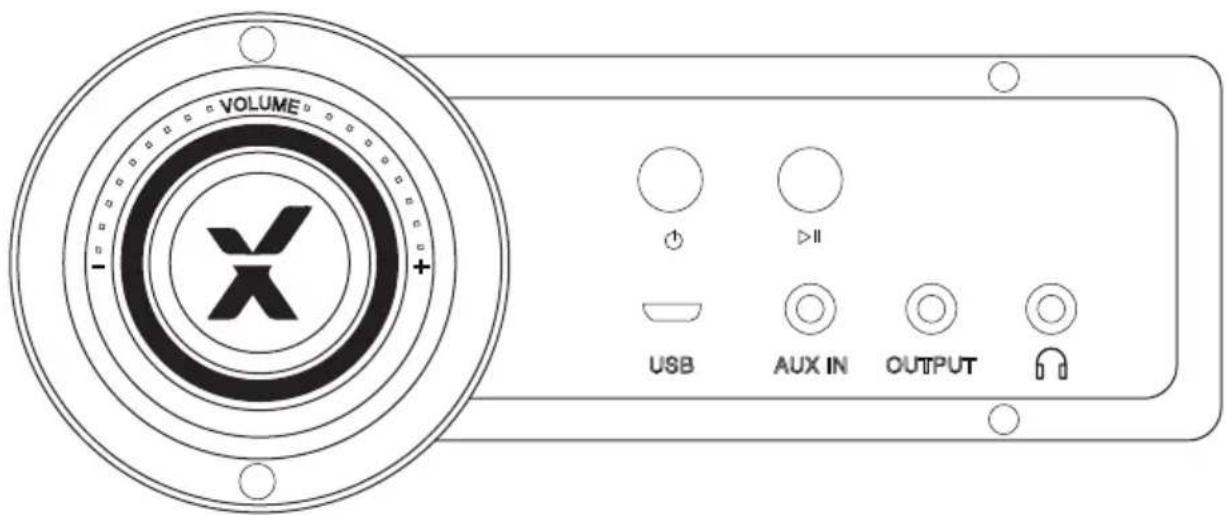
Control panel overview
Wired connection guide: TV (Xbox One and PS4 audio)
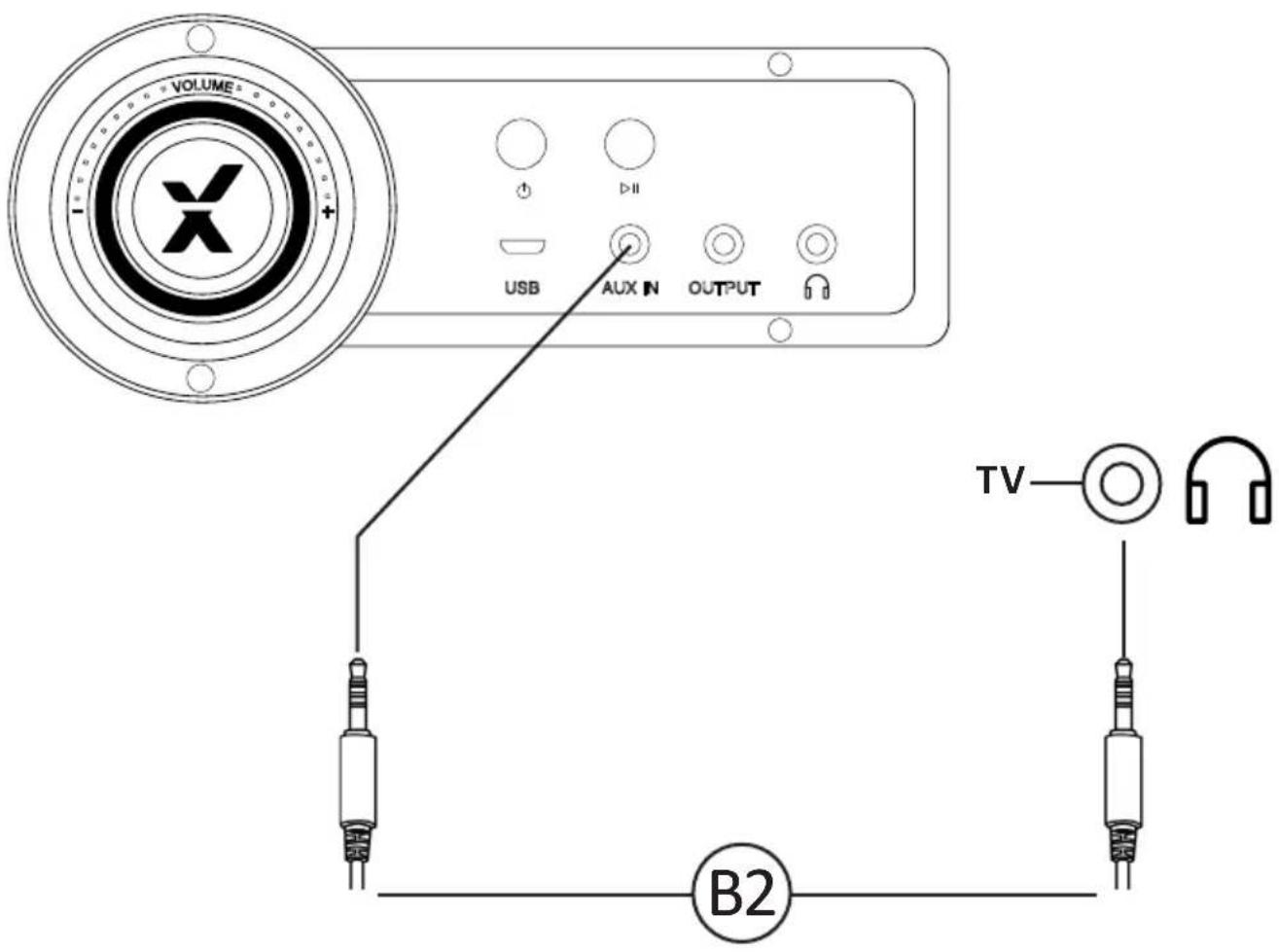
- Connect B2 cable to X Rocker control panel 3.5mm INPUT socket.
- Connect other end of B2 cable to the TV headphone socket.
- Once connected to your TV, increase volume to 50% of the maximum for the best sound level.**
*N.B: If your TV does not feature a headphone socket then you may need to purchase an additional TOSlink adapter to get connected directly to a console for audio.
**Depending on your TV you may need to Increase the headphone volume separately in the TV sound settings.
Connect by controller: (PS4 systems only)
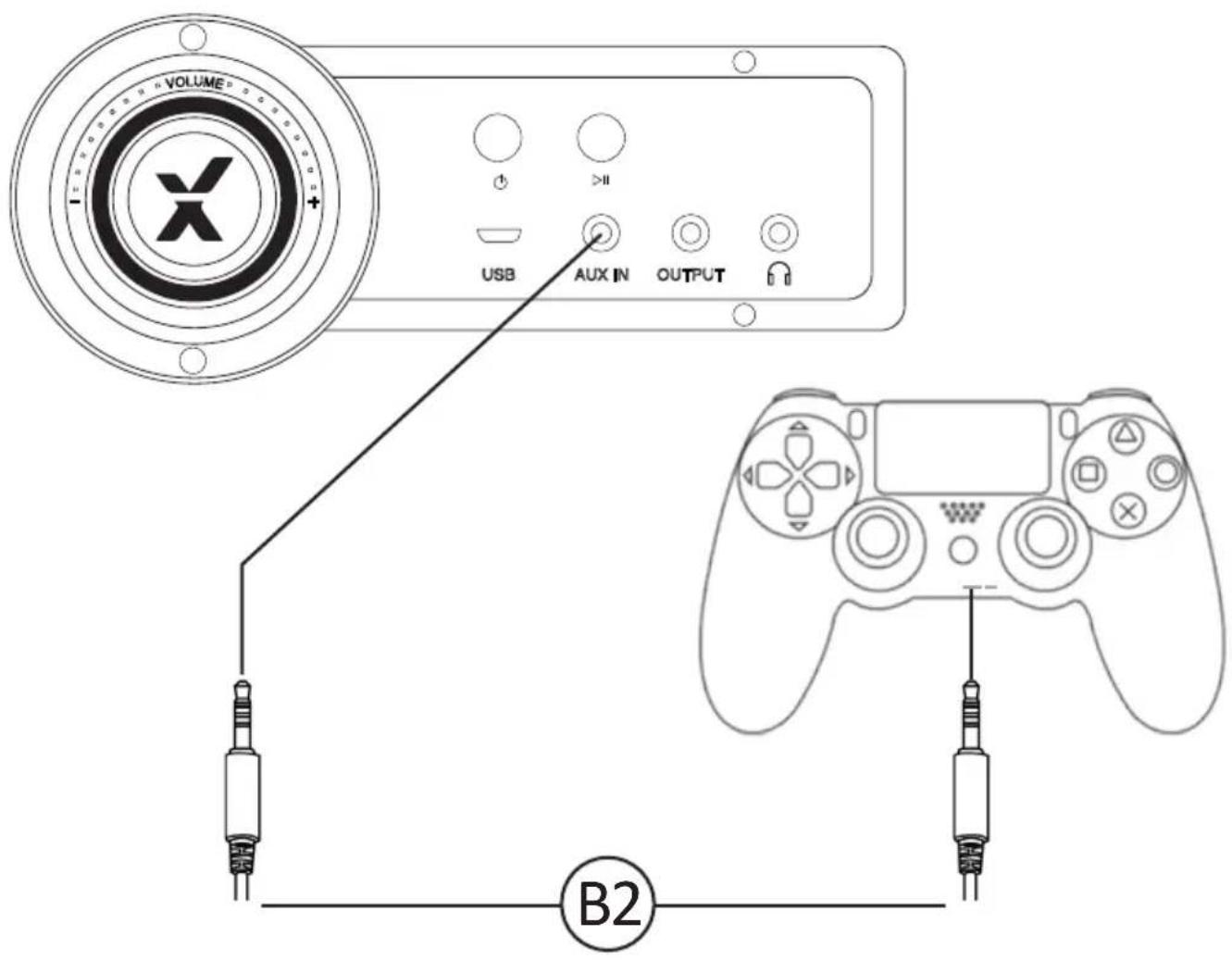
- Connect the B2 cable to the bottom of the PS4 controller via the headset socket.
- Connect the other end of the B2 cable to the chair via the green port.
- With the PS4 turned on and in the main menu, press and hold the black PS button until the quick menu appears.
- In this menu select [Adjust sound and devices]
- Then select [output to headphones]
- Change the setting from [Chat Only] to [All audio]
- Make sure the volume in the previous menu is set to the maximum.
Bluetooth connection guide: (Mobile phones/tablet devices)
Setup:
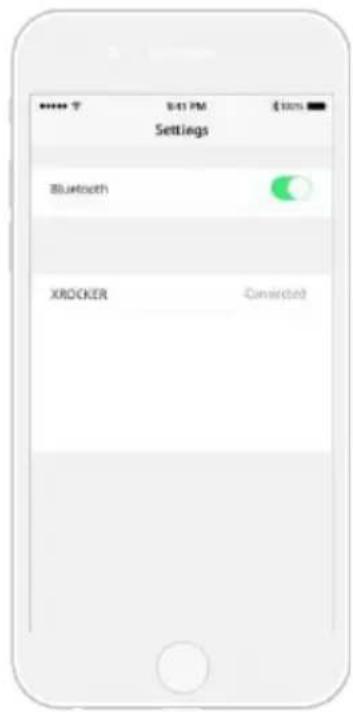
On the Audio output device go into its Bluetooth settings, turn Bluetooth on if it is not on already and search for XROCKER. Upon finding this, select the XROCKER option. If a passcode is required the four digit code will be '0000'.
natural_image
Simple line drawing of a circle emitting sound waves (no text or symbols)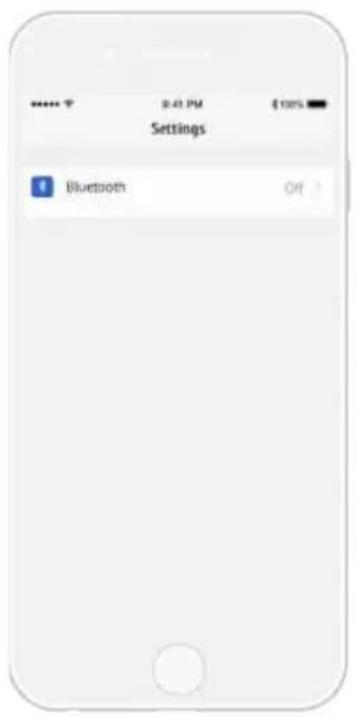
Troubleshooting tips
Issue Troubleshooting steps
| No power going to control panel | Make sure that the power cable is connected correctly.Make sure that the power supply at the power source is working correctly.With the chair turned to the ON position, give the power cable a slight wiggle in the port. If any lights flicker (or not) then please contact support (details below). |
| No sound | Review the connection methods on the previous page and try alternative connection methods if possible.Confirm that the device/system is correctly configured as per previous connection guide. |
| Bluetooth mode cuts out during gameplay/No vibration or subwoofer sound via analogue connection | Please make sure that the volume of the source device is at a higher level to strengthen the audio signal. |
| The cables connected to my X Rocker have been broken accidentally | Please contact X Rocker support (service@XRockerNation.co.uk) regarding this issue. |
| Interference over wireless connection | In this case, try another of the three wireless bands to isolate the signal. |
Health and safety information
- Avoid immersing or allowing the X Rocker to come into contact with liquids.
- Please consult X Rocker Support before unscrewing any of the electrical components on the chair.
- Please be mindful of any cabling laid out between the X Rocker and power source/audio device.
- Please be mindful of cabling attached when moving/swivelling the X Rocker.
- If the cables or electrical equipment are broken then this may present a choking risk, please contact Support for replacements and dispose of these parts safely.
- Do not stand on the X Rocker or exceed the 120kg weight limit via other means.
- Do not lean back on the chair to the point in which the pedestal would lift off the ground.
- X Rocker armrests are designed for support and comfort during gameplay, please do not use these as support for getting in/out of the chair.
- Playing audio for long periods at loud volumes may contribute to difficulties in hearing.
- Please be considerate to others when playing audio through the X Rocker speakers at higher volumes.
Power supply safety information
ATTENTION:
A. For Power Adapter, the apparatus shall not be exposed to dripping or splashing and that no objects filled with liquids, such as vases, shall be placed on the apparatus;
B. For Power Adapter, the MAINS plug is used as the disconnect device, the disconnect device shall remain readily operable;
C. Only use the attachments/accessories specified by manufacturer.
Power Supply unit trademark: BI;
Model name: BI12T-050100-I;
Input: 100-240V\~, 50/60 Hz, 0,5A;
Output: 5 VDC, 1 A;
Need Help? Email: Service@XRockerNation.co.uk
Phone: 01274 683 109
www.XRockerNation.co.uk
IMPORTANT: You must keep your original retail receipt as proof of purchase.



Brand : X Rocker
Model : Paladin
Category : Office Chair