
ET-DLE085 - Projector Accessories PANASONIC - Free user manual and instructions
Find the device manual for free ET-DLE085 PANASONIC in PDF.


| Product Type | Projector Zoom Lens |
| Brand | Panasonic |
| Model | ET-DLE085 |
| Compatibility | Select Panasonic projectors |
| Lens Type | Zoom lens |
| F Value | 1.85 - 2.20 |
| Focal Length | 11.8 mm - 14.6 mm |
| Dimensions (W x H x D) | 140 mm x 140 mm x 206 mm |
| Net Weight | 1.3 kg |
| Color | Black |
| Material | Glass lens, plastic/metal body |
| Supplied Accessories | Lens cap, desiccant bag |
| Key Functions | Focus balance adjustment for periphery |
| Safety Features | Automatic power-off before lens replacement; electrical shock prevention |
| Cleaning | Use clean, soft, dry cloth; avoid fluffy or oily cloths |
| Storage | Store away from vibration or impacts |
| Disposal | WEEE compliant; do not dispose with household waste |
Frequently Asked Questions - ET-DLE085 PANASONIC
User questions about ET-DLE085 PANASONIC
0 question about this device. Answer the ones you know or ask your own.
Ask a new question about this device
Download the instructions for your Projector Accessories in PDF format for free! Find your manual ET-DLE085 - PANASONIC and take your electronic device back in hand. On this page are published all the documents necessary for the use of your device. ET-DLE085 by PANASONIC.
USER MANUAL ET-DLE085 PANASONIC
Thank you for purchasing this Panasonic product.
Please read these operating instructions and the projector operating instructions carefully, and then use this product correctly. Before using this product, be sure to read "Read this first!" (→ Page 2). Please save this manual for future use.
Read this first!
Always follow these precautions
WARNING:
Before replacing the zoom lens, be sure to turn the power off and disconnect the power plug from the wall outlet.
● Otherwise, an electrical shock may result.
CAUTION:
■ Supplied accessories and consumables:
Do not open the desiccant bag. Do not eat the contents. (Inadvertently ingesting desiccant could be harmful.)
- If the desiccant gets into your eyes or mouth, immediately rinse with plenty of water and seek medical attention.
- Keep desiccant out of the reach of children.
Supplied Accessories
Make sure that the following has been provided
| Part name Appearance (quantity) | ||
| Lens cap | 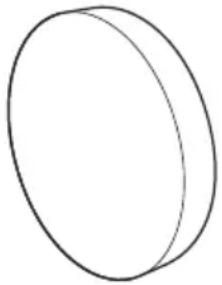 | 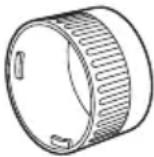 1 of each 1 of each |
Attaching the Lens / Detaching the Lens
Before replacing the projection lens
Return the projection lens to the home position before replacing or removing it.
For details on how to return the lens to the home position, refer to the operating instructions of the projector.
Attention
● Make sure that the projector power supply is switched off before attaching or detaching the projection lens. ● After removing the projection lens, store it safely away from vibration or impacts. - Do not touch the electric contact points of the projection lens with your fingers. Dust and dirt on the contacts may cause contact malfunctions. - Remove the lens cap before mounting the zoom lens. - Do not touch the surface of the lens with bare hands. Fingerprints and dirt on the surface of the lens will be magnified by the lens and lower the quality of the projected image. Place the supplied lens cap on the zoom lens when the projector is not in use. - The lens is made of glass. The lens could be damaged if brought into contact with or rubbed against hard objects. Handle the lens carefully. - Use a clean, soft and dry cloth to wipe away dust and dirt from the lens. Do not use fluffy cloths containing oil, water or dust for cleaning. The material in the lens is easily damaged so do not apply excessive pressure when wiping it.
Attaching the Lens
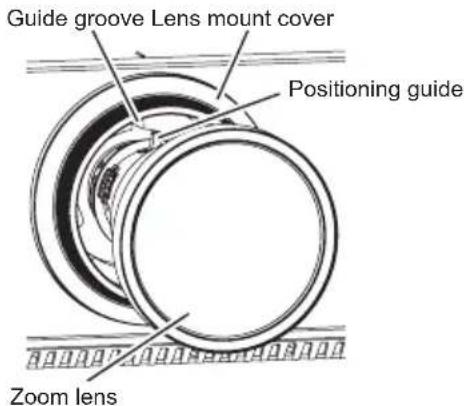
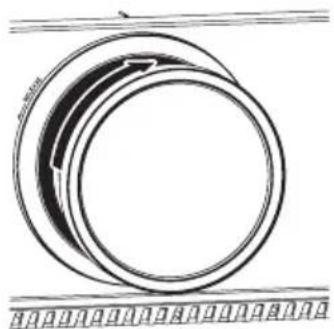
1) With the lens mount cover that came with your projector attached, align the positioning guide on the zoom lens with the guide grooves on the projector, and insert the zoom lens fully.
● There is a red dot at the bottom right end of the positioning guide.
2) Rotate the lens clockwise until you hear a "click".
Note
● Gently turn the zoom lens counterclockwise to check that it will not fall out.
Attaching the Lens / Detaching the Lens (continued)
Detaching the Lens
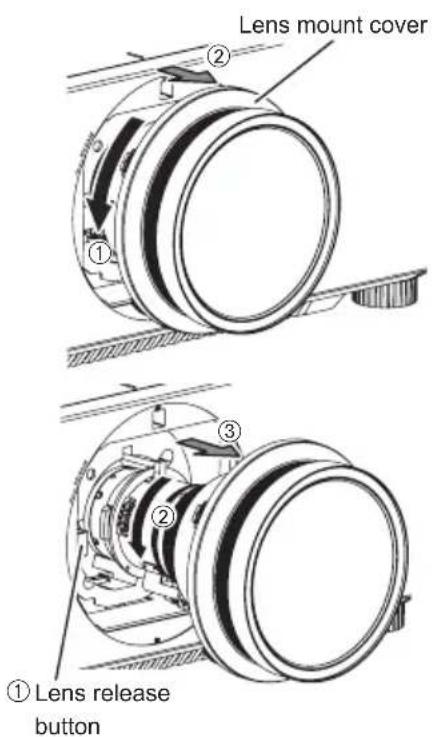
1) Turn the lens mount cover counterclockwise to detach it from the lens and slide it towards the front end of the lens.
2) Turn the zoom lens completely counterclockwise while pressing the lens release button to detach the lens.
3) Turn the lens mount cover clockwise to reattach it.
Focus Adjustment Function
The focal balance between the center and periphery of the projected image changes depending on the size of the projected image.
The lens is equipped with a focus balance adjustment function for the screen periphery.
■ Adjusting the Focus
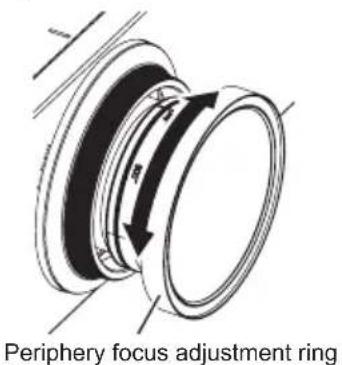
1) Focus the center of the screen by operating the projector unit.
2) Turn the periphery focus ring by hand as shown in the figure to adjust the focus in the periphery of the screen.
Note
● The projected image sizes and scale shown on the periphery focus adjustment ring are an approximate guide.
- For details on the projection distance, see the projector specifications (https://eww.pavc.panasonic.co.jp/projector/extranet/main/spec/index.html).
Specifications of the Lens
| Lens Type Zoom lens | ||
| F value 1.85 - 2.20 | ||
| Focal Length (f) 11.8 mm (15/32 inches) - 14.6 mm (9/16 inches) | ||
| Dimensions | Width | 140 mm (5-1/2 inches) |
| Height | 140 mm (5-1/2 inches) | |
| Depth | 206 mm (8-1/8 inches) | |
| Net Weight 1.3 kg (2.87 lb) | ||
Note
● As for projection distance, please refer to the operating instructions of the projector.
Information for users in the European Union

Importer's name and address within the European Union
Panasonic Marketing Europe GmbH
Panasonic Testing Center
Winsbergring 15, 22525 Hamburg, Germany
Information on Disposal for Users of Waste Electrical & Electronic Equipment (private households)

This symbol on the products and/or accompanying documents means that used electrical and electronic products should not be mixed with general household waste.
For proper treatment, recovery and recycling, please take these products to designated collection points, where they will be accepted on a free of charge basis.
Alternatively, in some countries you may be able to return your products to your local retailer upon the purchase of an equivalent new product.
Disposing of this product correctly will help to save valuable resources and prevent any potential negative effects on human health and the environment which could otherwise arise from inappropriate waste handling. Please contact your local authority for further details of your nearest designated collection point.
Penalties may be applicable for incorrect disposal of this waste, in accordance with national legislation.
For business users in the European Union
If you wish to discard electrical and electronic equipment, please contact your dealer or supplier for further information.
Information on Disposal in other Countries outside the European Union
This symbol is only valid in the European Union.
If you wish to discard this product, please contact your local authorities or dealer and ask for the correct method of disposal.


- READ THIS FIRST
- ALWAYS FOLLOW THESE PRECAUTIONS
- WARNING
- CAUTION
- SUPPLIED ACCESSORIES AND CONSUMABLES
- SUPPLIED ACCESSORIES
- ATTACHING THE LENS / DETACHING THE LENS
- BEFORE REPLACING THE PROJECTION LENS
- ATTENTION
- ATTACHING THE LENS
- NOTE
- ATTACHING THE LENS / DETACHING THE LENS (CONTINUED)
- DETACHING THE LENS
- FOCUS ADJUSTMENT FUNCTION
- ADJUSTING THE FOCUS
- SPECIFICATIONS OF THE LENS
- INFORMATION FOR USERS IN THE EUROPEAN UNION
- INFORMATION ON DISPOSAL FOR USERS OF WASTE ELECTRICAL & ELECTRONIC EQUIPMENT (PRIVATE HOUSEHOLDS)
- FOR BUSINESS USERS IN THE EUROPEAN UNION
- INFORMATION ON DISPOSAL IN OTHER COUNTRIES OUTSIDE THE EUROPEAN UNION
Brand : PANASONIC
Model : ET-DLE085
Category : Projector Accessories