
ET-D3LEW10 - Projector Accessories PANASONIC - Free user manual and instructions
Find the device manual for free ET-D3LEW10 PANASONIC in PDF.


| Product Type | Zoom Lens for Projector (Accessory) |
| Brand | Panasonic |
| Model | ET-D3LEW10 |
| Category | Projector Accessories |
| F Value | 2.5 |
| Focal Length | 26.6 mm – 36.4 mm (1-1/16" – 1-7/16") |
| Dimensions (W x H x D) | 154 mm x 154 mm x 354 mm (excluding protrusions) |
| Net Weight | Approx. 6.2 kg (13.7 lb) |
| Supported Projectors | PT-RQ32K, PT-RZ31K, PT-RS30K, PT-RZ21K, PT-RS20K |
| Firmware Requirement | For PT-RQ32K/RZ31K/RS30K: v3.00 or later; for PT-RZ21K/RS20K: v2.00 or later |
| Peripheral Focus Adjustment | Yes, via adjustment ring with lock knob |
| Lens Calibration | Required after attachment to ensure full zoom range |
| Lens Shift Adjustment | Yes, within specified ranges (see manual for details) |
| Supplied Accessories | Lens cover (1 piece) |
| Material | Glass lens with EEPROM and stepping motor |
| Safety Features | Lens drop prevention screw, lock knob, warnings against direct light exposure |
| Usage | Commercial use |
Frequently Asked Questions - ET-D3LEW10 PANASONIC
User questions about ET-D3LEW10 PANASONIC
0 question about this device. Answer the ones you know or ask your own.
Ask a new question about this device
Download the instructions for your Projector Accessories in PDF format for free! Find your manual ET-D3LEW10 - PANASONIC and take your electronic device back in hand. On this page are published all the documents necessary for the use of your device. ET-D3LEW10 by PANASONIC.
USER MANUAL ET-D3LEW10 PANASONIC
Operating Instructions
Zoom Lens Commercial Use
Model No. ET-D3LEW10
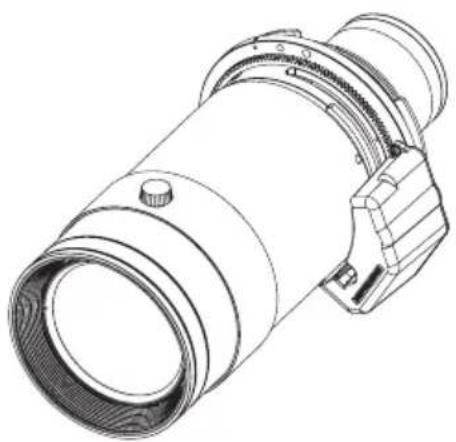
ENGLISH
Thank you for purchasing this Panasonic product.
To ensure correct use of this lens, please read the operating instructions supplied with the lens and the projector carefully. Before using this product, be sure to read "Read this first!" (→Page 3). Please save this manual for future use.

Contents
Read this first! ....3
Before Use....4
Attaching the Lens / Detaching the Lens....5
Before replacing the projection lens 5
Attaching the Lens....5
Peripheral focus adjustment function 7
Lens calibration 8
Removing the Lens 9
Projection relationships....10
Lens shift ranges....11
Specifications 12
Dimensions 12
Projected image size and Projection distance......Appendix / Annexe / 付録 1
The "Appendix" can be found after the Japanese language section (日本語).
WARNING:
Do not look at or place your skin into the light emitted from the lens while the projector is being used.
Doing so can cause burns or loss of sight.
- Strong light is emitted from the projector's lens. Do not look at or place your hands directly into this light. ● Turn off the power when moving away from the projection lens or projector.
Do not project an image with the lens cover attached.
- Doing so can cause fire.
CAUTION:
Before replacing the projection lens, be sure to turn off the power and disconnect the power plug from the wall outlet.
● Unexpected projection of light may cause injury to eyes. ● Replacing the projection lens without removing the power plug may result in electric shock.
Do not stand in front of the lens while the projector is being used.
Doing so can cause damage and burns to clothing.
- Strong light is emitted from the projector's lens.
Do not place objects in front of the lens while the projector is being used.
Doing so can cause fire, damage to the object, or malfunction of the lens and projector.
- Strong light is emitted from the projector's lens.
Do not open the desiccant bag. Do not eat the contents.
Inadvertently ingesting desiccant could be harmful.
- If the desiccant gets into your eyes or mouth, immediately rinse with plenty of water and seek medical attention.
- Keep desiccant out of the reach of children.
Before Use
This zoom lens is a projection lens equipped with an EEPROM 4 and stepping motor.
*1 EEPROM: Electrically erasable programmable read-only memory
■ Supported projectors
PT-RQ32K / PT-RZ31K / PT-RS30K / PT-RZ21K / PT-RS20K
Note
- Some of the alphabet letters at the end of projector model numbers may be omitted in this manual.
- Models other than the above may also be supported. Refer to the operating instructions for your projector or the Panasonic website (https://panasonic.net/cns/projector/).
- If the projector you are using is PT-RQ32K / PT-RZ31K / PT-RS30K / PT-RZ21K / PT-RS20K, you may not be able to use the projection lens depending on the main version of the firmware. If the main version of the firmware is the version number shown below, update to the latest firmware before use.
- PT-RQ32K / PT-RZ31K / PT-RS30K: Earlier than 3.00
- PT-RZ21K / PT-RS20K: Earlier than 2.00
For details on the update procedure, refer to the latest firmware information on the Panasonic website (https://panasonic.net/cns/projector/pass/).
● The main version of the firmware can be checked in the [STATUS] screen.
■ Supplied Accessories
Make sure that the following has been provided.
| Part name Appearance | ||
| Lens cover | 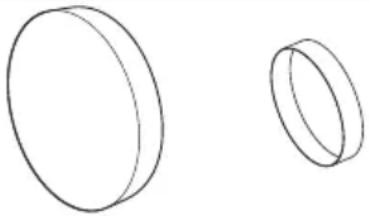 | (The product is delivered with a lens cover attached.)1 each |
Attaching the Lens / Detaching the Lens
Before replacing the projection lens
Return the projection lens to the home position before replacing or removing it.
For details on how to return the lens to the home position, refer to the operating instructions of the projector.
Attention
● Make sure that the projector power supply is switched off before attaching or detaching the projection lens. ● After removing the projection lens, store it safely away from vibration or impacts. - Do not touch the electrical contacts of the projection lens with your fingers. Dust and dirt on the contacts may cause contact malfunctions, while static electricity may damage the unit. - Do not touch the surface of the lens with bare hands. Fingerprints and dirt on the surface of the lens will be magnified by the lens and lower the quality of the projected image. Place the supplied lens cover on the zoom lens when the projector is not in use. ● The lens is made of glass. The lens could be damaged if brought into contact with or rubbed against hard objects. Handle the lens carefully. - Use a clean, soft and dry cloth to wipe away dust and dirt from the projection lens. Do not use fluffy cloths containing oil, water or dust for cleaning. The lens is easily damaged, so do not apply excessive pressure when wiping it.
Attaching the Lens
Attention
- Before attaching the Projection Lens, remove the lens hole cover (only lens options models) and the two lens covers attached to the Projection Lens.
- If the lens hole cover is already removed, start from step 3.
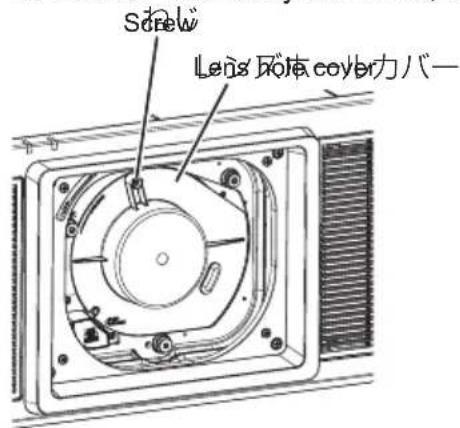
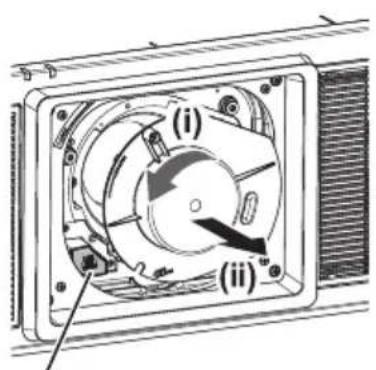
Lens release button
The illustrations in this procedure depict use of the PT-RZ21K as an example.
1) Loosen the lens hole cover screw.
- Use a Phillips screwdriver to turn the lens hole cover screw counterclockwise until it is in its loosened state.
2) Remove the lens hole cover.
(i) While pressing the lens release button, turn the lens hole cover counterclockwise until its marker (O) aligns with the marker on the projector (O to the left of "LOCK"). (ii) Then remove the lens hole cover.
Attaching the Lens / Detaching the Lens (continued)
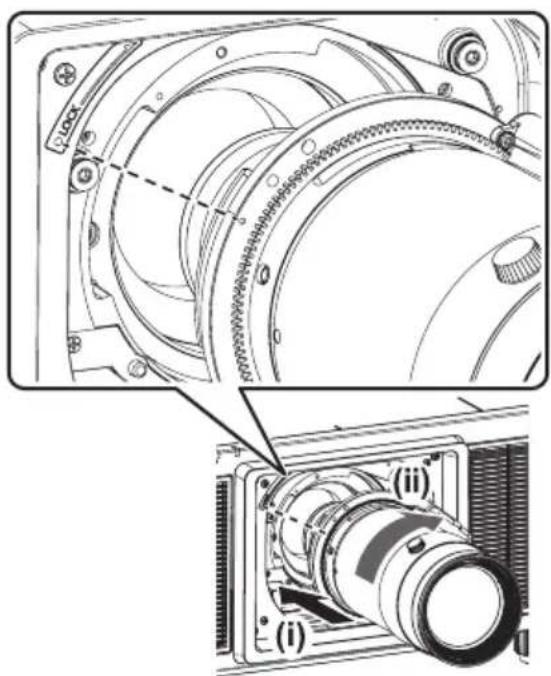
3) (i) Insert the projection lens while aligning its marker (orange) with the marker on the projector (○ to the left of “LOCK”), and (ii) turn it clockwise until it clicks into place.
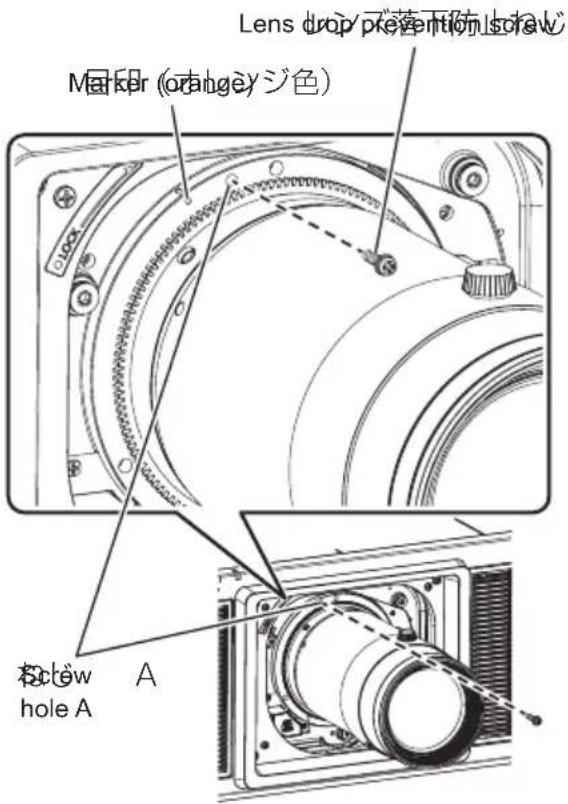
4) Use the lens drop prevention screw supplied with the projector to secure the projection lens.
- Use a Phillips screwdriver to secure the screw in hole A to the right of the marker (orange) on the projection lens.
Attention
● Turn the projection lens counterclockwise, and verify that it is secure. ● Store the removed lens hole cover safely for future use. - After attaching the projection lens, turn on the projector and perform lens calibration. (→page 8)
6-ENGLISH
Attaching the Lens / Detaching the Lens (continued)
Peripheral focus adjustment function
When using the projection lens, the focus balance between the center of the projected image and the peripheral areas differs depending on the size of the image.
The projection lens is equipped with a function for adjusting the peripheral focus.
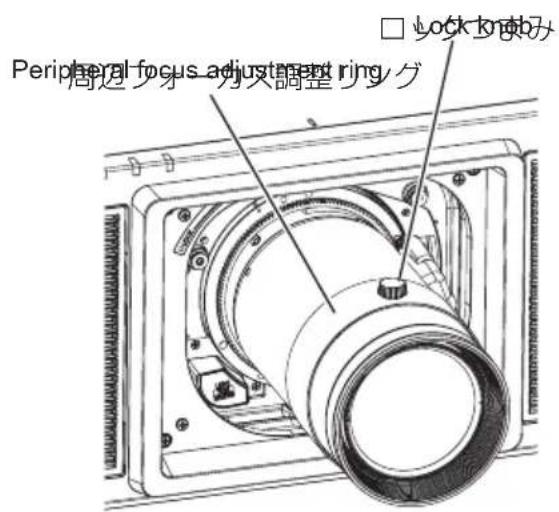
The illustrations in this procedure depict use of the PT-RZ21K as an example.
■ Adjusting the focus
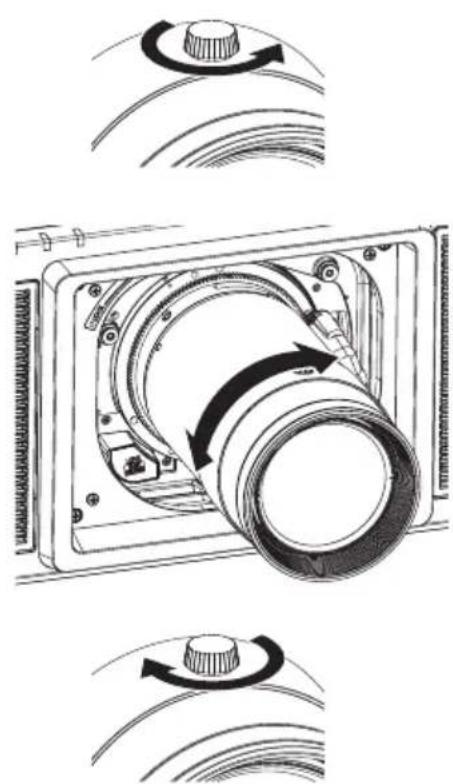
1) Operate the projector to align the focus of the center of the projected image.
2) Loosen the lock knob by turning it counterclockwise.
3) Turn the peripheral focus adjustment ring in the directions of the arrows to align the focus of the peripheral areas of the image.
4) Tighten the lock knob by turning it clockwise.
Note
● The screen sizes displayed on the lens are approximate guides.
Attaching the Lens / Detaching the Lens (continued)
Lens calibration
Perform lens calibration after attaching the lens.
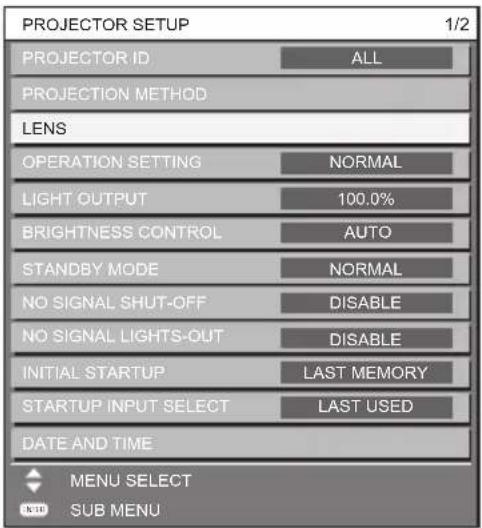
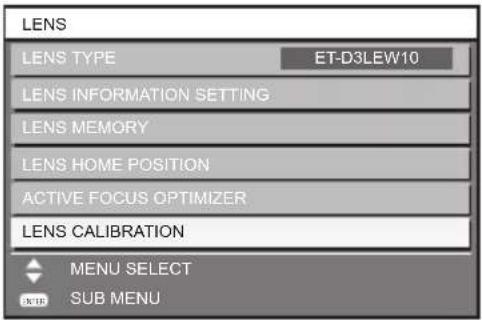
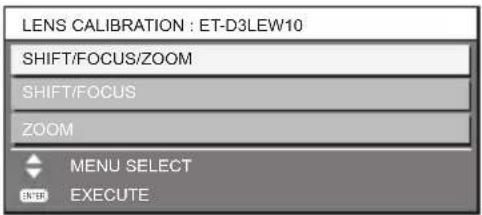
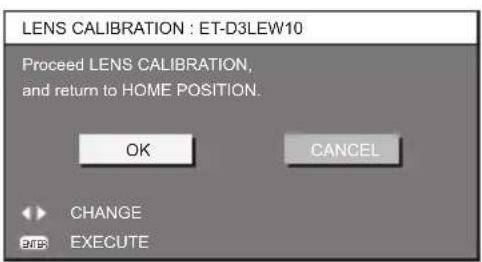
1) Press the


- OPERATING INSTRUCTIONS
- CONTENTS
- READ THIS FIRST
- BEFORE USE
- ATTACHING THE LENS / DETACHING THE LENS
- PROJECTION RELATIONSHIPS
- LENS SHIFT RANGES
- SPECIFICATIONS
- DIMENSIONS
- PROJECTED IMAGE SIZE AND PROJECTION DISTANCE......APPENDIX / ANNEXE / 付録
- WARNING
- CAUTION
- SUPPORTED PROJECTORS
- NOTE
- SUPPLIED ACCESSORIES
- BEFORE REPLACING THE PROJECTION LENS
- ATTENTION
- ATTACHING THE LENS
- LOOSEN THE LENS HOLE COVER SCREW
- REMOVE THE LENS HOLE COVER
- ATTACHING THE LENS / DETACHING THE LENS (CONTINUED)
- ENGLISH
- PERIPHERAL FOCUS ADJUSTMENT FUNCTION
- ADJUSTING THE FOCUS
- LENS CALIBRATION
- REMOVING THE LENS
- REMOVE THE LENS DROP PREVENTION SCREW
- WHILE PRESSING THE LENS RELEASE BUTTON, (II) TURN THE PROJECTION LENS COUNTERCLOCKWISE, AND (III) REMOVE IT
- ATTACH THE LENS HOLE COVER SUPPLIED WITH THE PROJECTOR
- SECURE THE LENS HOLE COVER
- DIMENSIONAL RELATIONSHIP DIAGRAM
- DIMENSIONAL RELATIONSHIP
- INFORMATION FOR USERS IN THE EUROPEAN UNION
- DISPOSAL OF OLD EQUIPMENT
- ONLY FOR EUROPEAN UNION AND COUNTRIES WITH RECYCLING SYSTEMS
- INFORMATION ON DISPOSAL IN OTHER COUNTRIES OUTSIDE THE EUROPEAN UNION
- PRODUCT INFORMATION (FOR TURKEY ONLY)
- PANASONIC CORPORATION
- APPENDIX / ANNEXE / 付録
- APPENDIX (CONTINUED)
- APPENDIX / ANNEXE / 付録 (CONTINUED / SUITE / つづき)
Brand : PANASONIC
Model : ET-D3LEW10
Category : Projector Accessories