
ET-DLE035 - Projector Accessories PANASONIC - Free user manual and instructions
Find the device manual for free ET-DLE035 PANASONIC in PDF.


| Product Type | Fixed-Focus Lens |
| Brand | Panasonic |
| Model | ET-DLE035 |
| Category | Projector Accessories |
| F Number | 2.0 |
| Focal Length | 5.3 mm (7/32 in) |
| Dimensions (W x H x D) | 132 mm x 102 mm x 311 mm (5-3/16 in x 4-1/32 in x 12-1/4 in) |
| Net Weight | Approx. 1.3 kg (2.9 lb) |
| Lens Type | Fixed-focus, commercial use |
| Supported Projectors | PT-RZ120, PT-RZ970, PT-RW930, PT-RX110, PT-RZ870, PT-RZ770, PT-RW730, PT-RZ660, PT-RW620, PT-DZ870, PT-DW830, PT-DX100, PT-DZ780, PT-DW750, PT-DX820 |
| Supplied Accessories | Lens cap (1), Lens shift gauge (1) |
| Focus Adjustment | Center focus via projector controls; Periphery focus via manual ring |
| Lens Position Setup | Requires home/standard position adjustment via projector menus |
| Safety Feature | Automatic light shutoff when lens is removed (if supported) |
| Cleaning | Use a clean, soft, dry cloth. Avoid oil, water, or dust. |
| Storage | Store with lens cap attached, away from vibration/impacts |
| Operating Temperature | Not specified; follow projector guidelines |
| Lens Shift Gauge | Included for alignment verification |
| Warranty | Standard Panasonic warranty applies |
| Country of Origin | Not specified |
Frequently Asked Questions - ET-DLE035 PANASONIC
User questions about ET-DLE035 PANASONIC
0 question about this device. Answer the ones you know or ask your own.
Ask a new question about this device
Download the instructions for your Projector Accessories in PDF format for free! Find your manual ET-DLE035 - PANASONIC and take your electronic device back in hand. On this page are published all the documents necessary for the use of your device. ET-DLE035 by PANASONIC.
USER MANUAL ET-DLE035 PANASONIC
Operating Instructions
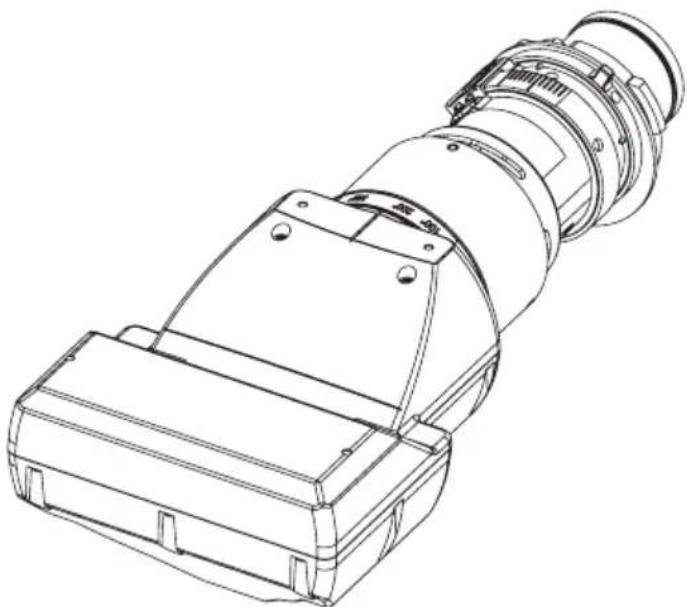
Fixed-Focus Lens Commercial Use
Model No. ET-DLE035
ENGLISH
Thank you for purchasing this Panasonic product.
To ensure correct use of this lens, please read the operating instructions supplied with the lens and the projector carefully. Before using this product, be sure to read "Read this first!" (→ Page 3). Please save this manual for future use.

Contents
Read this first! ....3
Before Use....4
Attaching the Lens / Detaching the Lens....4
Before replacing the projection lens....4
Attaching the Lens.... 5
Detaching the Lens 6
Projection relationships....7
Lens position setup and focus adjustment ....9
Lens position setup 9
Focus Adjustment Function....12
Specifications ....13
Dimensions....13
Dimensional relationship......Appendix / Annexe / 付録 1
The "Appendix" can be found after the Japanese language section (日本語).
WARNING:
Do not look at or place your skin into the light emitted from the lens while the projector is being used.
Doing so can cause burns or loss of sight.
- Strong light is emitted from the projector's lens. Do not look at or place your hands directly into this light. ● Turn off the power when moving away from the projection lens or projector.
Do not project an image with the lens cover attached.
- Doing so can cause fire.
CAUTION:
Before replacing the projection lens, be sure to turn off the power and disconnect the power plug from the wall outlet.
● Unexpected projection of light may cause injury to eyes. - Replacing the projection lens without removing the power plug may result in electric shock.
Do not stand in front of the lens while the projector is being used.
Doing so can cause damage and burns to clothing.
- Strong light is emitted from the projector's lens.
Do not place objects in front of the lens while the projector is being used.
Doing so can cause fire, damage to the object, or malfunction of the lens and projector.
- Strong light is emitted from the projector's lens.
Do not open the desiccant bag. Do not eat the contents.
Inadvertently ingesting desiccant could be harmful.
- If the desiccant gets into your eyes or mouth, immediately rinse with plenty of water and seek medical attention.
- Keep desiccant out of the reach of children.
Before Use
■ Supported projectors
PT-RZ120 / PT-RZ970 / PT-RW930 / PT-RX110 / PT-RZ870 / PT-RZ770 / PT-RW730 / PT-RZ660 / PT-RW620 / PT-DZ870 / PT-DW830 / PT-DX100 / PT-DZ780 / PT-DW750 / PT-DX820
Note
- Models other than the above may also be supported. Refer to the operating instructions of the projector you are using.
- In this document, the alphabet letters at the end of the projector part numbers are omitted.
■ Supplied Accessories
Make sure that the following has been provided. Numbers enclosed in < > show the number of accessories.
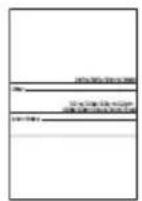
Lens cap <1> Lens shift gauge <1>
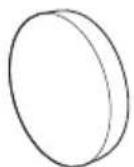
(The product is delivered with a lens cap attached.)
Attaching the Lens / Detaching the Lens
Before replacing the projection lens
Return the projection lens to the home position before replacing or removing it.
For details on how to return the lens to the home position, refer to the operating instructions of the projector.
Attention
● Make sure that the projector power supply is switched off before attaching or detaching the projection lens. ● After removing the projection lens, store it safely away from vibration or impacts. - Do not touch the electric contact points of the projection lens with your fingers. Dust and dirt on the contacts may cause contact malfunctions. - Before attaching the Fixed-focus lens, remove the protective film from the light projecting surface and the lens cap from the lens.
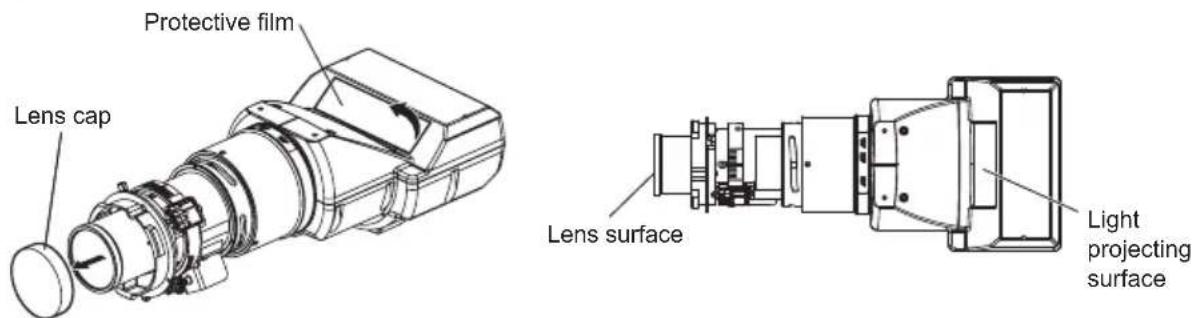
- Be sure not to touch the light projecting surface or the surface of the lens. Any fingerprints or smudges on these surfaces will be magnified and lower the quality of the image displayed on the screen.
- The light projecting surface and lens are made of glass. The lens could be damaged if brought into contact with or rubbed against hard objects. Handle the lens carefully.
- Use a clean, soft, and dry cloth to wipe away dust and dirt from the light projecting surface and projection lens. Do not use fluffy cloths containing oil, water or dust for cleaning.
- When the Fixed-focus lens is removed from the projector, place it with the light projecting surface facing downwards.
4-ENGLISH
Attaching the Lens / Detaching the Lens (continued)
Attaching the Lens
* Unless specified otherwise, the illustrations in these operating instructions show the lens used with the PT-DZ870 projector.
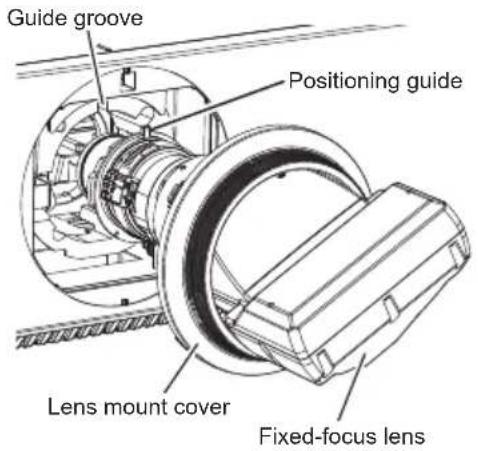
1) With this lens already passed through the lens mount cover that came with your projector, align the positioning guide with the guide groove on the projector, and insert the lens fully.
● There is a red dot at the bottom right end of the positioning guide.
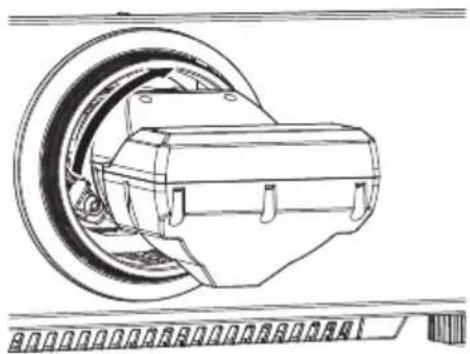
2) Turn the fixed-focus lens clockwise until you hear a click.
3) Attach the lens mount cover to the projector.
● Turn the lens mount cover clockwise to fix it in place.
Attention
- Gently turn the projection lens counterclockwise to check that it will not fall out.
Attaching the Lens / Detaching the Lens (continued)
Detaching the Lens
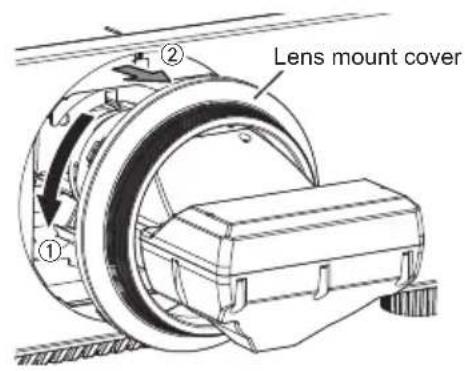
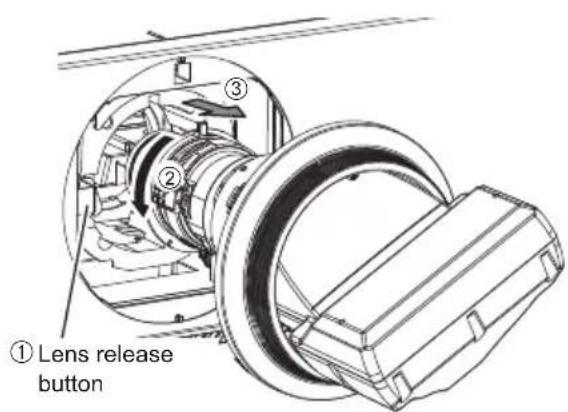
1) Turn the lens mount cover counterclockwise to detach it from the lens and slide it towards the front end of the lens.
2) Hold down the lens release button while turning the lens counterclockwise to release it.
3) Turn the lens mount cover clockwise to reattach it.
Attention
- Attach the supplied lens cap before storing the lens.
Projection relationships
The dimensional relationship between the screen and the projector is shown below.
■ Dimensional relationship diagram
Projected image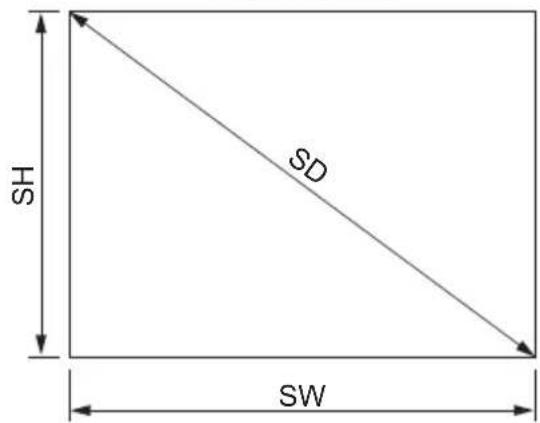
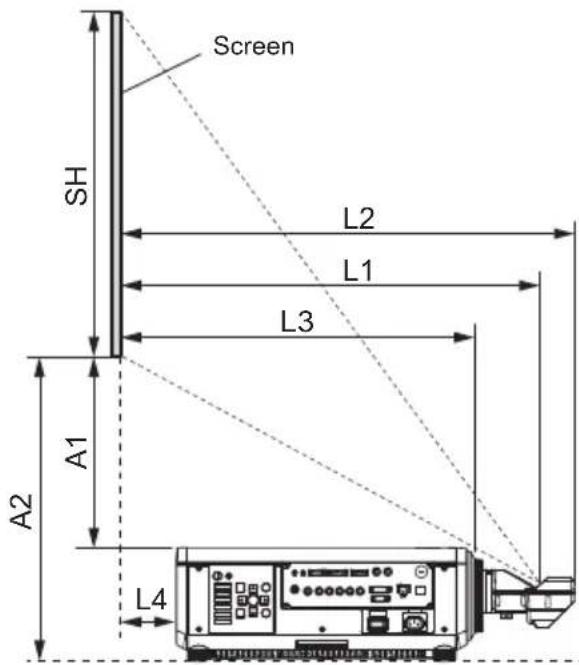
Note
● The indications of this illustration are premised on aligning the projected image size and position to the full screen. ● This illustration is not drawn to scale.
| SH P | Projected image height L3 Screen to projector front end | ||
| SW P | Projected image width L4 Screen to projector rear end | ||
| SD D | agonal length of the projected image | A1 | Bottom edge of the screen to the top of the projector |
| L1 | Projection distance(from screen to mirror reflective surface*) | ||
| A2 | Bottom edge of the screen to the bottom of the projector | ||
| L2 S | Screen to lens front end |
* The mirror reflective surface is inside the fixed-focus lens, and is not visible from the outside.
Note
- The illustrations of projectors in this manual are for informational purposes only and do not represent a specific projector model. Configurations may vary with the model.
- Dimension L4 is the distance from the projector rear panel to the screen.
- Dimension A2 is the distance from the bottom edge of the screen to the bottom of the adjustable projector legs (with the legs fully screwed in).
Attention
- Dimension L4 is not the distance from the projector rear panel to a wall, but the distance from the projector rear panel to the screen. To prevent obstruction of the intake and exhaust vents, install the projector with a clearance of at least 500 mm (19-11/16") from walls and objects. When placing the projector in a confined space, a ventilation and/or air conditioning system is required. Exhaust heat may accumulate when ventilation is insufficient, triggering the projector's protection circuit.
- Avoid setting up in places subject to sudden temperature changes, such as near an air conditioner or lighting equipment (studio lamps, etc.).
Projection relationships (continued)
■ Dimensional relationship
- When using one of PT-RZ120 / PT-RZ970 / PT-RW930 / PT-RX110 / PT-RZ870 / PT-RZ770 / PT-RW730 / PT-RZ660 / PT-RW620 / PT-DZ870 / PT-DW830 / PT-DX100 / PT-DZ780 / PT-DW750 / PT-DX820
For details on projection distance (L1), and A1, A2, L2, L3, and L4 values, refer to "Projected image size and Projection distance" or "Projection distance formulas" in the Appendix.
- When using a projector other than one listed above
Please see "Setting up" in the operating instructions for the projector you are using.
■ Keystone distortion correction
When attaching this lens for use, regardless of the projector model, set up the projector so that the projected image is rectangular and the back of the projector and the screen are parallel.
In addition, depending on the projector used, keystone distortion correction may be feasible after setup.
- When using one of PT-RZ120 / PT-RZ970 / PT-RW930 / PT-RX110 / PT-RZ870 / PT-RZ770 / PT-RW730 / PT-RZ660 / PT-RW620 / PT-DZ870
For keystone distortion in the vertical direction generated within the angle range below, select [MAIN MENU] → [POSITION] → [GEOMETRY] / [GEOMETRY(2D)] → [KEYSTONE] → [VERTICAL KEYSTONE] to perform correction.
Keystone distortion in the vertical direction greater than this angle and keystone distortion in the horizontal direction can be corrected, but the projected image overall will no longer be in focus.
Correction feasible angle (α): 0 - 5°
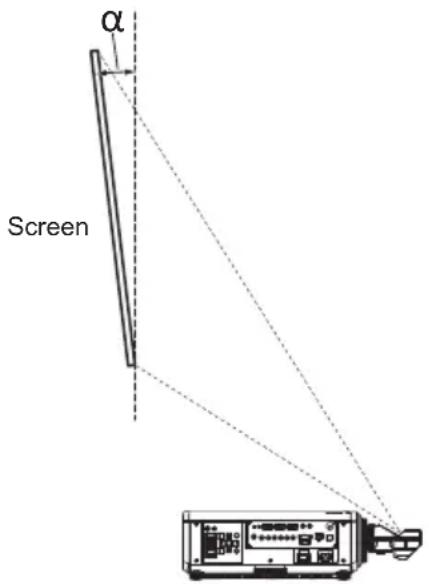
(Side view)
- When using one of PT-DW830 / PT-DX100 / PT-DZ780 / PT-DW750 / PT-DX820
If keystone distortion in vertical direction or horizontal direction is corrected, the projected image overall will no longer be in focus. Set up the projector so that the projected image is rectangular and the back of the projector and the screen are parallel.
- When using a projector other than one listed above
Please see "Setting up" in the operating instructions for the projector you are using.
8-ENGLISH
Lens position setup and focus adjustment
Lens position setup
- When using PT-RZ120
When moving the lens position to the home position, perform the operation with the following procedure.
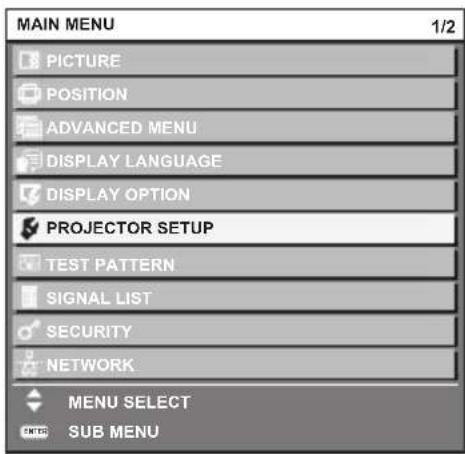
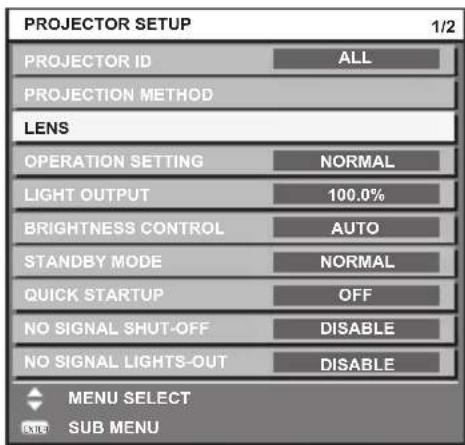
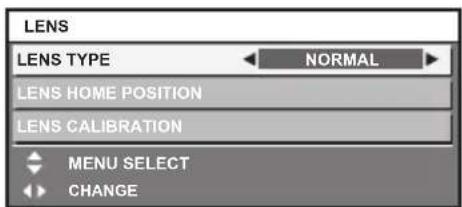
1) Turn on the projector to start the projection.
2) Press the
- After returning the lens to the standard projection position, lens shift adjustments are possible within the range where the projector will not interfere with the edges of the projected image.
- If the rear of the projector blocks the bottom edge of the projected image, it may also obscure the view of an On-screen display (OSD) that is positioned at the lower edge of the screen. If this happens, open the [DISPLAY OPTIONS] menu and select [ON-SCREEN DISPLAY] → [OSD POSITION] to change display location so that the whole OSD menu can be seen.
Lens position setup and focus adjustment (continued)
Focus Adjustment Function
After setting the lens position, adjust the focus.
The focal balance between the center and periphery of the projected image changes depending on the size of the projected image. The lens is equipped with a focus balance adjustment function for the screen periphery.
■ Adjusting the Focus
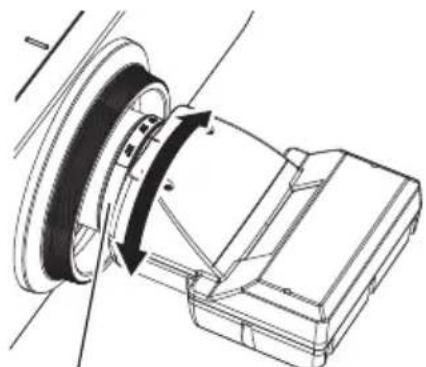
Periphery focus adjustment ring
1) Focus the center of the screen by operating the projector unit.
2) Turn the periphery focus ring by hand as shown in the figure to adjust the focus in the periphery of the screen.
3) Again check focus at the center of the screen and use the projector controls to make fine adjustments.
Note
● The projected image sizes and scale shown on the periphery focus adjustment ring are an approximate guide.
Specifications
| F value 2.0 | |
| Focal Length (f) 5.3 mm | (7/32") |
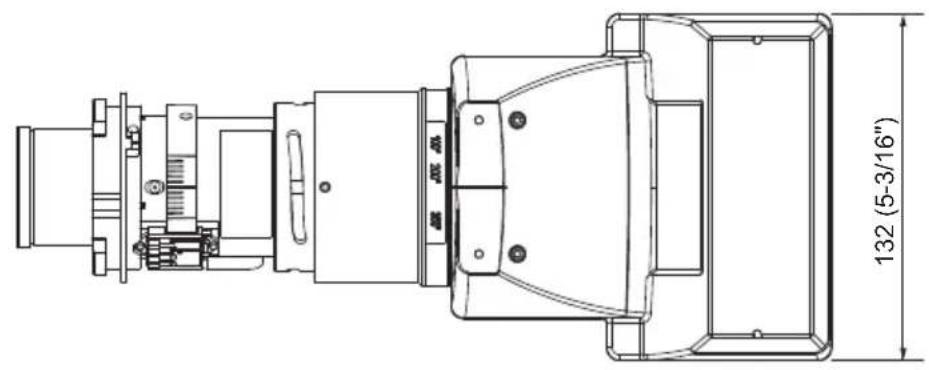
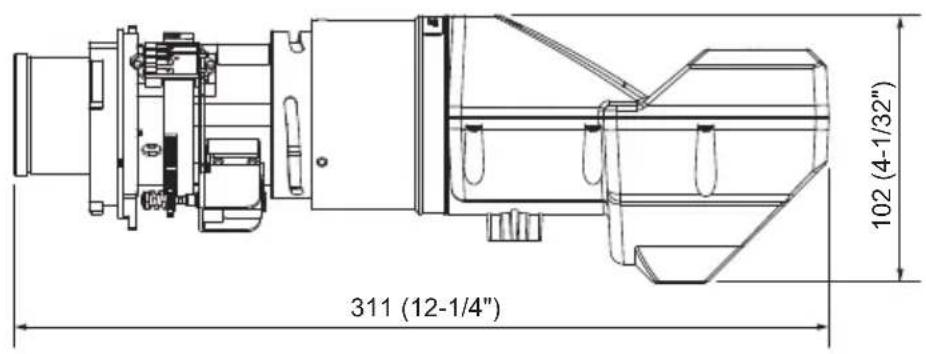
| Dimensions*1 | Width 132 mm (5-3/16")Height 102 mm (4-1/32")Depth 311 mm (12-1/4") |
| Net Weight Approx. 1.3 k | g (2.9 lb) |
*1: Excluding protrusions.
Dimensions
(Unit: mm)
MEMO
MEMO
Information for users in the European Union
Importer's name and address within the European Union
Panasonic Marketing Europe GmbH
Panasonic Testing Centre
Winsbergring 15, 22525 Hamburg, Germany
Disposal of Old Equipment
Only for European Union and countries with recycling systems

This symbol on the products, packaging, and/or accompanying documents means that used electrical and electronic products must not be mixed with general household waste.
For proper treatment, recovery and recycling of old products, please take them to applicable collection points in accordance with your national legislation.
By disposing of them correctly, you will help to save valuable resources and prevent any potential negative effects on human health and the environment.
For more information about collection and recycling, please contact your local municipality.
Penalties may be applicable for incorrect disposal of this waste, in accordance with national legislation.
Information on Disposal in other Countries outside the European Union
This symbol is only valid in the European Union.
If you wish to discard this product, please contact your local authorities or dealer and ask for the correct method of disposal.
Product Information (for Turkey only)

Web Site : https://panasonic.net/cns/projector/
© Panasonic Corporation 2018
Panasonic System Solutions Company of North America
Two Riverfront Plaza, Newark, NJ 07102
TEL: (877) 803 - 8492
Panasonic Canada Inc.
5770 Ambler Drive, Mississauga, Ontario L4W 2T3
TEL: (905) 624 - 5010


- OPERATING INSTRUCTIONS
- CONTENTS
- WARNING
- CAUTION
- BEFORE USE
- SUPPORTED PROJECTORS
- NOTE
- SUPPLIED ACCESSORIES
- ATTACHING THE LENS / DETACHING THE LENS
- BEFORE REPLACING THE PROJECTION LENS
- ATTENTION
- ENGLISH
- ATTACHING THE LENS / DETACHING THE LENS (CONTINUED)
- ATTACHING THE LENS
- DETACHING THE LENS
- PROJECTION RELATIONSHIPS
- DIMENSIONAL RELATIONSHIP DIAGRAM
- PROJECTION RELATIONSHIPS (CONTINUED)
- DIMENSIONAL RELATIONSHIP
- KEYSTONE DISTORTION CORRECTION
- LENS POSITION SETUP AND FOCUS ADJUSTMENT
- LENS POSITION SETUP
- LENS POSITION SETUP AND FOCUS ADJUSTMENT (CONTINUED)
- FOCUS ADJUSTMENT FUNCTION
- ADJUSTING THE FOCUS
- SPECIFICATIONS
- DIMENSIONS
- MEMO
- INFORMATION FOR USERS IN THE EUROPEAN UNION
- DISPOSAL OF OLD EQUIPMENT
- ONLY FOR EUROPEAN UNION AND COUNTRIES WITH RECYCLING SYSTEMS
- INFORMATION ON DISPOSAL IN OTHER COUNTRIES OUTSIDE THE EUROPEAN UNION
- PRODUCT INFORMATION (FOR TURKEY ONLY)
- PANASONIC SYSTEM SOLUTIONS COMPANY OF NORTH AMERICA
- PANASONIC CANADA INC
Brand : PANASONIC
Model : ET-DLE035
Category : Projector Accessories