Type 07 - Pregnant HEDD - Free user manual and instructions
Find the device manual for free Type 07 HEDD in PDF.


User questions about Type 07 HEDD
0 question about this device. Answer the ones you know or ask your own.
Ask a new question about this device
Download the instructions for your Pregnant in PDF format for free! Find your manual Type 07 - HEDD and take your electronic device back in hand. On this page are published all the documents necessary for the use of your device. Type 07 by HEDD.
USER MANUAL Type 07 HEDD
Please read the following safety instructions carefully before setting up your system. Keep the instructions for subsequent reference. Please read the warnings and follow the instructions.
EXPLANATION OF GRAPHICAL SYMBOLS
| The lightning flash with arrowhead symbol, within an equilateral triangle, is intended to alert the user to the presence of uninsulated "dangerous voltage" within the product's enclosure that may be of sufficient magnitude to constitute a risk of electric shock to persons. | |
| The excitation point within an equilateral triangle is intended to alert the user to the presence of important operating and maintenance (servicing) instructions in the literature accompanying the appliance. |
| CAUTIONRISK OF ELECTRIC SHOCK!DO NOT OPEN! |
CAUTION
TO REDUCE THE RISK OF FIRE OR ELECTRIC SHOCK, DO NOT REMOVE THE BACK COVER OR ANY OTHER PART. NO USER SERVICEABLE PARTS INSIDE. DO NOT EXPOSE THOUS EQUIPMENT TO RAIN OR MOISTURE. REFER SERVICING TO QUALIFIED PERSONNEL.
| To reduce the risk of an electric shock, do not open the loudspeaker yourself. Always refer to qualified service personnel. | |
| This product must be connected with an IPC 60320 AC mains power card (like the one we supplier). | |
| Please switch of your audio system before connecting or disconnecting any cables so the speaker - also, if you intend to clean the surface or single components. Never use flammable or combustible chemicals for cleaning audio components. | |
| HDD studio monitors are equipped with universal mains, meaning that the speakers work within a voltage range from 85-261V. This makes voltage switches unnecessary. | |
| Do not place this unit on an unstable card, stand or triad, bracket or table. The unit may fall, causing serious injury and/or serious damage. | |
| This product should never be used outside. Avoid exposing it to rain or any sort of moisture. | |
| Powercords and audio cables connected to this product should never be steeped on. | |
| Please note that defective cables can harm your speakers and / or create hamming, creakling, etc. |
| Always keep electric equipment out of the reach of children. | |
| Always unplug sensitive electronic equipment during lightning storms. | |
| The monitor should be installed near the socket outlet and quick disconnection of the device should be easily possible. | |
| To completely disconnect the speaker from the AC mains, physically disconnect the powerchord. | |
| Please try to avoid touching the speaker diaphragm. Always keep the woofer's ventilation parts open. | |
| Don't use the speaker at very high or low temperatures. The speakers back panel should not be exposed to direct sunlight. Never operate this product in an explosive atmosphere. | |
| High SPU's can irreparably damage your ears! Please take good care when running the speakers at high levels. | |
| Make sure that the air can circulate behind the speaker as it needs sufficient cooling. | |
| Only mount this product onto dry and non-conducting walls (wood, plaster). For other wall materials, an additional solution panel is required. To prevent injury, this loudspeaker must be securely attached to the wall in accordance with the installation instructions of your wall mount instead. | |
| Always carry the speaker with the back panel facing to your body. Otherwise, the diaphragm of the woofer can be damaged, which is not covered by the warranty. | |
| The drivers of the speaker are NOT magnetically shielded: Keep away all items that are sensitive to magnetic fields, like magnetic tapes, credit cards, CRI monitors and so on. | |
| Keep away Ferrre-magnetic (steel, iron, etc.) objects from the leverer like small screws, sawf and so on. The strong magnetic field of the leverer can pull objects to the folded diaphragm. This can lead to permanent damage of the leverer, which is not covered by the warranty. | |
| For cleaning the surface of the cabinet, we recommend to use a microfiber cloth and simply warm water. Don't use any aggressive detergent, as it will damage the finish. Always switch off the speaker before cleaning! For clearing dust out of the loudspeaker diaphragm, use a very soft brush. | |
| If you need to send the speakers via a postal service, use the original packaging. It is she safest way to get them from A to B. |

Introduction
HI THERE,
and first of all Many thanks for choosing our Type 07 nearfield studio monitor. We are stoked to have you on board as a customer. Without any more hesitation we would like to take you through the basics of this powerful and ultra-transparent active loudspeaker, that is suitable for all kinds of audio-related jobs, may it be mixing in stereo or multichannel setups, mastering, producing beats, recording string quartets, rockbands, or anything that is related, really ...
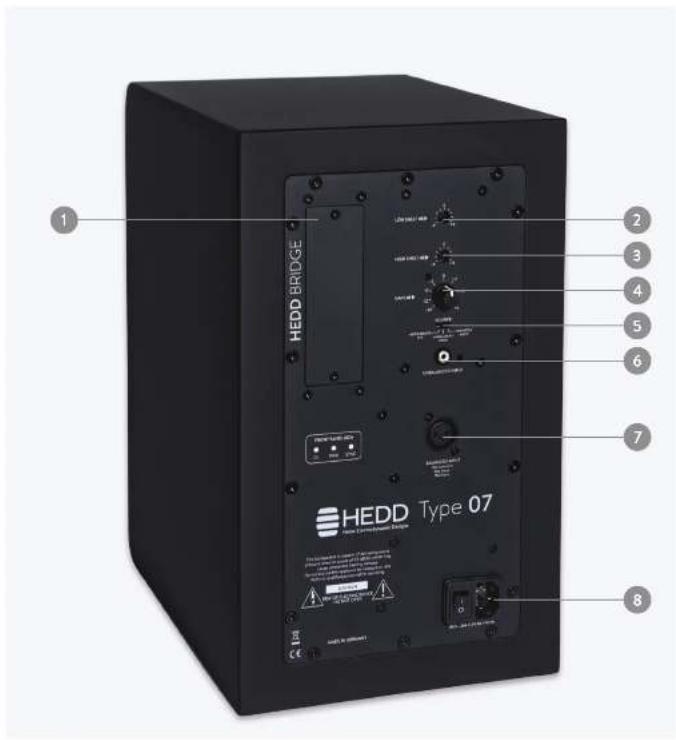
Let's assume that you unpacked the monitor carefully and that you gave a little bit of time to scclimate to the temperature of your room fan hour is safe. Let's also assume that you couldn't wait to connect it to the power socket (B) and your audio system using the balanced XLR, unbalanced RCA, or HEDD Bridge inputs (1, 6, 7).
Now is the time to confirm the input you used by selecting it on the SOURCE Switch (5) - and to finally press that power switch on the back panel. There you go!
Note: By the way, do you know that these speakers are equipped with regulated Universal Mains, working from 85V-264V (8)? This means that our amps will work at their full capacity under any voltage condition. Just saying ...
GAIN
Now, there is a lot you can tweak on the back panel to adapt the speaker to your working environment. First of all, you have a proper GAIN-Control (4) that lets you adjust the overall volume of the speaker in a range from -30dB to -6dB. You can use this control to adapt the speakers to your signal chain and to compensate for any level differences between the speakers, may they be caused by your listening position, the room acoustics, or slight variations of the control knob's tolerance (which is normal and no malfunction).
SHELYING FILTERS FOR ROOM ADJUSTMENTS
Listening to these monitors can be a real joy, but depending on your room and its acoustical properties, you might not really feel it. Your room might be very small so that the speakers are close to a wall or corner (hello, bass boost). You might have to work in a super bright and big room with hard surfaces such as glass or stone, or the other way around, in a particularly muffled sounding room with big curtains and beautiful but thick carpets.
In situations like these, it is difficult to impossible for the speaker to unfold its rich sound quality. That's why we designed two very effective shelving filters (2, 3). Here is how they work:
- the Low Shelf lets you reshape the bottom end around 50Hz (±4dB)
- the High Shelf helps you to bring back the details and transparency around 20kHz (±4dB)
text_image
1 2 3 4 5 6 7 8 HEDD BRIDGE HEDD Type 07 HEDD CNTM HEDD CNTM HEDD CNTM HEDD CNTM HEDD CNTM HEDD CNTM HEDD CNTM HEDD CNTM HEDD CNTM HEDD CNTM HEDD CNTM HEDD CNTM HEDD CNTM HEDD CNTM HEDD CNTM 120 MHz (1.0 Hz) 120 MHz (1.0 Hz) 120 MHz (1.0 Hz) 120 MHz (1.0 Hz) 120 MHz (1.0 Hz) 120 MHz (1.0 Hz) 120 MHz (1.0 Hz) 120 MHz (1.0 Hz) 120 MHz (1.0 Hz) 120 MHz (1.0 Hz) 120 MHz (1.0 Hz)Introduction
STATUS LeDs
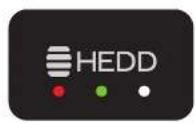
When we designed the Type 07, one of our guidelines was to keep the look of the speaker as minimal and elegant as possible and to place the speaker controls on the back panel. On the front of your speaker, all you will find is a nice front LED panel which will indicate its operational status in the following way:
- The red "OL" LED will light up if the limiter circuit of the speaker kicks in and protects the drivers from overloading. It's okay, you don't have to feel bad as this can happen when working at high levels. However, if the "OL" LED lights up regularly or is always on in extreme cases, reduce the level of your input signal until the "OL" LED stays dim.
- The green LED "PWR" will indicate normal operational power-on status of the speaker. Green = Good!
- The white LED "SYNC" will only light up if you have inserted one of our HEDD Bridge extension card. The LED tells you that the speaker has synchronized to the digital source and is receiving an audio-stream.
HeDD BrIDGe
So, to conclude, what is this thing we call a HEDD Bridge and what's up with this cardslot on the backpanel of your speaker (1)? Well, now is the time to actually stop talking about the analog side of things: One of the most unique aspects of this speaker is the fact that it can handle various digital protocols.
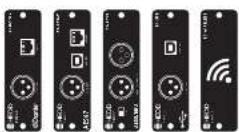
The HEDD Bridge is a modular inputcard system that gives you USB2, AES3, and even AES67 / Dante, that is Audio over IP compatibility. Simply choose one of our available input modules and you are ready to enter the digital realm. With the latest developments in Audio-over-IP in mind, this is nothing less than a world premiere:
You can directly connect your computer to this monitor via a CAT 6 Ethernet cable and stream high-resolution audio up to 96kHz. Or, if you are lucky enough to work in complex multi-channel setup (Dolby Atmos, Auro 3D, etc.), you can find multiple separates HEDD monitors with a single high-resolution audio stream while every speaker can be administrated individually via a control software. And this is just the beginning ...
natural_image
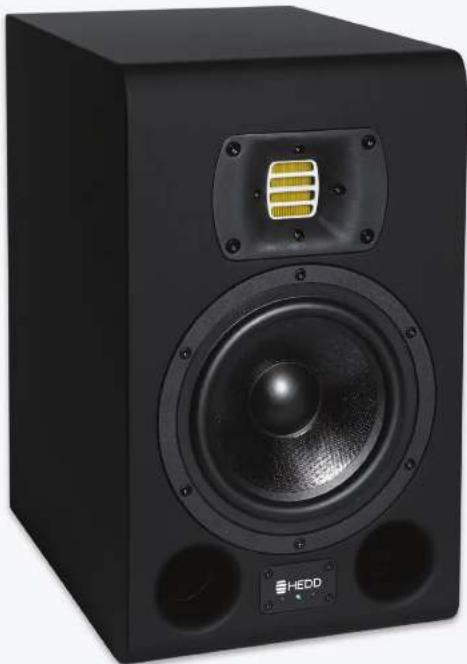
Black HEDD audio amplifier with speaker grille and buttons (no visible text or symbols on body)Speaker Placement Speaker Placement
Vertical & Horizontal Setup
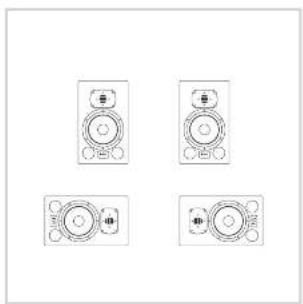
In a stereo setup we recommend placing the speakers vertically and facing towards you. The tweeters should match the height of your ears. Like this you will be as close as it gets to hear the intended character of the monitor.
That being said, it is also possible to place a pair of Type D7 horizontally. In this case, you must make sure to align them symmetrically. Both tweeters should face inwards. Otherwise, the acoustical image will be distorted.
STereo POSITIONING
For optimizing your listening position, place the two speakers so that they form an equilateral triangle with your listening position (see figure below). This position should be an imaginary center point between the two speakers. Now, if you have the space, play a recording that you are familiar with and try playing around with adjusting the distance of the speakers and the distance of your listening position accordingly. Stop when you think that you hear an authentic stereo panorama. Trust your ears, they are your best friends.
natural_image
Four identical line drawings of a speaker or amplifier device with no text or symbols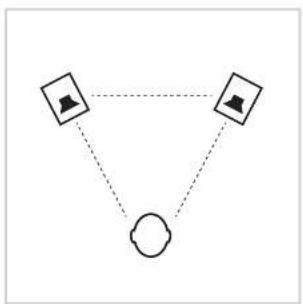
flowchart
graph TD
    A[" "] --> B[" "]
    B --> C[" "]
    C --> A
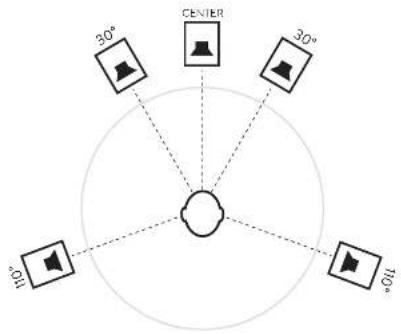
Place the speakers in a circle around your listening position and work with the following angles: Center 0°, Front/Right 30°, Rear/Right 110°, Rear/Left 250° and Front/Left 330°. The overall radius of the circle should be somewhere in between 0.7m and 2m. Also beware of the walls! The surrounding walls should be at least 40cm away from every speaker to avoid early reflections.
We recommend that you use the same type of speaker for every channel (except the subwoofer, of course), because otherwise you can run into negative frequency and/or phase coloration. Check out the ITU recommendation BS-2159-4 for a detailed explanation.
text_image
30° CENTER 30° 100° 100°
EN
Troubleshooting
| Problem Solution | |
| “ON” LED lights green but no audio output | Check the wiring and make sure that all cables are working and connected correctly.Check if you have selected the correct input via the SOURCE switch on the back panel of the speaker.Connect an audio source directly to the speaker. If you do hear audio now, the malfunction is in your signal path.If the back panel of the speaker is very hot, it may be that the internal thermal protection of the amplifiers has shut down the audio output to prevent electrical damage. Turn the unit off, let it cool down and repower. |
| Hum, buzz and noise | Disconnect all signal cables. If the noise is gone, check your audio cables and the equipment in your signal path.Check if you have any electrical devices that potentially produce high amounts of RFI (collphones, switching power supplies, radio equipment) sitting next to your speakers.Try to connect the speakers to a different power socket. |
| “OL” LED lights up constantly | Reduce the input audio level either on the source or wish the help of the GAIN control. |
| “SYNC” LED lights up but no audio | Check if you have selected the HEDD BRIDGE input via the SOURCE switch on the back panel of the speaker.Check if you have routed the audio source correctly to the HEDD BRIDGE output of your HEDD Bridge extension card. |
| Speakers vary in volume | Use the GAIN control to compensate for any level differences. |
All our products comply with RoHS and WEEE.
This product has a 2-year-warranty. Contact us or visit our
website for warranty information.
hedd.audio
Technical Data
| Drivers | |
| Woofer 1 | |
| Basket ∅ 7.2" (182mm) | |
| Voice coil ∅ 1.5" (38mm) | |
| Cone material UHC cone (Ultra Honeycomb Composite) | |
| Tweeter 1 | |
| Type HEDD AWT (HEDD Air Motion Transformer) | |
| Equiv. Diaphragm ∅ 2.2" (56mm) | |
| Input connectors | |
| Analog balanced/ unbalanced XLR / RCA | |
| Digital/HEDD Bridge Options AES67 Ravenna, Dante, AESS/EBU | |
| General data | |
| Amplification (ICEpower®) | 2 x 100W |
| Sensitivity | 410mVrms (-4,9dBu) / 90dB SPL / 1m at 0dB GAIN |
| Input gain | 30dB ... +5dB |
| Maximum input level (balanced / unbalanced) | 6Vrms (+17.8dBu, +17.6dBV) / 4.5Vrms (+15.3dBu, +13.0dBV) |
| High Shelf EQ > 2kHz | ±4dB at 20kHz |
| Low Shelf EQ < 200Hz | ±4dB at 50Hz |
| Frequency response | 381 Hz - 50kHz |
| Frequency response ± 1.5dB | 45Hz - 20kHz |
| THD 90dB/1m > 100Hz | ≤0.5 % |
| Max SPL sine wave 100Hz - 3kHz /1m | ≥107dB |
| Max SPL peak per pair at 1m | ≥116dB |
| Crossover frequency | 2.3kHz |
| Input impedance (balanced / unbalances) | 10kΩ / 47kΩ |
| Weight | 10kg (22lbs) |
| Height x Width x Depth | 370 mm x 220mm x 300mm |
| Warranty | 2 years |
The information and data contained in this manual is subject to change without prior notice.

EN

HEDD
Heine Electrodynamic Designs
Type 07
Bedienungsanleitung
DE
Sicherheitshinweise
natural_image
Black HEDD audio amplifier with speaker grille and external circuit breaker (no visible text or symbols)natural_image
Four identical line drawings of a speaker or amplifier device with no text or symbols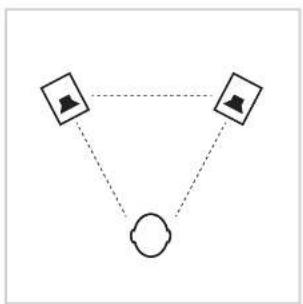
flowchart
graph TD
    A[" "] --> B[" "]
    B --> C[" "]
    C --> A
SURROUND
text_image
30° CENTER 30° 100° 100°
Fehlerbehebung
Heinz Electrodynamic Designs