Vegas - Car stereo Megakick - Free user manual and instructions
Find the device manual for free Vegas Megakick in PDF.


User questions about Vegas Megakick
0 question about this device. Answer the ones you know or ask your own.
Ask a new question about this device
Download the instructions for your Car stereo in PDF format for free! Find your manual Vegas - Megakick and take your electronic device back in hand. On this page are published all the documents necessary for the use of your device. Vegas by Megakick.
USER MANUAL Vegas Megakick
text_image
MEGA KICK PAU- BND MOD AMS RPT MUT TA DISP SCAN PTY RDS 1 2INT 3 4RDM 5 6 PWR Vegas CD/MP3 PLAYER TRK MUT MEM-CA R I 6 INT RDM RPT LOU ①0 PLY TATP RDS EON R-D-S ECON FLAT CLSC ROCK POP AMPION ANTI SHOCK AUX SD MP3 INPUTEinführung
Geehrter Kunde,
3.4 AUDIO-DSP (Equalizer)
natural_image
Diagram showing two views of a device rear panel with ports and buttons, no text or symbols presentnatural_image
Diagram of a computer rear panel showing ports and connectors, with arrows indicating loading or movement (no text or symbols present)natural_image
Line drawing of a device rear panel with ports and buttons, no text or symbols presentReference Manual
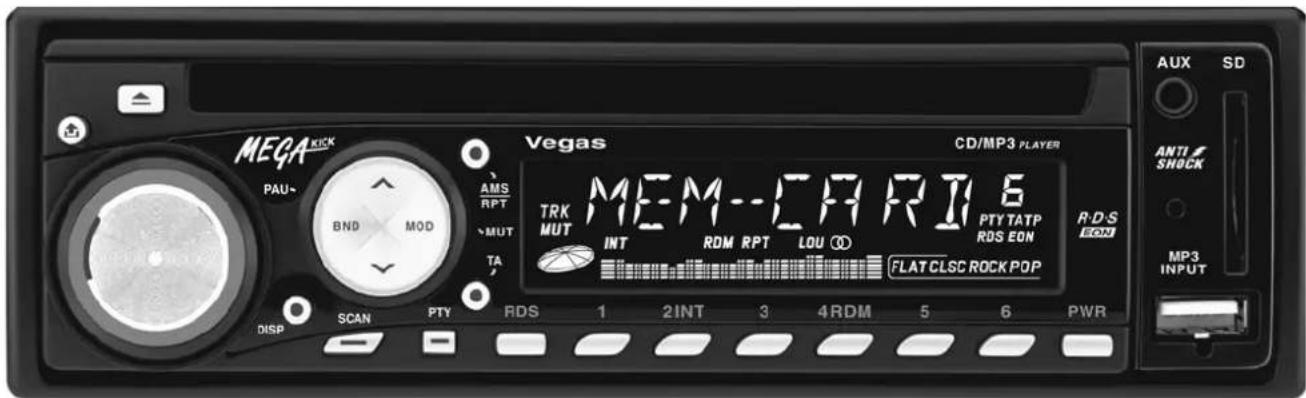
Car Radio including CD- & MP3-Player „Megakick Vegas“
text_image
MEGA KICK PAU- BND MOD AMS RPT MUT TA DISP SCAN PTY RDS 1 2INT 3 4RDM 5 6 PWR Vegas CD/MP3 PLAYER TRK MUT MEM--CHRIT6 INT RDM RPT LOU ① PTY TATP ROS EON FLAT CLSC ROCK POP R-D-S ECN AUX SD ANTI/ SNOCK MP3 INPUTPreface
Dear Customer, we like to congratulate you on the purchase of your new car radio!
You have chosen a product which combines deliberate technical features with an appealing design.
Please read this manual conscientiously and carry out the given instructions before and while you are using your new device.
Technical Specifications:
Operation: DC 12 V
Current Consumption: max. 8 A
Output Power (max.): 4 x 40 W
Impedance: 4 Ω speaker
Frequency Response: 20 - 20000 Hz
Frequency Range (Radio): 87.5 - 108.0 MHz (FM)
522 - 1620 kHz (MW)
Channel Step: 50 kHz (FM), 9 kHz (MW)
Intermediate Freq.: 10.7 MHz (FM), 450 kHz (MW)
Sensitivity: 2.8 μV at (S/N) = 30 dB
Signal/Noise-Ratio (S/N): 50 dB
Stereo Separation: 20 dB
Fuse: 10A
Capability Characteristics
- Plays back music-CDs.
- Plays back MP3 from SD-cards or MP3-player by an USB-port.
• 30 stations memory (18 for FM and 12 for AM).
• Many Radio Data System functions (RDS-EON).
• Electronic anti shock system.
• Detachable front panel against theft.
Security Advices
- Before using the device, please check it for any possible damages. In case of damage do not operate it.
- The bracket for dashboard mounting must be under 30^ .
- The device may not become subject of mechanical stress and should not be exposed to humidity.
• To be considerate of the ventilation do not cover the device and protect it from direct solar radiation. - Clean the device with a dry and soft cloth only.
- Caution! Should the device itself get damaged, please let the repair to the manufacturer or to a qualified service agent.
- Please dispose packaging materials properly and do not let children play with it.
• The device itself is not a toy. Do not let children play with it too.
Functions:
text_image
(9) (8) (2) (15) (10) (3) (12) (4) (5) (19) (21) MEGA KICK PAU~ BND MOD AMS RPT MUT TA DISP SCAN PTY Vegas TRK MUT MEM--CFRIT6 INT ROM RPT LOU ① PTY TATP RDS EON FLAT CLSC ROCK POP RDS 1 2 INT 3 4 RDM 5 6 PWR CD/MP3 PLAYER R-D-S ECON ANTI SHOCK MP3 INPUT AUX SD (14) (6) (7) (16) (13) (11) (17) (1) (20)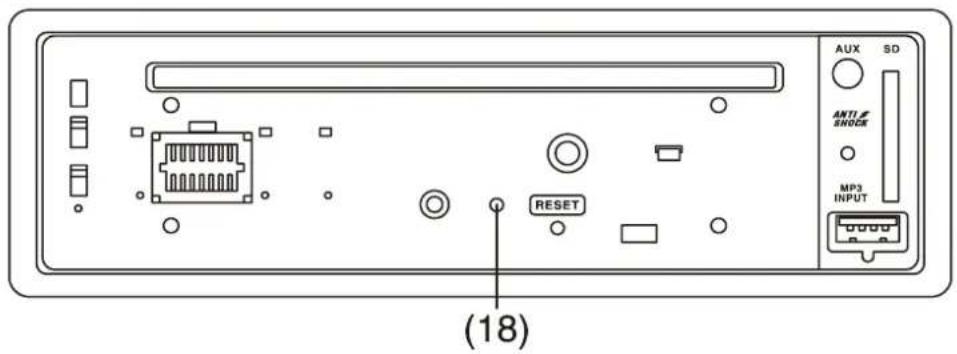
text_image
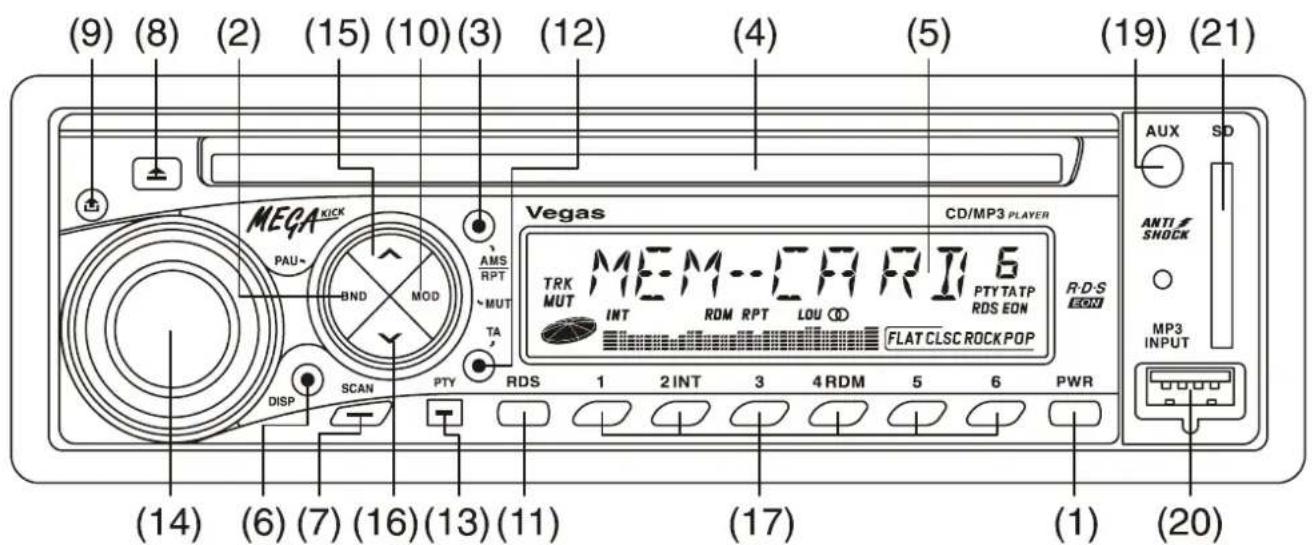
(18) AUX SD ANT1 SHOCK MP3 INPUT RESET- POWER: On- / Off-switch.
- BAND: a) Togg le for the frequency bands: FM1, FM2, FM3, MW1 or MW2. The current band will be displayed. b) Pause button during the playback of MP3 or CD.
- AMS \~ RPT: a) AS = The 6 strongest stations are saved automatically. After this the function of this button changes to PS = The 6 saved stations will be consecutively called every 5 s. Press button [3] for more than 2 s to repeat the saving process (AS). b) Repeats the current titles during the playback of MP3 or CD.
- CD slot
- LCD: The current station frequency and all active functions are displayed on the screen.
- DISP: a) Activates the display of station name, frequency band and frequency, the current time, name of the program type and number of the current titles with playing time if this information is available. b) Adjustment of the clock = Keep button [6] pressed until the flashing empty digits appear. Now use VOL/SEL [14] to adjust the hour (by turning clockwise) and the minutes (by turning counter clockwise).
- SCAN: Automatic station search through all frequency bands. The available stations will be called for 5 s each. Press button [7] again in case the scanning should stop.
- EJECT: Eject the CD from the drive.
- PANEL RELEASE: Button to release the control panel from the radio.
- MOD \~ MUTE: a) Toggle. By pressing this button for short times consecutively the following functions will be activated RADIO → CD/MP3 → USB-port → SD-Card-port → Auxiliary input for an external audio device like a CD-player (AUX) → RADIO → ... b) Press this button for more than 2 s activates or deactivates the muting.
- RDS: Activates the RDS-functions. PS = The name of the current station will be displayed. TP = The current station offers traffic messages. AF = Automatic tuning of the receiving frequency if the signal is becoming weak. If no alternative frequency is available the RDS-Symbol is flashing. EON = The enhanced other networks allows the receiving of traffic messages even if the current station has none. REG ON/REG OFF = To restrict the receiving stations to regional ones press RDS [11] for more than 2 s. REG ON appears on the screen. For deactivating this function again press [11] for more than 2 until REG OFF appears on the screen.
120-051
-
TA: On- / Off-switch of the function traffic news. If the desired station is transmitting the TP-signal or is linked with EON the current program, MP3 or CD playback will be interrupted in case of traffic news. For the duration of the interruption the sound level of the radio will be increased.
-
PTY: Toggle for choosing a program type (Switching mechanism: POP M → NEWS → Off → POP M). During a station search the transmitted PTY code will be considered if there is any. If there is no station which sends a PTY code the display shows NO PTY.
-
VOL/SEL: a) Turn the radio on when it is in standby mode. b) Adjusting of volume, bass, treble, balance and fader of front- and rear speakers. Every push on VOL/SEL [14] switches the menu as follows VOLUME → BASS → TREBLE → BALANCE → FADER → VOLUME. c) Function selection of the audio adjustments TA → MASK → RETUNE → DSP → LOUD → MULT → SCROLL → BEEP → STEREO/MONO → DX/LOCAL → TA.
-
^ : a) Tunes to the next station on this frequency band during radio operation. b) Skips to the next title during CD or MP3-operation.
-
v : a) Tunes to the previous station on this frequency band during radio operation. b) Skips to the previous title during CD or MP3-operation.
-
RDM 1 - 6: a) Calls back the 6 stations saved by AMS [3] one by one. For saving a certain radio station press one of the memory buttons 1 to 6 for more than 2 s. The current station is saved then. b) During CD or MP3-operation the buttons have the following functions. 2 = All titles will be called for 10 s; 4 = The titles playbacks in random order; 5 = Title search -10 (down); Title search +10 (up).
-
RESET: Reset the factory setting (is situated under the front panel). Every adjustment will be deleted. It is recommended to use this function after the initial installation and when abnormal operation occurs.
-
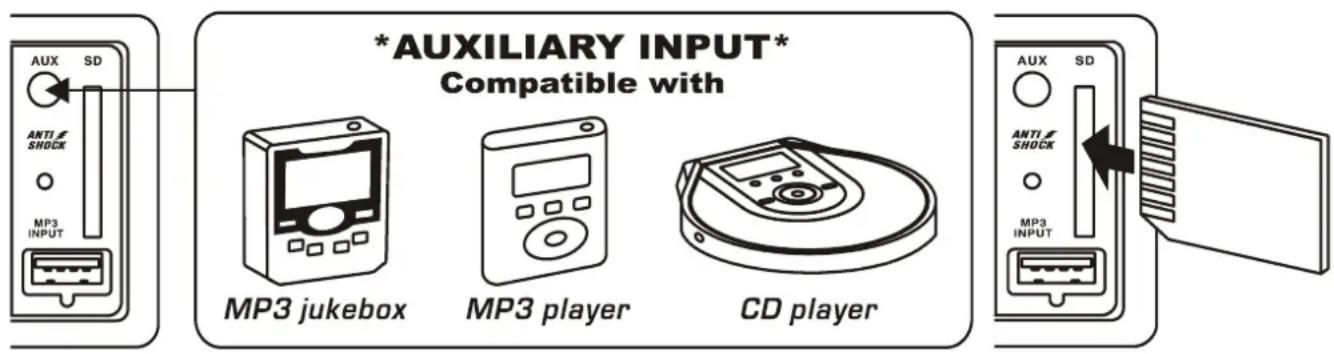
AUX: Connector for an external audio device like CD-player or MP3-player. The port will be addressed with MOD [10].
-
MP3 INPUT: USB-connector for a MP3-player or a memory stick. The port will be addressed with MOD [10].
-
SD: SD-Card-slot for SD-memory cards. The port will be addressed with MOD [10].
text_image
*AUXILIARY INPUT* Compatible with MP3 jukebox MP3 player CD player AUX SD ANTI SHOCK MP3 INPUTThe Function Selector / Volume Control (VOL/ SEL) [14]:
- By simple turning the rotary switch control the volume of the radio.
- By multiple pushing the switch get the following switching mechanism: Volume → bass → treble → balance → fader → volume. All functions can be adjusted by turning the rotary switch and will be displayed on the screen.
- Press the button for more than 2 s to enter another adjustment menu. All these items here can be adjusted as described above. Skip to the next item by pressing the switch [14] for more than 2 s.
3.1 TA SEEK/TA ALARM (Traffic Announcements)
By turning the button [14] you can toggle between the two functions. In the mode TA SEEK the device searches for another station automatically when the current one does not send TA-information or is getting weak. In the mode it will not search automatically but gives an alarm signal.
3.2 MASK DPI/MASK ALL (Masking)
By turning the button [14] you can toggle between the two functions. In the mode MASK DPI all stations without a PI-Code will be ignored during a search. In the mode MASK ALL all stations without a PI-Code and a weak RDS-signal will be ignored.
3.3 RETUNE-L/S (Skip Interval for TA SEEK)
By turning the button [14] you can toggle between the two functions. With RETUNE-L the next station will be addressed after 180 seconds. With RETUNE-S after 45 seconds.
3.4 AUDIO-DSP (Equalizer)
By turning the button [14] you can toggle between the four functions. There are the following possibilities POP M, ROCK M und CLASS-FLAT M.
3.5 LOUD ON/OFF (Loudness)
By turning the button [14] you can toggle between the two functions. With LOUD ON bass and treble will be emphasized at a low volume level.
3.6 MULT ON/OFF
By turning the button [14] you can toggle between the two functions. (Not available for this model)
The displayed messages on the screen move either from left to right (SCROLL 1) or from right to left (SCROLL 2).
3.8 BEEP ON/OFF (Key Sounds)
By turning the button [14] you can toggle between the two functions. With BEEP ON you will hear a sound every time push a button. (Not available for this model)
3.9 STEREO/MONO
Toggle between the two functions by turning the switch [14].
3.10 DX/LOCAL (Receive mode)
Toggle between both functions by turning the switch [14] . In DX mode the station search includes long distance scanning. In LOCAL mode only regional station will be considered.
RDS-Function:
RDS is a digital information system which signals are transmitted on FM-frequency. It allows broadcasting stations to transfer additional information.
AF (Alternative Frequencies):
Is the AF-mode active the radio constantly check the signal strength of the current station and the alternative stations. You can activate this mode by tapping on the button RDS [11].
By pressing the button longer you can activate the regional code additionally which means the device only consider stations with the same PI-code. REG appears on the display.
TA (Traffic Announcements) [12]:
If the TA-mode is active an incoming traffic announcement will break into broadcasting features or the playback of other media. Furthermore a hint appears on the display.
PTY (Program Type) [13]:
Is the PTY-mode active the station search works according to the individual adjustment.
The Addressing of Files on Storage Media:
Address the different ports with MOD [10].
When MP3-files on SD- or USB- data storage medium should be played the following functions are active.
• With the buttons [15] and [16] skip to the previous or next file.
- With AMS [3] switch track number- (TRK SCH) → file- (FILE SCH) → character search (CHAR SCH).
- By turning VOL/SEL [14] make the input of TRK SCH, FILE SCH and CHAR SCH.
Attention: SD- or USB-data storage media should be formatted by a computer to be recognized without problems by the radio's software! Probably MP3-files with a bitrate under 128 kbps will not be recognized by the radio!
Installation:
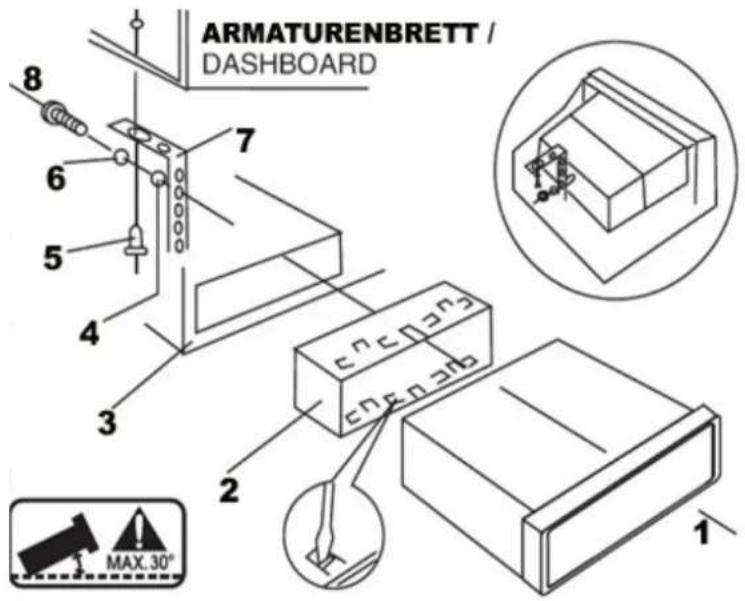
text_image
ARMATURENBRETT / DASHBOARD 8 7 6 5 4 3 2 1 MAX.30°- Use the screw (5) for attaching the angle bracket (7) to the radio console (3) in the dashboard.
- Release the screws and remove the mounting frame (2) from the radio (1).
- Insert the mounting frame (2) in the radio console (3) and use the screw (8) and washers (4&6) for attaching it to the angle bracket (7).
- Bend the metal claws of the mounting frame (2) as much as necessary.
- Connect all cable to the radio (1) and push it into the mounting frame (2) subsequently.
Connection terminals POWER (A) and SPEAKER (B):
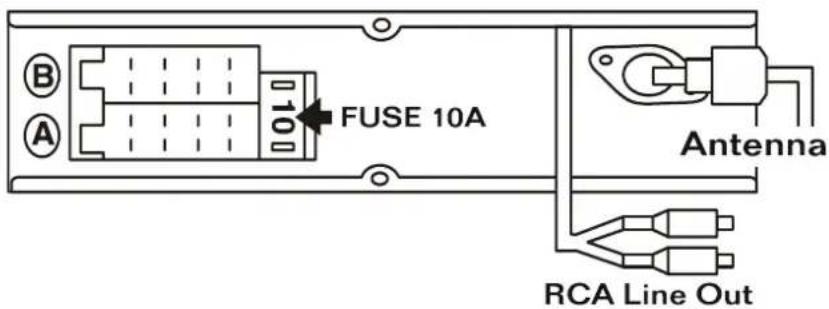
text_image
B A 10 FUSE 10A Antenna RCA Line Out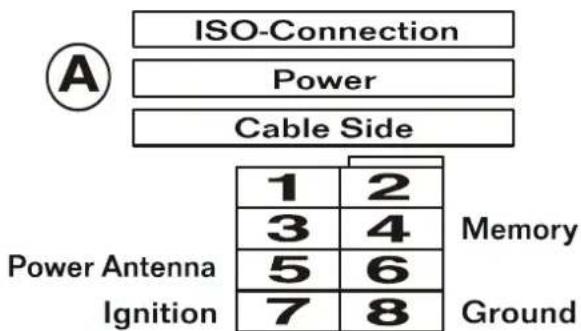
text_image
ISO-Connection Power Cable Side 1 2 3 4 5 6 7 8 Power Antenna Ignition Memory Ground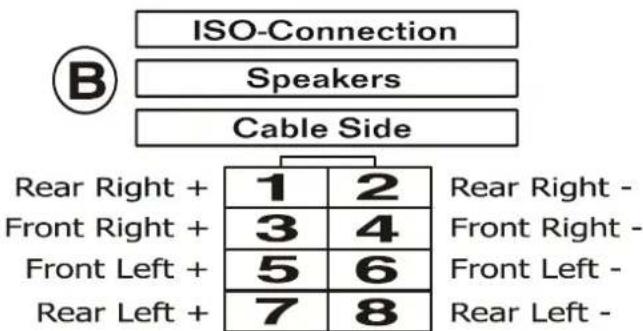
text_image
ISO-Connection Speakers Cable Side B Rear Right + Front Right + Front Left + Rear Left + 1 2 3 4 5 6 7 8 Rear Right - Front Right - Front Left - Rear Left -• A4: Memory (12V)
• A5: Antenna output
• A7: power supply (12V) / connected with car ignition
A8: Grounding
• B1: Speaker (+) rear right
• B2: Speaker (-) rear right
• B3: Speaker (+) front right
• B4: Speaker (-) front right
• B5: Speaker (+) front left
• B6: Speaker (-) front left
• B7: Speaker (+) rear left
• B8: Speaker (-) rear left
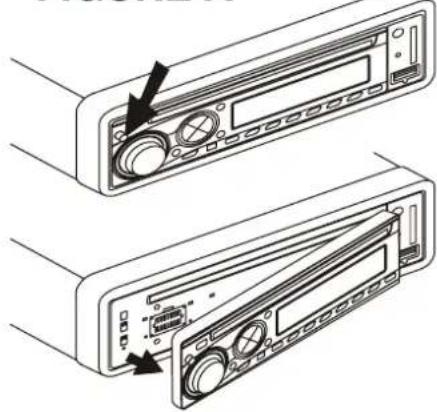
FIGURE A
natural_image
Technical line drawing of two electronic device rear panels with arrows indicating component alignment (no text or symbols)FIGURE A: Remove the radio panel when you park the car for a longer time and during the installation process by pressing PANEL RELEASE [9] and pulling it off.
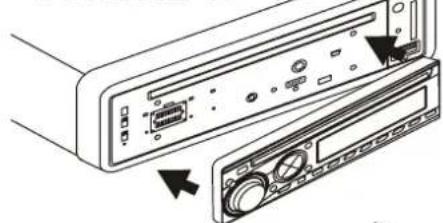
FIGURE B
natural_image
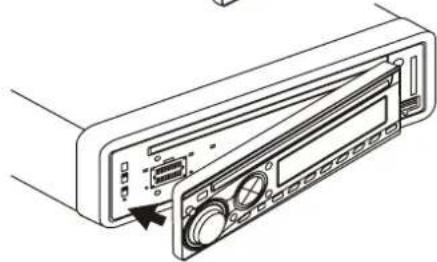
Diagram of a computer rear panel showing ports and control knobs (no text or labels)FIGURE B: Reattach the radio panel by inserting the right side first and then pushing the left side until the panel snaps in.
natural_image
Line drawing of a device rear panel with ports and connectors (no text or symbols)570-D6A904-01