
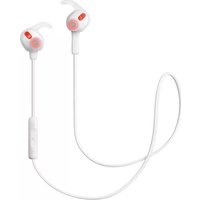
Move Wireless - Headphones JABRA - Free user manual and instructions
Find the device manual for free Move Wireless JABRA in PDF.


| Product Type | Wireless Over-Ear Headphones |
| Brand | Jabra |
| Model | Move Wireless |
| Dimensions (H x W x L) | 172 mm x 146.1 mm x 59 mm |
| Weight | 150 grams |
| Speaker Size | 40 mm dynamic speaker |
| Microphone | 4 mm omni-directional microphone |
| Wireless Connectivity | Bluetooth 4.0 |
| Wireless Range | Up to 10 meters (33 feet) |
| Wired Connectivity | 3.5 mm jack (detachable audio cable included) |
| Charging Port | Micro-USB (charging only) |
| Charging Time | 1-2 hours |
| Talk Time | Up to 8 hours |
| Standby Time | Up to 12 days |
| Number of Paired Devices | Up to 8 (2 simultaneous connections via MultiUse) |
| Supported Bluetooth Profiles | HSP v1.2, HFP v1.6, A2DP v1.2, AVRCP v1.4 |
| Controls | Volume up/down, Multi-function button, On/Off/Pairing switch |
| Voice Guidance | Yes (on/off, connection status, battery level) |
| Materials | Premium stainless steel, adjustable headband |
| Operating Temperature | -10°C to 60°C (14°F to 140°F) |
| Storage Temperature | -20°C to 85°C (-4°F to 185°F) |
| Care Instructions | Store with power off; avoid extreme temperatures and liquids |
| Included Accessories | Micro-USB cable, Audio cable (3.5 mm) |
Frequently Asked Questions - Move Wireless JABRA
User questions about Move Wireless JABRA
0 question about this device. Answer the ones you know or ask your own.
Ask a new question about this device
Download the instructions for your Headphones in PDF format for free! Find your manual Move Wireless - JABRA and take your electronic device back in hand. On this page are published all the documents necessary for the use of your device. Move Wireless by JABRA.
USER MANUAL Move Wireless JABRA
natural_image
Line drawing of a pair of hardcover headsets (no text or symbols)User Manual
jabra.com/movewireless
- WelcoMe....3
- WHaT's in THe boX......4
- HoW To Wear....5
3.1 HeiGHT aDjUsTMenT
- HoW To cHarGe......6
4.1 baTTerY sTaTUs
- HoW To connecT......7
5.1 blUeTooTH connect To a neW or seconD Mobile Device
5.2 connecT To 3.5 MM jacK connecTor
- HoW To Use 9
6.1 MUsic & cHaT
6.2 TUnn HeaDPHones on/oFF
6.3 MULTIPlc call HanDlinG
6.4 voice GUiDance
- sUPPorT....13
7.1 FaQ
7.2 FacTorY resetT
7.3 HoW To care For YoUr HeaDPHones
- TecHnical sPeciFicaTions .....14
1. WelcoMe
Thank you for purchasing the Jabra Move Wireless. We hope you will enjoy it!
JaBra MoVe WireleSS FeaTUreS
■ Premium wireless sound experience - amplifies without distortion. Brings out the depth and clarity of your music
■ Seals the sound - angled earcups allow you to hear all the music
■ Easily connect with any device via Bluetooth 4.0
■ Life proof - lightweight, comfortable headphones built & tested for life on the move
■ Premium materials - stainless steel
■ Wired option - detachable cord for when you need to be wired
2. WHaT's in THE boX


natural_image
Simple line drawing of a cable with two connectors (no text or symbols)Micro-USB cable

natural_image
Simple line drawing of a coiled cable with two connectors (no text or symbols)Audio cable
3. How To Wear

natural_image
Line drawing of a person wearing a Jabra headphones (no text or symbols present)3.1 HEIGHT ADJUSTMENT
Get the perfect fit by adjusting the headband, as illustrated.

natural_image
Illustration of hands using a tool to adjust a circular component, with a green arrow indicating rotation (no text or symbols)4. HoW To cHarGe
Plug the headphones into any available USB port on your PC using any micro-USB cable.
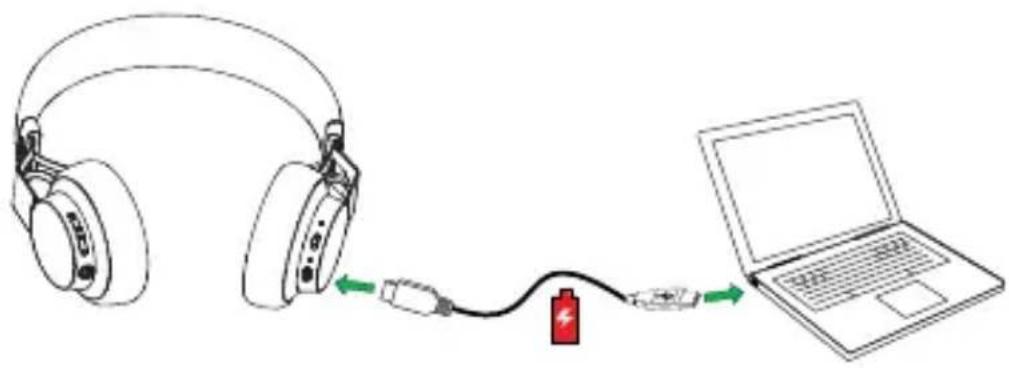
4.1 BATTERY STATUS
Tap the Multi-function button when not on a call to see the battery status. It takes 1-2 hours to fully charge the headphones.
led color BaTTerY level

Green Medium/High

Red Low

Flashing red Critically low
5. How To connect
The Jabra Move Wireless will automatically attempt to Bluetooth connect to a mobile device whenever it is powered on (unless already connected to a Bluetooth device). Simply follow the voice-guided connection instructions.
5.1 BLUETOOTH CONNECT TO A NEW OR SECOND MOBILE DEVICE
- Hold the on/off/Pairing switch in the Pairing position for 3 secs.
- Pairing mode will be announced in the headphones, and the Bluetooth light will flash blue.
- Follow the voice-guided instructions to connect to your Bluetooth device.

NoTe: If two mobile phones have been connected to the Jabra Move Wireless, you may need to select which phone will be used for calls/music. Simply open the Bluetooth menu on the mobile phone you wish to use for calls/music and select the Jabra Move Wireless from the list of devices.
5.2 CONNECT TO 3.5 MM JACK CONNECTOR
Connect the headphones to a 3.5 mm jack connector on your mobile device or PC using the supplied audio cable.
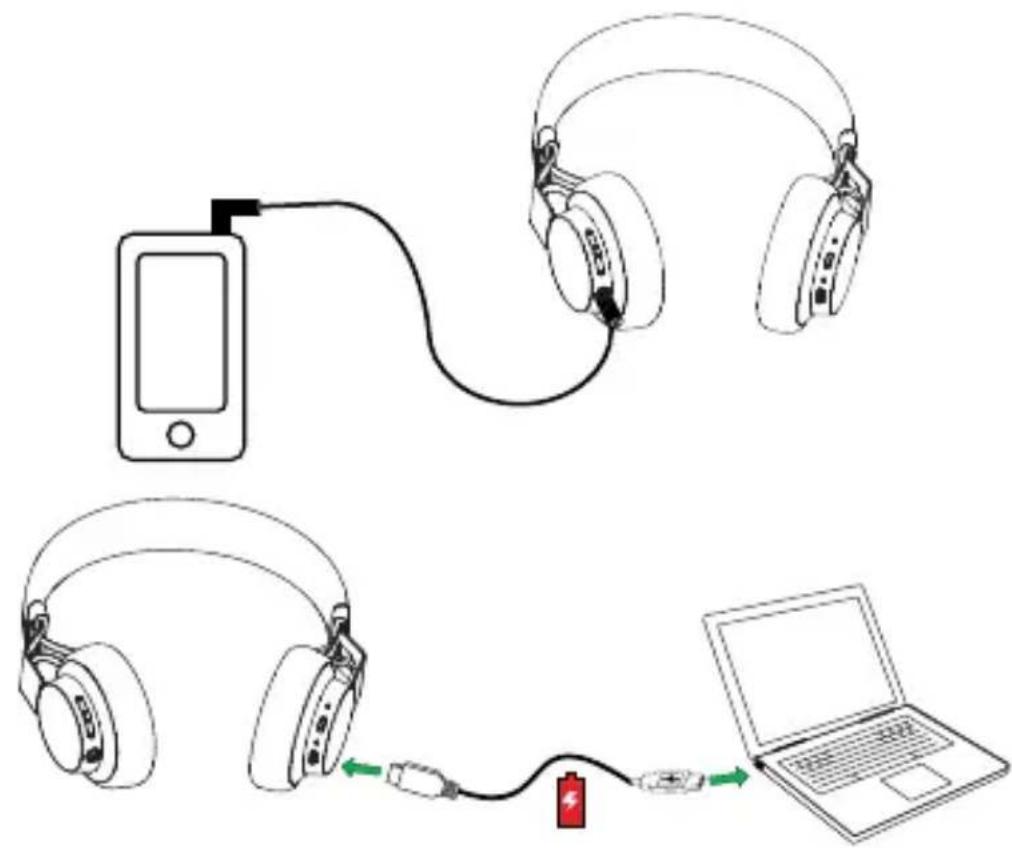
NoTe: Bluetooth connections are disabled when connected to the 3.5 mm Jack Connector.
6. How To Use
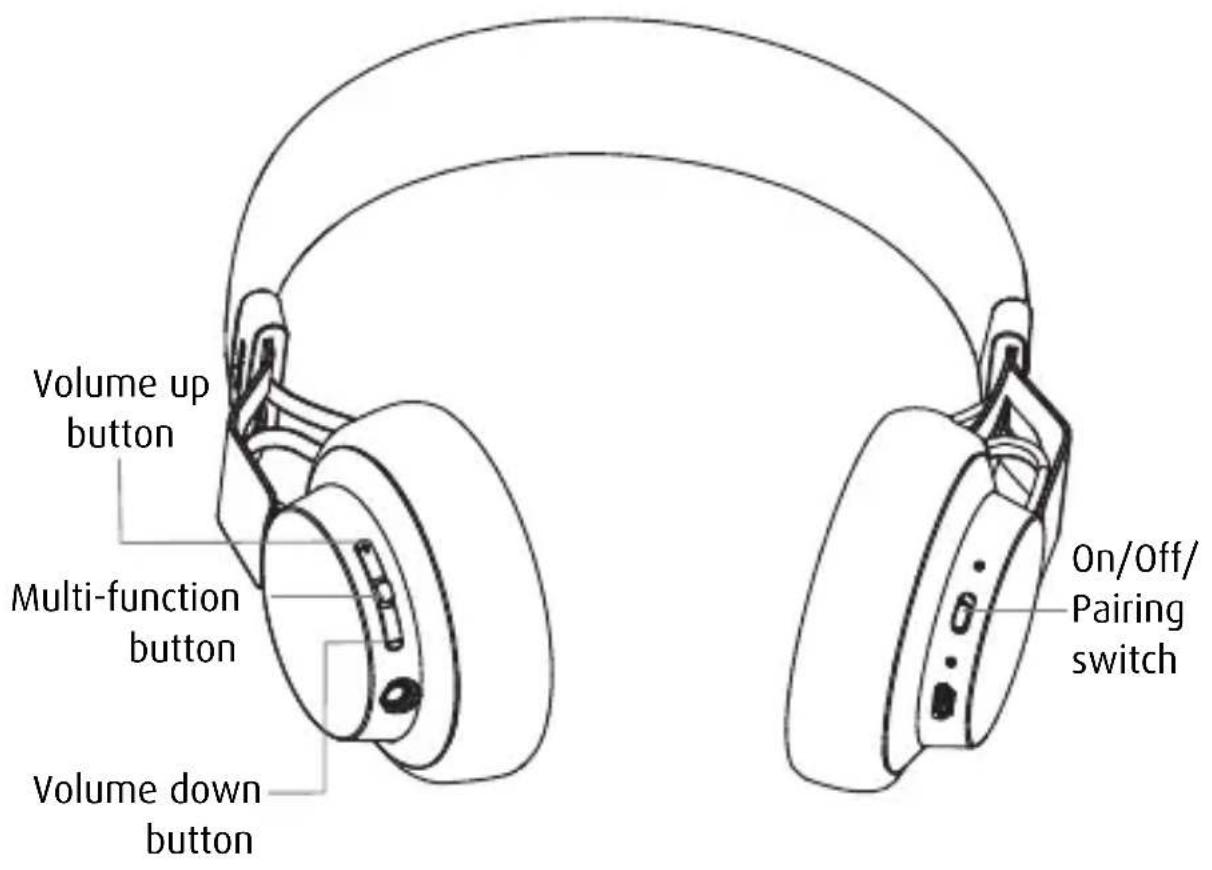
6.1 MUSIC & CHAT
The buttons on the headphones enable you to control your music and phone calls.
FUNCTION HOW TO DO IT
| Pause/play music | Tap theMulti-functionbutton | |
| Adjust volume | Tap theVolume uporVolume downbutton | |
| Skip track | Press and hold either theVolume uporVolume downbutton | |
| Battery status | Tap theVolume uporVolume downbutton,when not on a call | |
| Answer/end call | Tap theMulti-functionbutton | |
| Reject call | Press and hold (1 sec) theMulti-functionbutton | |
| Redial last number | Double-tap theMulti-functionbutton |
Slide the On/Off/Pairing switch to On or Off.

natural_image
Hand interacting with a device component, showing a green directional arrow (no text or symbols)6.3 MULTIPLE CALL HANDLING
The headphones can accept and handle multiple calls simultaneously.
| FUNCTION HOW TO DO IT | ||
 | Put current call on hold and answer incoming call | Press (2 secs) theMulti-functionbutton |
| Switch between held call and active call | Press (2 secs) theMulti-functionbutton | |
| Reject incoming call | Double-tap theMulti-functionbutton | |
6.4 VOICE GUIDANCE
click To liSTeN WHaT YoU Hear
| To connect Move, go to the Bluetooth menu on your phone and select it from the list. |
| Connected |
| Disconnected |
| Connection cancelled |
| Two devices connected |
| No device connected |
| Recharge battery |
| Battery level low |
| Battery level medium |
| Battery level full |
| Voice prompts off |
| Voice prompts on |
| Redialing |
7. sUPPorT
7.1 FAQ
View the full FAQ at jabra.com/movewireless
7.2 FACTORY RESET
To factory reset the headphones and clear the pairing list, press and hold (5 secs) both the Volume up button and the Multi-function button at the same time.
7.3 HOW TO CARE FOR YOUR HEADPHONES
■ Always store the headphones with the power off and safely protected.
- Avoid storage at extreme temperatures (above 85°C/185°F or below -20°C/-4°F). This can shorten battery life and may affect operation. High temperatures may also degrade performance.
- Do not expose the headphones to rain or other liquids.
8. TecHnical sPeciFicaTions
JaBra MoVe HeadPHoNeS SPeciFicaTioN
Weight: 150 grams
Dimensions: H 172 mm x W 146.1 mm x L 59 mm
Microphone: 4 mm Omni-directional microphone
Speaker: 40 mm dynamic speaker
Operating range: Up to 10 meters (33 feet)
Bluetooth version: 4.0
Paired devices: Up to 8 devices, connected to 2 at same time (MultiUse TM )
Supported Bluetooth profiles: Headset profile v1.2, Handsfree profile v1.6, A2DP v1.2, AVRCP v1.4
Talk time: Up to 8 hours
Standby time: Up to 12 days
Operating temperature: -10° C to 60° C (14 F to 140 F)
Storage temperature: -20° C to 85° C (-4 F to 185 F)
Pairing passkey or PIN: 0000
- WelcoMe
- JaBra MoVe WireleSS FeaTUreS
- WHaT's in THE boX
- How To Wear
- HEIGHT ADJUSTMENT
- HoW To cHarGe
- BATTERY STATUS
- led color BaTTerY level
- How To connect
- BLUETOOTH CONNECT TO A NEW OR SECOND MOBILE DEVICE
- CONNECT TO 3.5 MM JACK CONNECTOR
- How To Use
- MUSIC & CHAT
- MULTIPLE CALL HANDLING
- VOICE GUIDANCE
- sUPPorT
- FAQ
- FACTORY RESET
- HOW TO CARE FOR YOUR HEADPHONES
- TecHnical sPeciFicaTions
- JaBra MoVe HeadPHoNeS SPeciFicaTioN
Brand : JABRA
Model : Move Wireless
Category : Headphones