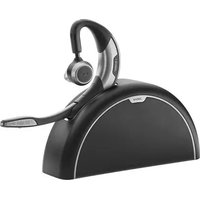
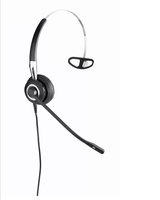
Motion UC+ MS - Headphones JABRA - Free user manual and instructions
Find the device manual for free Motion UC+ MS JABRA in PDF.


| Type de produit | Bluetooth & DECT Headset |
| Dimensions (H x W x D) | ~175 x 145 x 60 mm |
| Poids | ~142 g |
| Alimentation | Rechargeable lithium-ion battery (3.7V, 950 mAh) |
| Autonomie (talk time) | Up to 10 hours |
| Autonomie (standby) | Up to 8 days |
| Portée Bluetooth | Up to 30 m |
| Portée DECT | Up to 150 m |
| Microphone | Noise-canceling microphone |
| Haut-parleurs | 32 ohm loudspeaker |
| Technologie de réduction de bruit | Active noise cancellation (ANC) |
| Connectivité | Bluetooth 4.0, DECT 6.0 |
| Profils Bluetooth supportés | HSP, HFP, A2DP, AVRCP |
| Protocole DECT | GAP compatible |
| Plage de températures de fonctionnement | 0°C à 40°C (32°F à 104°F) |
| Entretien et nettoyage | Clean with a soft, dry cloth. Do not use liquids or solvents. |
| Sécurité | Do not expose to moisture or heat sources. Use only Jabra approved chargers. |
| Pièces détachées et réparabilité | Replaceable ear cushions and battery. Contact Jabra support for service. |
| Informations générales | Designed for UC (Unified Communications). Optimized for Microsoft Lync. |
Frequently Asked Questions - Motion UC+ MS JABRA
User questions about Motion UC+ MS JABRA
0 question about this device. Answer the ones you know or ask your own.
Ask a new question about this device
Download the instructions for your Headphones in PDF format for free! Find your manual Motion UC+ MS - JABRA and take your electronic device back in hand. On this page are published all the documents necessary for the use of your device. Motion UC+ MS by JABRA.
USER MANUAL Motion UC+ MS JABRA
Jabra motion uc Jabra motion uc+
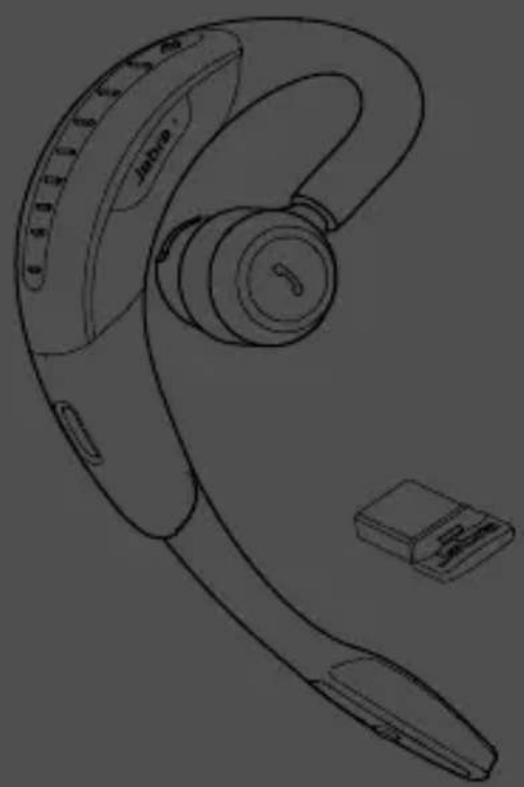
natural_image
Line drawing of a Jahra brand ear with attached microphone and connector (no text or symbols)User Manual
jabra.com/motionuc
- WelcoMe....4
- HeaDset oVeRVIeW....5
2.1 tRaVel & cHaRGe KIt (JabRa Motion Uc+ only)
2.2 JabRa lInK 360
- HoW to WeaR....7
3.1 HeIGHt aDJUstMent
3.2 leFt oR RIGHT eaR WeaRInG stYle
3.3 eaRGel PositionInG
- HoW to cHaRGe 9
4.1 cHaRGInG UsInG tHe MlcRo-Usb cable
4.2 cHaRGInG UsInG tHe Wall cHaRGeR
4.3 cHaRGInG UsInG tHe tRaVel & cHaRGe KIt
4.4 batteRY statUs
- HoW to connect....11
5.1 connect With tHe JabRa InK 360
5.2 Reconnect With tHe JabRa InK 360
5.3 connect WITH a blUetootH DeVIce
5.4 connect With an nFc DeVice
5.5 tRansFeR aUDIo betWeen nFc DeVIce anD HeaDset
6. How to Use ......15
6.1 bUsYlIGHT
6.2 Multiple call HanDllnG
6.3 Voice coMManDs on/off
6.4 List of Voice coMManDs
6.5 List of Voice GUIDance
7. Motion sensoR contRols......22
7.1 call assist
7.2 PoWeR naP
7.3 Intelligent Volume control
8. soFtWaRe 25
8.1 JabRa connect
8.2 JabRa Pc sUlte
8.3 UPDATE HeaDset FIRMWaRe
8.4 cUstoMIZe HeaDset settInGs
9. sUPPoRt 28
9.1 FaQ
9.2 coMPlIance MoDe
9.3 HoW to caRe FoR YoUR HeaDset
10.tecHnIcal sPecIFications ..... 30
1. WelcoMe
Thank you for using the Jabra Motion UC or Jabra Motion UC+. We hope you enjoy it!
Jabra motion uc or motion uc+ features
■ Motion sensor technology for call control, and enhanced audio performance and extended battery performance
■ Power Nap for extended battery performance
■ Intelligent volume control that automatically adjusts to surroundings
■ NFC technology
■ Volume touch controls
■ Voice controls
■ HD Voice
■ Wireless freedom - Up to 100m/300ft
■ Noise Blackout™ 3.0
■ Wind noise protection
- Jabra SafeTone™
- Busylight indicator
■ Adjustable height for perfect fit
2. HeaDset oVeRVIeW


Jabra Link 360 Eargels

3 sizes for custom fit
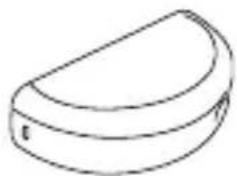
natural_image
Simple line drawing of a semi-circular object with a small protrusion (no text or symbols)Travel & Charge kit Incl. with Jabra Motion UC+

natural_image
Simple line drawing of a plug and cable (no text or symbols)Wall charger

natural_image
Simple line drawing of a USB cable with a connector (no text or symbols)Micro-USB cable
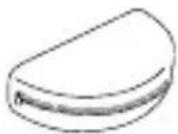
Soft Pouch
Incl. with Jabra Motion UC
note All accessories are also available at jabra.com.
2.1 TRAVEL & CHARGE KIT (JABRA MOTION UC+ ONLY)
The Travel & Charge kit conveniently stores and charges the headset.

natural_image
Illustration of a washing machine and a handheld device connected to a laptop (no text or symbols present)note The Travel & Charge Kit is available as an optional accessory at jabra.com.
2.2 JABRA LINK 360

natural_image
Line drawing of a rectangular electronic component with a handle and label (no readable text or symbols)The Jabra Link 360 is a plug-and-play Bluetooth adapter that connects the headset to your PC.
note: For more information about the Jabra Link 360 visit the Jabra website.
3. How to WeaR

natural_image
Line drawing of a person's head profile showing ear and antenna device (no text or symbols)3.1 HEIGHT ADJUSTMENT
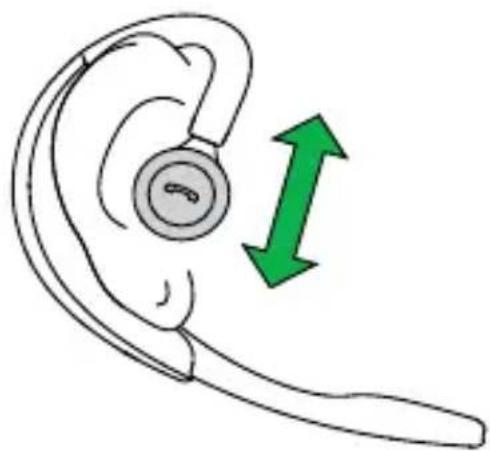
Get the perfect fit for your ear by adjusting the height of the speaker up or down.
natural_image
Illustration of a ear with a circular earpiece and green directional arrows indicating sound or sound pressure (no text or symbols)3.2 LEFT OR RIGHT EAR WEARING STYLE
The headset can be worn on the left or right ear. To switch ear:
- Pull the speaker all the way down.
- Rotate the speaker 180° .
- Twist the eargel around to fit.

3.3 EARGEL POSITIONING
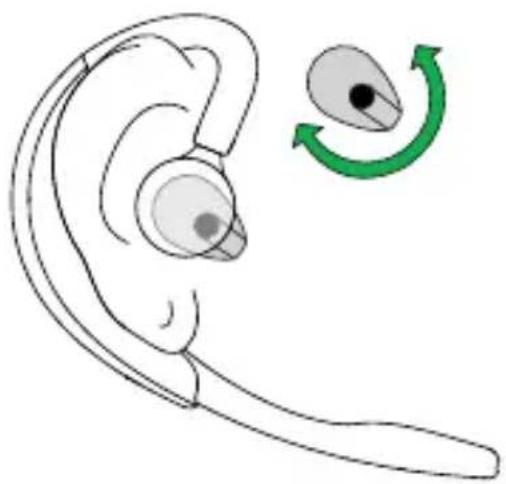
For optimal audio quality rotate the eargel for best fit. It is recommended to try all three eargel sizes to find the optimal fit.
natural_image
Illustration of a ear with an earbell and a green circular arrow indicating rotation (no text or symbols)4. How to cHaRGe
4.1 CHARGING USING THE MICRO-USB CABLE
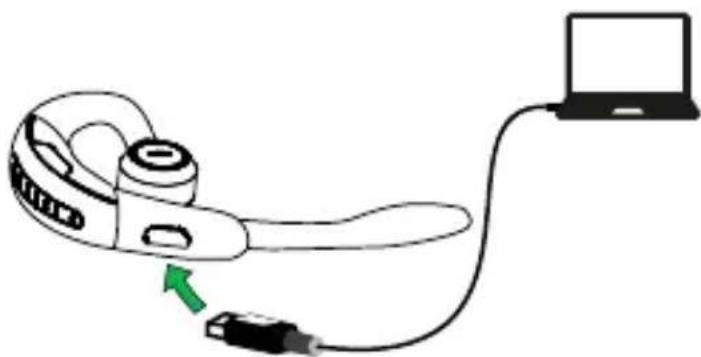
Plug the headset into any available USB port on your PC using the micro-USB cable.
natural_image
Diagram of a handheld device connected to a laptop via cable, with a green arrow indicating the cable's direction (no text or symbols present)4.2 CHARGING USING THE WALL CHARGER
Plug the headset into a power supply using the wall charger.

natural_image
Line drawing of a handheld device connected to an electrical outlet (no text or symbols)note: For safety reasons, it is recommended not to use the headset while it is charging.
4.3 CHARGING USING THE TRAVEL & CHARGE KIT
Dock the headset in the Travel & Charge kit and plug into a power supply using the micro-USB cable or the wall charger.

natural_image
Line drawing of two earbuds connected via cable to a laptop and a power outlet (no text or symbols)4.4 BATTERY STATUS
| in use When charging | |
| 50% - 100% 100% | |
| 10% - 50% 50% - 100% | |
| 0% - 10% 0% - 50% | |
note: It takes 2 hours to fully charge the headset.
5. How to connect
5.1 CONNECT WITH THE JABRA LINK 360
- Plug the Jabra Link 360 into any available USB port on your PC.
- Open the flip boom-arm on the headset to connect to the Jabra Link 360.
- The connection is established when the LED on the Jabra Link 360 stops flashing and shows a solid blue light.

flowchart
graph LR
    A["Laptop"] -->|Green Arrow| B["earband switch"]
    B -->|Green Arrow| C["earboard with Bluetooth Signal"]
note: If the Jabra Link 360 has been connected to other devices, please ensure that all those devices are switched off when connected a new device, as the Jabra Link 360 can only have one active Bluetooth connection. The headset and the Jabra Link 360 come pre-connected from the factory.
5.2 RECONNECT WITH THE JABRA LINK 360
- Remove the Jabra Link 360 from the PC.
- While pressing the call button, open the flip boom-arm on the headset.
- Plug the Jabra Link 360 into the PC to automatically connect to the headset. Connection can take up to 1 minute.

flowchart
graph LR
    A["User Device"] -->|Data Transfer| B["Speaker with Bluetooth Signal"]
    B --> C["User Device"]
5.3 CONNECT WITH A BLUETOOTH DEVICE
- While pressing the call button, open the flip boom-arm. Release the call button when the Bluetooth light flashes blue.
- Wear on the ear and follow the voice-guided connection instructions.

5.4 CONNECT WITH AN NFC DEVICE
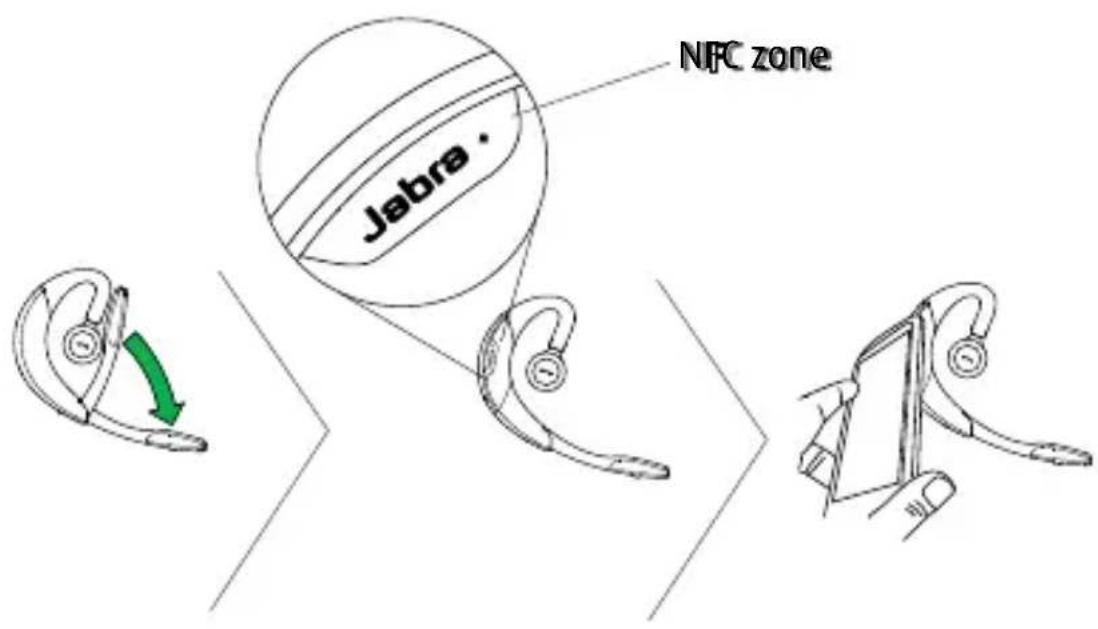
- Ensure that NFC is enabled on your mobile device.
- Open the flip boom-arm on the headset.
- Locate and gently tap the NFC zone on the headset against the NFC zone on your mobile device. The mobile device will announce that the headset is now paired when the connection is successful.
note: NFC devices have NFC implemented in different ways. The size and sensitivity of the NFC zone and how to connect the headset may vary between devices.
5.5 TRANSFER AUDIO BETWEEN NFC DEVICE AND HEADSET
To transfer audio to or from the headset, gently tap the NFC zones of the connected NFC device and the headset. Audio is now transferred:
■ To the headset from the NFC device, or
■ To the NFC device from the headset
note: NFC devices have NFC implemented in different ways. Depending on the NFC device, this feature might not be available.
6. How to Use


On/off Open or close the flip boom-arm
| Answer call | Open the flip boom-arm, or tap thecallbutton if the boom-arm is open | |
 | End call | Close the boom-arm, or tap thecallbutton |
| Talk time status | When not on a call, tap thecallbutton to hear the remaining talk time | |
 | Reject call | Double-tap thecallbutton when there is an incoming call |
| Redial last number | Double-tap thecallbutton when not on a call | |
 | Adjust speaker volume | Slide a finger up/down theVolumetouch-sensitive panel |
 | Voice commands | Tap theVoice and Mutemicrophonebutton when not on a call, until you hear 'Say a command'. Say 'What can I say?' for a list of voice commands |
| Mute/un-mutemicrophone | Tap theVoice and Mutemicrophonebutton during a call to mute the microphone. Tap again to un-mute. |
6.1 BUSYLIGHT
The Busylight indicator has 2 features:
- Incoming call indication (fast flashing red light)
■ On a call indication (slow flashing red light)
note: It is possible to turn the Busylight indicator on/off using Jabra PC Suite or the Jabra Connect app.
6.2 MULTIPLE CALL HANDLING
The headset can accept and handle multiple calls simultaneously.
| End current call and answer incoming call | Tap the call button | |
 | Switch between held call and active call | Press and hold (2 secs) the call button |
| Put current call on hold and answer incoming call | Press and hold (2 secs) the call button | |
 | Reject incoming call | Double-tap the call button |
6.3 VOICE COMMANDS ON/OFF
Voice commands are on by default. To turn voice commands on/off:
- Press and hold the Voice button while opening the flip boom-arm.
- Release the the Voice button when the flip boom-arm is open.

note: It is also possible to turn voice commands on/off using Jabra PC Suite or the Jabra Connect app.
6.4 LIST OF VOICE COMMANDS
Description
What can I say? Hear a list of all voice commands
Answer Answer incoming call
Ignore Reject incoming call
Pair new device Enter pairing mode
Redial Redial last number dialed
Call back Call the phone number that last called you
Battery Hear current battery status
Cancel Cancel voice command
Phone commands
Turns on the connected device's phone commands (e.g. Siri)
| Description |
| Power on |
| Power off |
| Welcome. You are now ready for pairing. Go to the Bluetooth menu on your phone... |
| Pairing cancelled |
| Pairing failed |
| Mobile connected |
| PC connected |
| Two devices connected |
| Not connected |
| Redialing |
| Mute on / Mute off |
| Call from (name or number from phone address book) |
| Unknown caller |
Description
Low battery
Your remaining talk time is...
Say a command
Voice on
Voice off
7. Motion sensoR contRols
7.1 CALL ASSIST
If the flip boom-arm is open, simply pick up the headset from the desk to your ear to automatically answer an incoming call.

To extend battery life always close the flip boom-arm when the headset is not in use. If the flip boom-arm is left open the headset will enter Power Nap mode when it has not been moved for 60 minutes (when Bluetooth connected), or 5 minutes (when Bluetooth not connected). The headset will announce 'Power Off' when it enters Power Nap mode.
To exit Power Nap mode, move or pick up the headset. The headset will announce 'Power On' when exiting Power Nap mode.

NOTE If the headset is in Power Nap mode for 24 hours, the headset will automatically turn off 100% to preserve battery. To turn the headset back on, close the flip boom-arm and then open it.
7.3 INTELLIGENT VOLUME CONTROL
The headset uses Intelligent Volume Control to adjust the headset speaker volume depending on the motion of the wearer, and the sounds of the surrounding environment (e.g. automatically increasing the speaker volume on an active call when walking or entering a noisy environment).

natural_image
Silhouette of a human figure in walking pose with no text or symbolsnote: Motion sensor controls are default-enabled, and can be disabled in Jabra PC Suite and/or the Jabra Connect app.
8. soFtWaRe
8.1 JABRA CONNECT
Jabra Connect is a smartphone app that enables call control and configuration of product settings for selected Jabra devices connected to the smartphone.
■ Android download - Google Play
■ iOS download - App Store
8.2 JABRA PC SUITE
Jabra PC Suite is a collection of software designed to support, manage and enable optimal functionality for Jabra devices. It is highly recommended to download and install Jabra PC Suite.
Download the latest version - jabra.com/pcsuite.
Firmware updates improve performance or add new functionality to Jabra devices. Firmware can be updated in two ways:
■ Launch the Jabra Firmware Updater installed with Jabra PC Suite, and follow the firmware updater wizard, or
- Check for the latest firmware update yabra Control Center > Help > Check for Updates
NOTE: The headset must be connected to the PC via USB.
8.4 CUSTOMIZE HEADSET SETTINGS
With the Jabra Connect app and Jabra PC Suite it is possible to customize headset settings when the headset is connected to your mobile device or PC.
JABRA CONNECT & JABRA PC SUITE (VIA JABRA LINK 360)
■ Busylight indicator
■ Power Nap mode
■ Intelligent Volume Control
■ Voice controls
■ Sound profiles (equalizer)
■ Mute reminder tone
- Call assist
Jabra pc suite only (Via Jabra link 360)
Jabra Safetone™
■ Wireless range (and density performance)
■ Automatic PC Audio detection
■ Target softphone for outgoing calls
■ Pairing (Headset and Jabra Link 360)
Jabra firmWare upDater (installeD With Jabra pc suite)
■ Voice commands/Voice guidance language
note: The headset must be connected directly to PC using the USB cable. To change the voice language, follow the procedure for a normal firmware update and accept the update even when prompted that the headset has the latest firmware. On-screen instructions with language options will become available.
9. sUPPoRt
9.1 FAQ
View the comprehensive FAQ at Jabra.com/motionuc.
Q Why do I hear crackling noises?
A Bluetooth is a radio technology that is sensitive to objects between the headset and the connected device. Ensure the headset and the connected device are within range (up to 100 meters or 300 feet).
Q What is the range of the headset?
A The Jabra Motion UC or Motion UC+ supports the following maximum ranges: - When connected to the Jabra Link 360 the range is up to 100m/300ft. - When talking on (most) Bluetooth devices the range is up to 10m/33ft.
Q Why do I not hear anything?
A You might need to increase the speaker volume, or ensure that the headset is connected to a device.
Q I am having Bluetooth connection problems
A Check your mobile device's Bluetooth menu and delete/forget the headset. Re-connect the headset to your Bluetooth device following the Bluetooth connection instructions.
Q Why doesn't my PC detect the Jabra Link 360?
A Try connecting the Jabra Link 360 to another USB port on the PC that is a direct connection (i.e. not a USB hub connected to the PC).
For compliance with EU Directive 2003/10/EC (Noise at work) and Australian G616 guidelines set the headset into the desired compliance/guideline mode.
- Install and open Jabra PC Suite Control Center.
- Connect the headset using Jabra Link 360.
- In Control Center, set the desired mode by ticking off the box 'SafeTone protection' in the section 'Audio protection'.
for tco compliance:
The headset needs to be set in TCO mode.
- Install and open Jabra PC Suite Control Center.
- Connect the headset using Jabra Link 360.
- In Control Center, set the desired mode by adjusting the 'Wireless range' to setting 'Low' or 'Very low'.
9.3 HOW TO CARE FOR YOUR HEADSET
■ Always store the headset with the power off and safely protected
- Avoid storage at extreme temperatures (above 35°C/95°F or below -20°C/-4°F). This can shorten battery life and may affect headset operation
■ Do not expose the headset to rain or other liquids
10. tecHnIcal sPecIFications
Jabra motion uc anD uc+ heaDset
Description
Weight: 17.5g
Dimensions: L 53.5mm x W 16mm x H 24mm
Microphones:
2 Omni-directional microphones with Jabra Noise Blackout technology
Speaker: Micro dynamic, 14.8mm
Operating range: Up to 100m (300 feet), Class 1
Bluetooth version: 4.0
Paired devices:
Up to 8 stored devices, 2 connected devices at same time (Multiuse™)
Supported Bluetooth profiles:
A2DP (v1.6), Hands free profile (v1.6), Headset profile (v1.2)
Talk time:
Up to 7 hours Up to 5.5 hours (with Busylight on)
Standby time: Up to 15 days
Operating temperature: -10°C to 60°C ( 14°F to 140°F )
Storage temperature: -20°C to 35°C (-4°F to 95°F)
AC power supply 100-240V, 50-60Hz
Pairing passkey or PIN: 0000
Jabra link 360 Description
PC connection: USB 2.0
Bluetooth version: 4.0
Bluetooth range: Up to 100m (300 feet), Class 1
Bluetooth profiles: A2DP (v1.2), Hands free profile (v1.6)
Simultaneous Bluetooth connections:
1
Bluetooth audio bandwidth Wideband (HD voice), A2DP
Visual indicators: Multicolor LED
- Jabra motion uc Jabra motion uc+
- How to Use ......15
- Motion sensoR contRols......22
- soFtWaRe 25
- sUPPoRt 28
- 10.tecHnIcal sPecIFications ..... 30
- WelcoMe
- Jabra motion uc or motion uc+ features
- HeaDset oVeRVIeW
- TRAVEL & CHARGE KIT (JABRA MOTION UC+ ONLY)
- JABRA LINK 360
- How to WeaR
- HEIGHT ADJUSTMENT
- LEFT OR RIGHT EAR WEARING STYLE
- EARGEL POSITIONING
- How to cHaRGe
- CHARGING USING THE MICRO-USB CABLE
- CHARGING USING THE WALL CHARGER
- CHARGING USING THE TRAVEL & CHARGE KIT
- BATTERY STATUS
- How to connect
- CONNECT WITH THE JABRA LINK 360
- RECONNECT WITH THE JABRA LINK 360
- CONNECT WITH A BLUETOOTH DEVICE
- CONNECT WITH AN NFC DEVICE
- TRANSFER AUDIO BETWEEN NFC DEVICE AND HEADSET
- How to Use
- BUSYLIGHT
- MULTIPLE CALL HANDLING
- VOICE COMMANDS ON/OFF
- LIST OF VOICE COMMANDS
- Description
- Motion sensoR contRols
- CALL ASSIST
- INTELLIGENT VOLUME CONTROL
- soFtWaRe
- JABRA CONNECT
- JABRA PC SUITE
- CUSTOMIZE HEADSET SETTINGS
- JABRA CONNECT & JABRA PC SUITE (VIA JABRA LINK 360)
- Jabra pc suite only (Via Jabra link 360)
- Jabra firmWare upDater (installeD With Jabra pc suite)
- sUPPoRt
- FAQ
- Q Why do I hear crackling noises?
- Q What is the range of the headset?
- Q Why do I not hear anything?
- Q I am having Bluetooth connection problems
- Q Why doesn't my PC detect the Jabra Link 360?
- for tco compliance:
- HOW TO CARE FOR YOUR HEADSET
- tecHnIcal sPecIFications
- Jabra link 360 Description
Brand : JABRA
Model : Motion UC+ MS
Category : Headphones