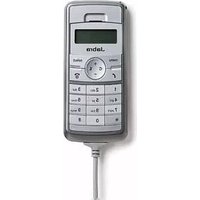
DIAL 520 OC - Headphones JABRA - Free user manual and instructions
Find the device manual for free DIAL 520 OC JABRA in PDF.


| Product Type | DECT Wireless Headset |
| Brand | Jabra |
| Model | DIAL 520 OC |
| Dimensions | 150 x 60 x 170 mm (headset) |
| Weight | 150 g |
| Power Supply | Rechargeable Li-ion battery, 5V DC via charging base |
| Battery Life | Up to 12 hours talk time, 100 hours standby |
| Maximum Operating Range | Up to 150 m (open area) |
| Audio Features | Wideband audio, noise-canceling microphone, volume control, mute |
| Control Buttons | Answer/end call, mute, volume up/down, power |
| Connectivity | DECT, compatible with desk phones and softphones |
| Headset Design | Over-the-head, single ear or binaural option |
| Ear Cushions | Replaceable foam/leatherette cushions |
| Base Station | Charging cradle with connection to desk phone |
| Compatibility | Jabra Link adapter, most desk phones, PC/Mac softphones |
| Safety Certifications | CE, FCC, RoHS compliant |
| Cleaning | Wipe with soft dry cloth; do not use liquids or solvents |
| Environmental Conditions | Operating temperature: -10°C to 50°C |
| Spare Parts Available | Ear cushions, battery, charging base, headband |
| Intended Use | Office telephony, call centers, unified communications |
Frequently Asked Questions - DIAL 520 OC JABRA
User questions about DIAL 520 OC JABRA
0 question about this device. Answer the ones you know or ask your own.
Ask a new question about this device
Download the instructions for your Headphones in PDF format for free! Find your manual DIAL 520 OC - JABRA and take your electronic device back in hand. On this page are published all the documents necessary for the use of your device. DIAL 520 OC by JABRA.
USER MANUAL DIAL 520 OC JABRA
WHAT YoUR HAndset CAn do....2;
BefoRe fiRst time Use....2;
mAKing A CALL....3;
AnsWeRing A CALL 3;
teRminAting A CALL....3;
mUting A CALL....4;
deleting A digit 4;
need sUppoRt? 5;
WARning! 7;
THANK YOU
Thank you for purchasing the Jabra DIAL 520 OC. We hope you enjoy it! This instruction manual will get you started and ready to make the most of your handset.
ABOUT YOUR JABRA diAl 520 Oc
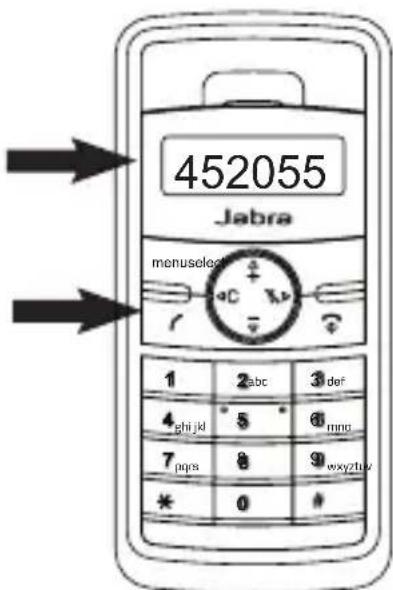
1 Menu button
2 Delete button
Press 'C' to delete the last dialled digit
3 Call button
4 Volume up
Press '+' to increase the volume
5 Volume down
Press '-' to decrease the volume
6 Mute button
7 Select button
8 End call button
-can also be used as an escape button

WHAT YOUR HANdseT cAN dO
Your Jabra DIAL 520 OC lets you do all this:
- Place calls
- Answer calls
- Terminate calls
- Mute
- Delete a digit
BeFORe FiRsT Time Use
You should follow these steps before using your handset
1) Connect the Jabra DIAL 520 OC to the USB port on your computer.
2) The product will install automatically as 'Jabra DIAL 520 OC' in Windows.
3) Once installed, the handset is ready for use.
mAKiNg A cAll
- Key in the digits.
The numbers will appear in the display. - Press the 'call' button
- There is a ringing tone
ANsWeRiNg A cAll
- The display light will flash
- To accept the call press the 'call button'

TeRmiNATiNg A cAll
- Press the 'end call' button.

mUTiNg A cAll
- To mute the handset, press the 'mute' button.
'Mute_on' will appear in the display.
- To unmute the handset, press the 'mute' button again.
You can resume the conversation instantly.

deleTiNg A digiT
- To delete a dailled digit press the 'C' button

Need sUppORT?
If you are having problems with your headset solution that are not addressed by the information in this manual, then please feel free to contact Jabra technical support at any the locations listed below.
eUROpe
Web (for the latest support info and online User Manuals):
www.jabra.com
e-mail: techsupport@gn.com
Phone:
Belgique/Belgium +49 (0)8031 2651 72, Email: techsupport@gn.com
Czech Republic 800 522 722
Danmark +45 45 75 99 99, Email: support.dk@gn.com
Deutschland +49 (0)8031 2651 72, Email: techsupport@gn.com
España +34 916 398 064
France +33 (0) 130 589 075, Email: techsupport@gnnetcom.fr
Italia +39 02 5832 8253
Luxembourg +49 (0)8031 2651 72, Email: techsupport@gn.com
Nederland +49 (0)8031 2651 72, Email: techsupport@gn.com
Web (for the latest support info and online User Manuals):
www.jabra.com
E-mail Technical support: techsupp@jabra.com
E-mail Information: info@jabra.com
Phone (toll-free in USA and Canada):
Canada 1-800-489-4199
USA 1-800-826-4656
AsiA/pAciFic
Web (for the latest support info and online User Manuals):
www.jabra.com
Phone (toll free)
Australia 1800636086 - local distributor CS/1800-083-140- GN APAC CS
China +86-21-5836 5067
Hong Kong 800-968-265 (Toll free)
India 000-800-852-1185 (Toll free)
Indonesia 001-803-852-7664
Japan +81-3-5297-7976
Malaysia 1800-812-160 (Toll free)
New Zealand 0800-447-982 (Toll free)
Philippines 1800-765-8068 (Toll free)
Singapore 800-860-0019 (Toll free)
Taiwan 0080-186-3013 (Toll free)
Store your Jabra DIAL 520 OC when not use
- You can store Jabra DIAL 520 OC in the black Jabra bag when not in use
- You can attach Jabra DIAL 520 OC to the monitor via the magnet which is provided together with product
- Do not expose the Jabra DIAL 520 OC to rain or other liquids.
The enclosed magnet is for attaching the handset to, for example, a wall, a desk or a monitor. Do not leave the magnet close to any hard disk as this can result in damage and data loss.
This is a class A product. In a domestic environment this product may cause radio interference in which case the user may be required to take adequate measures.
EMEA
DESCRIPTION OF SAFETY
For your protection and comfort, GN Netcom A/S ("GN") has implemented several protective measures in this headset which are carefully designed to maintain safe volume levels and ensure that the headset operates in compliance with government safety standards.
This headset is suitable for indoor use only.
WARNING!
Permanent hearing loss may result from long-term exposure to sounds at loud volumes. Use as low a volume as possible.
Headsets are capable of delivering sounds at loud volumes and high pitched tones. Under certain circumstances, exposure to such sounds can result in permanent hearing loss or damage. The volume level may vary based on conditions such as the phone you are using, its reception and volume settings, and the environment. Avoid prolonged use of the headset at excessive sound pressure levels. Please read the safety guidelines below prior to using this headset.
YOU CAN REDUCE THE RISK OF HEARING DAMAGE BY FOLLOWING THESE SAFETY GUIDELINES
1. Prior to using this headset follow these steps:
- Before putting on the headset, turn the volume control to its lowest level,
• Put the headset on, and then
• Slowly adjust the volume control to a comfortable level.
2. During use of this headset
- Keep the volume at the lowest level possible and avoid using the headset in noisy environments where you may be inclined to turn up the volume;
• If increased volume is necessary, adjust the volume control slowly;
- Ringing in the ears may indicate that the sound levels are too high;
• If you experience any discomfort or ringing in your ears, immediately discontinue using the headset and consult a physician;
and
- Stop using the headset if it causes great discomfort.
With continued use at a high volume, your ears may become accustomed to the sound level, which may result in permanent damage to your hearing without any noticeable discomfort.
Use caution while using your headset when you are engaging in any activity that requires your full attention. While engaging in any such activity, removing the headset from your ear or turning off your headset will keep you from being distracted, so as to
avoid accident or injury.
SAfETY InfOrMATION
- Unplug the headset during lightning, storms, or when unused for long periods of time.
- Use of a headset will impair your ability to hear other sounds.
Use caution while using your headset when you are engaging in any activity that requires your full attention.
- Keep out of reach from children. This package contains small parts that may be hazardous to children. The bags themselves, or the many small parts they contain, may cause choking if ingested.
- Never try to dismantle the headset yourself, or push objects of any kind into the headset, as this may cause short circuits which could result in a fire or electric shock.
- None of the components can be replaced or repaired by users. Only authorized dealers or service centers may open the headset. If any parts of your headset require replacement for any reason, including normal wear and tear or breakage, contact your local dealer.
- Avoid exposing the headset to moisture, rain, or other liquids to protect against damage of the headset or injury to you.
- Protect the cord from being walked on or pinched, particularly at plugs and the point where it exits from the headset.
- Do not use in areas where there are explosive hazards.
- The product may hold small objects in the area of the earpiece.
- Do not use in areas where there are explosive hazards.
- Dispose of the headset according to local standards and regulations.
MAInTEnAnCE
- Unplug the headset before cleaning.
- Clean the headset by wiping it with a dry or slightly damp cloth as required. The cord may be dry-dusted as required.
- Avoid getting moisture or other liquids into any button sockets
or other openings.
- Do not immerse the headset or cord in water.
For full user manual and maintenance in your local language, please go to your local Jabra® website and search for your product in the menu system.
For information on warranty please go to www.jabra.com.
EUROPE Declaration
This product is CE marked according to the provisions of the R & TTE Directive (99/5/EC). Hereby, GN Netcom A/S declares that this product is in compliance with the essential requirements and other relevant provisions of Directive 99/5/EC. For further information please consult http://www.jabra.com.
WARRANTY
Limited One (1) -Year Warranty
GN Netcom A/S, warrants this product to be free from defects in materials and workmanship (subject to the terms set forth below) for a period of one (1) year from the date of purchase ("Warranty Period"). During the Warranty Period, GN Netcom A/S will repair or replace (at GN Netcom A/S's discretion) this product or any defective parts ("Warranty Service"). If repair or replacement is not commercially practicable or cannot be timely made, GN Netcom A/S may choose to refund to you the purchase price paid for the affected product. Repair or replacement under the terms of this warranty does not give right to any extension or a new beginning of the period of warranty.
Claims under the Warranty
To obtain Warranty Service, please contact the GN Netcom A/S dealer from which you purchased this product or visit www.jabra.com for further information about customer support. You will need to return this Product to the dealer or ship it to the dealer or to GN Netcom A/S (if so indicated on www.jabra.com) in either its original packaging or packaging affording an equal degree of protection. You will bear the cost of shipping the product to GN Netcom A/S. If the Product is covered by the warranty, GN Netcom A/S will bear the cost of shipping product back to you after the completion of service under this warranty. Return shipping will be charged to you for products not covered by the warranty or
requiring no warranty repair.
The Following information must be presented to obtain Warranty Service: (a) the product, and (b) proof of purchase, which clearly indicates the name and address of the seller, the date of purchase and the product type, which is evidence that this product is within the Warranty Period. Please further include (c) your return address. (d) daytime telephone number, and (e) reason for return. As part of GN Netcom A/S/Jabra's efforts to reduce environmental waste you understand that the product may consist of reconditioned equipment that contains used components, some of which have been reworked. The used components all live up to GN Netcom A/S/Jabra's high quality standards and comply with the GN Netcom A/S product performance and reliability specifications. You understand that replaced parts or components will become the property of GN Netcom A/S.
Limitation of Warranty
This warranty is only valid for the original purchaser and will automatically terminate prior to expiration if this product is sold or otherwise transferred to another party. The warranty provided by GN Netcom A/S in this statement applies only to products purchased for use, and not for resale. It does not apply to open box purchases, which are sold
“as is” and without any warranty. Specifically exempt from warranty are limited-life consumable components subject to normal wear and tear, such as microphone windscreens, ear cushions, modular plugs, ear tips, decorative finishes, batteries, and other accessories. This warranty is invalid if the factory-applied serial number, date code label, or product label has been altered or removed from this product. This Warranty does not cover cosmetic damage or damage due to misuse, abuse, negligence, Acts of Nature, accident, disassembling or modification of, or to any part of, the product. This Warranty does not cover damage due to improper operation, maintenance or installation, or attempted repair by anyone other than GN Netcom A/S or a GN Netcom A/S dealer which is authorized to do GN Netcom A/S warranty work. Any unauthorized repairs will void this warranty. REPAIRS OR REPLACEMENTS AS PROVIDED UNDER THIS WARRANTY ARE THE EXCLUSIVE REMEDY OF THE CONSUMER. GN Netcom A/S SHALL NOT BE LIABLE FOR ANY INCIDENTAL OR CONSEQUENTIAL DAMAGES FOR BREACH OF ANY EXPRESS OR IMPLIED WARRANTY ON THIS PRODUCT. EXCEPT TO THE EXTENT PROHIBITED BY LAW, THIS WARRANTY IS EXCLUSIVE AND IN
LIEU OF ALL OTHER EXPRESS AND IMPLIED WARRANTIES WHAT SO EVER, INCLUDING BUT NOT LIMITED TO THE WARRANTY OF MERCHANTABILITY AND FITNESS FOR A PRACTICAL PURPOSE. NOTE! This warranty gives you specific legal rights. You may have other rights which vary from location to location. Some jurisdictions do not allow the exclusion or limitation of incidental or consequential damages or implied warranties, so the above exclusions may not apply to you. This warranty does not affect your legal (statutory) rights under your applicable national or local laws.
CErTIfICATlOn
CE This product is CE marked according to the provisions of the R & TTE Directive (99/5/EC). Hereby, GN Netcom A/S, declares that this product is in compliance with the essential requirements and other relevant provisions of Directive 1999/5/EC. For further information please consult http://www.jabra.com. Within the EU this device is intended to be used in Austria, Belgium, Bulgaria, Cyprus, Czech Republic, Denmark, Estonia, Finland, France, Germany, Greece, Hungary, Ireland, Italy, Latvia, Lithuania, Luxembourg, Malta, Poland, Portugal, Romania, Slovakia, Slovenia, Spain, Sweden, The Netherlands, United Kingdom, and within EFTA in Iceland, Norway and Switzerland.
Bluetooth The Bluetooth® word mark and logos are owned by the Bluetooth SIG, Inc. and any use of such marks by GN Netcom A/S is under license. Other trademarks and trade names are those of their respective owners.
nA
DESCrIPTION Of SAFETY
For your protection and comfort, GN Netcom, Inc. ("GN") has implemented several protective measures in this headset which are carefully designed to maintain safe volume levels and ensure that the headset operates in compliance with government safety standards.
This headset is suitable for indoor use only.
WArning
Permanent hearing loss may result from long-term exposure to sound at high volumes. Use as low a volume as possible. Headsets are capable of delivering sounds at loud volumes and high pitched tones. Under certain circumstances, exposure to
such sounds can result in permanent hearing loss damage. The volume level may vary based on conditions such as the phone you are using, its reception and volume settings, and the environment. Avoid prolonged use of the headset at excessive sound pressure levels. Please read the Safety Guidelines below prior to using this headset.
YOU CAN REDUCE THE RISK OF HEARING DAMAGE BY FOLLOWING THESE SAFETY GUIDELINES
1. Prior to using this product follow these steps
- Before putting on the headset, turn the volume control to its lowest level;
- Put the headset on; and then
- Slowly adjust the volume control to a comfortable level.
2. During the use of this product
- Keep the volume at the lowest level possible and avoid using the headset in noisy environments where you may be inclined to turn up the volume;
- If increased volume is necessary, adjust the volume control slowly;
- Ringing in the ears may indicate that the sound levels are too high;
- If you experience discomfort or ringing in your ears, immediately discontinue using the headset and consult a physician; and Stop using the headset if it causes great discomfort.
With continued use at high volume, your ears may become accustomed to the sound level, which may result in permanent damage to your hearing without any noticeable discomfort.
Use caution while using your headset when you are engaging in any activity that requires your full attention. While engaging in any such activity, removing the headset from your ear or turning off your headset will keep you from being distracted, so as to avoid accident or injury.
SAFETY INFORMATION
- Unplug the headset during lightning, storms, or when the headset is not used for long periods of time.
- Use of a headset will impair your ability to hear other sounds. Use caution while using your headset when you are engaging in any activity that requires your full attention.
• The headset, the headset stand and the power adapter (the
"products") are not toys – never allow children to play with the products and always store the products out of reach from children.
- This package contains small parts that may be hazardous to children. The bags themselves, or the many small parts they contain, may cause choking if ingested.
- Never try to dismantle the products yourself, or push objects of any kind into the products, as this may cause short circuits which could result in a fire or electric shock.
- None of the components can be replaced or repaired by users. Only authorized dealers or service centers may open the products. If any parts of the products require replacement for any reason, including normal wear and tear or breakage, contact your local dealer.
- Avoid exposing the products to moisture, rain, or other liquids to protect against damage of the products or injury to you.
- Keep the products, including cords and cables, away from operating machinery.
- Do not block any ventilation opening and protect the cables from being walked on or pinched, particularly at plugs and the point where they exit from the products.
- If the products overheat, if the products have been dropped or damaged, if the products have a damaged cord or plug, or if the products have been dropped in a liquid, immediately discontinue use and contact GN.
- Do not use in areas where there are explosive hazards.
- Dispose of the products according to local standards and regulations.
MAINTENANCE
- Unplug the headset before cleaning.
- Clean the headset by wiping it with a dry or slightly damp cloth as required. The cord may be dry-dusted as required.
- Avoid getting moisture or other liquids into any button sockets or other openings.
- Do not immerse the headset or cord in water.
For full user manual and maintenance in your local language, please go to your local Jabra® website and search for your product in the menu system.
USA / CANADA WARRANTY
Limited One (1) Year Warranty
GN Netcom, Inc. ("GN") warrants to the end-user purchasing the products from a distributor or reseller, that the products shall be free from defects in materials and workmanship subject to the terms set forth below ("Warranty") for a period of one (1) year from the date of such purchase ("Warranty Period"). If the products are sold or otherwise transferred to another party, the Warranty will automatically terminate prior to expiration.
During the Warranty Period, GN will repair or replace (at GN's sole discretion) the products or any defective parts ("Warranty Service"), provided the products are returned to GN. The Warranty sets forth the extent and limit of GN's obligation towards the end-user of the products except as modified by applicable Law.
How to Obtain Warranty Service
For customer service and technical support, please go to www.jabra.com.
To obtain Warranty Service, please contact the GN dealer from which you purchased the products.
You must return the products in their original packaging, if possible, or packaging affording an equal degree of protection. During the Warranty Period, you will bear the cost of shipping the products to GN. If the product is covered by this Warranty, GN will bear the cost of shipping the product back to you after service has been completed. Return shipping will be charged to you for products not covered by the Warranty or requiring no warranty repair. Damage occurred during shipment is deemed the responsibility of the carrier, and any claim should be made directly to said carrier.
The following information must be presented to obtain Warranty Service:
- The defective products
-
Your name, company name if applicable, address, and telephone number.
-
A description of the problem.
-
Proof of purchase which clearly indicates the name and address of the distributor or reseller, date of purchase, product type and model number. Without proof of purchase, your Warranty Period will commence on the date labeled on the headset.
As part of GN's efforts to reduce environmental waste you understand that the products may consist of reconditioned equipment that contain used components, some of which have been reworked. The used components all live up to GN's high
quality standards and comply with GN's product performance and reliability specifications. You understand that replaced parts or components will become the property of GN.
LIMITATIONS Of WArrAnTY
The Warranty applies only to products purchased for use, not for resale. Specifically exempt from warranty are limited-life consumable components subject to normal wear and tear, such as microphone windscreens, ear cushions, modular plugs, ear tips, ear hooks, decorative finishes, batteries, and other accessories including all foam products. The Warranty is invalid if the factory-applied serial number, date code label, and/or product label has been altered or removed from the products.
The Warranty applies only to defective factory material and factory workmanship, and does not cover defects or damages caused by or attributable to (a) improper storage or faulty installation and operation; misuse or abuse; accident or neglect, such as physical damage (cracks, scratches, etc.) to the surface of the products, (b) alterations, repair, or maintenance attempted by anyone other than GN or a GN dealer which is authorized to do GN warranty work, (c) contact with any liquid, (d) use of the products or accessories for commercial purposes or subjecting the products, or accessories, to improper or abnormal usage or conditions, or (e) other acts which are not the fault of GN.
Furthermore, the Warranty does not cover defects or damages that result from the use of non-GN branded or certified products, accessories, or other peripheral equipment.
The Warranty does not apply to products which have not been charged for six (6) months. If the battery in a product has not been charged for a period of six (6) months, the product might not function or regain its full potential and long-term performance.
GN does not offer any warranty for such performance.
It is the owner's responsibility to operate and care for the products in accordance with the instructions and specifications supplied with the products. Repairs resulting from failure to do so are not covered by the Warranty.
REPAIRS OR REPLACEMENTS AS PROVIDED UNDER THIS WARRANTY ARE THE EXCLUSIVE REM→EDY OF THE END-USER. NEITHER GN NOR YOUR RETAIL DEALER OR SELLING DISTRIBUTOR SHALL BE LIABLE FOR ANY INCIDENTAL OR CONSEQUENTIAL DAMAGES FOR BREACH OF ANY EXPRESS OR IMPLIED WARRANTY ON THE PRODUCTS INCLUDING WITHOUT LIMITATION COMMERCIAL LOSS, INCIDENTAL EXPENSES, LOSS OF TIME,
OR INCONVENIENCE. EXCEPT TO THE EXTENT PROHIBITED BY LAW, THE WARRANTY IS EXCLUSIVE AND IN LIEU OF ALL OTHER EXPRESS AND IMPLIED WARRANTIES WHATSOEVER, INCLUDING BUT NOT LIMITED TO THE WAR-RANTY OF MERCHANTABILITY AND FITNESS FOR A PRACTICAL PURPOSE.
NOTE!
The Warranty gives you specific legal rights. You may also have other rights which vary from state to state. Some jurisdictions do not allow the exclusion or limitation of incidental or consequential damages or implied warranties, so the above exclusions may not apply to you. The Warranty does not affect your statutory legal rights under your applicable national or local laws.
Cautionary Notes to Computer Users:
When using any product with a computer, care should be taken in dry or low humidity environments to protect the user from electrostatic discharge from the monitor (CRT). Computer monitors can induce a substantial electrostatic charge when turned on or off, or when there is a power failure, and the resulting electrostatic discharge can be passed through the product to ground. A user in close proximity to or touching the computer may feel a common “shock” sensation, similar to touching a door knob after walking across a carpet, causing no harm to the user. This discharge is entirely due to the computer monitor, the product is merely the shortest path to ground. To minimize the possibility of electrostatic discharge through the product, you can:
- Use a grounded screen in front of the monitor.
- Use static dissipative wrist straps.
- Increase the relative humidity in the room to 60% or more.
• Install static dissipative carpets or floor covering. - Remove the product before turning the computer on or off.
GN Netcom, Inc. products meet OSHA, FCC and CSA standards.
USA DECLARATION
USA FCC part 15
This equipment has been tested and found to comply with the limits for a Class B digital device, pursuant to part 15 of the FCC Rules.
These limits are designed to provide reasonable protection against harmful interference in a residential installation.
The device may not be connected directly to the telephone
network, but must connect to a FCC registered telephone.
WARRANTY
Limited One (1) -year Warranty:
GN Netcom, Inc. warrants this product to be free from defects in materials and workmanship (subject to the terms set forth below) for a period of one (1) year from the date of purchase (“Warranty Period”). During the Warranty Period, GN will repair or replace (at GN’s discretion) this product or any defective parts (“Warranty Service”). If repair or replacement is not commercially practicable or cannot be timely made, GN may choose to refund to you the purchase price paid for the affected product. Repair or replacement under the terms of this warranty does not give right to any extension or a new beginning of the period of warranty.
Claims under the Warranty:
To obtain Warranty Service, please contact the GN dealer from which you purchased this product or visit www.jabra.com for further information about customer support. You will need to return this Product to the dealer or ship it to the dealer or to GN (if so indicated on www.jabra.com) in either its original packaging or packaging affording an equal degree of protection. You will bear the cost of shipping the product to GN. If the Product is covered by the warranty, GN will bear the cost of shipping product back to you after the completion of service under this warranty. Return shipping will be charged to you for products not covered by the warranty or requiring no warranty repair. The Following information must be presented to obtain Warranty Service: (a) the product, and (b) proof of purchase, which clearly indicates the name and address of the seller, the date of purchase and the product type, which is evidence that this product is within the Warranty Period. Please further include (c) your return address, (d) daytime telephone number, and (e) a detailed reason for return. As part of GN/Jabra's efforts to reduce environmental waste you understand that the product may consist of reconditioned equipment that contains used components, some of which have been reworked. The used components all live up to GN/Jabra's high quality standards and comply with the GN product performance and reliability specifications. You understand that replaced parts or components will become the property of GN.
Limitation of Warranty:
This warranty is only valid for the original purchaser and will automatically terminate prior to expiration if this product is sold or otherwise transferred to another party. The warranty provided by GN in this statement applies only to products purchased for use, and not for resale. It does not apply to open box purchases, which are sold “as is” and without any warranty. Specifically exempt from warranty are limited-life consumable components subject to normal wear and tear, such as microphone windscreens, ear cushions, modular plugs, ear tips, decorative finishes, batteries, and other accessories. This warranty is invalid if the factory-applied serial number, date code label, or product label has been altered or removed from this product. This Warranty does not cover defects or damages that result from: (a) improper storage, misuse or abuse, accident or neglect, such as physical damage (cracks, scratches, etc.) to the surface of the product resulting from misuse; (b) contact with liquid, water, rain, extreme humidity or heavy perspiration, sand, dirt or the like, extreme heat, or food; (c) use of the products or accessories for commercial purposes or subjecting the product or accessories to abnormal usage or conditions; or (d) other acts which are not the fault of GN. This Warranty does not cover damage due to improper operation, maintenance or installation, or attempted repair by anyone other than GN or a GN dealer which is authorized to do GN warranty work. Any unauthorized repairs will void this Warranty. This Warranty does not cover defects or damages that result from the use of non-GN branded or certified products, accessories, or other peripheral equipment.
rEPAIrS Or rEPLACEMEnTS AS PROVIDED UnDEr ThIS WArrAnTY ArE ThE EXCLUSIVE rEM¬EDY Of ThE COn-SUMEr. gn ShALL nOT BE LIABLE fOr AnY InCIDEnTAL Or COnSEQUEnTIAL DAMAgES fOr BrEACH Of AnY EXPrESS Or IMPLIED WArrAnTY On ThIS PRODUCT. EXCEPT TO ThE EXTEnT PrOhIBITED BY LAW, ThIS WArrAnTY IS EXCLUSIVE AnD In LIEU Of ALL OThEr EXPrESS AnD IMPLIED WArrAn-TIES WhATSOEVER, InCLUDIng BUT nOT LIMITED TO ThE WAr¬rAnTY Of MErChAnTABILITY AnD fITnESS fOr A PrACTICAL PUrPOSE.
NOTE! This warranty gives you specific legal rights. You may have other rights which vary from location to location. Some jurisdictions do not allow the exclusion or limitation of incidental or consequential damages or implied warranties, so the above exclusions may not apply to you. This warranty does not affect
your legal (statutory) rights under your applicable national or local laws.
Jabra
MADE IN KOREA

TYPE: DIAL 520
© 2009 GN Netcom US. All rights reserved. Jabra® is a registered trademark of GN Netcom A/S. All other trademarks included herein are the property of their respective owners. The Bluetooth® word mark and logos are owned by the Bluetooth SIG, Inc. and any use of such marks by GN Netcom A/S is under license. (Design and specifications subject to change without notice).

- THANK YOU
- ABOUT YOUR JABRA diAl 520 Oc
- WHAT YOUR HANdseT cAN dO
- Your Jabra DIAL 520 OC lets you do all this:
- BeFORe FiRsT Time Use
- ANsWeRiNg A cAll
- TeRmiNATiNg A cAll
- mUTiNg A cAll
- deleTiNg A digiT
- Need sUppORT?
- eUROpe
- Phone (toll-free in USA and Canada):
- AsiA/pAciFic
- Phone (toll free)
- Store your Jabra DIAL 520 OC when not use
- EMEA
- DESCRIPTION OF SAFETY
- WARNING!
- YOU CAN REDUCE THE RISK OF HEARING DAMAGE BY FOLLOWING THESE SAFETY GUIDELINES
- Prior to using this headset follow these steps:
- During use of this headset
- and
- SAfETY InfOrMATION
- MAInTEnAnCE
- For information on warranty please go to www.jabra.com.
- EUROPE Declaration
- WARRANTY
- Limited One (1) -Year Warranty
- Claims under the Warranty
- Limitation of Warranty
- CErTIfICATlOn
- nA
- WArning
- Prior to using this product follow these steps
- During the use of this product
- USA / CANADA WARRANTY
- Limited One (1) Year Warranty
- How to Obtain Warranty Service
- LIMITATIONS Of WArrAnTY
- NOTE!
- Cautionary Notes to Computer Users:
- USA DECLARATION
- USA FCC part 15
- Limited One (1) -year Warranty:
- Claims under the Warranty:
- Limitation of Warranty:
- Jabra
Brand : JABRA
Model : DIAL 520 OC
Category : Headphones