Hard Beat SPK409 - Loudspeaker Manta - Free user manual and instructions
Find the device manual for free Hard Beat SPK409 Manta in PDF.


| Product Type | Bluetooth Speaker |
| Model | Hard Beat SPK409 |
| Brand | Manta |
| Dimensions (Approx.) | 200 x 80 mm (height x diameter) |
| Weight (Approx.) | 500 g |
| Power Input | DC 5V via Micro USB |
| Battery Type | Rechargeable Li-ion (built-in) |
| Charging Time (Approx.) | 2-3 hours |
| Playback Time (Approx.) | 4-6 hours at medium volume |
| Bluetooth Version | 4.0+ (typical) |
| Bluetooth Range (Approx.) | 10 m |
| Supported Audio Sources | Bluetooth, FM Radio, Micro SD Card (up to 32GB), USB Flash Drive (up to 32GB), Aux-in (3.5mm) |
| Audio Format | MP3 (from USB/SD) |
| FM Radio | Yes (requires Micro USB cable as antenna) |
| Hands-free Calling | Yes (built-in microphone) |
| LED Light | Yes, 7-color with 5 flashing modes |
| Controls | Power/Play/Pause/Call, Mode, Volume +/- , Next/Previous Track, LED light control |
| Speaker Output (Approx.) | 5-10 W (typical portable speaker) |
| Frequency Response (Approx.) | 20 Hz - 20 kHz |
| Operating Temperature | 0-40 °C |
| Safety & Disposal | Keep away from children, do not expose to fire/humidity. Dispose according to WEEE directive. |
Frequently Asked Questions - Hard Beat SPK409 Manta
User questions about Hard Beat SPK409 Manta
0 question about this device. Answer the ones you know or ask your own.
Ask a new question about this device
Download the instructions for your Loudspeaker in PDF format for free! Find your manual Hard Beat SPK409 - Manta and take your electronic device back in hand. On this page are published all the documents necessary for the use of your device. Hard Beat SPK409 by Manta.
USER MANUAL Hard Beat SPK409 Manta
natural_image
Close-up of a cylindrical device with a grid pattern and color gradient, no visible text or symbols.Instrukcja obsługi
User's Manual
Bedienungsanleitung
Manual de usuario
Istruzioni d'uso
Návod k obsluze
natural_image
Symbol of a trash bin with crossed lines indicating no waste or discharge (no text or labels): Long press to power on/off; Pause/ play the music; answer/ end a phone call.
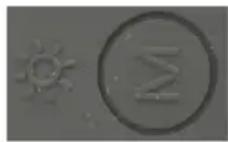
: Short press to switch Bluetooth/FM radio/ Micro SD card/USB /Line in mode when in dierent model; Long press to close the display light.
Note: all together 5 ashing modes, long press for changing each ashing mode, then turn o the light.
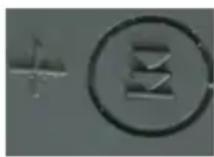
:long press for "Volume up", short press for " next song"

:long press for "Volume down", short press " for last song"
Bluetooth Mode
Turn on the device, and LED will flash rapidly and will try pairing. Follow the operating instructions for Bluetooth connection on your device and allow searching Bluetooth speaker
Usually this is done by going to “set up” menu, connect for “Bluetooth” function and then selecting the option to search for Bluetooth devices
Your device (mobile phone,PC, tablet,etc.)will detect the Bluetooth speaker and ask if you wish to connect with the speaker. Press "Yes" or "confirm" to confirm this action
if your phone requires a password or a PIN number, enter 0000 and confirm it.
After connection, you can adjust volume & select last/next song by
pressing
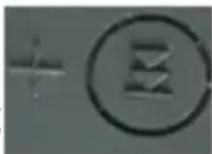
and
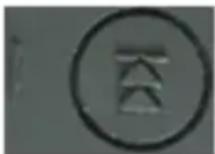
Volume down.If you want to
get the coming phone call, short press
, then you can
make phone call by the speaker(SPK409). Press again to end the phone call. And the speaker will recover playing music if audio source don't be stopped. ( support in MP)
Music play Mode
Short press in 2 seconds
, the system will remind"
Music mode' after insert the card before switching to music mode, otherwise it will not notice the "Music mode" without USB Flash disk. it will be played music from TF card from 128MB to 32GB.
Short press in 1 second again, music keep playi

to make music pause, press it
USB playback Mode
Short press in 2 second
, the system will remind" Music
mode' after insert the card before switching to music mode, otherwise it will not notice the “Music mode” without USB Flash disk. it will be played music from that from 128MB to 32GB. Short
press in 1 second music keep playing.
to make music pause, press it again,
Aux-input Mode
To connect with the speaker by Aux in cable to PC ,Mobile or other audio source by Line in cable .And the system will remind "AUX input mode" then audio signal can be played by the speaker from
external audio resource. Short press in 5 second switch to other modes
During the Line in mode, long press volume up&down
& for
FM Mode
Short Press in 2 seconds, switch to the FM radio, pls connect with the micro USB as an antenna before short pressing the to search station, and it will be save channels automatically, don't
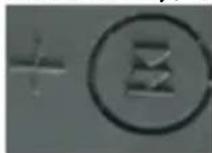
need to search it again when turn on .Short press
&
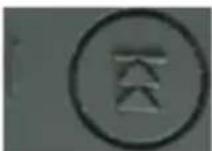
to the last &next station, and long
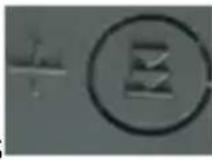

press
&
to increase and decrease the volume
LED Light
Short press
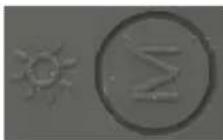
press again, it can be on.
in 5 seconds, the LED light can be off, shore
Charging
Charge the speaker in "OFF" mode through the USB cable from a computer or through a DC adaptor.
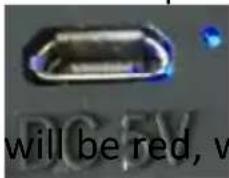
Status LED Indicaon light will be o
will be red, when charge full, the
If charge that in "ON" mode through the USB cable from a computer or through a DC adaptor, the LED with 7 colors will ash all the me
Indicator Light
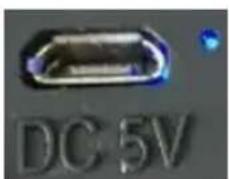
• Blue LED flashing : Speaker is in Bluetooth mode
• Blue LED flashing rapidly: Bluetooth is pairing
• Blue LED keep on : Bluetooth connected
• Blue LED flashing slow: Music play by Micro SD;
- Blue LED keep on: Music play is paused
• Blue led keep on: Line in Mode
- Red LED on : connected to speaker through USB charge cable
• Red LED off: the speaker is charged full
Note:
Do not let children play with the product
Do not throw the product into fire
Do not use in very humid or high/low temperature environments.
Product performance will decrease when used in such environments.

natural_image
Symbol of a trash bin crossed with no text or numbers, representing waste sorting or disposal (no text present)
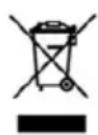
Correct Disposal of this product.
This marking indicates that this product should not be disposed with other household wastes throughout the EU. To prevent possible harm to the environment or human health from uncontrolled waste disposal, recycle it responsibly to promote the sustainable reuse of material resources. To return your used device, please use the return and collecon systems or contact the retailer where the product was purchased. They can take this product for environmental safe recycling.
Note!
Product design and Technical parameters may be change without noce. This mainly concerns parameters technical, software and user manual present. User's Manual is a general orientation on service product. Manufacturer and distributor do not assume any responsibility as compensation for any inaccuracies errors in the descripons appearing in this user manual.
natural_image
Abstract black-and-white circular logo design with interlocking curved shapes (no text or symbols)MANTA
INFOLINIA SERWISOWA
from Monday to Friday. 9.00-17.00
The manufacturer reserves the right to make changes to product specifics without noce.
Home: www.manta.com.pl
Home support: www.manta.info.pl


Made in P.R.C.
FOR MANTA EUROPE
Brand : Manta
Model : Hard Beat SPK409
Category : Loudspeaker