
TR-54 MK4 - Radio DENVER - Free user manual and instructions
Find the device manual for free TR-54 MK4 DENVER in PDF.


User questions about TR-54 MK4 DENVER
0 question about this device. Answer the ones you know or ask your own.
Ask a new question about this device
Download the instructions for your Radio in PDF format for free! Find your manual TR-54 MK4 - DENVER and take your electronic device back in hand. On this page are published all the documents necessary for the use of your device. TR-54 MK4 by DENVER.
USER MANUAL TR-54 MK4 DENVER
Operating Instructions
natural_image
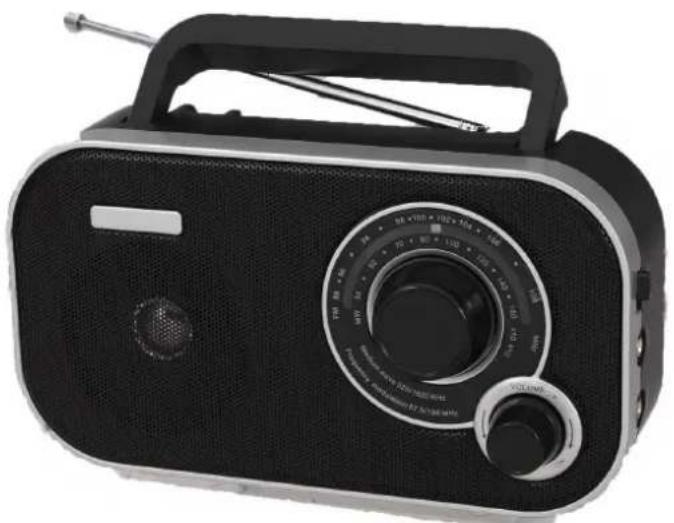
Black portable radio with analog dial and antenna (no visible text or symbols)www.facebook.com/denverelectronics
COMPONENTS
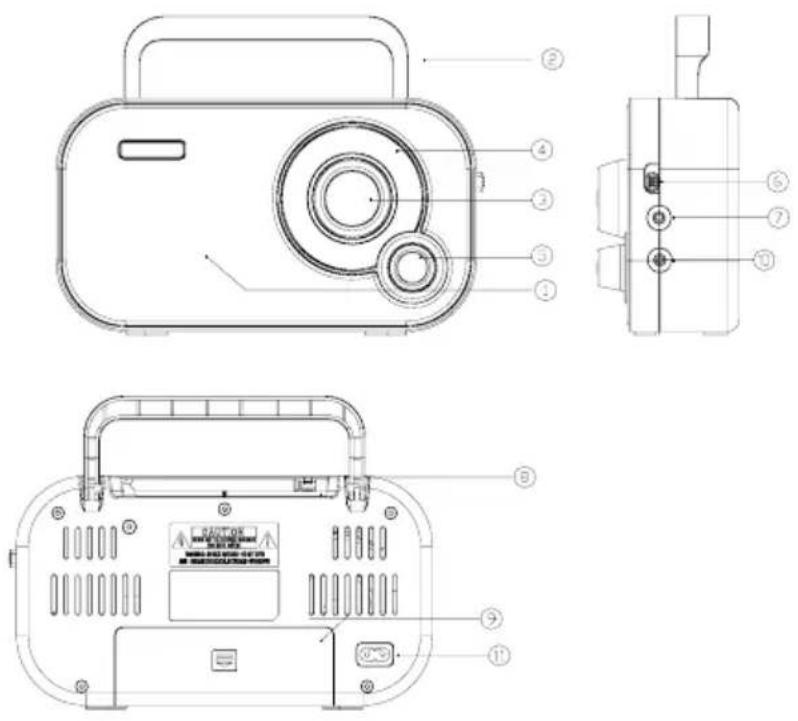
- Speaker
- Carrying handle
- Frequency turning
- Frequency display
- VOLUME ON/OFF
- AM /FM BAND SWITCH
- Aux in jack
- Telescopic antenna
- Battery compartment
- Headphone jack
- AC Socket
INSERTING THE BATTERIES
- Before inserting the batteries, the unit must be turned off and unplugged.
The power cable must be disconnected from the connector jack AC 230V, otherwise battery operation is not possible.
-
Open the battery compartment (9) on the unit's bottom side.
-
Insert 4 batteries, type 1.5V AA.
Heed the correct polarity of all batteries as indicated in the battery compartment.
- Close the battery compartment. The unit is ready for use.
OPERATING THE RADIO
- Set the frequency band with the frequency band switch AM FM (3).
When using (FM) frequency band, pull out the telescopic antenna (8) completely.
Reception can be improved by turning the radio and adjusting the antenna.
An internal ferrite antenna is installed for receiving MW (AM) stations.
To improve reception of MW (AM) stations, turn the radio appropriately.
- To turn on the radio, turn the dial VOLUME OFF (5) in direction VOLUME.
- Increase the volume by turning the dial VOLUME OFF in direction VOLUME.
- Set the desired frequency, which can be seen in the frequency display (4), by turning the dial TUNING.
- Carry the unit by the carrying handle (2).
- To turn off the radio, turn the dial VOLUME OFF in direction OFF as far as it will go.
AUX in jack
An external playing device (e.g. MP3 player) can be connected to this device using the AUX connection and music can be played back via the speakers. Attention: Before connecting your playing device, always observe its instructions regarding the safety information and use.
Switch off the device and its external playing device.
HEADPHONE JACK
Headphones with a 3.5 mm jack plug can be connected to the headphone jack (10). The speaker (1) is muted automatically when connecting headphones. Set the headphone volume with the dial
VOLUME OFF.
CLEANING AND MAINTENANCE

Attention! Do not use alcohol, acetone, benzene, scouring cleaning agents, etc., to clean the synthetic parts of the device. Do not use hard brushes or metallic objects..
The blender must be turned off and unplugged before every cleaning.
Wipe off the unit regularly with a dry rag. Remove the batteries from the battery compartment for extended periods of disuse. Leaking batteries can damage the unit. Store the unit at a dry, cool place shielded from moisture and direct sunlight.
TECHNICAL DATA
Frequency band: (FM) 87.5 – 108 MHz
MW (AM) 540 – 1600 KHz
Operating voltage: 230V\~50Hz, battery operation (4x 1.5V AA)
ALL RIGHTS RESERVED, COPYRIGHT DENVER ELECTRONICS A/S
DENVER®
www.denver-electronics.com



Electric and electronic equipment contains materials, components and substances that can be hazardous to your health and the environment, if the waste material (discarded electric and electronic equipment) is not handled correctly.
Electric and electronic equipment is marked with the crossed out trash can symbol, seen below. This symbol signifies that electric and electronic equipment should not be disposed of with other household waste, but should be disposed of separately.
All cities have established collection points, where electric and electronic equipment can either be submitted free of charge at recycling stations and other collection sites, or be collected from the households. Additional information is available at the technical department of your city.
Imported by:
Inter Sales A/S
Omega 5A
Soeften 8382 Hinnerup
Denmark
www.facebook.com/denverelectronics