Gooseneck LED Touch Desk Lamp KL-L008 - Desk lamp Easy Home - Free user manual and instructions
Find the device manual for free Gooseneck LED Touch Desk Lamp KL-L008 Easy Home in PDF.


| Product Type | LED Desk Lamp |
| Model | KL-L008 |
| Brand | Easy Home |
| Dimensions | Base: 15 cm diameter; Arm: 40 cm height; Total height: 50 cm |
| Weight | 0.7 kg |
| Power Supply | USB 5V DC (cable included) |
| Power Consumption | 5 W |
| Light Source | Integrated LED (non-replaceable) |
| Color Temperature | 3000K (warm white) |
| Brightness Levels | 3 adjustable levels via touch sensor |
| Material | Aluminum gooseneck, ABS plastic base |
| Touch Control | Yes, touch-sensitive base |
| Adjustable Arm | Flexible gooseneck for directional lighting |
| Cleaning Instructions | Wipe with a soft dry cloth; do not use liquids or abrasives |
| Safety Precautions | Do not immerse in water; use only with provided USB cable; keep away from heat sources |
| Spare Parts Availability | Contact manufacturer for USB cable replacement; LED not replaceable |
| Repairability | Not designed for user repair; consult professional if needed |
| General Information | Ideal for reading, working, or ambient lighting; energy-efficient |
Frequently Asked Questions - Gooseneck LED Touch Desk Lamp KL-L008 Easy Home
User questions about Gooseneck LED Touch Desk Lamp KL-L008 Easy Home
0 question about this device. Answer the ones you know or ask your own.
Ask a new question about this device
Download the instructions for your Desk lamp in PDF format for free! Find your manual Gooseneck LED Touch Desk Lamp KL-L008 - Easy Home and take your electronic device back in hand. On this page are published all the documents necessary for the use of your device. Gooseneck LED Touch Desk Lamp KL-L008 by Easy Home.
USER MANUAL Gooseneck LED Touch Desk Lamp KL-L008 Easy Home
natural_image
Black adjustable lamp with curved handle and conical base (no text or symbols)English.....3
Español.....12
Contents
Parts list....3
Contents ....3
Assembly 4
General informaon....5
Safety instrucons 6
User Instrucons 8
How to use....8
Cleaning and maintenance....9
Other useful informaon ....10
Technical specicaons 10
Storing 10
FCC 11
Main parts
A. Lamp body base
B. Touch power switch
C. Lamp head
D. A/C adapter
E. A/C adapter Input
F. A/C connector
G. Flexible neck
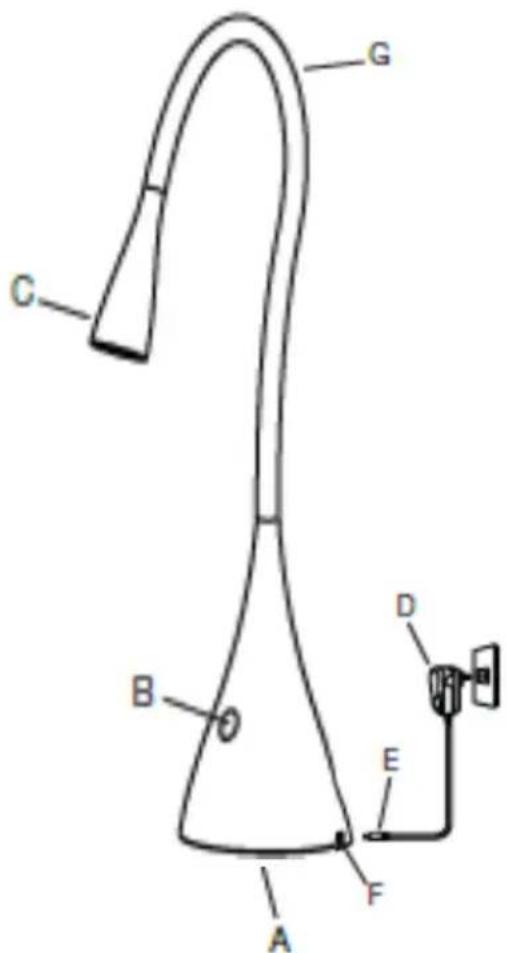
text_image
C G B D E F AContents of packaging
- Gooseneck LED touch desk lamp
- A/C adapter
- Instrucon manual
Assembly
- Remove lamp from packing and place lamp base (A) at on a steady surface.
- Connect the A/C adapter input (E) into connector (F) in the rear boom of the lamp.
- Plug the A/C adapter (D) into a standard household 120V AC outlet. ONLY USE WITH THE SUPPLIED A/C ADAPTER TO AVOID DAMAGE OR FIRE.
DO NOT USE ANY ABRASIVE MATERIALS TO CLEAN THE SURFACE
DO NOT IMMERSE THE DESK LAMP IN WATER OR ANY OTHER LIQUID AT ANYTIME
General informaon
When using the Gooseneck LED Touch Desk Lamp, basic safety precautions should always be followed. PLEASE READ AND SAVE ALL INSTRUCTIONS BEFORE USING THE GOOSENECK LED TOUCH DESK LAMP.
- To avoid possible electrocuon, do not operate this lamp near a water source.
- For Indoor use only.
- Keep out of reach of children or animals.
- Only use the lamp with the supplied A/C adapter to avoid damage or re.
- Unplug the lamp from the outlet when not in use and before cleaning.
- To protect against electric shock, do not immerse cord, plug, or lamp in water or any other liquid.
- Do not use in bathroom or any other damp place.
- It is recommended that you unplug the lamp during lightning storms or when not in use for long periods of me.
- Do not cut, shorten or alter the power cord.
- Always li the lamp by the base.
- Do not operate the lamp with a damaged cord or plug or if the lamp malfuncons, or has been damaged in any manner. Return the lamp to the nearest authorized service facility for examinaon, repair or refund.
- Never move the lamp by pulling the cord.
- Place the lamp on a at surface and ensure there are no ammable materials around it.
- Do not use the lamp with a damaged outlet.
- Make sure your hands are dry when plugging in and unplugging the lamp.
- Do not use this lamp for other than intended use.
- This lamp is not intended for use by persons (including children) with reduced physical, sensory, or mental capabilities, or lack of experience and knowledge, unless they have been given supervision or instrucon concerning the use of the lamp by a person responsible for their safety.
- The lamp head (C) included in this unit cannot be replaced by the consumer.
SAVE ALL INSTRUCTIONS!
Safety instrucons
WARNING: Read and understand all instrucons. Failure to follow all instrucons listed below may result in electric shock, re or serious personal injury. The warnings, cauons, and instrucons discussed in this instrucon manual cannot cover all possible conditions and situations that may occur. It must be understood by the operator that common sense and cauon are a factor which cannot be built into this product, but must be supplied by the operator.
CAUTION: A short power supply cord is provided to reduce the risk of personal injury resulting from becoming entangled in or tripping over a longer cord. Extension cords are available from local hardware stores and may be used if care is exercised in their use. If an extension cord is required, special care and cauon is necessary. Also the cord must be: (1) marked with an electrical rang of 125V, and at least 13 A., 1625 W., and (2) the cord must be arranged so that it will not drape over the countertop or tabletop where it can be pulled on by children or tripped over accidentally.
Electric power
If electric circuit is overloaded with other appliances, your lamp may not operate properly. The lamp should be operated on a separate electrical circuit from other operang appliances.

Safety warning
Although your lamp is easy to operate, for your safety, the warnings below must be followed:
- Do not place the lamp near a heat source.
- Never leave the lamp unaended while connected to the electrical outlet.
- Use the lamp on a stable work surface away from water.
-
Do not unplug from the wall socket by pulling on the supply cord.
-
The lamp must be unplugged:
A. Aer each use.
B. If it appears to be faulty.
C. Before cleaning or maintenance.
- The lamp head (C) might get hot aer several hours of connuous use. DO NOT place your hands directly on LED light source located in the front of the lamp head (C). Turn lamp o and wait unl lamp head (C) is cool before handling.
THIS PRODUCT IS INTENDED FOR HOUSEHOLD USE ONLY. SAVE THESE INSTRUCTIONS!
How to use the gooseneck LED touch desk lamp
- Turn the lamp ON & OFF using power switch (B) located in the front upper side of the base (A). Power switch (B) is a “touch” switch that controls the 3 levels of brightness.
-
To change the LED sengs, lightly touch the switch (B) for the following:
a. First touch will turn the lamp ON to the lowest seng.
b. Second touch will change it to the medium brightness
c. Third touch will change it to the highest brightness
d. Fourth touch will turn the lamp OFF. -
To posion the lamp head (C), simply bend the exible neck (G) as needed. Hold the lamp base (A) while adjusting the lamp head (C).
-
The lamp head (C) included in this unit cannot be replaced by the consumer.
THIS PRODUCT IS INTENDED FOR HOUSEHOLD USE ONLY. SAVE THESE INSTRUCTIONS!
Cleaning and maintenance
CAUTION:
Always be sure that the lamp is turned OFF, unplugged and completely cooled before cleaning or aempng to store. NEVER IMMERSE lamp in water or any other liquid.
- Use a dry dust cloth to periodically clean the lamp.
- If necessary, you may use a so damp cloth to wipe the lamp base, neck and head. Make sure the lamp is turned o, unplugged and cooled completely before wiping it down with a damp cloth.
- The lamp should be completely dried before plugging it back in and turning it ON.
DO NOT USE ANY ABRASIVE MATERIALS TO CLEAN THE SURFACE
DO NOT IMMERSE THE DESK LAMP IN WATER OR ANY OTHER LIQUID AT ANY TIME
SAVE THESE INSTRUCTIONS!
Other useful informaon
Technical specicaons
Model Number KL-L008
Rang Voltage 120V
Nominal Power 3W, LED
Storing
• Always unplug the lamp before storing.
- Store the lamp in a dry locaon in the original box if possible.
- Do not place any heavy items on top of the lamp during storage as this may result in possible damage.
Service center
If you have any quesons in regards to the operaon of this lamp or are in need of a spare part, please contact our service center at:
Tel: 1-888-367-7373
Business Hours: Mon-Fri 10:00am – 5:00pm EST
Email: help@myproduct.care

Environmental protecon
If the lamp should no longer work at all, please make sure that it is disposed of in an environmentally friendly way.
Other useful informaon
FCC PART 15
This device complies with Part 15 of the FCC Rules. Operaon is subject to the following two conditions: (1) this device may not cause harmful interference, and (2) this device must accept any interference received, including interferences that may cause undesired operaon.
Warning: Changes or modicaons to this unit not expressly approved by the party responsible for compliance could void the user's authority to operate the equipment.
NOTE: This equipment has been tested and found to comply with the limits for a Class B digital device, pursuant to Part 15 of the FCC Rules. These limits are designed to provide reasonable protecon against harmful interference in a residential installaon. This equipment generates, uses and can radiate radio frequency energy and, if not installed and used in accordance with the instrucons, may cause harmful interference to radio communicaons.
However, there is no guarantee that interference will not occur in a particular installaon. If this equipment does cause harmful interference to radio or television recepon, which can be determined by turning the equipment o and on, the user is encouraged to try to correct the interference by one or more of the following measures:
- Reorient or relocate the receiving antenna.
- Increase the separaon between the equipment and receiver.
- Consult the dealer or an experience radio/TV technician for help.
- Connect the equipment into an outlet on a circuit dierent from that to which the receiver is connected.
Contenido
Lista de componentes ...... 13
Contenido 13
Ensamblaje 14
Información general....15
text_image
C G B D E A F*We recommend you keep the receipt with this warranty card
Locaon of purchase
Descripon of malfuncon:
natural_image
Black adjustable desk lamp with curved handle and base (no text or symbols visible)Return your completed warranty card to:
Wachsmuth & Krogmann, Inc.
1015 Hawthorn Drive
Itasca, IL
60143
USA
help@myproduct.care
AFTER SALES SUPPORT 52149

888 367 7373

help@myproduct.care
MODEL: KL-L008
03/2017
Hotline:
888-367-7373
Operang hours:
Monday – Friday
10:00am - 5:00pm EST

YEAR WARRANTY AÑOS DE GARANTÍA
ALDI INC. FULL WARRANTY CONDITIONS
Dear Customer:
The ALDI warranty is a fully warranty oering you the following benets:
Warranty period: 2 years from date of purchase.
6 months for movable parts and consumables under normal and proper conditions of use (e.g. rechargeable baeries).
Costs: Free repair/exchange or refund.
No transport costs.
ADVICE: Please contact our service hotline by phone, e-mail or fax before sending in the device. This allows us to provide support in the event of possible operator errors.
In order to make a claim under the warranty, please send us:
The faulty item with all the component parts, the original receipt and the warranty card properly completed.
The warranty does not cover damage caused by:
Accident or unanticipated events (e.g. lightning, water, re).
Improper use or transport.
Failure to follow the safety and maintenance instrucons.
Other improper treatment or modicaon of the product.
Aer the expiraon of the warranty period, you may wish to have your product repaired at your own expense.
This warranty gives you specific legal rights, and you may also have other rights which vary from state to state but this warranty is not intended to exceed statutory minimum requirements beyond what is included above.
This warranty does not limit the statutory obligaon of the seller arising from any implied warranes. The period of warranty can only be extended in accordance with applicable law.
Neither the service company nor ALDI will assume any liability for data or sengs stored on any returned product.
TARJETA DE GARANTÍA
LÁMPARA TÁCTIL A LED CON CUELLO DE CISNE PARA ESCRITORIO
Sus datos:
Nombre ____
Dirección

reo electrónico
Fecha de la compra*
natural_image
Black adjustable showerhead with a curved handle and pointed base (no text or symbols visible)10:00 a.m. - 5:00 p.m. EST
2
YEAR WARRANTY AÑOS DE GARANTÍA
Esmado cliente: