ISD300 - Uncategorized SEH - Free user manual and instructions
Find the device manual for free ISD300 SEH in PDF.


| Product Type | Intelligent Spooling Device (Print Spooler/Print Appliance) |
| Models | ISD300, ISD300-PoE (Power over Ethernet), ISD300-SSD (Solid State Disk) |
| Interfaces | 2 x USB 2.0 High Speed, 1 x RJ45 (10BaseT/100BaseTX) |
| Network Type | 10BaseT / 100BaseTX Ethernet |
| Power Supply | External power adapter (standard model); PoE (IEEE 802.3af) for PoE model |
| Power Consumption | Approximately 10% of a typical server or PC; fanless design |
| Boot Time | Less than 10 seconds |
| Management | Web browser-based (transparent), ISD Manager software (Windows) for multiple devices |
| Main Functions | Efficient print job spooling, automatic printer detection, central printer driver management, load balancing, copy queue, repository print, ThinPrint gateway, cluster/copy printing |
| Security | Access protection, encrypted printing (TSL/SSL), ThinPrint SSL, Windows Active Directory support |
| Integrated DHCP/DNS Server | Yes |
| Automatic Printer Driver Installation | Yes (Point-and-Print, ISD Printer Driver Wizard) |
| ThinPrint Support | Integrated ThinPrint .print Client, compatible with AutoConnect and Output Gateway |
| Backup & Restore | Simple backup via ISD Manager (download .backup file, upload to device) |
| Warranty | 3 years |
| Dimensions (approx.) | Compact desktop unit (exact dimensions not provided, similar to typical network appliance) |
| Weight | Lightweight (exact weight not provided) |
| Operating Environment | Fanless, quiet, energy-saving; suitable for branch offices and workgroups |
| Operating Systems | ISD Manager supports Windows Vista, XP, 2000; device independent of OS |
Frequently Asked Questions - ISD300 SEH
User questions about ISD300 SEH
0 question about this device. Answer the ones you know or ask your own.
Ask a new question about this device
Download the instructions for your Uncategorized in PDF format for free! Find your manual ISD300 - SEH and take your electronic device back in hand. On this page are published all the documents necessary for the use of your device. ISD300 by SEH.
USER MANUAL ISD300 SEH
Smart NETWORK Solutions

text_image
Phi Pollen Pause Untitled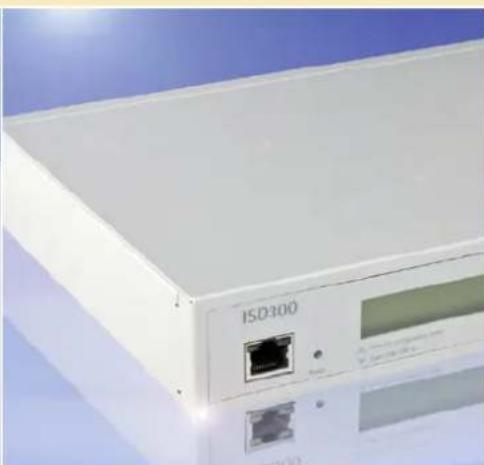
natural_image
Close-up of a white electronic device labeled 'ISO300' against a blue sky background (no readable text beyond label)
natural_image
Exterior view of a modern multi-story office building at dusk, illuminated by a twilight sky (no signage or text visible)ISD300 Intelligent Spooling Device
text_image
ISD300 SEH Print Appli · EfficientThinPrint®
Print Appliance and Print Spooler
· Efficient management of all print jobs and queues in a network
- Relief of server resources
- Ideal for branch offices and workgroups: Quiet – works without a fan
- Integrated ThinPrint ^ .print Client
- Cluster/Copy Printing
- Highly available
· 3 years warranty
Installation and Management
- Quick, simple installation (printers are detected automatically)
- Transparent management via browser
• Automatic printer driver installation
• Integrated DHCP and DNS-Server
Comprehensive Security Packet
- Access Protection
- Encrypted Printing TSL/SSL, ThinPrint SSL
• Support of Windows Active Directory
Also available as ISD300-PoE with Power-over-Ethernet technology (PoE, standard IEEE 802.3a): The devices are powered via the Ethernet data cable directly, eliminating the need for an external power connection. PoE enables independence from power circuits. And the costs of deployment, extension, and maintenance of networks can be signifi cantly reduced.
New! ISD300-SSD with integrated Solid State Disk (SSD). This model offers all advantages of SSD technology, such as greater system stability in case of shock and vibration as well as enhanced endurance.
MODELS
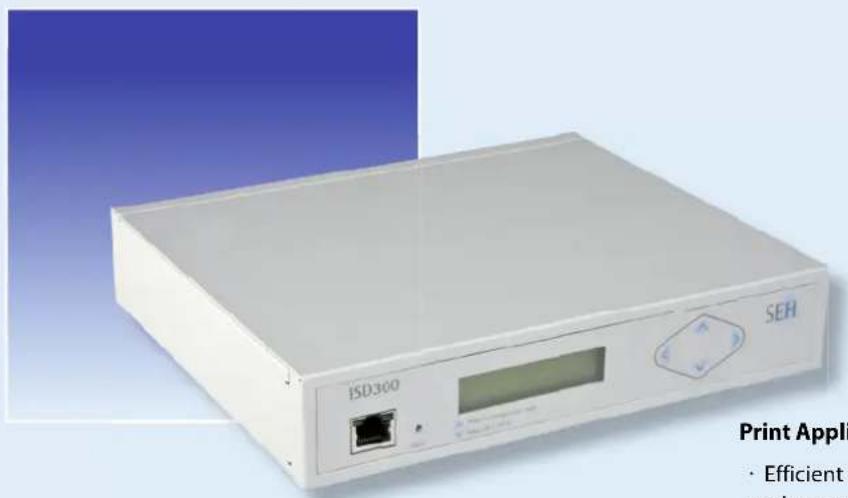
ISD300
ISD300-PoE
New! ISD300-SSD
INTERFACES
2 USB 2.0 HS
2 USB 2.0 HS
2 USB 2.0 HS
NETWORK TYPE
10BaseT/100BaseTX
10BaseT/100BaseTX
10BaseT/100BaseTX
CONNTECTOR
RJ45
RJ45
RJ45
Spooling is one of the core tasks in any network because voluminous print jobs (intensive use of graphic elements, color printing etc.) require a lot of bandwidth. The ISD300 Intelligent Spooling Device provides for the efficient spooling of all print jobs and the management of all available printers as print queues in any network where print job spooling is otherwise managed by central servers. The ISD300 is SEH's network spooling solution with a strong focus on cost-saving and user-friendlyness.
Existing server resources can be relieved by up to 40 per cent!
In peer-to-peer networks without a central server ISD300 allows for central print job management. It simplifies the administration of network printing so you can transparently administrate your network printing. The device significantly relieves the work stations by taking over the spooling of large print jobs.
BENEFITS
- No extra hardware costs for mouse, keyboard, monitor etc.
- No extra software costs for licences, free updates
- Minimum maintenance, maximum system stability, and highest availability of print services
- No specially trained staff required
- Energy-saving: no fan, needs only 10 per cent of the energy required by a server or PC in the same place
- Many value-added features – many fields of application!
FEATURES
• Efficient and transparent print job spooling with many management options
- Securing and boosting server performance
- Fast and simple installation
• Automatical localization of printers
- Highest availability of all print services in the network
· Simple and fast back-up
- Boots in less than 10 seconds
- Comprehensive security package
- And much more!
FIELDS OF APPLICATION
• Workgroup solution for small to medium businesses
- Decentralized sprint spooler in large businesses and organizations
- Outlets and branch offices without a central server
· WAN environments
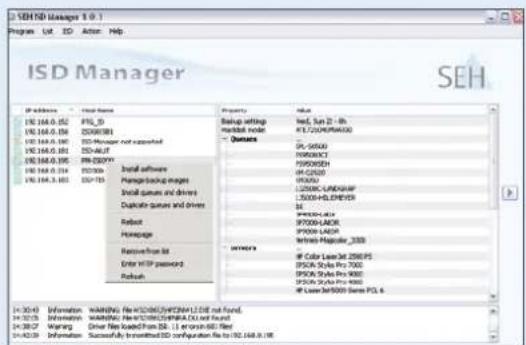
New! ISD Manager for Easy Administration of several ISD Appliances!
The ISD Manager is a new management software utility to efficiently monitor all ISD300 devices in a network as well as manage updates, back-ups, queues, and printer drivers.
Especially handy: You can use the ISD Manager to create a database with all queues and printer drivers in the network, which is very convenient and easy to keep up-to-date. The queues and drivers stored this way can be individually combined for each ISD appliance, enabling users to configure the devices flexibly.
Easy and secure back-up management: Just download the back-up files with the ISD Manager and save them to a selected location. If required, this file is simply uploaded to an ISD300 as software.
The ISD Manager is currently available for Windows networks (Vista, XP, Windows 2000).
There are a great number of operation scenarios for ISD300. On the following pages you will find some examples!
text_image
ISD Manager 10.1 Program List ID Active Help ISD Manager SEH IP address: IP address ISO_164.0.162 ISO_164.0.163 ISO_164.0.164 ISO_164.0.165 ISO_164.0.166 ISO_164.0.167 ISO_164.0.168 ISO_164.0.169 ISO_164.0.170 ISO_164.0.171 ISO_164.0.172 ISO_164.0.173 ISO_164.0.174 ISO_164.0.175 ISO_164.0.176 ISO_164.0.177 ISO_164.0.178 ISO_164.0.179 ISO_164.0.180 ISO_164.0.181 ISO_164.0.182 ISO_164.0.183 ISO_164.0.184 ISO_164.0.185 ISO_164.0.186 ISO_164.0.187 ISO_164.0.188 ISO_164.0.189 ISO_164.0.190 ISO_164.0.191 ISO_164.0.192 ISO_164.0.193 ISO_164.0.194 ISO_164.0.195 ISO_164.0.196 ISO_164.0.197 ISO_164.0.198 ISO_164.0.199 ISO_164.0.200 ISO_164.0.201 ISO_164.0.202 ISO_164.0.203 ISO_164.0.204 ISO_164.0.205 ISO_164.0.206 ISO_164.0.207 ISO_164.0.208 ISO_164.0.209 ISO_164.0.210 ISO_164.0.211 ISO_164.0.212 ISO_164.0.213 ISO_164.0.214 ISO_164.0.215 ISO_164.0.216 ISO_164.0.217 ISO_164.0.218 ISO_164.0.219 ISO_164.0.220 ISO_164.0.221 ISO_164.0.222 ISO_164.0.223 ISO_164.0.224 ISO_164.0.225 ISO_164.0.226 ISO_164.0.227 ISO_164.0.228 ISO_164.0.229 ISO_164.0.230 ISO_164.0 Setup setting system modeQueens
IP-SEKU PENKCHT PENKCHS IP-CAUU LZONCK-LNDAHPF LZONCK-LNDYERS IP-CCDC-DAUC IP-TOOOL-AUCR IP-TOOOL-LADR IP-TOOOL-HAOCER IP-TOOOL-HAOCER IP-TOOOL-HAOCER IP-TOOOL-HAOCER IP-TOOOL-HAOCER IP-TOOOL-HAOCER IP-TOOOL-HAOCER IP-TOOOL-HAOCER IP-TOOOL-HAOCER IP-TOOOL-HAOCER IP-TOOOL-HAOCERA IP-TOOOL-HAOCERA IP-TOOOL-HAOCERA IP-TOOOL-HAOCERA IP-TOOOL-HAOCERA IP-TOOOL-HAOCERA IP-TOOOL-HAOCERA IP-TOOOL-HAOCERA IP-TOOOL-HAOCERA IP-TOOOL-HAOCERA IP-TOOOL-HAOCEROA IP-TOOOL-HAOCEROA IP-TOOOL-HAOCEROA IP-TOOOL-HAOCEROA IP-TOOOL-HAOCEROA IP-TOOOL-HAOCEROA IP-TOOOL-HAOCEROA IP-TOOOL-HAOCEROA IP-TOOOL-HAOCEROA IP-TOOOL-HAOCEROADecentralized Printing Without ISD300
flowchart
graph TD
    A["Print Job"] --> B["LAN / WAN"]
    B --> C["Headquarters London"]
    C --> D["Print Job"]
    D --> E["Sales Office Hamburg"]
    E --> B
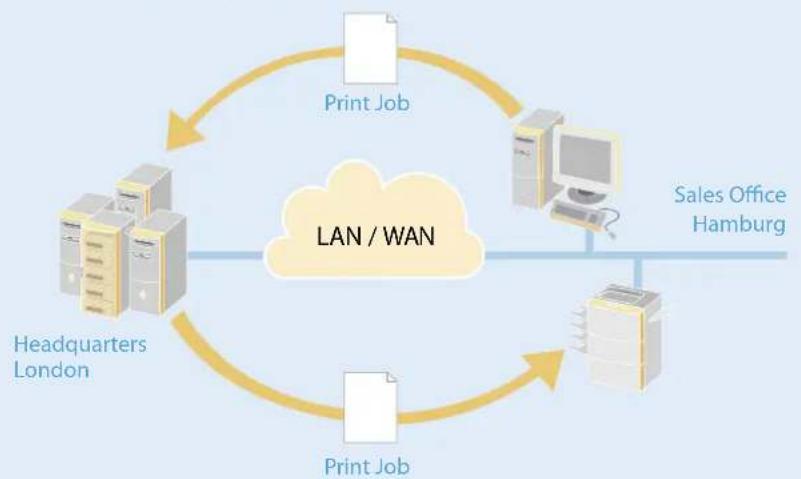
When a central server is operated as print spooler, print jobs will be sent across the whole network to the server and from there to the respective printer. Frequent and / or large print jobs put a strain on the network infrastructure.
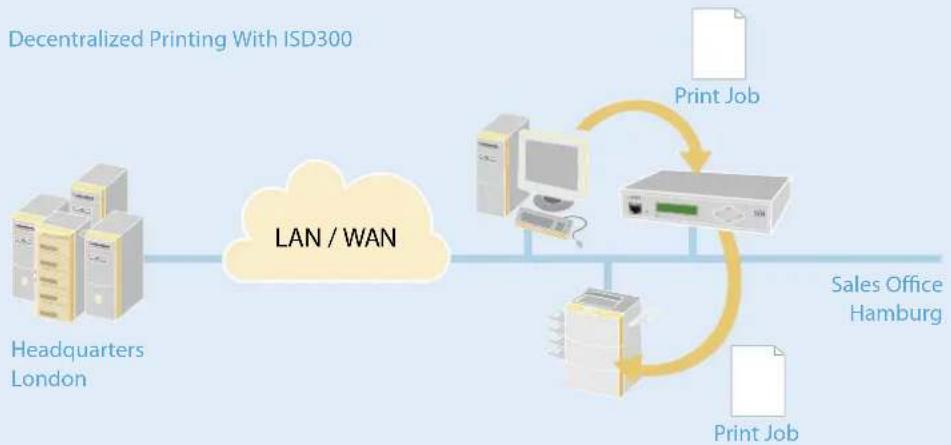
ISD300 as decentralized Printing-Spooler
ISD 300 is the ideal network solution for decentralized networks with several nodes (work groups, departments, subsidiaries, branch offices etc.). Print jobs remain in the local network segment, where they are buffered on the ISD300. The strategic operation of the appliance as local print or workgroup spooler in distributed networks (WAN) limits data traffic locally. The result is a significantly lower network load and less connection costs.
BENEFITS
- Reduction of data traffic in a network
- Limiting data traffic in a network to local segments
- Reduction of network load
- Reduction of connection costs in extensive WAN structures
FIELDS OF APPLICATION
- Decentrally organized network structures
• Businesses with branch offices, outlets, subsidiaries etc. - Workgroups
• Networks with highly complex, overworked server architectures
CENTRAL PRINTER DRIVER MANAGEMENT
ISD300 Solutions
flowchart
graph TD
    A["Printer Drivers on ISD300"] --> B["Field Staff"]
    B --> C["Computer 1"]
    B --> D["Computer 2"]
    B --> E["Computer 3"]
    B --> F["Computer 4"]
    B --> G["Computer 5"]
    B --> H["LAN"]
    style A fill:#f9f,stroke:#333
    style B fill:#ccf,stroke:#333
    style C fill:#cfc,stroke:#333
    style D fill:#cfc,stroke:#333
    style E fill:#cfc,stroke:#333
    style F fill:#cfc,stroke:#333
    style G fill:#cfc,stroke:#333
    style H fill:#cfc,stroke:#333
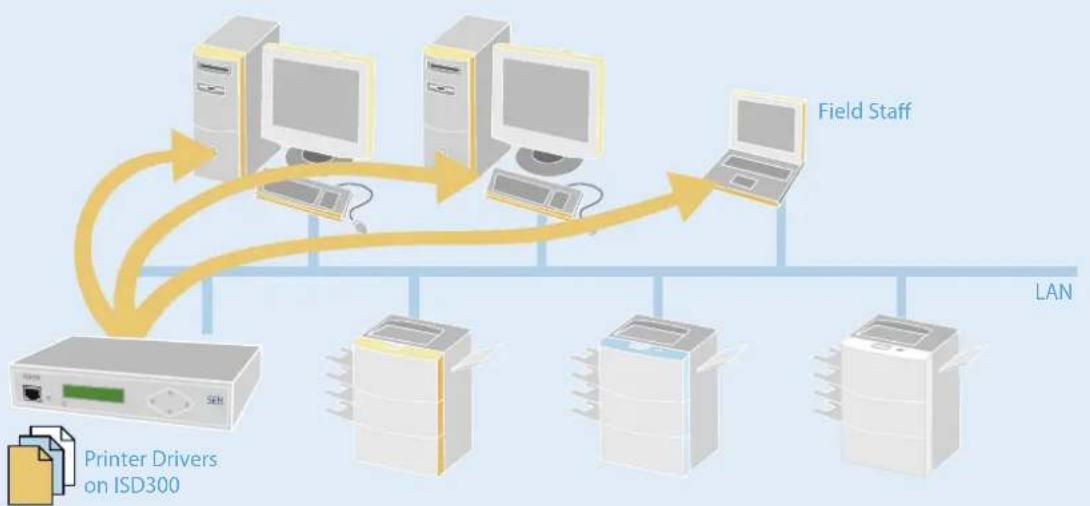
ISD300 supports the Point-and-Print functionality by Microsoft for central printer driver management. Simply store all required printer drivers to the appliance. From there they will be uploaded to each workstation which requires them. You no longer have to install printer drivers manually on the workstations. Instead, you can manage printer driver settings (e.g. duplex, paper trays) centrally and distribute drivers via the ISD300.
Your field staff does not need to install any printer drivers when visiting a branch office – they can simply start to print!
SEH has developed some useful tools to make it all even easier for you!
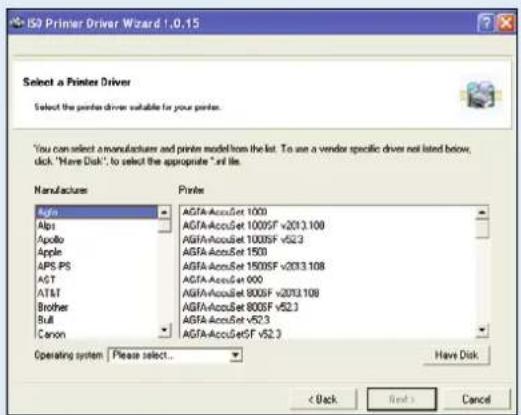
The SEH ISD Printer Driver Wizard simplifies storing all required printer drivers to ISD300. It collects all required files for installing and managing a certain printer driver. This packet can simply be uploaded to an ISD300, making the process much easier than the manual installation required in a Windows environment.
If you operate several ISD appliances in a network the new SEH ISD Manager is a very useful tool. You can use it to build a database with all printer drivers used in the network. From there you can upload every printer driver unto any ISD300 in the network. (Read more on page 3!)
BENEFITS
· Time-saving central printer driver management
• Automatic printer driver updates centrally via ISD300
- Smooth access to network printers for mobile field staff
text_image
ISO Primer Driver Wizard 1.0.15 Select a Printer Driver Select the printer driver suitable for your printer. You can select a manufacturer and printer model from the list. To use a vendor specific driver not listed below, click. "Have Disk", to select the appropriate "if file. Manufactures Agfa Alps Apollo Apple APS-PS AST AT&T Brother Bull Canon Printing AGFA-AccuSet 1000 AGFA-AccuSet 1000SF v2013.108 AGFA-AccuSet 1000SF v52.3 AGFA-AccuSet 1500 AGFA-AccuSet 1500SF v2013.108 AGFA-AccuSet 000 AGFA-AccuSet 800SF v2013.108 AGFA-AccuSet 800SF v52.3 AGFA-AccuSet v52.3 AGFA-AccuSetSF v52.3 Operating system | Please select... Have Disk < Back Next > CancelFIELDS OF APPLICATION
- All network printing environments
flowchart
graph TD
    A["Power Tower"] -->|Compressed, Encrypted| B["WiN / LAN"]
    B --> C["ISD300"]
    C --> D["Network Printer 50 Max."]
    D -->|without ThinPrint Print Client| C
    C -->|with ThinPrint Print Client| E["Computer 1"]
    E --> F["Computer 2"]
    F --> G["Computer 3"]
    G --> H["Computer 4"]
    H --> I["Computer 5"]
    I --> J["Computer 6"]
    J --> K["Computer 7"]
    K --> L["Computer 8"]
    L --> M["Computer 9"]
    M --> N["Computer 10"]
    N --> O["Computer 11"]
    O --> P["Computer 12"]
    P --> Q["Computer 13"]
    Q --> R["Computer 14"]
    R --> S["Computer 15"]
    S --> T["Computer 16"]
    T --> U["Computer 17"]
    U --> V["Computer 18"]
    V --> W["Computer 19"]
    W --> X["Computer 20"]
    X --> Y["Computer 21"]
    Y --> Z["Computer 22"]
    Z --> AA["Computer 23"]
    AA --> AB["Computer 24"]
    AB --> AC["Computer 25"]
    AC --> AD["Computer 26"]
    AD --> AE["Computer 27"]
    AE --> AF["Computer 28"]
    AF --> AG["Computer 29"]
    AG --> AH["Computer 30"]
    AH --> AI["Computer 31"]
    AI --> AJ["Computer 32"]
    AJ --> AK["Computer 33"]
    AK --> AL["Computer 34"]
    AL --> AM["Computer 35"]
    AM --> AN["Computer 36"]
    AN --> AO["Computer 37"]
    AO --> AP["Computer 38"]
    AP --> AQ["Computer 39"]
    AQ --> AR["Computer 40"]
    AR --> AS["Computer 41"]
    AS --> AT["Computer 42"]
    AT --> AU["Computer 43"]
    AU --> AV["Computer 44"]
    AV --> AW["Computer 45"]
    AW --> AX["Computer 46"]
    AX --> AY["Computer 47"]
    AY --> AZ["Computer 48"]
    AZ --> BA["Computer 49"]
    BA --> BB["Computer 50"]
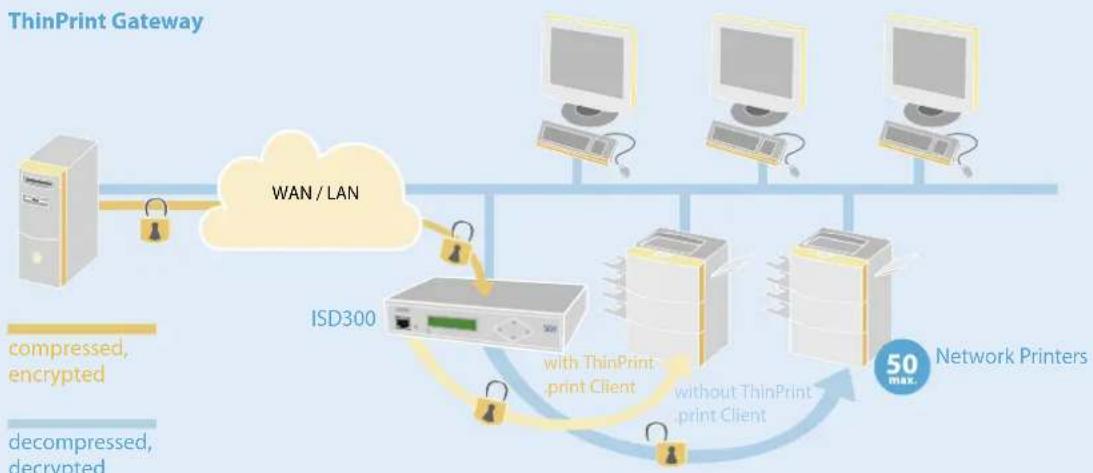
If you utilize the print management solution ThinPrint .print for bandwidth optimization and control the ISD300 can function as a ThinPrint Gateway for up to 50 network printers per ISD300. The integrated ThinPrint .print Client allows the ISD300 to function as an upstream .print client which receives ThinPrint compressed and bandwidth-optimized print data from the .print server and decompresses this data in the local network. The decompressed data is then sent in its original form to the available print servers in the LAN. As ThinPrint Gateway the ISD300 also supports valuable ThinPrint features such as AutoConnect and is compatible with the ThinPrint Output Gateway.
To protect your print data the ISD300 supports ThinPrint SSL encryption of print data and can decrypt ThinPrint SSL-encrypted print jobs to pass them on to the respective network printers.
ThinPrint®
BENEFITS
- Decompression of print jobs for printers and MFPs in ThinPrint environments
- Securing application performance by limiting bandwidth available for print jobs
- ThinPrint SSL support for securing print data
- Faster print data transmission and lower connection costs
• Less per printer cost (TCO)
FIELDS OF APPLICATION
- All ThinPrint.print environments
• Businesses and organizations with outlets or subsidiaries - WANs with narrow bandwidth or dial-up connections (server based computing, desktop virtualization)
· Decentralized networks, workgroups, outlets etc. - All networks with frequent and large print jobs
flowchart
graph LR
    A["Computer"] --> B["Processing Unit"]
    B --> C["Output Pack 1"]
    B --> D["Output Pack 2"]
    B --> E["Output Pack 3"]
    B --> F["Output Pack 4"]
    B --> G["Output Package 1"]
    B --> H["Output Package 2"]
    B --> I["Output Package 3"]
Balance Queue
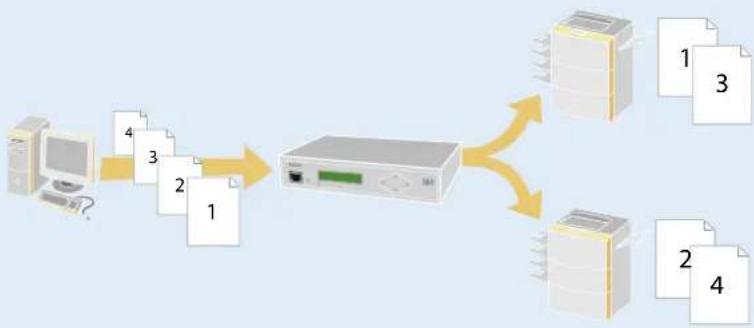
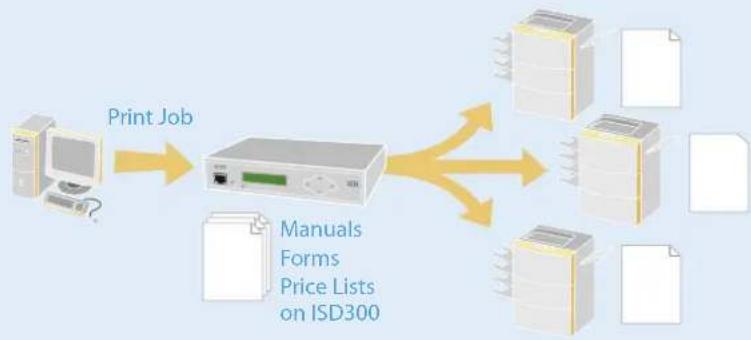
The load balancing functionality of ISD300 aims at distributing the load of your print jobs to the available output devices in the most efficient way. Larger print jobs will be carried out faster and more economically even if one of the involved output devices drops out.
flowchart
graph TD
    A["Print Job"] --> B["Printed Device"]
    B --> C["Manuals Forms Price Lists on ISD300"]
    C --> D["Printed Devices"]
    C --> E["Printed Documents"]
Copy Queue and Offloading Print Jobs (Repository)
The generation of print data for posters and bills with RIP software is complex and time-consuming. Print jobs which you have generated in this manner can be buffered on the ISD300 and printed again when needed without having to render the print data anew. You can store all print documents on the ISD300 which you have to print repeatedly (e.g. price lists, product flyers) and copy these as often as you like without having to refer to any other application.
flowchart
graph TD
    A["SAP R/3"] --> B["ISD300 + TBarCode/Embedded"]
    B --> C["LAN"]
    D["Computer 1"] --> E["Computer 2"]
    F["Computer 3"] --> G["Computer 4"]
    H["Computer 5"] --> I["Computer 6"]
    J["Computer 7"] --> K["Computer 8"]
    L["Computer 9"] --> M["Computer 10"]
    N["Computer 11"] --> O["Computer 12"]
    P["Print Job + Barcode → PS/PCL"] --> Q["+"]
    Q --> R["Output"]
Platform for Filter Applications
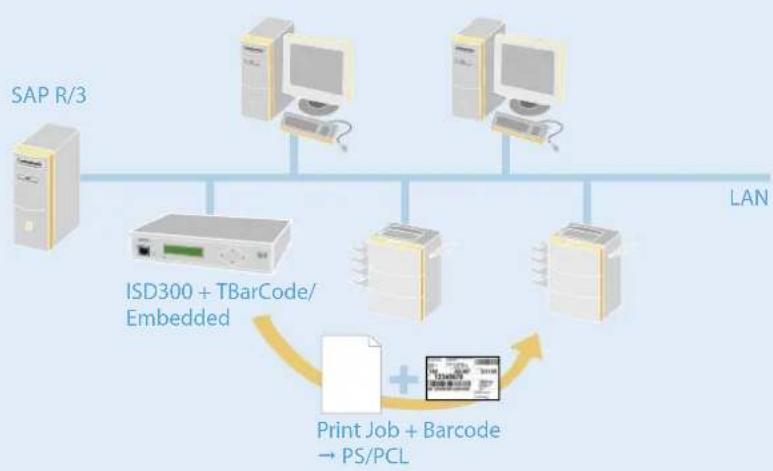
ISD300 easily adapts to individual environments and demands. You can use the appliance as a basis for special printing software solutions or for your own development, e. g. for filter applications developed by customers. These filters can transform or expand print data, e. g. as in barcode printing (SAP etc.): For example, the software solution TBarCode/Embedded by TEC-IT in combination with the ISD300 turns PS (Postscript) and PCL printers into barcode printers quickly and easily. You find more information on the Internet at www.tec-it.com.
Germany (Headquarter)
Suedring 11
33647 Bielefeld
Phone +49 (0) 5 21 - 9 42 26-29
Fax +49 (0) 5 21 - 9 42 26-99
Web www.seh.de
Email info@seh.de
natural_image
Person operating a printer with visible internal components and paper sheet (no text or symbols)
natural_image
Exterior view of a white electronic device labeled ISD300 with ports and a central port (no readable text beyond label)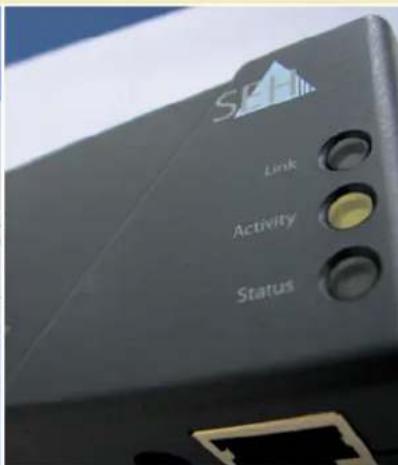
text_image
Link Activity StatusSEH Technology UK LTD.
UK/Ireland
Phone +44 (0) 12 73 - 23 46-81
Fax +44 (0) 12 73 - 23 46-82
Email info@seh-technology.co.uk
SEH Technology, Inc.
USA
Phone +1 610-9 33-20 88
Fax +1 484 - 2 29-06 97
Email info@seh-technology.com
SEH