IZF-V85 - Shaver Izumi - Free user manual and instructions
Find the device manual for free IZF-V85 Izumi in PDF.


User questions about IZF-V85 Izumi
0 question about this device. Answer the ones you know or ask your own.
Ask a new question about this device
Download the instructions for your Shaver in PDF format for free! Find your manual IZF-V85 - Izumi and take your electronic device back in hand. On this page are published all the documents necessary for the use of your device. IZF-V85 by Izumi.
USER MANUAL IZF-V85 Izumi
natural_image
Abstract geometric pattern with diagonal metallic stripes forming a stylized 'V' shape (no text or symbols)VIDAN
取扱説明書
保証書付
巻末にあります。
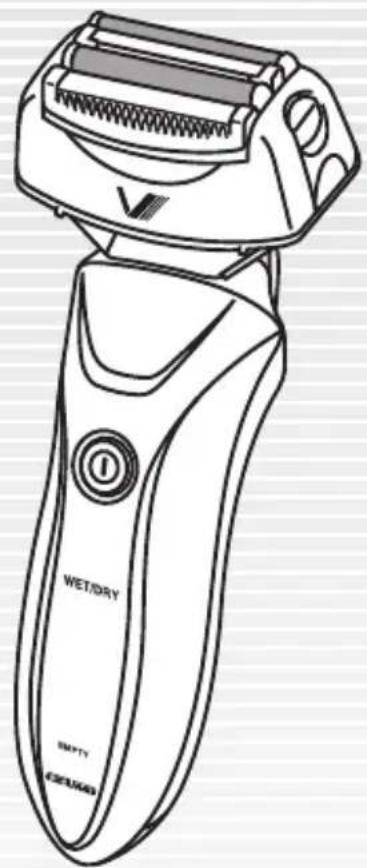
text_image
WET/DRY EMPTY 435/843You are now the proud owner of a IZUMI Rechargeable/AC-powered Shaver IZF-V85. Before using your shaver, please read the instructions in this manual carefully for its proper use and care. Please keep the manual handy for ready reference.
natural_image
Hand inserting a plug into an electrical outlet with a black arrow indicating downward motion (no text or symbols)蓄電池の寿命について
natural_image
Line drawing of a hand holding a cup (no text or symbols)1↑↓3
natural_image
Line drawing of a mechanical device with a button and handle (no text or symbols)電源ボタン
natural_image
Illustration of a person applying makeup to their face (no text or symbols)natural_image
Line drawing of a hand using a hairdryer to spray or spray onto a surface (no text or symbols)お手入れのしかた(つづき)
natural_image
Line drawing of a hand holding a flat tool with water droplets (no text or symbols)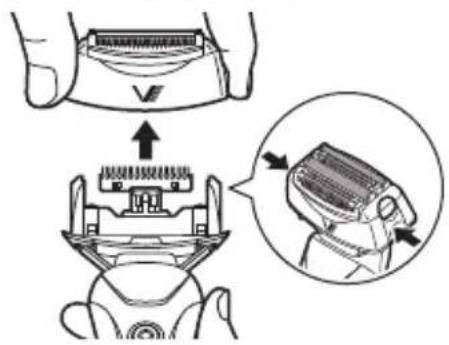
text_image
Diagram illustrating a hand holding a device with an arrow indicating the process, showing internal components and a magnified view of the device's internal structure.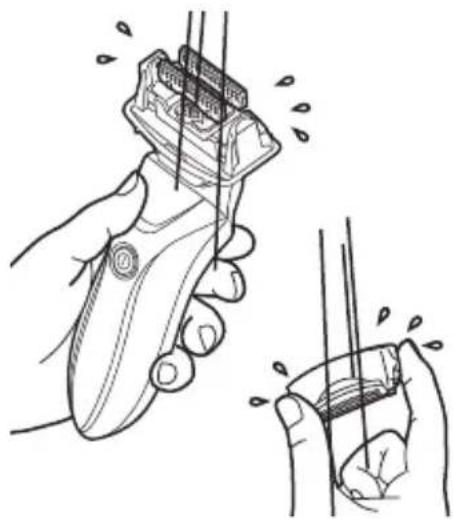
natural_image
Illustration of a hand using a hairbrush to clean or store items, showing the blade and handle (no text or symbols present)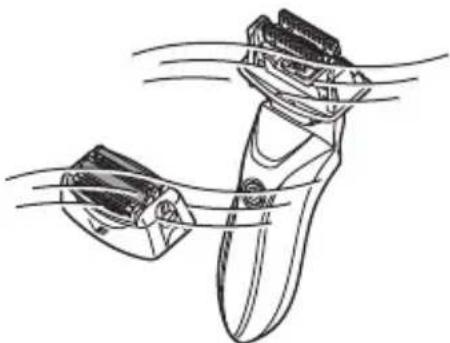
natural_image
Line drawing of a robotic arm gripping a device, with motion lines indicating movement (no text or symbols)IZF-V85
お手入れのしかた(つづき)
日本語
text_image
Diagram showing a hand holding a device with a V label and a downward arrow indicating process or transformation.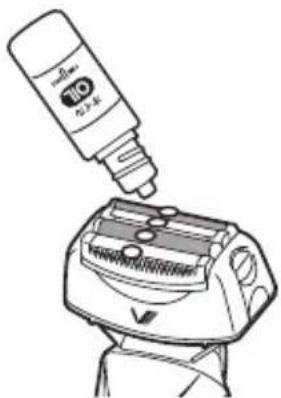
natural_image
Line drawing of a cleaning tool with a bottle and base, no text or symbols presentブラシ清掃のしかた
注意
text_image
Diagram illustrating a hand holding a device with an arrow pointing to a component, and a magnified inset showing the internal structure.natural_image
Two mechanical diagrams showing a lever mechanism with an arrow and a cross symbol (no text or labels)内刃
natural_image
Diagram showing a car interior with a seat and a side panel, no text or symbols present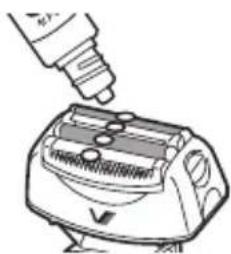
natural_image
Line drawing of a toaster with a hand inserting a screw into the top panel (no text or symbols)IZF-V85
text_image
Diagram illustrating a hairpin tool application process with labeled parts and directional arrows indicating steps.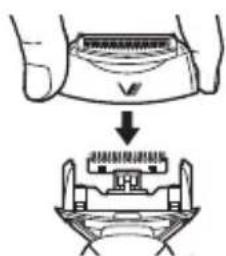
text_image
Diagram showing a hand pressing down on a device with Chinese text labels indicating 'Close-up of the device'内刃の交換のしかた
1 電源を OFF にする
text_image
電源ボタン日本語
text_image
Diagram illustrating a hairpin repair process with labeled parts and directional arrows indicating movementnatural_image
Diagram showing hands assembling a mechanical component with an upward arrow indicating assembly (no text or symbols present)text_image
Diagram showing a hand holding a device with a V-shaped component and its internal structure, illustrating the process of assembly or cleaning.IZF-V85
お手入れ用品(別売)について
日本語
natural_image
Mechanical tool diagram showing a lever and handle assembly (no text or symbols)3 基板カバーのネジ3本を取りはずす
4 蓄電池の付いている基板を引き抜く
IMPORTANT SAFETY INSTRUCTIONS
When using an electrical appliance, basic precautions should always be followed, including the following:
Read all instructions before using your shaver.
DANGER
- Do not disassemble, attempt to repair, or tamper with the shaver. It may catch fire or malfunction to cause injuries.
- Do not put the AC adaptor in water, splash water on it or wash it with water. A short circuit or an electric shock may be caused.
- Never wash the AC adaptor with water or use the shaver in a place where the AC adaptor is exposed to splashes of water such as a bathroom. Do not place or store the shaver in a humid place. A short circuit or an electric shock may be caused.
- When plugging in or unplugging the AC adaptor, do not hold the plug with wet hands. It may result in an electric shock or injury.
- Before cleaning the shaver, be sure to remove the AC adaptor from the outlet. An electric shock or injuries may be caused.
- Use the shaver only with a power supply of AC 100 to 240 V. Otherwise, it may result in a fire or an electric shock.
- If the cord or plug of the AC adaptor is damaged, or if the plug is loose in the outlet, do not recharge the shaver or use it with an AC power supply. An electric shock or short circuit will be caused, or the shaver will catch fire.
- Do not damage, break or tamper with the cord of the AC adaptor. Do not forcibly bend, pull, twist or bundle it. Do not place heavy objects on the cord or put it between them. A broken cord will cause a fire or an electric shock.
WARNING
- When unplugging the AC adaptor, be sure to hold the plug, not the cord, to pull it out. Otherwise, an electric shock or a short circuit may result and cause a fire.
- Before using the shaver, check if the foil or blade is damaged or deformed, as such foil or blade may scratch your face.
- Do not leave the AC adaptor plugged in after recharging the shaver or using it with an AC power supply. Injuries or burns may be caused. Also, this will deteriorate insulation to cause an electric shock or a fire due to electricity leakage.
- Do not forcibly press against the outer foil, as this may break the foil to cause an injury to your skin.
- Make sure that no dust or small metal objects such as a pin stick to the outlet and socket plugs of the AC adaptor. An electric shock, a short circuit or a fire will be caused.
- Do not use the AC adaptor included with the shaver for the purpose of recharging other electric appliances.
- Do not touch the blade portion of the inner blade, as it has sharp edges. Otherwise, injuries will result.
- Detach the hand-held part from the supply cord before cleaning it in water.
- Children should be supervised to ensure that they do not play with the appliance.
- Do not use the shaver on any other part of your body than your face such as your head. This may cause an injury to your skin, and will shorten the service life of the outer foil.
- This appliance is not intended for use by person (including children) with reduced physical, sensory or mental capabilities, or lack of experience and knowledge, unless they have been given supervision or instruction concerning use of the appliance by a person responsible for their safety.
- This appliance is for household use only.
PRECAUTIONS ON USING THE SHAVER
- Do not keep the shaver in a humid place, a place where the shaver is exposed to splashes of water, or in high temperatures.
- To clean the body case of the shaver, wipe it with a cloth soaked with a diluted water solution of a neutral detergent. Do not use thinner or benzine as it will damage the plastic portions of the body.
- Do not recharge the shaver or use it with an AC power supply when the room temperature is below 5°C or over 35°C. Also, never recharge it under direct sunlight or near a heating element such as a heater or incandescent light.
- Do not recharge the shaver or use it with an AC power supply in a humid place or a place where the shaver is exposed to splashes of water.
- Do not leave the shaver unattended while it is recharged.
- If pre-shave lotion or shaver oil sticks to the body case of the shaver, wipe it off completely. Otherwise, the plastic portions of the shaver may be damaged.
- Before shaving, wipe off the oiliness of our face. Otherwise, the shavings will stick to the outer foil as the inner blade rubs against it. If you find the outer foil soiled, wipe it clean with tissue paper or the like before using the shaver.
- Excessive application of shaver oil will also soil the outer foil. If this occurs, wipe the foil clean with tissue paper or the like before using the shaver. When cleaning the shaver, take care not to apply an excess amount of shaver oil on the inner blade and outer foil.
PARTS OF YOUR SHAVER
Accessories
Brush
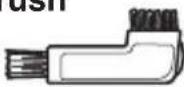
• The brush is stored in the pouch.
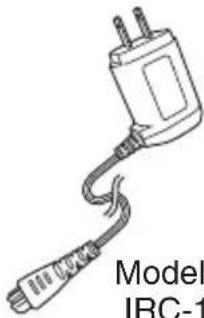
AC adaptor
natural_image
Line drawing of a cable with a plug and connector, labeled 'Model IRC-1' (no other text or symbols)Model: IRC-14
Travel pouch

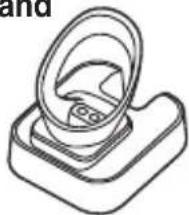
Battery charging stand
natural_image
Line drawing of a mechanical component with a circular opening and base plate (no text or symbols)Shaver oil
text_image
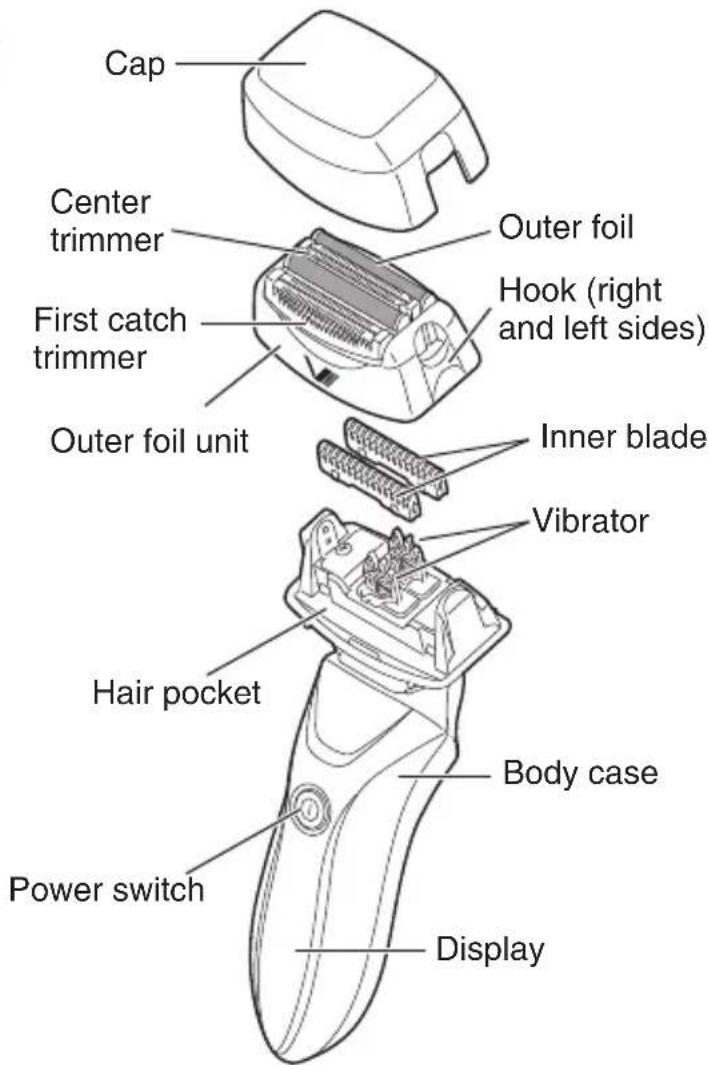
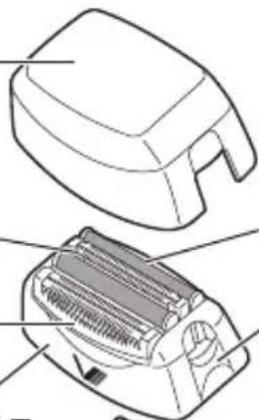
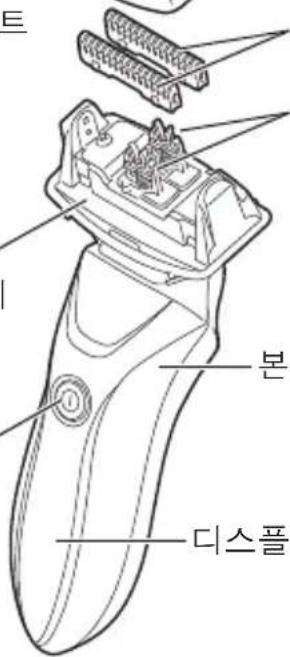
Cap Center trimmer First catch trimmer Outer foil unit Outer foil Hook (right and left sides) Inner blade Vibrator Hair pocket Power switch Body case DisplayRear side
natural_image
Line drawing of a handheld device with a handle and screwdriver (no text or symbols)Shaving head
Head lock button
Bottom view
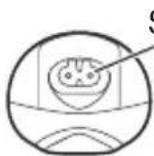
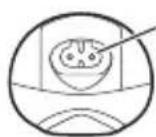
Socket
IZF-V85
English
HOW TO RECHARGE
To recharge the shaver, do not use any other apparatus than the AC adaptor included with the shaver.
- Recharge the shaver when the power reserve indicator lamp at the bottom flashes in red.
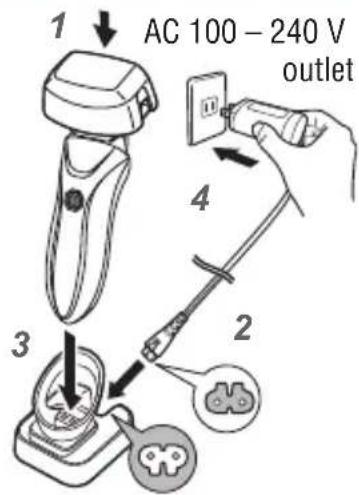
1 Recharging procedure
1 Push the power switch to turn off the shaver, and put the cap on.
- The shaver cannot be recharged while it is turned on.
2 Insert the socket plug of the AC adaptor securely into the socket of the battery charging stand.
3 Put the main unit into the battery charging stand securely with both faces aligned.
- This unit can also be charged by connecting the socket plug of the AC adaptor to the socket of the main unit directly.
- If the main unit is not put into the battery charging stand securely, recharging may not be done.
text_image
1 AC 100 - 240 V outlet 3 2 44 Insert the outlet plug of the AC adaptor into the outlet.
- Before putting the plug of the AC adaptor into the socket of the shaver, make sure that the socket is completely dry to prevent any possible malfunction.
- The shaver is fully charged in approximately 2 hours, and stored energy will last approximately 28 days if the shaver is used for 3 minutes a day. (Recharging for an hour can store energy for 14 days.) The number of days for which the stored energy lasts may vary depending on such factors as the force with which to push the outer foil against the skin, and the ambient temperature during use and storage.
- The recharging may be completed in less than 2 hours if the safety function works to prevent overcharge.
- During recharging, the recharge indicator lamp flashes to indicate that the recharging is in process.
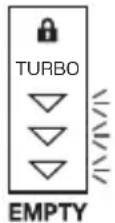
Power reserve indicator lamps
- During recharging:
The lamps flash, and then remain lit up one by one from the lamp at the bottom to indicate the power reserve.
• After full charge:
All the lamps remain flashing and then turn off.
- While shaving:
The lamps go out one by one as the power reserve decreases.
Blue Blue Blue or Red
Notes:
- A commercially available plug adaptor is required in regions other than regions where the A-2 plug is supported.
- Before recharging the shaver, check that both the plug and the outlet are intact to prevent any possible malfunction.
- While the shaver is recharging, a small continuous noise may be heard, or the body case or the AC adaptor may become slightly heated. This is not a malfunction.
2 After recharging:
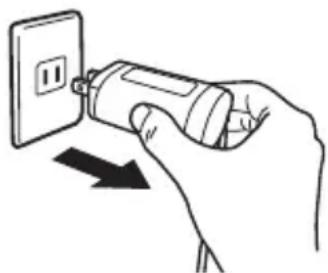
After recharging, be sure to pull out the outlet plug of the AC adaptor from the outlet.
When unplugging the AC adaptor, do not pull the cord, as this may cause a malfunction. Be sure to hold the plug to put it out.
natural_image
Hand inserting a plug into an electrical outlet with a black arrow indicating direction (no text or symbols)BATTERY LIFE
- The life of the rechargeable battery inside the shaver is approximately 4 years if it is recharged once a week. However, its life will be shortened if it is recharged more frequently, and it also varies depending on the conditions of use.
- If a 2-hours recharging permits only 2 to 3 shaves, the battery life is near its end. In that case, contact the retailer from whom the shaver was purchased. If the shaver is left unused for more than 6 months, the battery's characteristics will deteriorate by self-discharge. It is recommended, therefore, that the shaver be recharged at least once every 6 months even if not in use.
HOW TO USE THE SHAVER WITH AN AC POWER SUPPLY
Check that the power switch is turned off, insert the socket plug of the AC adaptor securely into the socket at the bottom of the shaver, and then, insert the outlet plug into the outlet. Then, push the power switch to turn on the shaver.
- If the shaver will not operate by pushing the power switch immediately after the plugs are inserted, the rechargeable battery is completely depleted. In that case, push the power switch to turn off the shaver, leave it untouched for 1 minute to recharge it, and then, push the power switch again to turn it on.
- After use, be sure to push the power switch to turn off the shaver, and then, unplug the AC adaptor from the outlet and the socket of the shaver.
- In a humid place such as bathroom, do not use the shaver with an AC power supply.
- When using the shaver with an AC power supply, do not use soap or shaving foam.
Note: The energy stored in the rechargeable battery decreases even while the shaver is used with an AC power supply. Recharge the shaver once every 3 weeks.
HOW TO USE
If the outer foil is deformed or damaged, be sure to replace it with a new one. Otherwise, it will scratch your face.
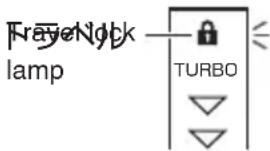
What is Travel Lock?
The travel lock function can prevent the power from being turned on by mistake when you carry this shaver.
When the power switch is held down for 3 seconds or more, the travel lock mode is activated.
- When the power is off, pressing the power switch turns on the power, and keeping on pressing the switch for 3 seconds or more turns off the power again and flashes the travel lock lamp (orange) for 3 seconds.
- When the power is on, pressing the power switch turns off the power, and keeping on pressing the switch for 3 seconds or more flashes the travel lock lamp (orange) for 3 seconds.
- When the power switch is pressed in the travel lock mode, the travel lock lamp (orange) flashes.
When the power switch is held down for 3 seconds or more again, the travel lock mode is canceled and the power is turned on.
- The travel lock lamp (orange) is turned off.
The travel lock mode is automatically canceled when the shaver is being
recharged or connected to the AC adaptor.
text_image
Fragel Notch lamp TURBOHOW TO USE (continued)
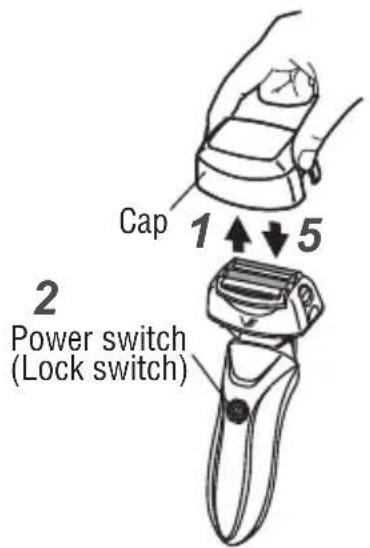
1 Remove the cap while pushing the convex parts of it inward.
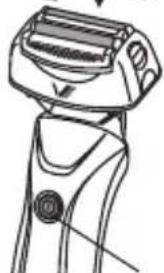
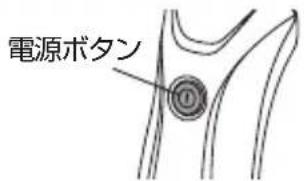
2 Push the power switch to operate the shaver.
When the travel lock lamp lights up by pressing the power switch, press and hold the power switch for 3 seconds or more to operate the shaver.
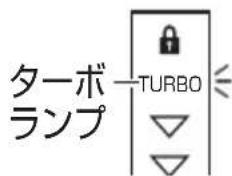
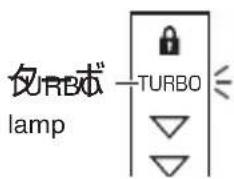
3 Pressing the power switch again during operation sets the shaver to the turbo mode.
- The TURBO lamp (blue) turns on. The turbo mode drives the shaver faster than the normal mode.
text_image
Cap 1 ↑ ↓ 5 2 Power switch (Lock switch)English
text_image
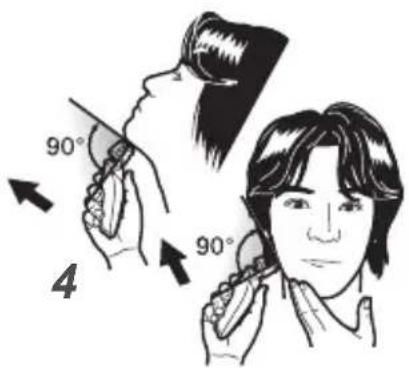
lamp TURBO4 Bring the outer foil in gentle contact with the skin at a right angle (reference value: approx. 400 g), stretch the skin and move the shaver gently upwards against the grain.
● While shaving, take care not to push the outer foil too strongly against the skin (reference value: more than 800 g). Otherwise, the outer foil will wear at a higher rate, and become dull or damaged.
- To shave delicate parts like the chin, pull up the slack of the skin by hand, and stroke upwards. When shaving the throat, lift the face upwards to thrust the throat out to pull the slack upwards.
text_image
90° 4 90°5 After use, turn off the power switch, and clean the shaver with the accessory brush. To protect the blades, be sure to put the cap on after cleaning.
The remaining battery amount is indicated for approx. 7 seconds after turning off the power.
Note: The shaver can be used to shave with soap or shaving foam. After every use with soap or shaving foam, be sure to wash the shaver in water.
HOW TO USE (continued)
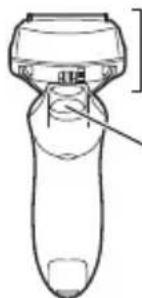
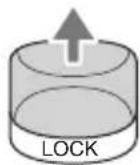
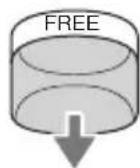
Head lock
● The head moves freely by sliding the head lock button downward.
- The head can be locked at your favorite angle by sliding the head lock button upward.
English

text_image
Shaving head Head lock buttonLock
((LOCK)
自由に動く
UNLOCK
(FREE)
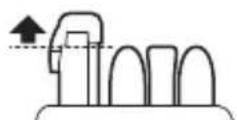
How to use first catch trimmer
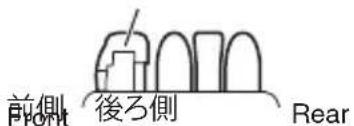
There are 3 ways of using the first catch trimmer depending on shaving areas such as beard, mustache, sideburns, and more.
The first catch trimmer is set to the following position according to the purpose.
- The position of the first catch trimmer can be changed even when the power is set to ON.
Set the trimmer to the middle position.
Put the trimmer in the housing.
Pull out the trimmer upward.
First catch trimmer
text_image
前側 Front 後ろ側 Rear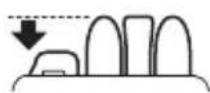
CARE AND MAINTENANCE
Before cleaning the shaver, make sure that the AC adaptor is disconnected from the shaver.
1 Washing in water
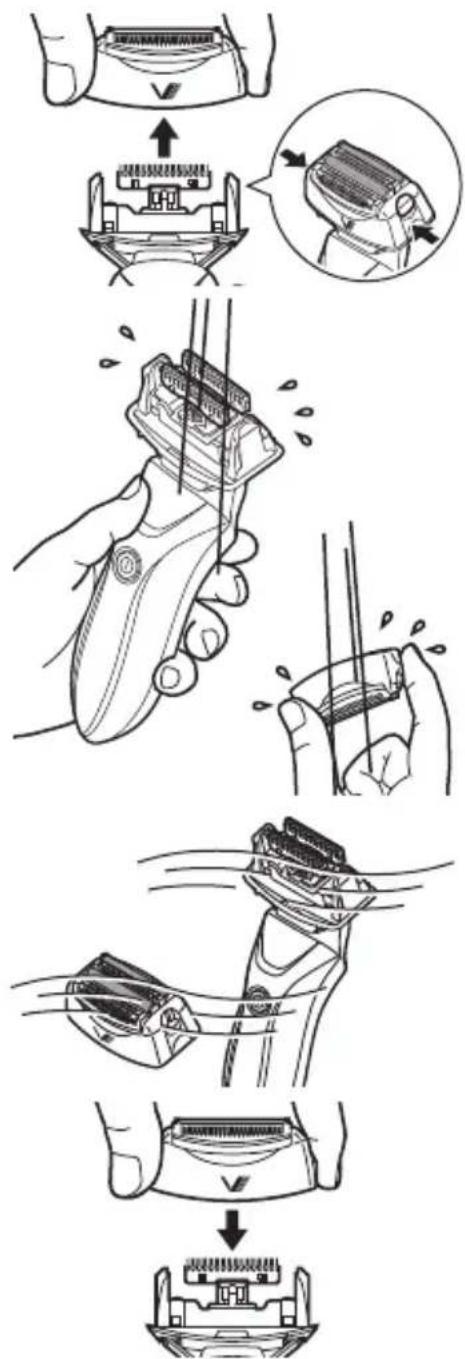
1 Hold the hook of the head using thumb and finger and remove the outer blade frame.
2 Push the power switch to turn on the shaver, and wash the blades in cold or lukewarm water.
Wash the blades completely. Soil left on them may prevent the inner blade from moving smoothly, generate an unpleasant smell, or cause mold to from on them.
After washing, push the power switch to turn off the shaver, and wipe them dry with a towel or the like.
3 Place the shaver in an airy place to dry it thoroughly.
4 Attach the outer foil unit securely to the outer foil frame, taking care not to touch the outer foil.
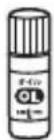
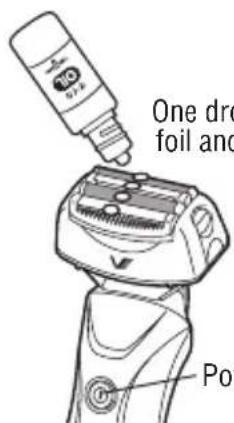
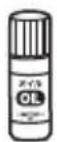
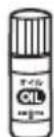
5 Apply shaver oil to the outer foil.
- Lubrication allows for smooth blade movement and accordingly keeps on giving a pleasant good shave.
- Use the supplied shaver oil (OIL-5).
text_image
Technical illustration showing a hand holding a device with multiple steps including assembly, cleaning, and disassembly.IZF-V85
CARE AND MAINTENANCE (continued)
6 Push the power switch to turn on the shaver. Keep it running for approximately 10 seconds, and wipe the residual shaver oil from the outer foil with tissue paper or the like.
Before wiping off the shaver oil, push the power switch to turn off the shaver.

The symbol means suitable for cleaning under an open water tap.
text_image
One dro foil and PonOne drop on each foil and trimmer
Power switch
2 Cleaning with the brush
1 Before cleaning your shaver, be sure to push the power switch to turn it off.
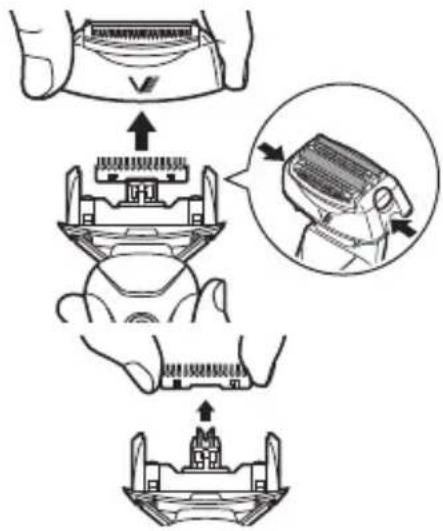
2 Hold the hook of the head using thumb and finger and remove the outer blade frame.
3 Clean the inside of the outer foil unit, inner blade and body of the shaver with the accessory brush.
- To remove the inner blade, pull it straight upwards.
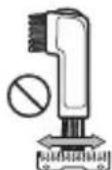
- When cleaning the inner blade, move the accessory brush along the blade portions. Moving the brush in a direction at right angles to them may deteriorate their sharpness to result in damage to them.
4 After cleaning, attach the inner blade. Then, set the outer foil unit properly to the outer foil frame, taking care not to touch the outer foil.
- If the shaver is used with the outer foil unit incorrectly set to the body, poor shaving quality and abnormal sound will result.
- Do not remove the outer foil from the outer foil unit.
5 Apply shaver oil to the outer foil.
text_image
Diagram illustrating a mechanical assembly process with labeled steps and an inset showing the component being processed.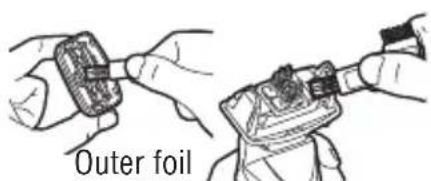
text_image
Outer foil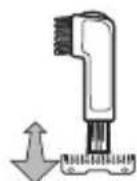
Inner blade
REPLACEMENT OF OUTER FOIL UNIT/INNER BLADE
The outer foil unit and inner blade are consumables. In order to enjoy a comfortable clean shave, it is recommended that the outer foil unit and inner blade be replaced with new ones at least once a year and once in two years, respectively. Use of blade or foil beyond its serviceable life may not only result in poor shaving performance but also damage such blade or foil to scratch your skin. Contact the retailer from whom your shaver was purchased for the replacement outer foil and inner blade.
- The above replacement periods of outer foil and inner blade serve as guidelines only, and their serviceable lives vary greatly depending on the condition of use of each user. If you find them unable to give a good shave, damaged or deformed, replace them with new ones immediately.
- When the outer foil or inner blade is replaced, lubricate it with shaver oil before use.
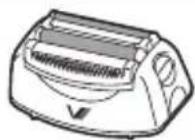
Outer foil unit SO-V85
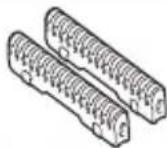
Inner blade SI-V65
HOW TO REPLACE OUTER FOIL UNIT/INNER BLADE
Before replacing the outer foil unit/inner blade, be sure to turn off the shaver.
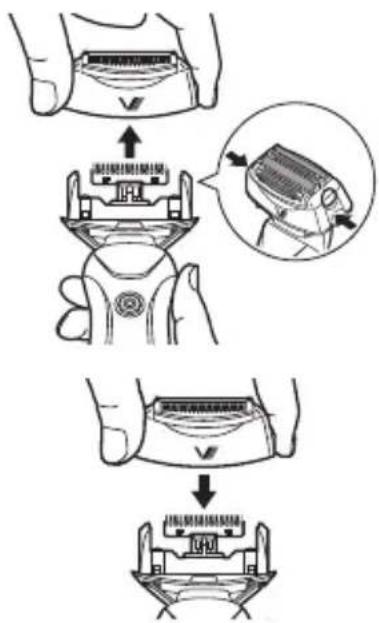
Outer foil unit
1 Hold the hook of the head using thumb and finger and remove the outer blade frame.
2 Mount a new outer blade frame on the main unit with the mark, " √" facing front.
text_image
Diagram illustrating a step-by-step assembly of a device with labeled parts and directional arrows indicating process flow.Inner blade
1 Remove the outer foil unit.
IZF-V85
HOW TO REPLACE OUTER FOIL UNIT/INNER BLADE (continued)
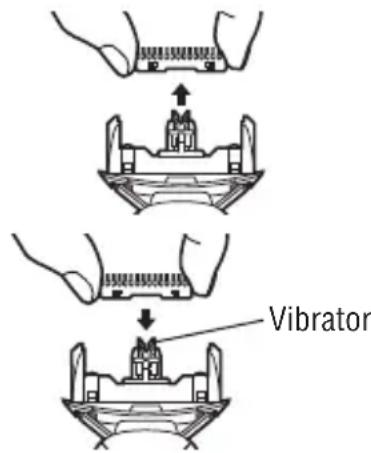
2 While holding the side faces of each inner blade with fingers, and lift it upward to remove it one by one.
3 Set the new inner blade to the vibrator by pushing it downward.
- Set the inner blade securely one by one.
- Be sure to set both the two inner blades. Otherwise, abnormal noise, injury or malfunction may result.
4 Set the outer foil unit securely.
text_image
VibratorFOR RECYCLING THE Li-ion BATTERY
The Li-ion battery which powers your shaver is recyclable. When disposing of the shaver, therefore, remove the Li-ion battery from the shaver to recycle.
WARNING
- Once the rechargeable battery has been removed from the shaver, do not re-use it for any purpose.
The rechargeable battery is designed for exclusive use with this shaver. Do not use it with any other device including another shaver. - Do not do any damage or give any shock to the rechargeable battery. Also, do not disassemble or tamper with it.
- Do not throw the rechargeable battery into fire, heat it, or leave it under direct sunlight or near fire.
- Do not left the terminals of the rechargeable battery touch any metal object after removing it from the shaver.
Otherwise, the battery may become extremely hot, catch fire or explode. - After the rechargeable battery is removed from the shaver, keep it out of the reach of children.
- If the fluid leakage of the rechargeable battery occurs, do not touch the shaver with a bare hand.
The fluid inside the rechargeable battery may cause blindness if it gets into the eye. If the fluid contacts your eyes or skin, wash the affected portions with clean water immediately, and consult the doctor. - Do not disassemble the shaver for any other purpose than to remove the rechargeable battery before disposing of the shaver. Otherwise, a fire, an electric shock or injury may be caused.
FOR RECYCLING THE Li-ion BATTERY (continued)
How to remove the Li-ion battery
● The appliance must be disconnected from the supply mains removing the battery.
- Turn on the power switch, and run the shaver until the inner blade stops moving. If the shaver is disassembled before the recharged electricity is depleted, it may catch fire or cause burns.
- Follow the procedure below to disassemble the shaver with a screwdriver.
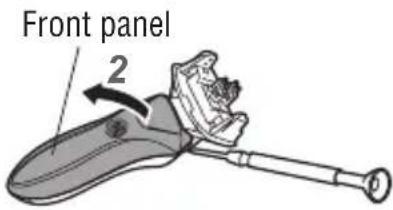
1 Insert the blade of a flatblade screwdriver into the front panel to pry it up as shown in the illustration.
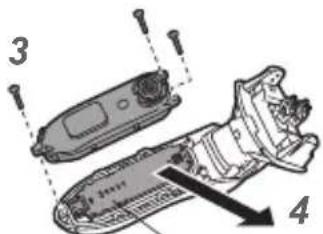
2 Loosen and remove the 3 screws with a Phillips screwdriver, and open the bode case. (See the illustration.)
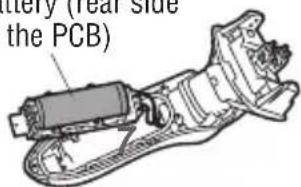
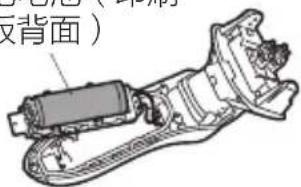
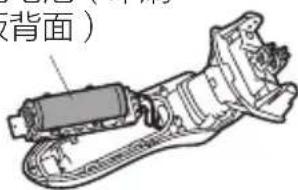
3 Pull out the printed circuit board on which a rechargeable battery is mounted.
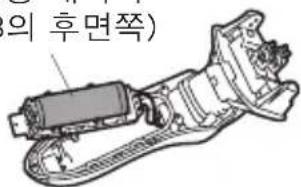
4 Cut the 2 lead wires with nippers.
5 Cut the terminals at the both sides of the rechargeable battery with nippers.
6 Remove the rechargeable battery.
7 Insulate the terminals of the removed rechargeable battery with vinyl tape.
Rechargeable battery (rear side of the PCB)
Note: The battery is to be disposed of safety.
text_image
Front panel 2English
text_image
Technical diagram showing exploded view of a mechanical component with numbered parts and directional arrow indicating assembly or inspection.Printed circuit board
text_image
Battery (Year side the PCB)SPECIFICATIONS
Power supply ....Rechargeable battery/AC power supply
Blade motion
Inner blade/First catch trimmer....Reciprocating
Rated voltage....AC 100 V - 240 V
Rated frequency....50/60 Hz
Rated capacity 7 W
Standard recharging time....2 housr
Battery....Li-ion cell (enclosed type), 1 pc.
Weight....197 g
安全注意事項
natural_image
Line drawing of a mechanical component with a ring and base (no text or symbols)natural_image
Line drawing of a mechanical component with a curved handle and a small notch (no text or symbols)text_image
Technical diagram of a remote control device with labeled component and directional arrow示
刀頭
刀頭鎖定按鈕
底視圖
插孔
IZF-V85
如何充電
natural_image
Hand inserting a plug into an electrical outlet with a downward arrow indicating insertion (no text or symbols)電池壽命
text_image
Diagram illustrating a mechanical device with labeled components and directional arrows indicating assembly or movement.中文繁體
natural_image
Illustration of a hand holding a handheld device with wires, showing internal components and motion (no text or symbols)3 把電鬍刀置於通風處以使其完全乾燥。
natural_image
Diagram showing a hand holding a car with a valve, and a close-up of the valve component (no text or symbols present)IZF-V85
維護及保養(繼續)
natural_image
Line drawing of a hairbrush with a cap and trigger, no text or symbols present在每個外刃和修剪刀上各滴一滴
電源開關
2 用刷子清潔
text_image
Diagram illustrating a mechanical assembly process with labeled steps and an inset showing the component being processed.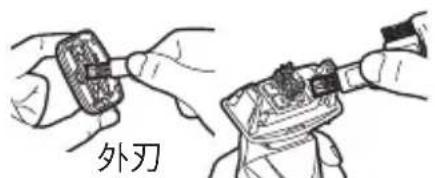
text_image
外刃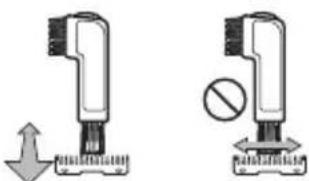
natural_image
Two mechanical devices with arrows indicating movement, one with a downward arrow and the other with a prohibition symbol (no text or labels)内刃
外刃装置 / 内刃的更换
text_image
Diagram illustrating a hand turning a device with an arrow indicating the process, plus a magnified view of the component being inserted.text_image
Diagram illustrating a medical procedure with labeled components and directional arrow indicating process flow内刃
1 取下外刃装置。
IZF-V85
如何更換外刃裝置 / 內刃(繼續)
text_image
Diagram showing exploded view of a device with labeled parts and directional arrow indicating assembly or repair.印刷電路板
natural_image
Simple line drawing of a mechanical component with a ring and base (no text or symbols)刮胡油
natural_image
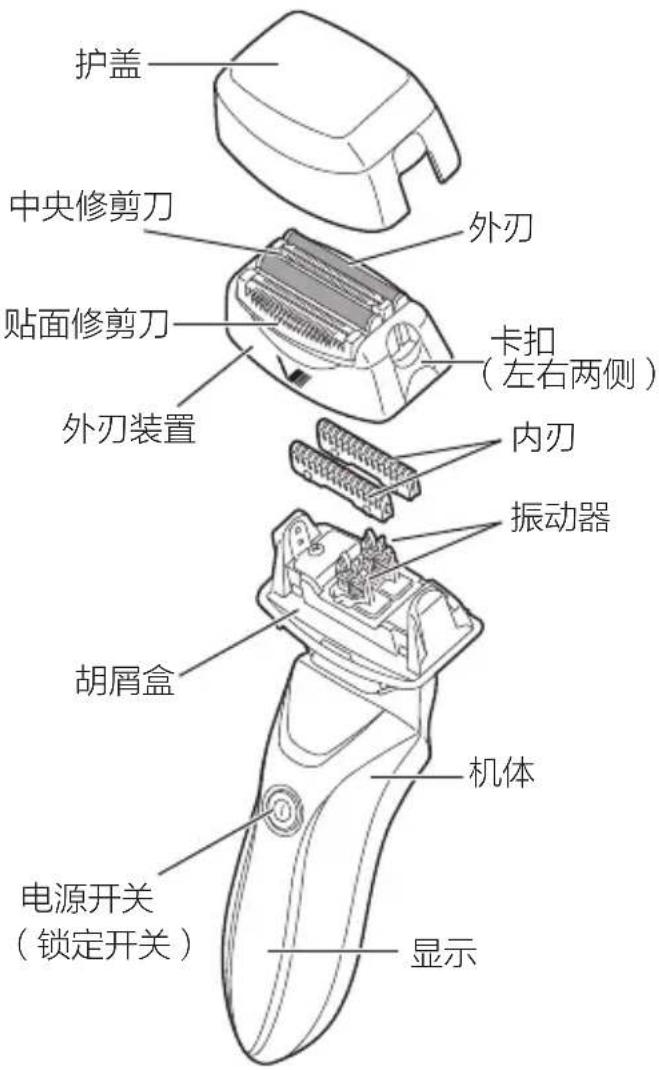
Line drawing of a handheld device with a handle and button (no text or symbols)刀头
刀头锁定按钮
底视图
插孔
IZF-V85
中文简体
如何充电
natural_image
Hand inserting a plug into an electrical outlet with a black arrow indicating downward motion (no text or symbols)电池寿命
text_image
Diagram illustrating a hairpin tool's internal structure and its application in a device, with Chinese annotations.natural_image
Illustration of a hand holding a hairdryer with a magnified inset showing the tip and base (no text or symbols)3 把剃须刀置于通风处以使其完全干燥。
text_image
Diagram illustrating a mechanical assembly process with labeled parts and directional arrows indicating assembly steps.IZF-V85
维护及保养(继续)
text_image
Diagram illustrating a mechanical assembly process with labeled steps and an inset showing the component being processed.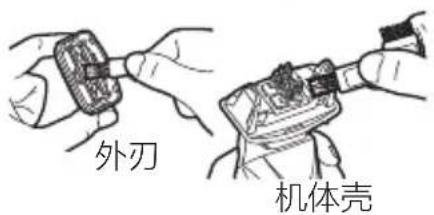
text_image
外刃 机体壳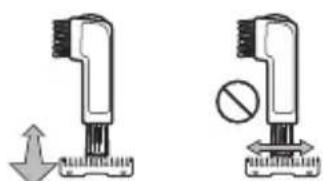
natural_image
Two mechanical devices with arrows indicating motion, one with a downward arrow and the other with a circle and plus sign (no text or symbols)内刃
外刃装置 / 内刃的更换
text_image
Diagram illustrating a step-by-step assembly of a hair clip device, showing steps from opening to closing.text_image
Technical diagram showing exploded view of a mechanical component with numbered parts and directional arrow indicating assembly or inspection.印刷电路板
可充电电池(印刷电路板背面)
text_image
背面)规格
natural_image
Line drawing of a mechanical component with a circular housing and base plate (no text or symbols)면도기 오일
뚜껑
센터 트리머
일차 캐치 트리머
포일 유니트
natural_image
Technical line drawing of a device with two views: top shows a mechanical component, bottom shows a physical component (no text or symbols)포일
후크(오른쪽 및 왼쪽)
수염 받아
안쪽날
진동기
전원 스위치
text_image
트 본 디스플본체케이스
뒷면
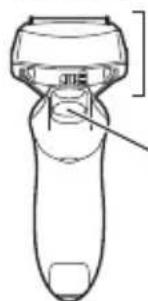
natural_image
Line drawing of a handheld device with a handle and lever (no text or symbols)바닥모양
면도기헤드
헤드 잠금 버튼
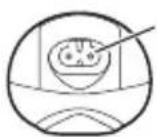
소켓
IZF-V85
충전방법
natural_image
Hand inserting a plug into an electrical outlet with a black arrow indicating downward motion (no text or symbols)배터리 수명
text_image
Diagram illustrating a mechanical device with labeled components and directional arrows indicating motion or assembly.natural_image
Illustration of a hand holding a hairdryer with a close-up view of its tip and handle (no text or symbols present)natural_image
Diagram showing a hand holding a tool above a device with a downward arrow indicating process (no text or symbols present)IZF-V85
관리 및 손질 (계속)
text_image
Diagram illustrating a mechanical assembly process with labeled parts and directional arrows indicating motion or assembly steps.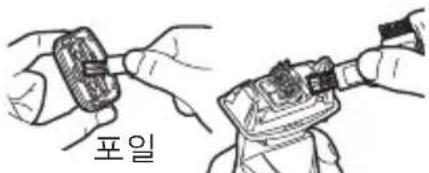
text_image
포일본체케이스
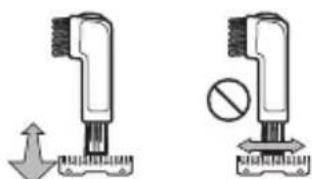
natural_image
Two mechanical devices with arrows indicating movement, one with a downward arrow and the other with a circle (no text or symbols)안쪽날
외부 포일 및 안쪽 날의 교환
text_image
Diagram illustrating the step-by-step assembly of a hairbrush, showing hand positioning and disassembly process.natural_image
Illustration of a medical or laboratory device with a labeled component (no text or symbols present)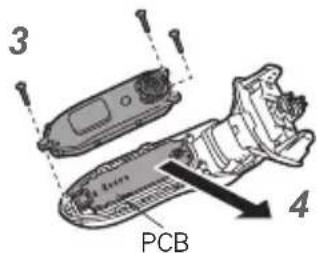
text_image
3 1 1 PCB 4충전용 배터리
(PCB의 후면쪽)
text_image
(의 후면쪽)This warranty is valid only in Japan.