VisaPure Advanced BSC431 - Nettoyeur visage PHILIPS - Free user manual and instructions
Find the device manual for free VisaPure Advanced BSC431 PHILIPS in PDF.


| Product Type | Facial Cleanser |
| Brand | Philips |
| Model | VisaPure Advanced BSC431 |
| Color | White and Pink |
| Power Supply | Adapter (SSW-2082 or SSW-2600), 100-240V, 50-60Hz |
| Battery Type | Rechargeable, non-replaceable |
| Charging Time (First) | Approximately 6 hours |
| Usage Time per Charge | At least 1 week with recommended usage |
| Intelligent Head Recognition | Yes, with NFC tag for customized DualMotion programs |
| Intensity Settings | 2 (gentle and intensive) |
| Skin Zone Timer | Yes, pauses after 15-20 seconds per zone |
| Cleansing Program Duration | 3 periods of 15-20 seconds (total ~1 minute) |
| Water Resistance | Safe for shower use and rinsing under tap (max 40°C/104°F) |
| Included Attachments | Anti Pollution Brush Head, Fresh Skin Attachment, Revitalising Massage Head |
| Other Accessories | Charging stand, adapter, travel pouch, storage palette, protection cap |
| Brush Head Replacement | Every 3 months or if damaged; available at shop.philips.com |
| Cleaning Method | Rinse with water and mild soap; do not use abrasive agents |
| Safety Certifications | Complies with IEC safety regulations; EMF standards |
| Operating Temperature | 10°C to 40°C (50°F to 104°F) |
| Warranty | See international warranty leaflet; support at www.philips.com/support |
Frequently Asked Questions - VisaPure Advanced BSC431 PHILIPS
User questions about VisaPure Advanced BSC431 PHILIPS
0 question about this device. Answer the ones you know or ask your own.
Ask a new question about this device
Download the instructions for your Nettoyeur visage in PDF format for free! Find your manual VisaPure Advanced BSC431 - PHILIPS and take your electronic device back in hand. On this page are published all the documents necessary for the use of your device. VisaPure Advanced BSC431 by PHILIPS.
USER MANUAL VisaPure Advanced BSC431 PHILIPS
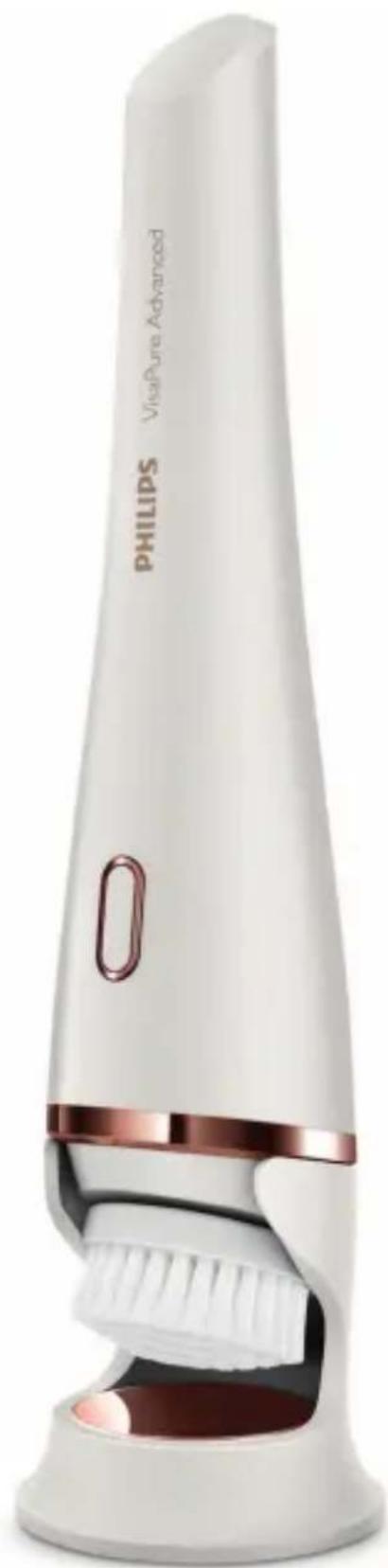
natural_image
White Philips Ultrasonic Advanced brush tool with pink and white body (no text or symbols visible on device body)
natural_image
Diagram of a folded paper or document with two panels, each showing a blank page and an arrow indicating direction (no text or symbols present)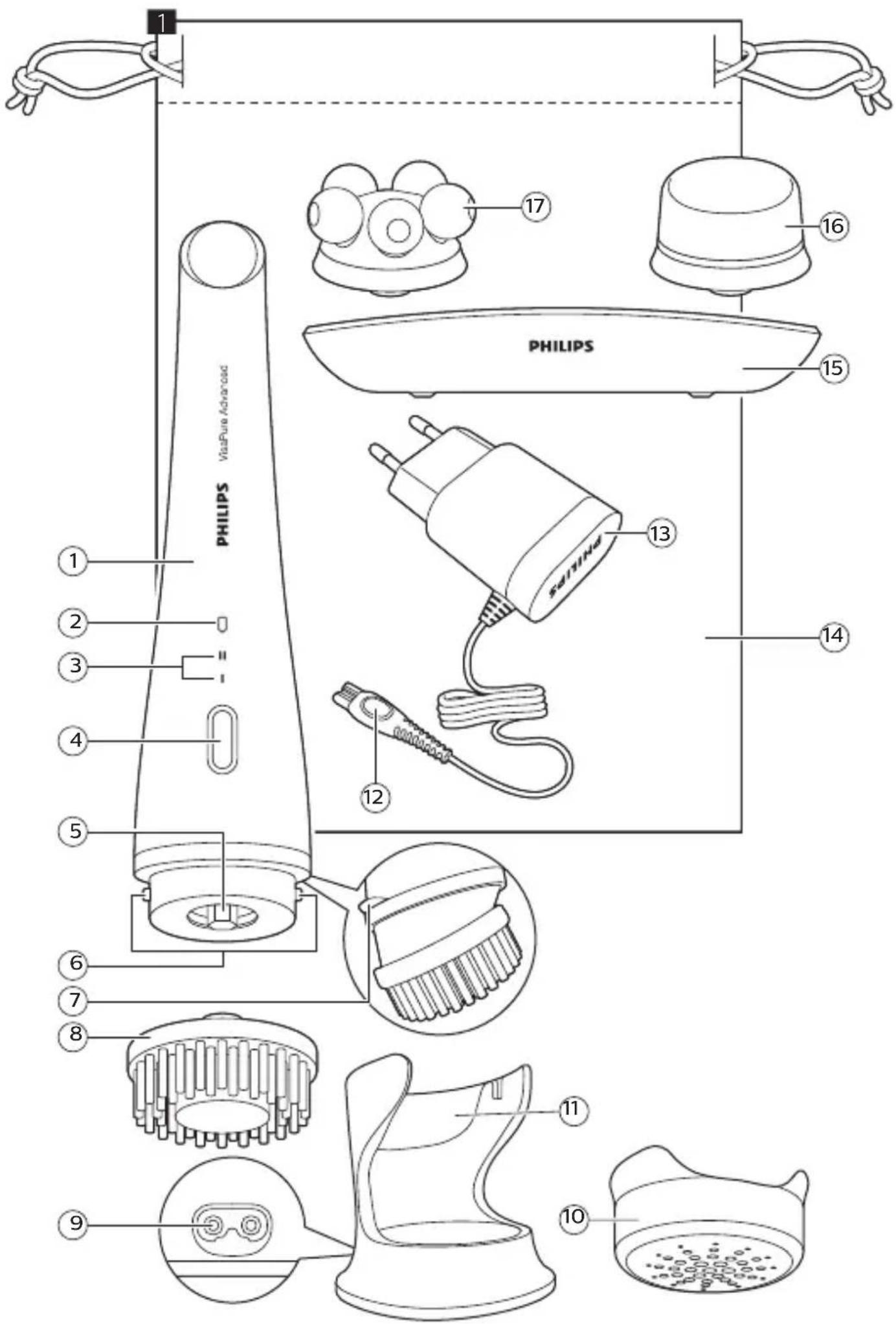
English 6
简体中文 21
繁體中文 32
한국어 44
General description (Fig. 1)
Note: Consult the foldout page at the beginning of the user manual.
Note: Attachments, pouch and brush may differ depending on the VisaPure type.
1 Handle
2 Charging light and battery low indication
3 Intensity setting indication
- Intensity setting 1
- Intensity setting 2
4 On/off button
5 Connection pin
6 Charging pins
7 Anti-roll ridge
8 Anti Pollution Brush head
9 Socket for small plug
10 Protection cap
11 Charging stand
12 Small plug
13 Adapter
14 Travel pouch
15 Storage palette
16 Fresh skin attachment
17 Revitalising Massage head
Important
Read this user manual carefully before you use the appliance and save it for future reference.
Danger
- Keep the adapter dry.
Warning
- For the purpose of recharging the battery, only use the detachable supply unit provided with this appliance. Adapter reference number SSW-2082 or SSW-2600.
-
Do not use the appliance, an attachment or the adapter if it is damaged or broken to avoid injuries.
-
If the adapter is damaged, always have it replaced with one of the original type in order to avoid a hazard.
- The adapter contains a transformer. Do not cut off the adapter to replace it with another plug, as this causes a hazardous situation.
- Fully charge the appliance at least every 3 months to sustain battery lifetime.
- This appliance is not intended for use by persons (including children) with reduced physical, sensory or mental capabilities, or lack of experience and knowledge, unless they have been given supervision or instruction concerning use of the appliance by a person responsible for their safety. Children should be supervised to ensure that they do not play with the appliance.
- Do not insert metal-containing material into the socket for the small plug to avoid short circuiting.
Caution
- Do not attempt to replace your VisaPure Advanced battery. This appliance contains batteries which are non-replaceable.
- Only use VisaPure attachments from Philips as described in this user manual.
- For hygienic reasons, we advise you to not share the appliance and the heads with other people.
- Do not clean the appliance with water that is hotter than shower temperature (max. 40^ C/104°F).
-
Do not put the appliance or any part in the dishwasher.
-
Charge, use and store the appliance at a temperature between 10^ C/50°F and 40^ C/104°F.
- Do not use the appliance on chapped skin, open wounds, healing wounds, skin recovering from surgery or if you suffer from a skin disease or skin irritation, such as severe acne, sunburn, skin infection, skin cancer, inflammation, eczema, psoriasis, nylon allergy etc.
- Do not use the appliance if you are taking steroid-based medication.
- If you wear piercings on your face, remove the piercings before you use the appliance or make sure that you do not use the appliance on or near the piercing.
- Please make sure that no loose hair gets trapped in the attachment during use by wearing a headband, tying your hair or holding it back with your hands.
- If you wear jewelry or glasses, take them off before you use the appliance, or make sure that you do not use the appliance on or near jewelry or glasses.
- Do not use the appliance with self-made cleansers, creams, oils or cosmetic products containing harsh chemicals or rough particles.
- Select intensity setting 1 the first few times you use the appliance or when you use a new type of attachment. If you do not experience any skin reactions, you can start using the appliance at intensity setting 2. Your skin might need to get used to the new treatment just like it normally does with a new skincare product.
- If your device has intelligent attachments with NFC tag, please follow the usage instructions described in their separate leaflets.
General
- Do not use the appliance for any other purpose than described in the user manual.
- Cease use if you experience reaction, severe irritation or pain.
- Please note that the condition of the skin varies throughout the year. Facial skin can get dryer during the winter season. In that case you can reduce the treatment time or frequency, depending on the needs of your skin.
- Regular cleaning of the appliance ensures optimal results and a longer life of the appliance.
- The appliance complies with the internationally approved IEC safety regulations and can be safely used in the shower and cleaned under the tap.
- The appliance is equipped with an automatic voltage selector and is suitable for mains voltages ranging from 100 to 240 volts.
Electromagnetic fields (EMF)
This Philips device complies with all applicable standards and regulations regarding exposure to electromagnetic fields.
The intelligent brush heads are equipped with an NFC tag.
Introduction
Congratulations on your purchase and welcome to Philips! To fully benefit from the support that Philips offers, register your product at www.philips.com/welcome.
With VisaPure Advanced you will enjoy a range of benefits to reveal a radiant, revitalized and refreshed skin. Thanks to Intelligent Head Recognition, the appliance recognizes which head you put on and automatically activates a customized DualMotion program, with dedicated levels of rotation, duration and vibration. This means you get great skincare results! VisaPure Advanced comes with a diverse set of heads that can be easily integrated into your skincare routine. You can use all heads with your current skincare products like cleansers, creams, oils and serums. This user manual contains usage instructions for the device and information about the recommended cleansing process. In the box you find separate leaflets with usage information and instructions for the other attachments.
Why cleansing?
Cleansing is an essential part of the daily skincare routine. VisaPure Advanced cleanses your skin better compared to cleansing by hand*. It cleanses your skin thoroughly and removes dead skin cells and make-up. Through research we found out that your skincare products will be absorbed better after you have used VisaPure Advanced. Therefore your skin feels clean and soft after you used VisaPure Advanced.
* Internal study performed in the Netherlands in 2015 with 15 women.
Features
Intelligent Head Recognition
VisaPure Advanced has Intelligent Head Recognition. Each attachment that comes with VisaPure has specific levels of rotation and vibration. When you attach a different intelligent attachment and switch on the appliance, it recognizes the intelligent attachment. You hear 2 beeps and the intensity setting indications flash alternately.
The device then activates a customized program for the attachment in use (Fig. 2).
Note: You can find images 2-29 on the last page of this user manual.
Intensity settings
You can choose between 2 different intensity settings depending on your personal preference.
- Intensity setting 1 for a gentle treatment (Fig. 3).
- Intensity setting 2 for an intensive treatment.
The first time you use the appliance, we advise you to select intensity setting 1. If you do not experience any skin reactions, you can start using the appliance at intensity setting 2.
Note: your skin might need to get used to the new treatment just like it normally does with a new skincare product.
The intelligent attachments with NFC tag may require other treatment settings. Consult the separate leaflets of the different attachments for the advised treatment settings or visit www.philips.com
Skin zone timer
The skin zone timer indicates when you need to move the appliance to another skin zone. For more information about skin zones, see chapter 'Using the brush head'.
Using the brush head
You can either use VisaPure Advanced in front of the sink or in the shower. We advise you to use the brush head in combination with your favorite cleanser. You can cleanse your face with VisaPure Advanced twice a day. Other types of attachments may require other treatment procedures. Consult the separate leaflets of the different types of attachments for the advised treatment frequencies or visit www.philips.com/.
Facial cleansing with VisaPure
Skin zones
The face can be divided into two zones: the U-zone (cheeks, chin and the area between nose and upper lip) and the T-zone (forehead and nose). Always treat the zones one by one, in the following order (Fig. 5):
1 Right cheek, chin and area between nose and upper lip
2 Left cheek, chin and area between nose and upper lip
3 Forehead and nose
Cleansing program
The cleansing program consists of 3 treatment periods of 15 to 20 seconds. The exact duration depends on the type of brush head you have, so please consult the separate leaflets from your attachment for the advised treatment periods. The treatment periods for VisaPure Advanced intelligent brush heads are customized and vary from person to person.
- For optimal performance, start on the right cheek and switch to the left cheek after 15 - 20 seconds. Use the last 15- 20 seconds to treat the forehead and nose (Fig. 5).
Tip: You can also use the VisaPure Advanced cleansing brush heads for cleansing the neck and décolleté.
Note: VisaPure Essential does not have Intelligent Head Recognition and therefore does not recognize the customized settings of intelligent attachments.
Note: Do not use the brush head on the sensitive skin area around the eyes.
Tip: If you want to change the rotation direction of your attachment after you turned on the appliance, you can hold the button until the rotation direction changes.
Cleansing procedure
1 Push the brush head onto the connection pin until it locks into position with a click (Fig. 6).
2 Moisten the brush head with water. Do not use the appliance with a dry brush head, as this can irritate the skin.
3 Moisten your face with water and apply a cleanser to your face.
4 Place the brush head on your right cheek.
5 Press the on/off button once to switch on the appliance. The appliance starts to operate at intensity setting 1. If you want to use intensity setting 2, press the on/off button twice. Press three times to switch off the appliance or wait until it switches off automatically (Fig. 7).
6 Gently move the brush head across your skin from the nose towards the ear (Fig. 8).
Tip: Do not push the brush head too hard onto the skin to make sure the treatment remains comfortable.
7 The face can be divided in different zones. The intelligent skin zone timer lets you know through a short pause when it is time to move to the next skin zone (Fig. 9).
8 After 15-20 seconds, the appliance pauses briefly to let you know that you have to move the appliance. Gently move the brush head from left to right (Fig. 10). The appliance stops automatically after it has completed the program for the entire face.
Note: We advise you to not overdo the cleansing and to not cleanse any zone longer than 20 seconds.
9 After the treatment, rinse and dry your face. Your face is now ready for the next step of your daily skincare routine.
10 Clean the brush head with water and mild soap and allow it to dry properly.
Cleaning
Never use scouring pads, abrasive cleaning agents or aggressive liquids such as petrol or acetone to clean the appliance.
Cleaning the appliance and the brush head
Make sure the appliance is switched off before you start cleaning it. Rinse the appliance and the brush head thoroughly with water and mild soap after each use, to ensure optimum performance.
1 Rinse the appliance and the brush head under the tap with warm water and mild soap (Fig. 11) (max. 40°C/104°F).
2 Remove the brush head from the appliance (Fig. 12).
3 Clean the bottom of the brush head and the connection pin of the appliance under the tap at least once a week (Fig. 13).
4 Dry the brush head and the appliance with a towel.
5 Place the attachment on the storage palette (if you have one) and leave it to dry.
Cleaning the adapter and the charging stand
Danger: Always keep the adapter dry. Never rinse it under the tap or immerse it in water.
1 Make sure the adapter is unplugged when you clean it. Only wipe it with a dry cloth.
2 Always detach the charging stand from the adapter before you clean it (Fig. 14).
3 You can clean the charging stand with a moist cloth. Dry the charging stand before you reconnect it to the adapter (Fig. 15).
Charging
Charging the appliance
Note: Charge the appliance before you use it.
Charging the appliance for the first time takes approximately 6 hours. A fully charged appliance can be used for at least 1 week without charging, according to the recommended usage per specific attachment.
1 Make sure the appliance is switched off.
2 Insert the small plug into the socket of the charging stand (Fig. 16). Put the adapter in the wall socket.
3 Remove the protection cap (Fig. 17).
4 Place the appliance upright into the charging stand, make sure that it is placed properly (Fig. 18).
5 The charging light flashes white to indicate that the appliance is charging. When the battery is fully charged, the charging light lights up white continuously for 30 minutes (Fig. 19).
Battery-low indication
When the battery is almost empty, the charging light flashes amber. The battery still contains enough energy for a complete treatment (Fig. 20). When the battery is completely empty, the battery charge indicator flashes amber quickly.
Storage
- Store the appliance in the charging stand (Fig. 21).
- To store the appliance horizontally, place it on its anti-roll ridge (Fig. 22).
- You can store the attachments in the storage palette (Fig. 23) (specific types only).
- If you are taking the appliance with you when you travel, put the protection cap on the dry brush head to protect the brush head filaments (Fig. 24).
Note: Never put the protection cap on a wet brush head.
Brush head replacement
Damaged brush heads or worn filaments could lead to skin irritation. To ensure a hygienic skincare routine, we advise to replace the brush heads every 3 months, or earlier if the filaments are deformed or damaged. Replacement brush heads are available from our website www.shop.philips.com or from the shop where you purchased your Philips VisaPure Advanced. If you have any difficulties obtaining replacement brush heads, please contact the Philips Consumer Care Center in your country. You find its contact details in the worldwide guarantee leaflet. You can also visit www.philips.com/support.
Other attachments
If you like to know more about other types of heads that are available for specific skincare needs, please visit www.philips.com.cn/c-m-pe/face-skin for information.
Recycling
- Do not throw away the product with the normal household waste at the end of its life, but hand it in at an official collection point for recycling. By doing this, you help to preserve the environment.
Removing the rechargeable battery
Warning: Only remove the rechargeable battery when you discard the appliance. Make sure the battery is completely empty when you remove it.
1 Remove the appliance from the charging stand, switch on the appliance and let it operate until it switches off after one minute. Repeat this action until the rechargeable battery is empty.
2 Insert a small flathead screwdriver between the silver-colored ring and the anti-roll ridge and pry loose the top part of the appliance. Carefully pull the top part with the battery holder out of the housing (Fig. 26).
3 Remove the rechargeable battery from the battery holder.
Warning: Do not attempt to replace the rechargeable battery.
Warning: Do not reconnect the appliance to the wall socket after you have removed the rechargeable battery.
Warranty and support
If you need information or support, please visit
www.philips.com/support or read the international warranty leaflet.
Troubleshooting
This chapter summarizes the most common problems you could encounter with the appliance. If you are unable to solve the problem with the information below, visit www.philips.com/support for a list of frequently asked questions or contact the Consumer Care Center in your country.
Problem Solution
| I do not know if the appliance is suitable for use on my skin. | Do not use the appliance on dry, chapped skin, open wounds, healing wounds, skin recovering from surgery or if you suffer from a skin disease or skin irritation, such as severe acne, sunburn, skin infection, skin cancer, inflammation, eczema, psoriasis etc. Do not use the appliance if you are taking steroid-based medication. |
| The appliance does not charge. | Consult the chapter ‘Charging the appliance’ for correct placement into the charging stand. Make sure the socket to which you connect the appliance is live. Check whether contact pins on the appliance are in proper contact with the contact points in the stand. If you use a socket in a bathroom cabinet, you may need to switch on the light to activate the socket. If the charging light on the appliance still does not light up or if the appliance still does not charge, take it to your Philips dealer or the nearest Philips service center. |
| The appliance does not work anymore. | Make sure that you have pressed the on/off button properly. Charge the appliance according to the instructions in this user manual. Verify whether there is a power failure and if the wall socket is live. Check if the charging light on the appliance lights up to make sure the appliance is charging. If it does not light up or if the appliance still does not work, take it to your Philips dealer or the nearest Philips service center. |
| I don’t know which heads I can use with VisaPure Advanced. | All standard or intelligent cleansing brush heads, the Revitalising Massage head and the Fresh Eyes head can be used with VisaPure Advanced. To find out more about the range of VisaPure attachments consult our website www.shop.philips.com or the shop where you purchased your Philips VisaPure Advanced. If you have any difficulties obtaining information on replacement brush heads, please contact the Philips Consumer Care Center in your country. You find its contact details in the international warranty leaflet. You can also visit www.philips.com/support. |
The brush head feels too harsh on my skin. If you experience the brush head as too harsh, we advise you to start using one of the brush heads specially developed for sensitive or extra sensitive skin. The Sensitive and Extra Sensitive brush heads have softer bristles. We recommend the Sensitive brush head for sensitive skin and the Extra Sensitive brush head for extra sensitive and dry skin. For the best treatment for your sensitive skin, we advise you to use the Intelligent Sensitive brush head. Thanks to the NFC tag in the brush head, the brush is programmed with lower levels of rotation, vibration and duration that are tailored to your delicate skin. Enjoy the benefits of a customized brush head that is adapted to your needs, with the intensity levels that are right for your skin.
I don't know with which cleansing products I can use the brush head. We advise you to cleanse your skin with your favorite cleanser. You can use cleansing gel, foam, oil, milk or lotions. Please do not use scrub cream or gel with particles.
Are the Intelligent heads compatible with all VisaPure models? The Intelligent heads are compatible with all VisaPure models. However, we recommend to use them with VisaPure Advanced, as thanks to the Intelligent head recognition in VisaPure Advanced, the Intelligent heads will start a customized cleansing program adjusted to your skin needs. The Intelligent heads can also be used on VisaPure Essential, but the program is similar to the program for standard brushes and takes the regular 1 minute. There are no extra benefits if the Intelligent heads are used on VisaPure Essential.
What is the difference between an Intelligent head and a standard brush head?
The Intelligent heads have a NFC tag incorporated in it, which makes it possible to have customized programs for specific skin types to achieve the best results for your skin type. Thanks to the Intelligent head recognition in VisaPure Advanced, the appliance recognizes the Intelligent head and starts a specific program with dedicated rotation, vibration and program settings. The standard brush heads do not have an incorporated NFC tag, and always uses the standard 1-minute program. The Intelligent heads are compatible with all VisaPure models, but for optimal use we recommend you to use them with VisaPure Advanced to achieve the most benefits. The standard brush head is compatible with both VPA and VPE. s
基本说明(图 1)
注意:请查阅用户手册开始处的插页。
natural_image
Illustration of a hand using a tool to lift a blue cylindrical object, with an arrow indicating the process (no text or symbols present)