Sub2100 - Subwoofer Adam - Free user manual and instructions
Find the device manual for free Sub2100 Adam in PDF.


| Product Type | Active Subwoofer |
| Brand | Adam Audio |
| Model | Sub2100 |
| Amplifier Power | 200 W RMS |
| Frequency Response | 28 Hz – 120 Hz |
| Crossover Frequency | 50 – 150 Hz (adjustable) |
| Driver Size | 10 inch (254 mm) |
| Driver Type | Paper cone with rubber surround |
| Enclosure Type | Bass reflex (front ported) |
| Input Connectors | XLR (balanced), RCA (unbalanced) |
| Output Connectors | XLR (balanced) pass-through |
| Phase Switch | 0° / 180° |
| Auto Standby | Yes, with defeat switch |
| Dimensions (HxWxD) | 14.2 x 12.6 x 16.1 inches (360 x 320 x 410 mm) |
| Weight | 35.3 lbs (16 kg) |
| Power Supply | 100-240 VAC, 50/60 Hz |
| Power Consumption | 250 W max, <0.5 W standby |
| Cleaning Instructions | Wipe with a soft dry cloth; do not use solvents |
| Safety Certification | CE, FCC |
| Spare Parts Availability | Official distributor |
| Repair Service | Authorized service centers |
Frequently Asked Questions - Sub2100 Adam
User questions about Sub2100 Adam
0 question about this device. Answer the ones you know or ask your own.
Ask a new question about this device
Download the instructions for your Subwoofer in PDF format for free! Find your manual Sub2100 - Adam and take your electronic device back in hand. On this page are published all the documents necessary for the use of your device. Sub2100 by Adam.
USER MANUAL Sub2100 Adam
natural_image
Technical line drawing of a speaker grille with concentric circles and mounting feet (no text or symbols)Safety Instructions
Please read the following safety instructions before setting up your system. Keep the instructions for subsequent reference. Please take notice of the warnings and follow the instructions.

Caution
Risk of electrical shock Do not open
CAUTION: TO REDUCE THE RISK OF FIRE OR ELECTRIC SHOCK, DO NOT REMOVE BACK COVER OR ANY OTHER PART. NO USER-SERVICABLE PARTS INSIDE. DO NOT EXPOSE THIS EQUIPMENT TO RAIN OR MOISTURE. REFER SERVICING TO QUALIFIED PERSONNEL.
Explanation of Graphical Symbols

The lightning flash with arrowhead symbol, within an equilateral triangle, is intended to alert the user to the presence of uninsulated 'dangerous voltage' within the product's enclosure that may be of sufficient magnitude to constitute a risk of electric shock to persons.

The exclamation point within an equilateral triangle is intended to alert the user to the presence of important operating and maintenance (servicing) instructions in the literature accompanying the appliance.

Caution: To reduce the risk of electric shock, do not open the subwoofer. There are no user-serviceable parts inside. Refer servicing to qualified service personnel.

This product, as well as all attached extension cords, must be terminated with an earth ground three-conductor AC mains power cord like the one supplied with the product. To prevent shock hazard, all three components must always be used.

Check if the specified voltage matches the voltage of the power supply you use. If this is not the case do not connect the loudspeakers to a power source! Please contact your local dealer or national distributor.

Do not place this unit on an unstable cart, stand or tripod, bracket or table. The unit may fall, causing serious injury and/or serious damage. When cart is used, use caution when moving the cart/apparatus combination.

Do not expose this product to rain or moisture, never wet the inside with any liquid and never pour or spill liquids directly onto this unit. Please do not put any objects filled with liquids (e.g. vases, etc.) onto the speaker.

Protect the cord from being walked on or pinched.

Always switch off your entire system before connecting or disconnecting any cables, or when cleaning any components.
Safety Instructions

To completely disconnect from AC mains, disconnect the power supply from the AC receptacle.
Always use fully checked cables. Defective cables can harm your speakers. They are a common source for any kind of noise, hum, crackling etc.
The Subwoofer should be installed near the socket outlet and disconnection of the device should be easily accessible.
Assure free airflow behind the subwoofer to maintain sufficient cooling.
Never use flammable or combustible chemicals for cleaning audio components.
Never expose this product to extremely high or low temperatures. Never operate this product in an explosive atmosphere.
Avoid touching the speaker membrane and do not block the woofer's ventilation ports.
Please note that the sub's driver builds up a magnetic field. Do not ply with magnetic items at close range to the diaphragm of the woofer.
High SPLs may damage your hearing! Please do not get close to loudspeakers when used at high volumes.
Always unplug sensitive electronic equipment during lightning storms.
Always keep electrical equipment out of the reach of children.
Table of contents
Safety Instructions 2-3
-
Introduction ......5
-
Quick Start 6
2.1 Important Information 6
2.2 Quick Start 6
- Connecting the Subwoofer .....7
3.1 Connections 7
3.2 Input....7
3.3 Satellite Out....7
3.4 Sub Out 7
- Subwoofer Placement 8
4.1 Distance to satellites 8
4.2 Walls/Distance to walls 8
4.3 Finding the best position 8
- Controls....9-10
5.1 LEDs on front panel 9
5.2 Controls on rear panel 9
5.2 Controls on rear panel (continued) 10
- Trouble Shooting.... 11
6.1 No or distorted signal 11
6.2 Parasitic noises 11
-
Maintenance....12
-
Shipping / Packaging 12
-
Environmental Information ...... 12
-
EU Declaration of Conformity 13
-
Limited Warranty 14
11.1 Terms and Conditions.... 14
11.2 How to claim.... 14
- Technical Data 15
1. Introduction
Dear customer,
Thank you for choosing the ADAM Audio Sub2100 subwoofer.
ADAM subwoofers are built for maximum quality reproduction and audio perfection. With the Sub2100 you have selected a precise tool that allows you to both evaluate and enjoy audio recordings. It meets highest expectations in sound quality and craftsmanship.
The Sub2100 is a very powerful subwoofer designed for large control rooms and studios in which powerful and yet accurate bass monitoring is required. The combination of its 21" driver with a 6" voice coil and an exuberant 1000 watts (RMS) of amplification makes the Sub2100 one of the most powerful subwoofers available.
This manual is intended to provide you with information about your new ADAM subwoofer. It contains important information regarding safety, setting up, handling, and warranty. We request that you read these sections carefully to ensure easy set up and prevent potential problems.
If you have any questions about this or any of our products, please don't hesitate to contact us – we will be happy to assist you.
For detailed information concerning ADAM's technologies and products, complete reviews, and a list of worldwide ADAM users and studios, please visit our website: www.adam-audio.com
You are invited to share your experience with our products by joining us on Facebook and also, if you don't want to miss out on the latest info on ADAM Professional Audio, come and follow us on Twitter!
We hope very much that you really enjoy your new subwoofer and wish you many delightful hours with it.
The ADAM Audio Team
2. Quick Start
2.1 Important Information for set up
After having unpacked your subwoofer, please allow the system to acclimate to the temperature of the room for approximately an hour.
The subwoofer should be positioned on a firm ground.
We recommend retaining the original packaging, as it is the best way to guarantee safe transportation should the need to do so arise.
Please note that the subwoofer will take some break-in time to achieve optimum sonic performance.
2.2 Quick Start
a) Before connecting the Sub2100 to your audio components and the power source make sure that the subwoofer, the satellite speakers and your audio source are switched off and set the level controls to minimum.
b) Choose your preferred connection as described under 3.
c) Check if the specified voltage matches the voltage of the power supply you use. If this is not the case do not connect the loudspeakers to a power source! Please contact your local dealer or national distributor.
If the voltages match, use the included power cables to connect the loudspeaker to the AC sockets.
d) Turn on your audio system and start your source of music.
e) Switch on the main on/off switch on the rear panel of the subwoofer and the main switches of the satellite speakers where required.
f) Turn up the volume levels of your audio system and of your satellite speakers carefully.
g) Adjust the Sub Level on the rear panel of the subwoofer to your liking.
3. Connecting the Subwoofer
3.1 Connections
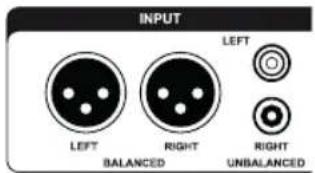
On the rear side of the speaker you can find balanced (XLR) and unbalanced (RCA) connectors. For professional use the XLR connectors will be the first choice.
3.2 Input
Connect the left and right line-level signal from your signal source (audio interface, mixer, etc.) to the LEFT and RIGHT INPUT jacks. Use either XLR (balanced) or RCA (unbalanced) cables.
text_image
INPUT LEFT RIGHT LEFT BALANCED RIGHT UNBALANCED3.3 Satellite Out
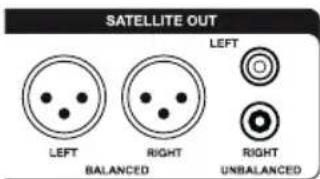
Connect the LEFT and RIGHT SATELLITE OUT jacks to the inputs of the left and right main powered speakers or the inputs of the amps powering the main speakers.
text_image
SATELLITE OUT LEFT BALANCED RIGHT UNBALANCED LEFT RIGHT UNBALANCED3.4 Sub Out
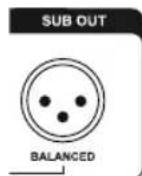
This balanced output mirrors the input signal enabling you to daisy-chain as many Sub15s in a row as you like. The Sub Level affects the output so that all Subs in the chain can be levelled at once.
4. Subwoofer Placement
It is common knowledge that low frequencies (below about 100Hz) are non-directional, meaning they can hardly be located by the listener. It is, however, a common misunderstanding that therefore the placement of a subwoofer does not matter. It does matter. Due to the fact that every room (geometry, furniture, etc.) is unique, the following descriptions intend to be a first introduction to the subject. The aim is to assist you tackling the most common problems with subwoofers and room acoustics, notably interference and standing waves.
4.1 Distance to satellites
In most set ups it is advisable to place the subwoofer not too far from the satellites to minimize the chance of Interferences. Interference means the superposition of two or more waves resulting in an attenuation/cancellation or enhancement of the specific frequency/frequencies.
Furthermore, big refelexion faces in close range of the subwoofer should be avoided if possible.
4.2 Walls/Distance to walls
Generally, every wall in relative close distance to the subwoofer enhances its sound pressure by about 6 dB. For instance, placing the subwoofer in a corner of a room will make it about 18 dB louder. It is likely that this will result in an impairment of the precision of the musical reproduction.
Another problem related to the geometrics of the room concerns the so called ‘standing waves’. These are sound waves being reciprocated between reflecting objects, so they ‘stand’ (don’t seem to move) in between these objects. The speaker continues to produce new waves that combines its force with the first wave(s): a vicious circle that results in local imbalances of the particular frequencies.
4.3 Finding the best position
Give it a try! The most important tool for finding the best position for your subwoofer are your ears. There are two rather easy ways:
You can determine your listening spot first and then compare the sound of the subwoofer at different positions.
Another option is to place the subwoofer at the listening position and then move around. Wherever the sound is the best the subwoofer should be positioned.
5. Controls
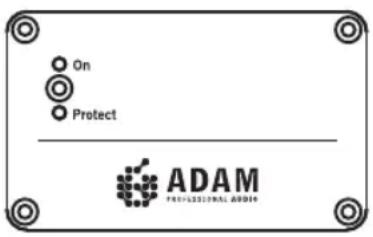
On the front side you will find Indicator LEDs for the operating and standby modes. Controls for the satellite filter, phase switch, signal on/continuous mode and Sub Level/Filter are located on the rear panel of the subwoofer. The following tips are intended to assist you at using the controls in the best manner.
5.1 LEDs on front panel
There are two LEDs on the front. The upper LED indicates the operating mode. In case the subwoofer receives an overload the lower LED will flash red indicating the function of the protective circuit.
text_image
On Protect ADAM PROFESSIONAL AUDIO5.2 Controls on the rear panel
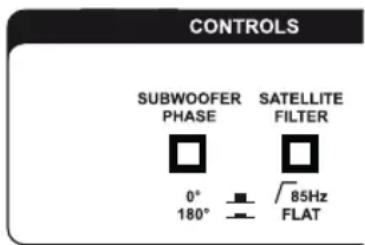
a) Subwoofer Phase
With the Phase Switch you can alter the phase of the subwoofer relative to the satellites. That means to change the polarity of the bass unit. Depending on the distance between woofer and satellites, either 0^ or 180^ may be the better position. We recommend to try out what position sounds better within your system.
text_image
CONTROLS SUBWOOFER PHASE SATELLITE FILTER 0° 180° 85Hz FLATb) Satellite Filter
The satellites in a system can be driven full range or with a 85 Hz high pass as recommended by Dolby® laboratories for use in surround setups. Recommendation: the main signal should go into the Subwoofer. Connect your satellites to the Subwoofer output, either via XLR symmetrical or RCA asymmetrical. In many cases, clarity and dynamic range of the speakers can be improved if they do not reproduce very low frequencies since they do not have to deliver big amplitudes.

Please note: If you alter the frequency it is advisable to check if an alteration of the phase improves the sound quality.
5. Controls
5.2 Controls on the rear panel (continued)
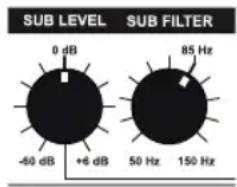
c) Sub Level
In the 0dB position the signal will be passed on 1:1 to the internal amplifier. The Input Sensitivity of the subwoofer can be adjusted from -60dB to +6dB and thus allows for a wide volume levelling range.
text_image
SUB LEVEL 0 dB -60 dB +6 dB 85 Hz 50 Hz 150 Hzd) Sub Filter
The upper frequency limit of the unit is variable and can be set to any value between 50 and 150Hz. The 85Hz marker indicates the recommendation of Dolby ^® labs for surround sound settings. In practice a slightly lower crossover frequency delivers tighter bass response. For typical near-midfield monitors we recommend 70 to 75Hz as the upper limit.

Please note: These settings do not have an absolute character, as different satellites and different room acoustics lead to results that cannot be predicted.
6. Troubleshooting
All ADAM products are designed and manufactured to the highest quality standards. However, if any problems with your subwoofer occur, we recommend to proceed as follows:
6.1 Problem: The LED shows normal operation (green) but there is either no or only a distorted audio signal.
Check the volumes of both the subwoofer and your signal source.
Check the wiring. Is the cable defective? Are all cables connected correctly? If possible, check with new cables.
Connect the subwoofer as directly to the signal source as possible (please mind the volume!). Is another part of the signal path (e.g. mixer, audio source) defective?
6.2 Problem: You hear parasitic noises (like humming, buzzing, soughing, cracking).
Please disconnect the signal cables. If the noises disappear, check the signal path.
Make sure that all cables are properly connected, especially the signal cable between the preamp/mixing console/etc. and the sub.
If the noises can still be heard, check for other electrical devices close to the speakers (mobile phones, switching power supplies, etc.). If there is no interfering device the subwoofer will probably cause the problem.
7. Maintenance

Please switch the subwoofer off before cleaning!

Please note that the diaphragms build up a magnetic field. Do not ply with magnetic items at close range to the diaphragms.

Please make sure that no liquids get inside the cabinet. Do not spray any fluids on the speaker. Do not use a wet cloth for cleaning.

Do not use flammable or acidic chemicals for cleaning.

Do not touch the membrane of the subwoofer.

We recommend using a lint-free, damp cloth for cleaning. The woofer membrane may be dusted using a very soft brush.
8. Shipping / Packaging
In case you have to send your speakers to any other location, it is of vital importance that you use the original packaging materials. Experience has shown that it is very difficult to avoid damage if you have to send them without these. ADAM Audio can not be held responsible for damages due to improper packaging.
9. Environmental Information
All ADAM products comply with international directives on the Restriction of Hazardous Substances (RoHS) in electrical / electronic equipment and the disposal of Waste Electrical / Electronic Equipment (WEEE).
For disposal, please consult your local authorities for further information.
We,
ADAM Audio GmbH
whose registered office is situated at
Rudower Chaussee 50, 12489 Berlin, Germany
declare under our sole responsibility that the product:
Sub2100
complies with the EU Electro-Magnetic Compatibility (EMC) Directive 89/336/EEC, in pursuance of which the following standards have been applied:
EN 61000-6-1 : 2001
EN 61000-6-3 : 2001
EN 55020:2002
EN 55013:2001

and complies with the EU General Product Safety 2001/95/EC, in pursuance of which the following standard has been applied:
EN 60065:2002.
This declaration attests that the manufacturing process quality control and product documentation accord with the need to assure continued compliance.
The attention of the user is drawn to any special measures regarding the use of this equipment that may be detailed in the owner's manual.
Christian Hellinger
Managing Director ADAM Audio GmbH
11. Warranty
ADAM Audio GmbH provides a two year limited warranty for this product.
11.1 Terms and Conditions
This warranty is limited to the repair of the equipment or, if necessary, the replacement of parts or the product and return shipping within the country of purchase.
This warranty complements any national/regional law obligations of dealers or national distributors and does not affect your statutory rights as a customer.
Neither other transportation, nor any other costs, nor any risk for removal, transportation and installation of products is covered by this warranty.
Products whose serial number have been altered, deleted, removed or made illegible are excluded from this warranty.
The warranty will not be applicable in cases other than defects in materials and/or workmanship at the time of purchase and will not be applicable:
a) for damages caused by incorrect installation, connection or packing,
b) for damages caused by any use other than correct use described in the user manual,
c) for damages caused by faulty or unsuitable ancillary equipment,
d) if repairs or modifications have been executed by an unauthorized person,
e) for damages caused by accidents, lightning, water, fire heat, public disturbances or any other cause beyond the reasonable control of ADAM Audio.
11.2 How to claim repairs under warranty
Should service be required, please contact the ADAM Audio dealer where the product has been purchased.
If the equipment is being used outside the country of purchase, the international shipping costs have to be paid for by the owner of the product.
Service may be supplied by your ADAM Audio national distributor in the country of residence. In this case, the service costs have to be paid for by the owner of the product whereas the costs for parts to be repaired or replaced are free of charge.
Please visit our website to get the contact details of your local distributor.
To validate your warranty, you will need a copy of your original sales invoice with the date of purchase.
1 = long term IEC 265-8-Wrms / 10 min
2 = nominal IEC 265-8 = Peak Power 5 μsec
Sub2100
| Subwoofer 1 | |
| Basket ø 543 mm / 21.5" | |
| Voice coil ø 150 mm / 6" | |
| Woofer material paper | |
| Built-in amplifier 1 | |
| Subwoofer channels ^1/2 | 200 W / 300 W |
| Frequency response 18 Hz - 150 Hz | |
| THD >60 Hz ≤ 1% | |
| Max. peak ≥ 128 dB | |
| Crossover frequency 50 Hz - 150 Hz | |
| Inputs XLR / RCA | |
| Input impedance 10 kΩ | |
| Weight | 85 kg / 187.4 lb. |
| Height x Width x Depth | 850 x 600 x 705 mm / 33.5" x 23.5" x 28" |
| Warranty | 2 years |
| Operating temperature | 0°C to 40°C (32°F to 104°F) |
| Storage temperature | -30°C to 70°C (-22°F to 167°F) |
| Humidity | Max. 90 % not condensing |
Notes/Notizen
Sub2100
Bedienungsanleitung
Deutsch
natural_image
Technical line drawing of a speaker grille with concentric circles and mounting feet (no text or symbols)Sicherheitshinweise
Managing Director ADAM Audio GmbH
11. Garantie
1 = long term IEC 265-8-Wrms / 10 min
2 = nominal IEC 265-8 = Peak Power 5 μsec
Sub2100
Follow us on Twitter
