
VS 711 CD - Shredder Opus - Free user manual and instructions
Find the device manual for free VS 711 CD Opus in PDF.


| Product Type | Paper, credit card, and CD/DVD shredder |
| Brand | Opus |
| Model | VS 711 CD |
| Shred Type | Cross-cut (4 x 40 mm) |
| Sheet Capacity | 7 sheets of 70 g/m² paper |
| CD/DVD Capacity | 1 CD/DVD at a time |
| Credit Card Capacity | 1 credit card at a time |
| Feed Slot Width | 225 mm (paper), 122 mm (CD/DVD), 60 mm (cards) |
| Waste Bin Capacity | 20 liters |
| Power Supply | 230-240 V AC, 50 Hz, 200 W |
| Current Fuse | 1.75 A |
| Net Weight | 4.3 kg |
| Dimensions (H x W x D) | 387 x 340 x 219 mm |
| Operating Modes | Auto (ON), OFF, Reverse (REV) |
| Duty Cycle | 2 minutes on / 4 minutes off |
| Safety Features | Overheating protection, auto-start/stop, safety switch |
| Materials Accepted | Paper, credit cards, CDs/DVDs (no staples, clips, or cardboard) |
| Maintenance | Regular oiling of blades with special oil; empty bin frequently |
| Cleaning | Wipe housing with damp cloth; do not use solvents |
| Certifications | CE, compliant with EN 60950-1, EN 55014-1 |
Frequently Asked Questions - VS 711 CD Opus
User questions about VS 711 CD Opus
0 question about this device. Answer the ones you know or ask your own.
Ask a new question about this device
Download the instructions for your Shredder in PDF format for free! Find your manual VS 711 CD - Opus and take your electronic device back in hand. On this page are published all the documents necessary for the use of your device. VS 711 CD by Opus.
USER MANUAL VS 711 CD Opus
OPUS Sp.z o.o. hereby declares that the machine specified below is in accordance with the following directives and standards:
2006/95/WE; 2004/108/WE
EN 60950-1 :2006+A1 :2009; PN- EN 55014-1:2007; PN-CISPR 16-1:1997; PN-CISPR 16-2 : 1999
- Before using, the equipment please read the Health & Safety precautions, manufacturers' recommendations and the operating manual.
- The operating manual should be available at all times for the operator to read.
- The equipment, can only be used in accordance with the specifications in the user guide/manual.
- The equipment should be installed on a sturdy and level surface near a 220 to 240 V AC socket.
- The equipment socket should be earthed in accordance with electrical regulations.
- The equipment must be protected against moisture and dust.
- Do not put the equipment near heating or ventilation units.
- The equipment must not be used in or near a room with inflammable liquids or gases.
- Do not use the equipment near aerosols of, oil or grease made from petroleum or inflammable substances.
- Do not use compressed air from a aerosol for clearing shredder it could have inflammable gases.
- The power supply cable should be protected against being damaged and not be used to pull the equipment or to remove the plug from the power socket.
- Unplug the equipment from the power socket when removing the cover or cleaning the inside.
- The equipment should be KEPT AWAY and out of reach of children and animal's.
- Danger! Equipment contains rotary elements. KEEP AWAY from, long hair, loose jewellery, ties and other loose pieces of clothing as they can become entangled in the cutting heads.
- Be careful when feeding material into the slots.
- When the motor overheats, it will turn off without a single, turn off the main switch of the shredder immediately and wait for it to cool down!
- Do not put any heavy objects on the device!
- When any malfunction occurs, check that the equipment is being used correctly and then contact the dealer or service point.
- The equipment must not be put or kept outside and should be operated in a room temperature higher than +8^ .
- The equipment should be operated in accordance with the general Health & Safety rules.
- Any repairs must be carried out by only authorised staff during the guarantee / warranty period.
- After using the shredder, it must be turned off by the main switch on the equipment or by unplugging it from the power socket.
Recommendations and requirements:
• The equipenemt was designed for shredding paper, credit card and CD/DVDs
- During longe none operation, the mains switch should be turned OFF and unplugged
• Empty the shredded waste from the bin frequently
- Before shredding, you must remove paper clips and stales the documents
- The shredder can only be operated with the original paper bin supplied
- Pay attention during fitting the cutting head to the bin. Improper fitting will cause a malfunction in the operation of shredder or damage sensor and the tab on the bin
• To ensure long and faultless use of the shredder do not shred more than 7 sheets of 70 g/m2 or one plastic card one CD at one time
- Do not shred computer printout paper, PCV foil, coated paper, card or cardboard - it can blunt the blades and cause damage to the cutting mechanism
- NOTE! Desk - side shredders are not designed for continuous operation. It is recommended to make at least 4 minutes breake after every 2 minutes of shredding. Overloading the shredder may cause it temporary switch off. Multiple overloads may cause permanent damage of shredder
Operation:
The main switch is located at the top of the shredder. It can be set in three positions:
- ON/AUTO - after choosing this option the equipment is ready for use. It starts automatically when the paper is inserted and stops automatically when no further paper is in the slot
- OFF - this option is recommended during a long standstill
- REV - When setting the main switch to REV position this will helps to remove paper if it gets stuck inside the cutting blades. It can also be used for cleaning the shredding mechanism
When the waste bin is full the machine does not stop working remember to remove/empty shreds from the bin often.
Notice!
Pay attention during the fitting of the cutting head on the bin. Improper fitting will cause a malfunction in operation of the shredder or damage sensor or the sensor tab on the bin
Performance:
Shreds up to 7 sheets of 70 g/m2 paper at one time. Maximum paper format tha can be shredded is A4. Insert paper into the center of the feed slot.
There is a special slot of (60 mm) in the middle of the cutting head. It is designed for shredding plastic cards, and can shred only one plastic card at s time.
The next special slot of (122 mm) for CDs/DVDs also on the top of the cutting head. The amchine can destroy only one CD/DVD at time. CDs/DVDs are destroyed by strip dotting.
Cleaning:
- Before cleaning the shredder ensure that the main power switch is switch off, then unplug the equipment from the mains socket.
- When the shredded paper bin gets overfilled, it may cause problems and paper will go inside the mechanism feed and there is a risk of fire. Pull the bin out, remove shreds and re-install the bin under the shredder
- To avoide problems please clean the shred bin regularly before it overfills
- Cleaning the housing. Wipe the cover of the shredder with a gentle home detergent or a damp piece of cloth
- Do not put the equipment tinto water
- Do not wipe the unit with petroleum, thinners, alcohol or solvents - they can cause permanent damage to the housing and the plastic
Maintenance:
- To prevent reduction of efficiently, increased sound levels and to prolong the lifespan of the equipment, it is necessary to the oil cutting blades regularly
- After filling the waste bin several times, the blades should be oiled with a special oil (provided by OPUS)
- Put a little oil on a few pieces of paper and shred them so that the oil will spread on the whole cutting mechanism
Possible malfunctions:
| Possible cause | Przyczyna | Remedy |
| Equipement does not start after inserting paper into teh slot | 1. Shredder is not plug in properly2. Pages to be shred are too soft3. Overheating4. Paper jam5. Bin/basket is not fitted properly | 1. Plug the equipment in correctly2. Fold pages or insert more paper in the feed opening3. Turn off the shredder, wait about 30 minutes and turn on one again4. Remove stuck paper5. Fit shred bin/basket correctly |
| Equipement does not stop after shredding | Photo cell in the entry slot is covered by scraps of paper | Clean the photo cell |
| The shredder operates to loud | Equipement is not on sturdy and level floor | Place the machine on study and level surface and lock front wheels |
| The shredder does not operate or take the paper correctly | 1. Too many pages inserted into the feed opening2. Too big a paper format3. Paper is not inserted in the centre of feed operating | 1. Reduce number of pages inserted to the slot at one time2. Switch to REV mode to remove paper and fold the Page/pages and insert once again3. Insert paper in the middle od the feed opening |
Technical data:
Shredder type: cross - cut
Feed openings: 225 mm / 122 mm / 60 mm
Performance: 7* sheets of paper / 1 CD/DVD / 1 credit card
Shred size: 4 x 40 mm
Waste bin: 20 litre
Voltage: 230 V to 240 Volt Ac at 50 Hz
Power: 200 W
Input current fuse: 1,75 A
Net weight: 4,3 kg
Dimentions: H 387 x W 340 x D 219 mm
paper 70 g/m²
13.04.2012
10.04.2012 KCH © Copyright OPUS PL: Distributor: OPUS Sp. z o.o. Toruńska 8 ● 44-122 Gliwice ● www.opus.pl

CE
OPUS Sp.z o.o. hereby declares that the machine specified below is in accordance with the following directives and standards:
2006/95/WE; 2004/108/WE
EN 60950-1 :2006+A1 :2009; PN- EN 55014-1:2007; PN-CISPR 16-1:1997; PN-CISPR 16-2 : 1999
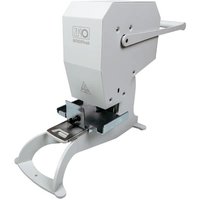
Brand : Opus
Model : VS 711 CD
Category : Shredder