
MP 10 - Computer Mouse SILVERCREST - Free user manual and instructions
Find the device manual for free MP 10 SILVERCREST in PDF.



| Product Type | Cordless optical mouse |
| Model | SilverCrest MP 10 |
| Number of Buttons | 10 (including scroll wheel) |
| Sensor Type | Optical |
| Resolution | 800 dpi |
| Wireless Technology | Radio frequency 27.045 MHz |
| Range | Approx. 1 m |
| Power Source | 2 x AA 1.2 V rechargeable batteries (included) |
| Charging Method | Via USB-connected charger unit with integrated receiver |
| System Requirements | Windows 2000/XP, free USB port |
| Dimensions (approx.) | 10 x 6 x 3 cm |
| Weight (with batteries) | Approx. 100 g |
| Energy Saving Mode | Auto sleep after minutes of inactivity; press any button to wake |
| Maintenance | Clean with dry cloth only |
| Safety | Keep away from children, heat, moisture, and flammable gases |
| Spare Parts | AA 1.2 V rechargeable batteries (type recommended by manufacturer) |
| Warranty | 36 months (6 months for batteries) |
| Certifications | CE, EMC Directive, Low Voltage Directive, R&TTE Directive |
| Package Contents | Mouse, charger/receiver, 2 rechargeable batteries, user manual |
Frequently Asked Questions - MP 10 SILVERCREST
User questions about MP 10 SILVERCREST
0 question about this device. Answer the ones you know or ask your own.
Ask a new question about this device
Download the instructions for your Computer Mouse in PDF format for free! Find your manual MP 10 - SILVERCREST and take your electronic device back in hand. On this page are published all the documents necessary for the use of your device. MP 10 by SILVERCREST.
USER MANUAL MP 10 SILVERCREST
Cordless, optical 10 button mouse

User instructions
Wireless, optical 10-button mouse

User instructions


User instructions
Silvercrest MP10
Thank you for purchasing the high-quality SilverCrest MP10 optical 10-button wireless scroll mouse. Please read through this instruction leaflet carefully and follow the safety instructions.
Important notes
Before using the device for the first time, please carefully read through the following instructions and note all warnings, even if you are familiar with handling electronic equipment. Store this manual in a safe place for future reference. If you sell or give away the device, please ensure you hand over these instructions too.
Place the device on a firm, level surface and do not place any objects on the device.
The device is not designed for use in rooms with high temperature or air humidity (e.g. bathrooms) or excessive dust.
Please ensure that:
- no direct heat sources (e.g. heaters) act on the device
- the device is not exposed to direct sunlight or strong artificial light
- contact with splashing and dripping water and aggressive liquids is avoided and the device is not operated near water, in particular the device must never be submerged;
- there are no naked flames or fire sources (e.g., burning candles) on or next to the device;
- no foreign bodies penetrate;
- the device is not exposed to excessive impacts and vibrations.
Maintenance and care
Clean the device with a clean, dry cloth only. Maintenance work is necessary if the device has been damaged, if liquid or objects have got inside the housing, the device has been exposed to rain or moisture, or if it is not working properly or has been dropped. All maintenance work must be carried out by trained, qualified personnel only.
Children
Electrical devices must be kept out of reach of children. Never allow children to use electrical devices without supervision. Children are not always able to correctly recognize possible dangers. Rechargeable batteries and small parts can be extremely dangerous if swallowed. Store rechargeable batteries out of reach of small children. If a rechargeable battery has been swallowed, seek medical assistance immediately. Keep packaging films, foils, and sheeting out of reach of children too. Risk of suffocation.
Rechargeable batteries
Warning: The rechargeable batteries (type AA 1.2 V) can explode if they are not handled properly. Never dismantle them, do not change their polarization, and under no circumstances whatsoever should you ever throw the rechargeable batteries into an open fire. Keep them out of reach of children and dispose of them in an environmentally friendly way.
Risk of explosion if the rechargeable batteries are incorrectly replaced. Replace with the same type or types recommended by the manufacturer.
Actively think about protecting the environment. Used batteries do not belong in domestic waste. They must be submitted to a collection service for waste batteries.
If you use normal batteries instead of rechargeable batteries, the MP 10 wireless mouse must not be placed in the charger.
Radio interface
Switch off the wireless mouse if you are on an aeroplane, in a hospital, operating theatre, or near an electronic medical system. The radio waves transmitted can disrupt the function of sensitive equipment. Keep the device at least 20 cm away from a pacemaker, as otherwise proper function of the pacemaker can be disrupted by radio waves. The transmitted radio waves can cause interference noises in hearing aids. If the radio components are switched on, keep the device away from flammable gases and potentially explosive atmospheres (e.g., paint shop), as the transmitted radio waves can trigger an explosion or fire.
The range of radio waves depends on environmental and ambient conditions.

The devices in the set have been tested and approved with respect to compliance with the basic requirements and other relevant regulations of the EMC Directive 89/336/EEC, the Directive for low voltage electrical equipment 73/23/EEC and the R&TTE Directive 99/5/EC.

Devices marked with this symbol are subject to the European Directive 2002/96/EC. All waste electrical and electronic equipment must be disposed of separately from normal domestic waste in officially provided collection points. By properly disposing of old equipment you avoid environmental damage and a risk to your own personal health. Further information on proper disposal of the old device according to the regulations is available from your local authority, the waste disposal services authority or the shop where you purchased the product.
Package contents
Please use this list to check the packaging contents are complete:
- MP10 wireless mouse
- Charger unit with integrated receiver
- 2 rechargeable batteries, type AA 1.2V
- User instructions
System requirements
- Operating system: Microsoft® Windows® 2000/XP
- At least one free USB port
Technical Specifications
- Cordless, optical 10 button mouse
- 800 dpi resolution
- Radio frequency: 27.045 MHz
- Rechargeable batteries: 2x AA 1.2V
- Range: approx 1m
First steps
Insert the rechargeable batteries
Insert the rechargeable batteries type AA supplied with correct polarisation (note and match + and – symbols) in the wireless mouse (see figure below).
Overview

Fig.: Wireless mouse with rechargeable battery compartment cover open
1 Contacts for charging the rechargeable batteries in the charger unit 2 Optical sensor 3 Synchronizer button 4 Rechargeable battery compartment (open)
i The rechargeable batteries must be fully charged first in order to use their full capacity.
The buttons' functions

Fig.: Wireless mouse in the charger unit
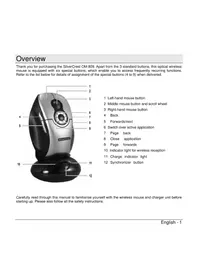
1 Middle mouse button and scroll wheel 2 Left-hand mouse button 3 Starts the standard eMail program (e.g. Outlook) 4 Page back (Internet) 5 Page forwards (Internet) 6 Switch between active applications 7 Receiver indicator light 8 Synchronizer button 9 Right-hand mouse button 10 Starts the standard browser (e.g. Internet Explorer) 11 Display browser favourites 12 Display My Computer 13 Charge indicator light
Installing the hardware
After you have inserted the rechargeable batteries the optical sensor (2) on the underside of the wireless mouse lights up.
- Plug the USB connector of the charger unit into a USB port on your switched on computer. The operating system automatically recognises the new hardware and installs the required drivers.
- During this short, one-off procedure, a message appears first "New hardware found", followed by the message "The new hardware has been installed and can now be used." After you have connected the USB, the receiver indicator light (7) on the charger unit lights up.
The wireless mouse is connected to the charger unit by means of radio transmissions. The radio channel must be synchronized the first time you use it. The wireless mouse and charger unit must be a maximum of 50 cm apart for this procedure.
- Press the synchronizer button (8) on the charger unit to start one-off and automatic radio synchronization between the charger unit and the wireless mouse. The receiver indicator light (7) flashes quickly.
- Then press the synchronizer button (3) on the wireless mouse within 20 seconds. The receiver indicator light (7) on the charger unit soon continues to flash with a fast rhythm. When the synchronization is finished, the receiver indicator light (7) flashes with a slower rhythm. Synchronization is finished.
If the mouse is now used, the receiver indicator light (7) flashes quickly. If not, please repeat steps 3 to 4.
If you remove or replace the rechargeable batteries, you must repeat the synchronization. Do this by following steps 3 to 4.
Switching the wireless mouse on and off
You can switch the wireless mouse on and off using the synchronizer button (3) on the underside of the mouse. To switch off the mouse: press the synchronizer button and briefly keep it pressed until the optical sensor (2) briefly flashes. Press the synchronizer button once to switch the mouse back on. Renewed radio synchronization is not necessary after switching back on.
Energy saver mode
The wireless mouse is equipped with an energy saver mode to spare the rechargeable batteries. If you do not use the mouse for several minutes, it automatically switches itself off. Then press any button on the wireless mouse to switch it back on.
Charging the rechargeable batteries
To recharge the rechargeable batteries: insert the wireless mouse with the inserted rechargeable batteries in the charger unit (see figure on page 6). The charge indicator light (13) lights up during the charging process and goes out when the charging process is finished.
The operating voltage required for charging is supplied via your computer's USB connection. Depending on your computer model, the operating voltage at the USB connection is switched off when the computer is switched off. You can only charge the wireless mouse's rechargeable batteries if the computer is switched on. Optionally, you can use an external, active USB distributor (hub), to charge the wireless mouse even if the computer is switched off (not included in the scope of supply).
Warranty notes
36 month warranty from date of purchase

Important warranty information

Dear Customer,
Thank you for purchasing a SILVERCREST product.
Please carefully read through the endorsed documentation or online help before putting your SILVERCREST product into service. If you have a problem, which can't be solved in this way, please contact our hotline.
If the problem cannot be solved over the phone, you will be given a reference number (RMA), which you should enclose together with a copy of the proof of purchase. After you have packaged the unit safe for transport and in plain packaging, please send it for warranty processing, with the RMA noted on the outside of the package, to the address given to you by our hotline employee. After receiving the unit we will correct the manufacturing and material defect free of charge.
Up-to-date information and answers to the most frequently asked questions are available on the internet from:
www.silvercrest.cc
Please note that the warranty period for rechargeable batteries is 6 months.
This guarantee is valid in the UK.
Your statutory guarantees from the seller are in addition to this warranty and are not limited by it.

MONTH WARRANTY
Hotline number: 0207/3650743
(Please have your serial number to hand!)
Manufacturer TARGA GmbH, Postfach 2244,
D-60482 Soest
www.silvercrest.cc

User manual
Silvercrest MP10
CE declaration of conformity: www.silvercrest.cc
1324804-NL
- USER INSTRUCTIONS
- IMPORTANT NOTES
- PLEASE ENSURE THAT
- MAINTENANCE AND CARE
- CHILDREN
- RECHARGEABLE BATTERIES
- RADIO INTERFACE
- PACKAGE CONTENTS
- SYSTEM REQUIREMENTS
- TECHNICAL SPECIFICATIONS
- FIRST STEPS
- INSERT THE RECHARGEABLE BATTERIES
- OVERVIEW
- THE BUTTONS' FUNCTIONS
- INSTALLING THE HARDWARE
- SWITCHING THE WIRELESS MOUSE ON AND OFF
- ENERGY SAVER MODE
- CHARGING THE RECHARGEABLE BATTERIES
- WARRANTY NOTES
- MONTH WARRANTY FROM DATE OF PURCHASE
- IMPORTANT WARRANTY INFORMATION
- HOTLINE NUMBER
- USER MANUAL
Brand : SILVERCREST
Model : MP 10
Category : Computer Mouse