KG-1005 - Kitchen scale Coline - Free user manual and instructions
Find the device manual for free KG-1005 Coline in PDF.


| Product Type | Kitchen Scale |
| Brand | Coline |
| Model | KG-1005 |
| Display | LCD with backlight |
| Maximum Capacity | 5 kg / 11 lb |
| Accuracy | 1 g |
| Units of Measurement | g, kg, lb, oz |
| Power Source | 2 x AAA batteries (not included) |
| Auto-Off | After 2 minutes of inactivity |
| Tare Function | Yes |
| Platform Material | Tempered glass |
| Housing Material | ABS plastic |
| Dimensions (W x D x H) | 20 x 15 x 2 cm |
| Weight | 300 g |
| Overload Indicator | Yes |
| Low Battery Indicator | Yes |
| Cleaning Instructions | Wipe with a damp cloth; do not immerse |
| Safety Notes | Do not exceed max load; keep away from water |
| Spare Parts Availability | Contact Coline customer service |
| Reparability | Battery compartment accessible; other repairs by professional |
Frequently Asked Questions - KG-1005 Coline
User questions about KG-1005 Coline
0 question about this device. Answer the ones you know or ask your own.
Ask a new question about this device
Download the instructions for your Kitchen scale in PDF format for free! Find your manual KG-1005 - Coline and take your electronic device back in hand. On this page are published all the documents necessary for the use of your device. KG-1005 by Coline.
USER MANUAL KG-1005 Coline
Electronic kitchen scale
Köksvåg • Kjøkkenvekt Keittiövaaka • Küchenwaage
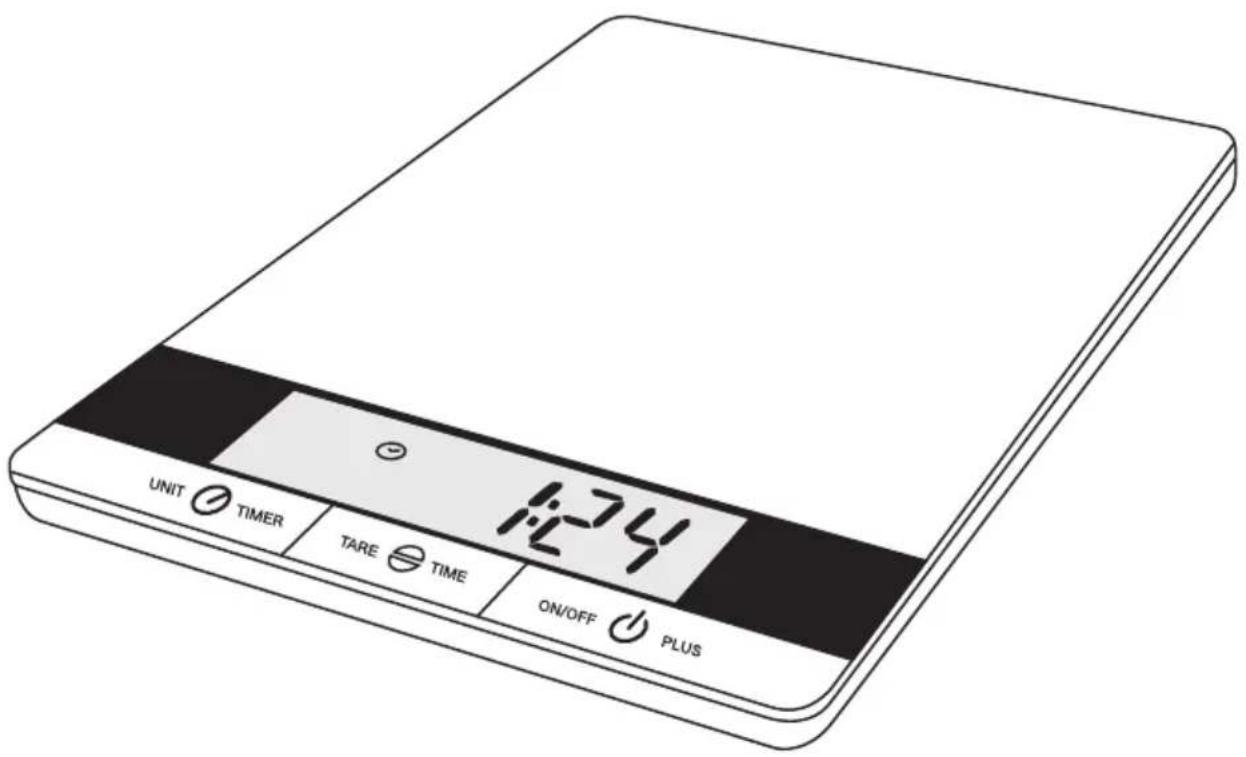
Electronic Kitchen Scale
Art.no 34-9886 Model KG-1005
Please read the entire instruction manual before using the product and save it for future reference. We reserve the right for any errors in text or images and any necessary changes made to technical data. If you have any questions regarding technical problems please contact our Customer Services.
Product description
• Easy to clean glass weighing platform
• Oversized LCD display
- Touch controls
• Timer, clock, thermometer and hygrometer
• Hanging slot for hanging on the wall
• Capacity: Max 10 kg
- Resolution: 1 g
- Units: g - ml - lb:oz - oz - fl.oz
- Tare function
• Batteries: 4 × AAA/LR03 (sold separately)
• Four sensors for extreme accuracy
• Overload and low-battery indicator
• Automatic shut-off

- Glass weighing platform
- Digital display
- [UNIT/TIMER] Sets the unit of measurement, temperature display and timer.
- [TARE/TIME] Controls the tare function and clock setting
- [ON/OFF/PLUS] On/off and time adjustment button
Inserting batteries
Batteries: 4 × AAA/LR03 (sold separately).
- Open the cover on the bottom of the scale.
- Insert the batteries according to the markings in the battery compartment.
- Change the batteries when the low-battery icon appears on the display.

Operation
- Place the scale on a hard and level surface.
- Press [ON/OFF/PLUS] to turn the scale on. All icons will display.

-
Select the desired unit of measurement by pressing [UNIT/TIMER] until the desired units are displayed at the bottom right: g - ml - lb:oz - oz - fl.oz. The selected units will be stored into memory the next time that you use the scale.
-
Wait until "0" is displayed.
-
Place the desired food item on the scale to be measured. The weight will be shown in the unit of measurement that you have previously set.


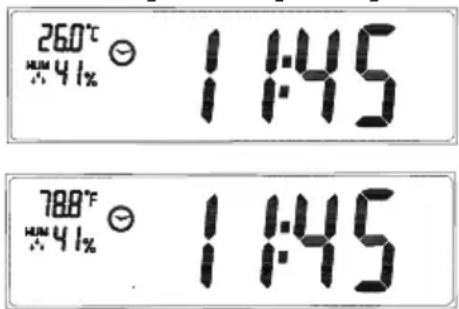
- Depress [ ON/OFF/PLUS ] for about 2 seconds to turn off the scale. The scale is also automatically programmed to turn off after 30 sec. of non-use. Note: When the scale is off it will still display the time, temperature and relative humidity (HUM %).
The scale can calculate the volume of whole standardised milk (3 %) or water and display a reading in either millilitres (ml) or fluid ounces (fl.oz).
Tare feature
The scale also has a tare function which allows you to measure goods using a container.
- Turn on the scale and place the empty container onto the scale. The weight will appear on the display.
- Press [TARE/TIME] to reset the scale. Add the foodstuff to the container and read the new weight (the new weight is that of the foodstuff alone).
When the tare function is active the icon will show on the display. If the weight is below 100 g, "0 g" will be displayed and if it is greater than 100 g then both → T ← and 0 g will be displayed.

Turning off the scale
Depress [ ON/OFF/PLUS ] for about 2 seconds to turn off the scale. The scale also turns off automatically after about 30 seconds. Note: When the scale is off it will revert to displaying the time, temperature and relative humidity (HUM %).

Changing the unit of measurement
Press [UNIT/TIMER] while weighing to change the unit of measurement.
Overload indicator
When the scale is overloaded with weight exceeding 10 kg “----” will appear on the display.
Timer
The scale also has an alarm timer with a max range of 99:59 minutes.
- Depress [UNIT/TIMER] for about a second.
- "00:00" will show with the first digit (minutes) flashing.
- Set the timer (minutes:seconds) using [ON/OFF/PLUS] and confirming with [UNIT/TIMER].
- Press [UNIT/TIMER] again when you have set the timer to activate it.
The timer will then count down until it reaches "00:00", at which time it will sound a 30-second alarm. "Timer" will show on the display.
- Press [UNIT/TIMER] to turn off the alarm.
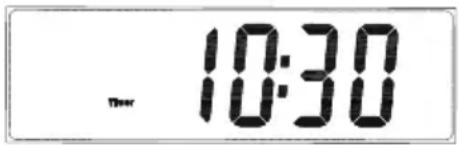
Clock
- Depress [TARE/TIME] for about a second.
- “12:00” will show with the first two digits (hours) flashing.
- Set the time (hours:minutes) using [ON/OFF/PLUS] and confirming with [TARE/TIME].
-
Press [TARE/TIME] again once you have set the time to finish.
-
The set time and the clock icon should now be displayed.

Indoor temperature and humidity display
Press [UNIT/TIMER] with the scale turned off to switch between °C or °F display. Humidity is always shown as a relative humidity reading in %.
Care and maintenance
- Place the scale on a hard, flat and level surface for the best accuracy.
- Be careful when handling the scale. Protect it from vibrations, blows and extreme temperatures.
- Never use strong cleaning agents/solvents to clean the product. Clean the scale using a soft cloth.
- Do not position the scale where it is exposed to moisture or splashing water.
- Remove the batteries from the scale if it is not to be used for an extended period.
- The scale is only intended for private and non-commercial use.
- Do not store anything on the scale when it is not in use.
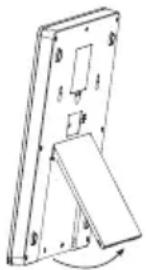
- Store the scale upright, use it's stand or hang it on a wall using the hanging slot on the back.
natural_image
Technical line drawing of a mechanical component with no visible text or symbolsTroubleshooting
Incorrect measurements or “strange symbols” on the display may mean: The scale is experiencing interference from radios, mobiles, microwaves that are in close proximity. Try moving the scale away from any such source of interference.
Disposal
This product should be disposed of in accordance with local regulations. If you are unsure how to proceed, contact your local authority.
Specifications
Capacity Min. 1 g/0.1 oz – Max: 10 kg/22 lb 0.1 oz
Resolution 1 g/0.1 oz
Batteries 4 × AAA/LR03
Operating environment Temperature 0–40 °C
Humidity ≤ 90 % RH
Storage temperature -20 to +60 °C
Köksvåg
Art.nr 34-9886 Modell KG-1005
natural_image
Technical line drawing of a mechanical component with no visible text or symbolsFelsökning
natural_image
Technical line drawing of a mechanical component with no visible text or symbolsFeilsøking
natural_image
3D diagram of a mechanical component with labeled parts and rotation arrow (no text or symbols)Vianetsintä
natural_image
Technical line drawing of a mechanical component with mounting holes and a curved arrow indicating rotation (no text or symbols)Fehlersuche
10 - 13 Market Place
Kingston Upon Thames
Surrey
KT1 1JZ
DEUTSCHLAND
KUNDENSERVICE


- Electronic kitchen scale
- Art.no 34-9886 Model KG-1005
- Product description
- Inserting batteries
- Operation
- Tare feature
- Turning off the scale
- Changing the unit of measurement
- Overload indicator
- Timer
- Clock
- Indoor temperature and humidity display
- Care and maintenance
- Troubleshooting
- Disposal
- Specifications
- Köksvåg
- Art.nr 34-9886 Modell KG-1005
- Felsökning
- Feilsøking
- Vianetsintä
- Fehlersuche
- DEUTSCHLAND
Brand : Coline
Model : KG-1005
Category : Kitchen scale