EK2510 - Kitchen scale Coline - Free user manual and instructions
Find the device manual for free EK2510 Coline in PDF.


| Product Type | Kitchen Scale |
| Brand | Coline |
| Model | EK2510 |
| Weight Capacity | 5 kg (11 lb) |
| Readability | 1 g |
| Dimensions (L x W x H) | 20 x 15 x 2 cm |
| Net Weight | 300 g |
| Power Source | 2 x AAA batteries (not included) |
| Material | Stainless steel platform, ABS plastic body |
| Display Type | LCD screen |
| Tare Function | Yes |
| Auto-Off | Yes (after 60 seconds of inactivity) |
| Unit Selection | g, kg, lb, oz |
| Operating Temperature | 0°C to 40°C |
| Cleaning Instructions | Wipe with a damp cloth; do not immerse in water |
| Safety Precautions | Do not exceed maximum capacity; use on a flat, stable surface |
| Spare Parts / Repairability | Batteries are user-replaceable; no other spare parts available |
| General Information | For household kitchen use only; not for commercial use |
Frequently Asked Questions - EK2510 Coline
User questions about EK2510 Coline
0 question about this device. Answer the ones you know or ask your own.
Ask a new question about this device
Download the instructions for your Kitchen scale in PDF format for free! Find your manual EK2510 - Coline and take your electronic device back in hand. On this page are published all the documents necessary for the use of your device. EK2510 by Coline.
USER MANUAL EK2510 Coline
Folding Kitchen Scale
Art.no 44-2169 Model EK2510
ENGLISH
Please read the entire instruction manual before using the product and then save it for future reference. We reserve the right for any errors in text or images and any necessary changes made to technical data. In the event of technical problems or other queries, please contact our Customer Services.
Safety
Do not overload the scale. Refer to the weight capacity stated in the specifications.
Inserting the battery
- Note: When sold, there is a plastic film on the battery which prevents it from discharging during storage. This plastic film must be removed first before using the product for the first time.
- Change the battery when "Lo" appears on the display.
- The kitchen scale is powered by 1 × CR2032 battery (included).
- Turn the scale upside down. Open the battery compartment by turning the cover clockwise.
- Remove the battery.
- Insert a new battery into the compartment.
- Refit the battery cover by turning it anticlockwise.
Buttons and functions
- Weighing zone
- Display
- [MODE] Function selector
- Battery cover

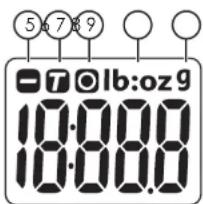
Display
- Negative value
- Tare feature
- Zero
- Pounds and ounces
- Grams
Operating instructions
The scale can be read in the following units: grams (g), pounds and ounces (lb:oz). The default setting is grams (g).
Weighing food, ingredients, etc.
- Place the scale on a hard and level surface.
- Press [MODE] to activate the scale. The default unit of measurement is grams (g). After a few seconds, the reading "0" will appear on the display. The scale is now zeroed and can be used.
- If the foodstuff to be weighed is held in a container such as a bowl or saucer, the weight of the container needs to be subtracted from the total weight by using the TARE function. Place the empty container onto the scale. The weight of the container will appear on the display. Press [MODE] to set the scale to zero.
- Place the foodstuff into/onto the container. The weight displayed now will be the weight of the foodstuff alone.
Tare function
- Turn on the scale and place the empty container onto the scale. The weight will appear on the display.
- Press [MODE] to set the scale to zero. For all appear on the display. Add the foodstuff to the container and read the new weight (the new weight is that of the foodstuff alone).
Handy tip: This function can be useful when baking if you want to add several ingredients to a bowl placed on the scale. The scale can be zeroed before adding each new ingredient.
Automatic shut-off
If no key is pressed for 2 minutes, the scale switches off automatically. The scale cannot be switched off manually.
Changing units
Hold down [MODE] for 5 seconds to change the unit of measurement from grams (g) to pounds and ounces (lb:oz).

Warning symbols
- When the message "Lo" is displayed, it is time to replace the battery.
- When the message "En" is displayed, the maximum weight has been exceeded.
Care and maintenance
- Place the scale on a hard, flat and level surface for the best accuracy.
- Be careful when handling the scale; protect it from vibrations, blows and extreme temperatures.
- Never use strong cleaning agents/solvents to clean the product. Wipe it clean with a soft cloth.
- Never expose the scale to moisture or water.
- Remove the battery from the scale if it is not to be used for an extended period.
- The scale is only intended for private and non-commercial use.
- Do not place anything onto the scale when it is not in use.
Responsible disposal
This symbol indicates that this product should not be disposed of with general household waste. This applies throughout the entire EU. In order to prevent any harm to the environment or health hazards caused by incorrect waste disposal, the product must be handed in for recycling so that the material can be disposed of in a responsible manner. When recycling your product, take it to your local collection facility or contact the place of purchase. They will ensure that the product is disposed of in an environmentally sound manner.

Specifications
Capacity Min/max 1 g - 5 kg
Battery 1 × CR2032 (included)
Resolution 1 g (up to 5 kg)
Units g, lb:oz
Hopfällbar köksvåg
Art.nr 44-2169 Modell EK2510
SVENSKA
Displayen
- Negativt värde
- Tarering
- Noll
- Pounds and ounces
- Gram

Användning
Displayet
Näyttö
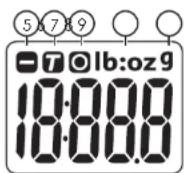
Das Display
- Negativer Wert
- Tara-Funktion
- Null
- Pounds and Ounces
- Gramm
Benutzung


- Folding Kitchen Scale
- Safety
- Inserting the battery
- Buttons and functions
- Display
- Operating instructions
- Tare function
- Automatic shut-off
- Changing units
- Warning symbols
- Care and maintenance
- Responsible disposal
- Specifications
- Hopfällbar köksvåg
- Displayen
- Användning
- Displayet
- Näyttö
- Das Display
- Benutzung
Brand : Coline
Model : EK2510
Category : Kitchen scale